








Innovative EA MT4 v9.996.3 with SetFiles (Unlimited)

Subscriptions for Special Plan
- 30 EA package is more economical!
- Special package with 99%
- Download 1 EA/Day

Subscriptions for Premium Membership
- Download Unlimited in 1 Year
- Get 100% Discount
- Get free access to all

Subscriptions for Gold Membership
- 1 Year Membership
- Get 100% Discount
- Access EA+Indicator+Course
Frequently bought together 🎁
Add these products to enhance your purchase




Quick Verdict
Innovative EA MT4 is a feature-rich automated trading system built for traders who demand flexibility, precision and robust risk management. With up to 12 configurable trading signals, multi-timeframe confirmation, intelligent order correction, and advanced trade protection, it offers an excellent balance between automation, customization and long-term trading stability.
Best For
- ✅ EURUSD traders.
- ✅ Multi-timeframe trading.
- ✅ Trend-following strategies.
- ✅ Medium to long-term automated trading.
- ✅ Traders seeking extensive customization.
- ✅ MT4 users looking for professional risk management.
Overall Rating
9.6/10 ⭐⭐⭐⭐⭐
| Category | Rating |
|---|---|
| Trading Strategy | 9.7/10 |
| Automation | 9.6/10 |
| Risk Management | 9.7/10 |
| Flexibility | 9.8/10 |
| Performance | 9.5/10 |
| Ease of Use | 9.3/10 |
| Overall Rating | 9.6/10 |
What is Innovative EA MT4?
Innovative EA MT4 is a highly configurable automated trading robot developed for MetaTrader 4. It combines multiple confirmation signals, intelligent money management, advanced trade filters, and automated order management to help traders execute trades with greater consistency.
The EA supports up to 12 independent trading signals, allowing traders to build sophisticated strategies using multiple timeframes while maintaining full control over lot sizing, trade scheduling, and execution quality.

Innovative EA MT4 Review
How Does Innovative EA MT4 Work?
Multi-Timeframe Signal Confirmation
The EA analyzes multiple trading signals on M15 timeframes before identifying trading opportunities.
Each signal module features customizable cycle and confirmation settings to enhance accuracy.
Intelligent Order Management
Innovative EA automatically manages pending orders by correcting entry prices, maintaining minimum spacing between positions and updating orders based on market changes.
Smart Trade Protection
The system integrates Stop Loss management, spread monitoring, slippage protection, trailing logic, and optional ATR / MACD filters to improve execution quality and reduce unnecessary risk.
Flexible Trading Schedule
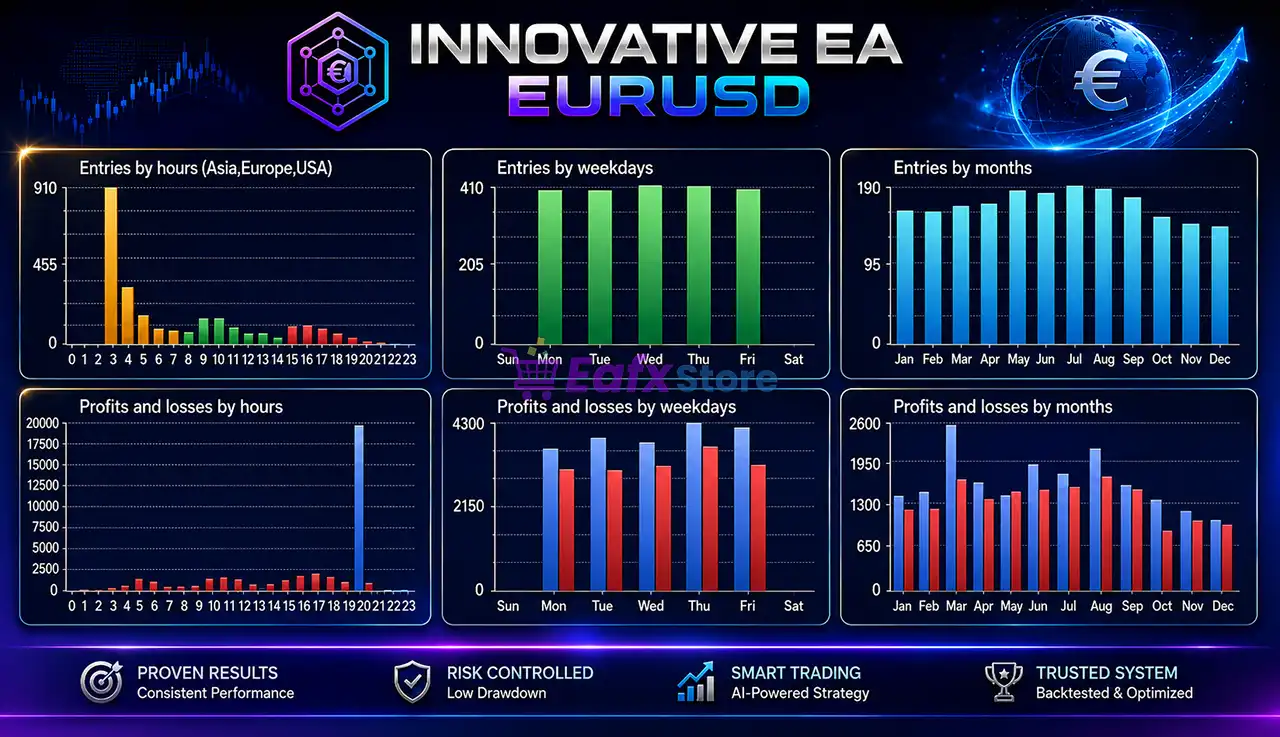
Built-in GMT adjustment, hourly trading controls, rollover settings, and weekday scheduling allow traders to optimize execution during preferred market sessions.
Key Features of Innovative EA MT4
Multi-Timeframe Signal Engine
Supports up to 12 configurable trading signals across multiple timeframes for stronger trade confirmation.
Flexible Money Management
Choose between fixed lot sizing or percentage-based risk to match different account sizes and trading styles.
Advanced Trade Protection
Includes Stop Loss management, slippage protection, spread filtering, and intelligent order correction for safer execution.
Professional Market Filters
Built-in ATR, MACD, volatility, and trend filters help eliminate low-quality trading opportunities when enabled.
Fully Customizable Trading Schedule
Configure trading hours, GMT offset, Monday start, Friday stop, and rollover periods for precise session control.
Intelligent Order Management
Automatically adjusts pending orders, manages trade spacing, and optimizes entries based on changing market conditions.
Historical Trading Results Performance
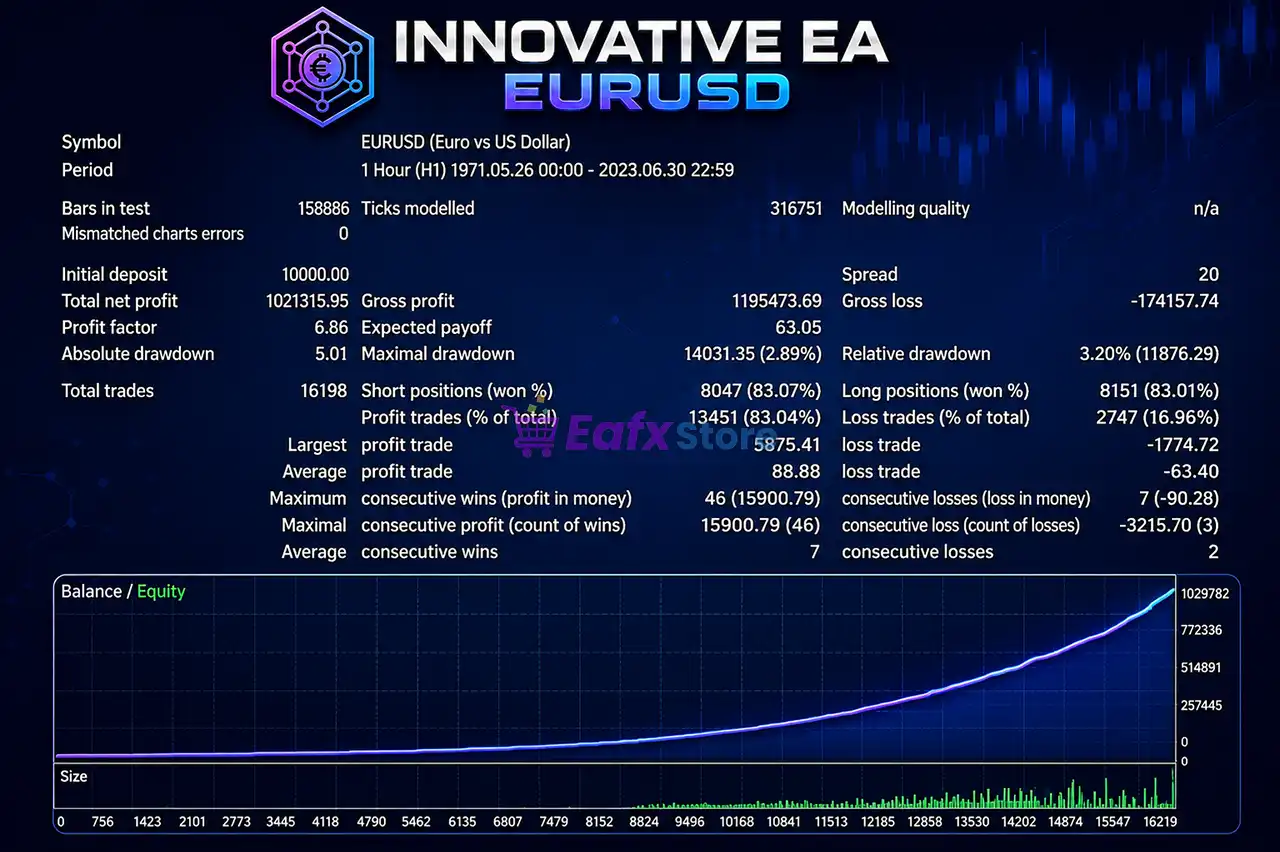
The supplied backtest demonstrates impressive long-term consistency over several decades of EURUSD historical data.
Innovative EA MT4 Backtest Results
| Metric | Result |
|---|---|
| Symbol | EURUSD (H1) |
| Test Period | 1971 – 2023 |
| Initial Deposit | $10,000 |
| Total Net Profit | $1,021,315.95 |
| Profit Factor | 6.86 |
| Total Trades | 16,198 |
| Winning Trades | 83.04% |
| Relative Drawdown | 3.20% |
| Max Drawdown | 2.89% |
Performance Analysis
The historical results indicate exceptional long-term profitability with a high winning percentage and remarkably low drawdown. Over 16,000 completed trades provide a substantial statistical sample, while the Profit Factor of 6.86 highlights the strategy’s strong profitability potential.
Why Innovative EA MT4 Stands Out
Exceptional Strategy Flexibility
Few MT4 Expert Advisors offer this level of customization. Traders can combine multiple signal modules, adjust execution filters, and fine-tune virtually every aspect of the trading process.
Multi-Layer Confirmation
Using multiple timeframes and independent signal modules helps improve trade quality while filtering weaker market setups.
Professional Execution Control
Spread protection, slippage management, pending order correction, and GMT synchronization contribute to more consistent trade execution across different brokers.
Designed for Long-Term Automation
The combination of intelligent scheduling, advanced filters, and flexible money management makes the EA suitable for continuous automated trading.
Risk Management Features
Innovative EA MT4 includes a comprehensive set of tools designed to protect trading capital.
🔹 Fixed or percentage-based money management.
🔹 Fixed Stop Loss with ATR support.
🔹 Intelligent slippage protection.
🔹 Spread filtering.
🔹 Pending order correction.
🔹 Risk protection during execution.
🔹 Hourly trading schedule control.
🔹 GMT synchronization.
🔹 Friday market shutdown.
🔹 Optional trend and volatility filters.
These features allow traders to customize their preferred balance between risk and profitability.
Recommended Trading Conditions
| Parameter | Recommendation |
|---|---|
| Platform | MetaTrader 4 |
| Symbol | EURUSD |
| Timeframe | H1 (60 minute chart) |
| Minimum Deposit | $1,000+ |
| Account Type | ECN / Raw Spread |
| VPS | Highly Recommended |
| Lot Type | Fixed or Risk-Based |
| Trading Style | Automated Trend Following |
Product Download Package?
The download package of the product suite includes:
Experts
 Innovative EA v9.996.3.ex4
SetFiles
EURUSD_Magin%.set
EURUSD_Risk_1%.set
EURUSD_Risk_2%.set
EURUSD_Risk_3%.set
EURUSD_Risk_5%_High.set
EURUSD_Fixed Lot_Low Risk.set
 Reviewed by David Easton
Weaknesses and Risk Warnings
Although Innovative EA MT4 delivers strong historical performance, traders should consider several important factors.
Extensive Configuration
The large number of available settings may require additional time for beginners to fully understand and optimize.
Market Conditions Change
Historical performance should not be interpreted as a guarantee of future profitability.
Broker Quality Matters
Execution speed, spreads, commissions, and slippage can influence live trading performance.
Forward Testing Recommended
Running the EA on a demo or small live account before increasing capital is recommended to verify compatibility with your broker.
Who Should Use Innovative EA MT4?
Innovative EA MT4 is ideal for traders who:
🔹 Prefer fully automated trading.
🔹 Trade EURUSD regularly.
🔹 Want extensive strategy customization.
🔹 Need professional money management.
🔹 Value multi-timeframe confirmation.
🔹 Seek long-term systematic trading.
🔹 Use MetaTrader 4 as their primary platform.
It is especially suitable for traders looking for an advanced EA that can be tailored to different market conditions without sacrificing execution quality.
Final Verdict
Innovative EA MT4 is one of the most comprehensive automated trading solutions available for MetaTrader 4. Its combination of multi-timeframe confirmation, configurable signal modules, intelligent order management, professional risk controls, and flexible scheduling makes it a versatile Expert Advisor (EA) suitable for a wide range of trading styles.
The impressive historical backtest, featuring more than 16,000 trades, 83% winning trades, a Profit Factor of 6.86, and a relative drawdown of only 3.20%, demonstrates the EA’s strong long-term potential. Combined with extensive customization options and advanced execution protection, Innovative EA stands out as an excellent choice for traders seeking a reliable and professional automated trading system.
🔢 Innovative EA MT4 Settings Guide
Innovative EA MT4 is a professional Expert Advisor designed for MetaTrader 4, featuring advanced money management, multi-timeframe signal confirmation, intelligent stop loss and trailing stop management, ATR and MACD filtering, spread protection, volatility correction and flexible time scheduling.
With up to 12 configurable trading signals, customizable risk controls, and automatic order correction, Innovative EA MT4 provides traders with a highly adaptable automated trading system suitable for different market conditions.
Innovative EA MT4 Settings
🔢 Innovative EA MT4 Settings Explained
🔄 Main Properties
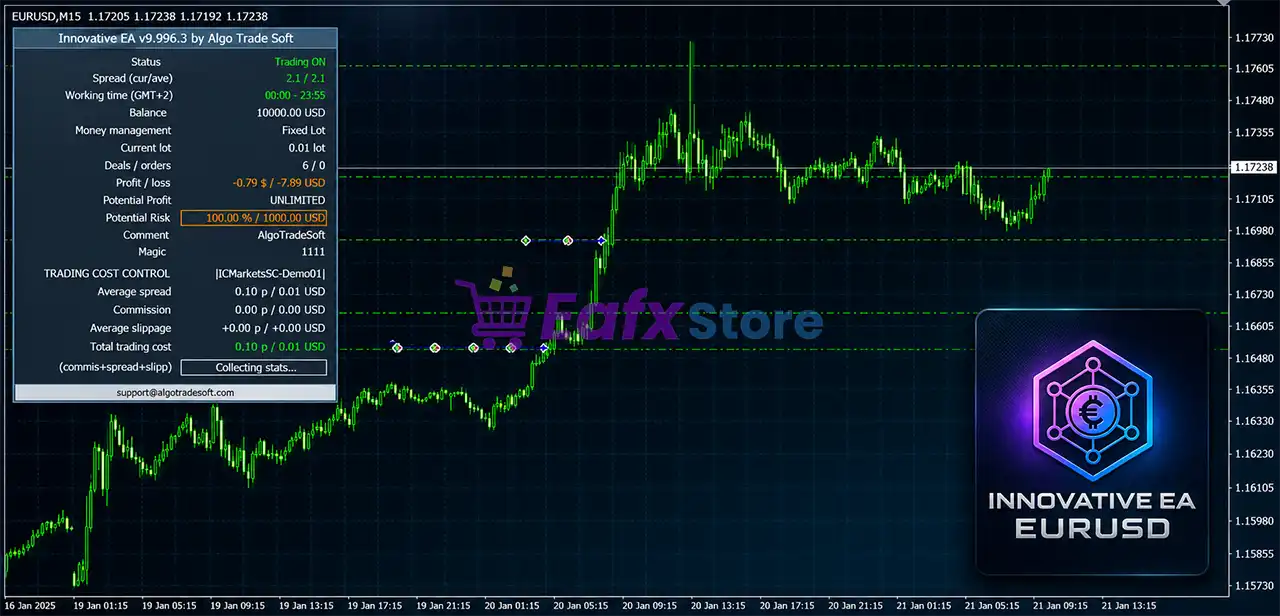
🔹 Magic = 1111 – Unique Magic Number used to identify and manage trades opened by the EA.
🔹 EA comment = AlgoTradeSoft – Custom trade comment attached to every order.
🔹 Manual H4 shift (hours) (-999 – use auto shift) = 0 – Manual H4 time shift; 0 means no manual adjustment.
🔄 Spread Properties
🔹 Max current spread (0 – disable limit) = 0.0 – Maximum allowed current spread; 0.0 disables the limit.
🔹 Max average spread (0 – disable limit) = 1.5 – Maximum average spread allowed before new trades are blocked.
🔹 Base spread (0 – disable correction) = 0.0 – Base spread used for spread correction; 0.0 disables correction.
🔹 Correction min size (0 – disable limit) = 0.0 – Minimum spread correction size; 0.0 disables the filter.
🔹 Correction max size (0 – disable limit) = 0.0 – Maximum spread correction size; 0.0 disables the filter.
🔹 Seconds for averaging (0 – disable averaging) = 0 – Number of seconds used to average spread values; 0 disables averaging.
🔹 Fast BackTest = true – Enables fast backtesting mode for quicker strategy testing.
🔄 Lot Properties
🔹 Lot type = Fixed lot – Uses a fixed lot size instead of percentage-based risk.
🔹 Fixed lot size = 0.1 – Opens every trade with 0.10 lots.
🔹 Risk % = 1.0 – Risk percentage used when dynamic lot sizing is enabled.
🔹 Max lot (0 – disable limit) = 0.0 – Maximum lot restriction; 0.0 means unlimited.
🔄 Personal Balance Properties
🔹 Personal balance % (0 – disable) = 0.0 – Personal balance adjustment percentage; disabled.
🔹 Initial date = 1970.01.01 00:00 – Reference date for personal balance calculations.
🔄 Stop Loss Properties
🔹 StopLoss type = Fixed StopLoss – Uses a fixed Stop Loss method.
🔹 Fixed StopLoss size = 50.0 – Fixed Stop Loss distance of 50.0 points.
🔹 StopLoss Shift = 0.0 – Additional Stop Loss offset.
🔹 ATR TimeFrame = current – Uses the current chart timeframe for ATR calculations.
🔹 ATR Period = 14 – ATR indicator period.
🔹 ATR Coefficient = 2.0 – ATR multiplier for dynamic Stop Loss calculations.
🔹 Min StopLoss size = 0.0 – Minimum Stop Loss distance.
🔹 Max StopLoss size = 0.0 – Maximum Stop Loss distance.
🔄 Take Profit Properties
🔹 TakeProfit type = TakeProfit disabled – Disables Take Profit management.
🔹 Fixed TakeProfit size = 150.0 – Default Take Profit distance if enabled.
🔹 TakeProfit to SL Coefficient = 1.0 – Ratio between Take Profit and Stop Loss.
🔹 ATR TimeFrame = current – ATR timeframe for Take Profit calculations.
🔹 ATR Period = 14 – ATR period for dynamic TP.
🔹 ATR Coefficient = 2.0 – ATR multiplier for TP calculations.
🔄 Break Even Properties
🔹 BreakEven After (0 – disable) = 0.0 – Break-even activation distance; disabled.
🔹 BreakEven To = 1.0 – Moves Stop Loss to 1.0 point beyond entry.
🔹 Adapt BreakEven to slippages = false – Does not adjust Break Even for execution slippage.
🔄 Trailing Stop Properties
🔹 Trailing stop (-1 – disable, 0 – use SL size) = -1.0 – Trailing Stop disabled.
🔹 Min profit to protect (0 – start from BE) = 0.0 – Starts trailing immediately after Break Even.
🔹 Trailing step = 0.1 – Trailing Stop adjustment step.
🔹 Trailing interval = Every tick – Updates trailing stop on every market tick.
🔹 Trailing correction = false – Disables trailing correction.
🔹 Use negative profit = false – Prevents trailing while trades are losing.
🔹 Risk protection on slippages = true – Protects trades against excessive slippage.
🔹 Adapt Trailing to slippages = true – Adjusts trailing stop according to execution slippage.
🔄 Lags and Protect Levels
🔹 Lag coefficient #0 (>1 – outrunning, <1 – lag) = 1.0 – First lag adjustment coefficient.
🔹 Protect coefficient #1 (0 – disable) = 0.0 – First protection coefficient disabled.
🔹 Lag coefficient #1 = 1.0 – Second lag coefficient.
🔹 Protect coefficient #2 (0 – disable) = 0.0 – Second protection coefficient disabled.
🔹 Lag coefficient #2 = 1.0 – Third lag coefficient.
🔄 Volatility Properties
🔹 Volatility Type = Disabled – Disables volatility correction.
🔹 Ticks/Seconds count = 5 – Number of ticks or seconds used for calculations.
🔹 Change correction coefficient = 1.0 – Volatility correction multiplier.
🔄 Auto Ticks/Seconds Count
🔹 Etalon volume (0 – disable correction) = 0 – Reference volume; disabled.
🔹 Etalon TimeFrame = current – Current timeframe used as reference.
🔹 Etalon bars count = 5 – Uses 5 reference bars.
🔹 Profit correction coefficient (0 – disable) = 0.0 – Profit correction disabled.
🔹 Parabola correction (0 – disable) = 0.0 – Parabolic correction disabled.
🔄 Technical Trailing Stop
🔹 Trailing type = TrailingStop Disabled – Technical trailing stop disabled.
🔹 Min profit to protect (0 – start from BE) = 0.0 – Begins from Break Even.
🔹 Trailing step = 0.1 – Technical trailing increment.
🔹 Check before open = false – Does not validate trailing before opening trades.
🔹 Force close = false – Force-close function disabled.
🔹 Use only closed bars = true – Calculates trailing using closed candles only.
🔄 Donchian Trailing
🔹 Donchian 1 Start after profit = -999.0 – First Donchian trailing disabled.
🔹 Donchian 1 Trailing TimeFrame = current – Current timeframe.
🔹 Donchian 1 Signal Period = 25 – Period 25.
🔹 Donchian 1 OpenShift Bars L = 4 – Left shift 4 bars.
🔹 Donchian 1 OpenShift Bars R = 6 – Right shift 6 bars.
🔹 Donchian 2 Start after profit = 0.0 – Disabled.
🔹 Donchian 2 Trailing TimeFrame = current – Uses current timeframe.
🔹 Donchian 2 Signal Period = 0 – Uses first indicator.
🔹 Donchian 2 OpenShift Bars L = 0 – No left shift.
🔹 Donchian 2 OpenShift Bars R = 0 – No right shift.
🔹 Donchian 3 Start after profit = 0.0 – Disabled.
🔹 Donchian 3 Trailing TimeFrame = current – Uses current timeframe.
🔹 Donchian 3 Signal Period = 0 – Uses first indicator.
🔹 Donchian 3 OpenShift Bars L = 0 – No left shift.
🔹 Donchian 3 OpenShift Bars R = 0 – No right shift.
🔄 Time Properties
🔹 EveryDay start hour = Disabled – Daily start filter disabled.
🔹 EveryDay start minute = 00 – Default start minute.
🔹 EveryDay end hour = Disabled – Daily end filter disabled.
🔹 EveryDay end minute = 00 – Default end minute.
🔹 RollOver start time (“hh:mm”) – Uses broker default rollover.
🔹 RollOver stop time (“hh:mm”) – Uses broker default rollover.
🔹 Friday stop time (“hh:mm”) = 20:45 – Stops trading at 20:45 on Friday.
🔹 Monday start time (“hh:mm”) = 01:15 – Starts trading Monday at 01:15.
🔹 Close profit after seconds (0 – disable) = 0 – Profit timer disabled.
🔹 Close loss after seconds (0 – disable) = 0 – Loss timer disabled.
🔄 GMT Settings
🔹 GMT mode = Auto GMT (not for tester!) – Automatically detects broker GMT.
🔹 DST mode = DST Europe (last Sunday of March / last Sunday of October) – European daylight saving adjustment.
🔹 Manual GMT offset = 2 – Manual GMT offset of +2 hours.
🔄 Working Hours
🔹 WorkHour 00 = true – Trading allowed during hour 00.
🔹 WorkHour 01 = true – Trading allowed during hour 01.
🔹 WorkHour 02 = true – Trading allowed during hour 02.
🔹 WorkHour 03 = true – Trading allowed during hour 03.
🔹 WorkHour 04 = true – Trading allowed during hour 04.
🔹 WorkHour 05 = true – Trading allowed during hour 05.
🔹 WorkHour 06 = true – Trading allowed during hour 06.
🔹 WorkHour 07 = true – Trading allowed during hour 07.
🔹 WorkHour 08 = true – Trading allowed during hour 08.
🔹 WorkHour 09 = true – Trading allowed during hour 09.
🔹 WorkHour 10 = true – Trading allowed during hour 10.
🔹 WorkHour 11 = true – Trading allowed during hour 11.
🔹 WorkHour 12 = true – Trading allowed during hour 12.
🔹 WorkHour 13 = true – Trading allowed during hour 13.
🔹 WorkHour 14 = true – Trading allowed during hour 14.
🔹 WorkHour 15 = true – Trading allowed during hour 15.
🔹 WorkHour 16 = true – Trading allowed during hour 16.
🔹 WorkHour 17 = true – Trading allowed during hour 17.
🔹 WorkHour 18 = true – Trading allowed during hour 18.
🔹 WorkHour 19 = true – Trading allowed during hour 19.
🔹 WorkHour 20 = true – Trading allowed during hour 20.
🔹 WorkHour 21 = true – Trading allowed during hour 21.
🔹 WorkHour 22 = true – Trading allowed during hour 22.
🔹 WorkHour 23 = true – Trading allowed during hour 23.
🔄 Trade Direction
🔹 Trade direction = Both (Buy & Sell) – Allows both long and short positions.
🔄 Signal Properties
🔹 Market enter = false – Uses pending signal logic instead of instant market entries.
🎯 Signal 1
🔹 Signal TimeFrame 1 = H1 – First signal uses the H1 timeframe.
🔹 Signal Period 1 = 30 – Indicator period 30.
🔹 OpenShift Bars Left 1 = 6 – Left shift 6 bars.
🔹 OpenShift Bars Right 1 = 4 – Right shift 4 bars.
🎯 Signal 2
🔹 Signal TimeFrame 2 = H1 – Second signal timeframe.
🔹 Signal Period 2 = 35 – Period 35.
🔹 OpenShift Bars Left 2 = 6 – Left shift 6.
🔹 OpenShift Bars Right 2 = 4 – Right shift 4.
🎯 Signal 3
🔹 Signal TimeFrame 3 = H1 – Third signal timeframe.
🔹 Signal Period 3 = 40 – Period 40.
🔹 OpenShift Bars Left 3 = 7 – Left shift 7.
🔹 OpenShift Bars Right 3 = 4 – Right shift 4.
🎯 Signal 4
🔹 Signal TimeFrame 4 = H1 – Fourth signal timeframe.
🔹 Signal Period 4 = 60 – Period 60.
🔹 OpenShift Bars Left 4 = 6 – Left shift 6.
🔹 OpenShift Bars Right 4 = 10 – Right shift 10.
🎯 Signal 5
🔹 Signal TimeFrame 5 = H1 – Fifth signal timeframe.
🔹 Signal Period 5 = 100 – Period 100.
🔹 OpenShift Bars Left 5 = 7 – Left shift 7.
🔹 OpenShift Bars Right 5 = 6 – Right shift 6.
🎯 Signal 6
🔹 Signal TimeFrame 6 = H1 – Sixth signal timeframe.
🔹 Signal Period 6 = 25 – Period 25.
🔹 OpenShift Bars Left 6 = 6 – Left shift 6.
🔹 OpenShift Bars Right 6 = 7 – Right shift 7.
🎯 Signal 7
🔹 Signal TimeFrame 7 = H4 – Seventh signal timeframe.
🔹 Signal Period 7 = 4 – Period 4.
🔹 OpenShift Bars Left 7 = 2 – Left shift 2.
🔹 OpenShift Bars Right 7 = 2 – Right shift 2.
🎯 Signal 8
🔹 Signal TimeFrame 8 = D1 – Eighth signal timeframe.
🔹 Signal Period 8 = 6 – Period 6.
🔹 OpenShift Bars Left 8 = 2 – Left shift 2.
🔹 OpenShift Bars Right 8 = 2 – Right shift 2.
🎯 Signal 9
🔹 Signal TimeFrame 9 = H4 – Ninth signal timeframe.
🔹 Signal Period 9 = 20 – Period 20.
🔹 OpenShift Bars Left 9 = 2 – Left shift 2.
🔹 OpenShift Bars Right 9 = 2 – Right shift 2.
🎯 Signal 10
🔹 Signal TimeFrame 10 = Disabled – Signal disabled.
🔹 Signal Period 10 = 20 – Default period.
🔹 OpenShift Bars Left 10 = 3 – Left shift 3.
🔹 OpenShift Bars Right 10 = 0 – Right shift 0.
🎯 Signal 11
🔹 Signal TimeFrame 11 = Disabled – Signal disabled.
🔹 Signal Period 11 = 20 – Period 20.
🔹 OpenShift Bars Left 11 = 3 – Left shift 3.
🔹 OpenShift Bars Right 11 = 0 – Right shift 0.
🎯 Signal 12
🔹 Signal TimeFrame 12 = Disabled – Signal disabled.
🔹 Signal Period 12 = 20 – Period 20.
🔹 OpenShift Bars Left 12 = 3 – Left shift 3.
🔹 OpenShift Bars Right 12 = 0 – Right shift 0.
🔄 All Signals Properties
🔹 Init Orders Distance (0 – disable) = 45.0 – Initial pending order distance.
🔹 Min distance between orders = 2.0 – Minimum spacing between trades.
🔹 Check chart level = false – Chart level validation disabled.
🔹 Correct orders every minutes (0 – disable) = 150 – Updates pending orders every 150 minutes.
🔹 Correct orders if SL changes (0 – disable) = 0.5 – Adjusts orders after Stop Loss modifications.
🔹 Max pending lots difference (0 – disable) = 0.01 – Maximum lot size difference between pending orders.
🔹 OpenShift BUY = -0.7 – BUY entry offset.
🔹 OpenShift SELL = -0.2 – SELL entry offset.
🔄 Entry Level Correction
🔹 Volatility Correction Type = Disabled – Entry correction disabled.
🔹 Ticks/Seconds count = 30 – Uses 30 ticks/seconds.
🔹 Change correction coefficient = 1.0 – Entry correction multiplier.
🔹 Level In (points) = 0.0 – Entry offset disabled.
🔹 Level Out B (points) = 0.0 – Exit offset B disabled.
🔹 Level Out S (points) (-999 – use Level Out B) = -999.0 – SELL uses Level Out B.
🔹 Level Ratio (points) (0 – use Level In) = 0.0 – Uses Level In.
🔄 Ticks Standard Deviation Filter
🔹 Ticks StDev Filter Type = Disabled – Standard deviation filter disabled.
🔹 Ticks/Seconds count = 30 – Uses 30 ticks/seconds.
🔹 Min STD (points) (0 – disable limit) = 0.0 – Minimum deviation disabled.
🔹 Max STD (points) (0 – disable limit) = 0.0 – Maximum deviation disabled.
🔄 Broker Quotes Shift
🔹 Broker quotes shift (points) = -999.0 – Automatic quote shift.
🔄 Slippage Properties
🔹 Custom commission (USD per lot) (0 – disable) = 0.0 – Custom commission disabled.
🔹 Max Slippage (for Instant Execution) = 50 – Maximum allowed slippage is 50 points.
🔄 ATR Filter
🔹 ATR Period (0 – disable ATR filter) = 0 – ATR filter disabled.
🔹 ATR TimeFrame = 1 Week – Weekly ATR reference.
🔹 Min ATR value (points) = 150 – Minimum ATR.
🔹 Max ATR value (points) = 350 – Maximum ATR.
🔄 MACD Filter
🔹 Filter type = Disable MACD filter – MACD filter disabled.
🔹 TimeFrame = current – Current chart timeframe.
🔹 Fast Period = 12 – Fast EMA period.
🔹 Slow Period = 26 – Slow EMA period.
🔹 Signal Period = 9 – Signal smoothing period.
🔹 Applied price = Close price – Uses closing prices.
🔹 Custom level (in points) = 0.0 – Custom threshold disabled.
🔹 Trend/flat mode = Allow trades only in trend – Trades only during trending markets.
🔹 Reverse trend mode = false – Reverse trend trading disabled.
🔢 Conclusion
Innovative EA MT4 offers an exceptionally flexible trading framework with configurable money management, multi-timeframe signal confirmation, ATR and MACD filtering, sophisticated trailing stop logic, spread and slippage protection, and up to 12 independent trading signals. These settings allow traders to fine-tune the EA for conservative or aggressive strategies while maintaining strong execution control and adaptability across changing market conditions.
🔢 FAQs
❓ What is the purpose of the Magic Number?
The Magic Number uniquely identifies trades opened by Innovative EA MT4 so they can be managed independently from other EAs.
❓ Can I use fixed lots instead of percentage risk?
Yes. Set Lot type = Fixed lot and specify your preferred Fixed lot size.
❓ How many trading signals can Innovative EA MT4 use?
The EA supports up to 12 configurable signal modules, each with its own timeframe, period, and bar shift settings.
❓ Does the EA include volatility and trend filters?
Yes. It includes configurable ATR, MACD, volatility correction, and trend filtering options, which can be enabled or disabled.
❓ Can I restrict trading to specific hours?
Yes. The EA provides 24 hourly trading switches, GMT adjustment, Monday/Friday scheduling, rollover controls, and daily time filters for precise session management.
User Reviews
Only logged in customers who have purchased this product may leave a review.
❓ What trading strategy does Innovative EA MT4 use?
Innovative EA MT4 combines multi-timeframe signal confirmation, trend analysis, ATR and MACD filters to identify trading opportunities with flexible automation.
❓ Can I use fixed lots or risk-based money management?
Innovative EA MT4 supports both fixed lot trading and percentage-based risk management, allowing traders to match position sizing with their account strategy.
❓ Does Innovative EA MT4 include Stop Loss protection?
Yes. Innovative EA MT4 supports fixed Stop Loss settings and ATR-based calculations, helping traders protect positions with customizable risk parameters.
❓ How many trading signals can Innovative EA MT4 use?
Innovative EA MT4 supports up to 12 configurable signal modules across multiple timeframes, allowing flexible confirmation before opening new trades.
❓ Can I control trading hours in Innovative EA MT4?
Yes. Innovative EA MT4 provides hourly trading schedules, GMT settings, Monday and Friday timing controls, and daily session filters for flexible automation.
❓ Does Innovative EA MT4 include spread and slippage protection?
Yes. Innovative EA MT4 offers configurable spread limits, slippage protection, and execution safeguards to improve order quality under changing market conditions.
❓ Can Innovative EA MT4 manage trailing stops automatically?
Innovative EA MT4 includes configurable trailing stop logic, break-even options, and slippage adaptation to help protect profits as trades move favorably.
❓ Does Innovative EA MT4 use technical market filters?
Yes. Innovative EA MT4 supports ATR, MACD, volatility, and trend filters that can be enabled or disabled to improve trade selection quality.
❓ Can I run Innovative EA MT4 with other Expert Advisors?
Yes. Innovative EA MT4 uses a dedicated Magic Number and trade comment, allowing it to manage its own positions without conflicting with other EAs.
❓ Is Innovative EA MT4 suitable for different market conditions?
Yes. Innovative EA MT4 combines flexible money management, multi-timeframe confirmation, and advanced execution controls to adapt to various trading environments.
🔥 Get This EA for FREE with Our Membership! 🚀🚀
Unlock access to this EA, premium Indicators, and exclusive trading tools completely FREE with any of our Membership Plans! Thousands of traders already benefit from our VIP library—join them and level up your trading instantly. Choose Your Membership:
- SPECIAL – 1 Month Membership
- GOLD – 1 Year Membership
- PREMIUM – 1 Year Membership
-
 Original price was: $8,000.00.$249.00Current price is: $249.00.
 -
 Original price was: $7,000.00.$249.00Current price is: $249.00.
 -
 Original price was: $8,000.00.$249.00Current price is: $249.00.
 -
 Original price was: $25,000.00.$249.00Current price is: $249.00.
-
 1Original price was: $1,599.00.$59.00Current price is: $59.00.
 -
 10Original price was: $2,100.00.$69.00Current price is: $69.00.
 -
 3Original price was: $499.00.$59.00Current price is: $59.00.
 -
 3Original price was: $999.00.$69.00Current price is: $69.00.
There are no reviews yet.