







MFXT GOLD AI EA MT4 v2.13 with SetFiles (Unlimited)

Subscriptions for Special Plan
- 30 EA package is more economical!
- Special package with 99%
- Download 1 EA/Day

Subscriptions for Premium Membership
- Download Unlimited in 1 Year
- Get 100% Discount
- Get free access to all

Subscriptions for Gold Membership
- 1 Year Membership
- Get 100% Discount
- Access EA+Indicator+Course
Frequently bought together 🎁
Add these products to enhance your purchase




Quick Verdict
MFXT GOLD AI EA is a feature-rich MT4 Gold trading Expert Advisor (EA) combining RSI market-zone detection, trend filtering, fixed-lot execution, Martingale controls, daily targets, drawdown protection, trading-hour restrictions, and economic-news filtering for structured XAUUSD automation.
Best For
✅ XAUUSD Traders: Automated Gold trading on MT4.
✅ Fixed-Lot Traders: Simple position-size control.
✅ Active EA Users: Multiple trading and market filters.
✅ Automated Traders: Automatic entries and trade management.
✅ Experienced Traders: Suitable for users familiar with Martingale risk.
Overall Rating
8.4/10 ⭐⭐⭐⭐⭐
| Rating Category | Score |
|---|---|
| Gold Trading Focus | 9.0/10 |
| Strategy Configuration | 8.5/10 |
| Risk Management | 7.5/10 |
| Market Filters | 8.5/10 |
| Trade Management | 8.0/10 |
| Ease of Configuration | 8.5/10 |
| Performance Transparency | 8.5/10 |
| Overall Rating | 8.4/10 |
What is MFXT GOLD AI EA?
MFXT GOLD AI EA is an automated XAUUSD trading Expert Advisor for MetaTrader 4, designed to analyze market conditions and execute trades systematically using RSI market zone detection, trend filtering, automated position management and configurable risk controls.
By combining market analysis, automated execution, position management, and risk control features, MFXT GOLD AI provides traders with a flexible solution for automated XAUUSD trading while giving users greater control over trading conditions, position sizing and overall account management.
⭐ Vendor Website: View here
MFXT GOLD AI EA Review
How Does MFXT GOLD AI EA Work?
RSI Market-Zone Detection
The EA uses RSI analysis to identify configured market zones.
The supplied setup uses an RSI-based framework with separate thresholds for oversold and overbought conditions.
Trend Filtering
A Moving-Average (MA) trend filter helps the EA evaluate the broader market direction before executing its trading logic.
Position Sizing
The current setup uses a fixed-lot method, providing a straightforward way to define the initial trading volume.
Position Management
The EA can manage multiple positions according to its configured order and recovery parameters.
Its Martingale-related controls determine how additional positions may be handled during unfavorable sequences.
Profit and Drawdown Controls
Daily profit-target and drawdown settings provide account-level controls intended to help regulate trading activity.
Trading and News Filters
The EA can restrict trading according to configured hours and economic-news periods, helping avoid selected market conditions.
Key Features of MFXT GOLD AI EA
AI Optimization & Market Analysis
The EA includes configurable RSI and trend parameters to evaluate market conditions through multiple technical factors.
RSI-Based Buy and Sell Zones
Uses oversold and overbought market zones to help identify potential Buy and Sell opportunities.
Trend Direction Filter
A moving-average filter helps evaluate the broader market direction and provides additional confirmation for trading conditions.
Flexible Lot & Risk Management
Supports fixed-lot operation together with configurable position-sizing and risk parameters, allowing traders to adapt the EA to different account sizes.
Martingale & Order Management Controls
Provides dedicated controls for recovery-style trading, position multiplication, order spacing and maximum exposure.
Traders can adjust these settings according to their risk tolerance.
Trailing Stop & Trade Protection
Includes trailing-stop functionality for managing profitable positions and dynamically protecting trades.
The feature can be enabled or disabled according to the selected configuration.
Daily Profit & Drawdown Controls
Provides daily performance controls that can help limit trading activity after reaching a desired profit objective or an unacceptable loss level.
Trading Hours & News Filter
Allows traders to restrict when the EA can operate and reduce trading activity around selected economic-news periods that may cause sharp Gold movements.
Profit Performance Verified by MyFxBook
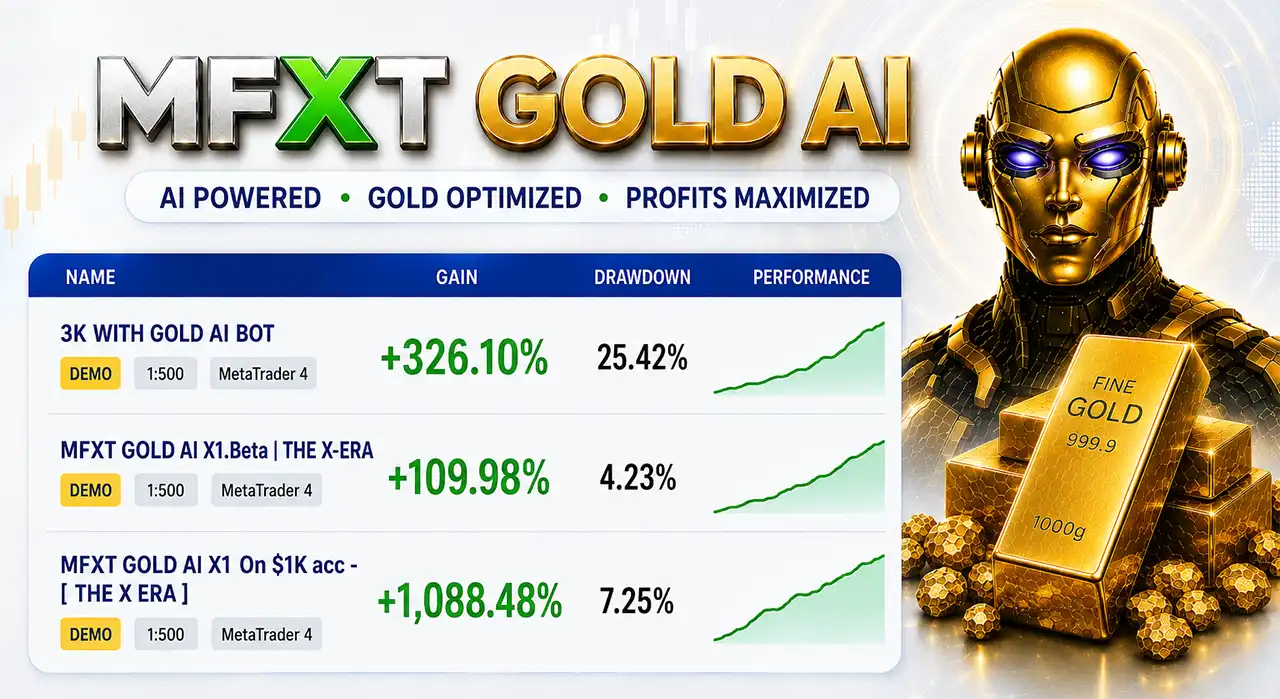
Performance data from MyFxBook shows promising account growth in the trading records of MFXT GOLD AI.
MyFxBook Results – Signal 1
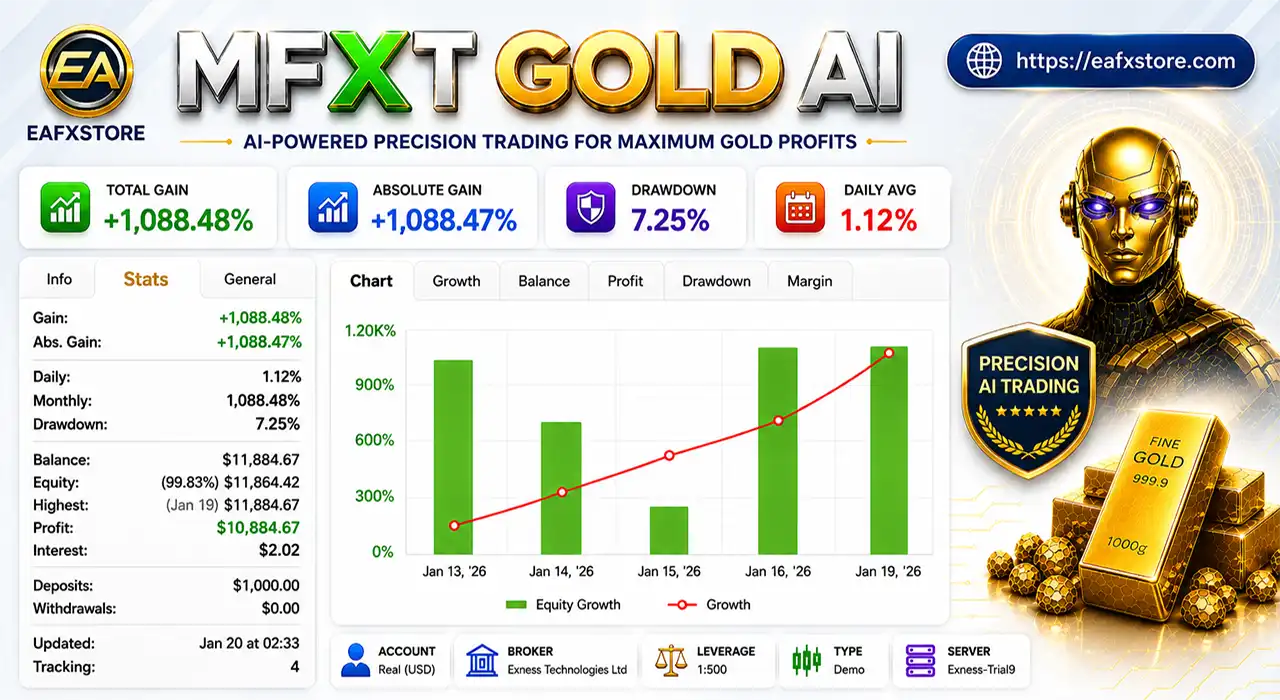
MFXT GOLD AI EA MT4 Myfxbook Results
| Metric | Result |
|---|---|
| Gain | +1,088.48% |
| Absolute Gain | +1,088.47% |
| Daily Gain | 1.12% |
| Monthly Gain | 1,088.48% |
| Drawdown | 7.25% |
| Profit | $10,884.67 |
| Initial Deposits | $1,000.00 |
The reported account grew from an initial $1,000.00 deposit to a balance of $11,884.67, with a displayed drawdown of 7.25%.
MyFxBook Results – Signal 2
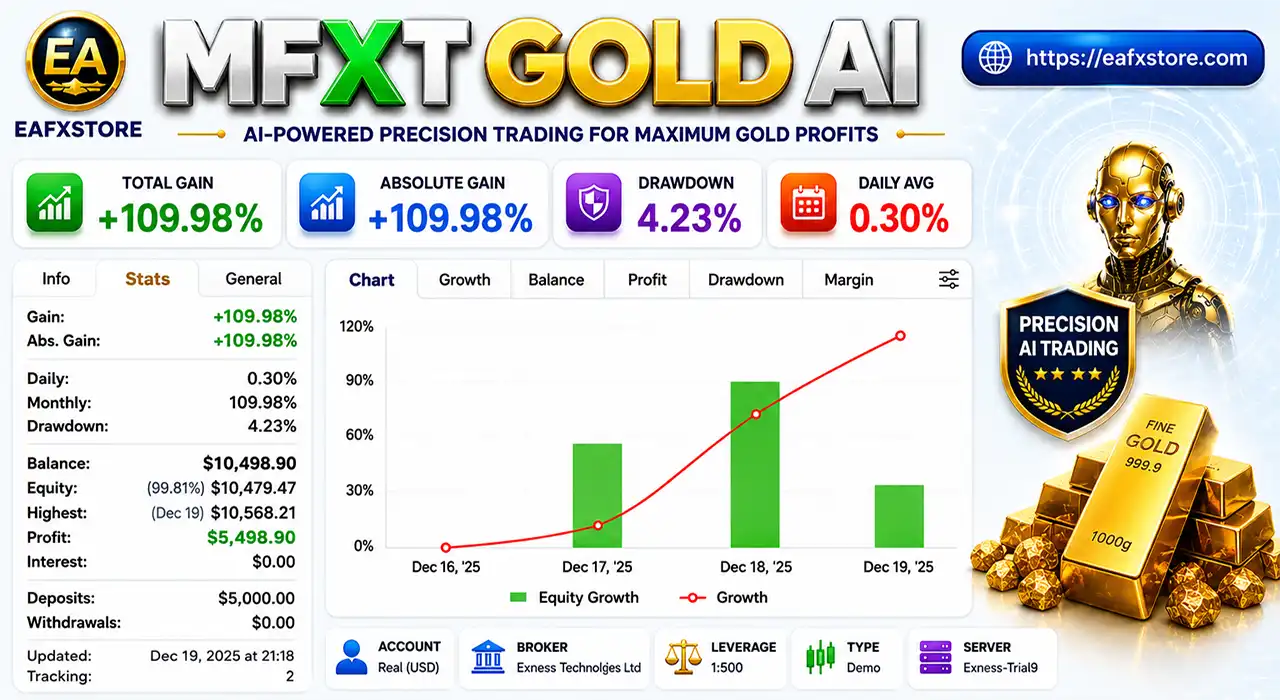
MFXT GOLD AI EA Myfxbook Results
| Metric | Result |
|---|---|
| Gain | +109.98% |
| Absolute Gain | +109.98% |
| Daily Gain | 0.30% |
| Monthly Gain | 109.98% |
| Drawdown | 4.23% |
| Profit | $5,498.90 |
| Initial Deposits | $5,000.00 |
The second account reports growth from $5,000.00 initial capital to a balance of $10,498.90, with a reported drawdown of 4.23%.
Actual results can change over time and may vary according to broker execution, spreads, slippage, liquidity and account conditions.
Why MFXT GOLD AI EA Stands Out
Gold-Focused Automated Trading
MFXT GOLD AI EA is structured around automated Gold trading and provides a dedicated set of parameters for market analysis, position sizing and trade management.
Extensive Parameter Control
Rather than offering only basic lot and risk settings, the EA provides detailed control over RSI, Trend filtering, Martingale limits, order count, trading hours, daily targets, drawdown and news filtering.
Built-In Protection Layers
The configuration includes several protective mechanisms, including maximum daily drawdown, trading-hour restrictions, news filtering, maximum order limits, and Martingale step limits.
Flexible Strategy Configuration
Users can adjust the EA’s behavior through its extensive input parameters instead of relying on a fixed configuration.
Risk Management Features
Fixed Lot Control
The EA uses a fixed-lot approach, making it easier for traders to control the starting position size.
Martingale Step Limit
Martingale trading is limited by a defined maximum number of steps, helping prevent the recovery sequence from continuing indefinitely.
Maximum Order Control
A maximum order setting helps limit the number of positions that the EA can open during trading.
Daily Drawdown Protection
The EA includes a daily drawdown limit to help control potential losses within a trading day.
Daily Profit Target
The daily target feature can stop or control further trading after the configured profit objective is reached.
News Filter Protection
The economic-news filter helps reduce trading activity during the configured news period, when Gold may experience sudden and unpredictable price movements.
Recommended Trading Conditions
For optimal performance, the developer recommends:
| Features | Type |
|---|---|
| Trading platform | MetaTrader 4 (MT4) |
| Time frames | Any |
| Currency pairs | XAUUSD (Gold) |
| Minimum / Recommended deposit | $500+ |
| Minimum / Recommended leverage | Any |
| Account types | Any |
| Product type | NoDLL |
| Additional services | Unlock and Decompile |
| Recommended brokers | Exness Broker, Icmarkets Broker |
| Recommended VPS | MyfxVPS.com (Blue VPS, Golden VPS). Lowest Latency, 2 week Free Trial, 100% Free for 12-18 Months. |
Product Download Package?
The download package of the product suite includes:
Experts
✅ MFXT GOLD AI EA v2.13.ex4
SetFiles
✅ Gold H1.set
✅ Gold H1_Auto Lot.set
➡️ Reviewed by David Easton
Weaknesses and Risk Warnings
Martingale Risk
The EA uses Martingale-style position management, so trading exposure can increase after unfavorable trades.
This can make losses grow faster during prolonged losing periods.
High Market Volatility
Gold can move very quickly, especially during major economic events. Sudden price movements may cause larger losses or unexpected execution.
Multiple Positions
The EA can manage multiple orders, which means total account exposure may become higher than the risk of a single trade.
Trailing Stop Is Disabled
In the supplied configuration, the Trailing Stop Loss function is turned off. Traders should review this setting before using the EA on a live account.
Broker Conditions Matter
Spreads, slippage, execution speed, liquidity, and broker specifications can affect the EA’s real trading results.
Past Results Are Not Guaranteed
Historical or MyFxBook performance can look strong, but it does not guarantee future profitability. Always backtest and demo-test the EA before live deployment.
Who Should Use MFXT GOLD AI EA?
🔹 Traders looking for an automated XAUUSD Expert Advisor for MT4.
🔹 Users who prefer fixed-lot trading and configurable position controls.
🔹 Experienced traders who understand Martingale and multi-order exposure.
🔹 Traders who want RSI and trend-based market filtering.
🔹 Users seeking built-in daily target, drawdown, trading-hour and news controls.
Final Verdict
MFXT GOLD AI EA is a feature-rich automated Gold trading solution designed for traders who want a structured approach to XAUUSD trading on MetaTrader 4. Its combination of RSI market-zone analysis, trend filtering, automated position management, daily targets, drawdown protection, trading-hour controls, and news filtering provides a flexible framework for systematic trading.
The EA is particularly suitable for experienced traders who understand automated trading and are comfortable managing the additional exposure that can arise from its Martingale-based position management. Users should carefully select their configuration according to their account size, risk tolerance, broker conditions and trading objectives.
🔢 MFXT GOLD AI EA MT4 – Complete Settings Guide
MFXT GOLD AI EA is an automated Gold trading Expert Advisor featuring a structured configuration for AI optimization, RSI-based zone detection, trend filtering, lot sizing, risk management, trailing stops, position limits, daily profit targets, drawdown protection, trading-hour restrictions, and news filtering.
The settings shown in the supplied panel provide granular control over the EA’s trading behavior. Below is a complete SEO-friendly breakdown of every displayed parameter, with all original values and numerical details preserved.
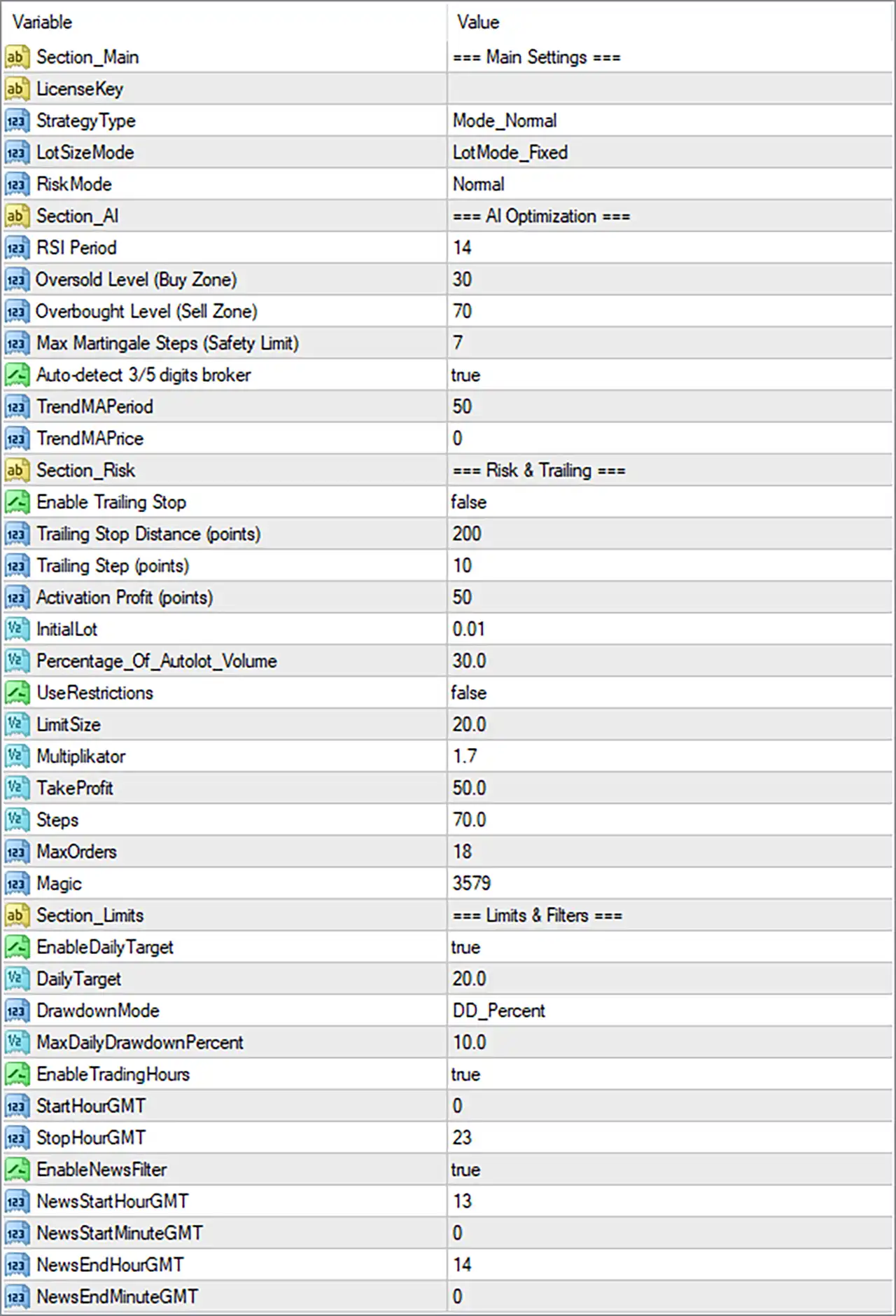
MFXT GOLD AI EA MT4 Settings Panel
🔄 Main Settings
🔹 Section_Main = === Main Settings === — Identifies the primary configuration section containing the EA’s core trading parameters.
🔹 LicenseKey = [blank] — The License Key field is displayed but no value is provided in the supplied settings panel.
🔹 StrategyType = Mode_Normal — Selects Mode_Normal as the EA’s active strategy type.
🔹 LotSizeMode = LotMode_Fixed — Selects LotMode_Fixed, meaning the EA is configured to use a fixed-lot position-sizing approach.
🔹 RiskMode = Normal — Sets the active risk profile to Normal.
🔄 AI Optimization
🔹 Section_AI = === AI Optimization === — Identifies the section containing the EA’s AI-oriented optimization and signal parameters.
🔹 RSI Period = 14 — Sets the RSI calculation period to 14.
🔹 Oversold Level (Buy Zone) = 30 — Defines 30 as the RSI oversold threshold used for the Buy Zone.
🔹 Overbought Level (Sell Zone) = 70 — Defines 70 as the RSI overbought threshold used for the Sell Zone.
🔹 Max Martingale Steps (Safety Limit) = 7 — Limits the configured Martingale sequence to a maximum of 7 steps, providing a defined upper boundary for this recovery mechanism.
🔹 Auto-detect 3/5 digits broker = true — Enables automatic detection of whether the broker uses 3-digit or 5-digit pricing.
🔹 TrendMAPeriod = 50 — Sets the Moving Average trend-detection period to 50.
🔹 TrendMAPrice = 0 — Sets the applied price parameter to 0, corresponding to the default price index used by the EA.
🔄 Risk & Trailing
🔹 Section_Risk = === Risk & Trailing === — Identifies the section controlling risk, trailing, and position-management parameters.
🔹 Enable Trailing Stop = false — Disables the trailing Stop Loss function in the current configuration.
🔹 Trailing Stop Distance (points) = 200 — Sets the trailing Stop Loss distance to 200 points when trailing is enabled.
🔹 Trailing Step (points) = 10 — Sets the trailing Stop Loss adjustment step to 10 points.
🔹 Activation Profit (points) = 50 — Configures trailing activation to begin after 50 points of profit when the trailing function is enabled.
🔹 InitialLot = 0.01 — Sets the initial position size to 0.01 lots.
🔹 Percentage_Of_AutoLot_Volume = 30.0 — Sets the automatic-lot volume percentage parameter to 30.0%.
🔹 UseRestrictions = false — Disables the additional trading restrictions associated with this parameter.
🔹 LimitSize = 20.0 — Sets the configured position or sizing limit to 20.0.
🔹 Multiplikator = 1.7 — Sets the position multiplier to 1.7, controlling the scaling factor applied by the relevant lot/recovery logic.
🔹 TakeProfit = 50.0 — Sets the configured Take Profit value to 50.0.
🔹 Steps = 70.0 — Sets the strategy step parameter to 70.0.
🔹 MaxOrders = 18 — Limits the maximum number of orders to 18.
🔹 Magic = 3579 — Assigns 3579 as the EA’s Magic Number for identifying and managing its trades.
🔄 Limits & Filters
🔹 Section_Limits = === Limits & Filters === — Identifies the section containing daily targets, drawdown controls, trading hours, and news-filter settings.
🔹 EnableDailyTarget = true — Enables the daily profit-target function.
🔹 DailyTarget = 20.0 — Sets the daily trading target to 20.0 according to the EA’s configured target unit.
🔹 DrawdownMode = DD_Percent — Selects DD_Percent, meaning drawdown protection is calculated using a percentage-based method.
🔹 MaxDailyDrawdownPercent = 10.0 — Sets the maximum daily drawdown threshold to 10.0%.
🔹 EnableTradingHours = true — Enables the trading-hours restriction.
🔹 StartHourGMT = 0 — Sets the trading start time to 00:00 GMT.
🔹 StopHourGMT = 23 — Sets the trading stop time to 23:00 GMT.
🔹 EnableNewsFilter = true — Enables the economic-news filter.
🔹 NewsStartHourGMT = 13 — Sets the news-filter protection window start to 13:00 GMT.
🔹 NewsStartMinuteGMT = 0 — Sets the news-filter start minute to 00.
🔹 NewsEndHourGMT = 14 — Sets the news-filter protection window end to 14:00 GMT.
🔹 NewsEndMinuteGMT = 0 — Sets the news-filter end minute to 00.
🔢 Conclusion
MFXT GOLD AI EA MT4 provides a comprehensive configuration designed for automated Gold trading, combining RSI-based market zones, Moving Average trend filtering, fixed-lot sizing, Martingale controls, trailing-stop parameters, order limits, daily profit targets, drawdown protection, trading-hour restrictions, and news filtering.
The current setup uses Mode_Normal, LotMode_Fixed, and RiskMode = Normal, with an InitialLot of 0.01 and Magic Number 3579. The RSI uses a 14-period calculation, with 30 defining the Buy Zone and 70 defining the Sell Zone. The trend filter uses a 50-period Moving Average.
Trailing Stop is currently disabled, although its parameters remain configured at 200 points distance, 10 points step, and 50 points activation profit. The EA allows up to 18 orders, while the Martingale safety limit is set to 7 steps and the multiplier is 1.7.
Daily profit protection is enabled with a 20.0 daily target, while drawdown protection uses the DD_Percent mode with a maximum daily drawdown of 10.0%. Trading hours are enabled from 00:00 to 23:00 GMT.
The news filter is also enabled, with its configured window running from 13:00 GMT to 14:00 GMT. Broker digit detection is enabled through Auto-detect 3/5 digits broker = true, helping the EA adapt its price calculations to the broker’s pricing format.
Because the configuration includes Martingale Steps = 7, Multiplikator = 1.7, and MaxOrders = 18, traders should pay particular attention to potential exposure during consecutive losing trades. The EA should be thoroughly backtested and tested on a demo account before being deployed with real capital.
🔢 FAQs
❓ What lot-sizing mode does MFXT GOLD AI EA MT4 use?
The EA is configured with LotSizeMode = LotMode_Fixed, with InitialLot = 0.01.
❓ What RSI settings does the EA use?
The RSI Period is 14, with 30 as the Oversold Level for the Buy Zone and 70 as the Overbought Level for the Sell Zone.
❓ Is the Martingale function enabled and what is its limit?
The panel includes a Max Martingale Steps (Safety Limit) = 7 and Multiplikator = 1.7. These settings define the configured recovery progression and its maximum number of steps.
❓ What are the daily target and drawdown limits?
The daily target is 20.0, while the maximum daily drawdown is 10.0% using DD_Percent mode.
❓ What are the trading hours and news-filter times?
Trading hours are enabled from 00:00 GMT to 23:00 GMT. The news-filter window is configured from 13:00 GMT to 14:00 GMT, with both NewsStartMinuteGMT = 0 and NewsEndMinuteGMT = 0.
User Reviews
Only logged in customers who have purchased this product may leave a review.
❓ What market is MFXT GOLD AI EA designed for?
MFXT GOLD AI EA is an automated Gold trading system for MT4, combining RSI zones, trend filtering, risk controls, trading-hour limits, and news filtering.
❓ What are the RSI settings of MFXT GOLD AI EA?
MFXT GOLD AI EA uses RSI Period 14, with 30 defining the oversold Buy Zone and 70 defining the overbought Sell Zone for market analysis.
❓ Does MFXT GOLD AI EA use Martingale?
Yes. MFXT GOLD AI EA includes Martingale-related controls, with a maximum of 7 steps, a 1.7 multiplier, and up to 18 configured orders.
❓ What lot size does MFXT GOLD AI EA use?
MFXT GOLD AI EA is configured for fixed-lot trading with an InitialLot of 0.01, while additional AutoLot volume parameters are available for position sizing.
❓ Does MFXT GOLD AI EA use a trailing stop?
Trailing Stop is currently disabled in MFXT GOLD AI EA. If enabled, it uses a 200-point distance, 10-point step, and 50-point activation profit.
❓ Does MFXT GOLD AI EA have daily drawdown protection?
Yes. MFXT GOLD AI EA uses percentage-based drawdown protection with the maximum daily drawdown configured at 10.0% in the current settings.
❓ Does MFXT GOLD AI EA have a daily profit target?
Yes. MFXT GOLD AI EA has its Daily Profit Target enabled, with the current DailyTarget parameter set to 20.0 according to the configured target unit.
❓ Does MFXT GOLD AI EA use an economic news filter?
Yes. MFXT GOLD AI EA has the news filter enabled, with the current configured filtering window running from 13:00 to 14:00 GMT.
❓ What trading hours does MFXT GOLD AI EA use?
MFXT GOLD AI EA has trading-hour restrictions enabled from 00:00 GMT through 23:00 GMT, allowing the schedule to be controlled through its input settings.
❓ Is MFXT GOLD AI EA suitable for live trading?
MFXT GOLD AI EA should be thoroughly backtested and demo-tested first, especially because its Martingale settings can increase exposure during prolonged losing sequences.
🔥 Get This EA for FREE with Our Membership! 🚀🚀
Unlock access to this EA, premium Indicators, and exclusive trading tools completely FREE with any of our Membership Plans! Thousands of traders already benefit from our VIP library—join them and level up your trading instantly. Choose Your Membership:
- SPECIAL – 1 Month Membership
- GOLD – 1 Year Membership
- PREMIUM – 1 Year Membership
-
 Original price was: $4,999.00.$249.00Current price is: $249.00.
 -
 Original price was: $4,500.00.$249.00Current price is: $249.00.
 -
 Original price was: $4,999.00.$249.00Current price is: $249.00.
 -
 Original price was: $28,000.00.$249.00Current price is: $249.00.
-
 1Original price was: $11,000.00.$89.00Current price is: $89.00.
 -
 1Original price was: $950.00.$59.00Current price is: $59.00.
 -
 3Original price was: $999.00.$69.00Current price is: $69.00.
 -
 3Original price was: $499.00.$59.00Current price is: $59.00.
There are no reviews yet.