


JKJK FINAL VERSION V3 Pro MT5 Settings Explained
JKJK FINAL VERSION V3 Pro is an advanced automated trading Expert Advisor for MetaTrader 5 that combines RSI filtering, EMA confirmation, dynamic lot progression, profit booking systems and drawdown protection.
Designed for aggressive yet structured trade execution, this EA supports multiple trade entries, smart position scaling and customizable dashboard visualization.
With built-in protection tools and adaptive lot progression controls, JKJK FINAL VERSION V3 Pro is suitable for traders seeking semi-grid or high-frequency automated trading strategies.
JKJK FINAL VERSION V3 Pro MT5 Full Settings Explanation
Below are the details of the parameters in the advisor’s trading system settings table:
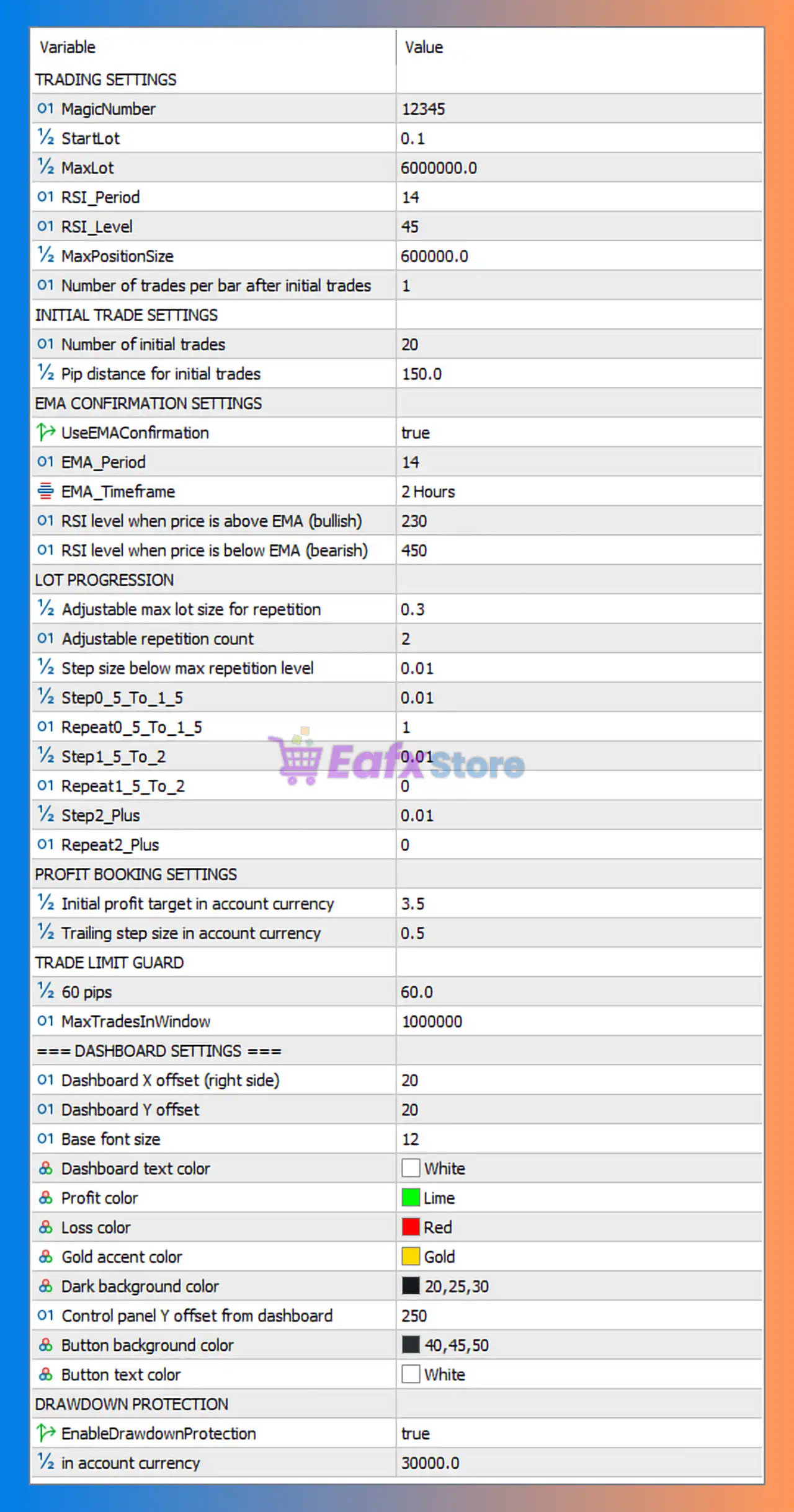
Trading Settings
🔹 MagicNumber = 12345: Unique identifier used by the EA to manage and track its own trades.
🔹 StartLot = 0.1: Sets the initial trading lot size to 0.1 lots.
🔹 MaxLot = 6000000.0: Defines the maximum lot size allowed for trading operations.
🔹 RSI_Period = 14: Uses RSI indicator period 14 for market analysis.
🔹 RSI_Level = 45: RSI trigger level is set to 45.
🔹 MaxPositionSize = 600000.0: Limits the maximum total open position size to 600000.0.
🔹 Number of trades per bar after initial trades = 1: Allows 1 additional trade per candle after initial entries.
Initial Trade Settings
🔹 Number of initial trades = 20: Opens up to 20 initial trade positions.
🔹 Pip distance for initial trades = 150.0: Distance between initial trades is 150.0 pips.
EMA Confirmation Settings
🔹 UseEMAConfirmation = true: Enables EMA-based trend confirmation filtering.
🔹 EMA_Period = 14: EMA indicator uses period 14.
🔹 EMA_Timeframe = 2 Hours: EMA confirmation is calculated on the 2 Hours timeframe.
🔹 RSI level when price is above EMA (bullish) = 230: RSI bullish threshold value is 230.
🔹 RSI level when price is below EMA (bearish) = 450: RSI bearish threshold value is 450.
Lot Progression Settings
🔹 Adjustable max lot size for repetition = 0.3: Maximum adjustable lot size for repeated entries is 0.3.
🔹 Adjustable repetition count = 2: Repetition cycle count is set to 2.
🔹 Step size below max repetition level = 0.01: Lot increment below repetition limit is 0.01.
🔹 Step0_5_To_1_5 = 0.01: Lot step adjustment between 0.5 and 1.5 levels is 0.01.
🔹 Repeat0_5_To_1_5 = 1: Repetition count for 0.5 to 1.5 range is 1.
🔹 Step1_5_To_2 = 0.01: Lot step adjustment between 1.5 and 2 levels is 0.01.
🔹 Repeat1_5_To_2 = 0: Repetition count for 1.5 to 2 range is 0.
🔹 Step2_Plus = 0.01: Lot step increment for levels above 2 is 0.01.
🔹 Repeat2_Plus = 0: Repetition count above level 2 is 0.
Profit Booking Settings
🔹 Initial profit target in account currency = 3.5: Initial profit target is set to 3.5 account currency units.
🔹 Trailing step size in account currency = 0.5: Profit trailing increment is 0.5 currency units.
Trade Limit Guard
🔹 60 pips = 60.0: Trade protection or spacing threshold is set to 60.0 pips.
🔹 MaxTradesInWindow = 1000000: Maximum allowed trades within trading window is 1000000.
Dashboard Settings
🔹 Dashboard X offset (right side) = 20: Horizontal dashboard position offset is 20.
🔹 Dashboard Y offset = 20: Vertical dashboard position offset is 20.
🔹 Base font size = 12: Dashboard base font size is 12.
🔹 Dashboard text color = White: Dashboard text is displayed in White.
🔹 Profit color = Lime: Profit values are highlighted using Lime color.
🔹 Loss color = Red: Loss values are highlighted using Red color.
🔹 Gold accent color = Gold: Accent elements use Gold color styling.
🔹 Dark background color = 20,25,30: Dashboard background RGB color is 20,25,30.
🔹 Control panel Y offset from dashboard = 250: Vertical offset for control panel placement is 250.
🔹 Button background color = 40,45,50: Button background RGB color is 40,45,50.
🔹 Button text color = White: Button text is displayed in White.
Drawdown Protection
🔹 EnableDrawdownProtection = true: Activates the EA drawdown protection system.
🔹 in account currency = 30000.0: Maximum allowed drawdown is limited to 30000.0 account currency units.
Conclusion
JKJK FINAL VERSION V3 Pro MT5 is a powerful automated MetaTrader 5 Expert Advisor designed for advanced traders seeking aggressive growth combined with intelligent risk management.
The EA integrates EMA confirmation, RSI filtering, adaptive lot progression, dynamic profit booking, and robust drawdown protection into a highly configurable trading framework.
Its advanced dashboard system and scalable trade management tools make it ideal for traders looking for flexible and automated portfolio management.
FAQs
❓ What is JKJK FINAL VERSION V3 Pro MT5?
JKJK FINAL VERSION V3 Pro MT5 is an advanced automated trading EA for MetaTrader 5 that uses RSI, EMA confirmation, lot progression, and drawdown protection systems.
❓ Does JKJK FINAL VERSION V3 Pro MT5 support EMA trend confirmation?
Yes, the EA includes EMA confirmation filters using a 14-period EMA on the 2 Hours timeframe.
❓ Can the EA automatically manage profits?
Yes, the EA includes built-in profit booking and trailing profit systems based on account currency targets.
❓ Does JKJK FINAL VERSION V3 Pro MT5 include drawdown protection?
Yes, it features a drawdown protection system with a limit set to 30000.0 account currency units.
❓ Is the dashboard customizable in JKJK FINAL VERSION V3 Pro MT5?
Yes, traders can customize dashboard colors, font sizes, positions, and control panel layouts.


