


LittleCrazy MT5 Settings & Configuration Guide
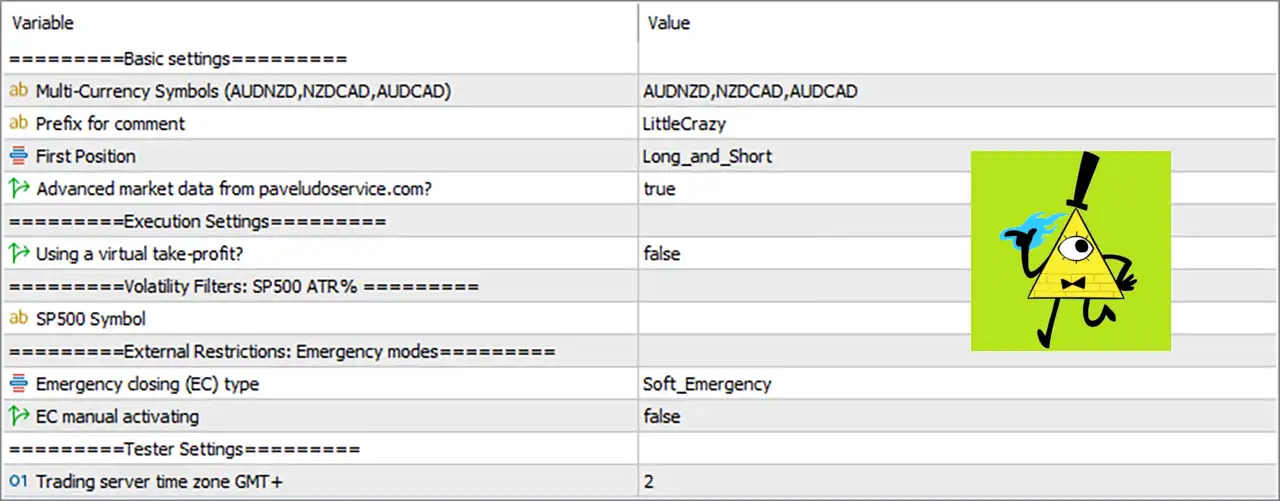
LittleCrazy MT5 is an automated trading Expert Advisor configured for multi-currency trading, with support for AUDNZD, NZDCAD, and AUDCAD. The displayed settings combine multi-symbol trading, flexible Buy and Sell positioning, advanced market-data integration, execution controls, volatility-filter infrastructure, emergency closing protection, and broker-server time configuration. The EA is currently configured to use Long_and_Short positioning, advanced market data from paveludose..., Soft_Emergency closing, and a GMT+2 trading server time zone. These settings provide a framework for managing market data, trade execution, emergency conditions, and multi-currency operations.
Basic Settings
🔹 Multi-Currency Symbols (AUDNZD,NZDCAD,AUDCAD) = AUDNZD,NZDCAD,AUDCAD — Defines the three currency pairs available to the EA: AUDNZD, NZDCAD, and AUDCAD, enabling its multi-currency trading configuration.
🔹 Prefix for comment = LittleCrazy — Sets LittleCrazy as the prefix used for trade comments, helping identify positions and orders generated by the EA.
🔹 First Position = Long_and_Short — Allows the EA's first-position logic to operate in both Long and Short directions rather than restricting entries to one market direction.
🔹 Advanced market data from paveludose...com? = true — Enables the advanced external market-data functionality associated with paveludose...com according to the displayed setting.
Execution Settings
🔹 Using a virtual take-profit? = false — Disables the virtual Take Profit function, meaning the EA is not configured to use its virtual TP mechanism in the displayed setup.
Volatility Filters: SP500 ATR %
🔹 SP500 Symbol = [blank] — The SP500 Symbol field is currently empty, so no specific SP500 symbol is defined in the displayed configuration for this volatility-filter section.
External Restrictions: Emergency Modes
🔹 Emergency closing (EC) type = Soft_Emergency — Sets the Emergency Closing type to Soft_Emergency, defining the EA's configured emergency-position management mode.
🔹 EC manual activating = false — Disables manual activation of the Emergency Closing function, meaning EC manual activation is not enabled in the current configuration.
Tester Settings
🔹 Trading server time zone GMT+ = 2 — Sets the trading server time-zone offset to GMT+2, allowing the EA's time-dependent logic to operate according to this configured server-time reference.
Key Configuration Summary
🔹 EA Name: LittleCrazy MT5
🔹 Multi-Currency Symbols: AUDNZD, NZDCAD, AUDCAD
🔹 Trade Comment Prefix: LittleCrazy
🔹 First Position Direction: Long_and_Short
🔹 Advanced Market Data: Enabled (true)
🔹 Virtual Take Profit: Disabled (false)
🔹 SP500 Symbol: Blank / Not specified
🔹 Emergency Closing Type: Soft_Emergency
🔹 Manual Emergency Closing: Disabled (false)
🔹 Trading Server Time Zone: GMT+2
How LittleCrazy MT5 Uses These Settings
🔹 Multi-Currency Trading: The EA is configured to work with AUDNZD, NZDCAD, and AUDCAD, allowing its trading logic to operate across multiple currency pairs.
🔹 Bidirectional Trading: With First Position = Long_and_Short, the EA can consider both upward and downward market opportunities.
🔹 External Market Data: The true setting for advanced market data enables the external-data functionality shown in the Inputs panel.
🔹 Execution Management: The virtual Take Profit option is set to false, so the EA does not use the displayed virtual TP mechanism.
🔹 Emergency Protection: Soft_Emergency is selected as the Emergency Closing type, while manual EC activation remains disabled.
🔹 Time Synchronization: GMT+2 is used as the configured trading-server time-zone reference for time-sensitive EA operations.
Conclusion
The displayed LittleCrazy MT5 configuration is focused on multi-currency automated trading across AUDNZD, NZDCAD, and AUDCAD. It supports both Long and Short initial positioning and has advanced external market data enabled. The current setup does not use virtual Take Profit, while its emergency management is configured with Soft_Emergency and manual activation disabled. The EA also uses GMT+2 as its trading server time-zone setting.
One notable point is that the SP500 Symbol field is blank in the provided configuration. Traders should therefore verify how the EA handles the SP500 ATR volatility-filter section when no symbol is specified. Before deploying LittleCrazy MT5 on a live account, it is also recommended to test the multi-currency configuration with the intended broker, symbol names, server time, and execution environment.


