


Apocalypse Gold MT5 Settings Guide
Apocalypse Gold MT5 is an automated Gold trading Expert Advisor designed with a broad range of configurable controls for position sizing, execution conditions, Stop Loss and Take Profit, directional trading, composite technical methods, fast-close management, time-based protection, volatility controls, holiday restrictions, and news protection.
The displayed configuration is primarily designed around XAUUSD / GOLD / Gold, with a standard setting of 100 balance units per 0.01 lot, Virtual Stop Loss = 800, Take Profit = 800, and Real Stop Loss = 800. It also enables both Buy and Sell trading, Composite Method A, Fast Close, Time Stop, Holiday Stop Trade, and several technical parameters.
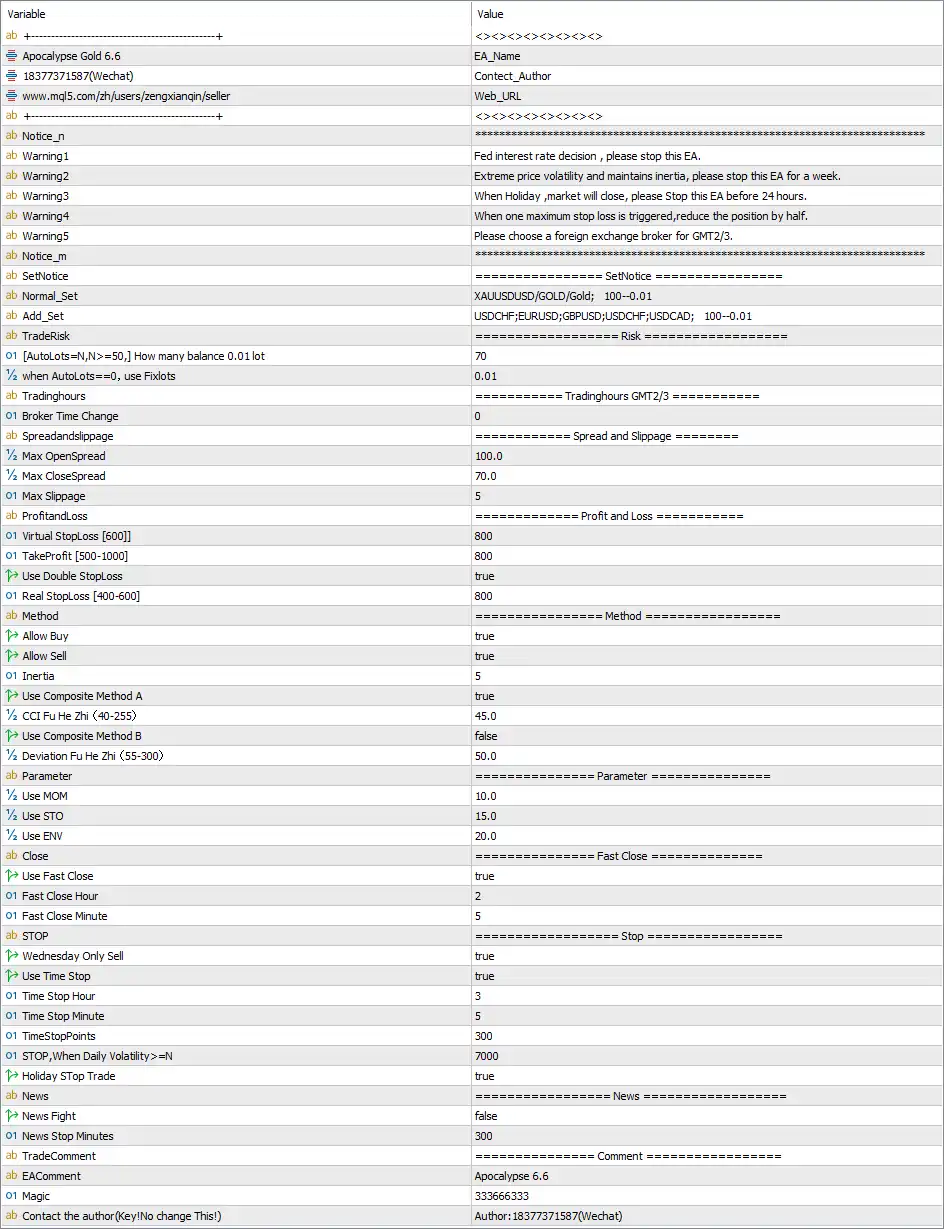
Basic Information & Notices
🔹 Warning1 = Fed interest rate decision , please stop this EA. — Warns users to stop the EA around a Federal Reserve interest-rate decision.
🔹 Warning2 = Extreme price volatility and maintains inertia, please stop this EA for a week. — Advises stopping the EA for one week during periods described by the parameter as extreme price volatility and persistent market inertia.
🔹 Warning3 = When Holiday ,market will close, please Stop this EA before 24 hours. — Advises stopping the EA 24 hours before a market holiday according to the displayed instruction.
🔹 Warning4 = When one maximum stop loss is triggered, reduce the position by half. — Advises reducing the trading position by 50% after one maximum Stop Loss is triggered.
🔹 Warning5 = Please choose a foreign exchange broker for GMT2/3. — Advises users to select a Forex broker operating under the specified GMT2/3 environment.
🔹 **Notice_n = ********************************************************** — Provides another visual separator for the EA's configuration sections.
Set Notice
🔹 SetNotice = ==================== SetNotice ==================== — Marks the beginning of the EA's preset and setup information.
🔹 Normal_Set = XAUUSDUSD/GOLD/Gold; 100--0.01 — Displays the normal Gold setup for XAUUSDUSD/GOLD/Gold, with the stated relationship of 100 balance units to 0.01 lot.
🔹 Add_Set = USDCHF;EURUSD;GBPUSD;USDCAD; 100--0.01 — Lists USDCHF, EURUSD, GBPUSD, and USDCAD as additional supported symbols in the displayed setup, using 100 balance units per 0.01 lot.
Trade Risk & Lot Management
🔹 TradeRisk = ==================== Risk ==================== — Marks the beginning of the EA's risk and position-sizing parameters.
🔹 (AutoLots_N,N>=50) How many balance 0.01 lot = 70 — Sets the Auto Lots calculation parameter to 70, meaning the displayed configuration uses 70 balance units per 0.01 lot when automatic lot sizing is active, subject to the EA's internal calculation.
🔹 (n when AutoLots==0, use Fixlots) = 0.01 — Sets the fixed lot size to 0.01 when the Auto Lots calculation is disabled by setting its relevant control to 0.
Trading Hours
🔹 Tradinghours = ==================== Tradinghours GMT2/3 ==================== — Marks the trading-hours configuration section and indicates the intended GMT2/3 broker-time environment.
🔹 Broker Time Change = 0 — Sets the broker-time adjustment to 0, meaning no additional broker-time offset is configured.
Spread & Slippage
🔹 Spreadandslippage = ==================== Spread and Slippage ==================== — Marks the section controlling spread and execution-slippage parameters.
🔹 Max OpenSpread = 100.0 — Sets the maximum permitted opening spread parameter to 100.0.
🔹 Max CloseSpread = 70.0 — Sets the maximum permitted closing spread parameter to 70.0.
🔹 Max Slippage = 5 — Sets the maximum permitted execution slippage to 5.
Profit & Loss Management
🔹 ProfitandLoss = ==================== Profit and Loss ==================== — Marks the section containing the EA's Stop Loss and Take Profit parameters.
🔹 Virtual StopLoss [600] = 800 — Sets the Virtual Stop Loss parameter to 800, with the input label displaying [600] as its reference value.
🔹 TakeProfit [500-1000] = 800 — Sets Take Profit to 800, within the displayed recommended/reference range of 500–1000.
🔹 Use Double StopLoss = true — Enables the Double Stop Loss function.
🔹 Real StopLoss [400-600] = 800 — Sets the Real Stop Loss parameter to 800; the input label displays [400–600] as its reference range.
Trading Method
🔹 Method = ==================== Method ==================== — Marks the section containing the primary trading-direction and strategy-method controls.
🔹 Allow Buy = true — Enables Buy trading.
🔹 Allow Sell = true — Enables Sell trading.
🔹 Inertia = 5 — Sets the EA's Inertia parameter to 5, controlling the corresponding internal strategy calculation.
🔹 Use Composite Method A = true — Enables Composite Method A.
🔹 CCI Fu He Zhi (40-255) = 45.0 — Sets the CCI composite-value parameter to 45.0, with the input displaying a reference range of 40–255.
🔹 Use Composite Method B = false — Disables Composite Method B.
🔹 Deviation Fu He Zhi (55-300) = 50.0 — Sets the Deviation composite-value parameter to 50.0; the input displays a reference range of 55–300.
Technical Parameters
🔹 Parameter = ==================== Parameter ==================== — Marks the section containing additional technical-indicator parameters.
🔹 Use MOM = 10.0 — Sets the Momentum (MOM) parameter to 10.0.
🔹 Use STO = 15.0 — Sets the Stochastic (STO) parameter to 15.0.
🔹 Use ENV = 20.0 — Sets the Envelope (ENV) parameter to 20.0.
Fast Close
🔹 Fast Close = ==================== Fast Close ==================== — Marks the section controlling the EA's fast-close schedule.
🔹 Use Fast Close = true — Enables the Fast Close feature.
🔹 Fast Close Hour = 2 — Sets the Fast Close hour to 2.
🔹 Fast Close Minute = 5 — Sets the Fast Close minute to 5, creating a configured Fast Close time of 02:05.
Stop & Time Protection
🔹 STOP = ==================== Stop ==================== — Marks the EA's Stop and protection settings.
🔹 Wednesday Only Sell = true — Enables the Wednesday-only Sell rule, indicating that the EA applies its configured Wednesday Sell restriction.
🔹 Use Time Stop = true — Enables the Time Stop function.
🔹 Time Stop Hour = 3 — Sets the Time Stop hour to 3.
🔹 Time Stop Minute = 5 — Sets the Time Stop minute to 5, creating a configured Time Stop time of 03:05.
🔹 TimeStopPoints = 300 — Sets the Time Stop point parameter to 300.
🔹 STOP,When Daily Volatility >=N = 7000 — Sets the daily-volatility Stop threshold to 7000, allowing the EA's Stop condition to respond when daily volatility reaches or exceeds the configured value.
🔹 Holiday Stop Trade = true — Enables the Holiday Stop Trade function, preventing or restricting trading according to the EA's holiday-stop logic.
News Protection
🔹 News = ==================== News ==================== — Marks the economic-news protection section.
🔹 News Fight = false — Disables the News Fight function.
🔹 News Stop Minutes = 300 — Sets the news-related Stop period to 300 minutes.
Trade Comment & Identification
🔹 TradeComment = ==================== Comment ==================== — Marks the section containing trade-comment and identification parameters.
🔹 EAComment = Apocalypse 6.6 — Sets Apocalypse 6.6 as the EA's trade comment.
🔹 Magic = 333666333 — Assigns 333666333 as the EA's Magic Number for identifying its trades.
🔹 Contact the author (Key!No change This!) = Author: 18377371587(Wechat) — Displays the author's contact information and indicates that this field should not be changed according to the input label.
Key Features of This Apocalypse Gold MT5 Configuration
🔹 Gold-Focused Setup — The Normal Set specifically references XAUUSDUSD/GOLD/Gold with a 100–0.01 position-sizing relationship.
🔹 Automatic Lot Management — Auto lot sizing is configured with 70 balance units per 0.01 lot, while the fixed lot value is 0.01.
🔹 Dual-Direction Trading — Both Allow Buy = true and Allow Sell = true enable Buy and Sell operations.
🔹 Configured Profit Protection — The setup uses Virtual StopLoss = 800, TakeProfit = 800, and Real StopLoss = 800.
🔹 Double Stop Loss Enabled — Use Double StopLoss = true activates the additional Stop Loss mechanism.
🔹 Composite Strategy Controls — Composite Method A is enabled with CCI = 45.0, while Composite Method B is disabled.
🔹 Technical Parameters — The configuration includes MOM = 10.0, STO = 15.0, and ENV = 20.0.
🔹 Fast Close Protection — Fast Close is enabled for the configured time of 02:05.
🔹 Time Stop Protection — Time Stop is enabled with a configured time of 03:05 and TimeStopPoints = 300.
🔹 Volatility Protection — The EA has a daily-volatility Stop threshold of 7000.
🔹 Holiday Protection — Holiday Stop Trade = true enables the holiday trading restriction.
🔹 Spread and Slippage Controls — Maximum opening spread is 100.0, maximum closing spread is 70.0, and maximum slippage is 5.
Conclusion
The displayed Apocalypse Gold MT5 configuration provides a highly parameterized setup focused primarily on Gold/XAUUSD trading. The configuration combines automated position sizing, Buy/Sell permissions, spread and slippage controls, Virtual and Real Stop Loss settings, Take Profit, composite technical methods, fast-close rules, time-based protection, volatility protection, holiday restrictions, and news-related controls.
The Gold setup is displayed as XAUUSDUSD/GOLD/Gold; 100--0.01, while Auto Lots is configured at 70 balance units per 0.01 lot and the fixed-lot fallback is 0.01. The primary P/L parameters are Virtual StopLoss = 800, TakeProfit = 800, Use Double StopLoss = true, and Real StopLoss = 800.
Both Buy and Sell trading are enabled, with Inertia = 5, Composite Method A = true, CCI = 45.0, Composite Method B = false, and Deviation = 50.0. Additional technical parameters are MOM = 10.0, STO = 15.0, and ENV = 20.0.
The configuration also enables Fast Close at 02:05, Time Stop at 03:05, a daily-volatility Stop threshold of 7000, and Holiday Stop Trade. The EA uses Magic = 333666333 and the trade comment Apocalypse 6.6.
Because the configuration contains multiple protective and position-sizing mechanisms, traders should verify how each parameter is interpreted by the specific EA version and broker before using it on a live account. Particular attention should be paid to the lot-sizing values, Stop Loss settings, spread limits, daily-volatility threshold, and the interaction between the various protection modules.


