
🔢 Mad Turtle EA MT5 Settings Explained – Complete Configuration Guide
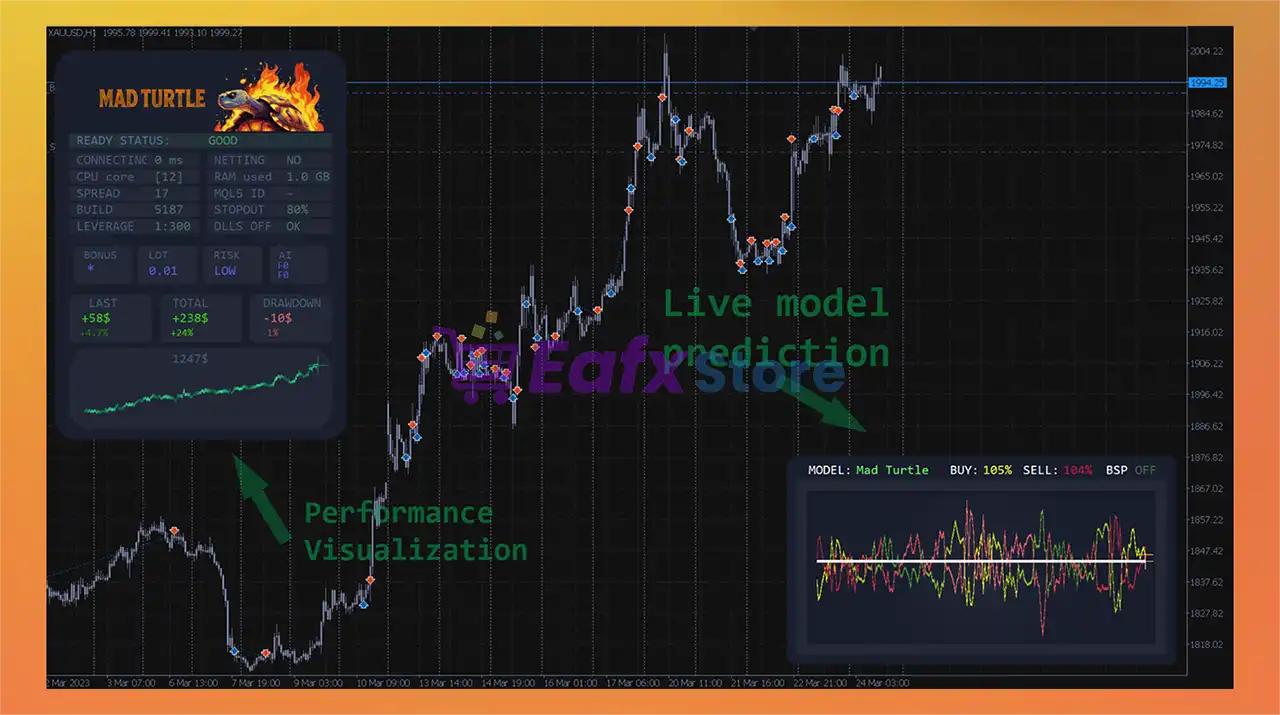
Mad Turtle EA is an intelligent automated trading robot for MetaTrader 5 designed to simplify forex trading through adaptive strategies, automatic risk control, portfolio management and flexible trading filters. The EA supports auto lot sizing, buy/sell signal automation, spread filtering and advanced trade management settings.
With its modular architecture and customizable strategy engine, Mad Turtle EA MT5 is suitable for both beginners and experienced traders looking for a stable and optimized automated trading system.

🔢 Mad Turtle EA MT5 Full Settings Explanation
Below are the details of the parameters in the advisor’s trading system settings table:
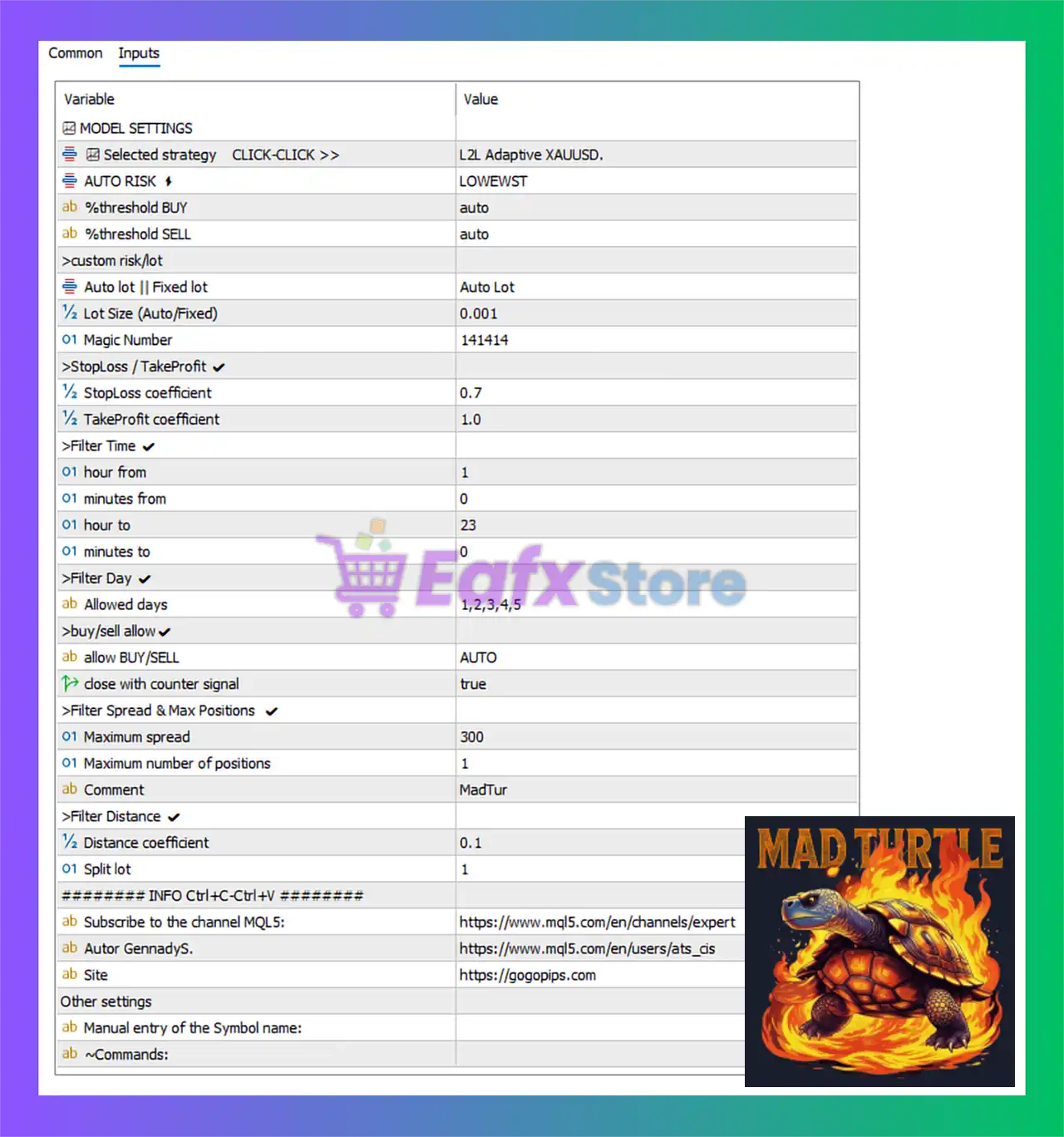
🔶 MODEL SETTINGS
🔹 [1.0] Personal portfolio # =: Section used to configure personal portfolio management settings.
🔹 [2.0] Selected strategy CLICK-CLICK >> = #1 MadTur H1: The active trading strategy is #1 MadTur H1.
🔹 [3.0] AUTO RISK = LOWEST: Automatic risk management is set to the LOWEST risk level.
🔹 [4.0] %threshold BUY = auto: Buy signal threshold is calculated automatically.
🔹 [4.1] %threshold SELL = auto: Sell signal threshold is calculated automatically.
🔶 Custom Risk Settings
🔹 [3.1] Auto lot | Fixed lot = Auto Lot: The EA uses automatic lot sizing mode.
🔹 [3.2] Lot Size (Auto/Fixed) = 0.001: Base lot size value is 0.001.
🔹 [5.0] Magic Number = 141414: Unique Magic Number used for identifying EA trades is 141414.
🔶 StopLoss / TakeProfit Settings
🔹 [7.1] StopLoss coefficient = 0.7: Stop Loss coefficient multiplier is 0.7.
🔹 [7.2] TakeProfit coefficient = 1.0: Take Profit coefficient multiplier is 1.0.
🔶 Filter Time Settings
🔹 [8.1] hour from = 1: Trading starts from hour 1.
🔹 [8.2] minutes from = 0: Trading starts from minute 0.
🔹 [8.3] hour to = 23: Trading stops at hour 23.
🔹 [8.4] minutes to = 0: Trading stops at minute 0.
🔶 Filter Day Settings
🔹 [9.0] Allowed days = 1,2,3,4,5: Trading is allowed from Monday (1) to Friday (5).
🔶 Buy/Sell Allow Settings
🔹 [10.0] allow BUY/SELL = AUTO: The EA automatically determines whether Buy or Sell trades are allowed.
🔹 [11.0] close with counter signal = true: Positions are closed automatically when an opposite trading signal appears.
🔶 Filter Spread & Max Positions Settings
🔹 [12.0] Maximum spread = 300: Maximum allowed spread for opening trades is 300.
🔹 [13.0] Maximum number of positions = 1: The EA allows only 1 open position at a time.
🔶 Filter Distance Settings
🔹 [14.0] Distance coefficient = 0.1: Distance coefficient used for position spacing is 0.1.
🔹 [15.0] Split lot = 1: Lot splitting feature uses 1 split portion.
🔶 Artificial Feature Reduction Settings
🔹 [16.0] AFR = false: Artificial Feature Reduction system is disabled.
🔹 [16.1] AFR X3 = false: AFR X3 mode is disabled.
🔹 [17.0] old mode = false: Legacy trading mode is disabled.
🔶 Other Settings
🔹 [18.0] Comment = AUTO: Trade comment mode is set to automatic.
🔹 [19.0] zen mode = false: Zen mode is disabled.
🔹 [20.0] Normalization of digits = true: Digit normalization is enabled for broker compatibility.
🔶 Information & Support Settings
🔹 ######## INFO Ctrl+C-Ctrl+V ########: Information and support section header.
🔹 Support: Zolia (any questions and support) = www.mql5.com/en/users/zolia: Official support profile for the EA developer.
🔹 Subscribe to the channel MQL5: = www.mql5.com/en/channels/expert: Official MQL5 channel link for updates and announcements.
🔹 Developer: Gennady.S (NOT for support) = www.mql5.com/en/users/ats_cis: Developer profile information.
🔹 Site = https://gogopips.com: Official website related to the EA.
🔶 Other Additional Settings
🔹 Manual entry of the Symbol name:: Allows manual symbol input configuration if required by broker settings.
🔹 Commands:: Reserved section for additional EA command inputs.
🔢 Conclusion
Mad Turtle EA MT5 is a flexible and intelligent Expert Advisor designed for automated forex trading with adaptive risk management and configurable strategy filters. The EA combines automatic lot sizing, spread protection, counter-signal exits, and time/day filtering into a user-friendly MT5 trading solution. With customizable risk coefficients and simplified portfolio management, Mad Turtle EA MT5 provides traders with a balanced and optimized automated trading experience.
🔢 FAQs
❓ What is Mad Turtle EA MT5?
Mad Turtle EA MT5 is an automated forex trading Expert Advisor for MetaTrader 5 with adaptive risk and strategy management.
❓ Does Mad Turtle EA MT5 support auto lot sizing?
Yes, the EA includes an automatic lot sizing feature.
❓ Can Mad Turtle EA MT5 trade both Buy and Sell positions?
Yes, the EA automatically manages Buy and Sell trading permissions.
❓ Does Mad Turtle EA MT5 include spread filtering?
Yes, the EA uses a maximum spread filter to avoid poor market conditions.
❓ Can Mad Turtle EA MT5 close trades on opposite signals?
Yes, the EA can automatically close trades when a counter signal appears.