




News Catcher Pro EA MT4 v4.38 with SetFiles (Platform 1473+)

Subscriptions for Special Plan
- 30 EA package is more economical!
- Special package with 99%
- Download 1 EA/Day

Subscriptions for Premium Membership
- Download Unlimited in 1 Year
- Get 100% Discount
- Get free access to all

Subscriptions for Gold Membership
- 1 Year Membership
- Get 100% Discount
- Access EA+Indicator+Course
Frequently bought together 🎁
Add these products to enhance your purchase


What is News Catcher Pro MT4?
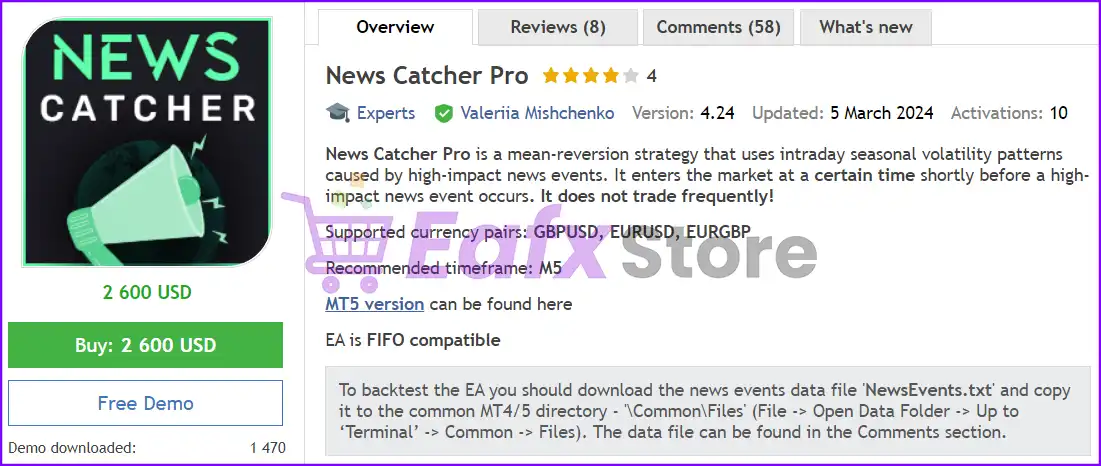
News Catcher Pro EA employs a mean reversion approach, leveraging seasonal intraday volatility patterns triggered by significant news events. The Expert Advisor (EA) strategically enters the market just before such events occur, focusing on GBPUSD, EURUSD, EURGBP pairs and operates within the M5 timeframe. Trading frequency is selective, targeting optimal opportunities.
🔶 Vendor Website: View here
About the Author
This product is compiled by Valeriia Mishchenko. This Russia author has more than +6 years of experience working on MQL5 with many famous products such as News Catcher Pro MT4, News Catcher Pro MT5, Night Hunter Pro, Evening Scalper Pro, Perceptrader AI and other products. Among them, News Catcher Pro MT4 is his best performing products.
News Catcher Pro Overview
Key Features of News Catcher Pro for MT4
🔹Mean reversion strategy: Focuses on taking advantage of market movements that tend to revert to the mean after high-impact news events.
🔹News filter: Identify and react to high-impact news events (Can be used for backtesting).
🔹Single chart setup: Manage trades across multiple currency pairs using a single chart.
🔹Professional risk management: Set Take profit (TP) and Stop loss (SL) targets based on market movements.
Additional Features
🔹Backtesting and solid live performance: Allows for real-time historical and trade testing.
🔹Automatic GMT detection: Automatically adjusts to your time zone.
🔹Trade control: Enable/disable buy/sell, hedge and set maximum open positions.
🔹Position management: Define position holding time and Friday closing time.
🔹Professional management system integration: FIFO system integration supports professional system management.
News Catcher Pro MT4 Review
News Catcher Pro EA Signal Results
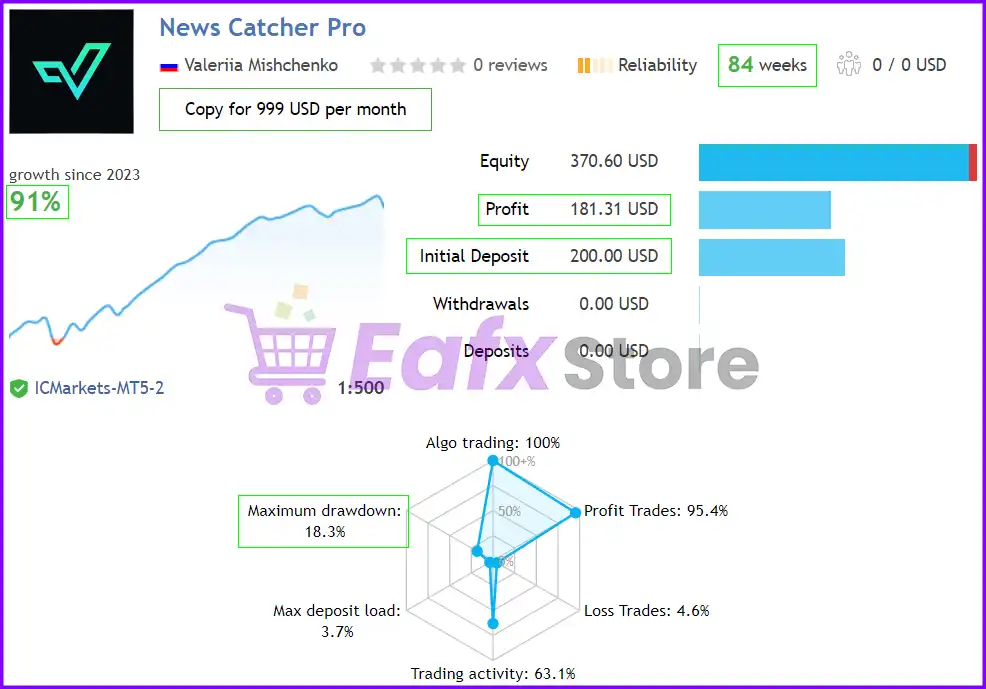
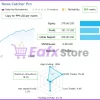
The News Catcher Pro EA achieved impressive profit performance when trading with GBPUSD, EURUSD, EURGBP pair. Trading results on real account for 84 consecutive weeks of trading:
✅ Initial Deposit: $200
✅ Growth Rate: +91%
✅ Win Rate (% of total): 95.4%
✅ Maximum Drawdown: 18.3%
News Catcher Pro Real Trading Results
News Catcher Pro MT4 Backtests
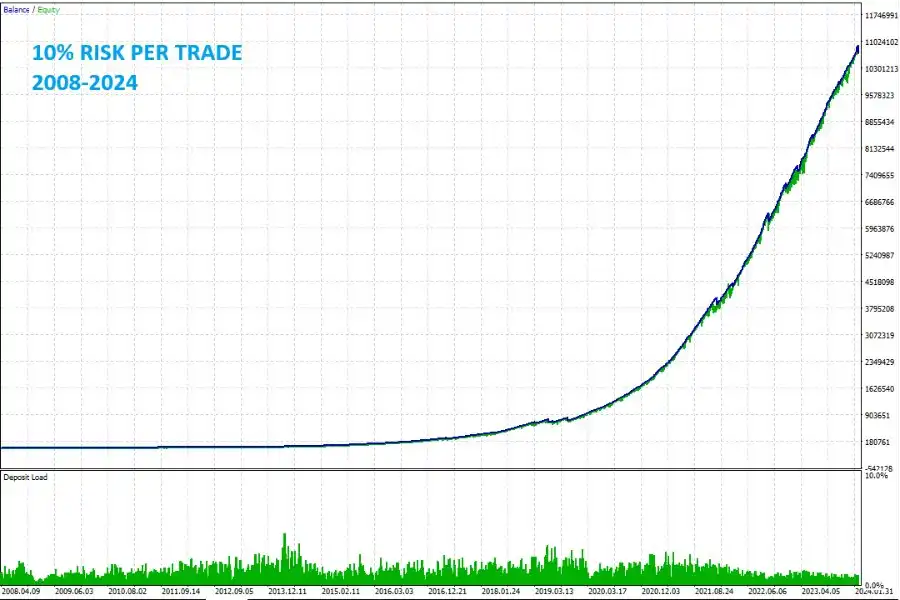
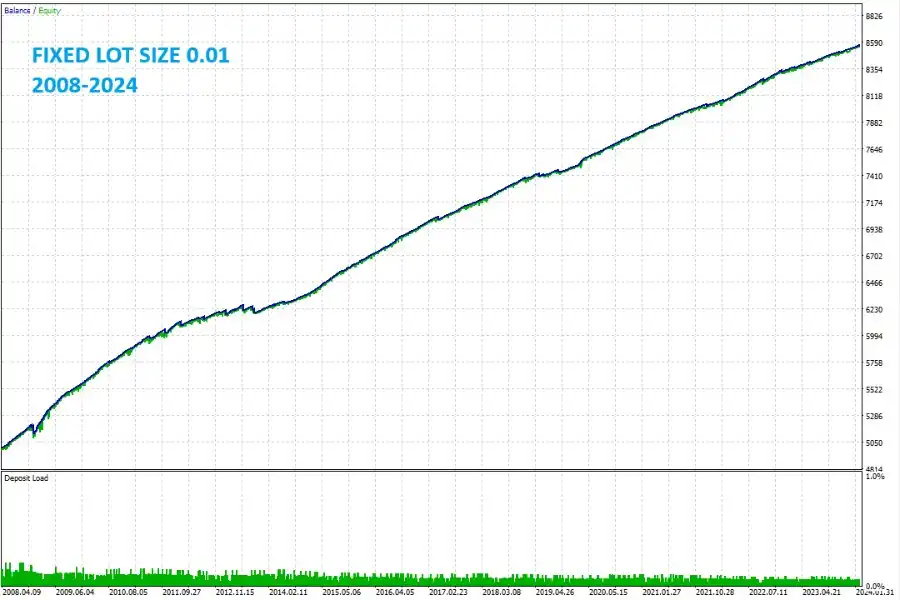
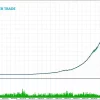
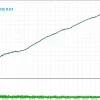
News Catcher Pro passes backtesting tests in the years 2008 – 2024 showing unlimited profit potential in the future. At the same time, the advisor is optimized and uses professional trading strategies, the drawdown risk level is maintained at 10%.
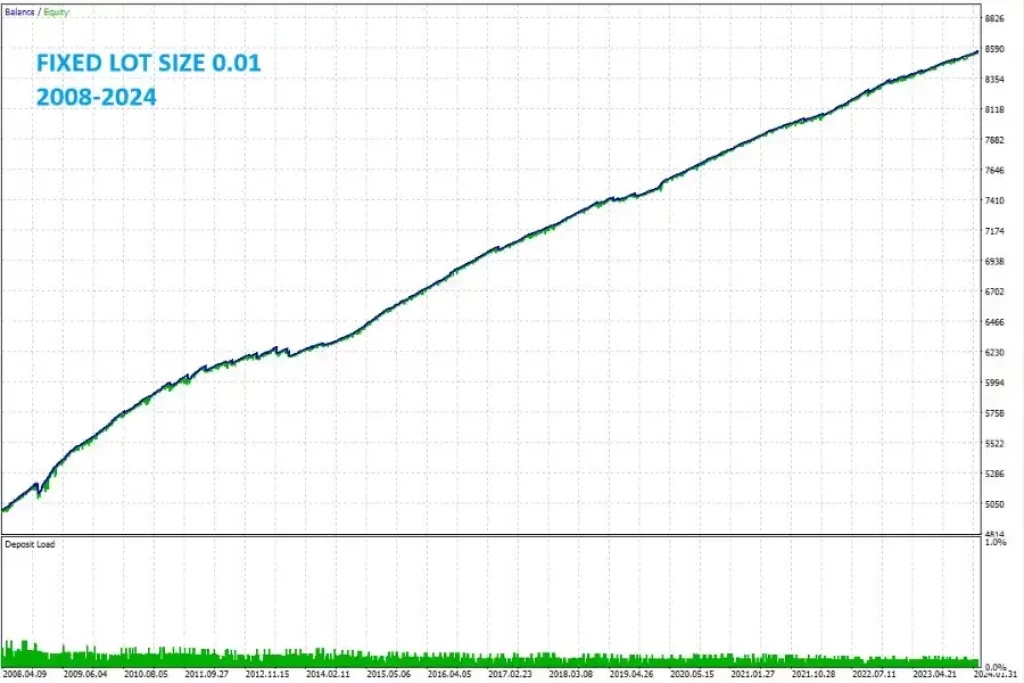
News Catcher Pro MT4 Review
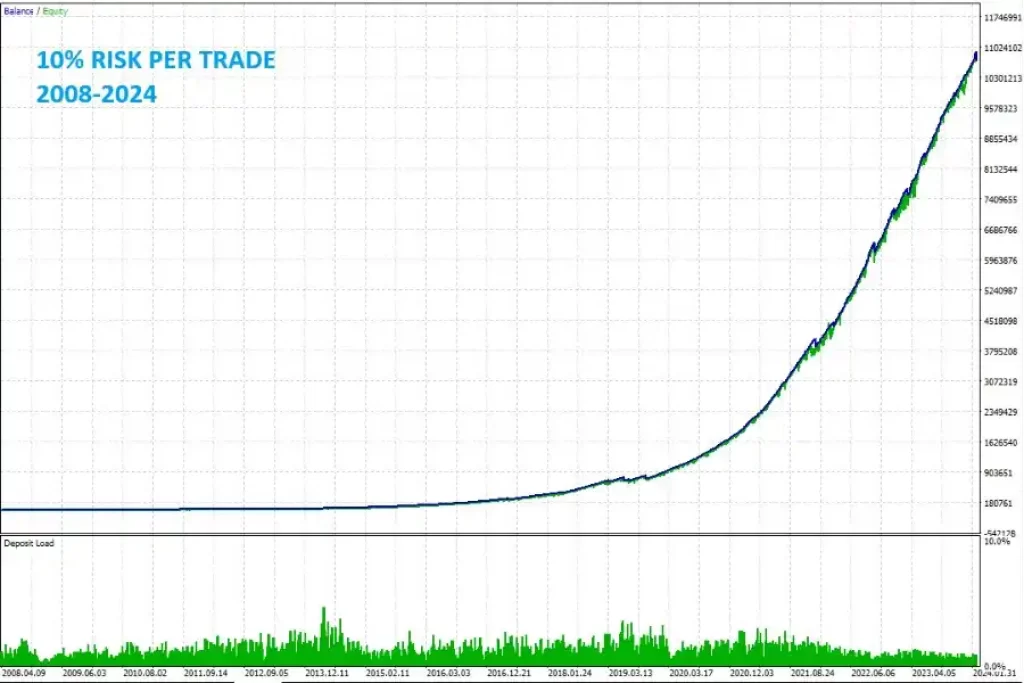
News Catcher Pro MT4 Review
Is News Catcher Pro MT4 Safe?
The News Catcher Pro shows significant potential in providing stable and reliable profits, making it a reliable tool in the forex market. The advisor is highly appreciated by the MQL5 community in many aspects and has won the trust of users.
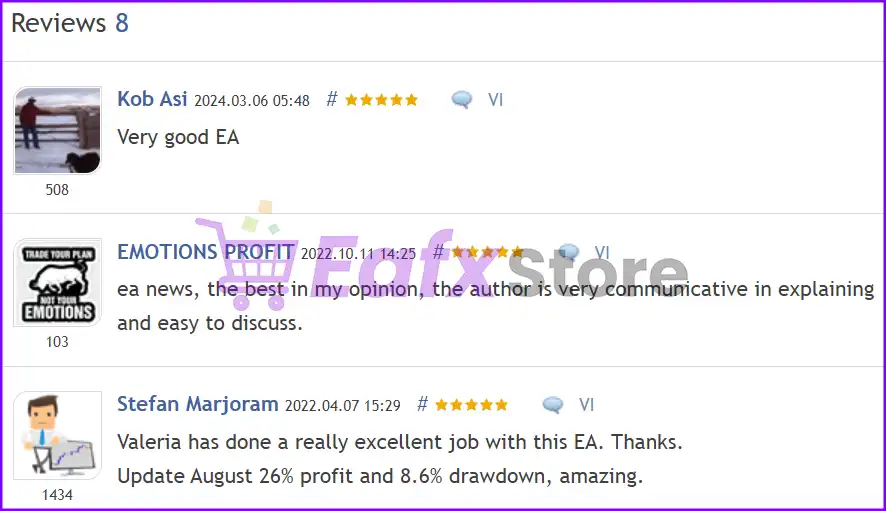
News Catcher Pro is highly rated by the MQL5 Community
What is News Catcher Pro’s trading strategy?
🔹News event focus: Enter and exit trades around high-impact news events.
🔹Price channels: Use price channels (PCh) to identify potential entry and exit points.
🔹Daily ATR: Look at the Average True Range (ATR) for volatility-based Stop loss and Take profit levels.
🔹Time management: Limit the time you hold a position and stop trading before the weekend.
Recommended settings
Recommended settings and parameters to pay attention to from developers and experts:
| Features | Type |
|---|---|
| Trading platform | MetaTrader 4 (MT4) |
| Currency pairs | GBPUSD, EURUSD, EURGBP |
| Times frames | M5 (5 minute chart) |
| Minimum / Recommended deposit | $100 |
| Minimum / Recommended leverage | Any |
| Setup files | Available |
| Product type | NoDLL / Fix |
| Additional services | Unlock and Decompile |
| Recommended brokers | Exness Broker, Icmarkets Broker |
| Recommended VPS | MyfxVPS.com ( Blue VPS, Golden VPS). Lowest Latency, 2 week Free Trial, 100% Free for 12-18 Months. |
Product Download Package?
The download package of the product suite includes:
Experts
✅ News Catcher Pro v4.24_fix.ex4
✅ News Catcher Pro v4.38_fix.ex4
SetFiles
✅ NCP_Default.set
✅ NCP_Trail_ProfLimit.set
✅ NCP_Trail_ProfLimit_AddTrades_Hedging.set
➡️ Reviewed by David Easton
Conclusion: Master Market Volatility with News Catcher Pro EA for MT4
In short, News Catcher Pro provides a sophisticated mean reversion strategy for high-impact news events. With its 95.4% win rate and ATR-based risk management, it stands as a premier Forex robot. Trade GBPUSD and EURUSD with institutional precision.
News Catcher Pro MT4 Settings Guide
News Catcher Pro MT4 is an advanced news trading Expert Advisor designed to capitalize on high-impact economic events with intelligent market filtering, machine learning pattern recognition, adaptive grid management, and comprehensive risk protection.
It supports multi-symbol trading, advanced news filters, stock market crash protection, and flexible money management, making it suitable for traders who want to automate event-driven Forex trading on MetaTrader 4.
News Catcher Pro MT4 Settings Explained
MM & Risk Settings
🔹 Check for Instances of the EA = true – Prevents multiple copies of the EA from running on the same account simultaneously.
🔹 Allow Opening a new Trade = true – Allows the EA to open new trading positions.
🔹 Lot-sizing Method = Fixed Lots – Uses fixed lot sizing instead of automatic balance-based calculation.
🔹 Fixed Lot = 0.01 – Sets every initial trade to 0.01 lots.
🔹 Dynamic Lot = 10000.0 – Reference balance of 10000.0 for dynamic lot sizing if enabled.
🔹 Max Risk per Trade = 5.0 – Limits the maximum risk to 5.0% per trade.
🔹 Maximum Lot = 200.0 – Restricts individual trade size to 200.0 lots.
🔹 Max Open Lots = 200.0 – Maximum combined open lot exposure is 200.0 lots.
🔹 Maximum Spread, in pips = 5.0 – Prevents new trades when spread exceeds 5.0 pips.
🔹 Maximum Slippage for a non-ECN account, in pips = 5.0 – Accepts a maximum execution slippage of 5.0 pips.
🔹 Portfolio Mode = false – Portfolio trading mode is disabled.
🔹 Initial Delay for Portfolio Mode, ms = 4000 – Portfolio mode starts after 4000 milliseconds when enabled.
🔹 Consider WAKA Orders (Portfolio only) = false – WAKA orders are excluded from portfolio calculations.
🔹 Consider PAI Orders (Portfolio only) = false – PAI orders are excluded from portfolio mode.
🔹 Consider GP Orders (Portfolio only) = false – GP orders are excluded from portfolio management.
🔹 Allow Additional Trades = false – Only the primary trade is allowed.
🔹 Maximum Symbols at a time = 3 – Trades a maximum of 3 symbols simultaneously.
🔹 Maximum Net Number of Currencies [0-disabled] = 2 – Limits exposure to 2 net currencies.
🔹 Only One Symbol if Grid reaches this Level [0-disabled] = 0 – No grid-based symbol restriction is applied.
🔹 Allow to Buy/Sell = Buy and Sell – Enables both Buy and Sell positions.
🔹 Allow Hedging = false – Hedging is disabled.
🔹 Minimum Free Margin % [0-disabled] = 0.0 – No minimum free margin restriction.
🔹 Max Floating Drawdown % = 100.0 – Floating drawdown protection threshold is 100.0%.
🔹 Max Floating Drawdown % for each Symbol = 100.0,100.0,100.0 – Applies 100.0% floating drawdown protection per symbol.
🔹 Max Floating Drawdown in Money [0-disabled] = 0.0 – Monetary floating drawdown protection is disabled.
🔹 Max Daily Drawdown Limit % FTMO Rules = 100.0 – Daily FTMO drawdown percentage is 100.0%.
🔹 Max Daily Drawdown Limit in Money FTMO Rules [0-disabled] = 0.0 – Monetary FTMO drawdown protection is disabled.
🔹 Max Daily Drawdown Reset Hour FTMO Rules (Broker time) = 0 – Daily drawdown resets at broker hour 00:00.
🔹 Max Daily Drawdown Type FTMO = Equity – Uses Equity for drawdown calculations.
🔹 Max Drawdown Action = Close trades & stop trading for 24h – Closes all trades and pauses trading for 24 hours after exceeding drawdown.
🔹 Do Nothing if During Rollover = false – Risk protection remains active during rollover.
🔹 Max Drawdown Calculation = This strategy – Drawdown applies only to this EA.
🔹 Handle Max Drawdown Events on Every Tick = false – Drawdown is not recalculated on every market tick.
Time Settings
🔹 Time Filter Set = Strong Filtration – Uses the strongest predefined trading session filter.
🔹 Trade on Monday = true – Enables Monday trading.
🔹 Trade on Tuesday = true – Enables Tuesday trading.
🔹 Trade on Wednesday = true – Enables Wednesday trading.
🔹 Trade on Thursday = true – Enables Thursday trading.
🔹 Trade on Friday = true – Enables Friday trading.
🔹 New Year Holiday Filter = true – Prevents trading during the New Year holiday period.
🔹 Rollover Start Hour = 23 – Rollover protection begins at 23:00.
🔹 Rollover Start Minutes = 45 – Rollover starts at 23:45.
🔹 Rollover End Hour = 0 – Rollover ends at 00:00.
🔹 Rollover End Minutes = 15 – Rollover ends at 00:15.
🔹 Send Orders During Rollover = true – Allows orders during rollover.
🔹 Remove TakeProfit During Rollover = false – Keeps Take Profit active.
🔹 Remove StopLoss During Rollover = false – Keeps Stop Loss active.
Forecast Settings
🔹 Use ChatGPT Forecast = false – AI forecasting with ChatGPT is disabled.
🔹 Use Gemini Forecast = false – Gemini forecasting is disabled.
Grid Settings
🔹 Enable Grid (optional) = false – Grid trading is disabled.
🔹 Weighted TakeProfit = true – Uses weighted Take Profit calculations.
🔹 Trade Distance = 75 – Grid spacing is 75 points.
🔹 Pause Between Grid Trades, in min [0-disabled] = 0 – No delay between grid orders.
🔹 Smart Distance = true – Uses adaptive spacing between trades.
🔹 2nd Trade Multiplier = 2.0 – Second position doubles the lot size.
🔹 3rd–5th Trade Multiplier = 2.0 – Third through fifth trades use a 2.0x multiplier.
🔹 6th+ Trade Multiplier = 1.5 – Sixth and later trades use a 1.5x multiplier.
🔹 Maximum Trades = 4 – Limits the grid to 4 positions.
🔹 Custom Multipliers = (empty) – Default multipliers are used.
🔹 Calculate Levels from Initial Trade = true – Grid levels are calculated from the first order.
🔹 Disable SL if Grid is Enabled = true – Disables Stop Loss when grid mode is active.
🔹 Force Basket Closure once the Initial Order is Closed = false – Basket remains active after the initial trade closes.
🔹 Send Push Notifications after this Level [0-disabled] = 0 – Push notifications are disabled.
Additional Settings
🔹 Trade Comment = News Catcher – Custom trade comment attached to every order.
🔹 UID (0…9) = 0 – User ID is set to 0.
🔹 Basic Magic Number = 36937 – Uses 36937 as the EA Magic Number.
🔹 Show Panel = true – Displays the on-chart information panel.
🔹 Show Stats = true – Displays trading statistics.
🔹 Font Size (1…8) = 6 – Dashboard font size is 6.
Backtest Settings
🔹 Disable Automatic GMT Detection = false – GMT detection remains automatic.
🔹 GMT Test/Manual = 2 – Manual GMT offset is 2.
🔹 DST Test/Manual = US – Uses the US daylight saving profile.
Strategy Settings
🔹 Symbols separated by comma = EURUSD, GBPUSD, EURGBP – Trades EURUSD, GBPUSD, and EURGBP.
🔹 Symbol Suffix = (empty) – No broker-specific suffix is used.
🔹 ML-based Pattern Recognition & Filtering = true – Enables machine learning pattern recognition.
🔹 ML-based Pattern Filter Threshold = 90.0 – Requires a minimum confidence score of 90.0.
🔹 PCh Period = 50 – Price Channel period is 50.
🔹 PCh Offset = 0.0 – Price Channel offset is 0.0.
🔹 ATR Period = 5 – ATR uses a 5-period calculation.
🔹 Swap Filter = false – Swap filtering is disabled.
🔹 Max Negative Swap, in points = 0.0 – No swap restriction is applied.
🔹 Apply Swap Filter To = All days – Swap filter applies to all trading days if enabled.
TP & SL Settings
🔹 TakeProfit, %ATR = 25.0 – Dynamic Take Profit equals 25.0% of ATR.
🔹 TakeProfit, in pips (fixed) = 0.0 – Fixed Take Profit is disabled.
🔹 StopLoss, %ATR = 400.0 – Dynamic Stop Loss equals 400.0% of ATR.
🔹 StopLoss, in pips (fixed) = 0.0 – Fixed Stop Loss is disabled.
🔹 Hide StopLoss = false – Stop Loss remains visible.
🔹 Position Time Stop, in bars [0-disabled] = 4000 – Positions may close after 4000 bars.
🔹 Hour to Stop Trading on Friday [0-disabled] = 0 – Friday stop hour is disabled.
🔹 Randomize TP/SL Levels = false – TP and SL remain fixed.
🔹 Do not adjust SL/TP after X bars [0-disabled] = 0 – Dynamic adjustment remains enabled.
🔹 Max Random Delay before sending Orders, sec [0-disabled] = 0.0 – No execution delay.
🔹 Allow sending SL along with an order (for a non-ECN account) = false – Stop Loss is sent after order execution.
🔹 Close in Profit/Loss if Open for X Minutes = false – Time-based closing by minutes is disabled.
🔹 Close in Profit/Loss if Open for X Bars = true – Time-based closing by bars is enabled.
🔹 Min/Max Profit/Loss to Close, in pips A = 15.0 – First closing condition uses 15.0 pips.
🔹 Minutes Since Trade Opened A = 1440 – First timer equals 1440 minutes.
🔹 Bars Since Trade Opened A = 288 – First bar timer equals 288 bars.
🔹 Min/Max Profit/Loss to Close, in pips B = 5.0 – Second closing condition uses 5.0 pips.
🔹 Minutes Since Trade Opened B = 2880 – Second timer equals 2880 minutes.
🔹 Bars Since Trade Opened B = 576 – Second bar timer equals 576 bars.
🔹 Enable TrailStop & BreakEven = false – Trailing Stop and Break Even are disabled.
🔹 Trailing StopLoss, in pips = 5.0 – Trailing distance is 5.0 pips.
🔹 Trailing StopLoss Start, in pips = 25.0 – Trailing activates after 25.0 pips.
🔹 BreakEven, in pips = 0.0 – Break Even is disabled.
News Filter Settings
🔹 News Filter Enabled = true – Enables the advanced economic news filter.
🔹 Minutes Before Event = 90 – Stops opening trades 90 minutes before news.
🔹 Minutes After Event = 10 – Resumes trading 10 minutes after news.
🔹 Speaks = true – Enables voice notifications.
🔹 Show News List = true – Displays the economic calendar.
🔹 News List Refresh Rate = Every 3 hours – Updates news every 3 hours.
🔹 Don’t Enter a Trade at the Moment of News Release = false – Allows trading exactly at release time if other conditions permit.
Stock Market Crash Filter
🔹 Stock Market Crash Filter Enabled = false – Crash filter is disabled.
🔹 Stock Market Symbol = US500, SPX500 – Monitors US500 and SPX500.
🔹 Filter Period = 12 – Uses a 12-period crash filter.
🔹 Max Historical Volatility (HV), in % = 30.0 – Crash detection threshold is 30.0%.
🔹 Block Trading for the Entire Day = true – Stops trading for the entire day if a crash event is detected.
Risk Level
🔹 Fix Lot – Uses a constant lot size regardless of account balance for predictable risk.
🔹 Safe – Focuses on preserving capital with conservative position sizing and lower exposure.
🔹 Balanced – Provides a compromise between growth potential and drawdown control for everyday trading.
🔹 Aggressive – Increases position size and overall exposure to maximize profit potential while accepting higher drawdown risk.
Conclusion
News Catcher Pro MT4 is a highly configurable automated news trading Expert Advisor featuring machine learning pattern recognition, advanced economic news filtering, dynamic ATR-based risk management, intelligent grid controls and comprehensive portfolio protection.
With flexible money management, multiple symbol support, and robust risk controls, it offers traders a powerful solution for automating event-driven Forex trading while maintaining strict control over exposure and execution quality.
FAQs
❓ What is News Catcher Pro MT4 designed for?
It is an automated MT4 Expert Advisor built specifically for trading around high-impact economic news events.
❓ Does News Catcher Pro MT4 support machine learning?
Yes. It includes ML-based pattern recognition and filtering with an adjustable confidence threshold.
❓ Can I trade multiple currency pairs simultaneously?
Yes. The EA supports multi-symbol trading and allows you to define your own list of trading instruments.
❓ Does the EA include advanced risk management?
Yes. It offers floating drawdown protection, ATR-based Stop Loss and Take Profit, spread filtering, position limits, and configurable money management.
❓ Can I customize the news filter and trading schedule?
Yes. You can configure the news filter timing, trading sessions, holiday filters, stock market crash protection, and numerous execution parameters to suit your preferred trading strategy.
User Reviews
Only logged in customers who have purchased this product may leave a review.
❓ What is News Catcher Pro MT4 and how does it work?
News Catcher Pro MT4 is a professional automated trading Expert Advisor (EA) developed by Valeriia Mishchenko. It utilizes a mean-reversion strategy that targets intraday seasonal volatility patterns triggered by high-impact news events. Unlike typical news EAs that chase breakouts, this robot enters the market strategically to capitalize on price corrections.
❓ Which currency pairs are supported by News Catcher Pro MT4?
The News Catcher Pro MT4 EA is highly optimized for three major currency pairs: GBPUSD, EURUSD, and EURGBP. These pairs are chosen for their high liquidity and predictable behavior during economic news releases like NFP, CPI, or Central Bank announcements.
❓ Does News Catcher Pro MT4 use risky strategies like Martingale?
By default, News Catcher Pro MT4 does not use Martingale or Grid strategies. It is designed as a safe system where every trade is protected by a fixed Stop Loss (SL). However, it does feature an optional "Recovery Mode" for experienced traders who wish to use a grid-based approach to recover losses faster.
❓ What is the recommended timeframe for News Catcher Pro MT4?
For optimal performance, News Catcher Pro MT4 must be attached to the M5 (5-minute) timeframe. The developer recommends using a "One Chart Setup," meaning you only need to open one EURUSD M5 chart to manage and trade all supported currency pairs simultaneously.
❓ What is the minimum deposit for News Catcher Pro MT4?
The minimum deposit to start trading with News Catcher Pro MT4 is $100 on a standard account. For those using the aggressive recovery settings, a balance of $500 to $1,000 is recommended to maintain a safe margin level and handle potential drawdowns during high volatility.
❓ Is News Catcher Pro MT4 Prop Firm and FIFO compatible?
Yes, News Catcher Pro MT4 is fully FIFO and Prop Firm compatible (e.g., FTMO, FundedNext). It includes specific settings to ensure compliance with strict daily loss limits and "No Martingale" rules required by funded account providers.
❓ How do I set up the News Filter in News Catcher Pro MT4?
To enable the advanced news filter in News Catcher Pro MT4, you must allow WebRequests in your MT4 terminal settings. Add URLs like https://ec.forexprostools.com and http://timesrv.online to ensure the EA can track real-time economic calendars.
❓ Does News Catcher Pro MT4 support Auto GMT Detection?
Yes, News Catcher Pro MT4 features Auto GMT detection. This is crucial for news trading as it ensures the EA perfectly syncs your broker's server time with the global economic news release schedule, preventing trades from opening at the wrong time.
❓ Why is a VPS mandatory for News Catcher Pro MT4?
A Forex VPS is mandatory for News Catcher Pro MT4 because the EA needs to monitor news events 24/7. Since news-driven volatility happens in milliseconds, a low-latency VPS ensures that trades are executed instantly without slippage caused by home internet delays.
❓ Can I backtest News Catcher Pro MT4 with historical news data?
Yes, News Catcher Pro MT4 allows for high-quality backtesting. To do this accurately, you must download the "NewsEvents.txt" file from the developer and place it in the MT4 Common Files folder. This enables the Strategy Tester to simulate how the EA reacted to historical news events from 2008 to 2026.
🔥 Get This EA for FREE with Our Membership! 🚀🚀
Unlock access to this EA, premium Indicators, and exclusive trading tools completely FREE with any of our Membership Plans! Thousands of traders already benefit from our VIP library—join them and level up your trading instantly. Choose Your Membership:
- SPECIAL – 1 Month Membership
- GOLD – 1 Year Membership
- PREMIUM – 1 Year Membership
-
 Original price was: $500.00.$249.00Current price is: $249.00.
 -
 Original price was: $888.00.$249.00Current price is: $249.00.
 -
 Original price was: $439.00.$249.00Current price is: $249.00.
 -
 Original price was: $9,999.00.$249.00Current price is: $249.00.
-
 1Original price was: $1,599.00.$59.00Current price is: $59.00.
 -
 1Original price was: $11,000.00.$89.00Current price is: $89.00.
 -
 1Original price was: $599.00.$59.00Current price is: $59.00.
 -
 0Original price was: $500.00.$69.00Current price is: $69.00.
There are no reviews yet.