


🔢 Waka Waka EA MT4 – Complete Settings & Input Parameters Guide
Waka Waka EA MT4 is a sophisticated Forex trading Expert Advisor (EA) developed for MetaTrader 4 traders who want advanced grid trading, intelligent risk management, machine-learning pattern recognition and professional news filtering capabilities.
The EA supports portfolio trading, dynamic lot sizing, Bollinger Bands and RSI strategies, smart take-profit systems, and extensive drawdown protection. Waka Waka EA MT4 is widely used for automated multi-pair trading with configurable safety controls and prop-firm compatible settings.
🔢 Waka Waka EA MT4 Settings Explained
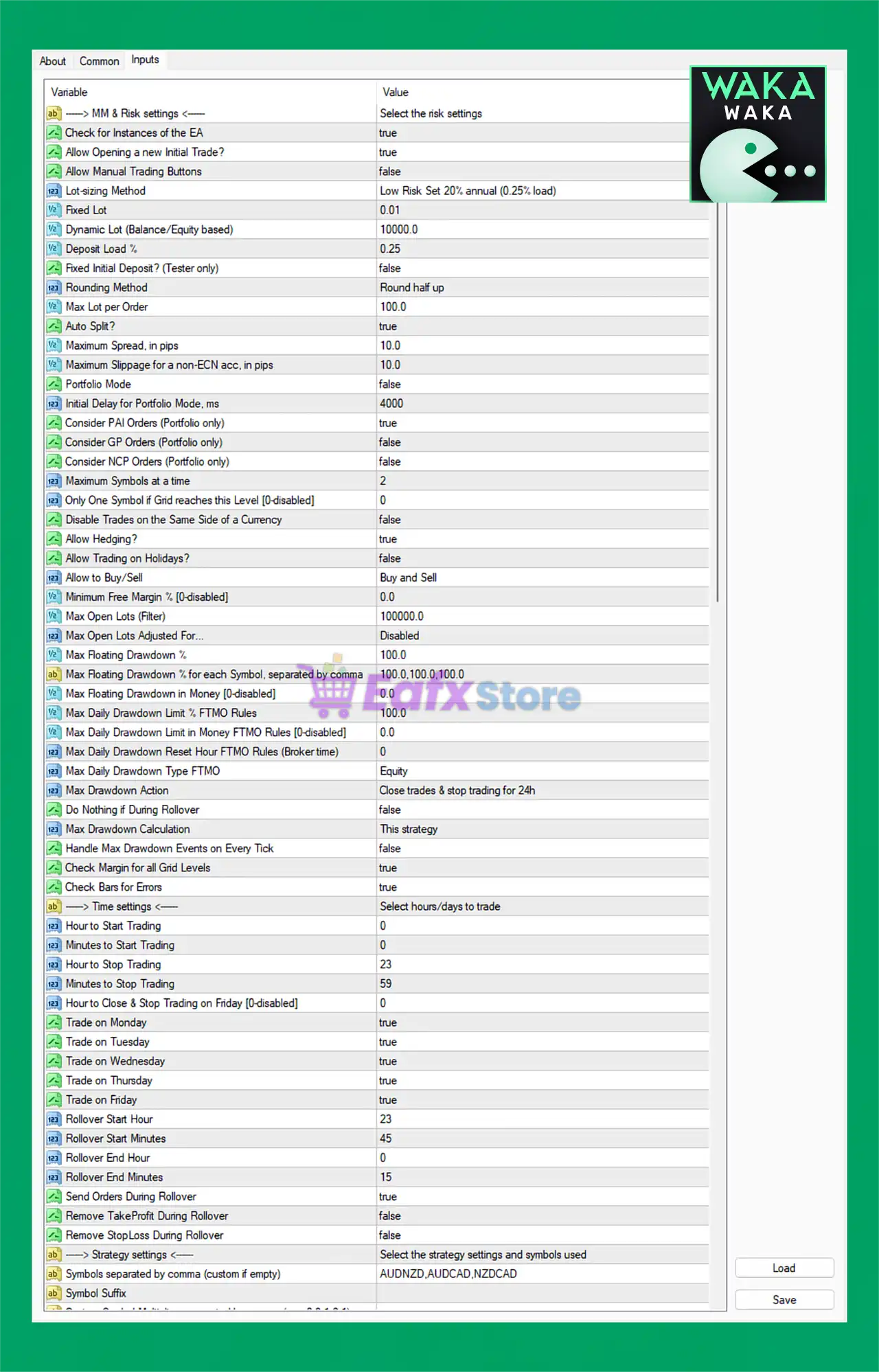
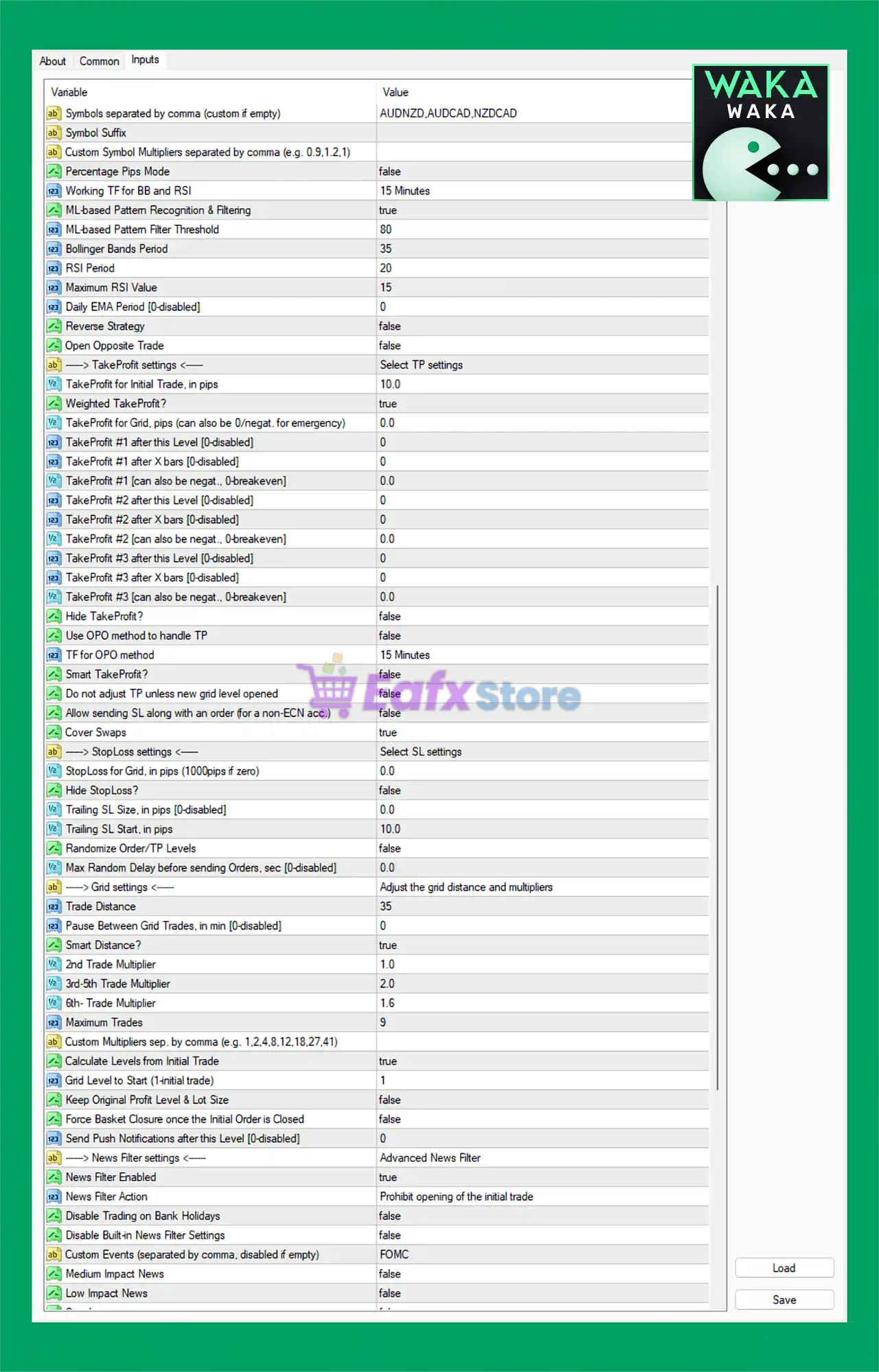
Below are the details of the parameters in the advisor’s trading system settings table:
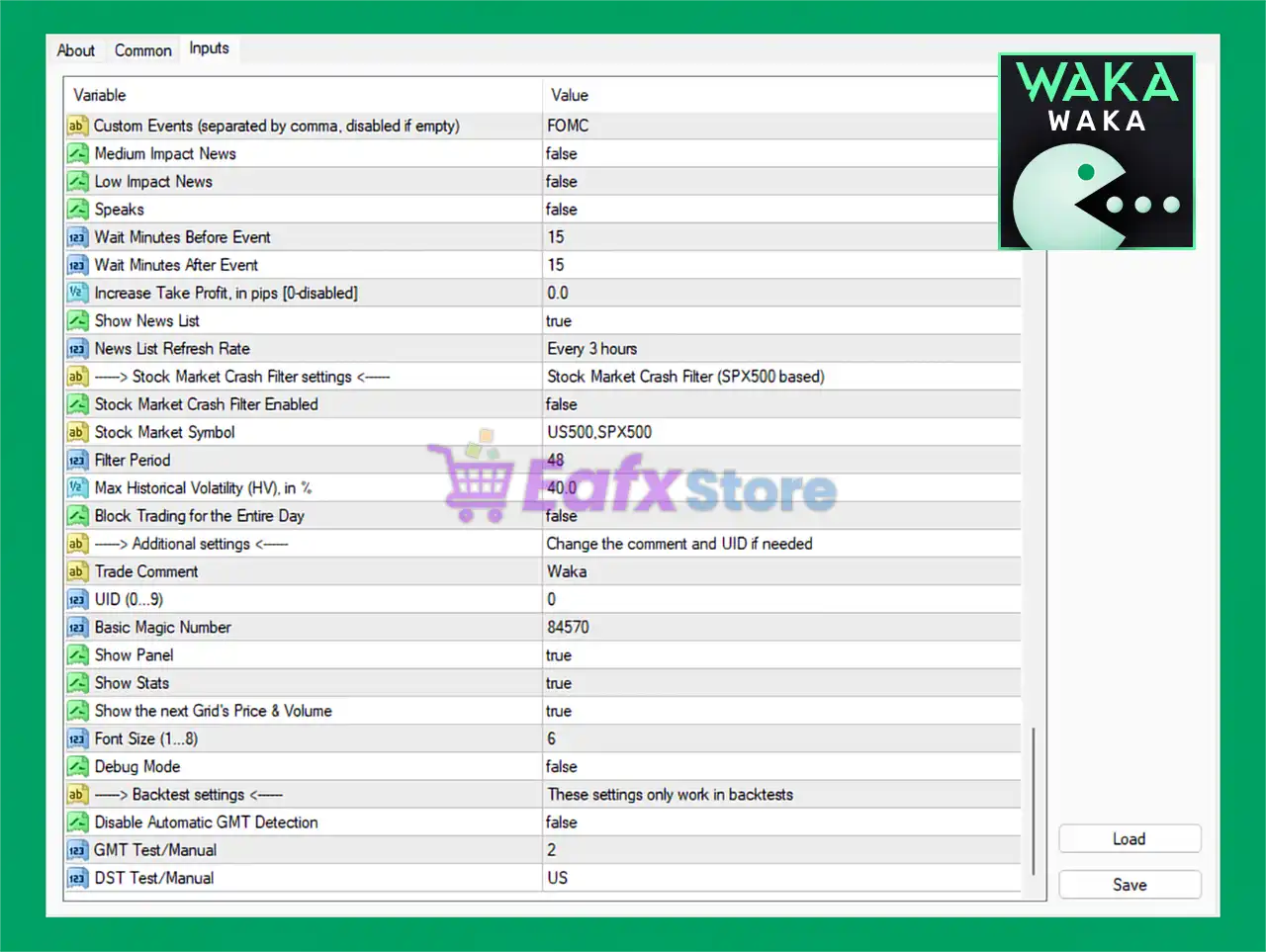
🔶 News & Event Filter Settings
🔹 Custom Events (separated by comma, disabled if empty) = FOMC: Defines custom economic events like FOMC to avoid trading during high-impact announcements.
🔹 Medium Impact News = false: Disables filtering for medium-impact economic news.
🔹 Low Impact News = false: Disables filtering for low-impact economic news releases.
🔹 Speaks = false: Disables speech-related news event filtering.
🔹 Wait Minutes Before Event = 15: EA stops trading 15 minutes before a filtered event.
🔹 Wait Minutes After Event = 15: EA resumes trading 15 minutes after a filtered event.
🔹 Increase Take Profit, in pips [0-disabled] = 0.0: Additional TP increase is disabled with value 0.0.
🔹 Show News List = true: Displays economic news events on the chart panel.
🔹 News List Refresh Rate = Every 3 hours: Refreshes the news calendar every 3 hours.
🔶 Stock Market Crash Filter Settings
🔹 Stock Market Crash Filter Enabled = false: Disables stock market crash protection filter.
🔹 Stock Market Symbol = US500,SPX500: Uses US500 and SPX500 as market crash reference symbols.
🔹 Filter Period = 48: Historical volatility filter period is 48.
🔹 Max Historical Volatility (HV), in % = 40.0: Maximum allowed market volatility is 40.0%.
🔹 Block Trading for the Entire Day = false: EA does not block trading for the entire day after volatility detection.
🔶 Additional Settings
🔹 Trade Comment = Waka: Adds the comment Waka to opened trades.
🔹 UID (0...9) = 0: Unique EA identification number is 0.
🔹 Basic Magic Number = 84570: Main Magic Number assigned to EA trades is 84570.
🔹 Show Panel = true: Displays EA control panel on the chart.
🔹 Show Stats = true: Displays trading statistics on the chart.
🔹 Show the next Grid's Price & Volume = true: Displays next grid level price and lot size information.
🔹 Font Size (1...8) = 6: Panel font size is set to 6.
🔹 Debug Mode = false: Disables debugging and advanced log outputs.
🔶 Backtest Settings
🔹 Disable Automatic GMT Detection = false: Automatic GMT detection remains enabled.
🔹 GMT Test/Manual = 2: Manual GMT offset during testing is 2.
🔹 DST Test/Manual = US: Uses US daylight saving time settings during testing.
🔶 Strategy Settings
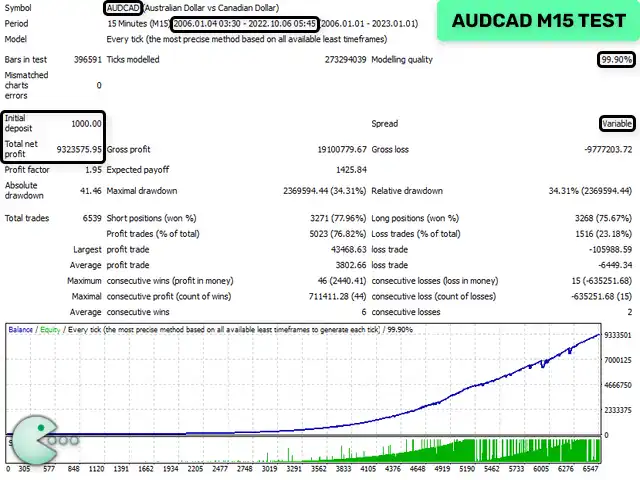
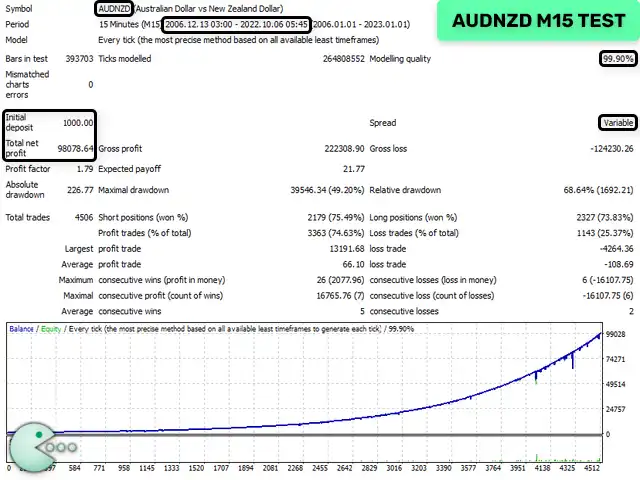
🔹 Symbols separated by comma (custom if empty) = AUDNZD,AUDCAD,NZDCAD: EA trades AUDNZD, AUDCAD, and NZDCAD.
🔹 Symbol Suffix: Field used for broker symbol suffix customization.
🔹 Custom Symbol Multipliers separated by comma (e.g. 0.9,1.2,1) =: Allows custom lot multipliers per symbol.
🔹 Percentage Pips Mode = false: Percentage pip calculation mode is disabled.
🔹 Working TF for BB and RSI = 15 Minutes: Bollinger Bands and RSI calculations use M15.
🔹 ML-based Pattern Recognition & Filtering = true: Enables machine-learning based pattern recognition.
🔹 ML-based Pattern Filter Threshold = 80: Machine learning confidence threshold is 80.
🔹 Bollinger Bands Period = 35: Bollinger Bands period is set to 35.
🔹 RSI Period = 20: RSI indicator period is 20.
🔹 Maximum RSI Value = 15: Maximum RSI threshold value is 15.
🔹 Daily EMA Period [0-disabled] = 0: Daily EMA filter is disabled.
🔹 Reverse Strategy = false: Reverse trading strategy is disabled.
🔹 Open Opposite Trade = false: Opposite direction trades are disabled.
🔶 Take Profit Settings
🔹 TakeProfit for Initial Trade, in pips = 10.0: Initial trade TP is 10.0 pips.
🔹 Weighted TakeProfit? = true: Uses weighted TP calculations across grid trades.
🔹 TakeProfit for Grid, pips (can also be 0/negative for emergency) = 0.0: Grid TP is disabled.
🔹 TakeProfit #1 after this Level [0-disabled] = 0: TP Level 1 activation disabled.
🔹 TakeProfit #1 after X bars [0-disabled] = 0: Bar-based TP Level 1 disabled.
🔹 TakeProfit #1 (can also be negative, 0-breakeven) = 0.0: TP Level 1 value is 0.0.
🔹 TakeProfit #2 after this Level [0-disabled] = 0: TP Level 2 activation disabled.
🔹 TakeProfit #2 after X bars [0-disabled] = 0: Bar-based TP Level 2 disabled.
🔹 TakeProfit #2 (can also be negative, 0-breakeven) = 0.0: TP Level 2 value is 0.0.
🔹 TakeProfit #3 after this Level [0-disabled] = 0: TP Level 3 activation disabled.
🔹 TakeProfit #3 after X bars [0-disabled] = 0: Bar-based TP Level 3 disabled.
🔹 TakeProfit #3 (can also be negative, 0-breakeven) = 0.0: TP Level 3 value is 0.0.
🔹 Hide Take Profit? = false: TP visibility remains enabled.
🔹 Use OPO method to handle TP = false: OPO TP handling method is disabled.
🔹 TF for OPO method = 15 Minutes: OPO timeframe uses M15.
🔹 Smart TakeProfit? = false: Smart TP system is disabled.
🔹 Do not adjust TP unless new grid level opened = false: TP can be adjusted anytime.
🔹 Allow sending SL along with an order (for a non-ECN acc.) = false: SL is not sent instantly with orders.
🔹 Cover Swaps = true: Includes swap costs in profit calculations.
🔶 Stop Loss Settings
🔹 StopLoss for Grid, in pips (1000pips if zero) = 0.0: Grid SL disabled.
🔹 Hide StopLoss? = false: Stop Loss visibility enabled.
🔹 Trailing SL size, in pips [0-disabled] = 0.0: Trailing Stop disabled.
🔹 Trailing SL start, in pips = 10.0: Trailing begins after 10.0 pips profit.
🔹 Randomize Order/TP Levels = false: Randomized order levels disabled.
🔹 Max Random Delay before sending Orders, sec [0-disabled] = 0.0: Order delay randomization disabled.
🔶 Grid Settings
🔹 Trade Distance = 35: Distance between grid trades is 35 pips.
🔹 Pause Between Grid Trades, in min [0-disabled] = 0: No pause between grid trades.
🔹 Smart Distance? = true: Enables dynamic smart distance calculations.
🔹 2nd Trade Multiplier = 1.0: Second trade lot multiplier is 1.0.
🔹 3rd-5th Trade Multiplier = 2.0: Trades 3–5 use multiplier 2.0.
🔹 6th- Trade Multiplier = 1.6: Sixth and higher trades use multiplier 1.6.
🔹 Maximum Trades = 9: EA can open a maximum of 9 trades.
🔹 Custom Multipliers sep. by comma (e.g. 1,2,4,8,12,18,27,41): Allows custom grid multipliers.
🔹 Calculate Levels from Initial Trade = true: Grid levels are calculated from the first trade.
🔹 Grid Level to Start (Initial trade) = 1: Grid sequence begins at Level 1.
🔹 Keep Original Profit Level & Lot Size = false: Dynamic adjustment remains enabled.
🔹 Force Basket Closure once the Initial Order is Closed = false: Basket continues even if first trade closes.
🔹 Send Push Notifications after this Level [0-disabled] = 0: Push notifications disabled.
🔶 Advanced Risk & MM Settings
🔹 Check for Instances of the EA = true: Prevents duplicate EA instances.
🔹 Allow Opening a new Initial Trade? = true: EA can open new initial trades.
🔹 Allow Manual Trading Buttons = false: Manual trade buttons disabled.
🔹 Lot-sizing Method = Low Risk Set 20% annual (0.25% load): Uses conservative low-risk money management.
🔹 Fixed Lot = 0.01: Fixed lot size is 0.01.
🔹 Dynamic Lot (Balance/Equity based) = 10000.0: Dynamic lot scaling reference is 10000.0.
🔹 Deposit Load % = 0.25: Deposit load is 0.25%.
🔹 Fixed Initial Deposit? (Tester only) = false: Fixed tester deposit disabled.
🔹 Rounding Method = Round half up: Uses standard half-up rounding.
🔹 Max Lot per Order = 100.0: Maximum allowed lot size per trade is 100.0.
🔹 Auto Split? = true: Automatically splits oversized orders.
🔹 Maximum Spread, in pips = 10.0: Maximum spread allowed is 10.0 pips.
🔹 Maximum Slippage for a non-ECN acc, in pips = 10.0: Slippage protection set to 10.0.
🔹 Portfolio Mode = false: Portfolio trading mode disabled.
🔹 Initial Delay for Portfolio Mode, ms = 4000: Portfolio delay set to 4000 ms.
🔹 Consider PAI Orders (Portfolio only) = true: Portfolio AI order handling enabled.
🔹 Consider GP Orders (Portfolio only) = false: GP portfolio mode disabled.
🔹 Consider NCP Orders (Portfolio only) = false: NCP portfolio mode disabled.
🔹 Maximum Symbols at a time = 2: EA can trade up to 2 symbols simultaneously.
🔹 Only One Symbol if Grid reaches this Level [0-disabled] = 0: Feature disabled.
🔹 Disable Trades on the Same Side of a Currency = false: Currency-side restrictions disabled.
🔹 Allow Hedging? = true: Hedging is allowed.
🔹 Allow Trading on Holidays? = false: Trading during holidays disabled.
🔹 Allow to Buy/Sell = Buy and Sell: Both buy and sell trades are allowed.
🔹 Minimum Free Margin % [0-disabled] = 0.0: Minimum margin protection disabled.
🔹 Max Open Lots (Filter) = 100000.0: Maximum open lots filter set extremely high.
🔹 Max Open Lots Adjusted For... = Disabled: Dynamic lot cap adjustment disabled.
🔹 Max Floating Drawdown % = 100.0: Maximum floating DD allowed is 100.0%.
🔹 Max Floating Drawdown % for each Symbol, separated by comma = 100.0,100.0,100.0: Per-symbol DD limit is 100%.
🔹 Max Floating Drawdown in Money [0-disabled] = 0.0: Money-based DD disabled.
🔹 Max Daily Drawdown Limit % FTMO Rules = 100.0: FTMO daily DD limit set to 100%.
🔹 Max Daily Drawdown Limit in Money FTMO Rules [0-disabled] = 0.0: Monetary FTMO DD disabled.
🔹 Max Daily Drawdown Reset Hour FTMO Rules (Broker time) = 0: DD reset hour is 0.
🔹 Max Daily Drawdown Type FTMO = Equity: Uses equity-based DD calculations.
🔹 Max Drawdown Action = Close trades & stop trading for 24h: EA stops trading after DD breach.
🔹 Do Nothing if During Rollover = false: EA remains active during rollover.
🔹 Max Drawdown Calculation = This strategy: DD calculated per strategy.
🔹 Handle Max Drawdown Events on Every Tick = false: DD checks are not tick-by-tick.
🔹 Check Margin for all Grid Levels = true: Margin is verified before all grid trades.
🔹 Check Bars for Errors = true: Candlestick error checking enabled.
🔶 Trading Time Settings
🔹 Hour to Start Trading = 0: Trading starts at 00:00.
🔹 Minutes to Start Trading = 0: Start minute is 0.
🔹 Hour to Stop Trading = 23: Trading stops at 23.
🔹 Minutes to Stop Trading = 59: Stop minute is 59.
🔹 Hour to Close & Stop Trading on Friday [0-disabled] = 0: Friday close disabled.
🔹 Trade on Monday = true: Monday trading enabled.
🔹 Trade on Tuesday = true: Tuesday trading enabled.
🔹 Trade on Wednesday = true: Wednesday trading enabled.
🔹 Trade on Thursday = true: Thursday trading enabled.
🔹 Trade on Friday = true: Friday trading enabled.
🔹 Rollover Start Hour = 23: Rollover starts at hour 23.
🔹 Rollover Start Minutes = 45: Rollover begins at minute 45.
🔹 Rollover End Hour = 0: Rollover ends at hour 0.
🔹 Rollover End Minutes = 15: Rollover ends at minute 15.
🔹 Send Orders During Rollover = true: Orders can still be placed during rollover.
🔹 Remove TakeProfit During Rollover = false: TP remains active during rollover.
🔹 Remove StopLoss During Rollover = false: SL remains active during rollover.
🔢 Conclusion
Waka Waka EA MT4 is a highly advanced automated Forex trading system featuring intelligent grid trading, machine-learning pattern recognition, robust drawdown protection and sophisticated news filtering.
With support for portfolio management, smart risk controls, multi-symbol trading, and customizable strategy logic, the EA is ideal for experienced traders seeking automation with institutional-grade configuration flexibility.
🔢 FAQs
❓ What is Waka Waka EA MT4?
Waka Waka EA MT4 is an automated Forex Expert Advisor for MetaTrader 4 with advanced grid trading and risk management features.
❓ Does Waka Waka EA MT4 support news filtering?
Yes, the EA includes advanced economic news filtering and custom event protection such as FOMC filtering.
❓ Can Waka Waka EA MT4 trade multiple currency pairs?
Yes, it supports multi-pair trading including symbols like AUDNZD, AUDCAD, and NZDCAD.
❓ Does Waka Waka EA MT4 use machine learning?
Yes, the EA includes ML-based pattern recognition and filtering systems.
❓ Is Waka Waka EA MT4 suitable for prop firm trading?
Yes, the EA includes FTMO-style drawdown controls, equity protection, and advanced risk management settings.


