

🔢 Nexus HFT Pro EA MT5 Settings Guide
Nexus HFT Pro EA is a high-frequency trading Expert Advisor designed to capture short-term market opportunities using advanced Order Flow Imbalance (OFI) analysis, volatility filters, spread monitoring, momentum detection and intelligent signal fusion.
The EA includes adaptive risk management, partial position closing, session filters, comprehensive logging, and a customizable dashboard, making it suitable for professional traders seeking precision and fast execution across multiple financial instruments.
🔢 Nexus HFT Pro EA MT5 Settings Explained
🔶 Execution Settings
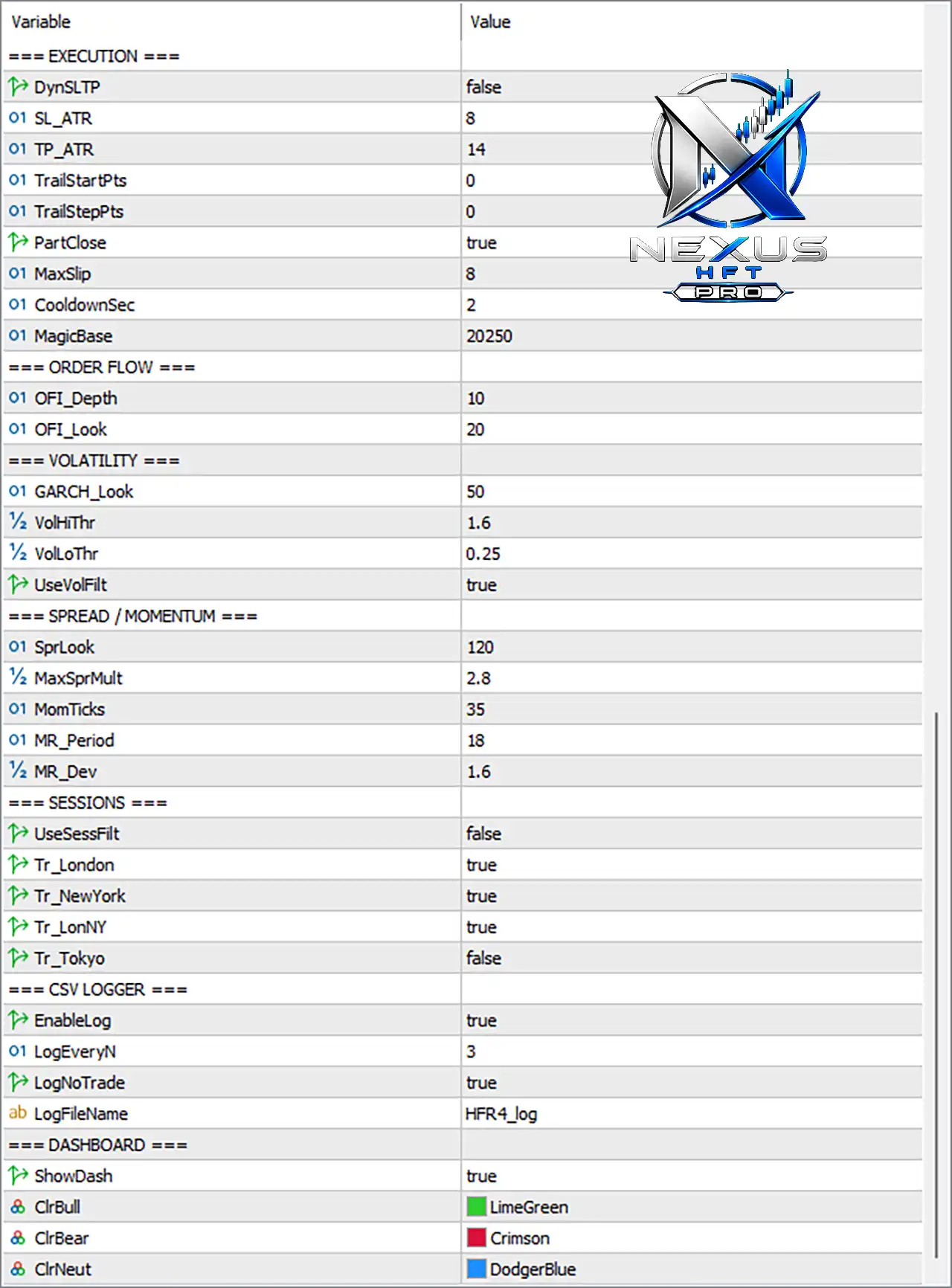
🔹 DynSLTP = false – Disables dynamic Stop Loss and Take Profit calculation, using fixed execution parameters instead.
🔹 SL_ATR = 8 – Uses an ATR multiplier of 8 when dynamic Stop Loss is enabled.
🔹 TP_ATR = 14 – Uses an ATR multiplier of 14 for dynamic Take Profit calculation.
🔹 TrailStartPts = 0 – Trailing Stop starts immediately since the activation threshold is 0 points.
🔹 TrailStepPts = 0 – No incremental trailing step is applied.
🔹 PartClose = true – Enables partial position closing to secure profits during active trades.
🔹 MaxSlip = 8 – Maximum acceptable execution slippage is 8 points.
🔹 CooldownSec = 2 – Waits 2 seconds before allowing another trade after execution.
🔹 MagicBase = 20250 – Base Magic Number used to uniquely identify trades opened by the EA.
🔶 Order Flow Settings
🔹 OFI_Depth = 10 – Analyzes Order Flow Imbalance using a depth of 10 market levels.
🔹 OFI_Look = 20 – Uses 20 observations for Order Flow calculations.
🔶 Volatility Settings
🔹 GARCH_Look = 50 – Uses 50 periods for GARCH-based volatility estimation.
🔹 VolHiThr = 1.6 – High volatility threshold is 1.6.
🔹 VolLoThr = 0.25 – Low volatility threshold is 0.25.
🔹 UseVolFilt = true – Enables the volatility filter before entering trades.
🔶 Spread & Momentum Settings
🔹 SprLook = 120 – Evaluates spread conditions over 120 observations.
🔹 MaxSprMult = 2.8 – Maximum spread multiplier allowed before filtering trades.
🔹 MomTicks = 35 – Momentum calculations use 35 ticks.
🔹 MR_Period = 18 – Mean Reversion indicator period is 18.
🔹 MR_Dev = 1.6 – Mean Reversion deviation threshold is 1.6.
🔶 Trading Sessions
🔹 UseSessFilt = false – Session filter is disabled, allowing trading throughout the day.
🔹 Tr_London = true – Trading is permitted during the London session.
🔹 Tr_NewYork = true – Trading is permitted during the New York session.
🔹 Tr_LonNY = true – Trading is permitted during the London–New York overlap.
🔹 Tr_Tokyo = false – Trading during the Tokyo session is disabled.
🔶 CSV Logger
🔹 EnableLog = true – Enables CSV logging for trading activity.
🔹 LogEveryN = 3 – Records trading information every 3 events.
🔹 LogNoTrade = true – Logs periods when no trades are executed.
🔹 LogFileName = HFR4_log – CSV log file is saved using the filename HFR4_log.
🔶 Dashboard
🔹 ShowDash = true – Displays the Nexus HFT Pro dashboard on the chart.
🔹 ClrBull = LimeGreen – Bullish signals are displayed using the LimeGreen color.
🔹 ClrBear = Crimson – Bearish signals are displayed using the Crimson color.
🔹 ClrNeut = DodgerBlue – Neutral market conditions are displayed using the DodgerBlue color.
🔶 Active Symbols
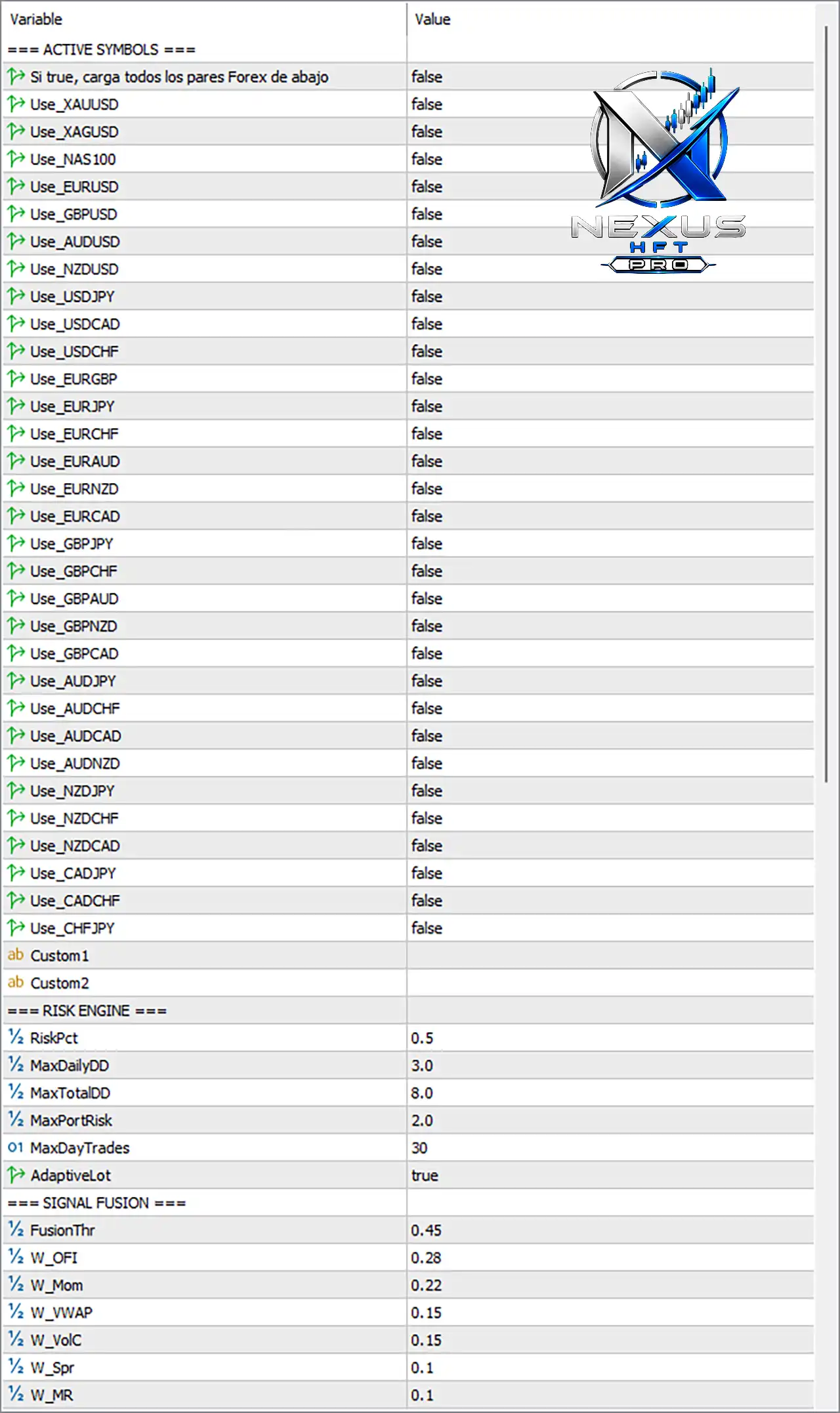
🔹 Si true, carga todos los pares Forex de abajo = false – Does not automatically load every predefined Forex pair.
🔹 Use_XAUUSD = false – XAUUSD trading is disabled.
🔹 Use_XAGUSD = false – XAGUSD trading is disabled.
🔹 Use_NAS100 = false – NAS100 trading is disabled.
🔹 Use_EURUSD = false – EURUSD trading is disabled.
🔹 Use_GBPUSD = false – GBPUSD trading is disabled.
🔹 Use_AUDUSD = false – AUDUSD trading is disabled.
🔹 Use_NZDUSD = false – NZDUSD trading is disabled.
🔹 Use_USDJPY = false – USDJPY trading is disabled.
🔹 Use_USDCAD = false – USDCAD trading is disabled.
🔹 Use_USDCHF = false – USDCHF trading is disabled.
🔹 Use_EURGBP = false – EURGBP trading is disabled.
🔹 Use_EURJPY = false – EURJPY trading is disabled.
🔹 Use_EURCHF = false – EURCHF trading is disabled.
🔹 Use_EURAUD = false – EURAUD trading is disabled.
🔹 Use_EURNZD = false – EURNZD trading is disabled.
🔹 Use_EURCAD = false – EURCAD trading is disabled.
🔹 Use_GBPJPY = false – GBPJPY trading is disabled.
🔹 Use_GBPCHF = false – GBPCHF trading is disabled.
🔹 Use_GBPAUD = false – GBPAUD trading is disabled.
🔹 Use_GBPNZD = false – GBPNZD trading is disabled.
🔹 Use_GBPCAD = false – GBPCAD trading is disabled.
🔹 Use_AUDJPY = false – AUDJPY trading is disabled.
🔹 Use_AUDCHF = false – AUDCHF trading is disabled.
🔹 Use_AUDCAD = false – AUDCAD trading is disabled.
🔹 Use_AUDNZD = false – AUDNZD trading is disabled.
🔹 Use_NZDJPY = false – NZDJPY trading is disabled.
🔹 Use_NZDCHF = false – NZDCHF trading is disabled.
🔹 Use_NZDCAD = false – NZDCAD trading is disabled.
🔹 Use_CADJPY = false – CADJPY trading is disabled.
🔹 Use_CADCHF = false – CADCHF trading is disabled.
🔹 Use_CHFJPY = false – CHFJPY trading is disabled.
🔹 Custom1 – Custom trading symbol slot available for user-defined instruments.
🔹 Custom2 – Second custom trading symbol slot available for user-defined instruments.
🔶 Risk Engine
🔹 RiskPct = 0.5 – Risks 0.5% of account equity per trade.
🔹 MaxDailyDD = 3.0 – Maximum daily drawdown is limited to 3.0%.
🔹 MaxTotalDD = 8.0 – Overall account drawdown limit is 8.0%.
🔹 MaxPortRisk = 2.0 – Maximum total portfolio exposure is 2.0%.
🔹 MaxDayTrades = 30 – Allows a maximum of 30 trades per day.
🔹 AdaptiveLot = true – Automatically adjusts lot size according to risk conditions.
🔶 Signal Fusion
🔹 FusionThr = 0.45 – Minimum combined confidence score required to trigger a trade is 0.45.
🔹 W_OFI = 0.28 – Order Flow Imbalance contributes 0.28 to the final signal score.
🔹 W_Mom = 0.22 – Momentum contributes 0.22 to the signal weighting.
🔹 W_VWAP = 0.15 – VWAP contributes 0.15 to the signal calculation.
🔹 W_VolC = 0.15 – Volatility component contributes 0.15.
🔹 W_Spr = 0.10 – Spread analysis contributes 0.10 to signal generation.
🔹 W_MR = 0.10 – Mean Reversion contributes 0.10 to the final trading signal.
🔢 Conclusion
Nexus HFT Pro EA MT5 is a sophisticated high-frequency trading system that integrates Order Flow Imbalance analysis, GARCH volatility modeling, adaptive risk management, signal fusion, and professional execution controls. Its flexible configuration allows traders to optimize trading sessions, portfolio exposure, execution quality, and market filters while maintaining disciplined risk management. Whether used for a single instrument or a diversified portfolio, the EA provides advanced tools for precision-driven automated trading.
🔢 FAQs
❓ What markets can Nexus HFT Pro EA MT5 trade?
The EA supports Forex pairs, Gold (XAUUSD), Silver (XAGUSD), NAS100, and custom symbols, although each instrument must be enabled individually.
❓ Does the EA include automatic risk management?
Yes. The built-in Risk Engine supports adaptive lot sizing, percentage-based risk, daily drawdown protection, and portfolio exposure limits.
❓ What is Signal Fusion in Nexus HFT Pro EA MT5?
Signal Fusion combines Order Flow, Momentum, VWAP, Volatility, Spread, and Mean Reversion into a weighted confidence score before opening trades.
❓ Can I restrict trading to specific market sessions?
Yes. The EA supports London, New York, London–New York overlap, and Tokyo session controls, which can be enabled or disabled individually.
❓ Does Nexus HFT Pro EA MT5 keep detailed trading logs?
Yes. The integrated CSV Logger records trading activity, execution events, and even periods without trades, making strategy analysis and optimization easier.


