




XAU Momentum EA MT5 (Latest version) - Unlimited

Subscriptions for Special Plan
- 30 EA package is more economical!
- Special package with 99%
- Download 1 EA/Day

Subscriptions for Premium Membership
- Download Unlimited in 1 Year
- Get 100% Discount
- Get free access to all

Subscriptions for Gold Membership
- 1 Year Membership
- Get 100% Discount
- Access EA+Indicator+Course
Frequently bought together 🎁
Add these products to enhance your purchase



Quick Verdict
XAU Momentum EA is a professional automated Gold trading robot built exclusively for XAUUSD. By combining higher-timeframe trend confirmation, momentum breakout entries, adaptive ATR-based grid management, intelligent AutoLot sizing, and extensive account protection tools, it provides a flexible yet disciplined solution for traders seeking long-term automated Gold trading.
Best For
✅ XAUUSD (Gold) traders
✅ MT5 automated trading
✅ Trend-following traders
✅ Breakout strategy enthusiasts
✅ Medium to high-risk traders
✅ VPS and ECN account users
Overall Rating
9.5/10 ⭐⭐⭐⭐⭐
| Category | Score |
|---|---|
| Trading Strategy | 9.6/10 |
| Risk Management | 9.5/10 |
| Customization | 9.8/10 |
| Ease of Use | 9.2/10 |
| Value for Money | 9.5/10 |
What is XAU Momentum EA?
XAU Momentum EA is a fully automated MetaTrader 5 Expert Advisor (EA) designed exclusively for Gold (XAUUSD) trading. The system combines momentum breakout entries with higher-timeframe trend confirmation, adaptive grid management, ATR-based lot scaling, intelligent AutoLot sizing and comprehensive account protection features.
Unlike traditional breakout systems that react solely to price movements, XAU Momentum uses multiple confirmation layers to identify higher-probability opportunities while dynamically adjusting exposure according to market volatility and account conditions.
 Vendor Website: View here
Delivery time 24h-48h after payment.
Refund if not delivered.
You will receive the current version without any limitations (ID+Time).
How Does XAU Momentum EA Work?
Higher-Timeframe Trend Confirmation
Before opening any position, XAU Momentum analyzes the dominant market trend on a higher timeframe.
This trend filter helps avoid low-quality breakout signals while aligning trades with the prevailing market direction.
Momentum Breakout Detection
After confirming the broader trend, the EA monitors lower-timeframe price action to identify genuine breakout opportunities.
Instead of chasing exhausted moves, the system attempts to enter while momentum is still building.
Adaptive Grid Management
One of the EA’s core technologies is its adaptive grid engine.
Rather than using a traditional martingale approach, the grid dynamically adjusts:
🔹 Position spacing
🔹 Trade sizing
🔹 Exposure levels
🔹 Volatility response
This allows the system to manage temporary adverse price movement more intelligently.
ATR-Based Position Sizing
The EA continuously measures market volatility using Daily ATR values.
ATR calculations influence:
🔹 Lot sizing
🔹 Grid spacing
🔹 Position scaling
🔹 Overall exposure
making the strategy more adaptive to changing market conditions.
Intelligent Trade Management
Once trades are active, XAU Momentum automatically manages:
🔹 Profit targets
🔹 Position scaling
🔹 Commission-adjusted TP calculations
🔹 Swap cost adjustments
🔹 Emergency protection
🔹 Drawdown monitoring
Without requiring manual intervention.
Key Features of XAU Momentum
Trend + Breakout Trading Logic
Combines higher-timeframe trend analysis with lower-timeframe breakout execution to improve entry quality.
Designed Exclusively for Gold
Optimized specifically for XAUUSD and its unique volatility characteristics.
Advanced AutoLot System
Automatically adjusts trade size according to account balance and selected risk level.
Available profiles include:
🔹 Low Risk
🔹 Moderate Risk
🔹 High Risk
🔹 Aggressive
🔹 Degen
🔹 YOLO
Adaptive ATR Lot Scaling
Uses Daily ATR calculations to dynamically modify lot sizing and position management based on current market volatility.
Intelligent Grid Engine
Features an adaptive Grid system designed to work with market momentum rather than blindly averaging losing positions.
Comprehensive News Filter
Supports filtering around major economic events including:
🔹 NFP
🔹 CPI
🔹 FOMC
🔹 GDP
🔹 Interest Rate Decisions
🔹 ECB Events
🔹 PMI
🔹 Retail Sales
🔹 Jobless Claims
Emergency Protection
Includes emergency stop-out protection that continuously monitors account margin and drawdown to reduce the risk of catastrophic losses.
Prop Firm Compatibility
Provides dedicated settings for traders participating in funded account challenges, including configurable equity targets and execution controls.
Extensive Customization
Nearly every aspect of the EA can be configured, including:
🔹 Risk levels
🔹 Trading hours
🔹 Grid behavior
🔹 Lot multipliers
🔹 News filtering
🔹 ATR settings
🔹 Position limits
🔹 Drawdown alerts
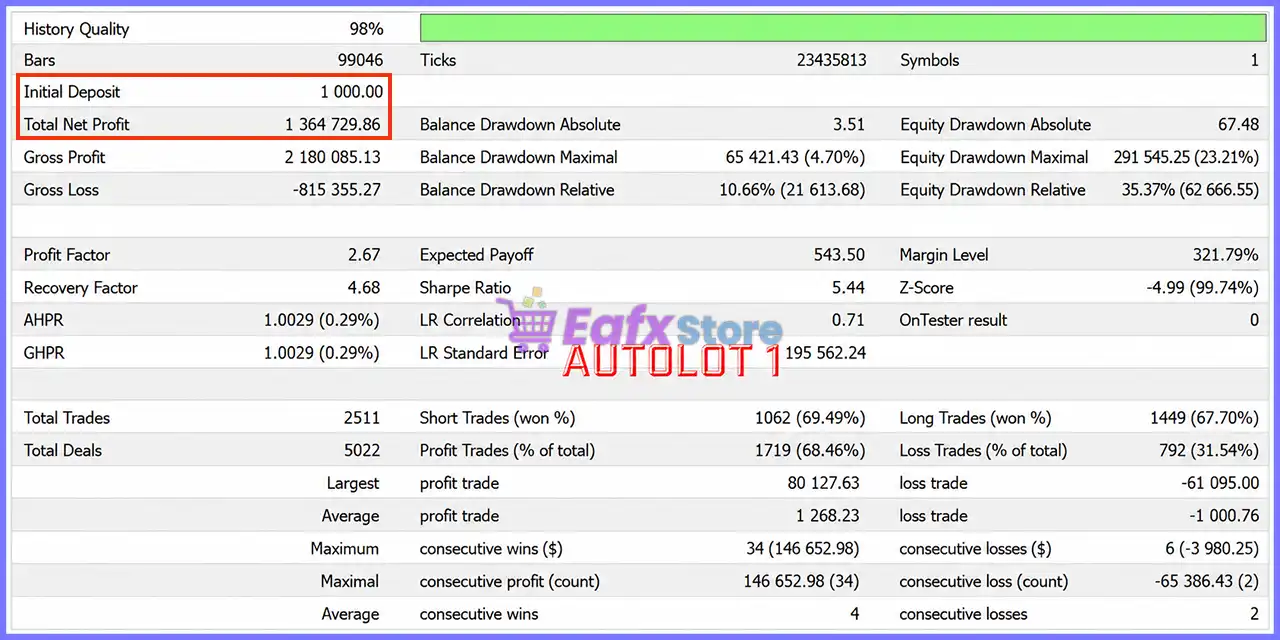
Historical Trading Results Performance
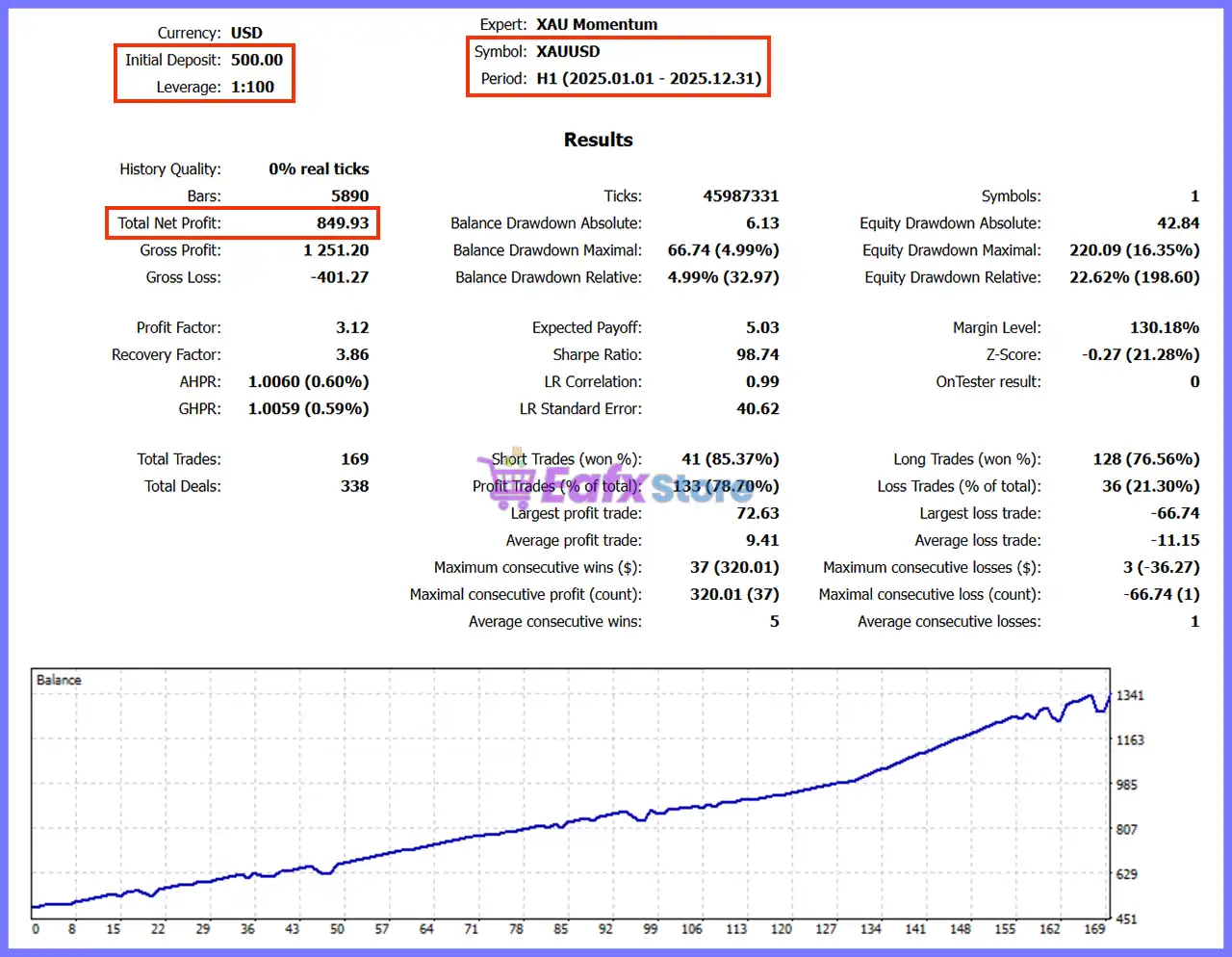
Backtest 1 — XAUUSD H1 (2025)
XAU Momentum EA MT5 Backtest Results
| Metric | Result |
|---|---|
| Initial Deposit | $500 |
| Net Profit | $849.93 |
| Total Trades | 169 |
| Winning Trades | 78.70% |
| Profit Factor | 3.12 |
| Recovery Factor | 3.86 |
| Maximum Equity Drawdown | 22.62% |
| Average Profit | $9.41 |
Performance Analysis
The 2025 historical test shows consistent profitability with a steady upward equity curve. Starting from $500, the EA generated approximately 170% net growth while maintaining a 78.70% winning trade ratio. Although drawdown reached 22.62%, the balance curve remained stable and reflected disciplined trend-following behavior rather than aggressive overtrading.
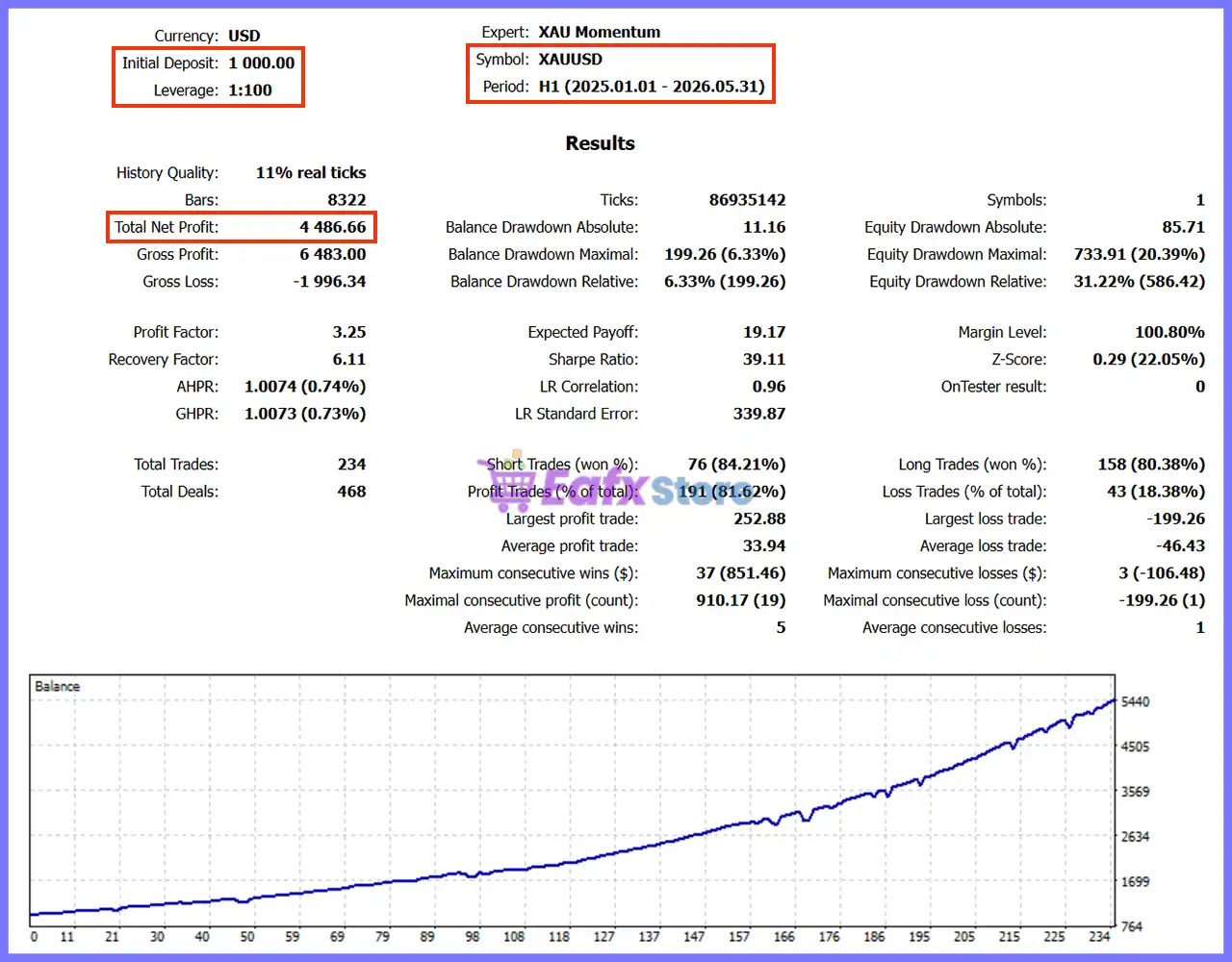
Backtest 2 — XAUUSD H1 (2025–2026)
XAU Momentum EA Backtest Results
| Metric | Result |
|---|---|
| Initial Deposit | $1,000 |
| Net Profit | $4,486.66 |
| Total Trades | 234 |
| Winning Trades | 81.62% |
| Profit Factor | 3.25 |
| Recovery Factor | 6.11 |
| Maximum Equity Drawdown | 31.22% |
| Average Profit | $33.94 |
Performance Analysis
The extended historical test demonstrates the EA’s ability to maintain profitability over a longer trading period. Beginning with $1,000, the system produced nearly $4,500 in net profit while improving its win rate to over 81%. The equity curve shows sustained long-term growth despite periods of market volatility, highlighting the effectiveness of the trend confirmation and adaptive position management framework.
Why XAU Momentum EA Stands Out
Purpose-Built for Gold
Unlike multi-asset systems, XAU Momentum focuses exclusively on XAUUSD, allowing its algorithms to be optimized for Gold’s unique volatility and session characteristics.
Trend and Breakout Confluence
The combination of higher-timeframe trend confirmation with lower-timeframe breakout execution reduces many of the false signals common in standalone breakout strategies.
Adaptive Grid Technology
Rather than employing a conventional martingale approach, the EA uses an adaptive grid model that responds to volatility and trend conditions, aiming to manage exposure more intelligently.
Professional Risk Controls
The inclusion of emergency stop-out protection, drawdown alerts, ATR-based sizing, and configurable money management makes the EA suitable for traders who prioritize structured risk management.
Exceptional Flexibility
With hundreds of configurable parameters, XAU Momentum can be tailored for conservative, balanced or aggressive trading approaches.
Risk Management Features
XAU Momentum EA includes a wide range of professional risk management tools:
🔹 Intelligent AutoLot sizing.
🔹 ATR-based lot multiplier.
🔹 Maximum lot limitation.
🔹 Adaptive grid control.
🔹 Position count modifier.
🔹 Drawdown protection.
🔹 Emergency stop-out system.
🔹 Drawdown alerts.
🔹 Prop firm protection settings.
🔹 Economic news filter.
🔹 Trading session scheduling.
🔹 Holiday trading filter.
🔹 Commission-aware Take Profit.
🔹 Swap-adjusted profit calculation.
🔹 Maximum positions per direction.
These features provide traders with significant flexibility in balancing profitability and capital preservation.
Recommended Trading Conditions
For the best performance, the following setup is recommended:
| Parameter | Recommendation |
|---|---|
| Platform | MetaTrader 5 |
| Symbol | XAUUSD |
| Timeframe | Any chart (EA optimized internally) |
| Recommended Trading Logic | Trend + Breakout |
| Minimum Deposit | $1,000 (or $10 Cent Account) |
| Recommended Leverage | 1:500 or higher |
| Account Type | ECN / Raw Spread |
| VPS | Strongly Recommended |
| Hedging | Enabled |
Product Download Package?
The download package of the product suite includes:
✅ Experts: XAU Momentum.ex5
 Reviewed by David Easton
Weaknesses and Risk Warnings
Although XAU Momentum EA incorporates sophisticated trading logic and numerous safety mechanisms, traders should be aware of the following:
🔹 The EA is optimized exclusively for XAUUSD and may not perform as intended on other instruments.
🔹 The adaptive grid system can increase exposure during prolonged adverse market conditions, particularly when higher AutoLot levels are selected.
🔹 Conservative AutoLot settings are recommended for long-term account stability, while aggressive profiles substantially increase risk.
🔹 Historical backtests provide valuable insight into strategy behavior but should not be considered guarantees of future performance.
🔹 Stable broker execution, low spreads, high leverage, and VPS hosting are strongly recommended to achieve optimal results.
Who Should Use XAU Momentum EA?
XAU Momentum EA MT5 is ideal for:
🔹 Gold traders seeking full automation.
🔹 Trend-following traders.
🔹 Breakout strategy enthusiasts.
🔹 Traders comfortable with adaptive grid management.
🔹 MetaTrader 5 users.
🔹 Prop firm participants.
🔹 Traders wanting highly configurable money management.
🔹 Users seeking institutional-style risk controls with flexible execution settings.
Final Verdict
XAU Momentum EA is a feature-rich automated Gold trading system that successfully combines trend confirmation, momentum breakout execution, adaptive grid management, ATR-based lot sizing, intelligent AutoLot scaling, and extensive account protection into one professional Expert Advisor. Its exceptional level of customization, sophisticated risk management tools, comprehensive news filtering, and optimized XAUUSD focus make it a compelling choice for traders seeking disciplined and flexible automated trading.
Whether your goal is conservative portfolio growth or higher-risk opportunity capture, XAU Momentum provides a robust framework that can be tailored to a wide range of trading objectives while maintaining a strong emphasis on capital protection.
🔢 XAU Momentum EA MT5 Settings Guide
XAU Momentum EA is a professional automated trading system developed specifically for XAUUSD (Gold). The Expert Advisor combines momentum-based entries, intelligent money management, ATR-driven lot scaling, advanced grid management, economic news filtering, drawdown protection, prop firm compatibility and flexible risk controls.
With extensive customization options, traders can fine-tune every aspect of execution, position sizing, trade filtering, and safety management to match different trading styles and account types.
XAU Momentum EA MT5 Settings
🔢 XAU Momentum EA MT5 Settings Explained
🔹 Load the EA on a XAUUSD chart (timeframe is irrelevant) – Install the EA on a XAUUSD chart; it works independently of the selected timeframe.
🔹 Adjust the input called |AutoLot level| to set your risk – Controls overall trading risk through the AutoLot system.
🔹 Contact via DM on MQL5.com if you have any questions – Developer support instruction.
🔶 Inputs
🔹 Allow entry without signals if DualMA aligned = false – Requires normal entry conditions; Dual MA alignment alone cannot trigger trades.
🔶 General Inputs
🔹 Enable spread filter = false – Disables spread filtering before opening trades.
🔹 Max spread in points for entry = 400.0 – Maximum acceptable spread is 400.0 points if the spread filter is enabled.
🔹 EA comment = Xau Momentum – Order comment attached to every position.
🔹 Hide Entry Model Comments = false – Displays entry model comments on trades.
🔹 EA magic number = 36353534 – Unique identifier used by the EA to manage its own positions.
🔹 Allow buy positions = true – Enables Buy trades.
🔹 Allow sell positions = true – Enables Sell trades.
🔹 Allow Hedging (set to false to comply with FIFO requirements) = true – Allows simultaneous Buy and Sell positions.
🔹 Set file used = Xau Momentum Default – Loads the default configuration profile.
🔶 Debug Print Settings
🔹 Time frame for printing debug = 1 Hour – Debug information is generated using the H1 timeframe.
🔹 Show array debug prints = false – Disables array debugging.
🔹 Show Range Entry Print Statements = false – Disables range entry logs.
🔹 Show ATR calculation debug prints = false – Disables ATR calculation logs.
🔹 Show lot multiplier ATR debug prints = false – Disables ATR lot multiplier debugging.
🔹 Show TP calculation debug prints = false – Disables Take Profit calculation logs.
🔹 Show grid debug prints in journal = false – Disables Grid system logs.
🔹 Show Stop Loss Debug Prints = false – Disables Stop Loss logging.
🔹 Show Price Action debug prints = false – Disables Price Action diagnostics.
🔹 Show emergency stop out debug prints in journal = false – Disables emergency protection logs.
🔹 Print currency checks in journal? = false – Disables currency validation logging.
🔹 Print new entry attempts in journal? = false – Disables entry attempt logs.
🔶 Money Management
🔹 Maximum positions per currency in same direction across account = 1 – Allows only one position per currency in the same direction.
🔹 Close grid on opposite signal? = false – Existing grid remains open after an opposite signal.
AutoLot Recommendations
🔹 AutoLot 0.1 = Low Risk (7–15% p.a.) – Minimum Balance 10K – Conservative profile.
🔹 AutoLot 0.3 = Moderate Risk (10–25% p.a.) – Minimum Balance 7K – Moderate profile.
🔹 AutoLot 0.5 = High Risk (40–100% p.a.) – Minimum Balance 5K – High-risk profile.
🔹 AutoLot 1 = Aggressive Risk (80–120% p.a.) – Minimum Balance 1K – Aggressive profile.
🔹 AutoLot 1.5 = Degen Risk (100–200% p.a.) – Minimum Balance 1K – Very aggressive profile.
🔹 AutoLot > 1.5 = YOLO (150–300% p.a.) – Minimum Balance 1K – Extremely aggressive profile.
🔹 Recommended leverage = 1:500 or higher – Higher leverage is recommended.
🔹 Cent account recommendation – Suggested when account balance is below the recommended level.
🔹 Trading is risky. Trade at your own risk – Standard risk disclaimer.
🔶 Starting Lot Settings
🔹 Risk Model = AutoLot – Uses automatic lot calculation.
🔹 Starting lot (if AutoLot is not used) = 0.01 – Fixed starting lot.
🔹 AutoLot level (1 = 0.01 lots per 1000 account balance) = 1.0 – Auto lot scaling level.
🔶 Safety Settings
Stop Loss
🔹 Enable stop loss = false – Stop Loss protection is disabled.
🔹 Stop loss at percentage or money drawdown = PercentageDD – Uses percentage drawdown.
🔹 Drawdown money for stop loss = 100.0 – Money threshold.
🔹 Drawdown percentage for stop loss = 50.0 – Maximum drawdown before protection activates.
Emergency Stop Out Protection
🔹 Enable emergency stop out protection = true – Enables emergency account protection.
🔹 Margin cushion above broker stop out (%) = 10.0 – Maintains a 10% safety buffer.
🔹 Check interval in seconds = 60 – Checks every 60 seconds.
🔹 Set to 0 to disable, or 1–2 for aggressive = 5 – Emergency sensitivity level.
Drawdown Alerts
🔹 Enable drawdown alerts = true – Activates account drawdown notifications.
🔹 Maximum allowed drawdown percentage = 15.0 – Alert threshold.
🔹 Alert interval in minutes = 15 – Sends alerts every 15 minutes.
🔶 Prop Firm Settings
Prop Firm Compliance
🔹 Enable random time delay for entries = false – No randomized execution delay.
🔹 Maximum delay in milliseconds (0–1000) = 30 – Maximum delay setting.
Prop Firm – Stop EA At Win
🔹 Enable prop firm challenge win = false – Automatic challenge stop disabled.
🔹 Close positions and stop trading at this equity = 110025 – Stops after reaching this equity target.
🔶 Info Panel Settings
🔹 Show info panel = false – Information panel disabled.
🔹 Number of days to calculate trading statistics = 600 – Uses 600 trading days.
🔹 Panel X position = 110 – Horizontal position.
🔹 Panel Y position = 20 – Vertical position.
🔹 Space between header and first text line = 50 – Header spacing.
🔹 Space between labels and values = 320 – Column spacing.
🔹 Width of black background = 450 – Panel width.
🔹 Height of black background = 560 – Panel height.
🔹 Short retry interval when market is closed = 15 – Retry interval.
🔶 News Filter Settings
🔹 Allow trading on NFP days = false – Blocks trading on Non-Farm Payroll days.
🔹 Enable news filter (for initial positions) = false – Initial news filter disabled.
🔹 Filter only selected news = true – Uses only selected news events.
🔹 Disable grid positions during news events = false – Grid continues during news.
🔹 Number of days to load = 5 – Loads 5 days of calendar data.
🔹 Print news info in journal = false – News logs disabled.
🔹 Minutes before unselected news to stop trading = 240 – Stops 240 minutes before.
🔹 Minutes after unselected news to start trading = 120 – Resumes after 120 minutes.
🔹 Minutes before selected news to stop trading = 600 – Stops 600 minutes before.
🔹 Minutes after selected news to start trading = 5 – Resumes after 5 minutes.
🔹 Minutes before to stop grid = 60 – Grid pause before news.
🔹 Minutes after to start grid = 60 – Grid resumes after news.
Selected News Events
🔹 Select NFP (Non-Farm Payrolls) = true – Enabled.
🔹 Select CPI (Consumer Price Index) = true – Enabled.
🔹 Select FOMC Meetings/Statements = true – Enabled.
🔹 Select PPI (Producer Price Index) = true – Enabled.
🔹 Select Retail Sales = true – Enabled.
🔹 Select GDP = true – Enabled.
🔹 Select Fed Interest Rate Decision = true – Enabled.
🔹 Select Unemployment Rate = true – Enabled.
🔹 Select Initial Jobless Claims = true – Enabled.
🔹 Select Average Hourly Earnings = true – Enabled.
🔹 Select PMI = true – Enabled.
🔹 Select JOLTS Job Openings = true – Enabled.
🔹 Select Fed Chair Speaks = true – Enabled.
🔹 Select ECB President Speaks = true – Enabled.
🔹 Select ECB Press Conference = true – Enabled.
🔹 Select ECB Interest Rate Decision = true – Enabled.
🔶 Time Settings
🔹 Trade on Monday = true – Monday trading enabled.
🔹 Trade on Tuesday = true – Tuesday trading enabled.
🔹 Trade on Wednesday = true – Wednesday trading enabled.
🔹 Trade on Thursday = true – Thursday trading enabled.
🔹 Trade on Friday = true – Friday trading enabled.
🔹 Using Trade Hour = true – Trading hours enabled.
🔹 Start Hour (Tuesday to Friday) = 3 – Trading starts at 03:00.
🔹 Last Hour (Monday to Thursday) = 20 – Stops at 20:00.
🔹 Start Hour (Monday) = 3 – Monday starts at 03:00.
🔹 Last Hour (Friday) = 12 – Friday stops at 12:00.
🔶 Close End Of Day
🔹 Close positions at hour = false – End-of-day closing disabled.
🔹 Hour to close all positions = 23 – Closing hour if enabled.
🔶 Christmas Holiday Filter
🔹 Enable Christmas Holiday Filter = true – Holiday filter enabled.
🔹 First Trading Day (DD.MM) = 02.01 – Trading resumes on 02.01.
🔹 Last Trading Day (DD.MM) = 23.12 – Trading ends on 23.12.
🔶 Lot Multiplier Settings
Linear Lot Multiplier
🔹 Only increase lot at full distance intervals = false – Continuous lot adjustments.
🔹 Use ATR-based distance instead of static pips = true – Uses ATR for spacing.
🔹 Pips distance for lot increase = 5.0 – Static spacing.
🔹 Lot amount to increase per distance = 0.01 – Increment size.
ATR Settings
🔹 ATR timeframe for lot multiplier = 1 Day – Uses Daily ATR.
🔹 ATR period for lot multiplier = 2 – ATR period.
🔹 ATR multiplier = 0.2 – Multiplier value.
Rolling Volatility
🔹 Rolling Volatility Window (hours) = 7 – Seven-hour rolling calculation.
🔹 Rolling Vol Weight % = 80 – Uses 80% rolling volatility.
Position Count Modifier
🔹 Enable position count modifier = true – Dynamic lot adjustment enabled.
🔹 Positions per modifier step = 3 – Adjustment interval.
🔹 Change per step = 0.5 – Multiplier increment.
🔹 Floor multiplier = 0.5 – Minimum multiplier.
🔹 Ceiling multiplier = 5.0 – Maximum multiplier.
Max Lot Size
🔹 Max Lot per 1K balance = 1.0 – Caps lot size.
🔹 FixedLot final size = AutoLot base size × AutoLot level = MaxLot – Final lot calculation formula.
🔶 Take Profit Settings
🔹 Money Target per 0.01 starting lot = 5.0 – Profit target equals $5 per 0.01 lot.
🔹 Commission per lot = 7.0 – Commission assumption.
🔹 Auto-detect commission from broker history = true – Reads historical commissions automatically.
🔶 Commission Cost Settings
🔹 Include commission costs in TP calculation = true – Includes commissions in Take Profit.
🔶 Swap Cost Settings
🔹 Include swap costs in TP calculation = true – Includes overnight swap.
🔹 Broker swap charging method = Full swap on open position at rollover – Swap model.
🔶 Grid Settings
🔹 Enable Grid = true – Grid trading enabled.
🔹 Minimum minutes between grid positions = 5 – Five-minute spacing.
🔹 Apply timer between initial entry and first grid = true – Timer enabled.
🔹 SL in pips (only used if grid disabled) = 20.0 – Stop Loss for non-grid mode.
🔹 Max number of positions in a grid = 100 – Maximum grid positions.
🔹 Use max available margin when insufficient for calculated lot = true – Uses available margin.
🔶 High/Low Settings
🔹 Bars on each side of highest high/lowest low = 8 – Swing confirmation bars.
🔹 Amount of bars in array to scan for highs/lows = 95 – Historical lookback length.
🔢 Conclusion
XAU Momentum EA MT5 offers a highly configurable automated Gold trading framework with advanced AutoLot sizing, adaptive ATR-based position scaling, sophisticated grid management, comprehensive economic news protection, prop firm compliance tools, emergency account protection, and extensive risk controls. Its wide range of parameters allows both conservative and aggressive traders to tailor the EA precisely to their preferred trading style while maintaining strong capital protection.
🔢 FAQs
❓ Which market is XAU Momentum EA MT5 designed for?
XAU Momentum EA MT5 is specifically designed for automated trading on XAUUSD (Gold).
❓ Does the EA support automatic lot sizing?
Yes. It includes an AutoLot system with multiple risk profiles ranging from conservative to aggressive.
❓ Can XAU Momentum EA MT5 trade during economic news?
Yes. It includes a configurable news filter that allows traders to select which economic events should pause trading.
❓ Does the EA include grid trading?
Yes. The EA features an advanced Grid Trading system with ATR-based lot scaling, position timing, and customizable maximum grid positions.
❓ Is XAU Momentum EA MT5 suitable for prop firm accounts?
Yes. It includes dedicated prop firm settings, drawdown protection, emergency stop-out safeguards, and configurable equity targets to help traders manage funded account requirements.
User Reviews
Only logged in customers who have purchased this product may leave a review.
❓ What market is XAU Momentum EA MT5 designed for?
XAU Momentum EA MT5 is built exclusively for XAUUSD, combining trend confirmation and breakout logic to capture strong Gold price movements efficiently.
❓ How does XAU Momentum EA MT5 identify trade entries?
XAU Momentum EA MT5 confirms the higher-timeframe trend first, then executes breakout entries on a lower timeframe when momentum aligns with market structure.
❓ Does XAU Momentum EA MT5 use a traditional martingale grid?
No. XAU Momentum EA MT5 uses an adaptive grid that adjusts spacing and exposure with volatility instead of relying on aggressive martingale averaging
❓ Can XAU Momentum EA MT5 trade automatically?
Yes. XAU Momentum EA MT5 is fully automated, handling market analysis, entries, grid management, and trade execution without manual intervention.
❓ Which chart timeframe should I use for XAU Momentum EA MT5?
XAU Momentum EA MT5 can be attached to any XAUUSD chart because the system automatically manages the required internal timeframe analysis.
❓ How do I adjust the trading risk in XAU Momentum EA MT5?
XAU Momentum EA MT5 uses the AutoLot Level setting. Increasing the value raises position size, trading risk, and potential profit opportunities.
❓ What are the recommended account requirements for XAU Momentum EA MT5?
XAU Momentum EA MT5 recommends at least a $1,000 balance, or $10 on a cent account, with 1:500 leverage for safer operation.
❓ Can XAU Momentum EA MT5 work with different brokers?
Yes. XAU Momentum EA MT5 is broker and account agnostic, making it compatible with MT5 brokers that provide sufficient leverage and execution quality.
❓ What makes XAU Momentum EA MT5 different from standard breakout EAs?
XAU Momentum EA MT5 combines higher-timeframe trend filtering, breakout execution, and an adaptive grid engine to manage Gold volatility more intelligently.
-
 Original price was: $9,999.00.$249.00Current price is: $249.00.
 -
 Original price was: $30,000.00.$249.00Current price is: $249.00.
 -
 Original price was: $30,000.00.$249.00Current price is: $249.00.
 -
 Original price was: $5,000.00.$249.00Current price is: $249.00.
-
 4Original price was: $499.00.$249.00Current price is: $249.00.
 -
 1Original price was: $500.00.$249.00Current price is: $249.00.
 -
 3Original price was: $199.00.$159.00Current price is: $159.00.
 -
 0Original price was: $500.00.$199.00Current price is: $199.00.
There are no reviews yet.