


🔢 MultiWay EA MT5 Settings Guide
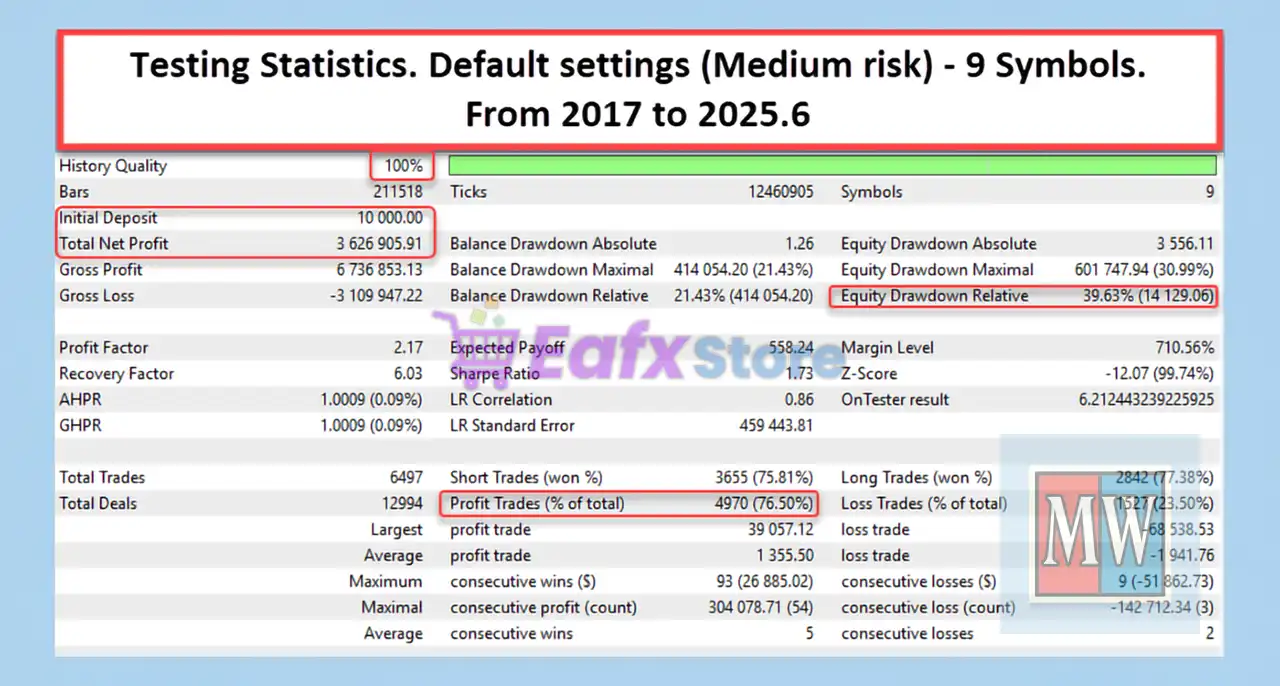
MultiWay EA is a professional multi-currency Expert Advisor designed for automated portfolio trading with adaptive money management, intelligent execution control, emergency drawdown protection and advanced risk management.
The EA supports simultaneous trading across multiple Forex pairs while offering configurable position sizing, spread filtering, safe exit mechanisms, and emergency protection to help traders optimize long-term portfolio performance.
🔢 MultiWay EA MT5 Settings Explained
🔄 Basic Settings
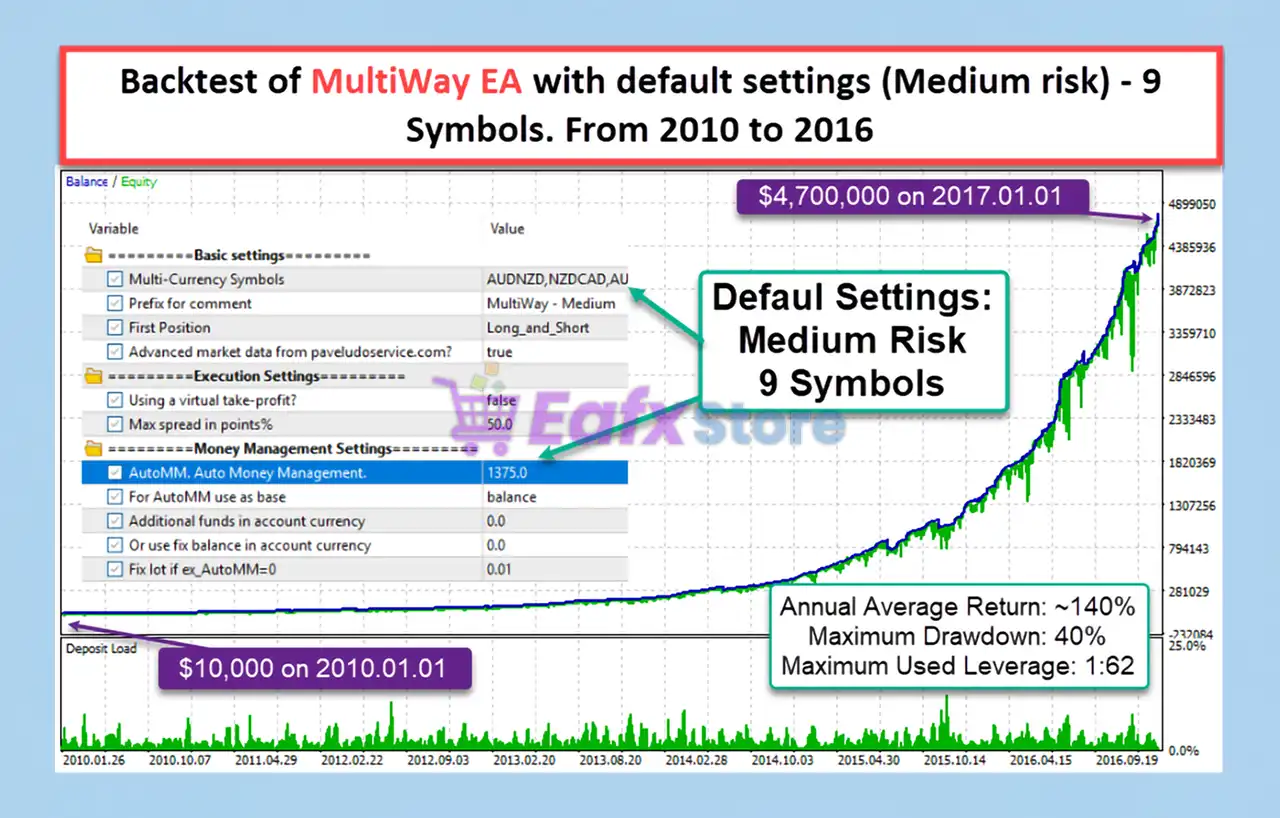
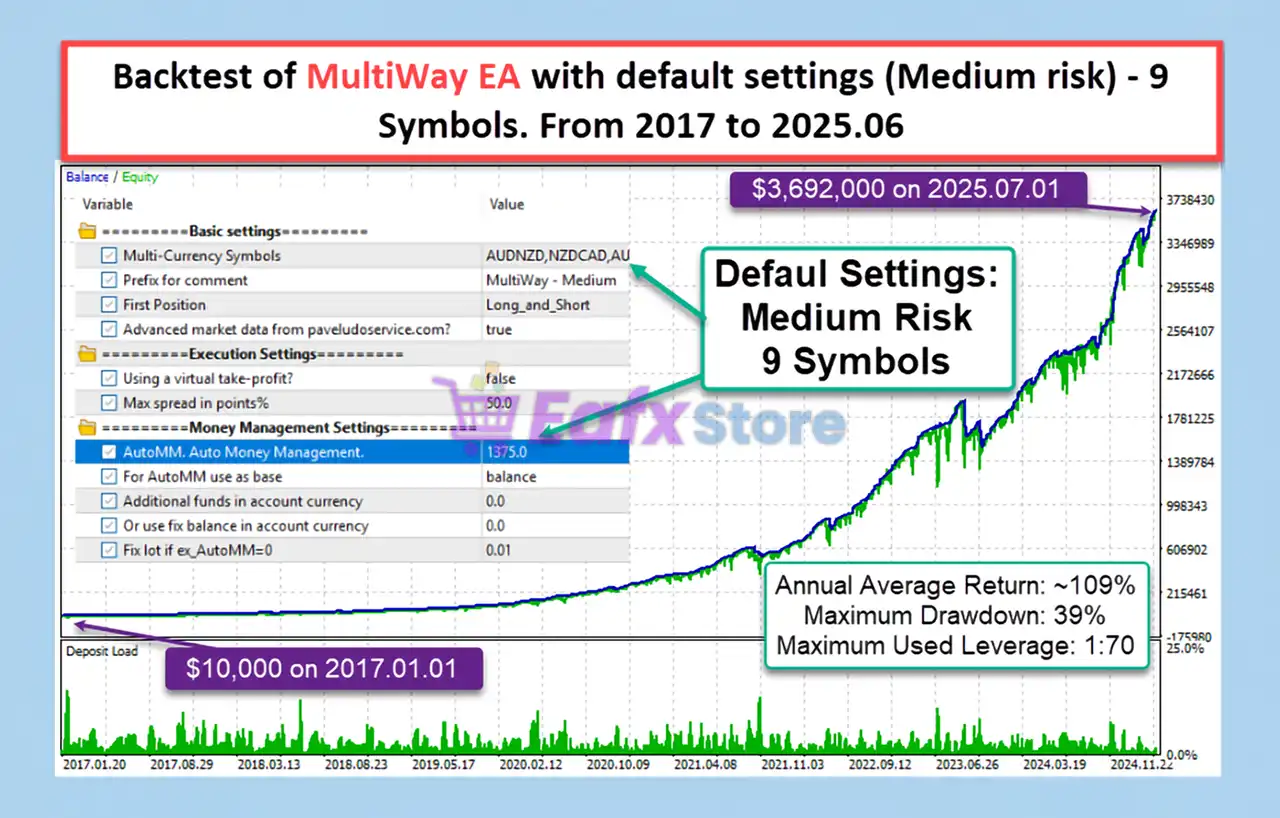
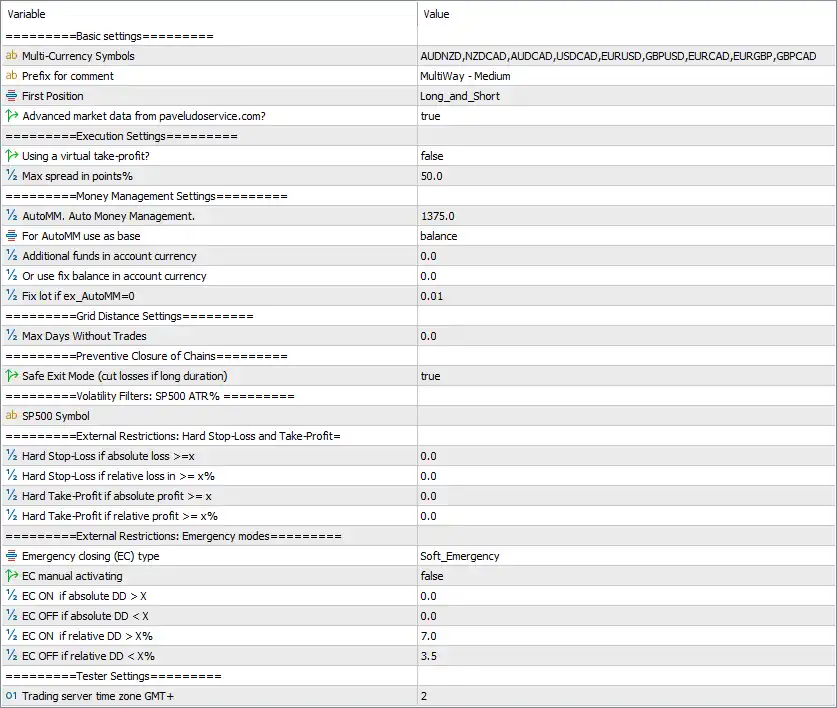
🔹 Multi-Currency Symbols = AUDNZD, NZDCAD, AUDCAD, USDCAD, EURUSD, GBPUSD, EURCAD, EURGBP, GBPCAD – Defines the complete list of currency pairs that the EA will monitor and trade simultaneously.
🔹 Prefix for comment = MultiWay - Medium – Adds the trade comment "MultiWay - Medium" to every position opened by the EA for easy identification.
🔹 First Position = Long_and_Short – Allows the EA to open both Buy and Sell positions as initial trades depending on market conditions.
🔹 Advanced market data from pavelduroservice.com? = true – Enables the use of advanced external market data to improve trading decisions and execution quality.
🔄 Execution Settings
🔹 Using a virtual take-profit? = false – Uses broker-side Take Profit orders instead of virtual profit management.
🔹 Max spread in points% = 50.0 – Prevents opening new trades when the current spread exceeds 50.0 points.
🔄 Money Management Settings
🔹 AutoMM. Auto Money Management. = 1375.0 – Sets the automatic money management factor to 1375.0 for dynamic lot size calculation.
🔹 For AutoMM use as base = balance – Uses the account balance as the reference for automatic position sizing.
🔹 Additional funds in account currency = 0.0 – No additional account balance is added when calculating lot sizes.
🔹 Or use fix balance in account currency = 0.0 – Fixed balance mode is disabled.
🔹 Fix lot if ex_AutoMM = 0 = 0.01 – Uses a fixed trading volume of 0.01 lots whenever Auto Money Management is disabled.
🔄 Grid Distance Settings
🔹 Max Days Without Trades = 0.0 – No maximum inactivity period is applied before the EA resumes trading.
🔄 Preventive Closure of Chains
🔹 Safe Exit Mode (cut losses if long duration) = true – Enables Safe Exit Mode to automatically reduce prolonged losing trading chains and improve portfolio stability.
🔄 Volatility Filters
SP500 ATR%
🔹 SP500 Symbol = (empty) – No custom S&P 500 symbol is specified for volatility monitoring, allowing the broker's default mapping if available.
🔄 External Restrictions
Hard Stop-Loss and Take-Profit
🔹 Hard Stop-Loss if absolute loss >= x = 0.0 – Absolute monetary stop-loss protection is disabled.
🔹 Hard Stop-Loss if relative loss in >= x% = 0.0 – Relative percentage stop-loss protection is disabled.
🔹 Hard Take-Profit if absolute profit >= x = 0.0 – Absolute monetary profit target is disabled.
🔹 Hard Take-Profit if relative profit >= x% = 0.0 – Relative percentage profit target is disabled.
🔄 Emergency Modes
🔹 Emergency closing (EC) type = Soft_Emergency – Uses the Soft Emergency protection mode to gradually reduce trading risk during adverse conditions.
🔹 EC manual activating = false – Manual emergency mode activation is disabled.
🔹 EC ON if absolute DD > X = 0.0 – Absolute drawdown trigger is disabled.
🔹 EC OFF if absolute DD < X = 0.0 – Absolute drawdown recovery trigger is disabled.
🔹 EC ON if relative DD > X% = 7.0 – Automatically activates Emergency Mode when account drawdown reaches 7.0%.
🔹 EC OFF if relative DD < X% = 3.5 – Automatically disables Emergency Mode once drawdown falls below 3.5%.
🔄 Tester Settings
🔹 Trading server time GMT+ = 2 – Sets the trading server timezone to GMT+2 for accurate session timing and historical testing.
🔢 Conclusion
MultiWay EA MT5 is a robust portfolio trading Expert Advisor built for traders who want diversified multi-currency automation with intelligent money management and comprehensive risk protection. Its combination of automatic position sizing, spread control, Safe Exit Mode, emergency drawdown management, and multi-symbol trading makes it suitable for both conservative and advanced traders seeking stable long-term portfolio performance.
🔢 FAQs
❓ What markets can MultiWay EA MT5 trade?
MultiWay EA MT5 is configured to trade multiple Forex pairs simultaneously, including AUDNZD, NZDCAD, AUDCAD, USDCAD, EURUSD, GBPUSD, EURCAD, EURGBP, and GBPCAD.
❓ How does Auto Money Management work in MultiWay EA MT5?
The EA automatically calculates lot sizes using the account balance and the configured AutoMM value of 1375.0, helping maintain consistent risk management.
❓ What is Safe Exit Mode?
Safe Exit Mode automatically cuts prolonged losing trading chains to reduce drawdown and improve overall account stability.
❓ When does Emergency Mode activate?
The Soft Emergency system automatically activates when the account reaches a 7.0% relative drawdown and deactivates once drawdown decreases below 3.5%.
❓ Can I use a fixed lot instead of automatic lot sizing?
Yes. If Auto Money Management is disabled, the EA will trade using the configured fixed lot size of 0.01 lots.


