




Prime Execution AI EA MT5 (Latest version) - Unlimited

Subscriptions for Special Plan
- 30 EA package is more economical!
- Special package with 99%
- Download 1 EA/Day

Subscriptions for Premium Membership
- Download Unlimited in 1 Year
- Get 100% Discount
- Get free access to all

Subscriptions for Gold Membership
- 1 Year Membership
- Get 100% Discount
- Access EA+Indicator+Course
Frequently bought together 🎁
Add these products to enhance your purchase


Quick Verdict
Prime Execution AI EA is a professional fully automated Expert Advisor (EA) developed exclusively for XAUUSD trading. Designed around intelligent execution, adaptive position management, automatic risk control, and minimal user intervention, it delivers disciplined Gold trading with impressive live results and exceptional drawdown control.
Best For
✅ Gold (XAUUSD) traders
✅ Busy traders seeking full automation
✅ Prop Firm traders
✅ Beginners who prefer simple setup
✅ Experienced traders looking for disciplined risk management
Overall Rating
9.8 / 10 ⭐⭐⭐⭐⭐
| Category | Rating |
|---|---|
| Trading Strategy | 9.8 / 10 |
| Risk Management | 9.9 / 10 |
| Live Performance | 9.9 / 10 |
| Ease of Use | 9.8 / 10 |
| Stability | 9.8 / 10 |
What is Prime Execution AI EA?
Prime Execution AI EA is a fully automated Expert Advisor built specifically for XAUUSD (Gold) trading on MetaTrader 5. Rather than requiring traders to optimize dozens of parameters, the EA manages the complete trading process independently—from market analysis and position sizing to trade execution, adaptive management and exit strategies.
Designed with automation, precision, and consistency in mind, Prime Execution AI focuses on execution quality and disciplined capital management instead of emotional decision-making. Users simply choose a suitable risk profile, while the algorithm handles every technical aspect of trading.
 Vendor Website: View here
Delivery time 24h-48h after payment.
Refund if not delivered.
You will receive the current version without any limitations (ID+Time).
How Does Prime Execution AI EA Work?
Complete Automated Execution
After installation, Prime Execution AI continuously scans the XAUUSD market, evaluates trading opportunities, calculates appropriate position sizes, executes trades, manages open positions, and closes trades according to its predefined logic.
Adaptive Position Management
The EA actively manages every open trade using intelligent trailing stop mechanisms and dynamic exit logic rather than leaving positions unmanaged after entry.
Automatic Position Sizing
Lot sizes automatically adjust according to:
🔹 Selected Risk Profile
🔹 Current Account Balance
🔹 Internal money management algorithm
No manual lot calculation is required.
Execution Quality Filters
Before opening any trade, the EA evaluates:
🔹 Current spread
🔹 Slippage conditions
🔹 Market volatility
🔹 Execution quality
Trades are skipped whenever execution conditions become unfavorable.
Optional News Protection
An optional news filter helps avoid opening new positions during periods of extreme market volatility caused by major economic events.
Key Features of Prime Execution AI EA
Fully Automated Gold Trading
Handles the complete trading cycle without manual intervention.
Automatic Risk Management
Automatically adjusts position sizes according to account balance and selected risk profile.
Adaptive Trailing Stop
Continuously manages positions as market conditions evolve.
Smart Execution Filters
Prevents trading during poor spread and slippage conditions.
Integrated Execution HUD
Displays real-time market statistics and EA status directly on the chart.
Prop Firm Mode
Includes dedicated risk controls for proprietary trading accounts.
Minimal Configuration
Requires only a risk profile selection instead of dozens of complex parameters.
XAUUSD Optimization
Specifically engineered for Gold trading on the H1 timeframe.
Verified Live Signal Performance
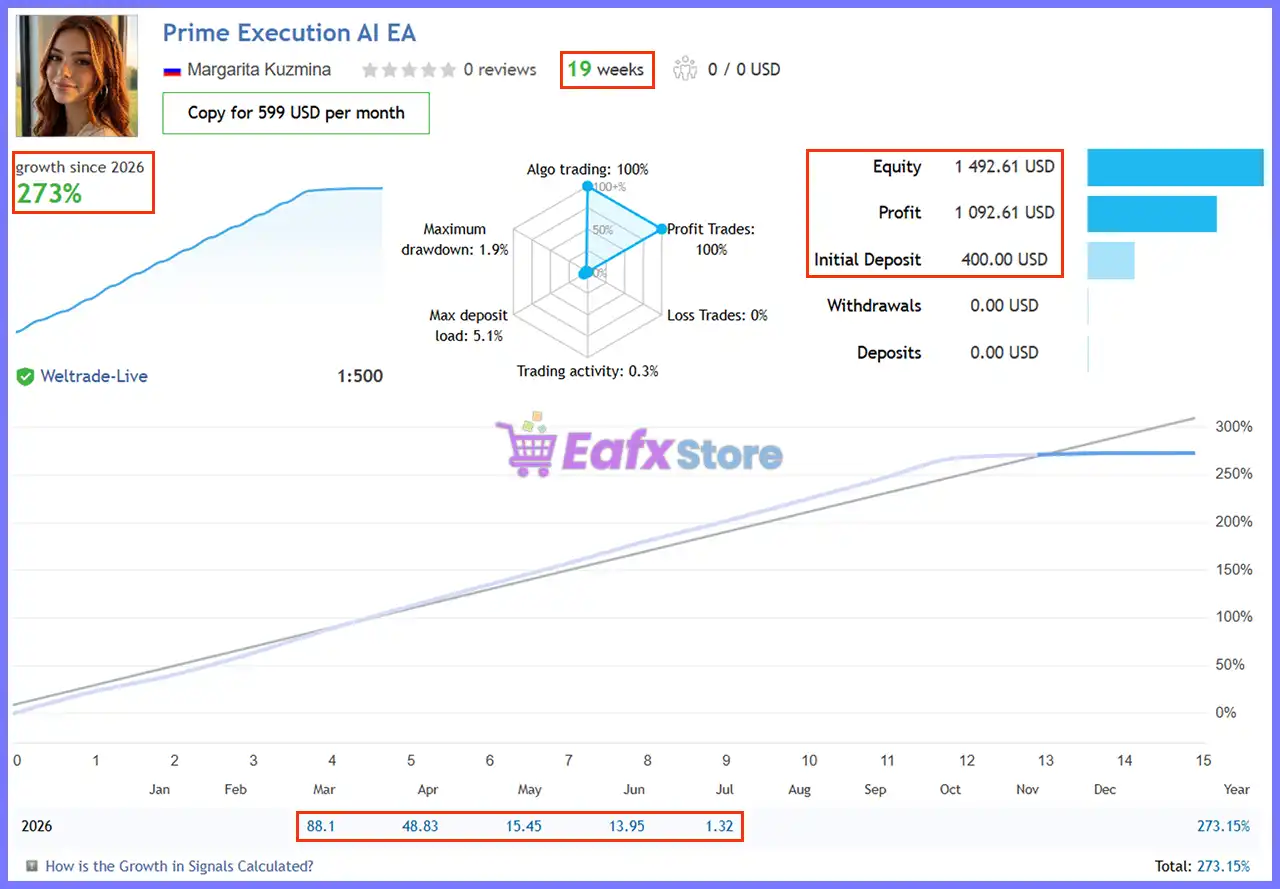
Prime Execution AI EA demonstrates exceptional verified live performance with remarkable profitability and extremely low drawdown over nearly five months of live trading.
Prime Execution AI EA Live Signal
Live Signal Summary
| Metric | Result |
|---|---|
| Signal Duration | 19 Weeks |
| Total Growth | 273.15% |
| Initial Deposit | $400 |
| Current Equity | $1,492.61 |
| Net Profit | $1,092.61 |
| Algo Trading | 100% |
| Winning Trades | 100% |
| Maximum Drawdown | 1.9% |
Live Performance Analysis
The verified live account has achieved 273.15% growth in just 19 weeks while maintaining an exceptionally low 1.9% maximum drawdown.
Combined with a 100% profitable trade record and fully automated execution, these statistics highlight the EA’s disciplined approach to Gold trading.
The steady equity curve also reflects a focus on consistent execution rather than excessive risk-taking.
Historical Trading Results Performance
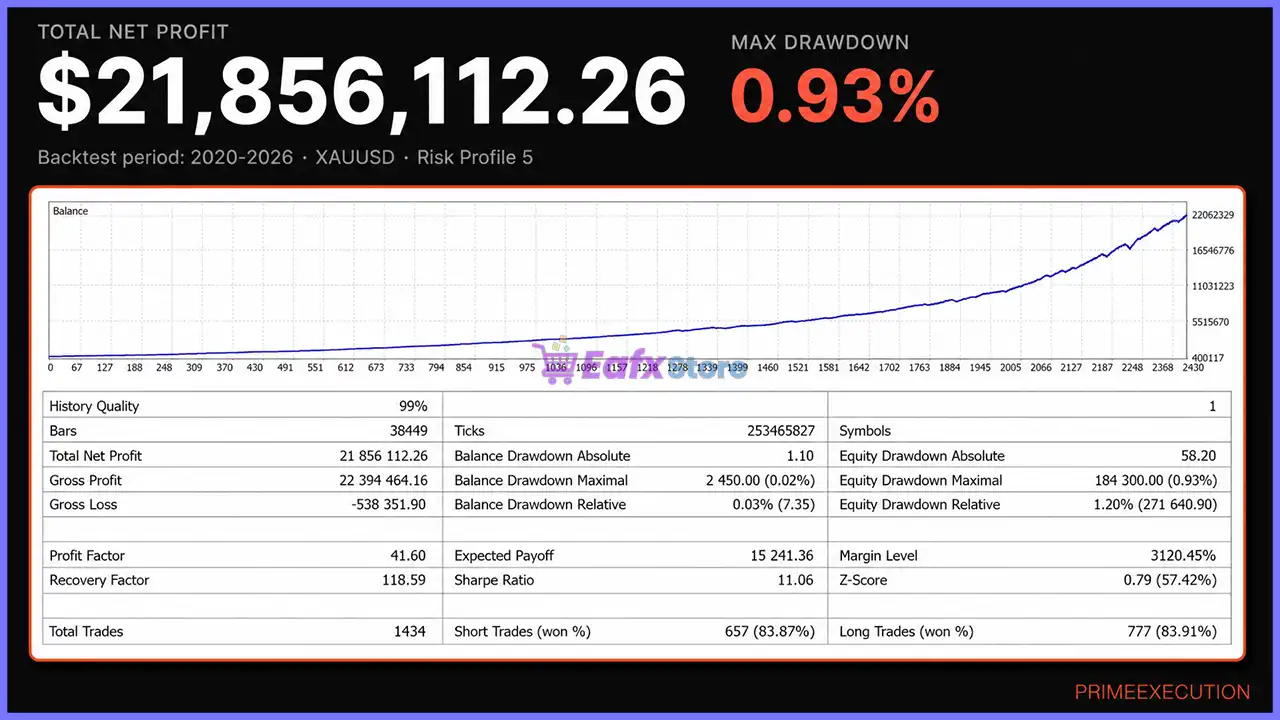
Prime Execution AI EA has been tested across multiple risk profiles using high-quality historical data, consistently demonstrating strong profitability with controlled drawdowns.
Backtest – Risk Profile 5 (2020–2026)
Prime Execution AI EA Backtest Results
| Metric | Result |
|---|---|
| History Quality | 99% |
| Test Period | 2020–2026 |
| Total Net Profit | $21,856,112.26 |
| Maximum Drawdown | 0.93% |
| Profit Factor | 41.60 |
| Recovery Factor | 118.59 |
| Total Trades | 1,434 |
| Winning Trades | ≈84% |
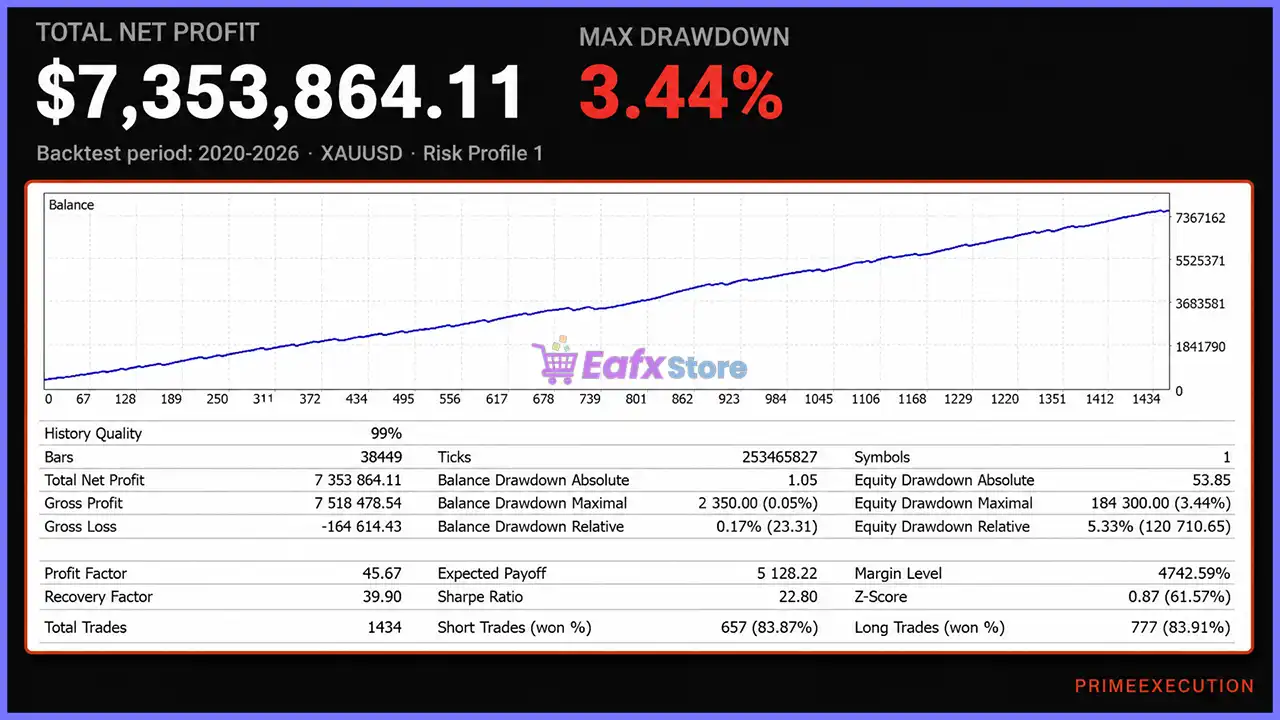
Backtest – Risk Profile 1 (2020–2026)
Prime Execution AI EA Backtest
| Metric | Result |
|---|---|
| History Quality | 99% |
| Test Period | 2020–2026 |
| Total Net Profit | $7,353,864.11 |
| Maximum Drawdown | 3.44% |
| Profit Factor | 45.67 |
| Recovery Factor | 39.90 |
| Total Trades | 1,434 |
| Winning Trades | ≈84% |
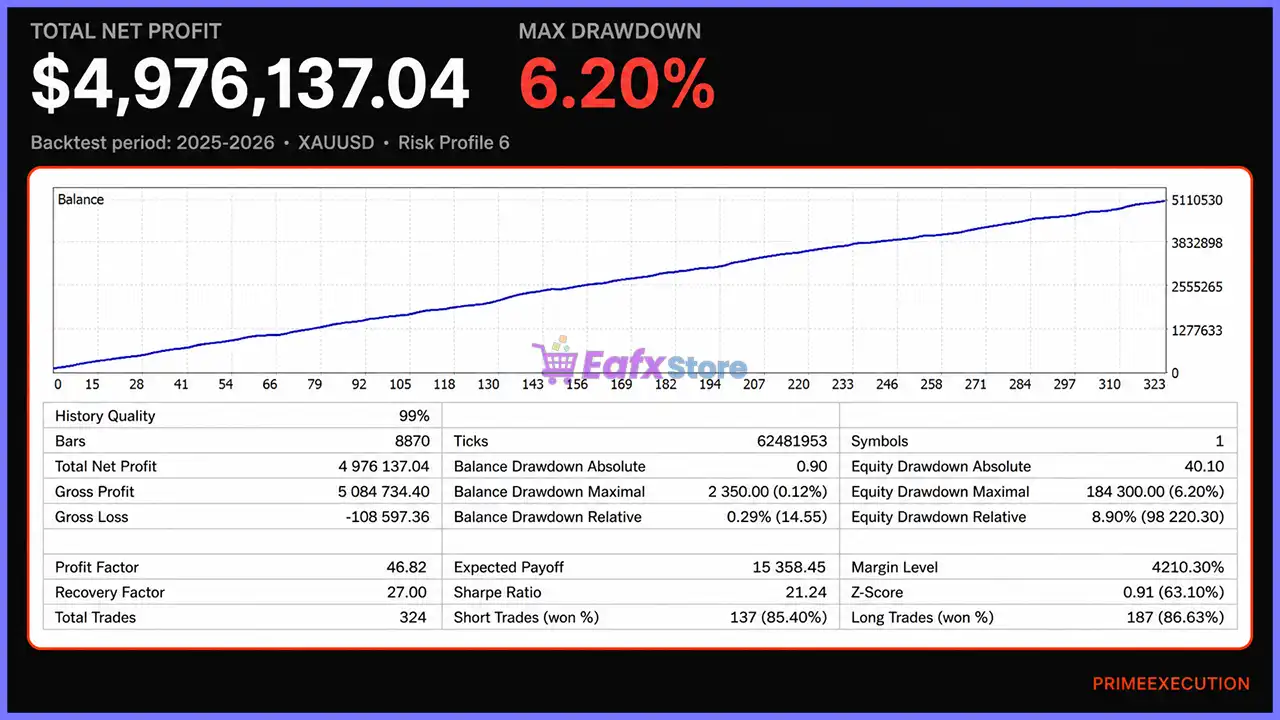
Backtest – Risk Profile 6 (2025–2026)
Prime Execution AI EA MT5 Backtest
| Metric | Result |
|---|---|
| History Quality | 99% |
| Test Period | 2025–2026 |
| Total Net Profit | $4,976,137.04 |
| Maximum Drawdown | 6.20% |
| Profit Factor | 46.82 |
| Recovery Factor | 27.00 |
| Total Trades | 324 |
| Winning Trades | ≈86% |
Performance Analysis
Across multiple historical tests, Prime Execution AI EA demonstrates outstanding consistency with high-quality modeling, strong Profit Factors, excellent Recovery Factors, and remarkably low drawdowns.
The availability of different risk profiles allows traders to balance growth potential with their preferred level of capital protection.
What Real Users Are Saying (User Reviews)
Customer feedback highlights the EA’s disciplined execution, stable trading behavior, and responsive support.
⭐⭐⭐⭐⭐ Xavierpla
“Praised the clean entries, balanced risk management, easy setup, and consistent trading approach. Rated it 10/10.”
⭐⭐⭐⭐⭐ RipleHT
“Impressed by the precise entries, attractive risk-to-reward ratio, and strong early live performance. Recommended the EA after initial testing.”
⭐⭐⭐⭐⭐ MotodorEA
“Reported a profitable first trade and expressed confidence in both the live signal and historical backtest results.”
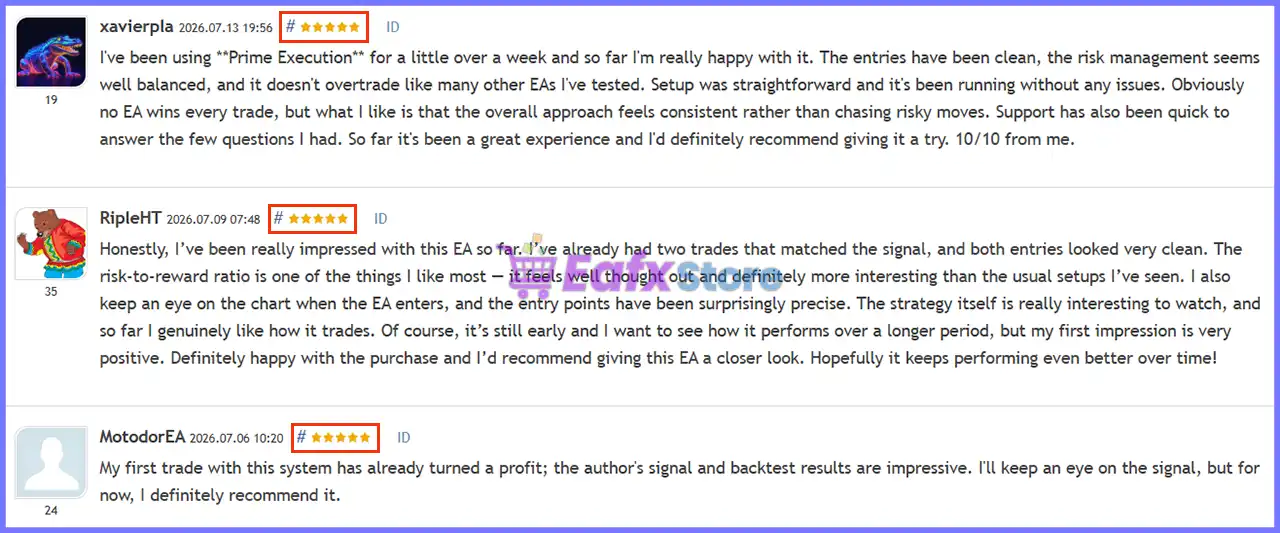
User reviews of Prime Execution AI EA
Why Prime Execution AI EA Stands Out
Complete Automation
Handles every stage of trading without requiring manual intervention.
Execution First Philosophy
Only trades when both market conditions and execution quality meet internal requirements.
Gold Specialist
Designed exclusively for XAUUSD instead of attempting to trade multiple unrelated instruments.
Intelligent Risk Profiles
Supports multiple risk levels while automatically adapting position sizes.
Minimal User Configuration
Users simply install the EA, select a risk profile, and enable automated trading.
Professional Execution HUD
Provides real-time market information without encouraging manual interference.
Risk Management Features
Prime Execution AI EA incorporates multiple protection layers designed to preserve trading discipline.
Automatic Position Sizing
Adjusts lot sizes according to account balance and selected risk profile.
Adaptive Trade Management
Continuously monitors open positions using dynamic trailing logic.
Spread Protection
Avoids opening trades during abnormal spread conditions.
Slippage Control
Reduces poor-quality trade executions during volatile markets.
Optional News Filter
Can suspend new entries around major economic events.
Prop Firm Mode
Additional controls for traders operating under proprietary trading firm restrictions.
Recommended Trading Conditions
For the best performance, the developer recommends:
| Features | Type |
|---|---|
| Trading platform | MetaTrader 5 (MT5) |
| Time frames | H1 (60 minute chart) |
| Currency pairs | XAUUSD (Gold) |
| Minimum / Recommended deposit | $200 |
| Minimum / Recommended leverage | 1:100 or higher |
| Type of account | Any |
| Additional services | Unlock and Decompile |
| Recommended brokers | Exness Broker, Icmarkets Broker |
| Recommended VPS | MyfxVPS.com ( Blue VPS, Golden VPS). Lowest Latency, 2 week Free Trial, 100% Free for 12-18 Months. |
Product Download Package?
The download package of the product suite includes:
 Experts: Prime Execution AI EA.ex5
 Reviewed by David Easton
Weaknesses and Risk Warnings
Although Prime Execution AI EA demonstrates strong historical and live performance, traders should remain aware of several considerations.
Gold Market Volatility
XAUUSD can experience rapid price movements during major economic events.
Broker Execution Differences
Spread, slippage, and execution quality vary across brokers and may affect performance.
Risk Profile Selection
Higher risk profiles increase both potential returns and potential drawdowns.
Historical Performance Disclaimer
Backtests and live statistics do not guarantee future trading results.
Who Should Use Prime Execution AI EA?
Ideal For
🔹 Gold traders
🔹 Fully automated trading enthusiasts
🔹 Busy professionals
🔹 Prop Firm traders
🔹 Beginners seeking simple setup
🔹 Traders prioritizing disciplined execution
Less Suitable For
🔹 Manual scalpers
🔹 Traders who frequently modify EA parameters
🔹 Investors expecting guaranteed profits
Final Verdict
Prime Execution AI EA is a highly specialized Gold trading Expert Advisor built around one clear objective: delivering fully automated, disciplined execution with minimal user involvement. Instead of overwhelming traders with endless configuration options, it focuses on intelligent automation, adaptive risk management and execution quality.
Supported by a 273.15% verified live growth over 19 weeks, extremely low 1.9% maximum drawdown, strong historical backtests across multiple risk profiles, and positive early user feedback, Prime Execution AI EA stands out as a compelling solution for traders seeking a professional XAUUSD automation system.
🔢 Prime Execution AI EA Settings Guide – Complete Parameter Explanation
Prime Execution AI EA is a professional automated trading Expert Advisor built for precision execution, intelligent money management, advanced trade protection and premium chart visualization.
The EA combines automated lot calculation, exposure control, ATR-based trade management, economic news filtering, prop firm compatibility, and a highly customizable visual HUD. Its extensive settings allow traders to optimize execution quality, risk exposure, and chart presentation for both live trading and analysis.
Prime Execution AI EA Settings
🔢 Installation Panel Parameters
Below are the details of the parameters in the advisor’s trading system settings table:
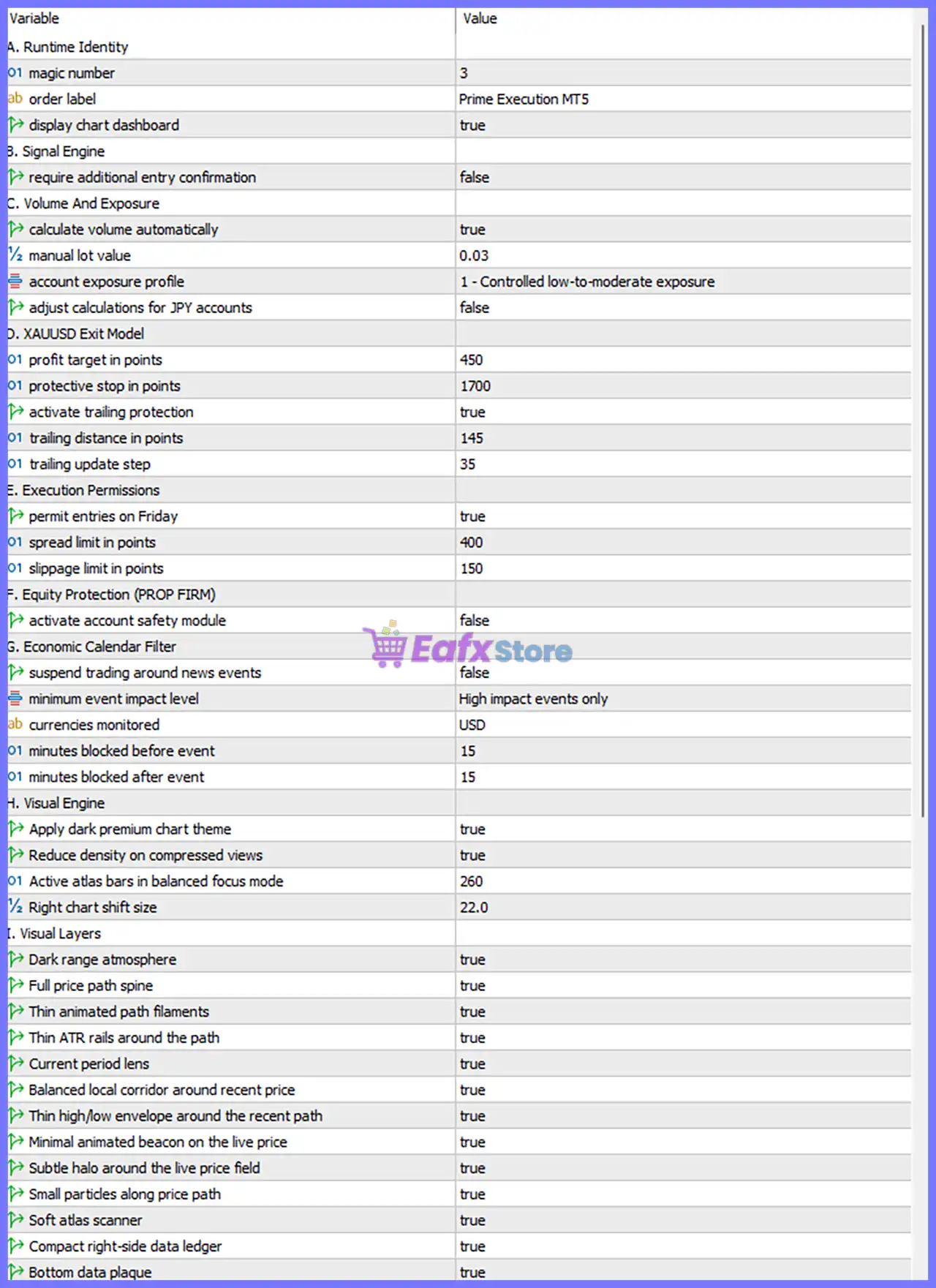
Prime Execution AI EA Settings Panel
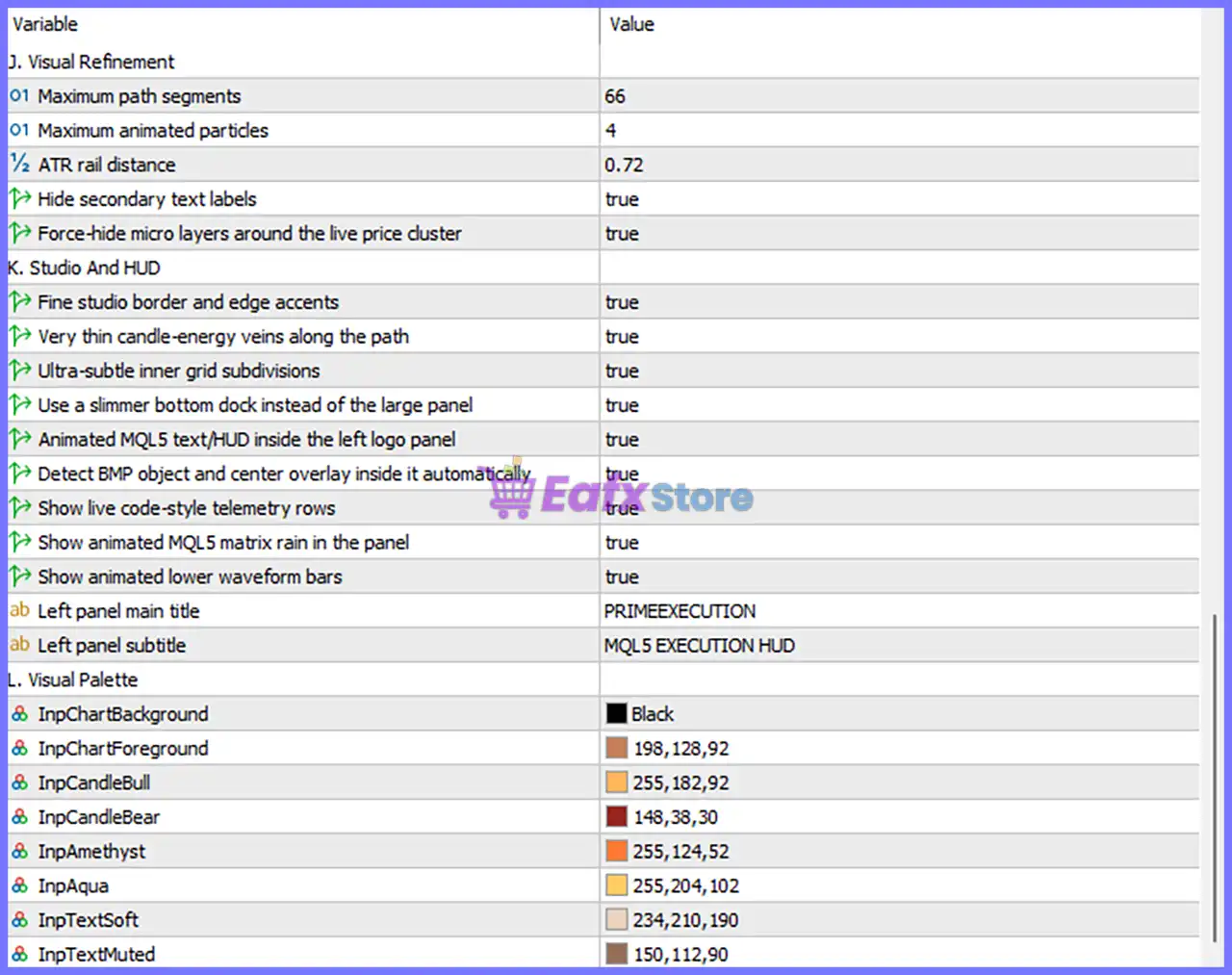
Prime Execution AI EA MT5 Settings Panel
🔄 A. Runtime Identity
🔹 Magic Number = 3 – Unique identifier assigned to all trades opened by Prime Execution AI EA, allowing independent trade management.
🔹 Order Label = Prime Execution MT5 – Adds the custom label “Prime Execution MT5” to every executed trade.
🔹 Display Chart Dashboard = true – Displays the EA dashboard directly on the trading chart.
🔄 B. Signal Engine
🔹 Require Additional Entry Confirmation = false – Disables secondary confirmation before opening a trade, allowing signals to execute immediately.
🔄 C. Volume And Exposure
🔹 Calculate Volume Automatically = true – Enables automatic lot size calculation according to the selected exposure profile.
🔹 Manual Lot Value = 0.03 – Uses a fixed lot size of 0.03 lots when automatic lot calculation is disabled.
🔹 Account Exposure Profile = 1 – Controlled low-to-moderate exposure – Uses Profile 1, designed for controlled low-to-moderate account risk.
🔹 Adjust Calculations for JPY Accounts = false – Disables special calculation adjustments for Japanese Yen denominated accounts.
🔄 D. XAUUSD Exit Model
🔹 Profit Target in Points = 450 – Sets the Take Profit target to 450 points.
🔹 Protective Stop in Points = 1700 – Sets the initial Stop Loss distance to 1700 points.
🔹 Activate Trailing Protection = true – Enables automatic trailing Stop Loss management.
🔹 Trailing Distance in Points = 145 – Maintains a trailing Stop Loss distance of 145 points.
🔹 Trailing Update Step = 35 – Updates the trailing Stop Loss every 35 points of favorable price movement.
🔄 E. Execution Permissions
🔹 Permit Entries on Friday = true – Allows the EA to continue opening new trades on Fridays.
🔹 Spread Limit in Points = 400 – Prevents new entries whenever the spread exceeds 400 points.
🔹 Slippage Limit in Points = 150 – Allows a maximum execution slippage of 150 points.
🔄 F. Equity Protection (PROP FIRM)
🔹 Activate Account Safety Module = false – Disables the built-in prop firm equity protection system.
🔄 G. Economic Calendar Filter
🔹 Suspend Trading Around News Events = false – News filtering is disabled, allowing trading during scheduled economic events.
🔹 Minimum Event Impact Level = High impact events only – If the news filter is enabled, only High-impact events are monitored.
🔹 Currencies Monitored = USD – Tracks economic news related to the USD currency.
🔹 Minutes Blocked Before Event = 15 – If enabled, trading stops 15 minutes before a monitored news event.
🔹 Minutes Blocked After Event = 15 – Trading resumes 15 minutes after the news release.
🔄 H. Visual Engine
🔹 Apply Dark Premium Chart Theme = true – Enables the premium dark visual theme.
🔹 Reduce Density on Compressed Views = true – Simplifies visual elements when the chart is compressed.
🔹 Active Atlas Bars in Balanced Focus Mode = 260 – Displays 260 active bars in balanced visualization mode.
🔹 Right Chart Shift Size = 22.0 – Reserves 22.0 units of chart space on the right side.
🔄 I. Visual Layers
🔹 Dark Range Atmosphere = true – Enables a dark background atmosphere.
🔹 Full Price Path Spine = true – Displays the complete animated price path.
🔹 Thin Animated Path Filaments = true – Shows thin animated price path effects.
🔹 Thin ATR Rails Around the Path = true – Displays ATR-based guide rails around the price path.
🔹 Current Period Lens = true – Highlights the currently active trading period.
🔹 Balanced Local Corridor Around Recent Price = true – Displays a balanced price corridor around recent market activity.
🔹 Thin High/Low Envelope Around the Recent Path = true – Draws a thin High/Low envelope around the latest price movement.
🔹 Minimal Animated Beacon on the Live Price = true – Displays a subtle animated beacon on the current price.
🔹 Subtle Halo Around the Live Price Field = true – Adds a soft glow around the current market price.
🔹 Small Particles Along Price Path = true – Displays decorative particle effects along the price path.
🔹 Soft Atlas Scanner = true – Enables animated scanning effects.
🔹 Compact Right-side Data Ledger = true – Shows a compact market information panel on the right.
🔹 Bottom Data Plaque = true – Displays the lower information panel.
🔄 J. Visual Refinement
🔹 Maximum Path Segments = 66 – Limits animated path rendering to 66 segments.
🔹 Maximum Animated Particles = 4 – Displays up to 4 animated particles simultaneously.
🔹 ATR Rail Distance = 0.72 – Sets the ATR guide rail distance to 0.72.
🔹 Hide Secondary Text Labels = true – Hides secondary information labels for a cleaner interface.
🔹 Force-hide Micro Layers Around the Live Price Cluster = true – Removes additional micro-layer graphics around the live price.
🔄 K. Studio And HUD
🔹 Fine Studio Border and Edge Accents = true – Enables premium border styling.
🔹 Very Thin Candle-energy Veins Along the Path = true – Displays subtle candle energy effects.
🔹 Ultra-subtle Inner Grid Subdivisions = true – Shows fine internal chart grid lines.
🔹 Use a Slimmer Bottom Dock Instead of the Large Panel = true – Replaces the larger bottom panel with a compact dock.
🔹 Animated MQL5 Text/HUD Inside the Left Logo Panel = true – Displays animated MQL5 branding inside the logo panel.
🔹 Detect BMP Object and Center Overlay Inside It Automatically = true – Automatically centers overlays inside BMP objects.
🔹 Show Live Code-style Telemetry Rows = true – Displays animated telemetry information.
🔹 Show Animated MQL5 Matrix Rain in the Panel = true – Enables Matrix-style animation effects.
🔹 Show Animated Lower Waveform Bars = true – Displays animated waveform indicators.
🔹 Left Panel Main Title = PRIMEEXECUTION – Sets the dashboard main title to PRIMEEXECUTION.
🔹 Left Panel Subtitle = MQL5 EXECUTION HUD – Sets the dashboard subtitle to MQL5 EXECUTION HUD.
🔄 L. Visual Palette
🔹 InpChartBackground = Black – Sets the chart background color to Black.
🔹 InpChartForeground = 198,128,92 – Uses RGB 198,128,92 for foreground elements.
🔹 InpCandleBull = 255,182,92 – Uses RGB 255,182,92 for bullish candles.
🔹 InpCandleBear = 148,38,30 – Uses RGB 148,38,30 for bearish candles.
🔹 InpAmethyst = 255,124,52 – Sets the accent color to RGB 255,124,52.
🔹 InpAqua = 255,204,102 – Uses RGB 255,204,102 for Aqua-themed elements.
🔹 InpTextSoft = 234,210,190 – Uses RGB 234,210,190 for soft text.
🔹 InpTextMuted = 150,112,90 – Uses RGB 150,112,90 for muted text.
🔢 Conclusion
Prime Execution AI EA combines intelligent trade execution, automatic money management, comprehensive execution protection, economic calendar filtering, and one of the most advanced visual interfaces available for MetaTrader 5.
With configurable exposure profiles, trailing protection, spread controls, and a fully customizable HUD, the EA allows traders to optimize both trading performance and chart usability. Properly configuring these settings helps improve execution quality, enhance risk management, and create a professional trading environment tailored to individual preferences.
🔢 FAQs
❓ What is the purpose of the Account Exposure Profile?
The Account Exposure Profile = 1 (Controlled low-to-moderate exposure) automatically adjusts position sizing to maintain conservative and consistent account risk.
❓ Can I use a fixed lot size instead of automatic volume calculation?
Yes. Disable Calculate Volume Automatically, and the EA will use the configured Manual Lot Value = 0.03 lots.
❓ How does the Trailing Protection feature work?
When enabled, the EA starts managing profitable trades with a 145-point trailing distance, updating the Stop Loss every 35 points as the market moves in your favor.
❓ Should I enable the Account Safety Module for Prop Firm accounts?
Yes. The Activate Account Safety Module is designed to provide additional equity protection for funded or proprietary trading accounts. In the current configuration, it is disabled (false).
❓ Why does Prime Execution AI EA include so many visual settings?
The extensive Visual Engine, HUD, and Visual Palette options allow traders to fully customize the chart appearance, improve readability, monitor live trading information, and create a professional workspace without affecting the EA’s trading logic.
User Reviews
Only logged in customers who have purchased this product may leave a review.
❓ What markets is Prime Execution AI EA designed to trade?
Prime Execution AI EA is built exclusively for XAUUSD on MetaTrader 5, using automated execution and adaptive trade management tailored to Gold market behavior.
❓ Does Prime Execution AI EA require manual trading?
Prime Execution AI EA handles analysis, position sizing, execution, and trade management automatically, allowing users to trade without manual intervention.
❓ How does Prime Execution AI EA manage trading risk?
Prime Execution AI EA lets you choose a risk profile, then automatically adjusts position sizing and trade management to match your selected exposure level.
❓ Can Prime Execution AI EA filter poor market conditions?
Yes. Prime Execution AI EA uses spread, slippage, and execution-quality filters to avoid opening trades when market conditions become unfavorable.
❓ Does Prime Execution AI EA include a news filter?
Yes. Prime Execution AI EA offers an optional news filter that can pause new entries during major economic events to reduce exposure to extreme volatility.
❓ What timeframe should I use with Prime Execution AI EA?
Prime Execution AI EA is optimized for the H1 timeframe on XAUUSD, providing a balanced approach between trade quality and market monitoring.
❓ Is Prime Execution AI EA suitable for prop firm accounts?
Yes. Prime Execution AI EA includes a dedicated Prop Firm Mode with configurable risk controls to help traders comply with common funding rules.
❓ Do I need to optimize many settings in Prime Execution AI EA?
No. Prime Execution AI EA is designed with preconfigured strategy logic, requiring only a suitable risk profile instead of dozens of complex settings.
❓ What are the minimum requirements for Prime Execution AI EA?
Prime Execution AI EA recommends MetaTrader 5, XAUUSD H1, a minimum $200 deposit, 1:100 leverage or higher, and a VPS for stable operation.
-
 Original price was: $500.00.$249.00Current price is: $249.00.
 -
 Original price was: $888.00.$249.00Current price is: $249.00.
 -
 Original price was: $439.00.$249.00Current price is: $249.00.
 -
 Original price was: $9,999.00.$249.00Current price is: $249.00.
-
 1Original price was: $500.00.$249.00Current price is: $249.00.
 -
 3Original price was: $199.00.$159.00Current price is: $159.00.
 -
 2Original price was: $990.00.$599.00Current price is: $599.00.
 -
 6Original price was: $1,000.00.$599.00Current price is: $599.00.
There are no reviews yet.