


PZ Day Trading EA MT5 Settings & Parameters Guide
PZ Day Trading EA MT5 is an automated day-trading system designed to identify market ranges and manage trades with configurable entry and exit conditions. Its Inputs provide control over trading direction, range detection, gap protection, break-even management, partial closing, trailing stops, trading sessions, money management, and NFA/FIFO compliance. The supplied configuration also allows traders to define specific trading days, session coverage, lot-sizing behavior, and execution parameters.
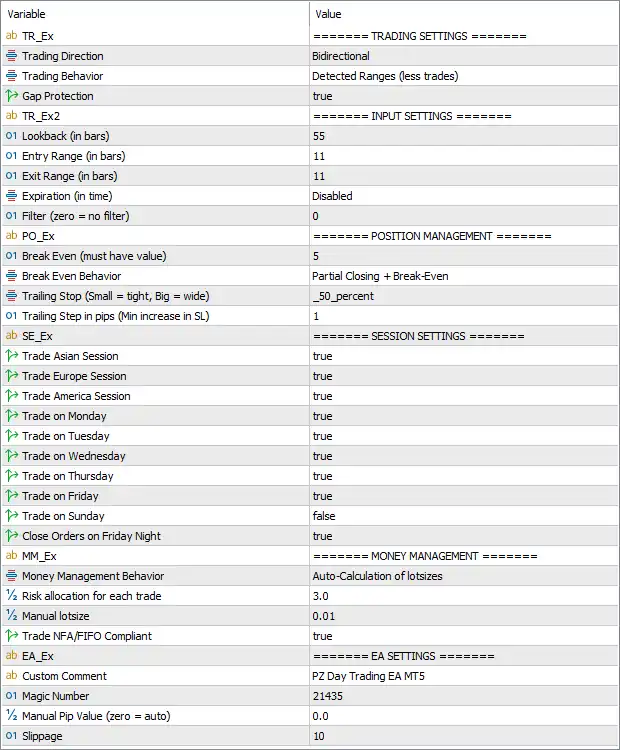
Trading Settings
🔹 Trading Direction — Bidirectional: Allows both Buy and Sell trades, enabling the EA to operate in either market direction.
🔹 Trading Behavior — Detected Ranges (less trades): Configures the EA to focus on detected market ranges, with the setting specifically described as generating less trades.
🔹 Gap Protection — true: Enables Gap Protection, allowing the EA to apply its gap-related protection logic when evaluating trading conditions.
Input Settings
🔹 Lookback (in bars) — 55: Sets the historical analysis window to 55 bars, which the EA uses when evaluating the relevant market structure or range conditions.
🔹 Entry Range (in bars) — 11: Sets the entry-analysis range to 11 bars, defining the configured period used for identifying potential entry conditions.
🔹 Exit Range (in bars) — 11: Sets the exit-analysis range to 11 bars, controlling the configured period used for evaluating exit conditions.
🔹 Expiration (in time) — Disabled: Disables time-based expiration for the EA's applicable trading signals or pending conditions.
🔹 Filter (zero = no filter) — 0: Sets the filter value to 0. According to the parameter description, 0 means no filter, so no additional filter is applied through this setting.
Position Management
🔹 Break Even (must have value) — 5: Sets the Break-Even parameter to 5, defining the configured threshold required for the break-even management function.
🔹 Break Even behavior — Partial Closing + Break-Even: Configures the EA to combine Partial Closing + Break-Even as its break-even management behavior.
🔹 Trailing Stop (Small = tight, Big = wide) — _50_percent: Sets the Trailing Stop mode to _50_percent, defining the configured trailing-stop behavior as a 50% setting.
🔹 Trailing Stop in pips (Max increase in SL) — 1: Sets the trailing-stop increment or maximum Stop Loss increase parameter to 1 pip.
Session Settings
🔹 Trade Asian Session — true: Enables trading during the Asian Session.
🔹 Trade Europe Session — true: Enables trading during the European Session.
🔹 Trade America Session — true: Enables trading during the American Session.
🔹 Trade on Monday — true: Allows the EA to trade on Monday.
🔹 Trade on Tuesday — true: Allows the EA to trade on Tuesday.
🔹 Trade on Wednesday — true: Allows the EA to trade on Wednesday.
🔹 Trade on Thursday — true: Allows the EA to trade on Thursday.
🔹 Trade on Friday — true: Allows the EA to trade on Friday.
🔹 Trade on Sunday — false: Disables trading on Sunday.
🔹 Close Orders on Friday Night — true: Enables automatic closing of applicable open orders on Friday night, helping prevent positions from remaining open over the weekend.
Money Management
🔹 Money Management Behavior — Auto-Calculation of lotsizes: Selects Auto-Calculation of lotsizes, allowing the EA to automatically calculate position volume according to its internal money-management logic.
🔹 Risk allocation for each trade — 3.0: Sets the risk allocation to 3.0 for each trade when automatic lot-size calculation is active.
🔹 Manual lotsize — 0.01: Sets the manual lot size to 0.01 lots, which can be used when manual lot sizing is selected.
🔹 Trade NFA/FIFO Compliant — true: Enables NFA/FIFO-compliant trading behavior, allowing the EA to apply its configured handling for regulatory requirements related to order management.
EA Settings
🔹 Custom Comment — PZ Day Trading EA MT5: Sets the custom trade comment to "PZ Day Trading EA MT5", making EA-generated positions easier to identify.
🔹 Magic Number — 21435: Assigns 21435 as the EA's unique Magic Number for identifying and managing its trades.
🔹 Manual Pip Value (zero = auto) — 0.0: Sets the manual pip value to 0.0. Because zero = auto, the EA is configured to automatically determine the pip value.
🔹 Slippage — 10: Sets the maximum configured execution slippage to 10, according to the EA's internal slippage-unit calculation.
Conclusion
The supplied PZ Day Trading EA MT5 configuration is set to Bidirectional trading, allowing both Buy and Sell operations, while the selected behavior is Detected Ranges (less trades). The EA analyzes 55 bars through the Lookback setting, with both Entry Range = 11 bars and Exit Range = 11 bars. Gap Protection is enabled, while Expiration is Disabled and Filter = 0, meaning no additional filter is applied through that parameter.
Position management uses Break Even = 5 with Partial Closing + Break-Even behavior. The Trailing Stop is configured as _50_percent, while the trailing-stop pip parameter is 1.
All three major sessions—Asian, Europe, and America—are enabled. Trading is permitted from Monday through Friday, while Sunday trading is disabled. Close Orders on Friday Night = true provides an additional weekend-position management feature.
For money management, the EA uses Auto-Calculation of lotsizes with Risk allocation for each trade = 3.0. The manual lot size remains 0.01, and NFA/FIFO Compliance is enabled. Finally, trades use the custom comment "PZ Day Trading EA MT5", Magic Number = 21435, automatic pip-value calculation through Manual Pip Value = 0.0, and Slippage = 10.


