


Quantum King MT4 Settings Explained – Complete Configuration & Optimization Guide
Quantum King MT4 is a fully automated Forex Expert Advisor (EA) optimized for the AUDCAD pair on the M5 timeframe.
The EA is designed with advanced money management, spread protection, adjustable grid controls, and trading session filters to help traders maintain stable performance in different market conditions.
With built-in drawdown protection and automated lot sizing, Quantum King MT4 is suitable for both beginner and experienced MetaTrader 4 users seeking a structured automated trading system.
Quantum King MT4 Full Settings Explanation
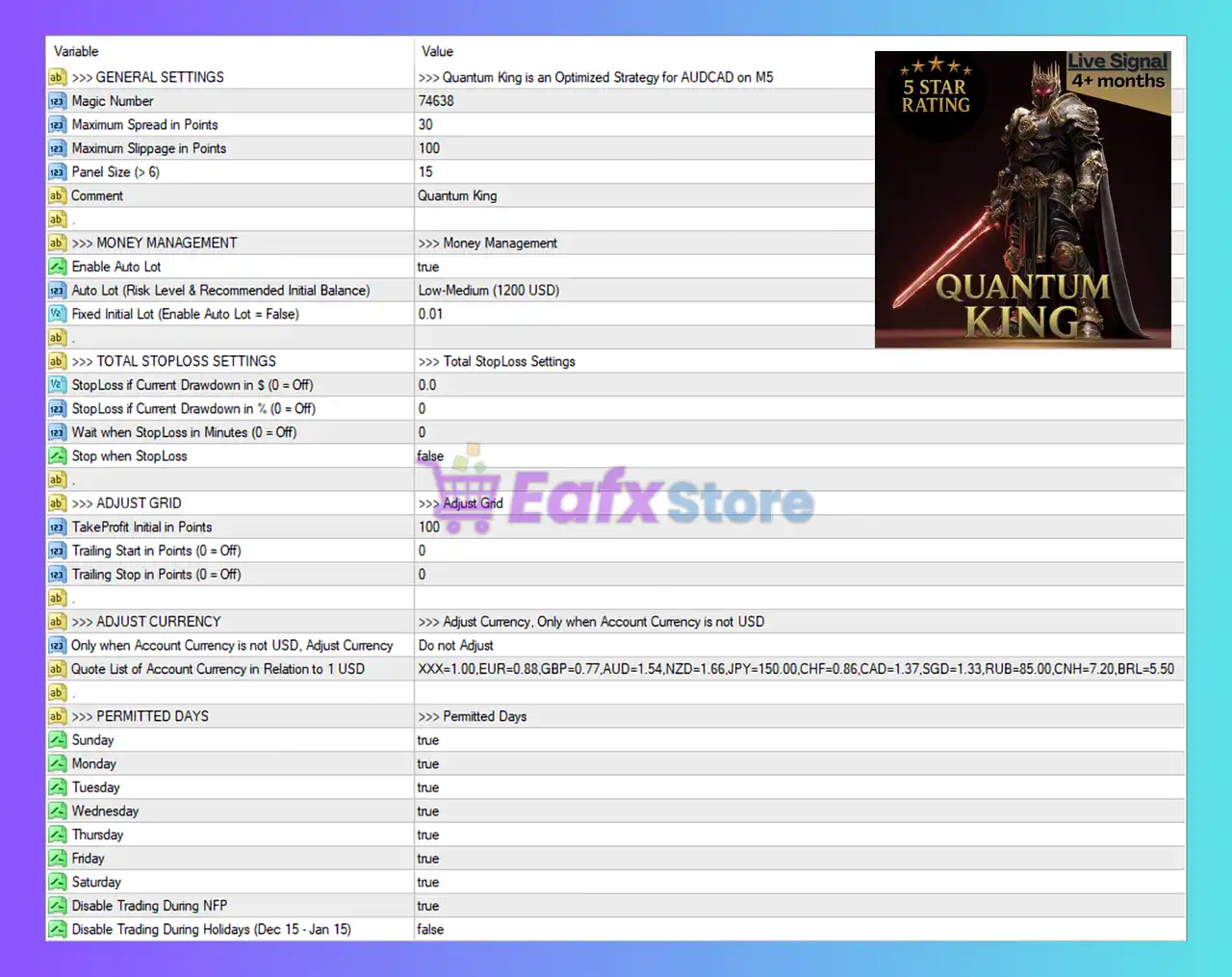
Below are the details of the parameters in the advisor’s trading system settings table:
General Settings
🔹 Magic Number = 74638: Unique Magic Number used to identify and manage all trades opened by Quantum King MT4.
🔹 Maximum Spread in Points = 30: Sets the maximum allowed spread to 30 points before the EA can open trades.
🔹 Maximum Slippage in Points = 100: Defines the maximum slippage tolerance at 100 points during order execution.
🔹 Panel Size (> 6) = 15: Sets the dashboard or information panel size to 15.
🔹 Comment = Quantum King: Adds the trade comment label Quantum King to EA orders.
Money Management Settings
🔹 Enable Auto Lot = true: Enables automatic lot size calculation based on account balance and risk settings.
🔹 Auto Lot (Risk Level & Recommended Initial Balance) = Low-Medium (1200 USD): Uses the Low-Medium risk profile optimized for an initial balance of 1200 USD.
🔹 Fixed Initial Lot (Enable Auto Lot = False) = 0.01: Sets the fixed starting lot size to 0.01 when Auto Lot is disabled.
Total StopLoss Settings
🔹 StopLoss if Current Drawdown in $ (0 = Off) = 0.0: Disables dollar-based total drawdown stop loss protection.
🔹 StopLoss if Current Drawdown in % (0 = Off) = 0: Disables percentage-based total drawdown stop loss protection.
🔹 Wait when StopLoss in Minutes (0 = Off) = 0: No waiting period after stop loss activation because the feature is disabled.
🔹 Stop when StopLoss = false: The EA will continue trading even after Stop Loss conditions are reached.
Adjust Grid Settings
🔹 TakeProfit Initial in Points = 100: Sets the initial Take Profit target to 100 points.
🔹 Trailing Start in Points (0 = Off) = 0: Trailing stop activation is disabled because the value is 0.
🔹 Trailing Stop in Points (0 = Off) = 0: Trailing stop distance is disabled with value 0.
Adjust Currency Settings
🔹 Only when Account Currency is not USD, Adjust Currency = Do not Adjust: Disables automatic currency adjustment for non-USD accounts.
🔹 Quote List of Account Currency in Relation to 1 USD = XXX=1.00, EUR=0.88, GBP=0.77, AUD=1.54, NZD=1.66, JPY=150.00, CHF=0.86, CAD=1.37, SGD=1.33, RUB=85.00, CNH=7.20, BRL=5.50: Defines currency conversion reference values relative to 1 USD.
Permitted Trading Days Settings
🔹 Sunday = true: Enables trading on Sunday.
🔹 Monday = true: Enables trading on Monday.
🔹 Tuesday = true: Enables trading on Tuesday.
🔹 Wednesday = true: Enables trading on Wednesday.
🔹 Thursday = true: Enables trading on Thursday.
🔹 Friday = true: Enables trading on Friday.
🔹 Saturday = true: Enables trading on Saturday.
🔹 Disable Trading During NFP = true: Prevents trading during Non-Farm Payroll (NFP) news events.
🔹 Disable Trading During Holidays (Dec 15 - Jan 15) = false: Holiday trading restriction is disabled between Dec 15 and Jan 15.
Conclusion
Quantum King MT4 is a flexible and risk-aware automated trading system optimized for AUDCAD trading on the M5 timeframe. The EA combines spread filtering, auto lot sizing, drawdown protection controls and trading day management to create a balanced trading environment.
With configurable grid settings and currency adjustment features, Quantum King MT4 offers traders strong customization while maintaining a user-friendly setup process.
FAQs
❓ What is Quantum King MT4?
Quantum King MT4 is an automated Forex Expert Advisor optimized for AUDCAD trading on MetaTrader 4.
❓ Does Quantum King MT4 support automatic lot sizing?
Yes, the EA includes an Auto Lot feature with configurable risk levels.
❓ Can Quantum King MT4 avoid trading during news events?
Yes, the EA can disable trading during Non-Farm Payroll (NFP) news releases.
❓ What does the Magic Number do in Quantum King MT4?
The Magic Number uniquely identifies trades opened by the EA for management and tracking.
❓ Can I enable trailing stop in Quantum King MT4?
Yes, trailing stop functionality is available through the trailing start and trailing stop settings.


