


Quantum Bitcoin EA MT5 – Complete Settings Guide & Explanation
Quantum Bitcoin EA is an advanced automated cryptocurrency trading Expert Advisor (EA) designed for the MetaTrader 5 (MT5) platform.
The EA is specifically optimized for Bitcoin trading and integrates automatic lot sizing, grid trading systems, break-even management, time filters and advanced money management tools.
With flexible strategy customization and intelligent risk controls, Quantum Bitcoin EA MT5 is suitable for traders seeking automated BTC trading with professional-level trade management.
Installation Panel Parameters
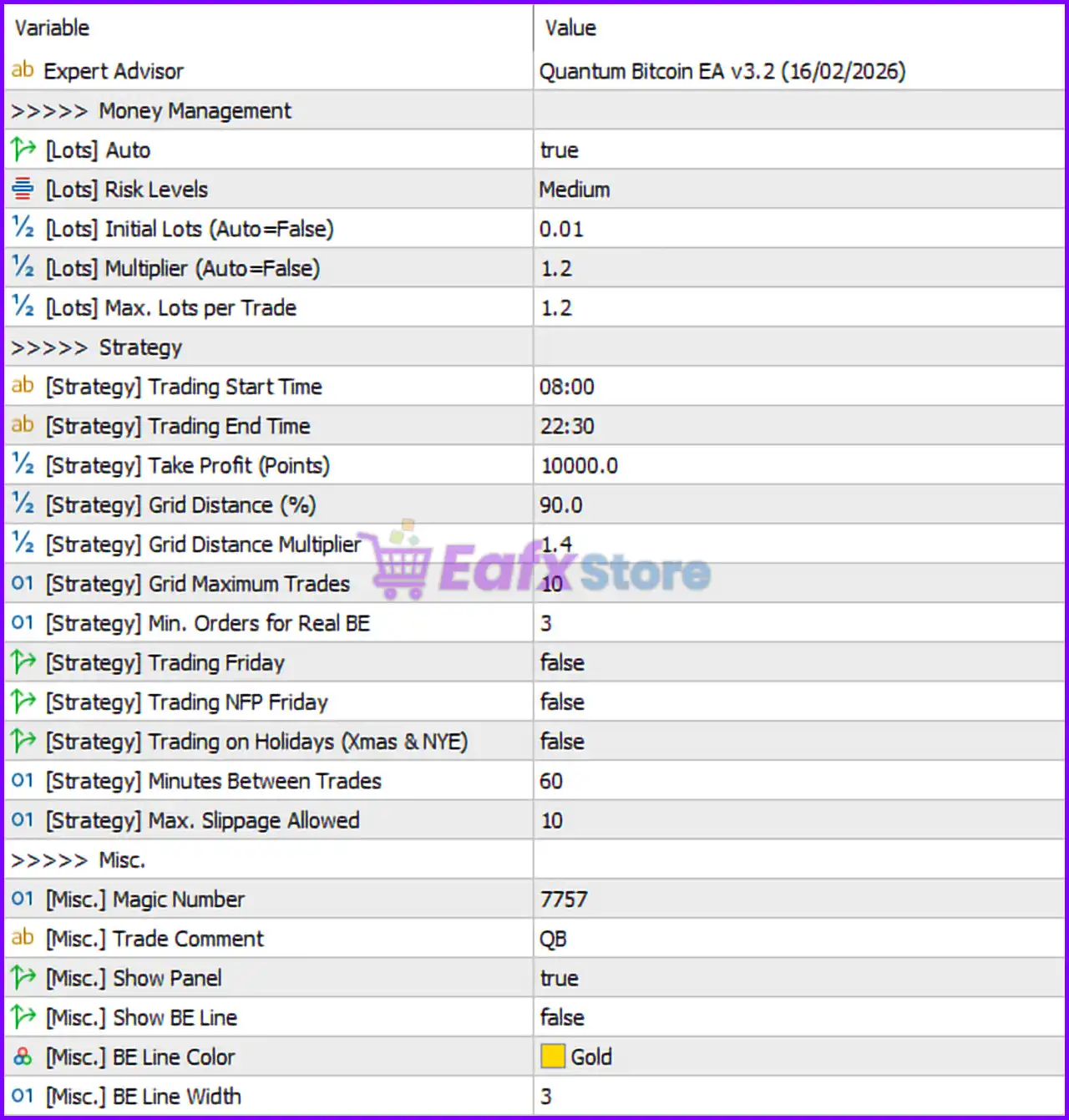
Below are the details of the parameters in the advisor’s trading system settings table:
Money Management Settings
🔹 >>>>>> Money Management — Main section header for lot sizing and risk management settings.
🔹 [Lots] Auto = true — Enables automatic lot size calculation based on risk settings.
🔹 [Lots] Risk Levels = Medium — Uses the Medium automatic risk profile for trade sizing.
🔹 [Lots] Initial Lots (Auto=False) = 0.01 — Sets the fixed starting lot size to 0.01 when automatic lot sizing is disabled.
🔹 [Lots] Multiplier (Auto=False) = 1.2 — Uses a 1.2 lot multiplier when fixed lot mode is active.
🔹 [Lots] Max. Lots per Trade = 1.2 — Maximum lot size allowed per individual trade is 1.2 lots.
Strategy Settings
🔹 >>>>>> Strategy — Main section header for trade strategy and execution settings.
🔹 [Strategy] Trading Start Time = 08:00 — Trading operations begin at 08:00 broker/server time.
🔹 [Strategy] Trading End Time = 22:30 — Trading operations stop at 22:30 broker/server time.
🔹 [Strategy] Take Profit (Points) = 10000.0 — Sets the Take profit target at 10000.0 points.
🔹 [Strategy] Grid Distance (%) = 90.0 — Distance between grid trades is calculated using 90.0% spacing logic.
🔹 [Strategy] Grid Distance Multiplier = 1.4 — Multiplies the grid spacing distance by 1.4 for subsequent trades.
🔹 [Strategy] Grid Maximum Trades = 10 — Maximum number of grid trades allowed simultaneously is 10.
🔹 [Strategy] Min. Orders for Real BE = 3 — Requires at least 3 orders before activating real Break-Even management.
🔹 [Strategy] Trading Friday = false — Disables trading activity on Fridays.
🔹 [Strategy] Trading NFP Friday = false — Disables trading during Non-Farm Payroll Fridays.
🔹 [Strategy] Trading on Holidays (Xmas & NYE) = false — Disables trading during Christmas and New Year holiday periods.
🔹 [Strategy] Minutes Between Trades = 60 — Requires a minimum delay of 60 minutes between new trades.
🔹 [Strategy] Max. Slippage Allowed = 10 — Maximum slippage allowed during order execution is 10 points.
Miscellaneous Settings
🔹 >>>>>> Misc. — Main section header for additional EA display and identification settings.
🔹 [Misc.] Magic Number = 7757 — Unique identification number used by the EA to manage and track trades.
🔹 [Misc.] Trade Comment = QB — Adds the comment “QB” to all trades opened by the EA.
🔹 [Misc.] Show Panel = true — Displays the EA information panel directly on the chart.
🔹 [Misc.] Show BE Line = false — Disables the display of the break-even line on the chart.
🔹 [Misc.] BE Line Color = Gold — Uses Gold color for the break-even line visualization.
🔹 [Misc.] BE Line Width = 3 — Sets the break-even line thickness to 3.
Conclusion
Quantum Bitcoin EA MT5 is a feature-rich Bitcoin trading Expert Advisor (EA) that combines automatic lot management, intelligent grid trading, break-even protection and advanced scheduling filters into one professional MT5 solution.
With configurable risk levels, holiday protection, and visual trade management tools, the EA is suitable for traders seeking automated cryptocurrency trading with enhanced flexibility and risk control.
FAQs
❓ What is Quantum Bitcoin EA MT5?
Quantum Bitcoin EA MT5 is an automated Bitcoin trading Expert Advisor for MetaTrader 5 that uses grid trading and advanced money management systems.
❓ Does Quantum Bitcoin EA MT5 support automatic lot sizing?
Yes, the EA supports automatic lot calculation with configurable risk levels such as Medium risk mode.
❓ What is the purpose of the Grid Distance setting?
The Grid Distance setting controls the spacing between grid trades to manage trade entries and market exposure.
❓ Can Quantum Bitcoin EA MT5 avoid trading during major news events?
Yes, the EA disables trading during NFP Fridays and holiday periods such as Christmas and New Year.
❓ Does Quantum Bitcoin EA MT5 include break-even management?
Yes, the EA supports real break-even management after a minimum number of open orders is reached.




