


🔢 Spider Gold MT5 – Complete Settings & Parameters Guide
Spider Gold MT5 is a fully automated MetaTrader 5 Expert Advisor designed for gold and forex trading. The EA combines intelligent money management, automatic lot sizing, trailing stop protection, spread filtering, and high-impact news avoidance to help traders manage risk while maximizing trading opportunities. This guide explains every available parameter shown in the Spider Gold MT5 settings panel.

🔢 Spider Gold MT5 Settings Explained
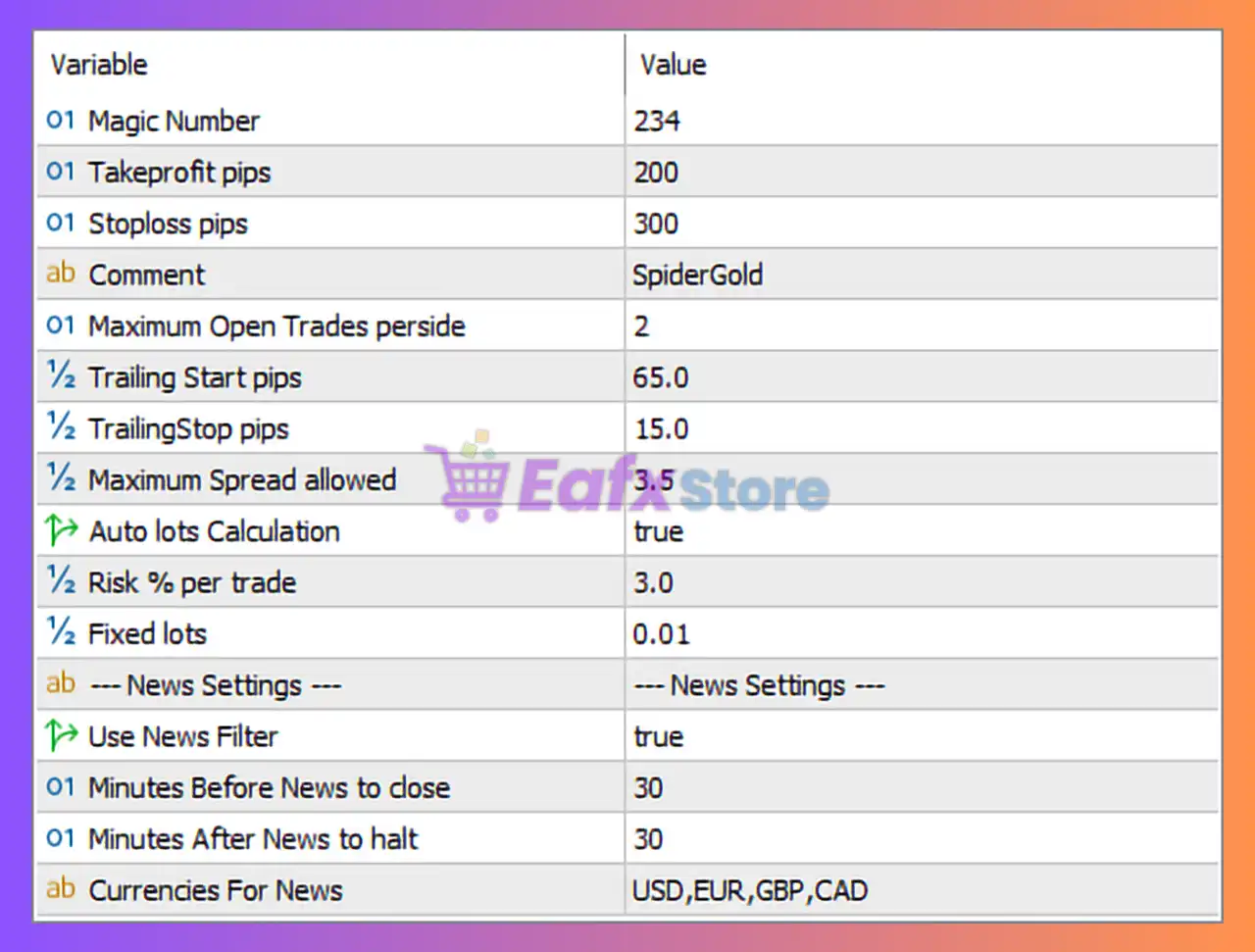
Below are the details of the parameters in the advisor’s trading system settings table:
🔶 General Trading Settings
🔹 Magic Number = 234 — Unique trade identifier used by Spider Gold MT5 to manage and track its own positions independently from other EAs or manual trades.
🔹 Takeprofit pips = 200 — Sets the Take Profit target at 200 pips, automatically closing profitable trades when the target is reached.
🔹 Stoploss pips = 300 — Defines a Stop Loss of 300 pips to limit potential losses on each position.
🔹 Comment = SpiderGold — Custom order comment attached to all trades opened by the EA.
🔹 Maximum Open Trades perside = 2 — Limits the EA to a maximum of 2 open positions per trading direction (buy or sell).
🔶 Trailing Stop Settings
🔹 Trailing Start pips = 65.0 — Activates the trailing stop feature once a trade reaches 65.0 pips in profit.
🔹 TrailingStop pips = 15.0 — Maintains the stop loss 15.0 pips behind the current market price after trailing has started.
🔶 Spread Protection Settings
🔹 Maximum Spread allowed = 3.5 — Prevents the EA from opening new trades when the market spread exceeds 3.5 pips.
🔶 Money Management Settings
🔹 Auto lots Calculation = true — Enables automatic lot size calculation based on account balance and risk settings.
🔹 Risk % per trade = 3.0 — Risks 3.0% of account equity per trade when Auto Lots Calculation is enabled.
🔹 Fixed lots = 0.01 — Defines a fixed trading volume of 0.01 lots when automatic lot sizing is not used.
🔶 News Filter Settings
🔹 Use News Filter = true — Activates the built-in economic news filter to avoid trading during major market events.
🔹 Minutes Before News to close = 30 — The EA closes or avoids trades 30 minutes before scheduled high-impact news releases.
🔹 Minutes After News to halt = 30 — Trading remains paused for 30 minutes after the news event.
🔹 Currencies For News = USD,EUR,GBP,CAD — News filtering is applied to economic events affecting USD, EUR, GBP, and CAD currencies.
🔢 Spider Gold MT5 Configuration Summary
🔹 Magic Number: 234
🔹 Take Profit: 200 pips
🔹 Stop Loss: 300 pips
🔹 Order Comment: SpiderGold
🔹 Maximum Open Trades Per Side: 2
🔹 Trailing Start: 65.0 pips
🔹 Trailing Stop: 15.0 pips
🔹 Maximum Spread Allowed: 3.5 pips
🔹 Auto Lot Calculation: Enabled
🔹 Risk Per Trade: 3.0%
🔹 Fixed Lot Size: 0.01
🔹 News Filter: Enabled
🔹 News Pause Before Event: 30 minutes
🔹 News Pause After Event: 30 minutes
🔹 Filtered Currencies: USD, EUR, GBP, CAD
🔢 Conclusion
Spider Gold MT5 is a risk-controlled automated trading solution that integrates dynamic money management, spread protection, trailing stop technology, and economic news filtering. With a 3.0% risk-per-trade model, 200-pip take profit, 300-pip stop loss, and support for major economic event filtering, the EA provides traders with a structured framework for automated trading while helping reduce exposure during volatile market conditions.
🔢 FAQs
❓ What is Spider Gold MT5?
Spider Gold MT5 is an automated Expert Advisor for MetaTrader 5 that manages entries, exits, risk control, and news filtering automatically.
❓ Does Spider Gold MT5 support automatic lot sizing?
Yes, the EA includes Auto Lots Calculation and uses a Risk % per trade value of 3.0%.
❓ What are the default Take Profit and Stop Loss values?
The default configuration uses a Take Profit of 200 pips and a Stop Loss of 300 pips.
❓ How many trades can Spider Gold MT5 open simultaneously?
The EA allows a maximum of 2 open trades per trading direction.
❓ Does Spider Gold MT5 avoid trading during major news events?
Yes, the built-in news filter pauses trading 30 minutes before and 30 minutes after high-impact news related to USD, EUR, GBP and CAD.



