



🔢 BTC Phantom X EA MT5 – Complete Settings & Parameters Guide
BTC Phantom X EA is an automated cryptocurrency trading Expert Advisor (EA) developed for MetaTrader 5. The EA focuses on systematic risk management, fixed-volume trading, weekday and weekend scheduling controls, stop-loss protection, news filtering capabilities and execution management.
With customizable trading days and flexible risk parameters, BTC Phantom X EA MT5 provides traders with a structured framework for automated Bitcoin trading.

🔢 BTC Phantom X EA MT5 Settings Explained
Below are the details of the parameters in the advisor’s trading system settings table:
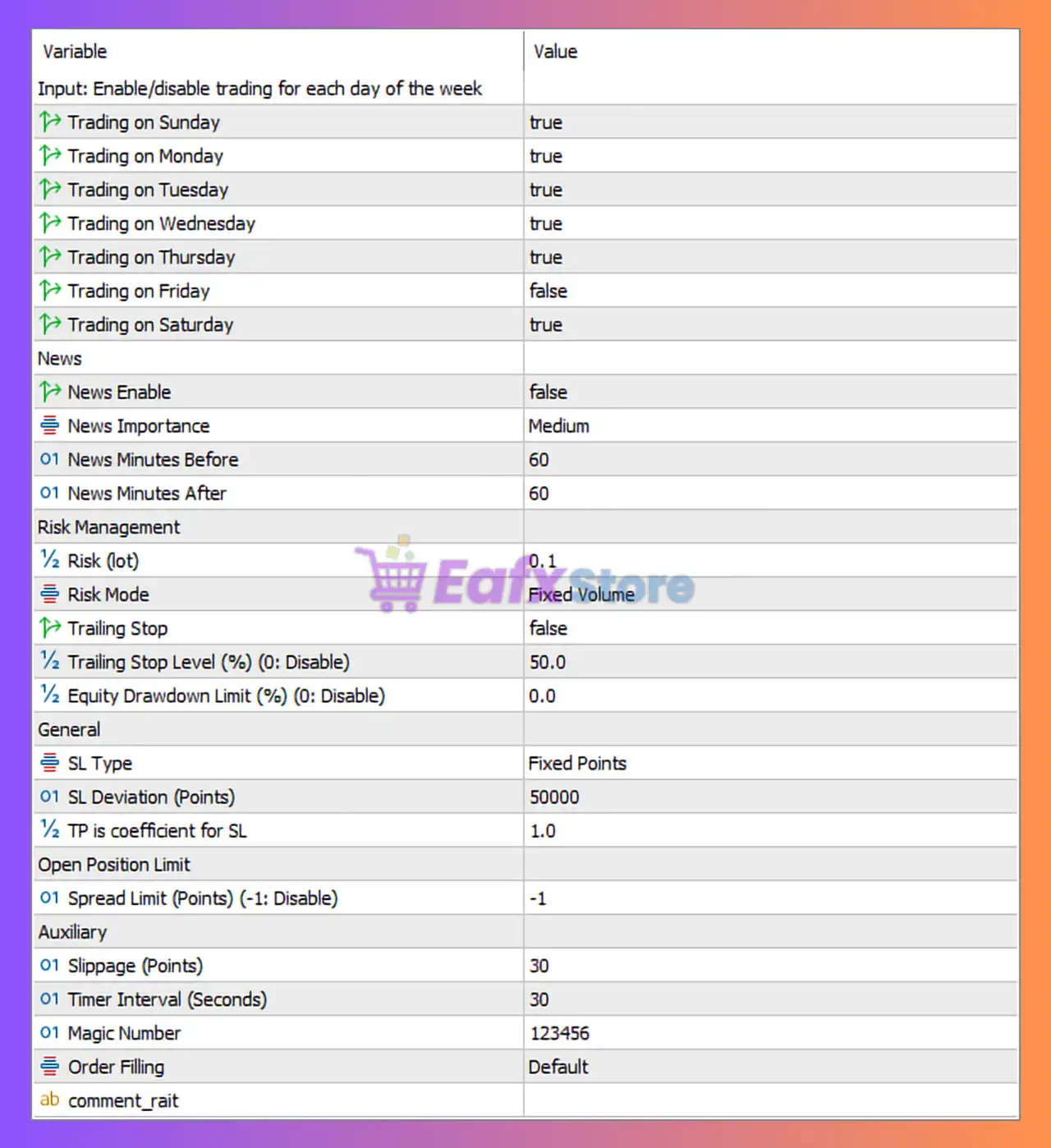
🔶 Trading Days Settings
🔹 Trading on Sunday = true — Enables trading activity on Sunday.
🔹 Trading on Monday = true — Enables trading activity on Monday.
🔹 Trading on Tuesday = true — Enables trading activity on Tuesday.
🔹 Trading on Wednesday = true — Enables trading activity on Wednesday.
🔹 Trading on Thursday = true — Enables trading activity on Thursday.
🔹 Trading on Friday = false — Disables trading activity on Friday.
🔹 Trading on Saturday = true — Enables trading activity on Saturday.
🔶 News Filter Settings
🔹 News Enable = false — Economic news filtering is currently disabled.
🔹 News Importance = Medium — The EA is configured to monitor Medium-impact news events when the news filter is enabled.
🔹 News Minutes Before = 60 — Trading pauses 60 minutes before scheduled news events.
🔹 News Minutes After = 60 — Trading resumes 60 minutes after news releases.
🔶 Risk Management Settings
🔹 Risk (lot) = 0.1 — Base trading volume is set to 0.1 lots.
🔹 Risk Mode = Fixed Volume — The EA uses a fixed lot size instead of balance-based or percentage-based risk calculations.
🔹 Trailing Stop = false — Trailing stop functionality is disabled.
🔹 Trailing Stop Level (%) (0: Disable) = 50.0 — If trailing stop is enabled, it will activate at a profit level of 50.0%.
🔹 Equity Drawdown Limit (%) (0: Disable) = 0.0 — Equity drawdown protection is disabled.
🔶 Stop Loss & Take Profit Settings
🔹 SL Type = Fixed Points — Stop-loss values are calculated using a fixed-point distance.
🔹 SL Deviation (Points) = 50000 — Stop-loss distance is set to 50000 points.
🔹 TP is Coefficient for SL = 1.0 — Take-profit distance is equal to 1.0 × Stop Loss, resulting in a 1:1 risk-to-reward ratio.
🔶 Open Position Limit Settings
🔹 Spread Limit (Points) (-1: Disable) = -1 — Spread filtering is disabled and no maximum spread restriction is applied.
🔶 Auxiliary Settings
🔹 Slippage (Points) = 30 — Maximum allowed execution slippage is 30 points.
🔹 Timer Interval (Seconds) = 30 — The EA refreshes and executes its internal logic every 30 seconds.
🔹 Magic Number = 123456 — Unique identifier used by the EA to manage and track its own trades.
🔹 Order Filling = Default — Uses the broker’s default order execution and filling mode.
🔹 comment_rait — Custom comment field reserved for trade labeling or strategy identification.
🔶 Trading Logic Overview
🔹 Weekend Trading Enabled — The EA is configured to trade on Sunday and Saturday.
🔹 Friday Trading Disabled — Trading operations are stopped on Friday.
🔹 Fixed Volume Strategy — Position sizing remains constant at 0.1 lots regardless of account balance.
🔹 Large Fixed Stop Loss — Uses a 50000-point stop-loss distance for position protection.
🔹 News Protection Available — Medium-impact news events can be filtered with 60-minute pre-news and post-news pauses when activated.
🔹 No Spread Restriction — Spread filtering is disabled by default.
🔢 Conclusion
BTC Phantom X EA MT5 is a cryptocurrency-focused Expert Advisor that combines fixed-volume trading, customizable trading-day filters, large fixed stop-loss protection and optional economic news filtering.
With support for weekend trading, a 1:1 risk-to-reward structure, and configurable execution settings, the EA offers traders a flexible environment for automated Bitcoin trading while maintaining straightforward risk management controls.
🔢 FAQs
❓ What lot size does BTC Phantom X EA MT5 use by default?
The EA uses a fixed trading volume of 0.1 lots.
❓ Does BTC Phantom X EA MT5 trade on weekends?
Yes, trading is enabled on Saturday and Sunday.
❓ Why is Friday trading disabled?
The default configuration sets Trading on Friday = false, likely to avoid end-of-week volatility and liquidity changes.
❓ Is the news filter active by default?
No, News Enable = false, meaning news filtering is disabled unless manually activated.
❓ What stop-loss method does BTC Phantom X EA MT5 use?
The EA uses a Fixed Points Stop Loss with an SL Deviation of 50000 points and a 1:1 Take-Profit-to-Stop-Loss ratio.



