


🔢 Mosquito EA MT5 – Complete Settings & Parameters Guide
Mosquito EA MT5 is an automated MetaTrader 5 Expert Advisor designed to combine intelligent trade management, automatic lot sizing, trailing stop protection, spread filtering, and high-impact news avoidance.
The EA focuses on maintaining disciplined risk control while optimizing trade execution through configurable take profit, stop loss and news filter settings.

🔢 Mosquito EA MT5 Settings Explained
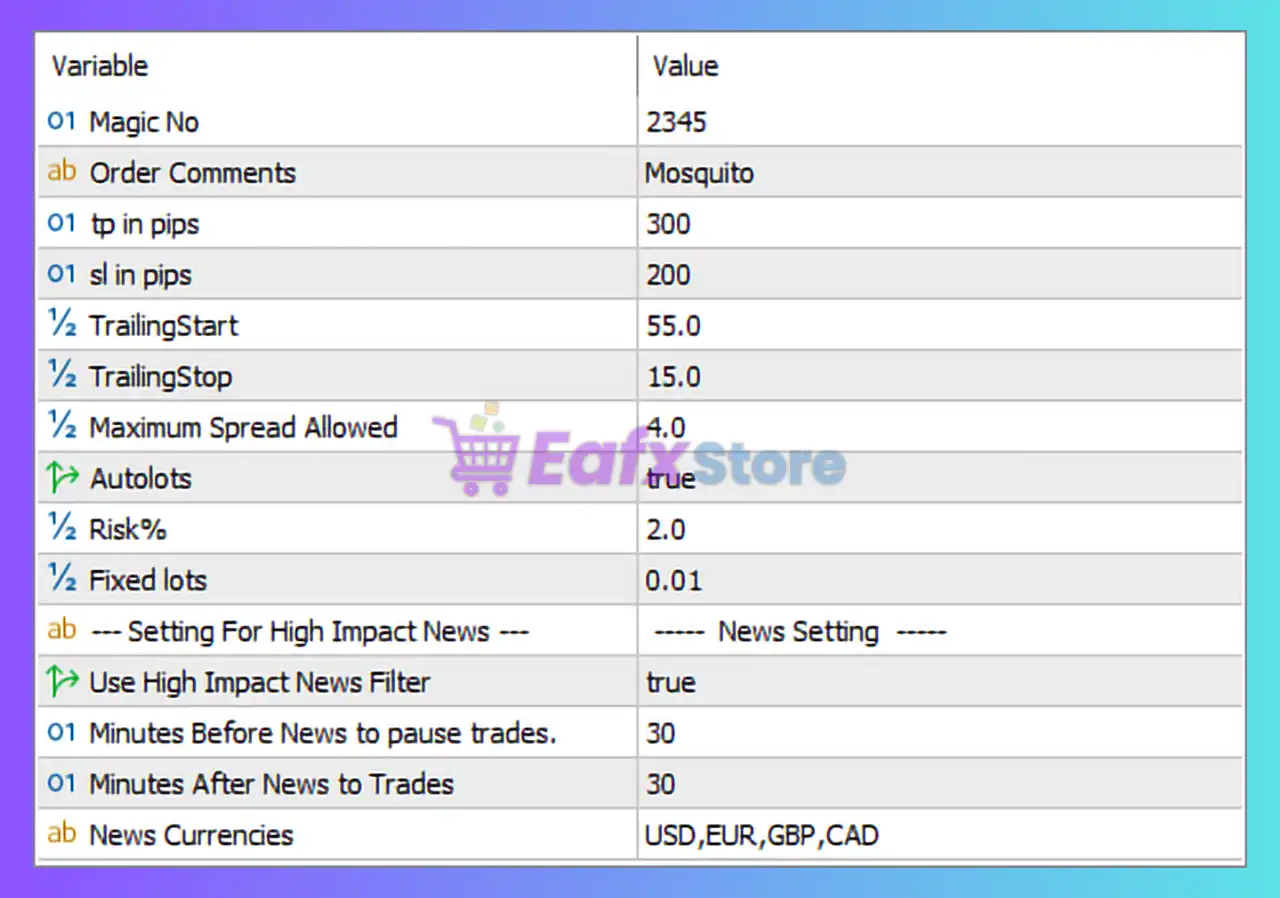
Below are the details of the parameters in the advisor’s trading system settings table:
🔶 General Trading Settings
🔹 Magic No = 2345 — Unique identifier assigned to all trades opened by Mosquito EA MT5, allowing the EA to manage only its own positions.
🔹 Order Comments = Mosquito — Custom text attached to every order for easy trade identification in the MT5 terminal.
🔹 tp in pips = 300 — Sets the Take Profit target to 300 pips, automatically closing trades when this profit level is reached.
🔹 sl in pips = 200 — Sets the Stop Loss distance to 200 pips, limiting potential losses on each trade.
🔹 TrailingStart = 55.0 — The trailing stop mechanism begins once a trade reaches 55.0 pips in profit.
🔹 TrailingStop = 15.0 — The stop loss follows the market at a distance of 15.0 pips after trailing is activated.
🔹 Maximum Spread Allowed = 4.0 — The EA will only open trades when the current market spread is 4.0 pips or lower.
🔶 Money Management Settings
🔹 Autolots = true — Enables automatic lot size calculation based on account balance and risk settings.
🔹 Risk% = 2.0 — The EA risks 2.0% of account equity per trade when AutoLots is enabled.
🔹 Fixed lots = 0.01 — Defines a fixed trading volume of 0.01 lots when manual lot sizing is used.
🔶 High Impact News Filter Settings
🔹 Use High Impact News Filter = true — Activates protection against trading during major economic news releases.
🔹 Minutes Before News to pause trades = 30 — The EA stops opening new trades 30 minutes before a high-impact news event.
🔹 Minutes After News to Trades = 30 — Trading resumes 30 minutes after the news event has passed.
🔹 News Currencies = USD,EUR,GBP,CAD — The news filter monitors economic events related to USD, EUR, GBP, and CAD currencies.
🔢 Mosquito EA MT5 Configuration Summary
🔹 Magic Number: 2345
🔹 Order Comment: Mosquito
🔹 Take Profit: 300 pips
🔹 Stop Loss: 200 pips
🔹 Trailing Start: 55.0 pips
🔹 Trailing Stop: 15.0 pips
🔹 Maximum Spread: 4.0 pips
🔹 Auto Lot Sizing: Enabled
🔹 Risk Per Trade: 2.0%
🔹 Fixed Lot Size: 0.01
🔹 High Impact News Filter: Enabled
🔹 Pause Before News: 30 minutes
🔹 Resume After News: 30 minutes
🔹 Filtered News Currencies: USD, EUR, GBP, CAD
🔢 Conclusion
Mosquito EA MT5 provides a balanced combination of automated trade execution, dynamic risk management, trailing stop protection, and economic news filtering. With 2.0% risk-based auto lot sizing, a 300-pip take profit, a 200-pip stop loss, and a built-in high-impact news filter covering USD, EUR, GBP, and CAD, the EA is designed to help traders maintain consistency while minimizing exposure during volatile market conditions.
🔢 FAQs
❓ What is Mosquito EA MT5?
Mosquito EA MT5 is an automated trading Expert Advisor for MetaTrader 5 that combines risk management, trailing stops, and news filtering.
❓ Does Mosquito EA MT5 support automatic lot sizing?
Yes, AutoLots is enabled by default and calculates position size using the configured Risk% value of 2.0%.
❓ What is the default Take Profit setting in Mosquito EA MT5?
The default Take Profit is set to 300 pips.
❓ How does the news filter work in Mosquito EA MT5?
The EA pauses trading 30 minutes before and resumes 30 minutes after high-impact news events affecting USD, EUR, GBP, and CAD.
❓ What is the maximum spread allowed by Mosquito EA MT5?
The EA only opens trades when the spread is 4.0 pips or lower.



