


🔢 SomaGold EA MT5 – Complete Settings & Parameters Guide
SomaGold EA is an automated gold trading Expert Advisor (EA) for MetaTrader 5 that combines flexible lot sizing, economic news protection, trading session controls, margin safety mechanisms and customizable trade management features.
The EA is designed to adapt position sizing dynamically while protecting accounts during major economic events such as NFP, CPI and Interest Rate announcements.

🔢 SomaGold EA MT5 Settings Explained
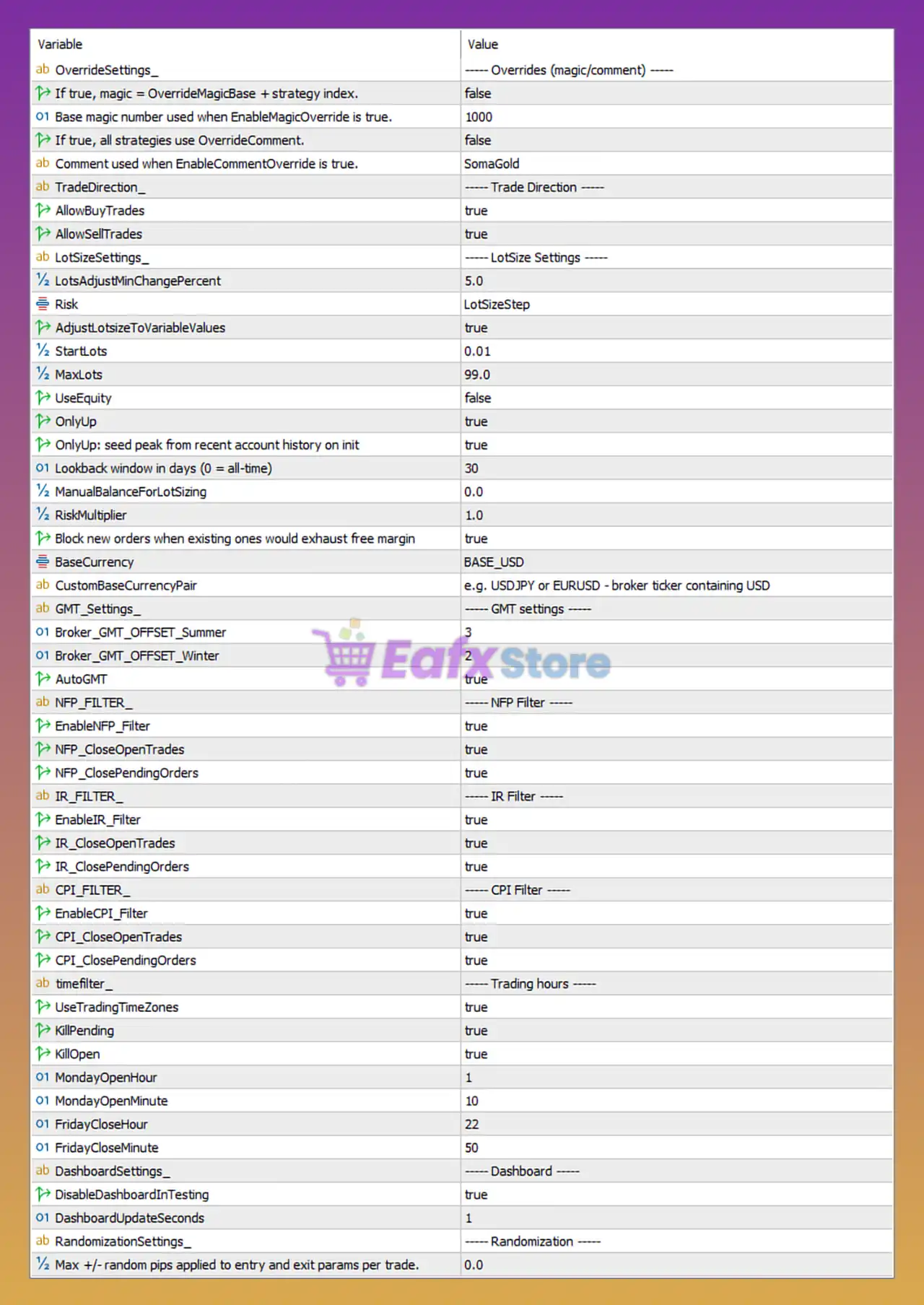
Below are the details of the parameters in the advisor’s trading system settings table:
🔶 Override Settings
🔹 If true, magic = OverrideMagicBase + strategy index. = false — Disables the Magic Number override feature; strategies use their own assigned identifiers.
🔹 Base magic number used when EnableMagicOverride is true. = 1000 — Starting Magic Number used if override mode is enabled.
🔹 If true, all strategies use OverrideComment. = false — Comment override feature is disabled.
🔹 Comment used when EnableCommentOverride is true. = SomaGold — Custom trade comment that will be applied if comment override is enabled.
🔶 Trade Direction Settings
🔹 AllowBuyTrades = true — Allows the EA to open Buy positions.
🔹 AllowSellTrades = true — Allows the EA to open Sell positions.
🔶 Lot Size Settings
🔹 LotsAdjustMinChangePercent = 5.0 — Minimum percentage change required before recalculating lot size.
🔹 Risk = LotSizeStep — Position sizing uses the LotSizeStep risk model.
🔹 AdjustLotsizeToVariableValues = true — Automatically adjusts lot size according to changing account conditions.
🔹 StartLots = 0.01 — Initial lot size used by the EA.
🔹 MaxLots = 99.0 — Maximum lot size allowed.
🔹 UseEquity = false — Equity-based lot calculation is disabled.
🔹 OnlyUp = true — Lot size may only increase and will not decrease automatically.
🔹 OnlyUp: seed peak from recent account history on init = true — Uses historical account peak values when initializing the lot-sizing model.
🔹 Lookback window in days (0 = all-time) = 30 — Uses the last 30 days of account history for calculations.
🔹 ManualBalanceForLotSizing = 0.0 — No manual balance override is used.
🔹 RiskMultiplier = 1.0 — Multiplier applied to calculated risk exposure.
🔹 Block new orders when existing ones would exhaust free margin = true — Prevents opening trades if free margin becomes insufficient.
🔹 BaseCurrency = BASE_USD — Uses USD as the account reference currency.
🔹 CustomBaseCurrencyPair = e.g. USDJPY or EURUSD - broker ticker containing USD — Custom currency pair field for USD conversion calculations.
🔶 GMT Settings
🔹 Broker_GMT_OFFSET_Summer = 3 — Broker server GMT offset during daylight saving time is GMT+3.
🔹 Broker_GMT_OFFSET_Winter = 2 — Broker server GMT offset during winter is GMT+2.
🔹 AutoGMT = true — Automatically detects broker GMT offset.
🔶 NFP Filter Settings
🔹 EnableNFP_Filter = true — Enables Non-Farm Payroll news protection.
🔹 NFP_CloseOpenTrades = true — Closes open positions during NFP events.
🔹 NFP_ClosePendingOrders = true — Removes pending orders before NFP releases.
🔶 Interest Rate (IR) Filter Settings
🔹 EnableIR_Filter = true — Enables Interest Rate announcement protection.
🔹 IR_CloseOpenTrades = true — Closes active trades before major Interest Rate decisions.
🔹 IR_ClosePendingOrders = true — Cancels pending orders before Interest Rate news.
🔶 CPI Filter Settings
🔹 EnableCPI_Filter = true — Enables Consumer Price Index (CPI) event protection.
🔹 CPI_CloseOpenTrades = true — Closes active positions before CPI releases.
🔹 CPI_ClosePendingOrders = true — Removes pending orders ahead of CPI announcements.
🔶 Trading Hours Settings
🔹 UseTradingTimeZones = true — Restricts trading according to configured trading hours.
🔹 KillPending = true — Deletes pending orders outside trading hours.
🔹 KillOpen = true — Closes open positions outside permitted trading hours.
🔹 MondayOpenHour = 1 — Trading starts Monday at 01:00 server time.
🔹 MondayOpenMinute = 10 — Trading begins Monday at 01:10 server time.
🔹 FridayCloseHour = 22 — Trading stops Friday at 22:00 server time.
🔹 FridayCloseMinute = 50 — Trading ends Friday at 22:50 server time.
🔶 Dashboard Settings
🔹 DisableDashboardInTesting = true — Dashboard is hidden during strategy testing to improve performance.
🔹 DashboardUpdateSeconds = 1 — Dashboard refresh interval is 1 second.
🔶 Randomization Settings
🔹 Max +/- random pips applied to entry and exit params per trade = 0.0 — Randomization is disabled; all trades use exact configured parameters.
🔢 Key Features of SomaGold EA MT5
🔹 Dynamic lot size management with automatic scaling.
🔹 Full Buy and Sell trading capability.
🔹 Built-in NFP, CPI, and Interest Rate news protection.
🔹 Automatic GMT detection for broker compatibility.
🔹 Trading session management with automatic position cleanup.
🔹 Free margin protection to prevent overleveraging.
🔹 Dashboard monitoring and real-time updates.
🔹 Configurable risk multipliers and account growth logic.
🔢 Conclusion
SomaGold EA MT5 is a sophisticated gold trading Expert Advisor that focuses on adaptive position sizing, strict risk control, and comprehensive economic news protection. With built-in filters for NFP, CPI, and Interest Rate announcements, automatic GMT handling, dynamic lot adjustment, and trading-session enforcement, the EA provides traders with a robust framework for managing risk while maintaining trading efficiency in volatile gold markets.
🔢 FAQs
❓ What is the default starting lot size in SomaGold EA MT5?
The EA starts with 0.01 lots as defined by the StartLots parameter.
❓ Does SomaGold EA MT5 trade both Buy and Sell positions?
Yes, both AllowBuyTrades and AllowSellTrades are enabled by default.
❓ How does the EA handle major news events?
The EA includes dedicated filters for NFP, CPI, and Interest Rate announcements, with options to close trades and cancel pending orders.
❓ What GMT settings are used by default?
The EA uses GMT+3 in summer, GMT+2 in winter, and can automatically detect broker time using AutoGMT = true.
❓ Can SomaGold EA MT5 prevent overleveraging?
Yes, the setting Block new orders when existing ones would exhaust free margin = true helps protect the account from excessive margin usage.



