


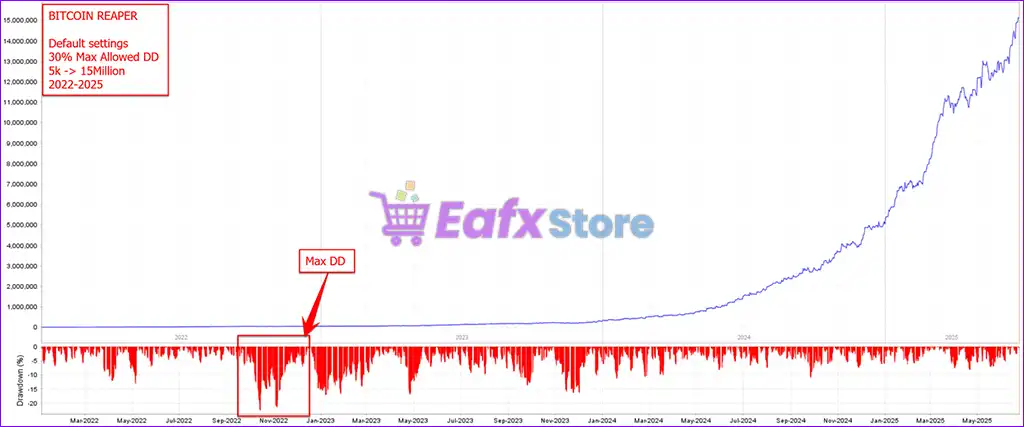
🔢 The Bitcoin Reaper EA MT5 Settings Guide
The Bitcoin Reaper EA is an automated Bitcoin trading Expert Advisor designed to provide flexible control over Buy and Sell execution, trade frequency, virtual expiration, break-even management, risk protection, news-event filtering, GMT synchronization and daily trading schedules.
Its configuration panel includes dedicated controls for Bitcoin execution, NFP protection, Prop Firm-style risk management, and individual trading windows from Monday through Sunday.
Understanding these settings can help traders configure The Bitcoin Reaper EA MT5 according to their account size, broker conditions, and preferred risk-management approach.
🔶 General & Backtest Settings
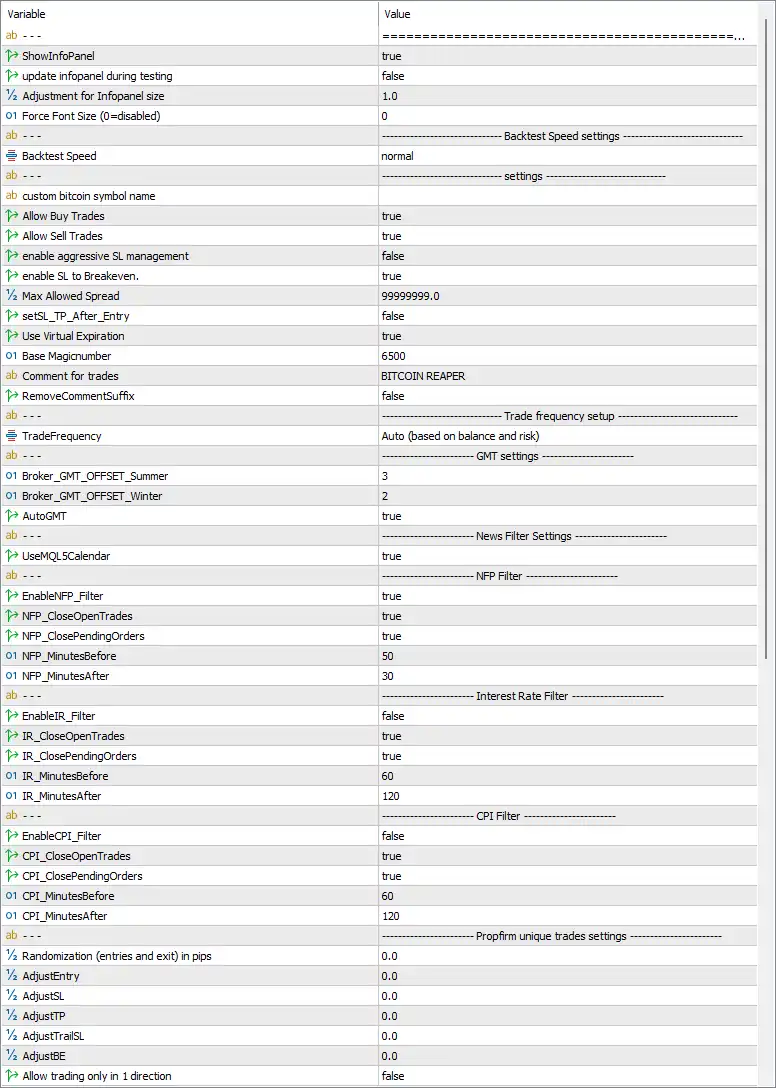
🔹 ShowInfoPanel: true — Enables the EA's on-chart information panel so users can monitor relevant trading and system information.
🔹 update infopanel during testing: false — Disables continuous information-panel updates during backtesting.
🔹 Adjustment for Infopanel size: 1.0 — Sets the information-panel size adjustment factor to 1.0, representing the configured default scale.
🔹 Force Font Size (0=disabled): 0 — Sets the forced font size to 0, which disables the manual font-size override.
🔹 Backtest Speed: normal — Sets the backtesting speed to normal, using the standard simulation speed.
🔶 Main Trading Settings
🔹 custom bitcoin symbol name: — The custom Bitcoin symbol field is left blank, meaning no specific custom symbol name is entered in the displayed configuration.
🔹 Allow Buy Trades: true — Enables Buy trades, allowing the EA to open long Bitcoin positions when its trading conditions are satisfied.
🔹 Allow Sell Trades: true — Enables Sell trades, allowing the EA to open short Bitcoin positions when its trading conditions are satisfied.
🔹 enable aggressive SL management: false — Disables aggressive Stop Loss management, so the more aggressive SL-management mode is not active.
🔹 enable SL to Breakeven: true — Enables the EA to move a position's Stop Loss toward the break-even level according to its internal trade-management logic.
🔹 Max Allowed Spread: 99999999.0 — Sets the maximum allowed spread to 99999999.0, an extremely high configured threshold that effectively places very little restriction on spread from this parameter alone.
🔹 setSL_TP_After_Entry: false — Disables setting Stop Loss and Take Profit after the position has been opened.
🔹 Use Virtual Expiration: true — Enables virtual expiration functionality for trades according to the EA's internal expiration logic.
🔹 Base Magicnumber: 6500 — Sets the base Magic Number to 6500, allowing the EA to identify and manage its own trades.
🔹 Comment for trades: BITCOIN REAPER — Sets the trade comment to BITCOIN REAPER, making EA-generated positions easier to identify.
🔹 RemoveCommentSuffix: false — Keeps the configured comment suffix functionality enabled because this parameter is set to false, meaning suffix removal is disabled.
🔶 Trade Frequency Settings
🔹 TradeFrequency: Auto (based on balance and risk) — Allows the EA to automatically determine trading frequency based on the account's balance and risk configuration.
🔶 GMT Settings
🔹 Broker_GMT_OFFSET_Summer: 3 — Sets the broker's summer GMT offset to 3 hours.
🔹 Broker_GMT_OFFSET_Winter: 2 — Sets the broker's winter GMT offset to 2 hours.
🔹 AutoGMT: true — Enables automatic GMT adjustment, allowing the EA to automatically account for the configured broker time offset.
🔶 News Filter Settings
🔹 UseMQL5Calendar: true — Enables the MQL5 economic calendar for detecting scheduled economic events.
🔶 NFP Filter
🔹 EnableNFP_Filter: true — Enables the Non-Farm Payroll (NFP) news filter.
🔹 NFP_CloseOpenTrades: true — Enables closing of open trades around NFP events according to the EA's NFP protection logic.
🔹 NFP_ClosePendingOrders: true — Enables closing of pending orders around NFP events.
🔹 NFP_MinutesBefore: 50 — Sets the NFP protection period to 50 minutes before the scheduled event.
🔹 NFP_MinutesAfter: 30 — Sets the NFP protection period to 30 minutes after the scheduled event.
🔶 Interest Rate Filter
🔹 EnableIR_Filter: false — Disables the Interest Rate news filter in the current configuration.
🔹 IR_CloseOpenTrades: true — Enables closing of open trades around Interest Rate events if the Interest Rate filter is activated.
🔹 IR_ClosePendingOrders: true — Enables closing of pending orders around Interest Rate events if the Interest Rate filter is activated.
🔹 IR_MinutesBefore: 60 — Sets the configured Interest Rate protection period to 60 minutes before the event.
🔹 IR_MinutesAfter: 120 — Sets the configured Interest Rate protection period to 120 minutes after the event.
🔶 CPI Filter
🔹 EnableCPI_Filter: false — Disables the CPI news filter in the current configuration.
🔹 CPI_CloseOpenTrades: true — Enables closing of open trades around CPI events if the CPI filter is enabled.
🔹 CPI_ClosePendingOrders: true — Enables closing of pending orders around CPI events if the CPI filter is enabled.
🔹 CPI_MinutesBefore: 60 — Sets the configured CPI protection period to 60 minutes before the event.
🔹 CPI_MinutesAfter: 120 — Sets the configured CPI protection period to 120 minutes after the event.
🔶 Prop Firm Unique Trades Settings
🔹 Randomization (entries and exit) in pips: 0.0 — Sets entry and exit randomization to 0.0 pips, meaning no additional randomization is configured.
🔹 AdjustEntry: 0.0 — Sets the entry adjustment value to 0.0.
🔹 AdjustSL: 0.0 — Sets the Stop Loss adjustment value to 0.0.
🔹 AdjustTP: 0.0 — Sets the Take Profit adjustment value to 0.0.
🔹 AdjustTrailSL: 0.0 — Sets the trailing Stop Loss adjustment value to 0.0.
🔹 AdjustBE: 0.0 — Sets the break-even adjustment value to 0.0.
🔹 Allow trading only in 1 direction: false — Disables the one-direction-only trading restriction, allowing the EA to trade in both Buy and Sell directions when its strategy permits.
🔶 Risk Settings
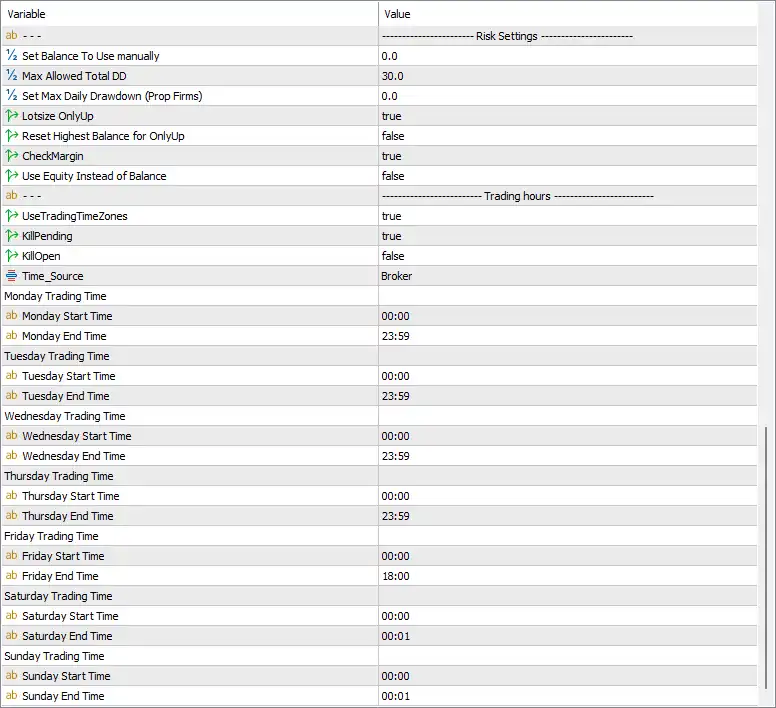
🔹 Set Balance To Use manually: 0.0 — Sets the manually specified balance reference to 0.0, so no positive manual balance override is configured.
🔹 Max Allowed Total DD: 30.0 — Sets the maximum allowed total drawdown parameter to 30.0, providing a defined overall drawdown threshold in the EA's risk-management framework.
🔹 Set max Daily Drawdown (Prop Firms): 0.0 — Sets the maximum daily drawdown for Prop Firm protection to 0.0, meaning no positive daily drawdown value is configured in this field.
🔹 Lotsize OnlyUp: true — Enables the OnlyUp lot-sizing function, allowing the lot-size reference to operate according to its upward-only logic.
🔹 Reset Highest Balance for OnlyUp: false — Disables resetting of the highest balance reference used by the OnlyUp mechanism.
🔹 CheckMargin: true — Enables margin checking to help ensure adequate available margin before executing trades.
🔹 Use Equity Instead of Balance: false — Disables equity-based calculations, meaning the EA uses its balance-based logic rather than replacing balance with equity.
🔶 Trading Hours Settings
🔹 UseTradingTimeZones: true — Enables the configured individual trading-time zones.
🔹 KillPending: true — Enables the EA to delete or cancel pending orders according to its trading-time management rules.
🔹 KillOpen: false — Disables automatic closing of open positions based solely on the configured trading-time zones.
🔹 Time_Source: Broker — Sets the trading-time reference to Broker time.
🔶 Monday Trading Time
🔹 Monday Start Time: 00:00 — Sets Monday trading to begin at 00:00 broker time.
🔹 Monday End Time: 23:59 — Sets Monday trading to end at 23:59 broker time.
🔶 Tuesday Trading Time
🔹 Tuesday Start Time: 00:00 — Sets Tuesday trading to begin at 00:00 broker time.
🔹 Tuesday End Time: 23:59 — Sets Tuesday trading to end at 23:59 broker time.
🔶 Wednesday Trading Time
🔹 Wednesday Start Time: 00:00 — Sets Wednesday trading to begin at 00:00 broker time.
🔹 Wednesday End Time: 23:59 — Sets Wednesday trading to end at 23:59 broker time.
🔶 Thursday Trading Time
🔹 Thursday Start Time: 00:00 — Sets Thursday trading to begin at 00:00 broker time.
🔹 Thursday End Time: 23:59 — Sets Thursday trading to end at 23:59 broker time.
🔶 Friday Trading Time
🔹 Friday Start Time: 00:00 — Sets Friday trading to begin at 00:00 broker time.
🔹 Friday End Time: 18:00 — Sets Friday trading to end at 18:00 broker time, creating an earlier Friday cutoff compared with Monday–Thursday.
🔶 Saturday Trading Time
🔹 Saturday Start Time: 00:00 — Sets the Saturday trading window to begin at 00:00 broker time.
🔹 Saturday End Time: 00:01 — Sets the Saturday trading window to end at 00:01 broker time.
🔶 Sunday Trading Time
🔹 Sunday Start Time: 00:00 — Sets the Sunday trading window to begin at 00:00 broker time.
🔹 Sunday End Time: 00:01 — Sets the Sunday trading window to end at 00:01 broker time.
🔢 Key Configuration Highlights
🔹 Two-Way Trading: Both Allow Buy Trades = true and Allow Sell Trades = true, allowing the EA to trade in both directions.
🔹 Break-Even Protection: enable SL to Breakeven = true, enabling break-even Stop Loss management.
🔹 Aggressive SL Management: enable aggressive SL management = false, so the aggressive Stop Loss mode is disabled.
🔹 Virtual Expiration: Use Virtual Expiration = true, enabling virtual expiration functionality.
🔹 Trade Frequency: The EA uses Auto (based on balance and risk) for TradeFrequency.
🔹 GMT Synchronization: AutoGMT = true, with Summer = 3 and Winter = 2 broker GMT offsets.
🔹 NFP Protection: The NFP filter is enabled with 50 minutes before and 30 minutes after protection, and both open trades and pending orders can be closed.
🔹 Interest Rate Protection: The Interest Rate filter is currently false, although its configured timing values are 60 minutes before and 120 minutes after.
🔹 CPI Protection: The CPI filter is currently false, with configured values of 60 minutes before and 120 minutes after.
🔹 Total Drawdown: Max Allowed Total DD = 30.0, providing a clearly defined overall drawdown parameter.
🔹 Prop Firm Daily Drawdown: Set max Daily Drawdown = 0.0, meaning no positive daily drawdown threshold is entered.
🔹 Trading-Time Zones: UseTradingTimeZones = true, with the time source set to Broker.
🔹 Weekend Schedule: Friday trading ends at 18:00, while Saturday and Sunday are configured only until 00:01.
🔢 Conclusion
The Bitcoin Reaper EA MT5 provides a comprehensive configuration system specifically structured around automated Bitcoin trading, combining flexible trade-direction controls with break-even management, virtual expiration, automatic trade-frequency calculation, GMT synchronization, news protection, Prop Firm risk parameters, and detailed weekly trading schedules.
The displayed configuration allows both Buy and Sell trades, enables break-even management, and uses Auto (based on balance and risk) for trade frequency. Its risk framework includes Max Allowed Total DD = 30.0, Lotsize OnlyUp = true, and CheckMargin = true. The EA also uses the MQL5 Calendar and has NFP protection enabled with 50 minutes before and 30 minutes after the event.
For traders evaluating this configuration, particular attention should be given to the 30.0 total drawdown setting, 0.0 daily Prop Firm drawdown value, 99999999.0 maximum spread, trading-time schedules, and news-filter settings. These parameters should be tested under the intended broker's Bitcoin trading conditions before being used on a live account.




