


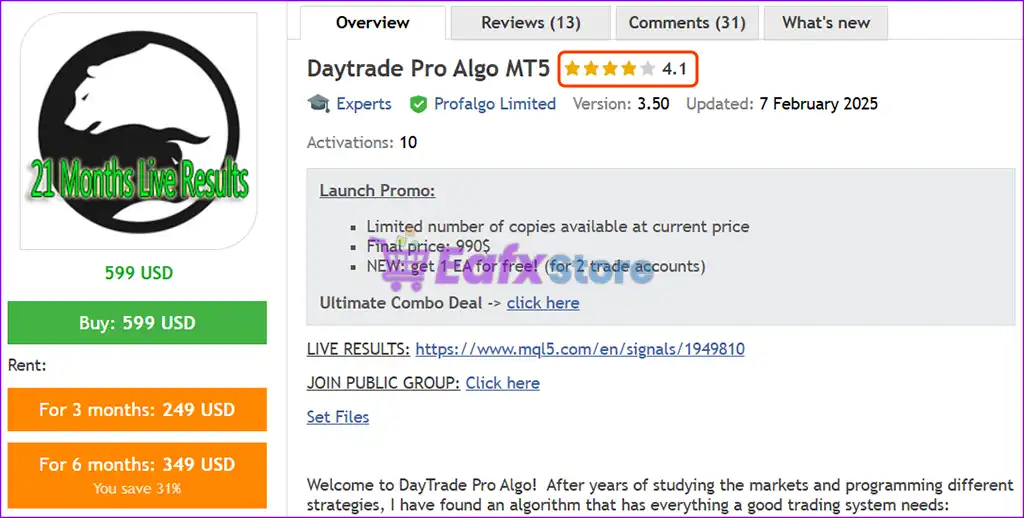
🔢 Daytrade Pro Algo MT5 Settings Explained – Complete Parameter Guide
Daytrade Pro Algo MT5 is a professional multi-currency Expert Advisor for MetaTrader 5 designed for automated day trading with intelligent money management, virtual expiration, configurable lot sizing, and proprietary prop firm optimization. It includes flexible risk controls, multi-pair support, account protection features, and customizable trade management, making it suitable for both retail and prop firm traders.

🔢 Installation Panel Parameters
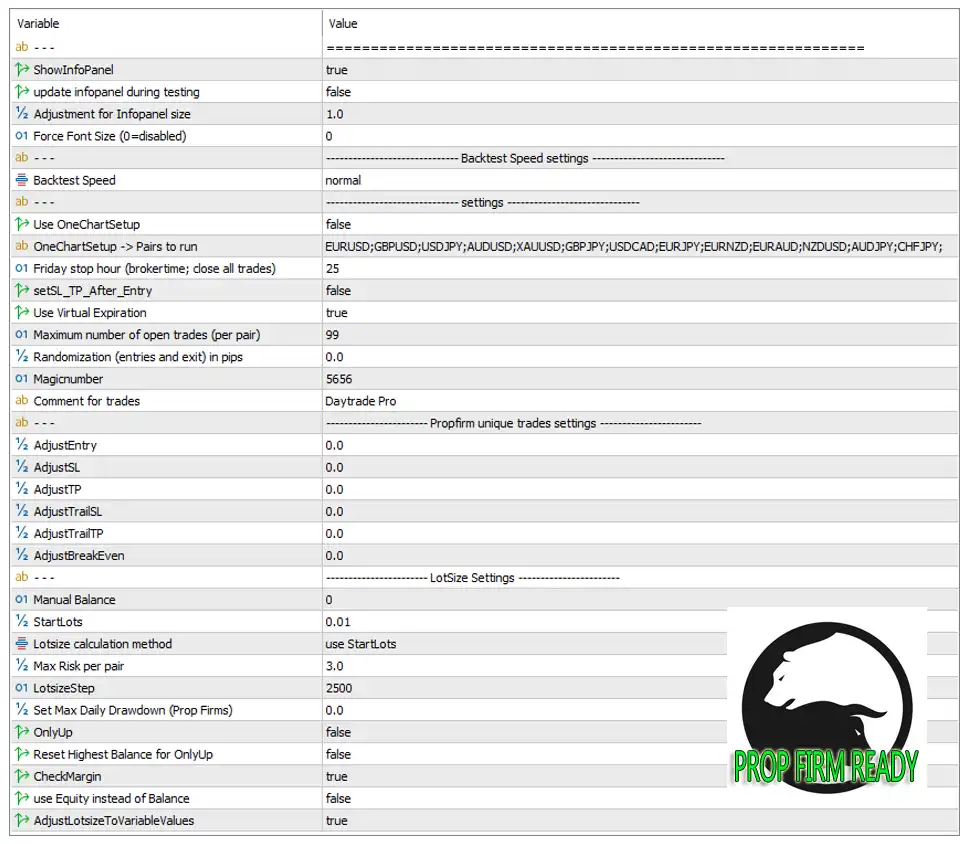
Below are the details of the parameters in the advisor’s trading system settings table:
🔶 General EA Settings
🔹 ShowInfoPanel = true – Displays the EA information panel on the chart for real-time monitoring of trades and account statistics.
🔹 update infopanel during testing = false – Disables information panel updates while running Strategy Tester to improve testing performance.
🔹 Adjustment for Infopanel size = 1.0 – Sets the information panel scaling factor to 1.0 (default size).
🔹 Force Font Size (0=disabled) = 0 – Uses the default chart font size because 0 disables forced font sizing.
🔶 Backtest Speed Settings
🔹 Backtest Speed = normal – Runs Strategy Tester using the normal simulation speed.
🔶 Trading Settings
🔹 Use OneChartSetup = false – Disables multi-symbol trading from a single chart.
🔹 OneChartSetup -> Pairs to run = EURUSD;GBPUSD;USDJPY;AUDUSD;XAUUSD;GBPJPY;USDCAD;EURJPY;EURNZD;EURAUD;NZDUSD;AUDJPY;CHFJPY; – Specifies the complete list of supported trading instruments for One Chart Setup.
🔹 Friday stop hour (brokertime; close all trades) = 25 – Friday trading shutdown is disabled because the stop hour is set beyond the normal 24-hour trading session.
🔹 setSL_TP_After_Entry = false – Does not automatically apply Stop Loss and Take Profit immediately after opening a trade.
🔹 Use Virtual Expiration = true – Enables virtual expiration management for pending orders.
🔹 Maximum number of open trades (per pair) = 99 – Allows up to 99 simultaneous open positions for each trading pair.
🔹 Randomization (entries and exit) in pips = 0.0 – No random offset is added to entry or exit prices.
🔹 MagicNumber = 5656 – Assigns the unique identifier 5656 to all trades opened by Daytrade Pro Algo MT5.
🔹 Comment for trades = Daytrade Pro – Adds the trade comment "Daytrade Pro" to every position opened by the EA.
🔶 Prop Firm Unique Trade Settings
🔹 AdjustEntry = 0.0 – No additional adjustment is applied to trade entry prices.
🔹 AdjustSL = 0.0 – No Stop Loss adjustment is applied.
🔹 AdjustTP = 0.0 – No Take Profit adjustment is applied.
🔹 AdjustTrailSL = 0.0 – No modification is applied to the Trailing Stop Loss.
🔹 AdjustTrailTP = 0.0 – No adjustment is applied to the trailing Take Profit.
🔹 AdjustBreakEven = 0.0 – No Break-even offset is added to positions.
🔶 Lot Size Settings
🔹 Manual Balance = 0 – Uses the actual trading account balance instead of a manually entered balance.
🔹 StartLots = 0.01 – Opens the initial trade with 0.01 lots.
🔹 Lotsize calculation method = use StartLots – Uses the configured StartLots value as the base position size.
🔹 Max Risk per pair = 3.0 – Limits the maximum exposure to 3.0 for each trading pair.
🔹 LotsizeStep = 2500 – Increases the lot size according to every 2500 units of account balance.
🔹 Set Max Daily Drawdown (Prop Firms) = 0.0 – Daily drawdown limitation is disabled.
🔹 OnlyUp = false – Automatic lot sizing can both increase and decrease with changes in account balance.
🔹 Reset Highest Balance for OnlyUp = false – Does not reset the recorded highest balance used for OnlyUp calculations.
🔹 CheckMargin = true – Verifies available free margin before opening new trades.
🔹 use Equity instead of Balance = false – Calculates lot sizing using the account balance rather than account equity.
🔹 AdjustLotsizeToVariableValues = true – Automatically adjusts lot sizes according to the configured variable lot-sizing rules.
🔢 Conclusion
Daytrade Pro Algo MT5 offers a comprehensive automated trading solution with multi-pair support, flexible money management, virtual expiration, intelligent lot sizing, and prop firm-oriented trade controls. Its configurable risk management, margin protection, and scalable position sizing make it suitable for traders seeking a disciplined and adaptable Expert Advisor for MetaTrader 5.
🔢 FAQs
❓ What markets can Daytrade Pro Algo MT5 trade?
The EA supports multiple instruments, including EURUSD, GBPUSD, USDJPY, AUDUSD, XAUUSD, GBPJPY, USDCAD, EURJPY, EURNZD, EURAUD, NZDUSD, AUDJPY, and CHFJPY.
❓ Does Daytrade Pro Algo MT5 support automatic lot sizing?
Yes. It supports automatic position sizing using the configured StartLots, LotsizeStep, and account balance.
❓ Can Daytrade Pro Algo MT5 be used for prop firm accounts?
Yes. The EA includes dedicated Prop Firm Unique Trade Settings and configurable daily drawdown management.
❓ Why is the MagicNumber important?
The MagicNumber (5656) uniquely identifies trades opened by Daytrade Pro Algo MT5, allowing it to manage its own positions independently from other Expert Advisors.
❓ What is the benefit of the CheckMargin option?
CheckMargin ensures sufficient free margin is available before opening new positions, helping reduce the risk of margin-related trading errors.



