








The ORB Master MT5 + SetFiles (Latest version) – GroupBuy
Select a variant to see availability.
What is The ORB Master MT5?
The ORB Master EA is a refined, high-performance Expert Advisor (EA) designed to capture early market momentum using the proven Opening Range Breakout (ORB) strategy. It targets the opening ranges of four major indices (SP, US, NASDAQ, DAX), deploying uncorrelated strategy variations for maximum diversification and robustness.
🔶 Vendor Website: View here
🔶 This is GroupBuy ==> How to Join
About the Author
This product is compiled by Wim Schrynemakers. This author has more than +12 years of experience working on MQL5 with many famous products such as The ORB Master MT5, The Bitcoin Reaper MT5, Ultimate Breakout System EA, Advanced Scalper MT5 and others. Among them, The ORB Master MT5 is his best performing products.
The ORB Master EA Overview
Key Features of The ORB Master EA for MT5
🔹 Opening Range Breakout Logic: Captures early momentum from major global index market openings.
🔹 Multi-Strategy Diversification: Runs twelve uncorrelated trading systems for balanced exposure.
🔹 Advanced Risk Management: Includes dynamic trailing stop and drawdown protection mechanisms.
🔹 Prop Firm Compatible Design: Supports strict risk controls and customizable execution behavior.
🔹 Adaptive Volatility Filters: Avoids unstable conditions through spread and news event filtering.
What is the The ORB Master EA Trading Strategy?
🔹 Opening Range Breakouts: Trades momentum moves after European and US market openings.
🔹 Multi-Index Execution: Simultaneously manages diversified strategies across major stock indices.
🔹 Dynamic Trade Protection: Uses trailing stop loss and trailing take profit optimization.
🔹 Volatility-Based Filtering: Avoids risky conditions during major economic news releases.
🔹 Adaptive Risk Allocation: Calculates position sizing based on drawdown and strategy exposure.
🔹 Time-Based Market Control: Restricts execution to optimized trading sessions for consistency.
The ORB Master MT5 Review
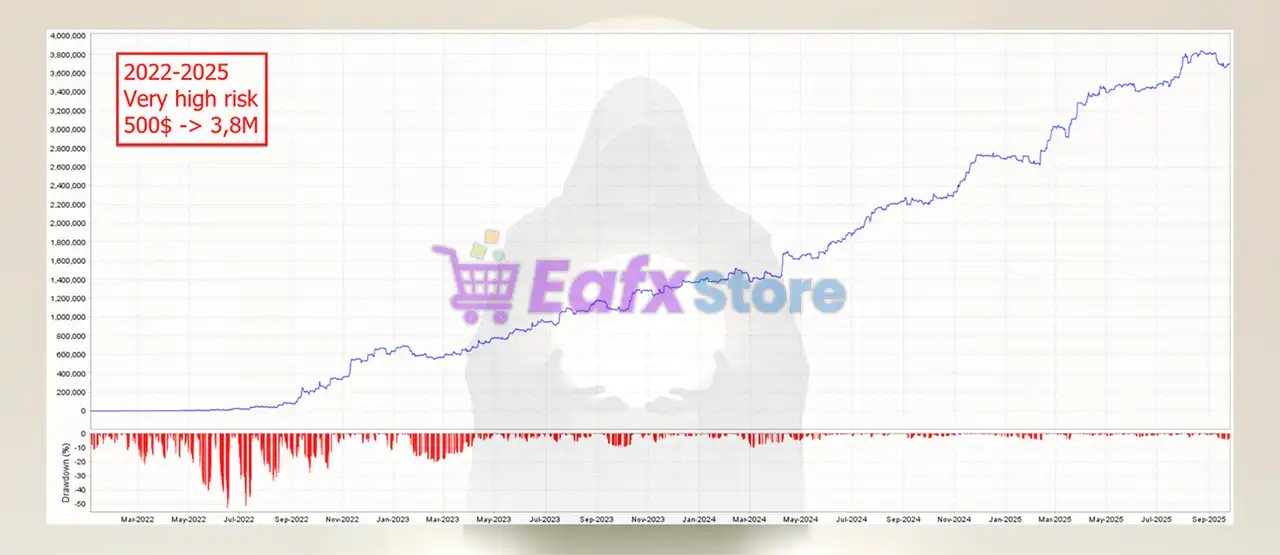
🔶 This backtesting result of The ORB Master MT5 from 2022 to 2025 shows impressive performance and high safety potential.
✅ Initial Deposit: $500
✅ Total Net Profit: $3.8 million
The ORB Master MT5 Backtest Trading Results
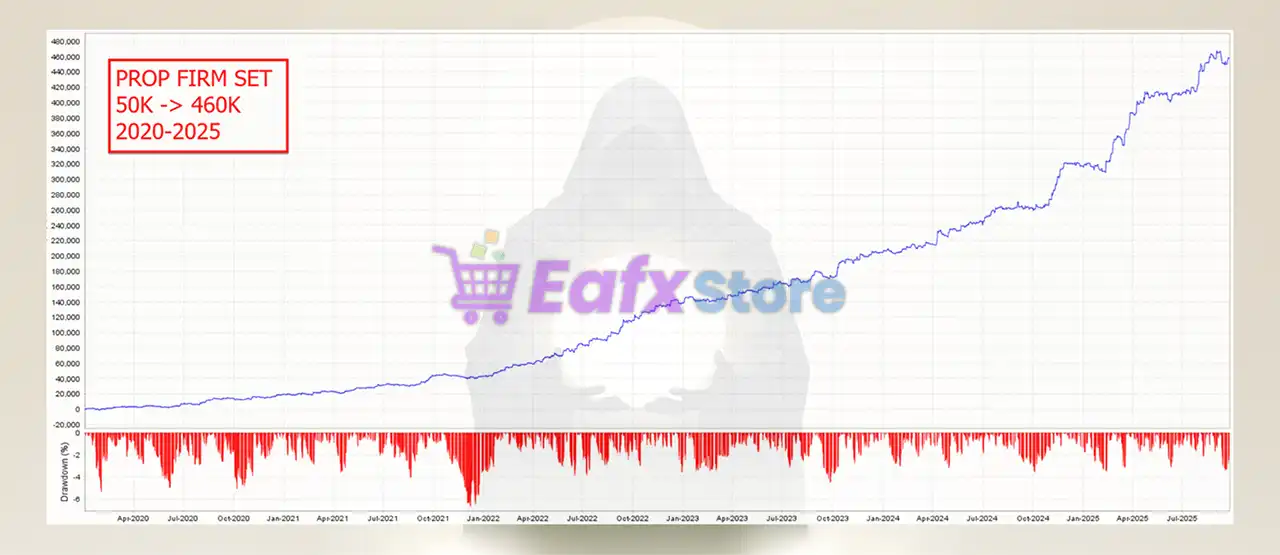
🔶 Trading results with the PROP FIRMS challenge for 3 years (2022 – 2025), achieving impressive performance.
✅ Initial Deposit: $50,000
✅ Total Net Profit: $460,000
The ORB Master MT5 Backtest Results
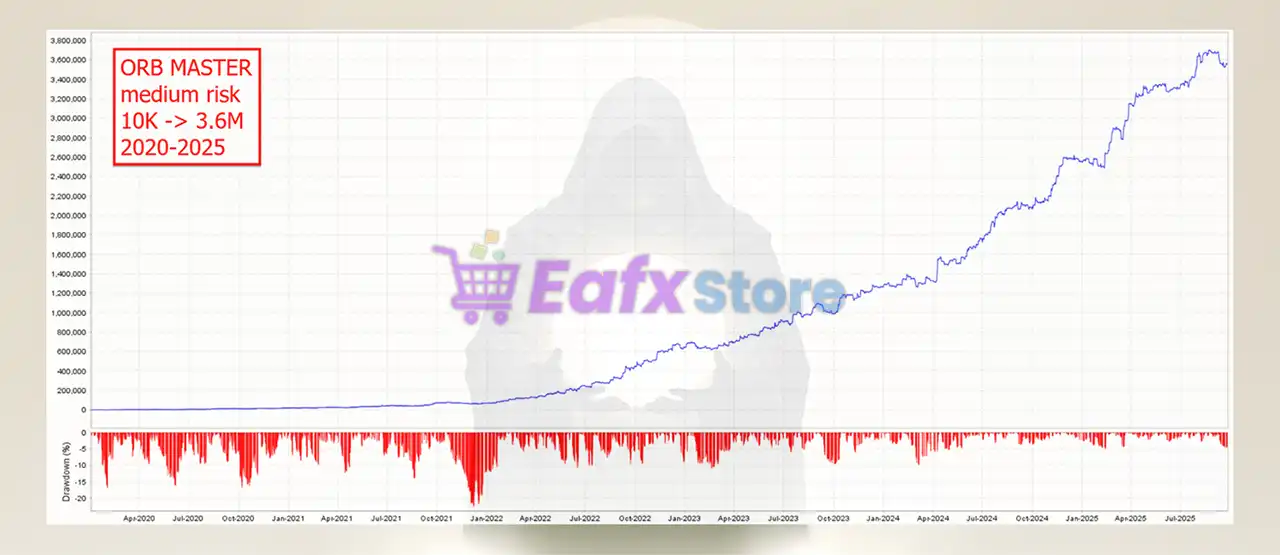
🔶 The ORB Master MT5 backtest trading results for 5 years (2020 – 2025) achieved high profit performance using MEDIUM RISK trading strategy.
✅ Initial Deposit: $10,000
✅ Total Net Profit: $3.6 million
The ORB Master EA MT5 Backtest Results
Why choose and use The ORB Master EA?
🔹 Stable Automated Performance: Built for consistent execution with controlled portfolio drawdowns.
🔹 Professional Risk Protection: Prioritizes disciplined exposure and sustainable capital management.
🔹 Robust Market Adaptability: Performs efficiently across volatile and changing index conditions.
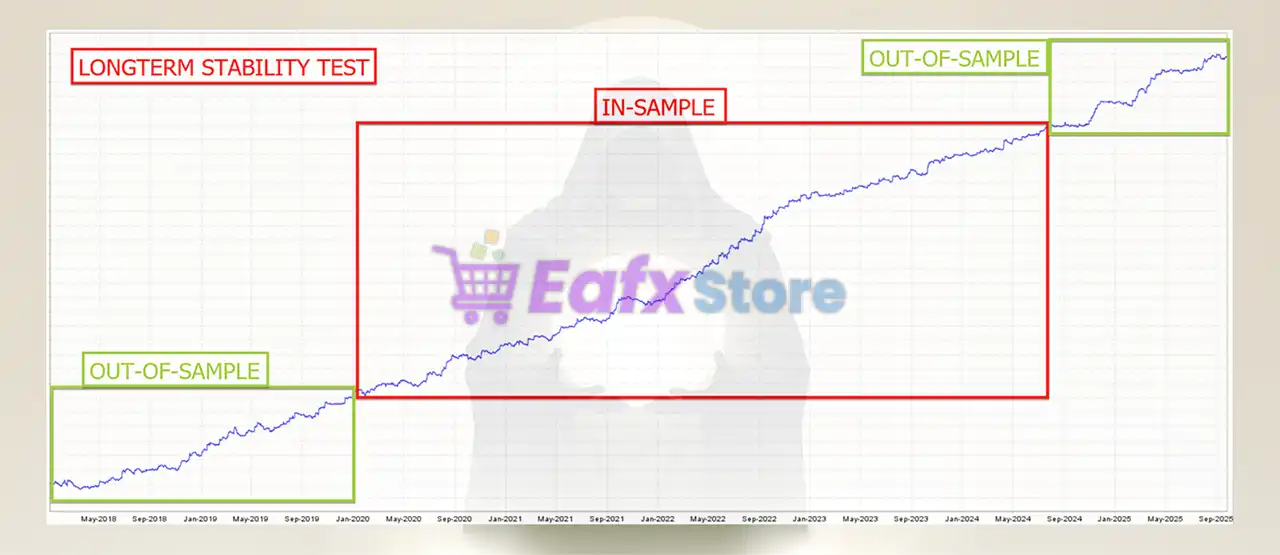
🔹 Extensive Stress Testing: Validated through out-of-sample testing to reduce overfitting risks.
🔹 Reliable Prop Firm Solution: Optimized for funded accounts with strict drawdown compliance.
🔹 Efficient Multi-Index Trading: Delivers diversified opportunities through advanced ORB execution.
Is The ORB Master EA MT5 safe?
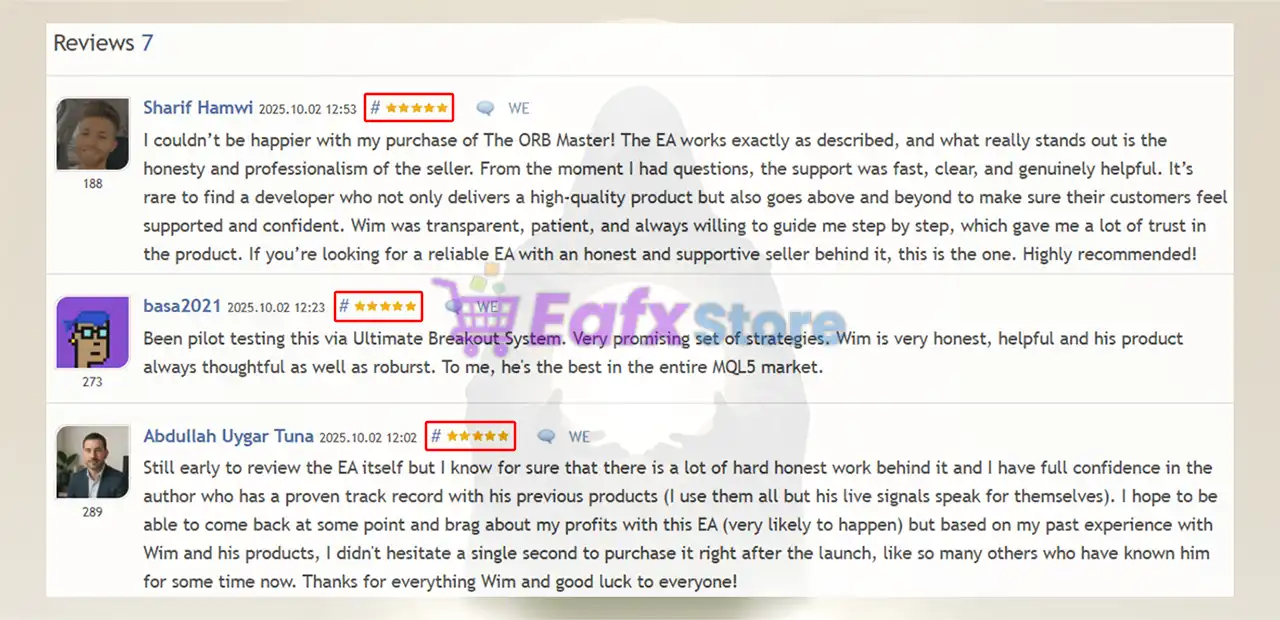
The ORB Master EA shows significant potential in providing stable and reliable profits, becoming a reliable tool in the forex market. This advisor is highly appreciated by the community in many aspects and has won the trust of users.
➡️ Dany Steyaert (2025.10.03): “Every EA Wim makes has been made professionally. Full confidence in the good performance of this new EA.”
➡️ Andrei Trif (2025.10.01): “Backtest is looking great. Should be a good product so well worth the launch price.”
➡️ Basa (2025.10.02): “Been pilot testing this via Ultimate Breakout System. Very promising set of strategies. To me, he’s the best in the entire MQL5 market.”
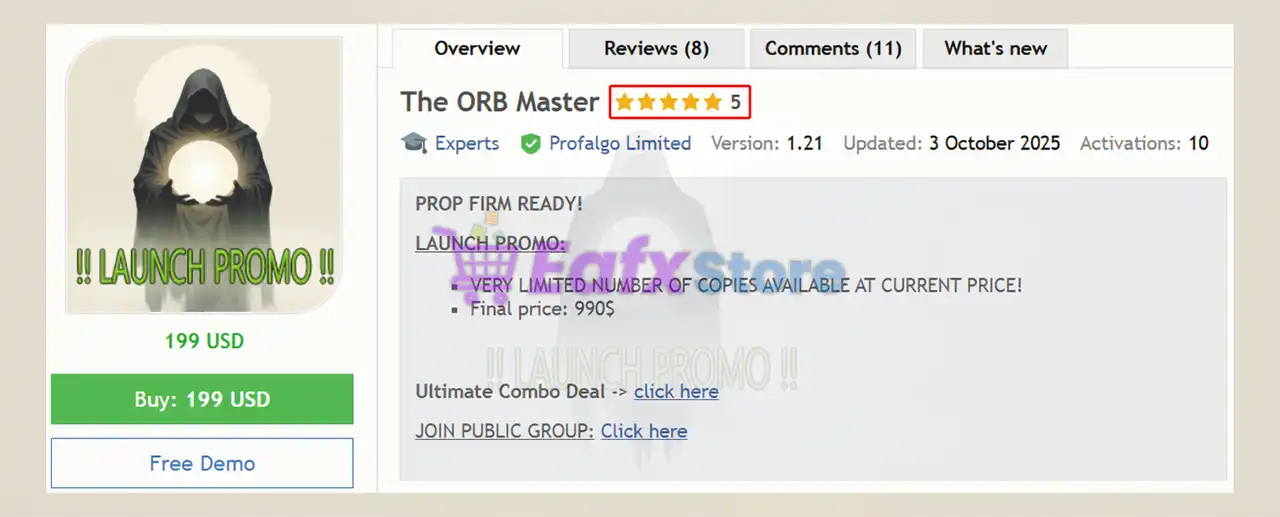
The ORB Master MT5 is rated 5 stars by users
Recommended settings
Recommended settings and parameters to pay attention to from developers and experts:
| Features | Type |
|---|---|
| Trading platform | MetaTrader 5 (MT5) |
| Time frames | M15 (15 minute chart) |
| Currency pairs | SP500, US30 (Dow Jones) NASDAQ and DAX |
| Minimum / Recommended deposit | $500 |
| Minimum / Recommended leverage | 1:30 |
| Account type | A low spread broker is recommended |
| Product type | Original version |
| Additional services | Unlock and Decompile |
| Recommended brokers | Exness Broker, Icmarkets Broker |
| Recommended VPS | MyfxVPS.com (Blue VPS, Golden VPS). Lowest Latency, 2 week Free Trial, 100% Free for 12-18 Months. |
➡️ Reviewed by David Easton
Product Download Package?
The download package of the product suite includes:
1. Experts:
✅ Setting (If Any).docx
✅ Installation Guide.docx
2. SetFiles:
✅ OrbMaster_prop firm set.set
✅ OrbMaster_medium risk.set
✅ OrbMaster_low risk.set
✅ OrbMaster_high risk.set
✅ OrbMaster_very high risk.set
✅ OrbMaster_combo_setup.set
✅ OrbMaster_prop firm_Combo set.set
Conclusion
In short, The ORB Master for MT5 combines quad-index specialization, 12 uncorrelated strategies, and advanced risk controls to deliver robust, prop firm–ready performance. With built-in news filters, dynamic SL/TP, and proven multi-year backtests, it offers traders a disciplined, high-profit solution for capturing early market momentum. Designed for safety, adaptability, and consistency, The ORB Master stands out as a professional-grade EA built for long-term success.
🔢 The ORB Master MT5 Settings Explained – Complete Setup Guide
The ORB Master MT5 is a professional Opening Range Breakout (ORB) Expert Advisor for MetaTrader 5 designed to trade major indices such as US500, US30, NAS100 and DAX.
The EA includes advanced prop firm protections, dynamic lot sizing, news filters, GMT automation, multi-session trading, and breakout strategies optimized for volatility-based index trading.
With highly customizable risk management and multiple market-specific configurations, The ORB Master MT5 is suitable for both funded account traders and aggressive index scalpers.
The ORB Master MT5 Settings
🔢 The ORB Master MT5 Full Settings Explanation
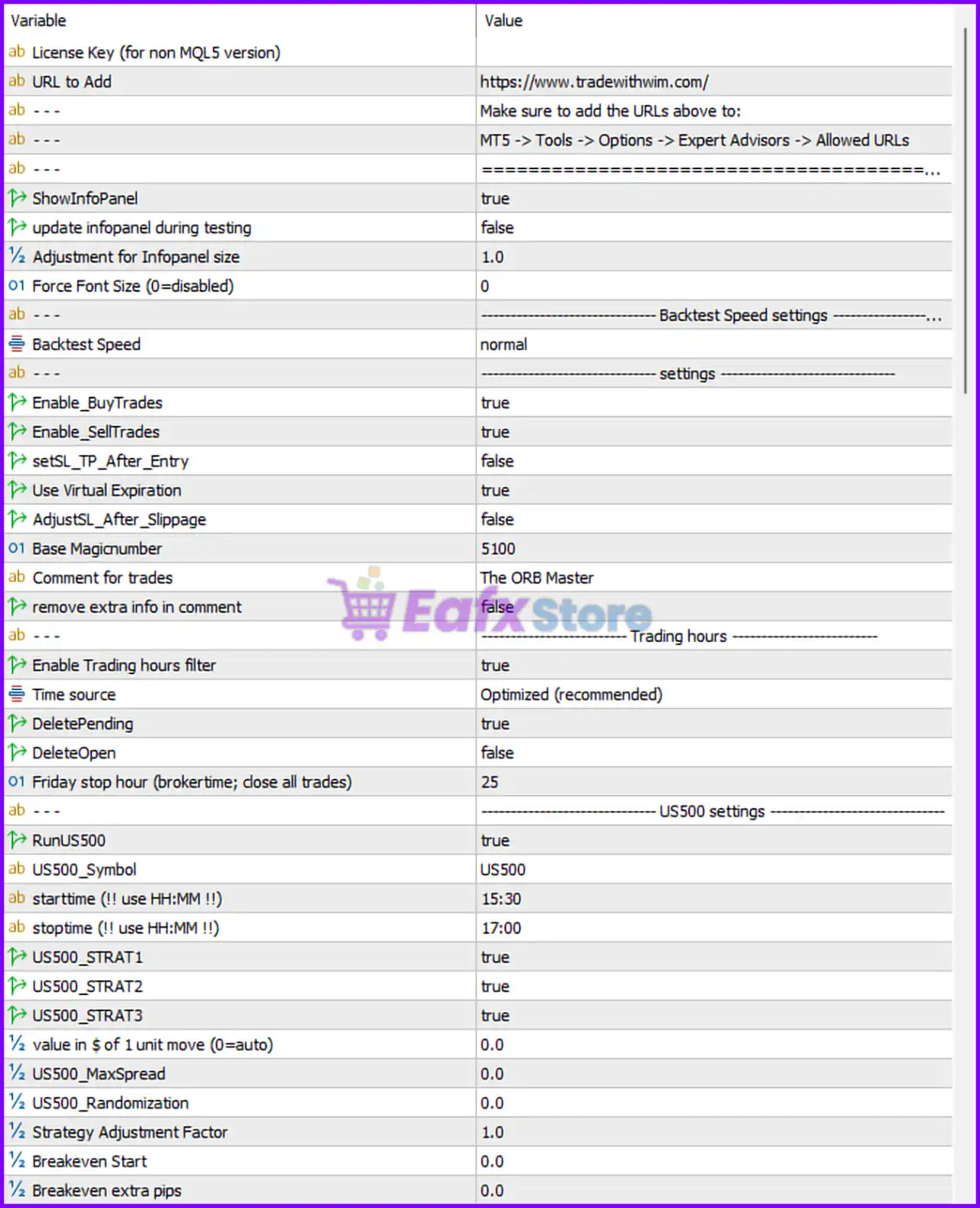
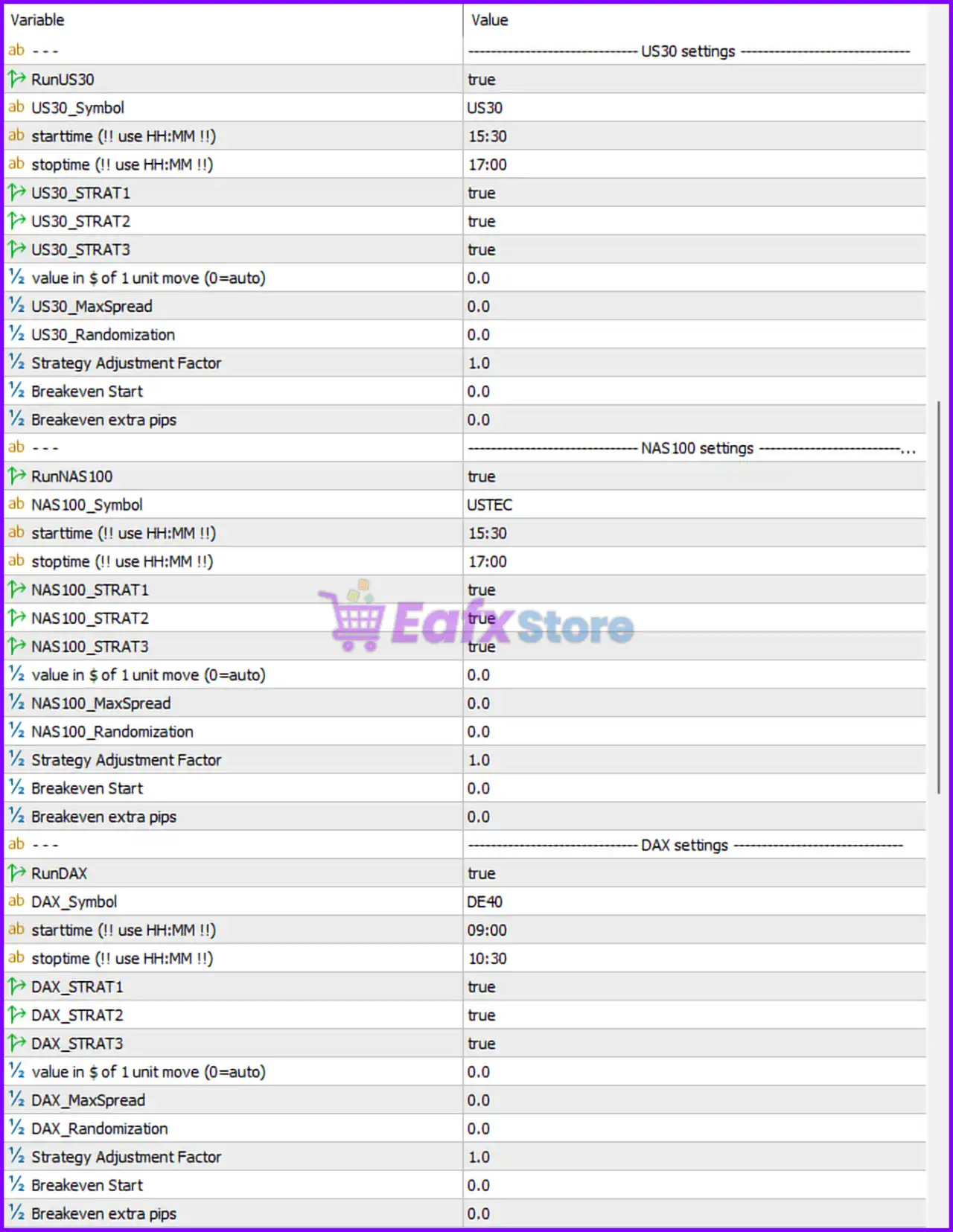
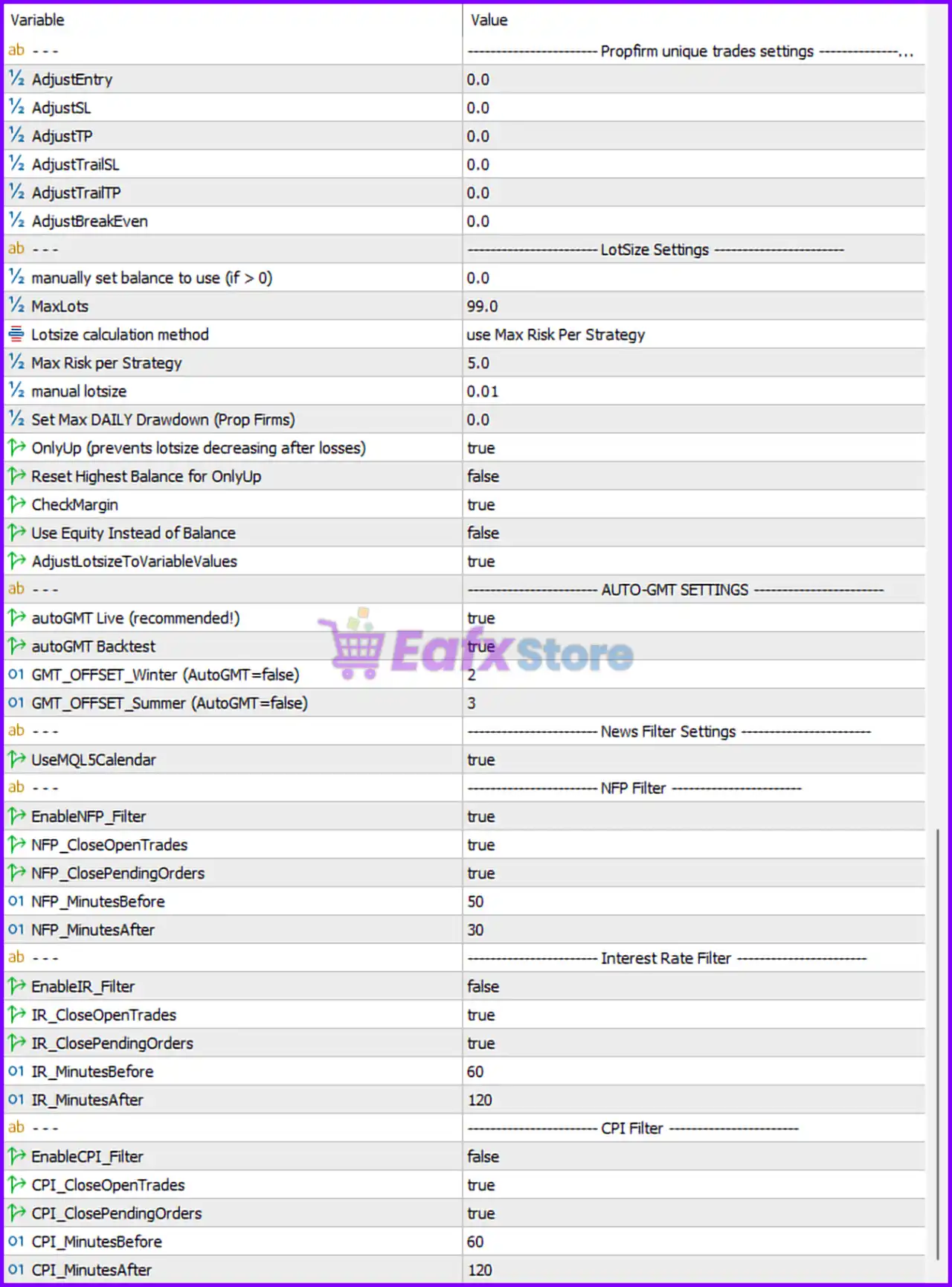
Below are the details of the parameters in the advisor’s trading system settings table:
The ORB Master EA MT5 Setting Panel
The ORB Master MT5 Setting Panel
The ORB Master EA Setting Panel
🔶 Prop Firm Unique Trades Settings
🔹 AdjustEntry = 0.0: Entry price adjustment offset is set to 0.0.
🔹 AdjustSL = 0.0: Stop Loss adjustment value is 0.0.
🔹 AdjustTP = 0.0: Take Profit adjustment value is 0.0.
🔹 AdjustTrailSL = 0.0: Trailing Stop Loss adjustment is 0.0.
🔹 AdjustTrailTP = 0.0: Trailing Take Profit adjustment is 0.0.
🔹 AdjustBreakEven = 0.0: Break-even adjustment value is 0.0.
🔶 Lot Size Settings
🔹 manually set balance to use (if > 0) = 0.0: Uses actual account balance because value is 0.0.
🔹 MaxLots = 99.0: Maximum allowed lot size is 99.0.
🔹 Lotsize calculation method = use Max Risk Per Strategy: Lot sizing is calculated using risk-per-strategy logic.
🔹 Max Risk per Strategy = 5.0: Maximum risk allowed per strategy is 5.0%.
🔹 manual lotsize = 0.01: Fixed manual lot size is 0.01.
🔹 Set Max DAILY Drawdown (Prop Firms) = 0.0: Daily drawdown protection is disabled at 0.0.
🔹 OnlyUp (prevents lotsize decreasing after losses) = true: Prevents lot size reduction after losing trades.
🔹 Reset Highest Balance for OnlyUp = false: Highest balance tracking reset is disabled.
🔹 CheckMargin = true: EA checks margin requirements before opening trades.
🔹 Use Equity Instead of Balance = false: Uses account balance instead of equity for calculations.
🔹 AdjustLotsizeToVariableValues = true: Automatically adjusts lot size to changing market conditions.
🔶 Auto-GMT Settings
🔹 autoGMT Live (recommended!) = true: Automatically detects GMT offset during live trading.
🔹 autoGMT Backtest = true: Automatically adjusts GMT during strategy backtesting.
🔹 GMT_OFFSET_Winter (AutoGMT=false) = 2: Winter GMT offset is 2 if AutoGMT is disabled.
🔹 GMT_OFFSET_Summer (AutoGMT=false) = 3: Summer GMT offset is 3 if AutoGMT is disabled.
🔶 News Filter Settings
🔹 UseMQL5Calendar = true: Uses the MQL5 economic calendar for news filtering.
🔶 NFP Filter Settings
🔹 EnableNFP_Filter = true: Enables Non-Farm Payroll news filtering.
🔹 NFP_CloseOpenTrades = true: Closes open trades before NFP news events.
🔹 NFP_ClosePendingOrders = true: Removes pending orders before NFP releases.
🔹 NFP_MinutesBefore = 50: Stops trading 50 minutes before NFP news.
🔹 NFP_MinutesAfter = 30: Resumes trading 30 minutes after NFP news.
🔶 Interest Rate Filter Settings
🔹 EnableIR_Filter = false: Interest rate news filter is disabled.
🔹 IR_CloseOpenTrades = true: Closes open trades during interest rate events.
🔹 IR_ClosePendingOrders = true: Removes pending orders during interest rate events.
🔹 IR_MinutesBefore = 60: Stops trading 60 minutes before interest rate news.
🔹 IR_MinutesAfter = 120: Resumes trading 120 minutes after interest rate news.
🔶 CPI Filter Settings
🔹 EnableCPI_Filter = false: CPI news filter is disabled.
🔹 CPI_CloseOpenTrades = true: Closes trades during CPI releases.
🔹 CPI_ClosePendingOrders = true: Removes pending orders during CPI events.
🔹 CPI_MinutesBefore = 60: Stops trading 60 minutes before CPI news.
🔹 CPI_MinutesAfter = 120: Resumes trading 120 minutes after CPI news.
🔶 License & URL Settings
🔹 License Key (for non MQL5 version): Area reserved for external license activation.
🔹 URL to Add = https://www.tradewithwim.com/: Website URL that must be added to MT5 allowed URLs.
🔹 MT5 -> Tools -> Options -> Expert Advisors -> Allowed URLs: Required MT5 navigation path for enabling web requests.
🔶 Info Panel Settings
🔹 ShowInfoPanel = true: Displays the information panel on the chart.
🔹 update infopanel during testing = false: Info panel updates are disabled during backtesting.
🔹 Adjustment for Infopanel size = 1.0: Default information panel scaling factor is 1.0.
🔹 Force Font Size (0=disabled) = 0: Forced font size is disabled.
🔶 Backtest Speed Settings
🔹 Backtest Speed = normal: Uses normal execution speed during strategy testing.
🔶 General Trading Settings
🔹 Enable_BuyTrades = true: Buy trades are enabled.
🔹 Enable_SellTrades = true: Sell trades are enabled.
🔹 setSL_TP_After_Entry = false: Stop Loss and Take Profit are not applied after order entry.
🔹 Use Virtual Expiration = true: Uses virtual expiration for pending orders.
🔹 AdjustSL_After_Slippage = false: Stop Loss is not adjusted after slippage occurs.
🔹 Base Magicnumber = 5100: Base Magic Number used for EA trade identification.
🔹 Comment for trades = The ORB Master: Adds The ORB Master comment to trades.
🔹 remove extra info in comment = false: Additional trade comment information remains enabled.
🔶 Trading Hours Settings
🔹 Enable Trading hours filter = true: Trading session filter is enabled.
🔹 Time source = Optimized (recommended): Uses optimized server/local time synchronization.
🔹 DeletePending = true: Deletes pending orders outside trading hours.
🔹 DeleteOpen = false: Open trades remain active outside trading hours.
🔹 Friday stop hour (brokertime; close all trades) = 25: Friday closing feature effectively disabled because value is 25.
🔶 US500 Settings
🔹 RunUS500 = true: Enables trading on US500.
🔹 US500_Symbol = US500: Broker symbol used for US500 trading.
🔹 starttime (!! use HH:MM !!) = 15:30: US500 trading session starts at 15:30.
🔹 stoptime (!! use HH:MM !!) = 17:00: US500 trading session ends at 17:00.
🔹 US500_STRAT1 = true: Strategy 1 enabled for US500.
🔹 US500_STRAT2 = true: Strategy 2 enabled for US500.
🔹 US500_STRAT3 = true: Strategy 3 enabled for US500.
🔹 value in $ of 1 unit move (0=auto) = 0.0: Automatically calculates point value.
🔹 US500_MaxSpread = 0.0: Spread filter disabled for US500.
🔹 US500_Randomization = 0.0: Randomization disabled for US500.
🔹 Strategy Adjustment Factor = 1.0: Default strategy scaling factor is 1.0.
🔹 Breakeven Start = 0.0: Break-even activation disabled.
🔹 Breakeven extra pips = 0.0: No additional pips added to break-even.
🔶 US30 Settings
🔹 RunUS30 = true: Enables trading on US30.
🔹 US30_Symbol = US30: Broker symbol for US30 trading.
🔹 starttime = 15:30: US30 session begins at 15:30.
🔹 stoptime = 17:00: US30 session ends at 17:00.
🔹 US30_STRAT1 = true: Strategy 1 enabled for US30.
🔹 US30_STRAT2 = true: Strategy 2 enabled for US30.
🔹 US30_STRAT3 = true: Strategy 3 enabled for US30.
🔹 value in $ of 1 unit move (0=auto) = 0.0: Auto-calculates point value.
🔹 US30_MaxSpread = 0.0: Spread filter disabled.
🔹 US30_Randomization = 0.0: Randomization disabled.
🔹 Strategy Adjustment Factor = 1.0: Default adjustment factor remains 1.0.
🔹 Breakeven Start = 0.0: Break-even disabled.
🔹 Breakeven extra pips = 0.0: Extra break-even pips disabled.
🔶 NAS100 Settings
🔹 RunNAS100 = true: Enables trading on NAS100.
🔹 NAS100_Symbol = USTEC: Broker symbol for NAS100 is USTEC.
🔹 starttime = 15:30: NAS100 session begins at 15:30.
🔹 stoptime = 17:00: NAS100 session ends at 17:00.
🔹 NAS100_STRAT1 = true: Strategy 1 enabled.
🔹 NAS100_STRAT2 = true: Strategy 2 enabled.
🔹 NAS100_STRAT3 = true: Strategy 3 enabled.
🔹 NAS100_MaxSpread = 0.0: Spread filter disabled.
🔹 NAS100_Randomization = 0.0: Randomization disabled.
🔹 Strategy Adjustment Factor = 1.0: Uses default strategy factor.
🔹 Breakeven Start = 0.0: Break-even disabled.
🔹 Breakeven extra pips = 0.0: No additional break-even pips.
🔶 DAX Settings
🔹 RunDAX = true: Enables trading on DAX.
🔹 DAX_Symbol = DE40: Broker symbol for DAX is DE40.
🔹 starttime = 09:00: DAX session starts at 09:00.
🔹 stoptime = 10:30: DAX session ends at 10:30.
🔹 DAX_STRAT1 = true: Strategy 1 enabled.
🔹 DAX_STRAT2 = true: Strategy 2 enabled.
🔹 DAX_STRAT3 = true: Strategy 3 enabled.
🔹 DAX_MaxSpread = 0.0: Spread filter disabled.
🔹 DAX_Randomization = 0.0: Randomization disabled.
🔹 Strategy Adjustment Factor = 1.0: Default scaling factor.
🔹 Breakeven Start = 0.0: Break-even disabled.
🔹 Breakeven extra pips = 0.0: No extra pips added.
🔢 Conclusion
The ORB Master MT5 is a highly advanced breakout trading Expert Advisor optimized for major indices including US500, US30, NAS100, and DAX. The EA combines prop firm protection systems, automated GMT synchronization, advanced news filters, dynamic lot management, and multiple breakout strategies into a powerful MT5 trading solution. With flexible risk management and extensive market customization, The ORB Master MT5 is ideal for traders seeking professional automated index trading performance.
🔢 FAQs
❓ What is The ORB Master MT5?
The ORB Master MT5 is an Opening Range Breakout Expert Advisor designed for automated index trading on MetaTrader 5.
❓ Which markets does The ORB Master MT5 support?
The EA supports US500, US30, NAS100, and DAX indices.
❓ Does The ORB Master MT5 include news filters?
Yes, it includes NFP, CPI, and Interest Rate news filtering systems.
❓ Can The ORB Master MT5 be used with prop firm accounts?
Yes, the EA includes daily drawdown management and prop firm protection features.
❓ Does The ORB Master MT5 support automatic GMT adjustment?
Yes, AutoGMT is enabled for both live trading and backtesting.
User Reviews
Only logged in customers who have purchased this product may leave a review.
❓ Which trading platform is The ORB Master EA compatible with?
The ORB Master EA is designed exclusively for MetaTrader 5 (MT5).
❓ Which markets does The ORB Master EA trade?
It specializes in the SP500, US30 (Dow Jones), NASDAQ, and DAX indices.
❓ What is the minimum deposit required to start?
The EA can start with a minimum of $500, though higher capital provides greater stability.
❓ What timeframe does The ORB Master EA use?
It operates on the M15 chart, automatically managing symbols from one chart.
❓ Does the EA comply with prop firm rules?
Yes, it is prop firm ready, with features like Max Daily Drawdown and trade randomization.
❓ How does The ORB Master EA manage risk?
It uses 12 uncorrelated strategies, dynamic trailing Stop Loss/Take Profit, and adjustable risk per strategy based on historical drawdowns.
❓ Does it trade during high-impact news events?
No, it has advanced news filters for events like NFP, CPI, and interest rate decisions, avoiding major volatility.
❓ What were the backtest results of The ORB Master EA?
Backtests from 2020–2025 showed profits up to $3.6M from $10,000 and $460K from $50,000 with controlled drawdown.
❓ Who developed The ORB Master EA?
It was created by Wim Schrynemakers, a Maltese developer with 12+ years of MQL5 experience and multiple best-selling EAs.
-
 Price range: $89.00 through $599.00
 -
 Price range: $70.00 through $599.00
 -
 Price range: $65.00 through $599.00
 -
 Price range: $70.00 through $599.00
-
 4
4 -
 5Price range: $89.00 through $599.00
 -
 3Price range: $89.00 through $599.00
 -
 1Price range: $89.00 through $599.00
There are no reviews yet.