



0
SHOPPING CART
Instant Digital Delivery
Get your EA software delivered instantly to your email after purchase.
Instant Activation
Your EA will be activated immediately after purchase. No waiting time!
All-Inclusive Pricing
No hidden fees—what you see is what you pay.

Advanced Scalper MT5 + SetFiles (Latest version) – GroupBuy

Advanced Scalper MT5 is a robot built for trading EURUSD and USDJPY. Real trading profit performance has been verified by real accounts.

Price range: $89.00 through $599.00
In stock

Select a variant to see availability.

What is Advanced Scalper MT5?

Advanced Scalper MT5 is a professional Expert Advisor (EA) designed for automated forex trading with a strong focus on stability, adaptability, and disciplined risk management. Using advanced Indicators, breakout analysis, and proprietary exit algorithms, it identifies high-probability market opportunities while maintaining precise trade management and controlled exposure.

🔶 Vendor Website: Click here
🔶 This is GroupBuy ==> How to Join

About the Author

This product is compiled by Wim Schrynemakers. This Malta author has more than +13 years of experience working on MQL5 with many famous products such as Advanced Scalper MT5, Stability Pro MT5, Apex Trader MT5, Goldbot One MT5, The Gold Reaper MT5 and others. Among them, Advanced Scalper MT5 is his best performing products.

🔶 Join Our Channel Telegram

Advanced Scalper MT5 Review

Advanced Scalper MT5 Review

Key Features of Advanced Scalper MT5

🔹 Advanced Exit Management Algorithms: Uses intelligent Stop Loss (SL) and trailing logic to protect profits.
🔹 Integrated Spread and Slippage Filters: Avoids trading during unfavorable broker conditions.
🔹 Fully Customizable Trading Settings: Allows traders to adjust parameters for different strategies.
🔹 Dual Trading Modes Available: Supports both fully automated trading and manual trade management.
🔹 Optimized for Liquid Forex Markets: Performs best on low spread pairs like EURUSD and USDJPY.

What is the Advanced Scalper MT5 Trading Strategy?

🔹 High-Low Breakout Entry Model: Identifies breakout opportunities based on recent price ranges.
🔹 Multi-Timeframe Signal Analysis: Works effectively across H1 and H4 for stronger confirmations.
🔹 Advanced Stop Loss Management Logic: Continuously adjusts protective levels to control risk.
🔹 Precision Exit Optimization System: Focuses on maximizing profits through strategic exits.
🔹 Market Condition Filtering Algorithm: Uses spread and slippage checks before executing trades.

Advanced Scalper MT5 Review

1. Advanced Scalper MT5 Live Results:

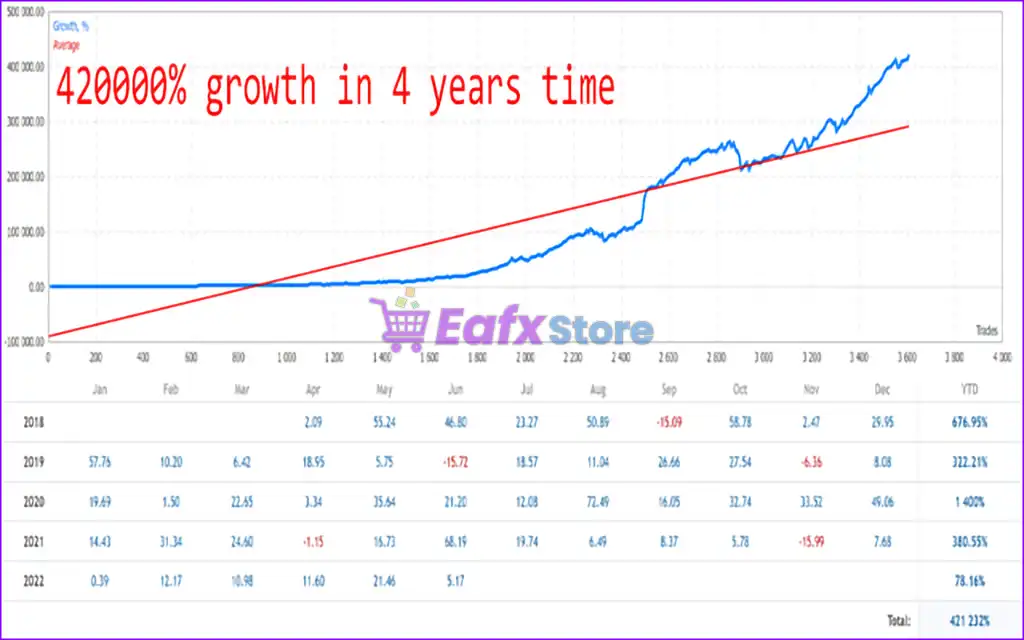
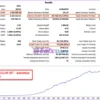
Advanced Scalper high frequency trading, precision engineered, built for explosive growth over time. According to its verified performance chart, this EA has delivered an incredible total return of 421,232%, which equates to a growth of 420,000% from 2018 to 2022, using real tick data and live trading conditions.

Advanced Scalper MT5 Live Results

Advanced Scalper MT5 Live Results

2. Advanced Scalper MT5 Backtest Results:

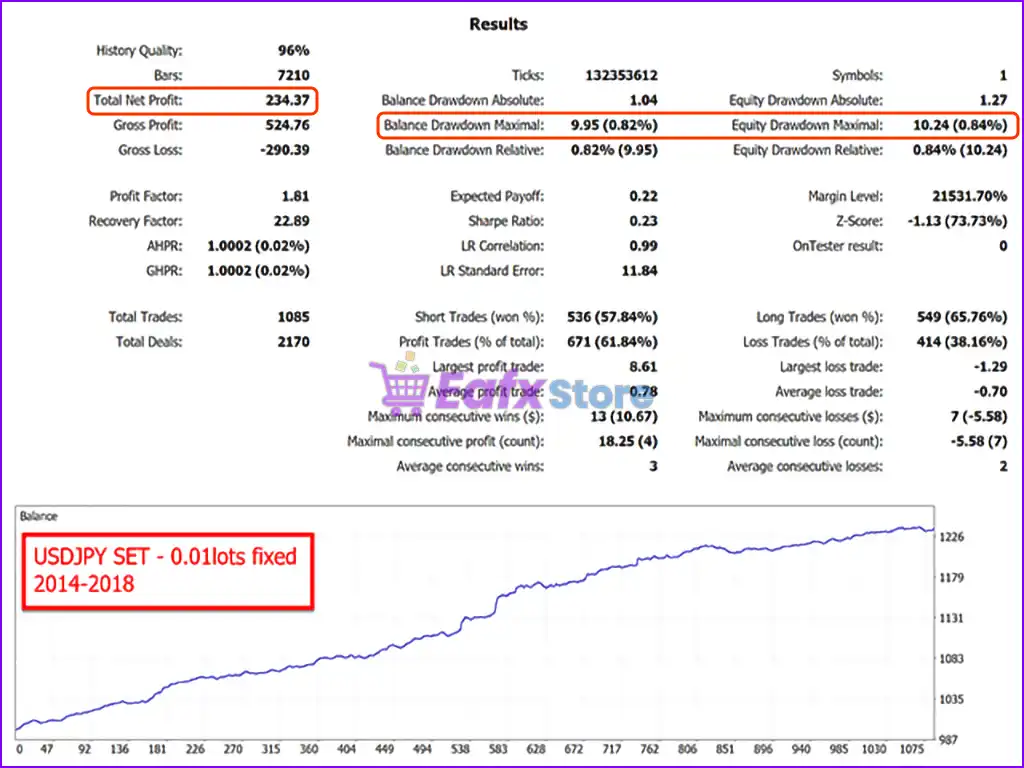
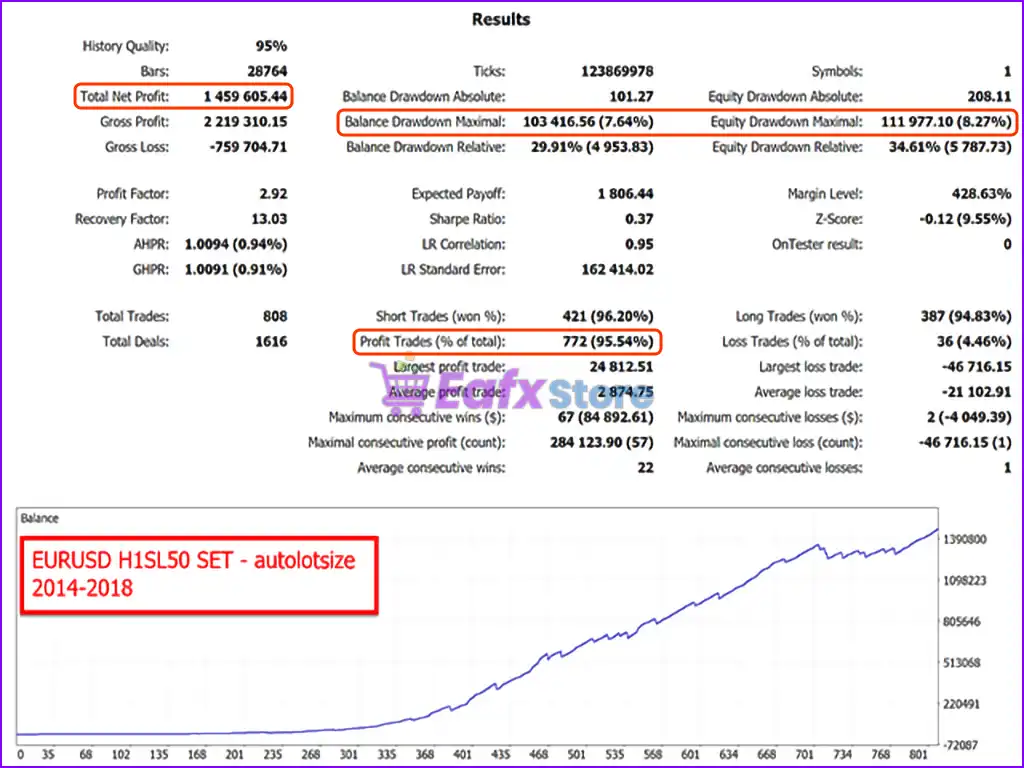
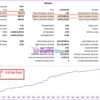
🔶 Backtested performance of Advanced Scalper MT5 on EURUSD (H1 SL50 strategy) from 2014–2018. With over $1.4 million in net profit and a 95% win rate, this EA proves that high frequency scalping can deliver long-term steady growth with minimal drawdown.

Total Net Profit: $1.4 Million
Win Rate: 95.54%
Maximal Balance Drawdown: 7.64%
Maximal Equity Drawdown: 8.27%

Advanced Scalper MT5 Backtests Trading Results

Advanced Scalper MT5 Backtests Trading Results

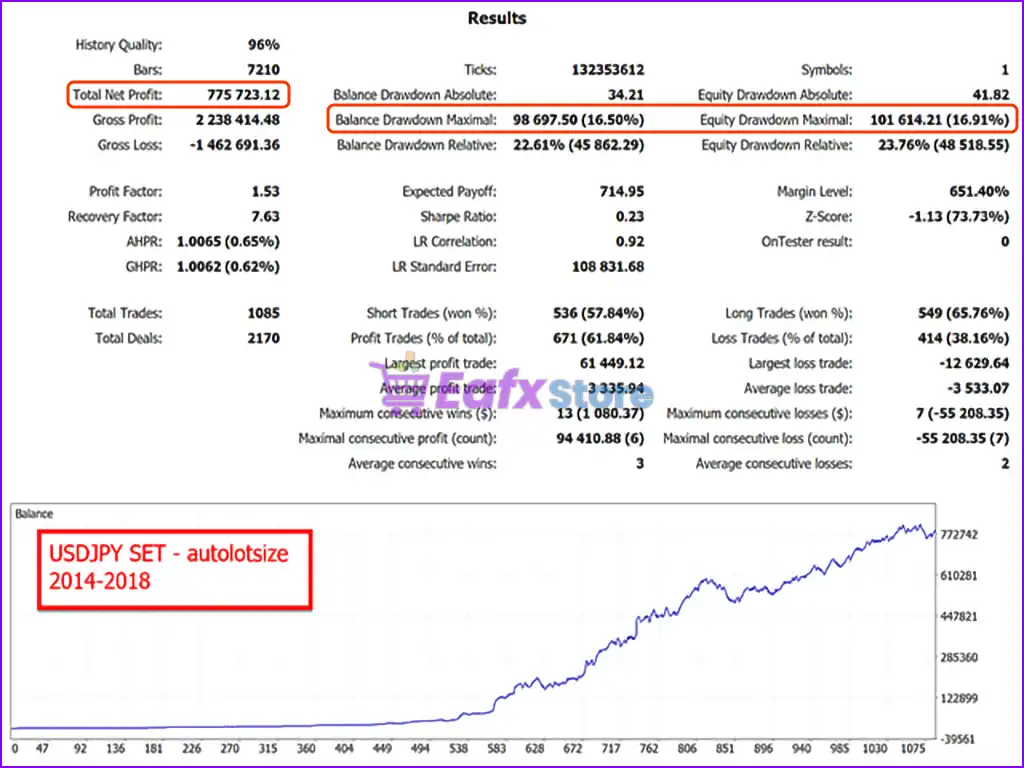
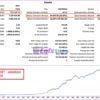
🔶 Backtested trading results over 4 years (2014 – 2018) with impressive profit performance. The advisor uses the AUTOLOTSIZE setting and shows impressive profit potential.

Total Net Profit: $775,723
Win Rate: 61.84%
Maximal Balance Drawdown: 16.50%
Maximal Equity Drawdown: 16.91%

Advanced Scalper MT5 Backtests Results

Advanced Scalper MT5 Backtests Results

Why Choose & Use Advanced Scalper MT5?

🔹 Stable Automated Trading Structure: Designed for consistent performance across different markets.
🔹 Professional Risk Control Framework: Ensures strict stop-loss protection on every trade.
🔹 Flexible Trading Integration: Can manage trades opened manually or by other strategies.
🔹 Adaptive Strategy Customization: Supports various trading styles and account conditions.
🔹 Marketplace-Ready Forex EA Solution: Ideal for traders seeking structured automated trading.

Is Advanced Scalper MT5 safe?

Advanced Scalper MT5 shows significant potential in providing stable and reliable profits, making it a reliable tool in the forex market. The advisor is highly appreciated by the MQL5 community in many aspects and has won the trust of users.

➡️ Hai Trung Vu (2023.11.17): “I bought my 2nd EA from Wing in just 1 week There is no cheating in running the blacktest. There are many good strategies in 1 EA.”
➡️ Konstantin Stratigenas (2021.10.19): “Best EA i ever bought. Tickmill Signal matches or better on Real Account. I am very satisfied with Advanced Scalper.”
➡️ Luca77 (2021.08.15): “Very good EA, I used it in REAL account for three months (2021/05/13 – 2021/08/13) with 10% profit (0,05 lots used), DD was very low. IMHO it’s ok.”
➡️ Ow1977mt5 (2021.06.08): “This is really a very good EA, definitely one of the best. In my opinion a must have. Good contact, I completely recommend. Thank you!”

Recommended settings

Recommended settings and parameters to pay attention to from developers and experts:

FeaturesType
Trading platformMetaTrader 5 (MT5)
Time framesH1 or H4
Currency pairsEURUSD and USDJPY
Minimum / Recommended deposit$150
Minimum / Recommended leverageAny
Product typeOriginal version
Additional servicesUnlock and Decompile
Recommended brokersExness Broker, Icmarkets Broker
Recommended VPSMyfxVPS.com ( Blue VPS, Golden VPS). Lowest Latency, 2 week Free Trial, 100% Free for 12-18 Months.

➡️ Reviewed by David Easton

Product Download Package?

The download package of the product suite includes:

Experts

✅ Setting (If Any).docx
✅ Installation Guide.docx

SetFiles

✅ eurusd_H1_SL2.set
✅ eurusd_H1_SL14.set
✅ eurusd_H1_SL22.set
✅ eurusd_H1_SL50.set
✅ gbpusd_H1_SL10.set
✅ usdjpy_H1_SL22.set
✅ usdjpy_H4_SL14.set
✅ xauusd_M5_5875576.set
✅ xauusd_H1.set
✅ usdjpy_H4_Set_SL14.set
✅ gbpusdH1_Set_SL10.set
✅ eurusdH1_set_SL50set.set
✅ eurusd_H1_set_SL14.set
✅ advanced_scalper.set

Conclusion

In short, Advanced Scalper MT5 is a professional-grade expert advisor built for traders who demand precision, performance, and reliability in fast-paced forex markets. Developed by veteran MQL5 author Wim Schrynemakers, this EA has been rigorously tested and fine-tuned over years, delivering high-frequency scalping execution with advanced exit logic, dynamic slippage control, and smart spread filtering. Trusted by the MQL5 community with numerous 5-star reviews, Advanced Scalper MT5 stands out as one of the most reliable and consistent forex scalping EAs.
🔢 Advanced Scalper MT5 Settings Explained – Complete Parameter Guide

Advanced Scalper MT5 is a professional MetaTrader 5 Expert Advisor designed for precision scalping using recent High/Low price action, intelligent pending order management, spread and slippage filters, dynamic trailing stops, break-even automation, and advanced money management. Its flexible configuration allows traders to optimize entries, exits, and risk control while adapting to different market conditions.

Advanced Scalper MT5 Settings

Advanced Scalper MT5 Settings


🔢 General EA Settings

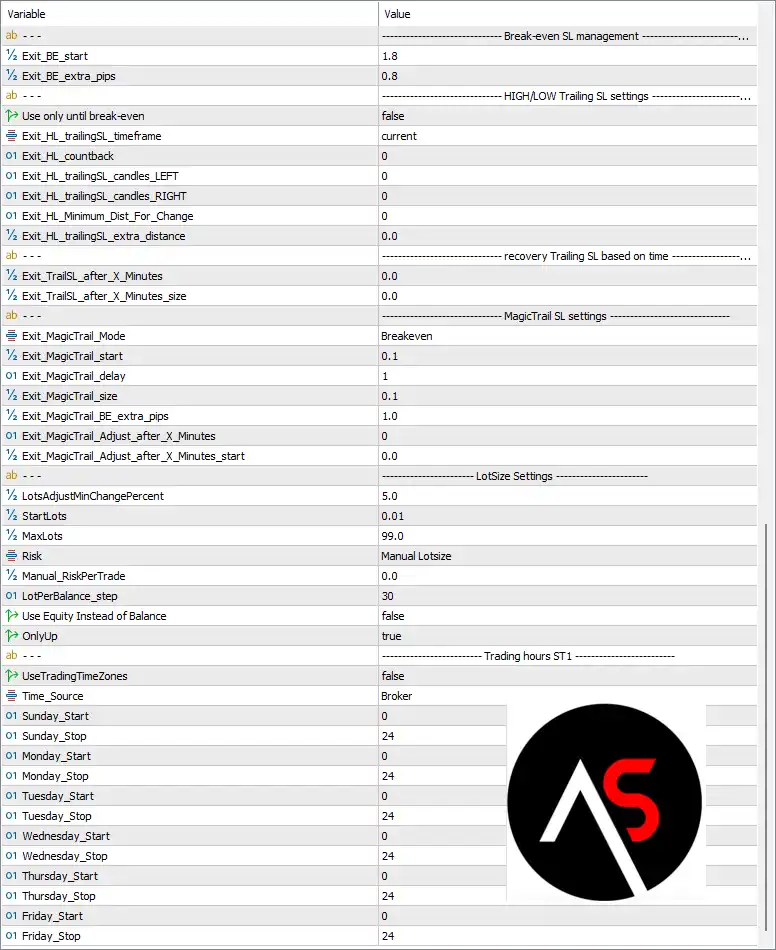
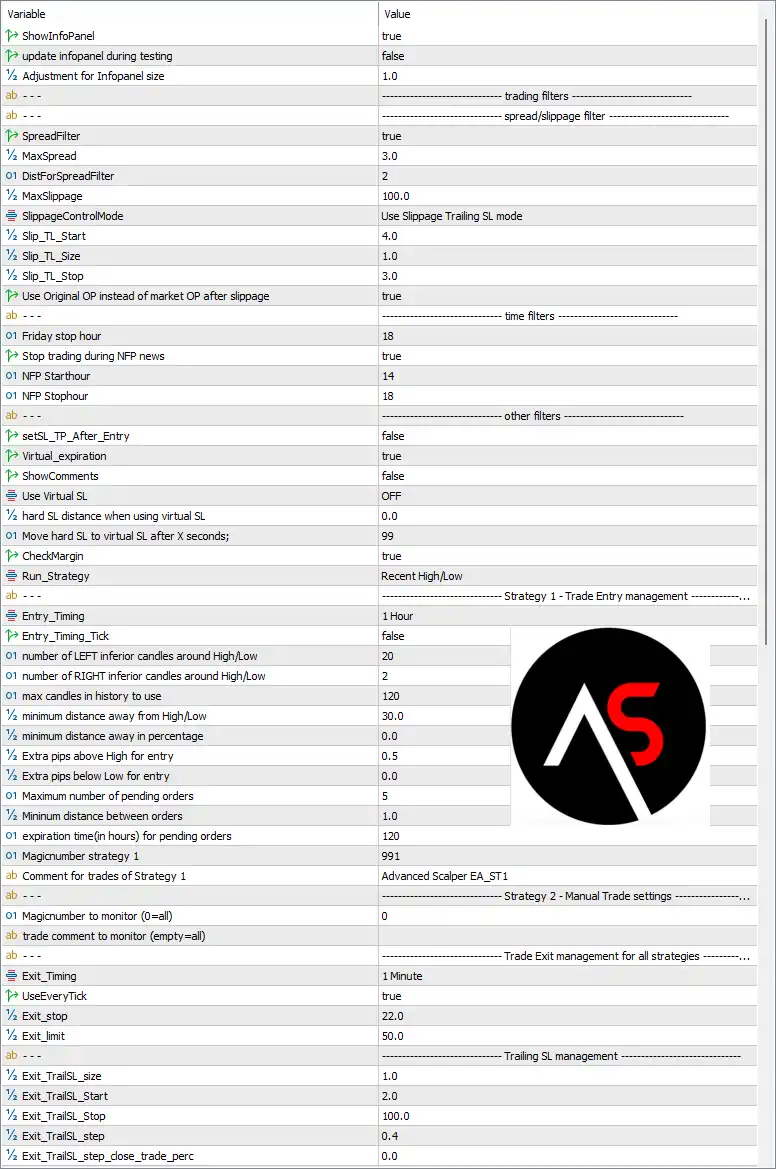
Below are the details of the parameters in the advisor’s trading system settings table:

Advanced Scalper MT5 Settings Panel

Advanced Scalper MT5 Settings Panel

Advanced Scalper MT5 Setting Panel

Advanced Scalper MT5 Setting Panel

🔹 ShowInfoPanel = true – Displays the EA information panel on the chart for real-time trading statistics and system status.

🔹 update infopanel during testing = false – Disables information panel updates during Strategy Tester execution for improved testing performance.

🔹 Adjustment for Infopanel size = 1.0 – Sets the information panel display scale to 1.0 (default size).


🔶 Spread & Slippage Filter

🔹 SpreadFilter = true – Enables spread filtering before opening new trades.

🔹 MaxSpread = 3.0 – Allows trading only when the spread is 3.0 points or lower.

🔹 DistForSpreadFilter = 2 – Defines the spread filter distance parameter as 2.

🔹 MaxSlippage = 100.0 – Sets the maximum allowable slippage to 100.0 points.

🔹 SlippageControlMode = Use Slippage Trailing SL mode – Applies slippage management using the Trailing Stop protection mode.

🔹 Slip_TL_Start = 4.0 – Starts slippage protection after 4.0 points.

🔹 Slip_TL_Size = 1.0 – Sets the slippage trailing size to 1.0 point.

🔹 Slip_TL_Stop = 3.0 – Stops slippage trailing after 3.0 points.

🔹 Use Original OP instead of market OP after slippage = true – Keeps the original order price after slippage instead of replacing it with the market execution price.


🔶 Time Filters

🔹 Friday stop hour = 18 – Stops opening new trades after 18:00 on Friday.

🔹 Stop trading during NFP news = true – Prevents trading during Non-Farm Payroll announcements.

🔹 NFP Starthour = 14 – Begins the NFP trading restriction at 14:00.

🔹 NFP Stophour = 18 – Ends the NFP trading restriction at 18:00.


🔶 Other Filters

🔹 setSL_TP_After_Entry = false – Does not apply Stop Loss and Take Profit immediately after order execution.

🔹 Virtual_expiration = true – Enables virtual expiration management for pending orders.

🔹 ShowComments = false – Hides EA comments from the trading chart.

🔹 Use Virtual SL = OFF – Uses broker-side Stop Loss instead of virtual Stop Loss.

🔹 hard SL distance when using virtual SL = 0.0 – No additional hard Stop Loss distance is configured.

🔹 Move hard SL to virtual SL after X seconds = 99 – Moves the hard Stop Loss to the virtual Stop Loss after 99 seconds.

🔹 CheckMargin = true – Verifies sufficient free margin before placing trades.

🔹 Run_Strategy = Recent High/Low – Uses the Recent High/Low breakout strategy for trade entries.


🔶 Strategy 1 – Trade Entry Management

🔹 Entry_Timing = 1 Hour – Evaluates entry signals every 1 Hour timeframe.

🔹 Entry_Timing_Tick = false – Entry logic is not evaluated on every incoming tick.

🔹 number of LEFT inferior candles around High/Low = 20 – Uses 20 candles to the left when detecting swing highs and lows.

🔹 number of RIGHT inferior candles around High/Low = 2 – Uses 2 candles to the right for High/Low confirmation.

🔹 max candles in history to use = 120 – Searches up to 120 historical candles.

🔹 minimum distance away from High/Low = 30.0 – Requires a minimum entry distance of 30.0 points from the detected High/Low.

🔹 minimum distance away in percentage = 0.0 – No percentage-based distance filter is applied.

🔹 Extra pips above High for entry = 0.5 – Places Buy entries 0.5 pips above the detected High.

🔹 Extra pips below Low for entry = 0.0 – Places Sell entries directly at the detected Low.

🔹 Maximum number of pending orders = 5 – Allows a maximum of 5 pending orders.

🔹 Minimum distance between orders = 1.0 – Requires 1.0 point minimum spacing between pending orders.

🔹 expiration time (in hours) for pending orders = 120 – Pending orders expire after 120 hours.

🔹 Magicnumber strategy 1 = 991 – Uses 991 as the unique Magic Number for Strategy 1.

🔹 Comment for trades of Strategy 1 = Advanced Scalper EA_ST1 – Adds the comment Advanced Scalper EA_ST1 to Strategy 1 trades.


🔶 Strategy 2 – Manual Trade Settings

🔹 Magicnumber to monitor (0=all) = 0 – Monitors all manual trades regardless of Magic Number.

🔹 trade comment to monitor (empty=all) – Monitors every trade comment when left empty.


🔶 Trade Exit Management

🔹 Exit_Timing = 1 Minute – Evaluates exit conditions every 1 Minute timeframe.

🔹 UseEveryTick = true – Updates exit logic on every market tick.

🔹 Exit_stop = 22.0 – Uses 22.0 points as the exit Stop parameter.

🔹 Exit_limit = 50.0 – Uses 50.0 points as the exit profit target.


🔶 Trailing Stop Management

🔹 Exit_TrailSL_size = 1.0 – Sets the trailing stop increment to 1.0 point.

🔹 Exit_TrailSL_Start = 2.0 – Activates trailing Stop Loss after 2.0 points.

🔹 Exit_TrailSL_Stop = 100.0 – Maximum trailing Stop Loss distance is 100.0 points.

🔹 Exit_TrailSL_step = 0.4 – Moves the trailing Stop Loss in 0.4-point increments.

🔹 Exit_TrailSL_step_close_trade_perc = 0.0 – No percentage-based partial close is used during trailing.


🔶 Break-even SL Management

🔹 Exit_BE_start = 1.8 – Activates Break-even after 1.8 points of profit.

🔹 Exit_BE_extra_pips = 0.8 – Adds 0.8 pips beyond Break-even to secure profits.


🔶 High/Low Trailing SL Settings

🔹 Use only until break-even = false – Continues trailing Stop Loss even after Break-even has been reached.

🔹 Exit_HL_trailingSL_timeframe = current – Uses the current chart timeframe for High/Low trailing.

🔹 Exit_HL_countback = 0 – Uses the default candle countback.

🔹 Exit_HL_trailingSL_candles_LEFT = 0 – No additional left candle requirement.

🔹 Exit_HL_trailingSL_candles_RIGHT = 0 – No additional right candle requirement.

🔹 Exit_HL_Minimum_Dist_For_Change = 0 – No minimum movement required before adjusting Stop Loss.

🔹 Exit_HL_trailingSL_extra_distance = 0.0 – No extra trailing distance is added.


🔶 Recovery Trailing SL Based on Time

🔹 Exit_TrailSL_after_X_Minutes = 0.0 – Time-based recovery trailing is disabled.

🔹 Exit_TrailSL_after_X_Minutes_size = 0.0 – No time-based trailing distance is configured.


🔶 MagicTrail SL Settings

🔹 Exit_MagicTrail_Mode = Breakeven – Uses Break-even mode for MagicTrail management.

🔹 Exit_MagicTrail_start = 0.1 – Starts MagicTrail after 0.1 points.

🔹 Exit_MagicTrail_delay = 1 – Waits 1 cycle before activating MagicTrail.

🔹 Exit_MagicTrail_size = 0.1 – Uses a 0.1-point MagicTrail increment.

🔹 Exit_MagicTrail_BE_extra_pips = 1.0 – Adds 1.0 pip beyond Break-even.

🔹 Exit_MagicTrail_Adjust_after_X_Minutes = 0 – No delayed MagicTrail adjustment.

🔹 Exit_MagicTrail_Adjust_after_X_Minutes_start = 0.0 – Immediate adjustment remains disabled.


🔶 Lot Size Settings

🔹 LotsAdjustMinChangePercent = 5.0 – Lot size changes only when balance changes by at least 5.0%.

🔹 StartLots = 0.01 – Opens the initial trade with 0.01 lots.

🔹 MaxLots = 99.0 – Limits the maximum position size to 99.0 lots.

🔹 Risk = Manual Lotsize – Uses manually configured lot sizing instead of percentage risk.

🔹 Manual_RiskPerTrade = 0.0 – Percentage risk management is disabled.

🔹 LotPerBalance_step = 30 – Uses 30 as the lot scaling step.

🔹 Use Equity Instead of Balance = false – Lot sizing calculations are based on account balance rather than equity.

🔹 OnlyUp = true – Lot sizes may increase with account growth but will not automatically decrease.


🔶 Trading Hours ST1

🔹 UseTradingTimeZones = false – Trading time restrictions are disabled.

🔹 Time_Source = Broker – Uses the broker server time.

🔹 Sunday_Start = 0 – Trading begins at 00:00 on Sunday.

🔹 Sunday_Stop = 24 – Trading ends at 24:00 on Sunday.

🔹 Monday_Start = 0 – Trading begins at 00:00 on Monday.

🔹 Monday_Stop = 24 – Trading ends at 24:00 on Monday.

🔹 Tuesday_Start = 0 – Trading begins at 00:00 on Tuesday.

🔹 Tuesday_Stop = 24 – Trading ends at 24:00 on Tuesday.

🔹 Wednesday_Start = 0 – Trading begins at 00:00 on Wednesday.

🔹 Wednesday_Stop = 24 – Trading ends at 24:00 on Wednesday.

🔹 Thursday_Start = 0 – Trading begins at 00:00 on Thursday.

🔹 Thursday_Stop = 24 – Trading ends at 24:00 on Thursday.

🔹 Friday_Start = 0 – Trading begins at 00:00 on Friday.

🔹 Friday_Stop = 24 – Trading ends at 24:00 on Friday.


🔢 Conclusion

Advanced Scalper MT5 provides a highly configurable scalping framework with Recent High/Low breakout entries, intelligent pending order management, spread and slippage protection, Break-even automation, multiple trailing stop methods, and comprehensive money management. Its flexible trading filters and detailed exit controls make it well suited for traders seeking precision, risk control, and consistent execution on MetaTrader 5.


🔢 FAQs

What trading strategy does Advanced Scalper MT5 use?
It uses a Recent High/Low breakout strategy with configurable pending orders and advanced entry filters.

Can Advanced Scalper MT5 avoid trading during major news events?
Yes. It includes an NFP news filter and configurable Friday trading restrictions.

Does Advanced Scalper MT5 support automatic Break-even and Trailing Stop?
Yes. The EA includes multiple exit management features such as Break-even, MagicTrail, High/Low Trailing, and dynamic Trailing Stop.

How does the spread filter improve performance?
The spread filter blocks new trades whenever the spread exceeds the configured 3.0-point threshold, helping reduce execution costs during volatile markets.

Can I manually control lot sizing in Advanced Scalper MT5?
Yes. The EA supports Manual Lotsize, configurable starting lots, maximum lot limits, and optional balance-based lot adjustments.

User Reviews

0.0 out of 5
0
0
0
0
0
Write a review

There are no reviews yet.

Only logged in customers who have purchased this product may leave a review.

1. What is Advanced Scalper MT5 and who is it for?

Advanced Scalper MT5 is a high-precision Expert Advisor (EA) for MetaTrader 5, specifically designed for professional traders and scalping enthusiasts. It combines advanced exit logic, spread filtering, and slippage control for optimized short-term trading.

2. Which forex pairs and timeframes does Advanced Scalper MT5 support?

It performs best on EURUSD and USDJPY, and is optimized for H1 or H4 timeframes. However, it supports multi-timeframe compatibility, giving traders flexibility to adapt based on their strategy.

3. How does Advanced Scalper MT5 manage risk?

Every trade is protected by a strict stop-loss and features a dynamic SL-management system, along with a spread filter and slippage control to minimize trading under unfavorable market conditions.

4. What is the minimum deposit required to use Advanced Scalper MT5?

The EA can run with a minimum deposit of $150, though a higher balance is recommended for smoother execution and better risk management.

5. Is Advanced Scalper MT5 suitable for beginners?

While it’s a professional-grade EA, beginners with basic MT5 experience can still use it, especially if they stick to default settings or use it as a smart trade manager alongside manual trades.

6. How does the EA perform in live trading conditions?

In live trading from 2018 to 2022, Advanced Scalper MT5 has achieved a total return of over 421,000%, proving its reliability and performance in real-market environments.

7. Can I customize the EA’s trading logic or use it with other strategies?

Yes. The EA offers customizable entry settings, supports AUTOLOTSIZE, and can even manage trades placed manually or by other EAs—making it highly flexible.

8. What makes Advanced Scalper different from other scalping EAs?

It features advanced exit algorithms, professional-grade execution filters, and a future-ready framework that allows for integration of new strategies, setting it apart from typical fixed-logic EAs.

9. Has Advanced Scalper MT5 been verified with quality backtests?

Yes. The EA passes rigorous backtests using 99% tick data, real spreads, commission, and slippage—showcasing its true performance potential, including over $1.4 million profit in just one strategy test.

Worldwide Instant Access
Download your EA software from anywhere in the world.
Reliable & Tested
Each EA is thoroughly tested and optimized for best performance.
Recently Viewed
  • Original price was: $999.00.Current price is: $69.00.
  • Price range: $89.00 through $599.00
  • Original price was: $1,299.00.Current price is: $89.00.
  • Original price was: $699.99.Current price is: $89.00.
Related Items
  • 0
    $180.00
  • 3
    Price range: $89.00 through $599.00
  • 5
    Price range: $89.00 through $599.00
  • 3
    Price range: $89.00 through $599.00
Want Unlimited Access to EA Bots, Indicators & Exclusive Trading Tools?

Start today, get instant access to all EA bots!

Download Unlimited - Exclusive Updates - Save More

The company’s mission

We are an organization offering affordable Forex trading tools for educational purposes. Achieve the greatest benefits with minimal investment at eafxstore.com.
  • Telegram
  • Email
  • Youtube
  • Facebook

Policy

DCMA REPORT
Privacy Policy
Refund policy

Help

About US
Contact
Copyright 2023 ©EAFXSTORE.COM
EA FX Store
Logo
Shopping cart