


🔢 US500 Pulse EA MT5 – Complete Settings Guide and Parameter Explanation
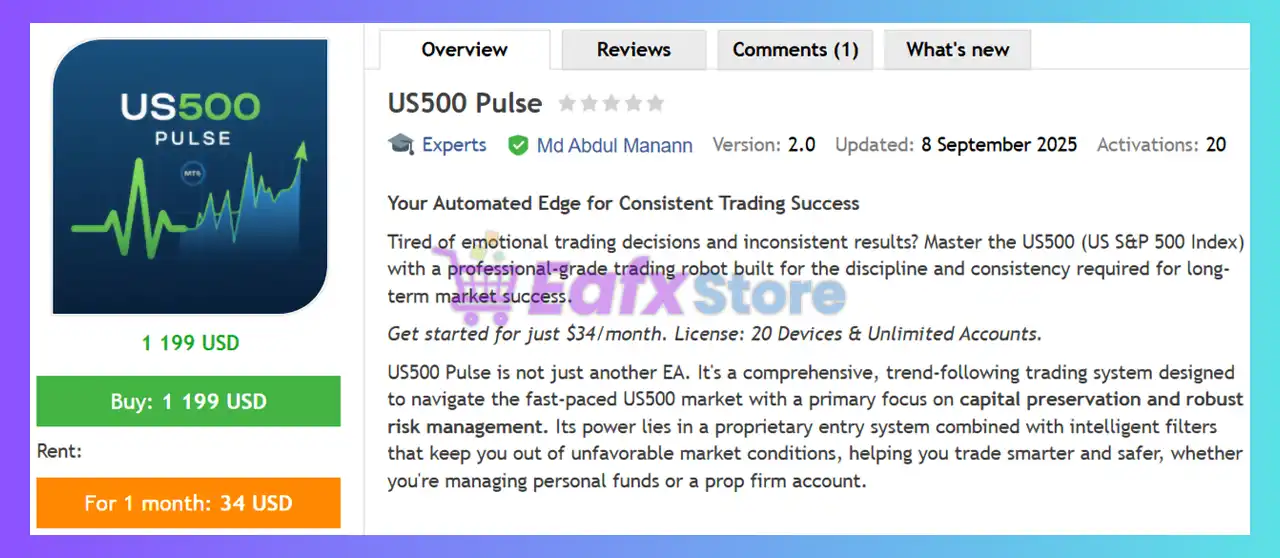
US500 Pulse EA is an automated trading system designed specifically for the US500 index, combining structured entry logic, support and resistance-based risk management, trailing stop protection, daily profit and loss controls, session filtering and economic news protection.
The EA allows traders to automate index trading while maintaining strict control over risk exposure and trading schedules.

🔢 US500 Pulse EA MT5 Parameters Explained
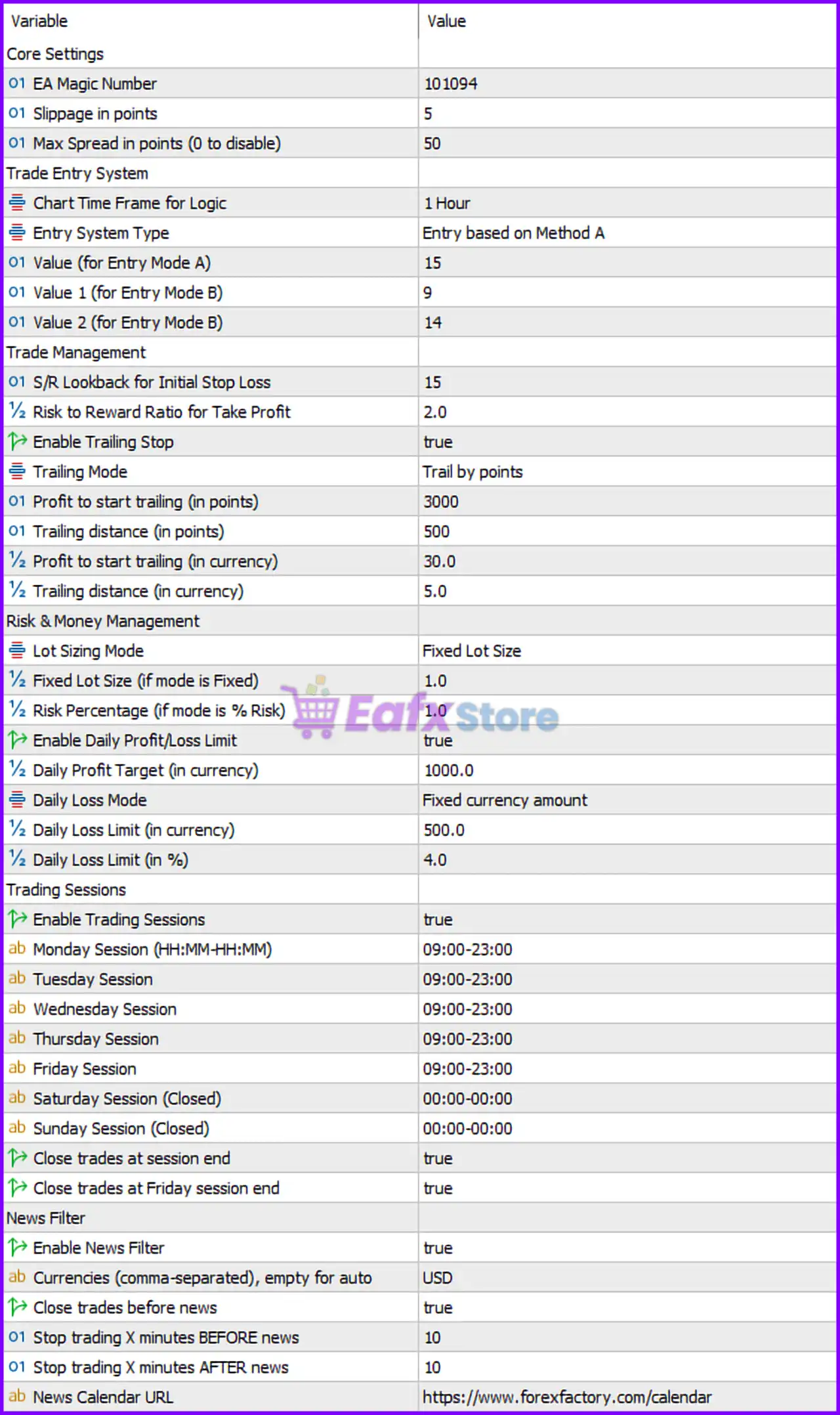
Below are the details of the parameters in the advisor’s trading system settings table:
🔄 Core Settings
🔹 EA Magic Number = 101094 – Unique identifier used by the EA to manage and track its own trades separately from other EAs.
🔹 Slippage in points = 5 – Maximum allowed execution slippage is limited to 5 points.
🔹 Max Spread in points (0 to disable) = 50 – Prevents opening new trades when the spread exceeds 50 points.
🔄 Trade Entry System
🔹 Chart Time Frame for Logic = 1 Hour – Uses the H1 timeframe as the primary chart for signal generation and trade decisions.
🔹 Entry System Type = Entry based on Method A – Activates Method A as the selected entry strategy.
🔹 Value (for Entry Mode A) = 15 – Main configurable parameter used by Entry Method A.
🔹 Value 1 (for Entry Mode B) = 9 – First parameter available for Entry Method B calculations.
🔹 Value 2 (for Entry Mode B) = 14 – Second parameter available for Entry Method B calculations.
🔄 Trade Management
🔹 S/R Lookback for Initial Stop Loss = 15 – Uses the previous 15 candles for support and resistance analysis when calculating the initial stop loss.
🔹 Risk to Reward Ratio for Take Profit = 2.0 – Sets a reward target equal to twice the defined risk amount.
🔹 Enable Trailing Stop = true – Activates dynamic trailing stop functionality.
🔹 Trailing Mode = Trail by points – Uses point-based trailing stop calculations.
🔹 Profit to start trailing (in points) = 3000 – Begins trailing stop management after a trade reaches 3000 points in profit.
🔹 Trailing distance (in points) = 500 – Maintains a 500-point distance between price and the trailing stop.
🔹 Profit to start trailing (in currency) = 30.0 – Currency-based trailing activates once profit reaches $30.0.
🔹 Trailing distance (in currency) = 5.0 – Maintains a trailing distance of $5.0 when currency trailing is applied.
🔄 Risk & Money Management
🔹 Lot Sizing Mode = Fixed Lot Size – Uses a fixed trading volume rather than dynamic percentage-based sizing.
🔹 Fixed Lot Size (if mode is Fixed) = 1.0 – Opens positions with a fixed lot size of 1.0 lot.
🔹 Risk Percentage (if mode is % Risk) = 1.0 – Risks 1.0% of account equity when percentage-risk mode is selected.
🔹 Enable Daily Profit/Loss Limit = true – Activates daily account protection controls.
🔹 Daily Profit Target (in currency) = 1000.0 – Stops trading after reaching a daily profit of $1000.0.
🔹 Daily Loss Mode = Fixed currency amount – Uses a fixed monetary value for daily loss control.
🔹 Daily Loss Limit (in currency) = 500.0 – Stops trading once daily losses reach $500.0.
🔹 Daily Loss Limit (in %) = 4.0 – Alternative percentage-based daily loss threshold of 4.0%.
🔄 Trading Sessions
🔹 Enable Trading Sessions = true – Restricts trading activity to predefined trading hours.
🔹 Monday Session (HH:MM-HH:MM) = 09:00-23:00 – Trading is allowed from 09:00 to 23:00 on Monday.
🔹 Tuesday Session = 09:00-23:00 – Trading is allowed from 09:00 to 23:00 on Tuesday.
🔹 Wednesday Session = 09:00-23:00 – Trading is allowed from 09:00 to 23:00 on Wednesday.
🔹 Thursday Session = 09:00-23:00 – Trading is allowed from 09:00 to 23:00 on Thursday.
🔹 Friday Session = 09:00-23:00 – Trading is allowed from 09:00 to 23:00 on Friday.
🔹 Saturday Session (Closed) = 00:00-00:00 – Trading is disabled on Saturday.
🔹 Sunday Session (Closed) = 00:00-00:00 – Trading is disabled on Sunday.
🔹 Close trades at session end = true – Automatically closes open positions when the session ends.
🔹 Close trades at Friday session end = true – Closes all positions before the weekend market closure.
🔄 News Filter
🔹 Enable News Filter = true – Activates the economic news protection system.
🔹 Currencies (comma-separated), empty for auto = USD – Monitors USD-related economic news events.
🔹 Close trades before news = true – Closes active positions before major news releases.
🔹 Stop trading X minutes BEFORE news = 10 – Pauses new trade entries 10 minutes before a news event.
🔹 Stop trading X minutes AFTER news = 10 – Resumes trading 10 minutes after the news event.
🔹 News Calendar URL = https://www.forexfactory.com/calendar – Uses the Forex Factory calendar as the news data source.
🔢 Conclusion
US500 Pulse EA is a comprehensive index trading robot that combines structured entry methods, support/resistance-based stop-loss calculations, trailing stop management, daily account protection and economic news filtering.
With features such as a 1-hour trading logic timeframe, 2:1 risk-to-reward ratio, daily profit target of $1000.0, and daily loss limit of $500.0, the EA provides traders with a disciplined framework for automated US500 trading. Proper understanding of each parameter allows users to optimize performance while maintaining strong risk control.
🔢 FAQs
❓ What timeframe does US500 Pulse EA MT5 use for its trading signals?
The EA uses the 1 Hour (H1) timeframe as its primary logic timeframe.
❓ What is the default risk-to-reward ratio?
The default setting uses a 2.0 risk-to-reward ratio, targeting profits that are twice the risk amount.
❓ How does the daily loss protection work?
The EA can stop trading after reaching a $500.0 daily loss or a 4.0% account drawdown threshold, depending on the selected mode.
❓ Does the EA use a news filter?
Yes. The news filter is enabled and pauses trading 10 minutes before and 10 minutes after important USD-related news events.
❓ Can US500 Pulse EA MT5 automatically close positions before the weekend?
Yes. The EA closes trades at the end of Friday's session and does not trade during Saturday or Sunday.



