



🔢 GoldSpire MT5 – Complete Settings Guide and Parameter Explanation
GoldSpire MT5 is an advanced automated trading system designed for gold and Forex traders who require flexible lot management, prop firm protection, risk controls, news filtering and execution safeguards.
The EA combines automated risk management with customizable trading restrictions, making it suitable for both personal accounts and prop firm challenges while maintaining strict control over drawdown and market exposure.

🔢 GoldSpire MT5 Parameters Explained
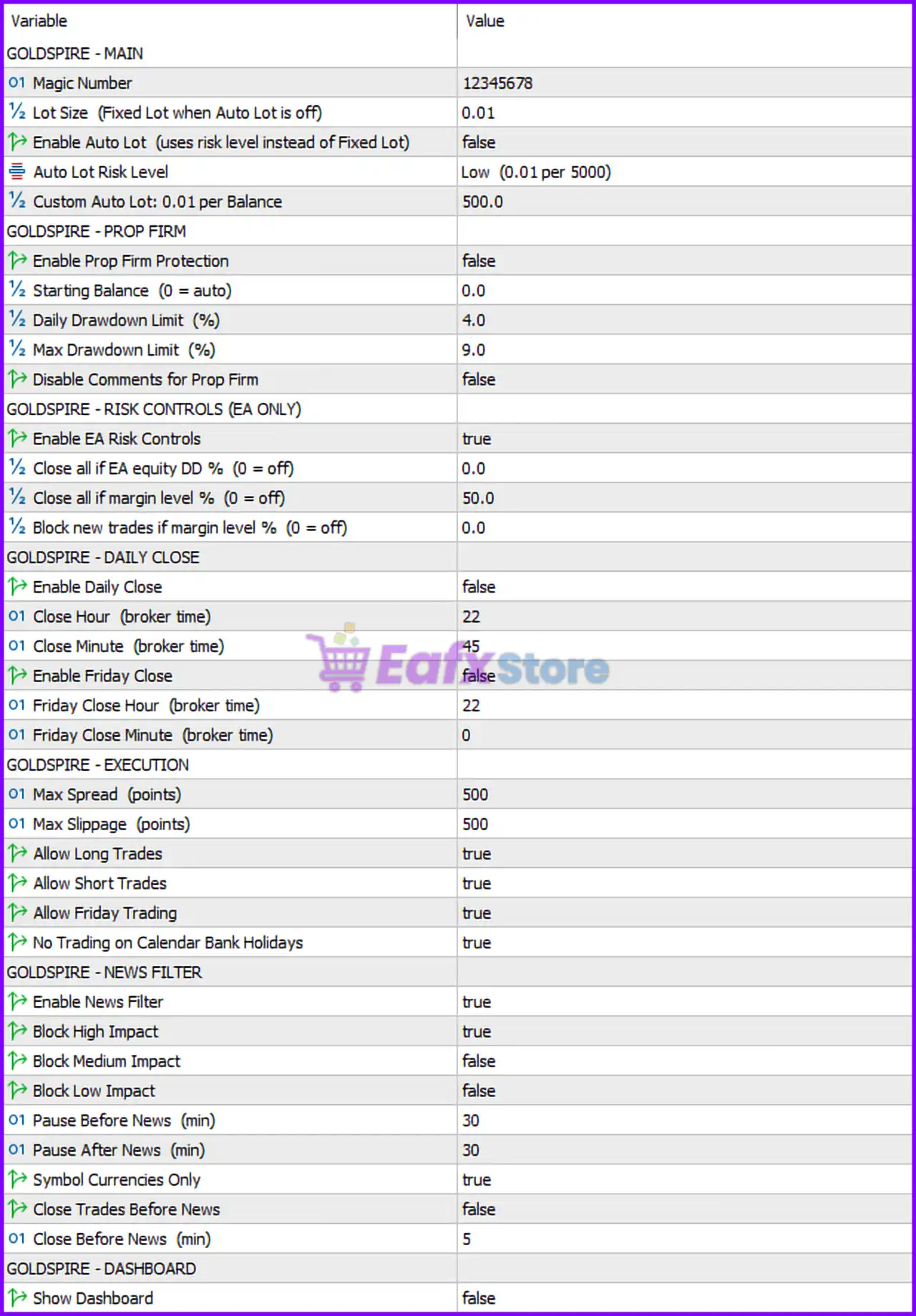
Below are the details of the parameters in the advisor’s trading system settings table:
🔶 GOLDSPIRE – MAIN SETTINGS
🔹 Magic Number = 12345678 – Unique trade identifier used by GoldSpire MT5 to manage its own positions independently from other EAs.
🔹 Lot Size (Fixed Lot when Auto Lot is off) = 0.01 – Sets the fixed trading volume to 0.01 lots when Auto Lot is disabled.
🔹 Enable Auto Lot (uses risk level instead of Fixed Lot) = false – Disables automatic lot sizing and uses the fixed lot size setting.
🔹 Auto Lot Risk Level = Low (0.01 per 5000) – Defines the automatic risk profile, allocating approximately 0.01 lots per 5000 units of account balance when Auto Lot is enabled.
🔹 Custom Auto Lot: 0.01 per Balance = 500.0 – Uses 0.01 lots for every 500.0 units of account balance when custom auto lot sizing is selected.
🔶 GOLDSPIRE – PROP FIRM SETTINGS
🔹 Enable Prop Firm Protection = false – Disables specialized protections designed for prop firm trading accounts.
🔹 Starting Balance (0 = auto) = 0.0 – Automatically detects the account starting balance when set to 0.0.
🔹 Daily Drawdown Limit (%) = 4.0 – Sets the maximum daily drawdown threshold to 4.0%.
🔹 Max Drawdown Limit (%) = 9.0 – Defines the maximum total account drawdown limit at 9.0%.
🔹 Disable Comments for Prop Firm = false – Allows trade comments to remain visible even when using prop firm mode.
🔶 GOLDSPIRE – RISK CONTROLS (EA ONLY)
🔹 Enable EA Risk Controls = true – Activates internal account protection and risk management functions.
🔹 Close all if EA equity DD % (0 = off) = 0.0 – Equity drawdown-based emergency closure is disabled.
🔹 Close all if margin level % (0 = off) = 50.0 – Closes all EA trades if margin level falls below 50.0%.
🔹 Block new trades if margin level % (0 = off) = 0.0 – Margin-based trade blocking is disabled.
🔶 GOLDSPIRE – DAILY CLOSE SETTINGS
🔹 Enable Daily Close = false – Disables automatic daily closing of all open positions.
🔹 Close Hour (broker time) = 22 – Scheduled daily close hour is set to 22:00 broker time.
🔹 Close Minute (broker time) = 45 – Scheduled daily close minute is set to 45.
🔹 Enable Friday Close = false – Disables automatic Friday position closure.
🔹 Friday Close Hour (broker time) = 22 – Friday closing hour is configured as 22:00.
🔹 Friday Close Minute (broker time) = 0 – Friday closing minute is set to 00.
🔶 GOLDSPIRE – EXECUTION SETTINGS
🔹 Max Spread (points) = 500 – Prevents trading when spread exceeds 500 points.
🔹 Max Slippage (points) = 500 – Allows a maximum execution slippage of 500 points.
🔹 Allow Long Trades = true – Enables BUY trade opportunities.
🔹 Allow Short Trades = true – Enables SELL trade opportunities.
🔹 Allow Friday Trading = true – Allows new positions to be opened on Fridays.
🔹 No Trading on Calendar Bank Holidays = true – Blocks trading during scheduled bank holidays.
🔶 GOLDSPIRE – NEWS FILTER
🔹 Enable News Filter = true – Activates the built-in economic news protection system.
🔹 Block High Impact = true – Prevents trading during high-impact economic events.
🔹 Block Medium Impact = false – Does not block trading during medium-impact news releases.
🔹 Block Low Impact = false – Does not block trading during low-impact news events.
🔹 Pause Before News (min) = 30 – Stops opening new trades 30 minutes before a filtered news event.
🔹 Pause After News (min) = 30 – Resumes trading 30 minutes after the news event.
🔹 Symbol Currencies Only = true – Filters only news events relevant to the currencies of the traded symbol.
🔹 Close Trades Before News = false – Existing trades remain open before news releases.
🔹 Close Before News (min) = 5 – If enabled, positions would close 5 minutes before news.
🔶 GOLDSPIRE – DASHBOARD
🔹 Show Dashboard = false – Disables the on-chart dashboard display.
🔢 Conclusion
GoldSpire MT5 is a feature-rich automated trading solution that emphasizes risk management, execution control and prop firm compatibility. With configurable lot sizing, drawdown protection, margin safeguards, economic news filtering, and flexible trading permissions, the EA provides traders with a comprehensive framework for disciplined automated trading. Proper adjustment of these settings can help optimize performance while maintaining strong capital preservation.
🔢 FAQs
❓ What is the default lot size used by GoldSpire MT5?
The default fixed lot size is 0.01 lots when Auto Lot is disabled.
❓ Does GoldSpire MT5 support prop firm trading?
Yes. The EA includes a dedicated Prop Firm Protection module with daily and maximum drawdown limits.
❓ Can GoldSpire MT5 trade both BUY and SELL positions?
Yes. Both Allow Long Trades and Allow Short Trades are enabled by default.
❓ How does the news filter work?
The EA blocks trading during high-impact news events and pauses trading 30 minutes before and 30 minutes after the event.
❓ What happens if margin levels become too low?
When EA Risk Controls are enabled, the EA can close all positions if the margin level drops to 50.0%, helping protect the trading account from excessive risk.



