
🔢 Titan Breaker EA MT5 – Complete Settings & Parameters Guide
Titan Breaker EA MT5 is an automated breakout trading Expert Advisor (EA) for MetaTrader 5 that combines configurable trading modes, session-based market filtering, money management controls, and economic news protection.
The EA allows traders to customize trade entries, risk exposure, trading sessions, and news-event handling, making it suitable for both conservative and active trading strategies.
🔢 Titan Breaker EA MT5 Settings Explained
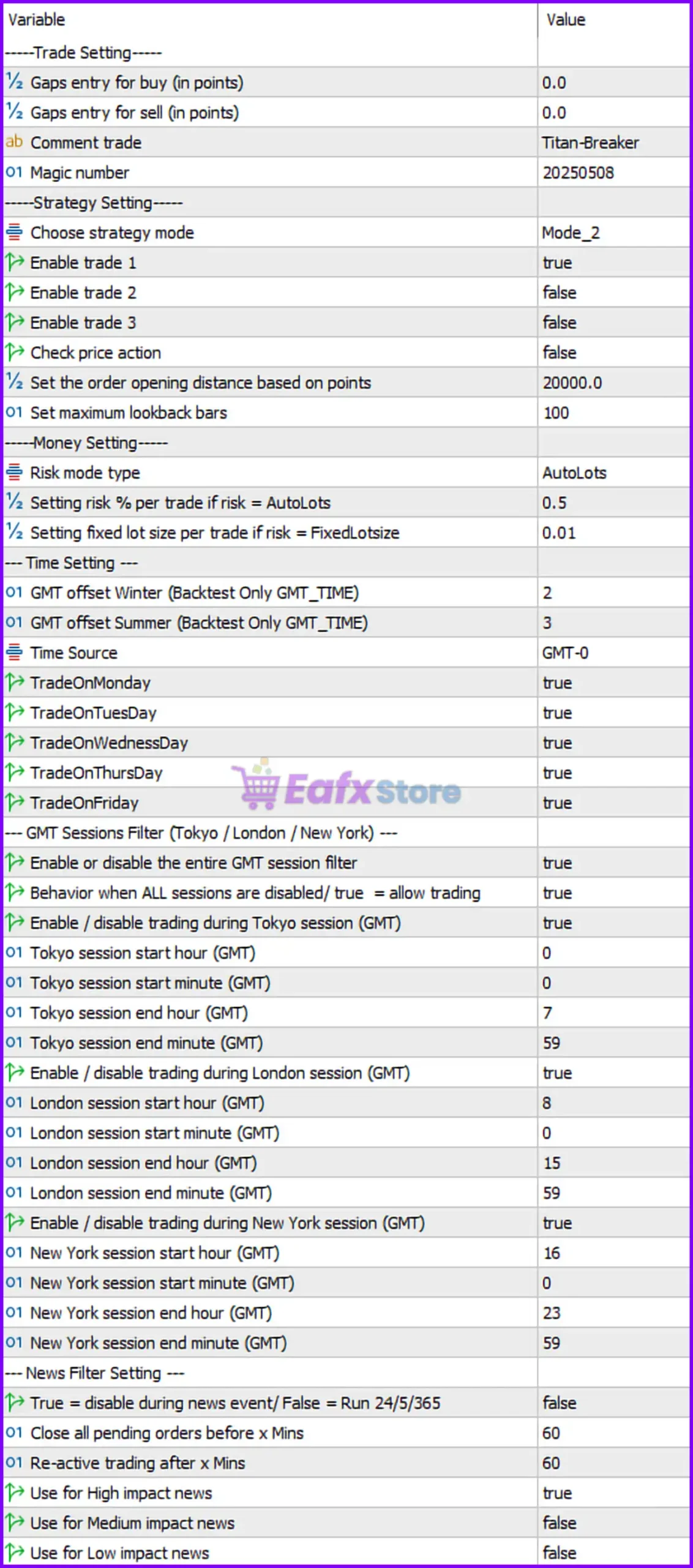
Below are the details of the parameters in the advisor’s trading system settings table:
🔶 Trade Settings
🔹 Gaps entry for buy (in points) = 0.0 — Defines the additional entry gap for Buy trades; 0.0 means no extra offset is applied.
🔹 Gaps entry for sell (in points) = 0.0 — Defines the additional entry gap for Sell trades; 0.0 means no extra offset is applied.
🔹 Comment trade = Titan-Breaker — Adds the trade comment "Titan-Breaker" to all orders opened by the EA.
🔹 Magic number = 20250508 — Unique identifier used by the EA to manage and track its own trades.
🔶 Strategy Settings
🔹 Choose strategy mode = Mode_2 — Selects Mode_2 as the active trading strategy logic.
🔹 Enable trade 1 = true — Enables the first trading setup or entry model.
🔹 Enable trade 2 = false — Disables the second trading setup or entry model.
🔹 Enable trade 3 = false — Disables the third trading setup or entry model.
🔹 Check price action = false — Price action confirmation is disabled.
🔹 Set the order opening distance based on points = 20000.0 — Uses an opening distance of 20,000.0 points for order placement calculations.
🔹 Set maximum lookback bars = 100 — The EA analyzes a maximum of 100 historical bars when evaluating trade conditions.
🔶 Money Management Settings
🔹 Risk mode type = AutoLots — Uses automatic lot size calculation based on account risk settings.
🔹 Setting risk % per trade if risk = AutoLots = 0.5 — Risks 0.5% of account balance per trade when AutoLots mode is active.
🔹 Setting fixed lot size per trade if risk = FixedLotsize = 0.01 — Uses 0.01 lots when FixedLotSize mode is selected.
🔶 Time Settings
🔹 GMT offset Winter (Backtest Only GMT_TIME) = 2 — Uses GMT+2 during winter backtesting.
🔹 GMT offset Summer (Backtest Only GMT_TIME) = 3 — Uses GMT+3 during summer backtesting.
🔹 Time Source = GMT-0 — The EA uses GMT-0 as its reference time source.
🔹 TradeOnMonday = true — Trading is enabled on Monday.
🔹 TradeOnTuesday = true — Trading is enabled on Tuesday.
🔹 TradeOnWednesday = true — Trading is enabled on Wednesday.
🔹 TradeOnThursday = true — Trading is enabled on Thursday.
🔹 TradeOnFriday = true — Trading is enabled on Friday.
🔶 GMT Sessions Filter (Tokyo / London / New York)
🔹 Enable or disable the entire GMT session filter = true — Session-based trading filters are enabled.
🔹 Behavior when ALL sessions are disabled/ true = allow trading = true — If all sessions are disabled, trading is still allowed.
🔶 Tokyo Session Settings
🔹 Enable / disable trading during Tokyo session (GMT) = true — Trading is permitted during the Tokyo session.
🔹 Tokyo session start hour (GMT) = 0 — Tokyo session begins at 00:00 GMT.
🔹 Tokyo session start minute (GMT) = 0 — Tokyo session starts at minute 00.
🔹 Tokyo session end hour (GMT) = 7 — Tokyo session ends at 07:00 GMT.
🔹 Tokyo session end minute (GMT) = 59 — Tokyo session ends at 07:59 GMT.
🔶 London Session Settings
🔹 Enable / disable trading during London session (GMT) = true — Trading is permitted during the London session.
🔹 London session start hour (GMT) = 8 — London session begins at 08:00 GMT.
🔹 London session start minute (GMT) = 0 — London session starts at minute 00.
🔹 London session end hour (GMT) = 15 — London session ends at 15:00 GMT.
🔹 London session end minute (GMT) = 59 — London session ends at 15:59 GMT.
🔶 New York Session Settings
🔹 Enable / disable trading during New York session (GMT) = true — Trading is permitted during the New York session.
🔹 New York session start hour (GMT) = 16 — New York session begins at 16:00 GMT.
🔹 New York session start minute (GMT) = 0 — New York session starts at minute 00.
🔹 New York session end hour (GMT) = 23 — New York session ends at 23:00 GMT.
🔹 New York session end minute (GMT) = 59 — New York session ends at 23:59 GMT.
🔶 News Filter Settings
🔹 True = disable during news event / False = Run 24/5/365 = false — News filtering is disabled, allowing continuous trading.
🔹 Close all pending orders before X mins = 60 — Pending orders can be removed 60 minutes before a news event when the filter is enabled.
🔹 Re-active trading after X mins = 60 — Trading resumes 60 minutes after a news event when the filter is enabled.
🔹 Use for High impact news = true — High-impact news events are monitored.
🔹 Use for Medium impact news = false — Medium-impact news events are ignored.
🔹 Use for Low impact news = false — Low-impact news events are ignored.
🔢 Conclusion
Titan Breaker EA MT5 is a versatile breakout trading robot that combines session-based filtering, dynamic risk management, configurable strategy modes and optional news-event protection.
With support for AutoLots risk control, GMT session management, and selective trade activation, the EA provides traders with a flexible framework that can be adapted to various market conditions and trading styles.
🔢 FAQs
❓ What trading mode is currently active in Titan Breaker EA MT5?
The EA is configured to use Mode_2 as its active strategy mode.
❓ How much risk does the EA use per trade in AutoLots mode?
The current setting risks 0.5% of account balance per trade.
❓ Which trading sessions are enabled?
All three major sessions are enabled: Tokyo (00:00–07:59 GMT), London (08:00–15:59 GMT), and New York (16:00–23:59 GMT).
❓ Does Titan Breaker EA MT5 use price action confirmation?
No. The parameter Check price action = false means price action confirmation is currently disabled.
❓ Is the news filter active by default?
No. The setting false under the news filter section means the EA is configured to trade continuously without pausing for news events.