


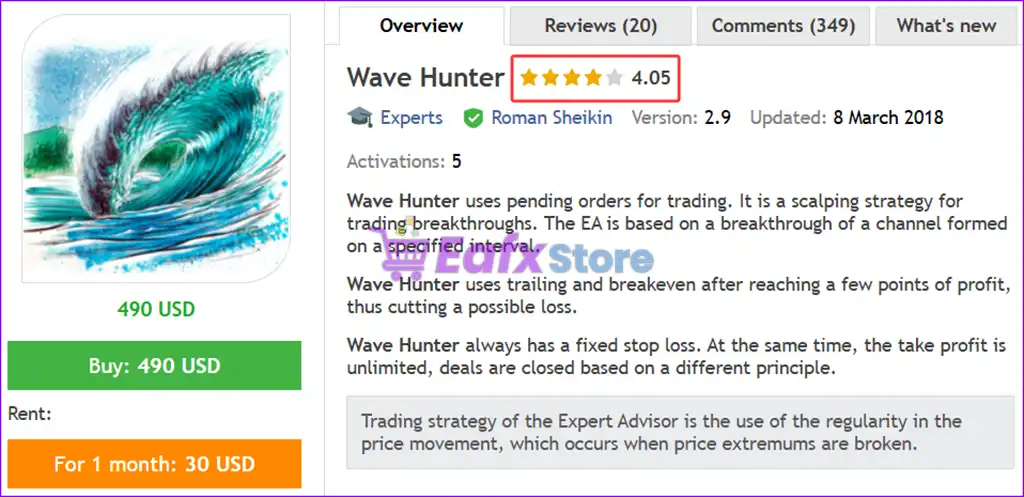






Wave Hunter EA MT4 with SetFiles (Latest version)

Subscriptions for Special Plan
- 30 EA package is more economical!
- Special package with 99%
- Download 1 EA/Day

Subscriptions for Premium Membership
- Download Unlimited in 1 Year
- Get 100% Discount
- Get free access to all

Subscriptions for Gold Membership
- 1 Year Membership
- Get 100% Discount
- Access EA+Indicator+Course
Frequently bought together 🎁
Add these products to enhance your purchase



What is Wave Hunter EA?
Wave Hunter EA is a high-performance scalping EA that uses pending orders to trade price breakouts. By analyzing market movements, it places trades at key price levels and maximizes profit potential using trailing stop and breakeven mechanisms.
This EA is designed for traders who seek low-risk, high-reward strategies while maintaining a fixed stop loss for every trade. Unlike conventional EAs with static take profit levels, Wave Hunter EA adapts dynamically to price action for optimized exits.
➡️ Vendor Wedsite: Click here
About the Author
This product is compiled by Roman Sheikin. This author has more than +12 years of experience working on MQL5 with many famous products such as Wave Hunter EA MT4, Wave Hunter EA MT5, Shark Surfer EA MT4 and other advisors. Among them, Wave Hunter EA is his best performing products.
➡️ Delivery time 24h-48h after payment.
➡️ Refund if not delivered.
➡️ ou will receive the current version without any limitations (ID+Time).
Key Features of Wave Hunter EA for MT4
🔹 Breakout Scalping System: Uses pending orders to capture price movements when key channel levels are broken.
🔹 Fixed Risk Protection: Applies a predefined Stop Loss (SL) on every trade to ensure consistent capital control.
🔹 Trailing & Breakeven Logic: Secures profits by adjusting stop levels once trades move into positive territory.
🔹 Smart Lot Management: Offers automatic lot sizing to adapt risk based on account balance and settings.
🔹 Flexible Trade Controls: Includes time filters, spread limits, and Friday closing options for safe execution.
Why Choose & Use Wave Hunter EA?
🔹 Stable Trading Performance: Designed to deliver consistent results using structured breakout logic.
🔹 Strong Risk Control System: Protects capital with fixed stop loss and adaptive trade management tools.
🔹 Efficient Scalping Approach: Captures short-term opportunities with precise and disciplined execution.
🔹 Adaptable Market Behavior: Responds to changing conditions using flexible parameters and smart filters.
🔹 Marketplace-Ready Solution: Ideal for traders seeking a reliable EA focused on control and consistency.
Wave Hunter EA MT4 Review
Wave Hunter EA backtest results achieved impressive profit performance when trading EURUSD pair. The Expert Advisor (EA) has made trading easy through the challenges and volatility of the forex market.
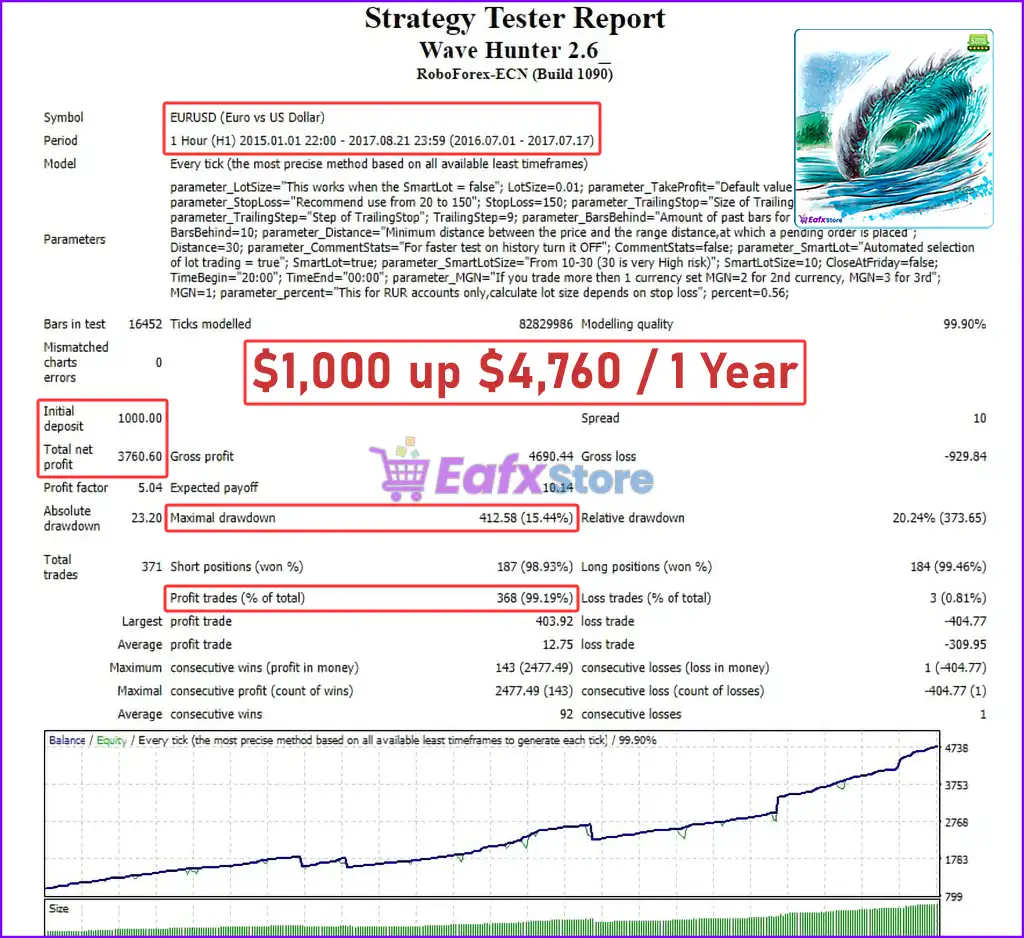
🔶 1 year backtest trading (2016 – 2017) with EURUSD pair on H1 timeframe, achieving performance parameters including:
✅ Intinal Deposit: $1,000
✅ Total Net Profit: $3,760
✅ Equity Drawdown Maximal: 15.44%
✅ High Win Rate: 99.19%
Wave Hunter EA Backtest Results
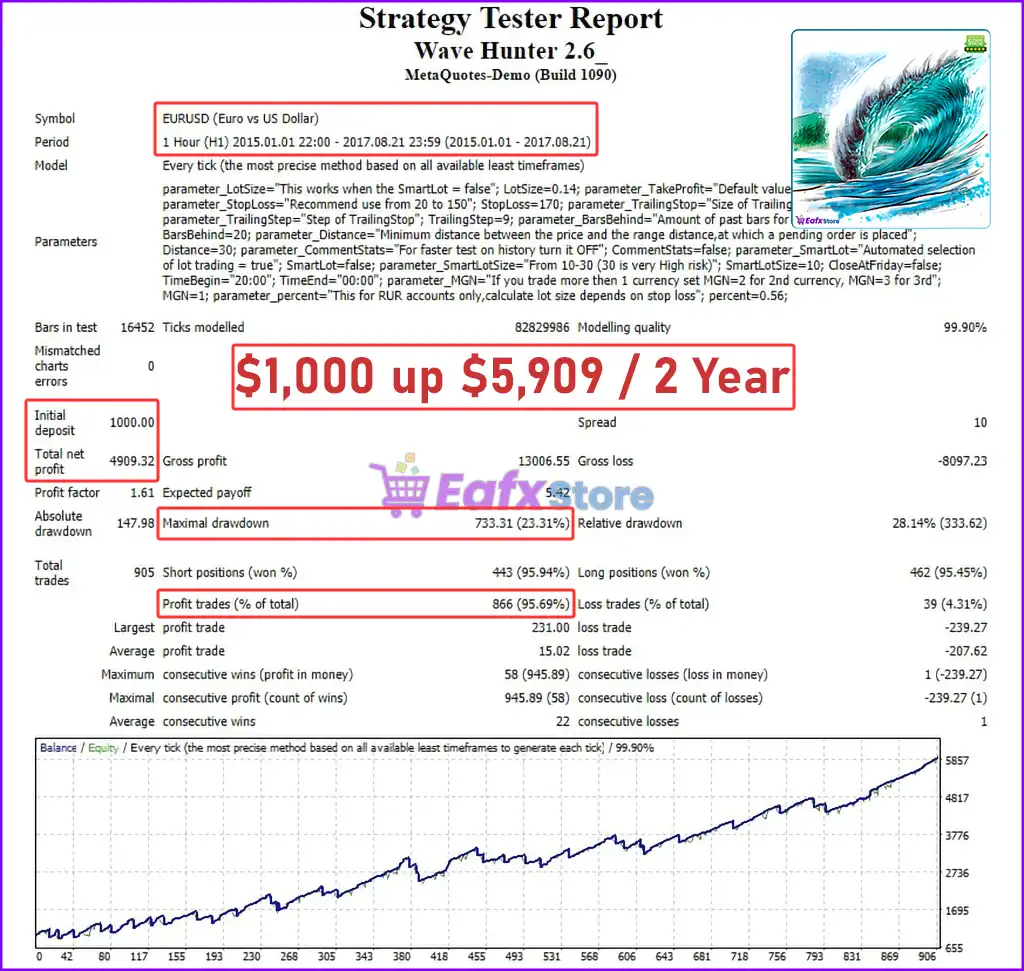
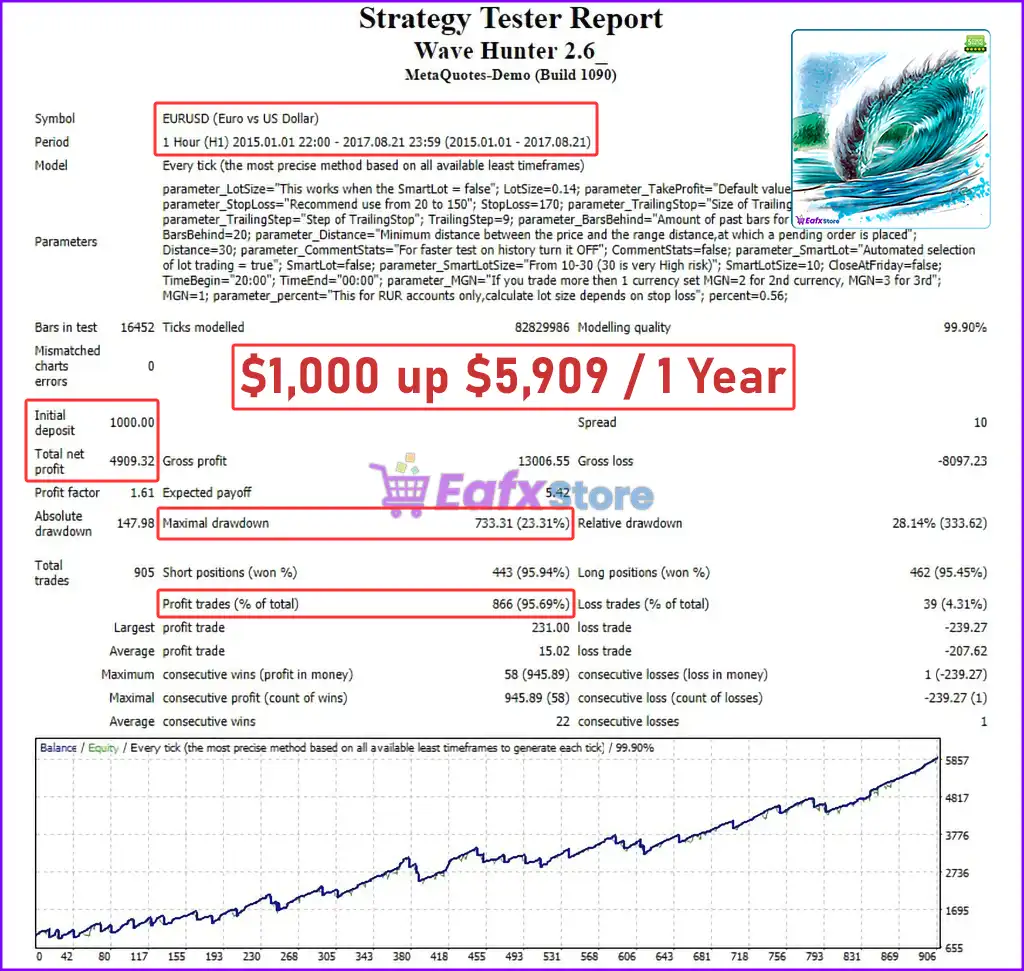
🔶 2 year backtest trading (2015 – 2017) with EURUSD pair on H1 timeframe, achieving performance parameters including:
✅ Intinal Deposit: $1,000
✅ Total Net Profit: $4,909
✅ Equity Drawdown Maximal: 23.31%
✅ High Win Rate: 95.69%
Wave Hunter EA Backtest
What is the Wave Hunter EA Trading Strategy?
🔹 Channel Breakout Logic: Identifies price ranges and places pending orders to capture breakout movements.
🔹 Momentum-Based Entries: Trades when price breaks key extremums, signaling strong directional momentum.
🔹 Dynamic Profit Handling: Uses trailing stop and breakeven instead of fixed targets to maximize gains.
🔹 Volatility-Aware Execution: Filters trades based on spread and market conditions for stable performance.
🔹 Price Action Confirmation: Incorporates candlestick behavior such as pin bars to refine exit decisions.
Is Wave Hunter EA MT4 safe?
Wave Hunter EA shows significant potential in providing stable and reliable profits, making it a reliable tool in the forex market. The advisor is highly appreciated by the MQL5 community in many aspects and has won the trust of users.
⭐⭐⭐⭐⭐ Trader1614 (2018.06.13)
“Excellent EA, Testing on Demo accounts looking very promising and highly recommend this EA as Roman is very patient and answering all my queries. I’m testing for other pairs.”
⭐⭐⭐⭐⭐ Aci-crosser89 (2017.08.11)
“Very good and Profitable EA. Love it. It Worth’s every cent.”
⭐⭐⭐⭐⭐ Andrea (2017.04.14)
“Good EA, profitable on live account for EURUSD pair. I’m testing for other pairs.”
⭐⭐⭐⭐⭐ Ahmed Ibrahim (2016.12.16)
“This EA one of the best breakout EA’s on the market i have been testing for 2 weeks and already get my rent back for 6 months.”
Trading Specifications
Recommended settings and parameters to pay attention to from developers and experts:
| Features | Type |
|---|---|
| Trading platform | MetaTrader 4 (MT4) |
| Time frames | H1 (60 minute chart) |
| Currency pairs | EURUSD (Any) |
| Minimum / Recommended deposit | $500 |
| Minimum / Recommended leverage | Any |
| Product type | NoDLL / Unlimited / Unlocked |
| Additional services | Unlock and Decompile |
| Recommended brokers | Exness Broker, Icmarkets Broker |
| Recommended VPS | MyfxVPS.com (Blue VPS, Golden VPS). Lowest Latency, 2 week Free Trial, 100% Free for 12-18 Months. |
Product Download Package?
The download package of the product suite includes:
Experts
✅ Wave Hunter EA_fix.ex4
SetFiles
✅ wave_1.set
✅ wave_2.set
➡️ Reviewed by David Easton
Conclusion
In short, Wave Hunter EA is a high-performance scalping Expert Advisor (EA) designed to maximize trading opportunities by utilizing a breakout strategy with pending orders. By dynamically adapting to market movements, it ensures precise entries and optimized exits through trailing stop and breakeven mechanisms. This EA is built for traders looking for low-risk, high-reward strategies, offering advanced risk management, customizable trading parameters and SmartLot automation for optimized trade execution.
🔢 Wave Hunter EA MT4 Settings Guide
Wave Hunter EA is a configurable automated trading Expert Advisor designed to manage entries, pending-order placement, position sizing, profit targets, Stop Loss, and dynamic trailing protection.
The settings shown provide flexibility for both fixed-lot and automated lot-selection modes, while also allowing traders to control trading distance, historical-bar analysis, Friday closing behavior, spread limits, and trade identification.
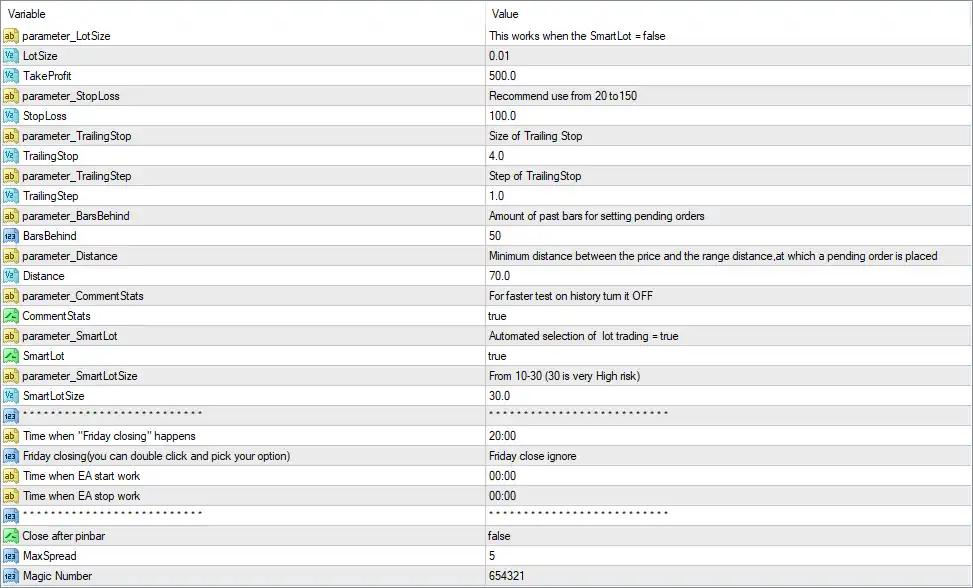
Wave Hunter EA MT4 Settings Panel
🔶 General Trading & Position Settings
🔹 parameter_LotSize = This works when the SmartLot = false – This parameter specifies that the manual lot-size setting is used when Smart Lot is disabled.
🔹 LotSize = 0.01 – Sets the fixed trading volume to 0.01 lots when the EA operates without Smart Lot selection.
🔹 parameter_TakeProfit = Recommend use from 20 to 150 – Defines the Take Profit parameter and recommends a range from 20 to 150 according to the EA’s settings.
🔹 TakeProfit = 500.0 – Sets the current Take Profit value to 500.0 according to the EA’s internal unit system.
🔹 parameter_StopLoss = Recommend use from 20 to 150 – Defines the Stop Loss parameter and recommends using a value between 20 and 150.
🔹 StopLoss = 100.0 – Sets the Stop Loss value to 100.0 according to the EA’s internal unit system.
🔶 Trailing Stop Settings
🔹 parameter_TrailingStop = Size of Trailing Stop – Indicates that the associated Trailing Stop value controls the size or distance of the trailing protection.
🔹 TrailingStop = 4.0 – Sets the Trailing Stop distance to 4.0.
🔹 parameter_TrailingStep = Step of TrailingStop – Defines the incremental step used when adjusting the trailing Stop Loss.
🔹 TrailingStep = 1.0 – Sets the Trailing Stop adjustment step to 1.0.
🔶 Pending Order & Distance Settings
🔹 parameter_BarsBehind = Amount of past bars for setting pending orders – Defines how many historical candles are considered when determining pending-order placement.
🔹 BarsBehind = 50 – Uses 50 past bars for the pending-order calculation.
🔹 parameter_Distance = Minimum distance between the price and the range distance, at which a pending order is placed – Controls the minimum required distance for placing a pending order relative to price and the calculated range.
🔹 Distance = 70.0 – Sets the pending-order distance parameter to 70.0.
🔶 Comment & Testing Settings
🔹 parameter_CommentStats = For faster test on history turn it OFF – Controls the comment/statistics functionality; the description recommends turning it off to speed up historical backtesting.
🔹 CommentStats = true – Enables trade comment/statistics functionality.
🔶 Smart Lot Settings
🔹 parameter_SmartLot = Automated selection of lot trading = true – Defines the Smart Lot feature for automated position-size selection.
🔹 SmartLot = true – Enables automated lot-size selection.
🔹 parameter_SmartLotSize = From 10-30 (30 is very High risk) – Indicates the recommended Smart Lot range of 10–30, with 30 explicitly described as very high risk.
🔹 SmartLotSize = 30.0 – Sets the current Smart Lot size/risk parameter to 30.0.
Risk note: The setting SmartLotSize = 30.0 is explicitly described in the EA panel as “very High risk.” Traders should carefully evaluate this setting before using it on a live account.
🔶 Friday Closing Settings
🔹 Time when “Friday closing” happens = 20:00 – Sets the Friday closing time to 20:00.
🔹 Friday closing (you can double click and pick your option) = Friday close ignore – The current configuration is set to Friday close ignore, meaning the selected option does not enforce the standard Friday closing action.
🔶 EA Operating Time
🔹 Time when EA start work = 00:00 – Sets the EA’s start time to 00:00.
🔹 Time when EA stop work = 00:00 – Sets the EA’s stop time to 00:00.
🔶 Additional Trade Management
🔹 Close after pinbar = false – Disables automatic closing of positions after a Pin Bar signal.
🔹 MaxSpread = 5 – Sets the maximum permitted spread to 5 according to the EA’s spread measurement.
🔹 Magic Number = 654321 – Uses 654321 as the unique Magic Number for identifying and managing trades opened by Wave Hunter EA MT4.
🔢 Wave Hunter EA MT4 Key Configuration Summary
🔹 Fixed Lot Size: 0.01
🔹 Smart Lot: true
🔹 Smart Lot Size: 30.0
🔹 Smart Lot Range: 10–30
🔹 Risk Warning: 30 is described as very High risk
🔹 Take Profit: 500.0
🔹 Recommended Take Profit Range: 20–150
🔹 Stop Loss: 100.0
🔹 Recommended Stop Loss Range: 20–150
🔹 Trailing Stop: 4.0
🔹 Trailing Step: 1.0
🔹 Bars Behind: 50
🔹 Pending Order Distance: 70.0
🔹 Comment Statistics: true
🔹 Friday Closing Time: 20:00
🔹 Friday Closing Mode: Friday close ignore
🔹 EA Start Time: 00:00
🔹 EA Stop Time: 00:00
🔹 Close After Pin Bar: false
🔹 Maximum Spread: 5
🔹 Magic Number: 654321
🔢 How Wave Hunter EA MT4 Settings Work Together
The displayed configuration uses Smart Lot = true, meaning the EA is currently configured to use automated lot-selection logic rather than relying solely on the fixed 0.01-lot setting. The Smart Lot parameter is set to 30.0, which the panel specifically identifies as very high risk.
For trade exits, the EA has Take Profit = 500.0 and Stop Loss = 100.0, while the trailing system is enabled through TrailingStop = 4.0 and TrailingStep = 1.0.
For pending-order calculations, the EA analyzes 50 historical bars and uses a 70.0 distance parameter. The maximum spread is limited to 5, helping prevent trading when the spread exceeds the configured threshold.
The EA’s Magic Number is 654321, allowing its trades to be distinguished from other Expert Advisors or manual positions using different identifiers.
🔢 Conclusion
Wave Hunter EA MT4 provides a broad set of parameters for controlling position sizing, pending-order placement, Take Profit, Stop Loss, trailing protection, trading conditions and trade identification.
The current configuration is particularly notable for SmartLot = true and SmartLotSize = 30.0. Because the EA explicitly labels 30 as very high risk, this setting deserves careful attention and should not be treated as a conservative default.
Before deploying Wave Hunter EA MT4 on a live account, traders should validate the EA’s point/unit calculations, broker spread conditions, lot-sizing behavior, and the practical monetary impact of the 500.0 TP, 100.0 SL, and 30.0 Smart Lot settings through adequate demo and forward testing.
🔢 FAQs
❓ What is the current fixed lot size of Wave Hunter EA MT4?
The LotSize parameter is set to 0.01 lots. However, SmartLot = true, so the EA is currently configured to use automated lot selection.
❓ What is the current Smart Lot setting?
The SmartLotSize is set to 30.0. The EA’s own description states that the Smart Lot range is 10–30 and that 30 is very high risk.
❓ What are the Take Profit and Stop Loss settings?
The current settings are TakeProfit = 500.0 and StopLoss = 100.0. The panel recommends using 20–150 for both parameters.
❓ Does Wave Hunter EA MT4 use a trailing stop?
Yes. The displayed configuration uses TrailingStop = 4.0 and TrailingStep = 1.0 to manage trailing protection.
User Reviews
Only logged in customers who have purchased this product may leave a review.
1. What is Wave Hunter EA MT4?
Wave Hunter EA is an advanced scalping expert advisor that uses pending orders to trade price breakouts with dynamic stop loss, trailing stop, and breakeven mechanisms for optimized trade exits.
2. How does Wave Hunter EA work?
It identifies key price breakout levels and places pending orders accordingly.
Implements fixed stop loss, trailing stop, and breakeven to maximize profitability.
Uses SmartLot for automatic lot sizing based on risk settings.
3. What currency pairs and timeframes does it support?
Currency pairs: EURUSD (optimized), but can be tested on other pairs.
Timeframes: H1.
4. What is the minimum deposit required?
Minimum deposit: $500.
Recommended deposit: Higher amounts for better risk management.
5. Does Wave Hunter EA work on other currency pairs?
While optimized for EURUSD, traders can test on other pairs using customized settings.
6. What makes Wave Hunter EA different from other scalping EAs?
Uses pending orders instead of market execution for better trade precision.
Implements adaptive take profit rather than fixed TP levels.
Includes SmartLot automation and Friday auto-close to avoid weekend gaps.
7. What are the key risk management features?
Fixed Stop Loss for every trade.
Trailing Stop & Breakeven for profit protection.
Max Spread Filter to prevent trading during high volatility.
8. Can I use Wave Hunter EA on a VPS?
Yes! A VPS is recommended for 24/7 automated trading to ensure stable operation.
-
 Original price was: $4,999.00.$249.00Current price is: $249.00.
 -
 Original price was: $4,500.00.$249.00Current price is: $249.00.
 -
 Original price was: $4,999.00.$249.00Current price is: $249.00.
 -
 Original price was: $28,000.00.$249.00Current price is: $249.00.
-
 0Original price was: $2,288.00.$249.00Current price is: $249.00.
 -
 0Original price was: $290.00.$179.00Current price is: $179.00.
 -
 1Original price was: $500.00.$249.00Current price is: $249.00.
 -
 3Original price was: $199.00.$159.00Current price is: $159.00.
There are no reviews yet.