





XAU Sniper Pro EA MT5 with SetFiles (Latest version)

Subscriptions for Special Plan
- 30 EA package is more economical!
- Special package with 99%
- Download 1 EA/Day

Subscriptions for Premium Membership
- Download Unlimited in 1 Year
- Get 100% Discount
- Get free access to all

Subscriptions for Gold Membership
- 1 Year Membership
- Get 100% Discount
- Access EA+Indicator+Course
Frequently bought together 🎁
Add these products to enhance your purchase



What is XAU Sniper Pro EA?
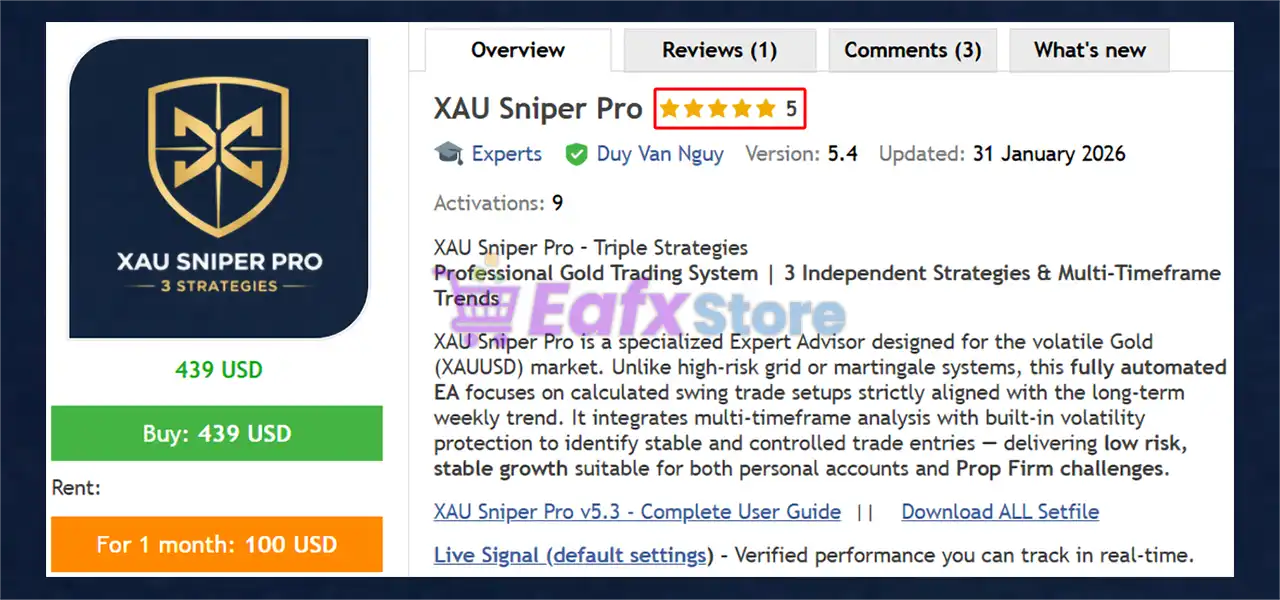
XAU Sniper Pro EA is a professional Expert Advisor (EA) for automated trading, engineered exclusively for Gold (XAUUSD). It delivers stability through multi-timeframe trend alignment, disciplined swing entries, and strict risk management. Designed for adaptability and capital protection, it targets controlled growth suitable for personal accounts and Prop Firm environments.
 Vendor Website: View here
About the Author
This product is compiled by Duy Van Nguy. This author has more than +2 years of experience working on MQL5 with many famous products such as XAU Sniper Pro MT5, Squid X MT5, Breakout Master EA MT5, XAU OneShot EA MT5 and other advisors. Among them, XAU Sniper Pro EA is his best performing products.
Delivery time 24h-48h after payment.
Refund if not delivered.
You will receive the current version without any limitations (ID+Time).
XAU Sniper Pro EA MT5 Review
Key Features of XAU Sniper Pro for MT5
🔹 Triple-Strategy Diversification: Runs three independent logics across M30, H1 and H4 to smooth equity.
🔹 Safety-First Risk Control: No Grid or Martingale, fixed stop loss per trade and capped exposure.
🔹 Multi-Timeframe Trend Filter: Trades only when lower timeframes align with the dominant weekly bias.
🔹 Optional News Protection: Can pause trading during high-impact events to reduce volatility risk.
🔹 Real-Time Alerts: Instant notifications for entries and exits keep you informed anywhere.
Why Choose & Use XAU Sniper Pro EA?
🔹 Capital Preservation Priority: Built to limit drawdowns and avoid cascading losses.
🔹 Prop Firm Ready: Complies with common evaluation rules and transparent risk policies.
🔹 Plug & Play Operation: Simple setup with flexible lot and risk options for any account size.
🔹 Stable Long-Term Design: Aims for consistent growth, not aggressive short-term speculation.
🔹 Professional Reliability: Ideal for traders seeking disciplined automation and recovery-focused logic.
XAU Sniper Pro EA MT5 Review
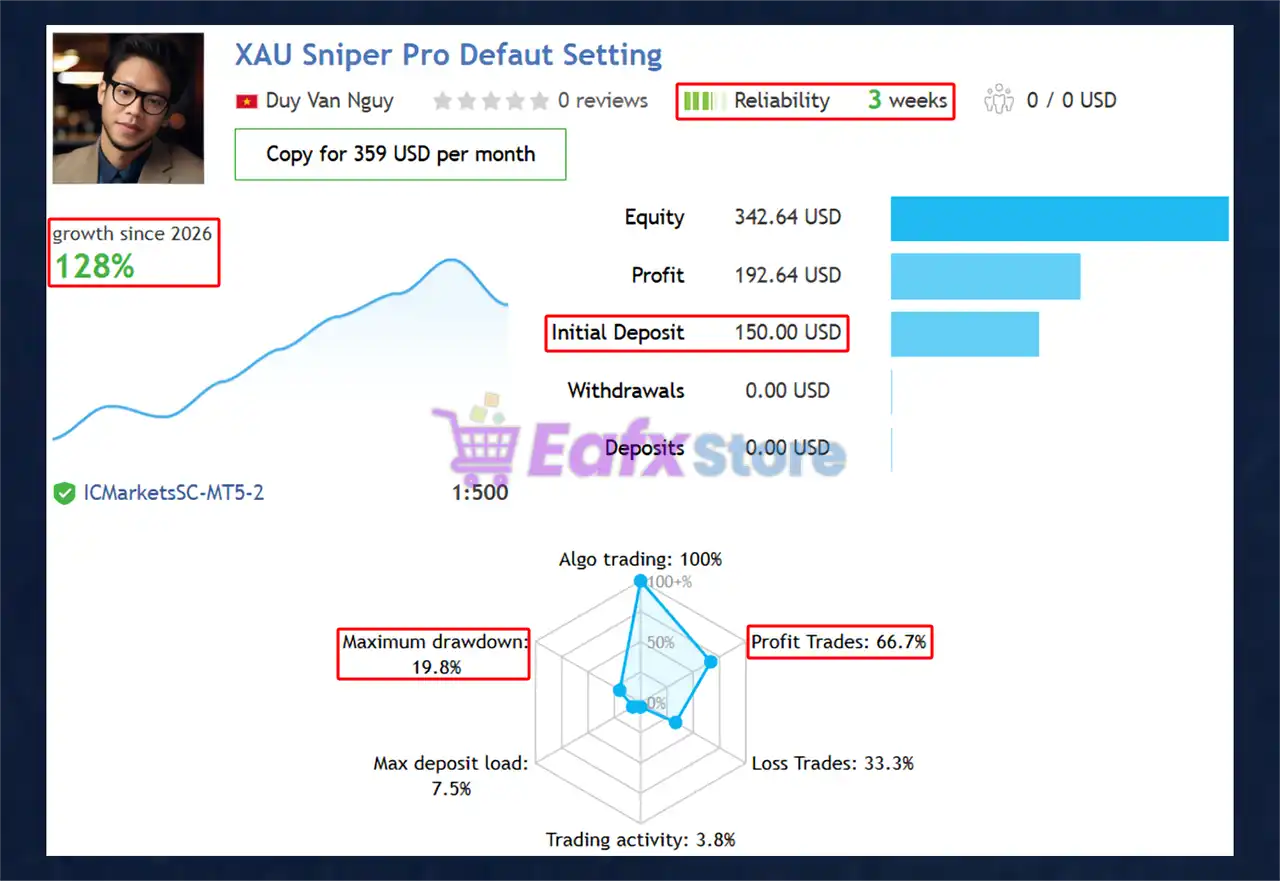
XAU Sniper Pro EA Signal Results
The XAU Sniper Pro achieved impressive profit performance when trading with XAUUSD (Gold) pair. Trading results on real account for 3 consecutive weeks of trading:
✅ Initial Deposit: $1500
✅ Growth Rate: +128%
✅ Win Rate (% of total): 66.7%
✅ Maximum Drawdown: 19.8%
XAU Sniper Pro EA Signal Results
XAU Sniper Pro EA Backtest Results
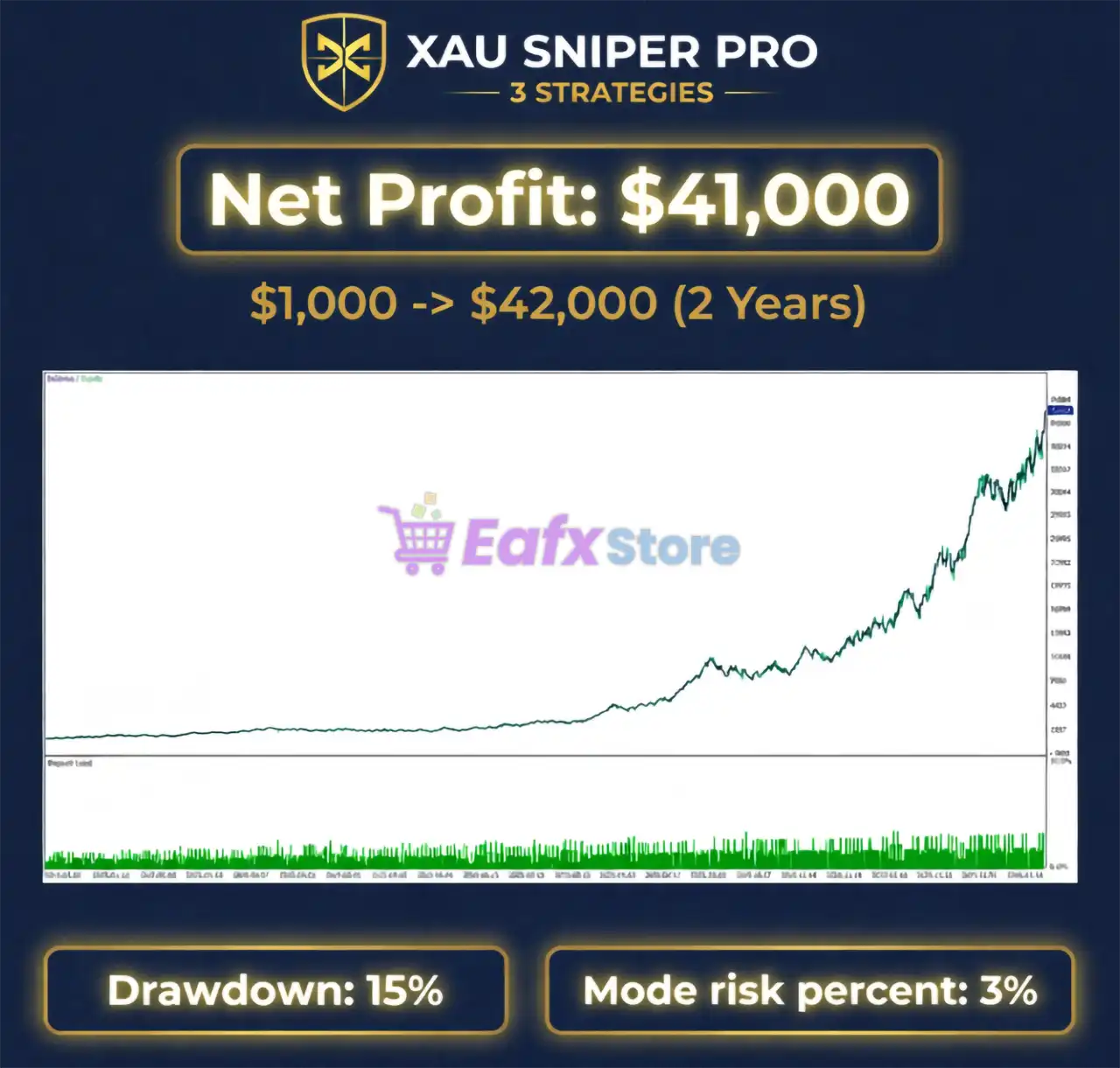
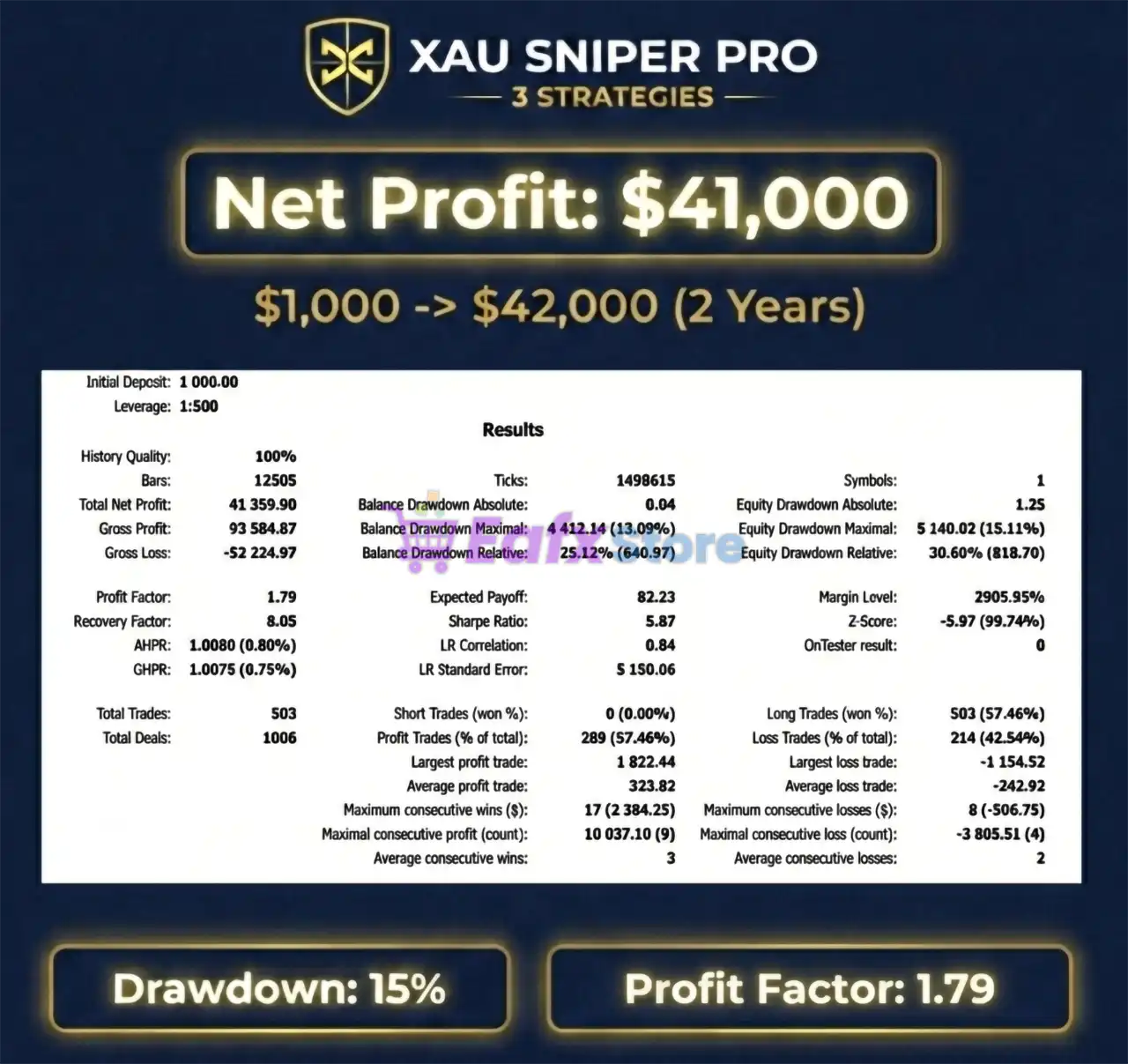
The XAU Sniper Pro EA backtest trading results achieved impressive profit performance for 2 years on the XAUUSD (Gold) pair.
✅ Initial Deposit: $1,000
✅ Total Net Profit: $41,359.90%
✅ Maximum Drawdown: 13.09%
XAU Sniper Pro EA MT5 Backtest
What is the XAU Sniper Pro EA Trading Strategy?
🔹 Trend Alignment Logic: Establishes higher-timeframe bias before allowing any trade execution.
🔹 Pullback-Based Entries: Focuses on continuation setups rather than predicting tops or bottoms.
🔹 Selective Swing Trading: Avoids overtrading by waiting for validated, high-quality conditions.
🔹 Volatility & Spread Filters: Ensures trades occur only in stable execution environments.
🔹 Independent Strategy Layers: Each timeframe logic validates signals separately for resilience.
Is XAU Sniper Pro MT5 Safe?
XAU Sniper Pro EA shows significant potential in providing stable and reliable profits, making it a reliable tool in the forex market. The advisor is highly appreciated by the MQL5 community in many aspects and has won the trust of users.
⭐⭐⭐⭐⭐ Stephen J Martret (2026.01.28)
“Very safe, no dangerous grids or martingale and most trades close over 1:1 RR all excellent signs for long term profits, highly recommend.”
⭐⭐⭐⭐⭐ JiangGui (2026.03.01)
“I’ve been using this product for almost a month now. Initially, I lost a lot of money, but I eventually made back my losses and even turned a profit. The long-term effects are quite good.”
Recommended settings
Recommended settings and parameters to pay attention to from developers and experts:
| Features | Type |
|---|---|
| Trading platform | MetaTrader 5 (MT5) |
| Time frames | M30, H1, H4 |
| Currency pairs | XAUUSD (Gold) |
| Minimum / Recommended deposit | $200 |
| Minimum / Recommended leverage | Any |
| Account type | ECN or Raw Spread account |
| Product type | Original version |
| Additional services | Unlock and Decompile |
| Recommended brokers | Exness Broker, Icmarkets Broker |
| Recommended VPS | MyfxVPS.com (Blue VPS, Golden VPS). Lowest Latency, 2 week Free Trial, 100% Free for 12-18 Months. |
Product Download Package?
The download package of the product suite includes:
Experts
 XAU Sniper Pro.ex5
SetFiles
xau_sniper_pro_strategy_1.set
xau_sniper_pro_strategy_2.set
xau_sniper_pro_strategy_3.set
xau_sniper_pro_combo_3_strategies.set
 Reviewed by David Easton
Conclusion
In short, XAU Sniper Pro EA is a disciplined and safety-focused Gold trading robot built for traders who value consistency and capital protection. With multi-timeframe trend alignment, swing-based entries, and strict risk control, it avoids risky tactics like grid or martingale. This makes XAU Sniper Pro a strong choice for both personal trading and Prop Firm challenges seeking stable, long-term growth.
🔢 GoldKiller PRO EA MT5 Settings Guide
GoldKiller PRO EA is presented as an automated Gold trading Expert Advisor with a multi-strategy architecture designed for XAUUSD (Gold). Based on the supplied configuration panel, the system combines a Weekly EMA trend filter, three independent trading strategies, fixed-lot position sizing, Prop Firm entry-delay protection, spread filtering, session-based trading hours, economic-news filtering, Telegram notifications, and interactive dashboard controls.
The displayed configuration uses H1, enables all three strategies, applies a 0.01 fixed lot size, and provides individual Stop Loss and Take Profit settings for each strategy. This gives traders considerable flexibility when adjusting the EA for different Gold-trading and risk-management preferences.

XAU Sniper Pro EA MT5 Settings Panel
🔢 GoldKiller PRO EA MT5 Settings Explained
🔶 Product & Basic Settings
🔹 Version: Xau Sniper Pro 6.1 — Identifies the version shown in the supplied settings panel as Xau Sniper Pro 6.1.
🔹 Symbol: XAU (Gold) — Specifies XAU (Gold) as the trading instrument.
🔹 TimeFrame: Use On H1 — Configures the EA to operate on the H1 (1-Hour) timeframe.
🔶 Trend Filter — Weekly EMA
🔹 Enable Weekly EMA Filter: true — Enables the Weekly EMA trend filter, allowing the EA to use weekly moving-average direction as part of its trade filtering.
🔹 Weekly EMA Period (e.g. 10, 20, 50): 5 — Sets the Weekly EMA period to 5, meaning the EA uses a 5-period Weekly EMA for its configured trend-filter logic.
🔶 Trade Mode & Position Sizing
🔹 Trading mode: TRADE_BOTH — Configures the EA to allow both Buy and Sell trades.
🔹 Lot Mode: LOT_FIXED — Sets position sizing to the fixed-lot method.
🔹 Mode FixedSize: 0.01 — Sets the fixed trading volume to 0.01 lots.
🔹 Mode RiskPercent: 1.0 — Sets the risk-percentage parameter to 1.0. Because Lot Mode = LOT_FIXED, the fixed-lot setting is the active position-sizing method in the displayed configuration.
🔶 Strategy 1 Settings
🔹 Enable Strategy 1: true — Activates Strategy 1.
🔹 Strategy 1 Magic Number: 111 — Assigns 111 as the Magic Number for Strategy 1, allowing its trades to be identified separately.
🔹 Strategy 1 Stop Loss: 15.0 — Sets Strategy 1’s Stop Loss to 15.0 according to the EA’s configured price/distance unit.
🔹 Strategy 1 Take Profit: 49.0 — Sets Strategy 1’s Take Profit to 49.0 according to the EA’s configured price/distance unit.
🔶 Strategy 2 Settings
🔹 Enable Strategy 2: true — Activates Strategy 2.
🔹 Strategy 2 Magic Number: 222 — Assigns 222 as the Magic Number for Strategy 2.
🔹 Strategy 2 Stop Loss: 16.0 — Sets Strategy 2’s Stop Loss to 16.0 according to the EA’s configured distance unit.
🔹 Strategy 2 Take Profit: 29.0 — Sets Strategy 2’s Take Profit to 29.0 according to the EA’s configured distance unit.
🔶 Strategy 3 Settings
🔹 Enable Strategy 3: true — Activates Strategy 3.
🔹 Strategy 3 Magic Number: 333 — Assigns 333 as the Magic Number for Strategy 3.
🔹 Strategy 3 Stop Loss: 30.0 — Sets Strategy 3’s Stop Loss to 30.0 according to the EA’s configured distance unit.
🔹 Strategy 3 Take Profit: 43.0 — Sets Strategy 3’s Take Profit to 43.0 according to the EA’s configured distance unit.
🔶 Entry Delay — Prop Firm Protection
🔹 Enable Random Entry Delay: false — Disables the random entry-delay mechanism in the displayed configuration.
🔹 Min Delay (seconds): 2 — Sets the minimum possible randomized entry delay to 2 seconds if the feature is enabled.
🔹 Max Delay (seconds): 45 — Sets the maximum possible randomized entry delay to 45 seconds if the feature is enabled.
🔶 Spread Filter Settings
🔹 Enable Spread Filter: false — Disables the spread filter in the current configuration.
🔹 Max Spread (Points): 50 — Sets the maximum spread threshold to 50 points if the spread filter is enabled.
🔶 Trading Hours — UTC
🔹 Trading Time Mode: MODE_24_7 — Configures the EA’s trading-time mode as MODE_24_7, allowing continuous trading according to the selected session and EA logic.
🔹 Custom Time: 08:00-12:00,14:00-18:00 — Defines the custom trading windows as 08:00–12:00 and 14:00–18:00. These custom hours are available when the corresponding custom-time mode is used.
🔹 Asia Session: true — Enables the Asian Session.
🔹 European Session: true — Enables the European Session.
🔹 US Session: true — Enables the US Session.
🔶 News Filter Settings
🔹 Enable News Filter: false — Disables the economic-news filter in the current configuration.
🔹 Pause Before News (mins): 30 — Configures the EA to pause trading 30 minutes before a relevant news event when the news filter is enabled.
🔹 Pause After News (mins): 30 — Configures the EA to remain paused for 30 minutes after a relevant news event when the news filter is enabled.
🔹 Filter High Impact: true — Enables filtering for high-impact economic news when the news filter is activated.
🔹 Filter Medium Impact: false — Disables filtering for medium-impact economic news.
🔹 Currencies to Filter: USD — Configures the news filter to monitor USD economic events.
🔶 Telegram Notifications
🔹 Enable Telegram: false — Disables Telegram notifications.
🔹 Telegram Bot Token: — The Telegram Bot Token field is blank in the supplied configuration.
🔹 Telegram Chat ID: — The Telegram Chat ID field is blank in the supplied configuration.
🔶 Dashboard Controls
🔹 Enable Interactive Buttons: true — Enables interactive dashboard buttons, allowing users to interact with supported EA controls directly from the trading interface.
🔢 Key Configuration Highlights
🔹 Gold Trading: The screenshot identifies the trading symbol as XAU (Gold).
🔹 Trading Timeframe: The EA is configured for H1, or the 1-Hour timeframe.
🔹 Weekly Trend Filter: The Weekly EMA filter is enabled with a 5-period EMA.
🔹 Two-Way Trading: TRADE_BOTH enables both Buy and Sell trading.
🔹 Fixed Position Size: LOT_FIXED is selected with a 0.01-lot fixed size.
🔹 Strategy Architecture: All 3 strategies are enabled simultaneously.
🔹 Strategy Identification: The three strategies use Magic Numbers 111, 222, and 333.
🔹 Strategy 1: Uses 15.0 Stop Loss and 49.0 Take Profit.
🔹 Strategy 2: Uses 16.0 Stop Loss and 29.0 Take Profit.
🔹 Strategy 3: Uses 30.0 Stop Loss and 43.0 Take Profit.
🔹 Prop Firm Entry Delay: Random entry delay is disabled, with configurable values of 2 seconds minimum and 45 seconds maximum.
🔹 Spread Protection: The spread filter is disabled, while the maximum configured spread is 50 points.
🔹 Trading Sessions: Asia, European, and US sessions are all enabled.
🔹 Trading Schedule: The active mode is MODE_24_7, while custom trading windows are configured as 08:00–12:00 and 14:00–18:00.
🔹 News Protection: The news filter is disabled, with 30 minutes before and 30 minutes after configured as the protection periods.
🔹 News Impact: High-impact filtering is enabled, while medium-impact filtering is disabled.
🔹 News Currency: The configured news currency is USD.
🔹 Telegram: Telegram notifications are disabled and both the Bot Token and Chat ID fields are blank.
🔹 Dashboard: Interactive dashboard buttons are enabled with Enable Interactive Buttons = true.
🔢 Conclusion
GoldKiller PRO EA MT5 offers a structured multi-strategy framework for automated XAUUSD Gold trading, with the supplied configuration showing a combination of trend filtering, fixed position sizing, independent strategy management, session controls, and optional Prop Firm and news protections.
The configuration uses H1, TRADE_BOTH, and LOT_FIXED with a 0.01 fixed lot size. The Weekly EMA filter is active using a 5-period EMA, while Strategy 1, Strategy 2, and Strategy 3 are all enabled with individual Magic Numbers and separate Stop Loss/Take Profit values.
An important characteristic of the displayed setup is that several protection mechanisms are available but currently disabled. Both the Spread Filter and News Filter are set to false, while random entry delay and Telegram notifications are also disabled. Conversely, the Asia, European, and US sessions are enabled, and interactive dashboard controls are active.
Before using the configuration on a live Gold account, traders should carefully evaluate the 0.01 fixed lot size, strategy-specific SL/TP values, 50-point spread threshold, 30-minute news protection windows, and 5-period Weekly EMA filter. Forward testing is recommended to verify how the three strategies interact when they are enabled simultaneously.
🔢 FAQs
❓ What market and timeframe does GoldKiller PRO EA MT5 use?
The supplied settings identify the symbol as XAU (Gold) and the timeframe as H1 (1 Hour).
❓ How many strategies are included in the displayed configuration?
The configuration contains 3 strategies, and all three are enabled. They use Magic Numbers 111, 222, and 333 respectively.
❓ What are the Stop Loss and Take Profit settings for the three strategies?
Strategy 1 uses 15.0 SL / 49.0 TP, Strategy 2 uses 16.0 SL / 29.0 TP, and Strategy 3 uses 30.0 SL / 43.0 TP.
❓ Does GoldKiller PRO EA MT5 use a news filter?
The news-filter function is currently disabled with Enable News Filter = false. If enabled, it is configured for 30 minutes before and 30 minutes after news, with High Impact = true, Medium Impact = false, and USD as the currency filter.
❓ What is the position-sizing method?
The EA uses Lot Mode = LOT_FIXED with Mode FixedSize = 0.01, meaning the displayed configuration uses a fixed trading volume of 0.01 lots.
User Reviews
Only logged in customers who have purchased this product may leave a review.
❓ What market does XAU Sniper Pro EA trade?
XAU Sniper Pro EA is designed exclusively for trading Gold (XAUUSD), focusing on its volatility, spreads, and behavior for precise and controlled execution.
❓ Is XAU Sniper Pro EA safe for long-term trading?
XAU Sniper Pro EA emphasizes capital protection with fixed stop losses, no grid or martingale, and disciplined swing logic for long-term stability.
❓ Can XAU Sniper Pro EA be used on Prop Firm accounts?
XAU Sniper Pro EA is prop-firm ready, following strict risk rules, capped exposure, and transparent trade logic suitable for evaluations.
❓ Does XAU Sniper Pro EA use martingale or grid?
XAU Sniper Pro EA does not use martingale or grid strategies, ensuring controlled drawdown and avoiding dangerous position escalation.
❓ How does XAU Sniper Pro EA select trades?
XAU Sniper Pro EA uses multi-timeframe trend alignment and pullback-based swing entries to trade only high-quality setups.
❓ What timeframes does XAU Sniper Pro EA operate on?
XAU Sniper Pro EA runs three independent strategies on M30, H1, and H4 to diversify entries and smooth equity growth.
❓ Is XAU Sniper Pro EA beginner-friendly?
XAU Sniper Pro EA offers plug-and-play setup with flexible lot sizing, making it accessible for both beginners and experienced traders.
❓ Does XAU Sniper Pro EA trade during news events?
XAU Sniper Pro EA includes optional news protection to pause trading during high-impact events and reduce volatility risk.
❓ What is the recommended minimum deposit for XAU Sniper Pro EA?
XAU Sniper Pro EA can operate from $200, though higher balances allow more conservative risk and smoother performance.
❓ Has XAU Sniper Pro EA been backtested and proven live?
XAU Sniper Pro EA shows strong live signals and multi-year backtests with controlled drawdown and consistent Gold performance.
-
 Original price was: $999.00.$599.00Current price is: $599.00.
 -
 Original price was: $500.00.$249.00Current price is: $249.00.
 -
 Original price was: $888.00.$249.00Current price is: $249.00.
 -
 Original price was: $439.00.$249.00Current price is: $249.00.
-
 4Original price was: $499.00.$249.00Current price is: $249.00.
 -
 1Original price was: $500.00.$249.00Current price is: $249.00.
 -
 3Original price was: $199.00.$159.00Current price is: $159.00.
 -
 0Original price was: $199.00.$179.00Current price is: $179.00.
There are no reviews yet.