






Xauron EA MT5 with SetFiles (Latest version) - Unlimited

Subscriptions for Special Plan
- 30 EA package is more economical!
- Special package with 99%
- Download 1 EA/Day

Subscriptions for Premium Membership
- Download Unlimited in 1 Year
- Get 100% Discount
- Get free access to all

Subscriptions for Gold Membership
- 1 Year Membership
- Get 100% Discount
- Access EA+Indicator+Course
Frequently bought together 🎁
Add these products to enhance your purchase



Xauron EA MT5: A Premium Gold (XAUUSD) Breakout EA
Xauron EA is a premium Expert Advisor (EA) designed to capture explosive breakouts on XAUUSD (Gold). It uses high-precision algorithms, dynamic protection, and real-time adaptability to market conditions. The EA is a professional and transparent solution, built for real performance, and is suitable for both beginners and professional traders.
 Vendor Website: View here
About the Author
This product is compiled by Roberto Liguoro. This author has more than +2 years of experience working on MQL5 with many famous products such as Xauron EA MT5, Xauron EA MT4, Counter Trend Grid EA MT5 and other advisors. Among them, Xauron EA is his best performing products.
Delivery time 24h-48h after payment.
Refund if not delivered.
You will receive the current version without any limitations (ID+Time).
Key Features of Xauron EA for MT5
🔹 High-Precision Breakout Detection: The EA uses smart breakout detection with advanced volume filtering to find optimal trading opportunities.
🔹 Integrated News Filter: The EA has a built-in news filter that avoids high-impact news events, such as NFP, FOMC and PMI.
🔹 Adaptive System: The EA’s adaptive system adjusts to real-time market conditions, including spread, slippage and latency.
🔹 No Risky Strategies: The EA does not use dangerous strategies like Grid, Martingale, or Arbitrage, which ensures a high level of capital protection.
Additional Features
🔹 Fixed and Trailing Stops: The EA uses both a fixed Stop Loss (SL), Take Profit (TP), along with an intelligent trailing stop for optimal risk management.
🔹 Time Filter: The EA has a built-in time filter that ensures trades are only opened during optimal market hours.
🔹 Real-Time Dashboard: The EA displays real-time statistics on the chart, which provides transparency and easy monitoring.
🔹 Full Customization: The EA provides full access to its settings, which allows for an open and customizable strategy.
Xauron EA MT5 Review
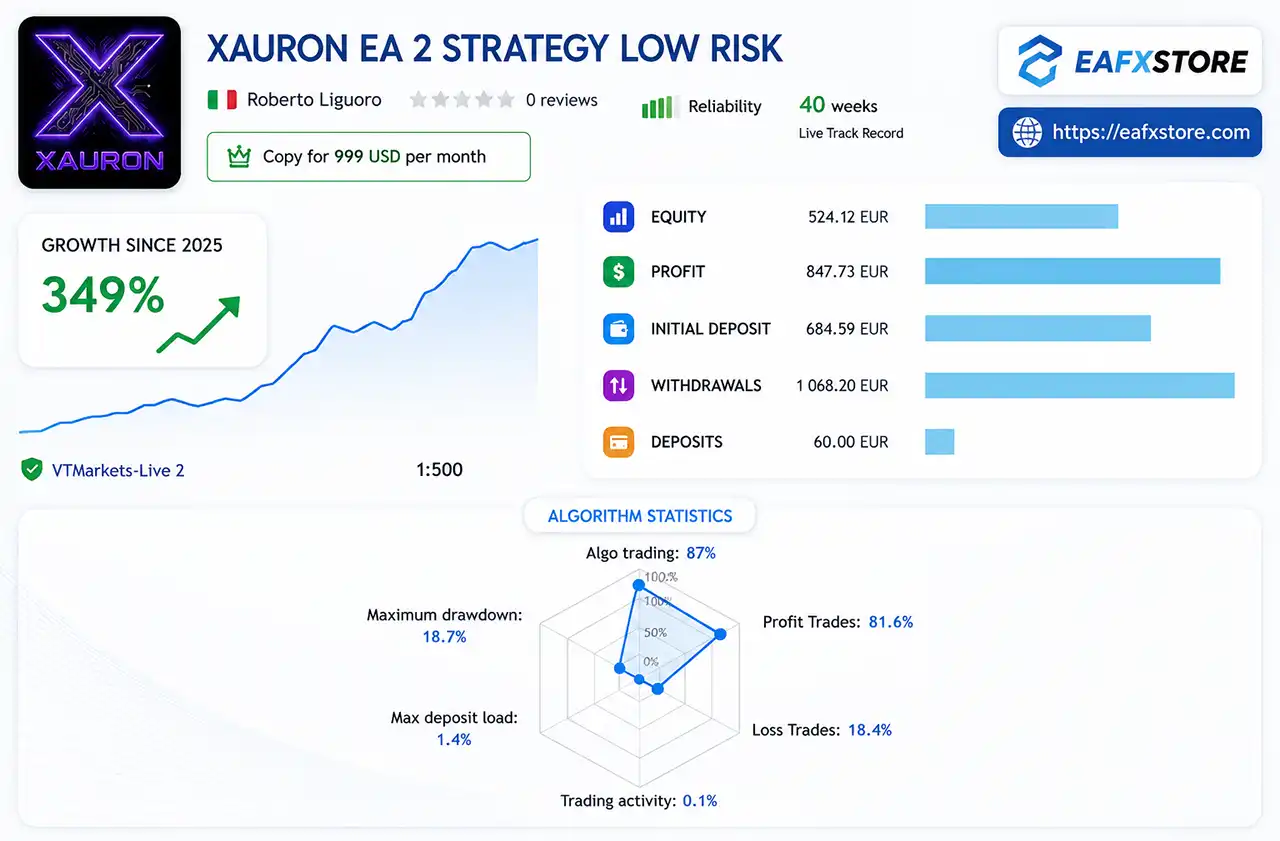
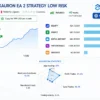
Xauron EA Live Signal Results
The Xauron EA achieved impressive profit performance when trading with XAUUSD (Gold). Trading results on real account for 40 consecutive weeks of trading.
✅ Initial Deposit: €648.59
✅ Growth Rate: +349%
✅ Win Rate (% of total): 81.6%
✅ Maximum Drawdown: 18.7%
Xauron EA Live Signal
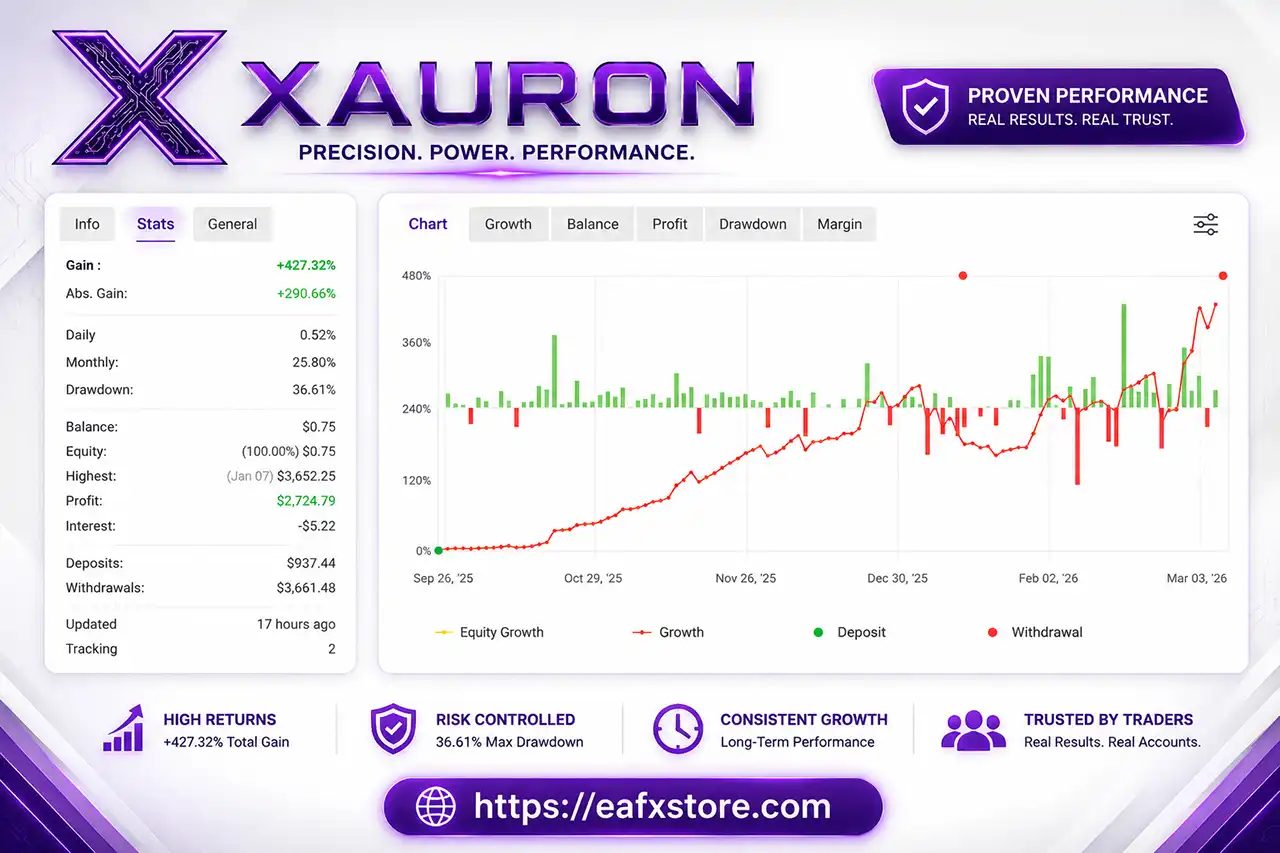
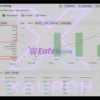
Xauron EA Myfxbook Results
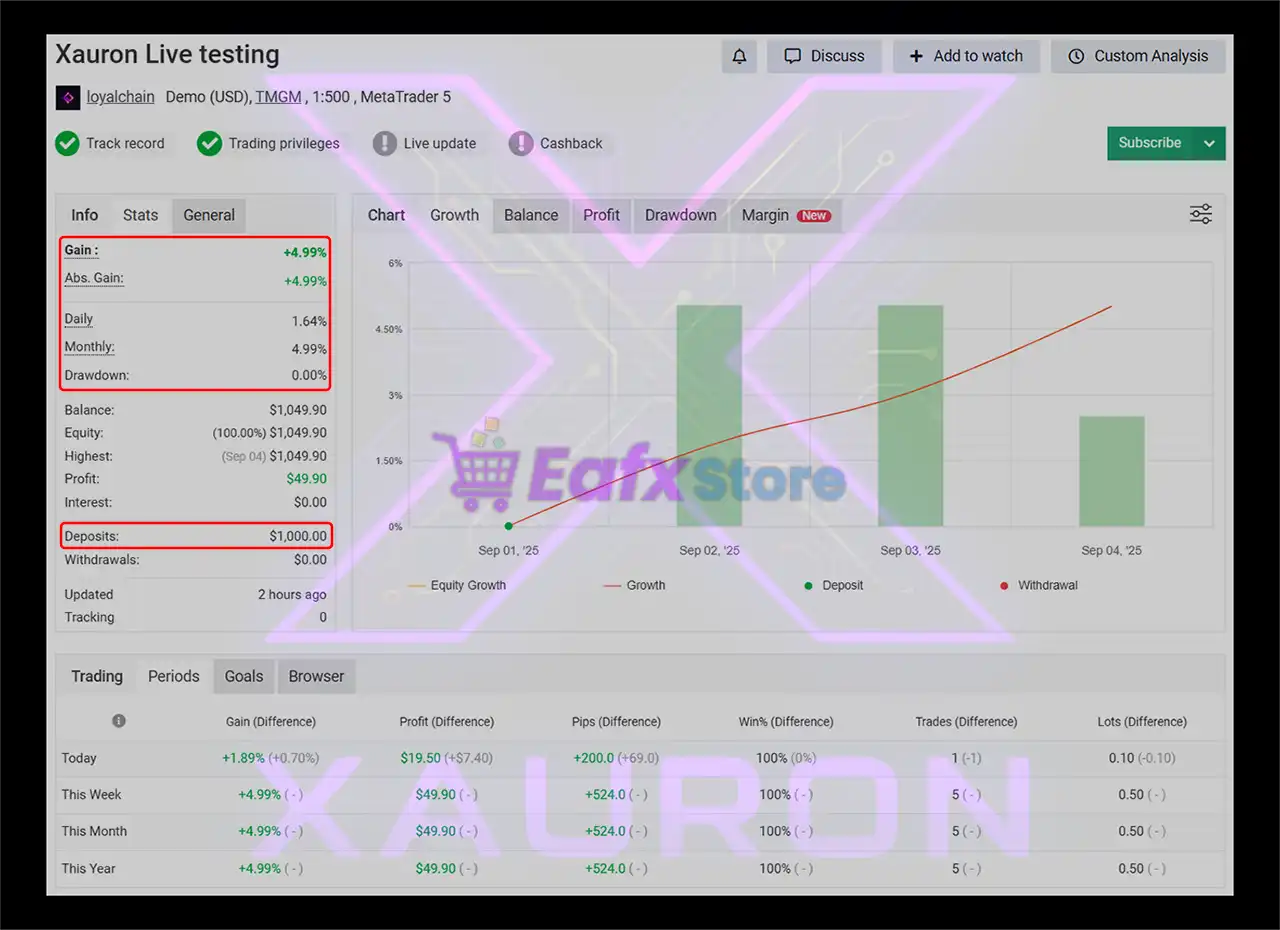
The Xauron EA has shown a solid start on its MyFxBook verified account, delivering consistent growth within a short period of testing. With disciplined trading, zero drawdown, and stable returns, it demonstrates strong potential for long-term profitability.
✅ Initial Deposit: $937
✅ Total Gain: $427.32
✅ Daily Profit: 0.52%
✅ Monthly Profit: 25.80%
✅ Max Drawdown: 36.61%
Xauron EA MT5 Myfxbook Results
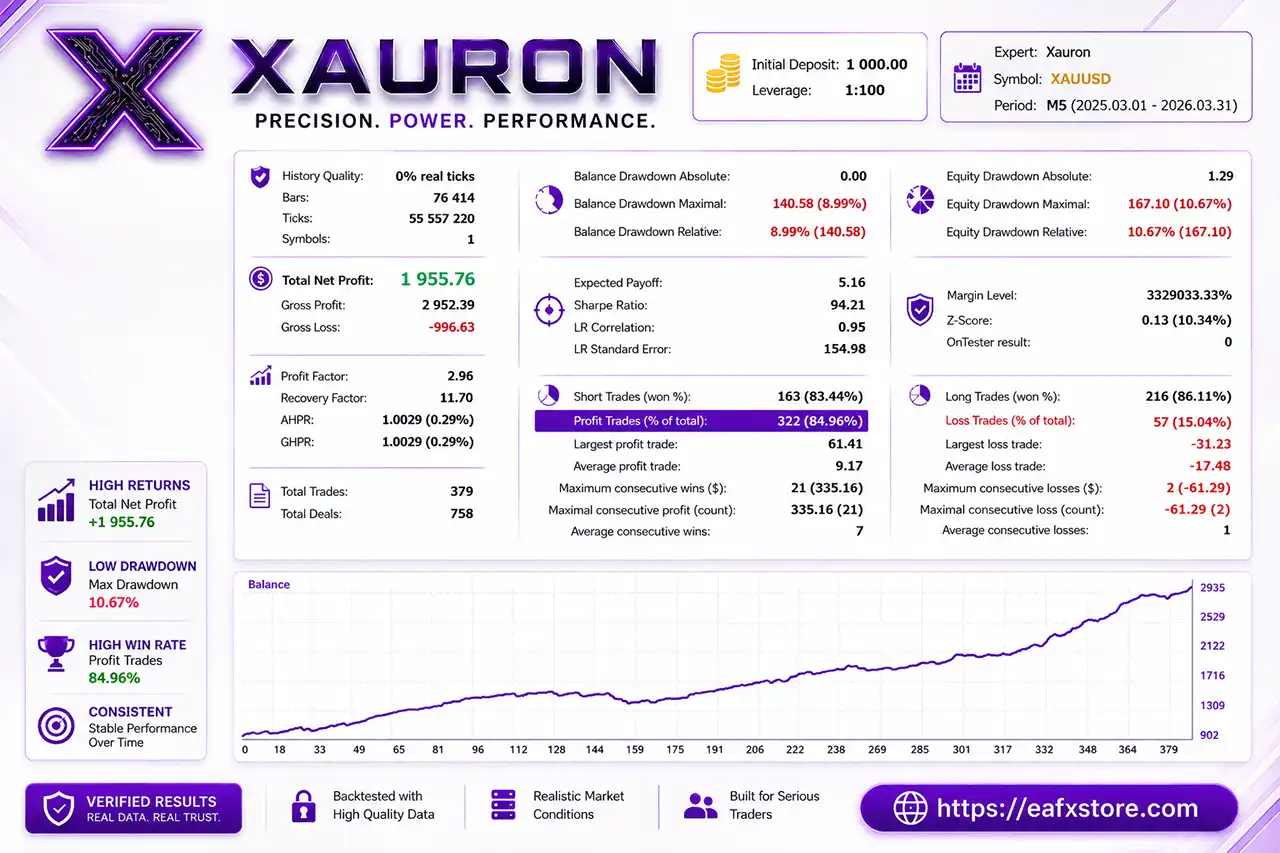
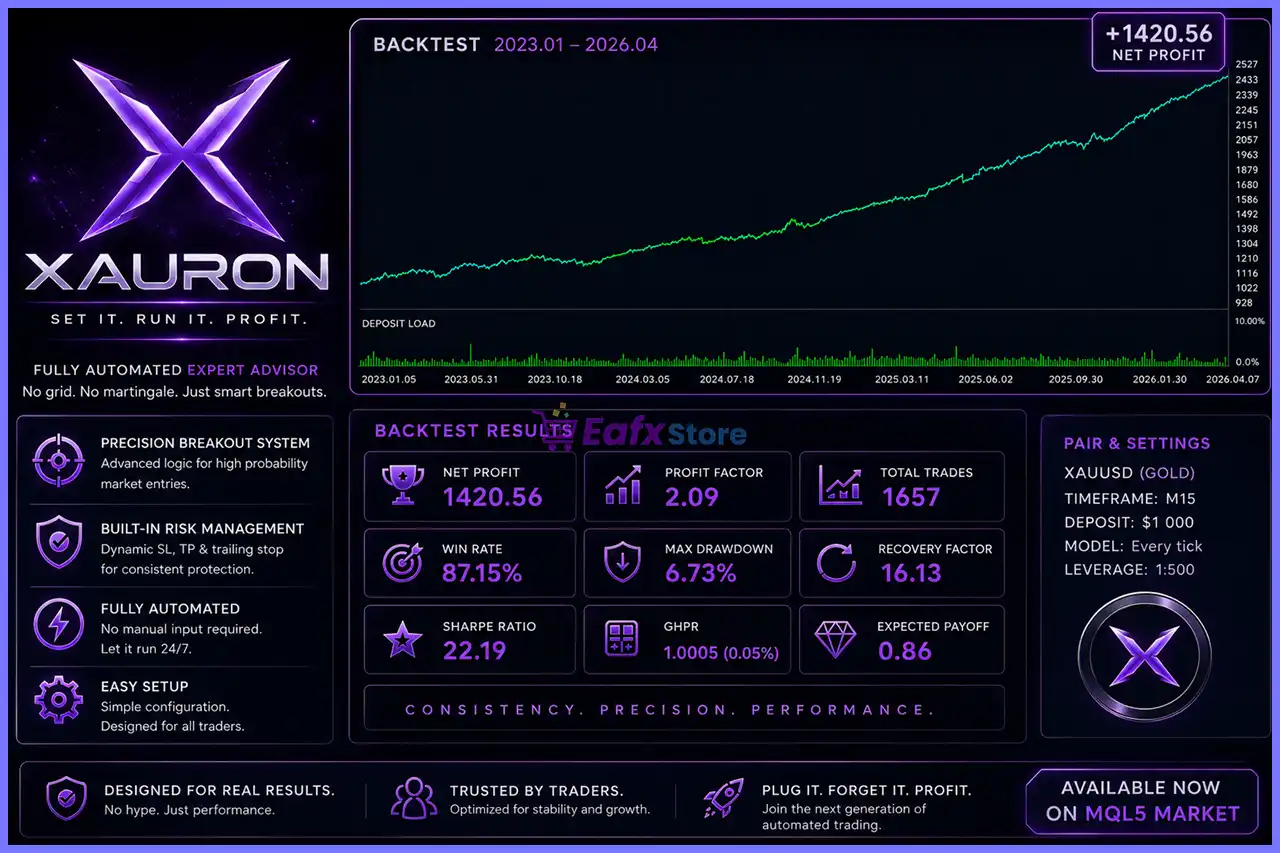
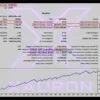
Xauron EA Backtest Results
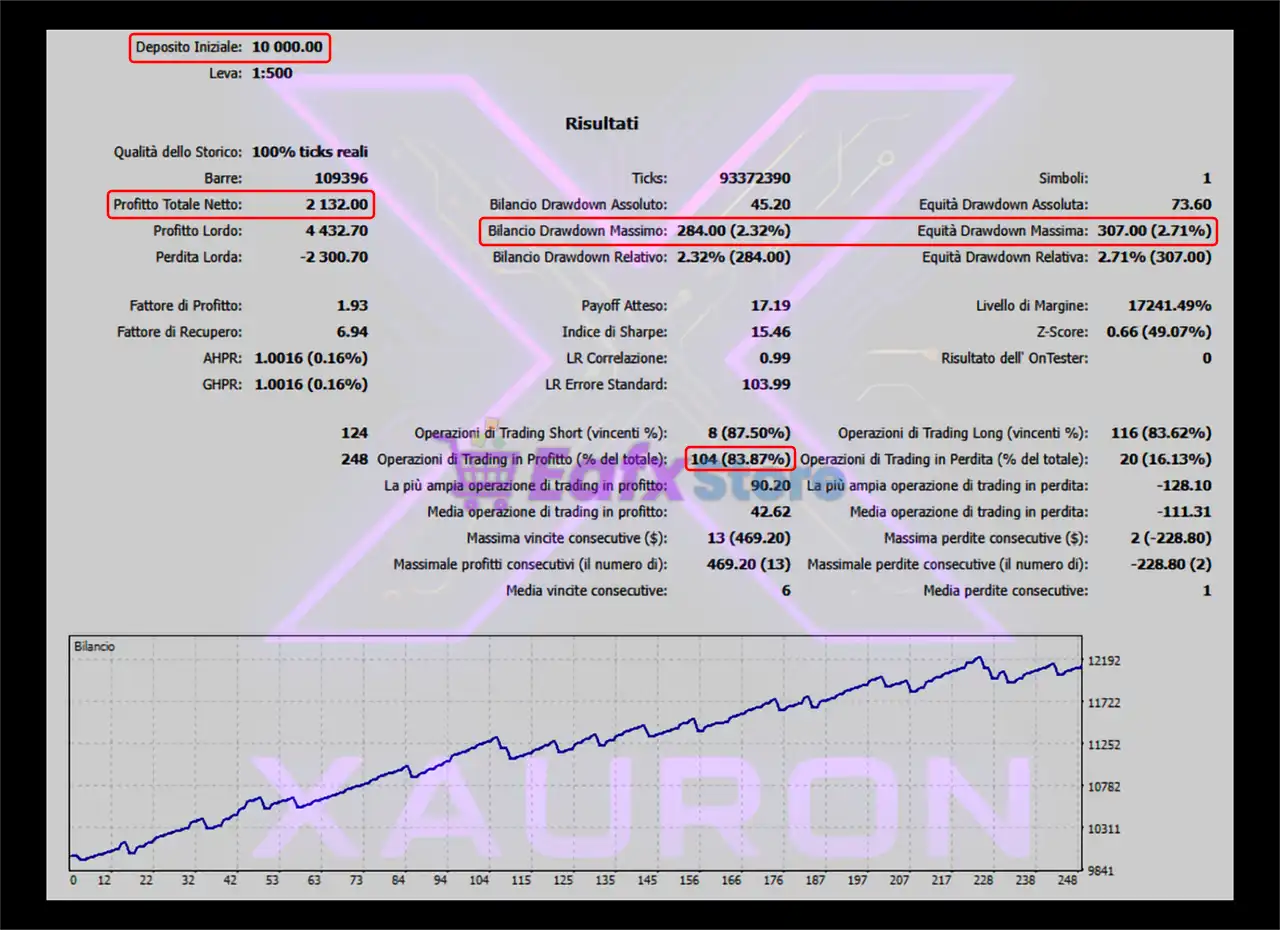
The Xauron EA has been backtested and proven to deliver consistent profits while maintaining a controlled level of risk. The results confirm the reliability of the EA for traders looking for a balance between profitability and stability.
✅ Initial Deposit: $1,000
✅ Total Net Profit: $1,955.76
✅ Winning Trades: 84.96%
✅ Maximum Drawdown: 8.99%
Xauron EA Backtests Results
Why choose and use Xauron EA?
🔹 High Reliability: The EA has high-precision algorithms, and it is a transparent solution with real-time dashboard statistics.
🔹 Enhanced Capital Protection: The EA’s no-martingale logic, news filter, and dynamic protection all work together to protect your capital from unnecessary risks.
🔹 High Adaptability: The EA’s adaptive system and full access to settings allow it to be adjusted to a variety of broker conditions and market environments.
🔹 User-Friendly and Safe: The EA is a simple and powerful tool that is fully guided for beginners, making it a safe and reliable option for traders of all experience levels.
Is Xauron EA MT5 safe?
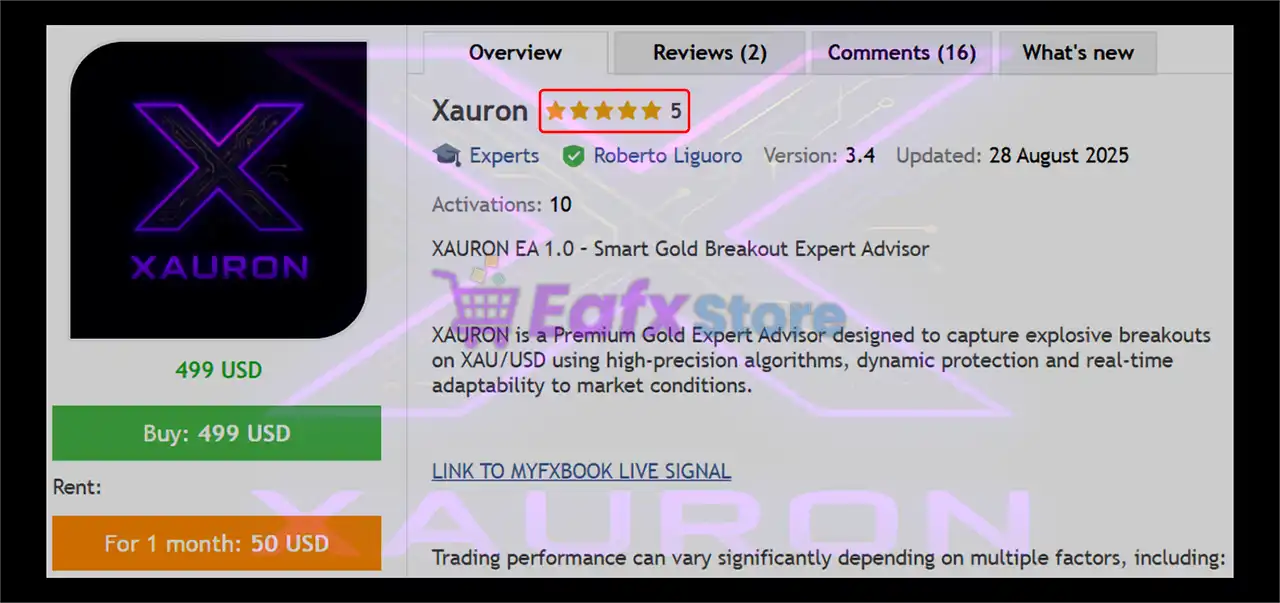
Xauron EA shows significant potential in providing stable and reliable profits, making it a reliable tool in the forex market. The advisor is highly appreciated by the MQL5 community in many aspects and has won the trust of users.
⭐⭐⭐⭐⭐ Dragoljub Vujcic (2026.08.03)
“I’ve only been using it for a short time, but EA it’s really professionally made.”
⭐⭐⭐⭐⭐ Chun Ho Chiu (2026.01.10)
I’ve been using XAURON since August’25 and the performance is fairly consistent over time. No AI fantasy or fancy dreams. Rob is also very responsive and supportive and I’m so far very much satisfied with XAURON!”
⭐⭐⭐⭐⭐ Ariston Carvalho (2025.09.08)
“Xauron is a very good EA implementing breakout strategy and it is not risky if you set the lot size accordling. Also Roberto is very responsive. I have be using Xauron for 1 month now with good results.”
⭐⭐⭐⭐⭐ Yoichiro Taki (2025.06.11)
“This is a review after using this EA for 10 days. The entry point is a very reliable trend-following point, so profits are generated. The backtest with Ducascopy and forward test performance shows a win rate of over 70%, and my funds have increased.”
Recommended settings
Recommended settings and parameters to pay attention to from developers and experts:
| Features | Type |
|---|---|
| Trading platform | MetaTrader 5 (MT5) |
| Time frames | M1, M5, M15 |
| Currency pairs | XAUUSD (Gold) |
| Minimum / Recommended deposit | $500 |
| Minimum / Recommended leverage | Any |
| Supports all brokers | ECN/RAW |
| Product type | Original version |
| Additional services | Unlock and Decompile |
| Recommended brokers | Exness Broker, Icmarkets Broker |
| Recommended VPS | MyfxVPS.com (Blue VPS, Golden VPS). Lowest Latency, 2 week Free Trial, 100% Free for 12-18 Months. |
Product Download Package?
The download package of the product suite includes:
✅ Experts: Xauron EA.ex5
➡️ Reviewed by David Easton
Conclusion
In short, Xauron EA combines high-precision breakout detection, adaptive risk management, and a built-in news filter to deliver safe and consistent trading results. With fixed and trailing stops, no risky strategies, and a real-time dashboard, it ensures both transparency and capital protection. Verified Myfxbook results with 100% win rate and strong backtests prove its reliability, making it a powerful tool for profitable automated trading.
🔢 Xauron EA MT5 Settings Guide
Xauron EA is an automated trading Expert Advisor built around a configurable breakout strategy with detailed controls for position sizing, Take Profit, Stop Loss, trailing-stop management, break-even protection, breakout detection, ATR filtering, trading schedules, and news-event protection.
The displayed configuration gives traders precise control over how pending Buy Stop and Sell Stop orders are created, how price breakouts are validated, and how open positions are managed after entry.
With adjustable parameters such as a 150-bar lookback period, 30-bar high/low period, 2,000-point Take Profit, 1,000-point Stop Loss, 100-point trailing trigger, and 720-minute pending-order expiration, Xauron EA MT5 offers a structured framework for automated trading while allowing users to adapt the system to different market conditions.
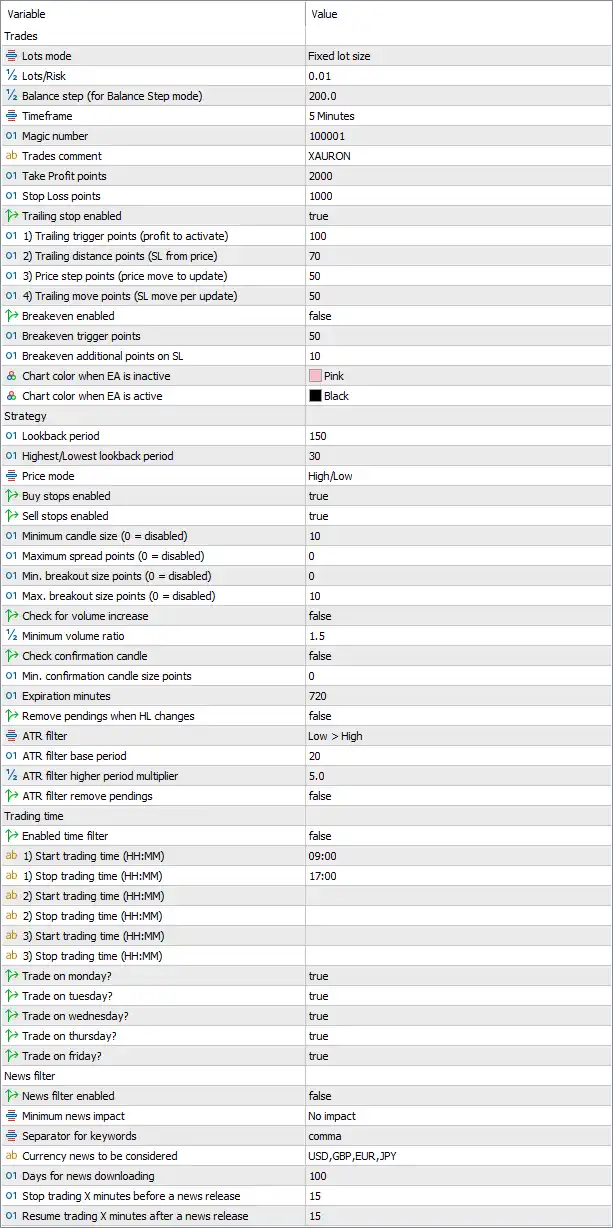
Xauron EA MT5 Settings Panel
🔢 Xauron EA MT5 Settings Explained
🔶 Trades Settings
🔹 Lots mode: Fixed lot size — Sets the position-sizing method to Fixed lot size, meaning trades use a predefined lot value rather than dynamically calculating volume from account risk.
🔹 Lots/Risk: 0.01 — Sets the trading volume to 0.01 lots under the selected Fixed lot size mode.
🔹 Balance step (for Balance Step mode): 200.0 — Sets the balance increment to 200.0 for the Balance Step sizing mode. This parameter is not the active sizing method because Fixed lot size is selected.
🔹 Timeframe: 5 Minutes — Sets the EA’s operating timeframe to 5 Minutes (M5).
🔹 Magic number: 100001 — Uses 100001 as the unique Magic Number for identifying and managing trades opened by Xauron EA MT5.
🔹 Trades comment: XAURON — Sets the trade comment to XAURON, making positions generated by the EA easier to identify.
🔹 Take Profit points: 2000 — Sets the Take Profit distance to 2,000 points.
🔹 Stop Loss points: 1000 — Sets the Stop Loss distance to 1,000 points.
🔶 Trailing Stop Settings
🔹 Trailing stop enabled: true — Activates the trailing-stop system.
🔹 1) Trailing trigger points (profit to activate): 100 — The trailing stop becomes active after the trade reaches 100 points of profit.
🔹 2) Trailing distance points (SL from price): 70 — Maintains the Stop Loss approximately 70 points away from the current market price once trailing is active.
🔹 3) Price step points (price move to update): 50 — Requires a 50-point favorable price movement before the trailing Stop Loss is updated again.
🔹 4) Trailing move points (SL move per update): 50 — Moves the Stop Loss by 50 points for each qualifying trailing update.
🔶 Break-Even Settings
🔹 Breakeven enabled: false — Disables the break-even function in the displayed configuration.
🔹 Breakeven trigger points: 50 — Sets the break-even activation threshold to 50 points if the break-even function is enabled.
🔹 Breakeven additional points on SL: 10 — Adds 10 points beyond the entry price when the Stop Loss is moved to break-even, if the feature is activated.
🔶 Chart Display Settings
🔹 Chart color when EA is idle: Pink — Sets the chart color to Pink when the EA is in its idle state.
🔹 Chart color when EA is active: Black — Sets the chart color to Black when the EA is actively trading.
🔶 Strategy Settings
🔹 Lookback period: 150 — Uses a 150-bar lookback period for the EA’s broader market and breakout analysis.
🔹 Highest/Lowest lookback period: 30 — Uses 30 bars to determine the relevant recent highest and lowest price levels for breakout calculations.
🔹 Price mode: High/Low — Uses the candle High/Low prices as the selected price reference for the strategy.
🔹 Buy stops enabled: true — Enables Buy Stop pending orders for upside breakout opportunities.
🔹 Sell stops enabled: true — Enables Sell Stop pending orders for downside breakout opportunities.
🔹 Minimum candle size (0 = disabled): 10 — Requires a minimum candle size of 10 points. A value of 0 would disable this filter, but the current configuration uses 10.
🔹 Maximum spread points (0 = disabled): 0 — Sets the maximum spread filter to 0 points. According to the parameter description, 0 = disabled, so no maximum spread restriction is configured through this setting.
🔹 Min. breakout size points (0 = disabled): 0 — Sets the minimum breakout-size requirement to 0 points. Because 0 = disabled, this minimum breakout filter is not active.
🔹 Max. breakout size points (0 = disabled): 10 — Sets the maximum breakout size to 10 points. This limits qualifying breakout movement according to the EA’s internal breakout logic.
🔶 Volume & Confirmation Filters
🔹 Check for volume increase: false — Disables the volume-increase confirmation filter.
🔹 Minimum volume ratio: 1.5 — Sets the minimum required volume ratio to 1.5 if volume confirmation is enabled.
🔹 Check confirmation candle: false — Disables the confirmation-candle filter.
🔹 Min. confirmation candle size points: 0 — Sets the minimum confirmation-candle size to 0 points. Since confirmation-candle checking is disabled, this value is currently inactive.
🔶 Pending Order Management
🔹 Expiration minutes: 720 — Sets pending-order expiration to 720 minutes, equivalent to 12 hours, unless the EA removes the order earlier according to its strategy rules.
🔹 Remove pendings when HL changes: false — Disables automatic removal of pending orders when the calculated High/Low levels change.
🔶 ATR Filter
🔹 ATR filter: Low > High — Configures the ATR filter mode as Low > High, using the relationship between the lower and higher ATR calculations as the selected volatility condition.
🔹 ATR filter base period: 20 — Sets the base ATR calculation period to 20.
🔹 ATR filter higher period multiplier: 5.0 — Multiplies the base ATR period by 5.0 for the higher-period comparison, resulting in a longer volatility reference based on the EA’s internal calculation.
🔹 ATR filter remove pendings: false — Disables automatic removal of pending orders when the ATR filter condition changes or is no longer satisfied.
🔶 Trading Time Settings
🔹 Enabled time filter: false — Disables the general time-filter function.
🔹 1) Start trading time (HH:MM): 09:00 — Sets the first configured trading window to begin at 09:00.
🔹 1) Stop trading time (HH:MM): 17:00 — Sets the first configured trading window to end at 17:00.
🔹 2) Start trading time (HH:MM): — The second trading-window start-time field is left blank in the displayed configuration.
🔹 2) Stop trading time (HH:MM): — The second trading-window stop-time field is left blank.
🔹 3) Start trading time (HH:MM): — The third trading-window start-time field is left blank.
🔹 3) Stop trading time (HH:MM): — The third trading-window stop-time field is left blank.
🔹 Trade on monday?: true — Enables trading on Monday.
🔹 Trade on tuesday?: true — Enables trading on Tuesday.
🔹 Trade on wednesday?: true — Enables trading on Wednesday.
🔹 Trade on thursday?: true — Enables trading on Thursday.
🔹 Trade on friday?: true — Enables trading on Friday.
🔶 News Filter Settings
🔹 News filter enabled: false — Disables the economic-news filter in the current configuration.
🔹 Minimum news impact: No impact — Sets the minimum news-impact level to No impact. Since the news filter itself is disabled, this setting does not currently restrict trading.
🔹 Separator for keywords: comma — Specifies a comma as the separator for individual news keywords.
🔹 Currency news to be considered: USD,GBP,EUR,JPY — Configures the EA to consider economic news affecting USD, GBP, EUR, and JPY when the news filter is enabled.
🔹 Days for news downloading: 100 — Sets the news-calendar download/history period to 100 days.
🔹 Stop trading X minutes before a news release: 15 — Configures the EA to stop trading 15 minutes before a relevant news release when the news filter is enabled.
🔹 Resume trading X minutes after a news release: 15 — Configures the EA to resume trading 15 minutes after a relevant news release when the news filter is enabled.
🔢 Key Configuration Highlights
🔹 Trading Timeframe: Xauron EA MT5 is configured for the 5 Minutes timeframe.
🔹 Fixed Position Size: The active lot mode is Fixed lot size, with Lots/Risk = 0.01.
🔹 Trade Identification: The EA uses Magic number 100001 and the trade comment XAURON.
🔹 Profit Target: The configured Take Profit is 2,000 points, while the Stop Loss is 1,000 points.
🔹 Trailing Protection: The trailing stop is enabled, activating after 100 points of profit with a 70-point trailing distance.
🔹 Trailing Updates: The EA requires a 50-point price step and moves the Stop Loss by 50 points per update.
🔹 Break-Even: Break-even is currently disabled with Breakeven enabled = false, although the trigger and additional SL values are configured at 50 and 10 points.
🔹 Breakout Analysis: The strategy uses a 150-bar lookback and a 30-bar Highest/Lowest lookback period.
🔹 Both Directions Enabled: Buy stops = true and Sell stops = true, allowing the EA to capture breakouts in either direction.
🔹 Pending Order Expiration: Pending orders are configured to expire after 720 minutes (12 hours).
🔹 ATR Volatility Filter: The ATR filter uses a 20-period base and a 5.0 higher-period multiplier.
🔹 Volume Confirmation: Volume confirmation is disabled with Check for volume increase = false, despite the configured 1.5 minimum volume ratio.
🔹 Candle Confirmation: Confirmation-candle checking is also disabled with Check confirmation candle = false.
🔹 Trading Days: Monday through Friday are all enabled with true.
🔹 News Filter: The news filter is currently disabled, even though news currencies and 15-minute before/after protection settings are configured.
🔢 Conclusion
Xauron EA MT5 provides a structured breakout-trading framework with extensive controls for entries, position management, volatility filtering, pending orders, trading schedules, and economic-news protection. The displayed configuration uses a 5-Minute timeframe, 0.01 fixed lot size, 2,000-point Take Profit, 1,000-point Stop Loss, and an active trailing-stop system.
Its breakout engine uses a 150-period lookback together with a 30-period High/Low calculation, while both Buy Stop and Sell Stop orders are enabled. Pending orders can remain active for up to 720 minutes, and the ATR filter uses a 20-period base with a 5.0 multiplier.
For traders evaluating this configuration, particular attention should be given to the relationship between the 2,000-point Take Profit and 1,000-point Stop Loss, the 100-point trailing trigger, 70-point trailing distance, 10-point minimum candle size, and the 0-point spread/breakout filters. The news filter is currently disabled, so traders who want additional protection around economic releases should review those settings before live deployment.
User Reviews
Only logged in customers who have purchased this product may leave a review.
❓ Which trading platform does Xauron EA support?
The EA is developed exclusively for MetaTrader 5 (MT5).
❓ Which instrument and timeframes are recommended?
It is optimized for XAUUSD (Gold) and works best on M1, M5, and M15 charts.
❓ What is the minimum deposit required?
The recommended starting deposit is $500, with flexibility depending on risk settings.
❓ Does Xauron EA use risky strategies like Grid, Martingale, or Arbitrage?
No. The EA avoids these dangerous methods and instead uses safe breakout trading with fixed risk management.
❓ How does Xauron EA detect trading opportunities?
It applies high-precision breakout detection with advanced volume filtering to capture explosive price moves.
❓ Does the EA include news protection?
Yes, it has a built-in news filter to avoid trading during high-impact events such as NFP, FOMC, and PMI.
❓ How does Xauron EA manage risk?
It uses fixed stop loss, take profit, and intelligent trailing stops, plus adaptive protection against spread, slippage, and latency.
❓ What are the live trading results?
On Myfxbook, Xauron EA grew a $1,000 deposit to $1,049.90 with a 100% win rate, zero drawdown, and nearly 50% monthly growth.
❓ What are the backtest results?
From a $10,000 deposit, it achieved $2,132 net profit, with 83.87% win rate and just 2.32% maximum drawdown.
-
 Original price was: $30,000.00.$599.00Current price is: $599.00.
 -
 Original price was: $3,750.00.$599.00Current price is: $599.00.
 -
 Original price was: $30,000.00.$599.00Current price is: $599.00.
 -
 Original price was: $999.00.$89.00Current price is: $89.00.
-
 1Original price was: $500.00.$249.00Current price is: $249.00.
 -
 3Original price was: $199.00.$159.00Current price is: $159.00.
 -
 0Original price was: $778.00.$249.00Current price is: $249.00.
 -
 6Original price was: $1,000.00.$599.00Current price is: $599.00.
There are no reviews yet.