

🔢 XIRO Robot MT4 Settings Guide
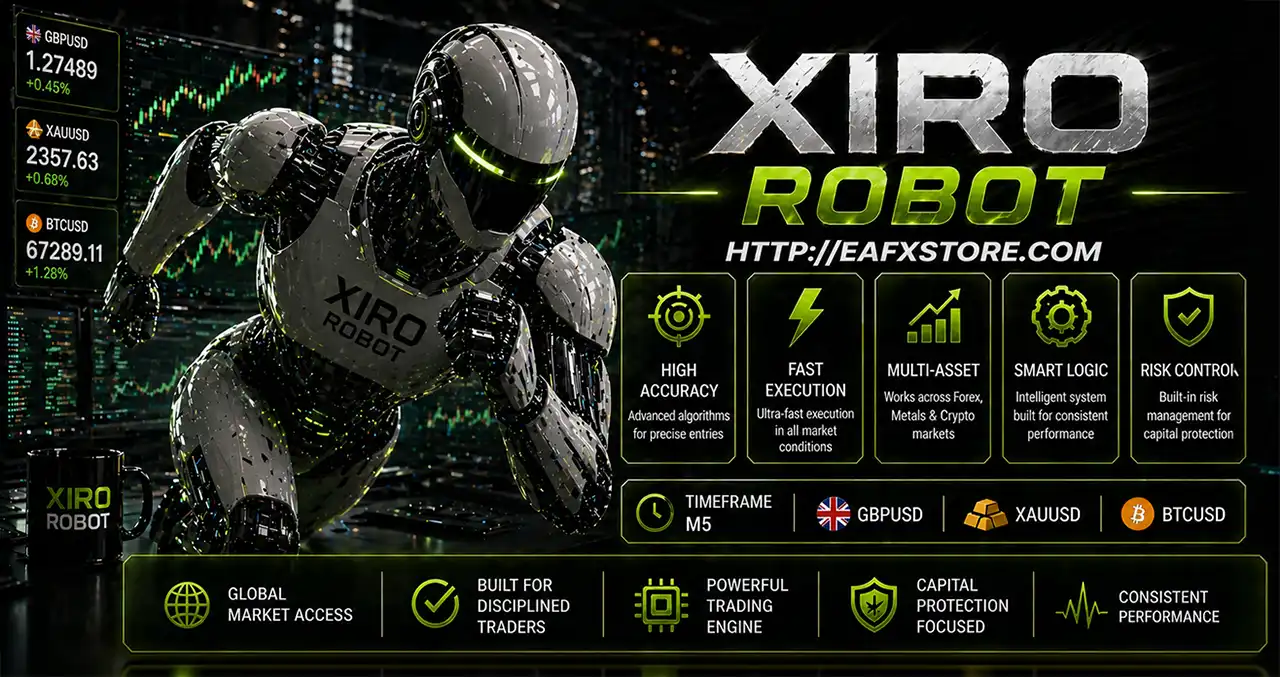
XIRO Robot MT4 is a professional multi-asset Expert Advisor designed to trade XAUUSD, BTCUSD, and GBPUSD on the M5 timeframe. It features advanced volatility filtering, automatic recovery cycles, trailing stop management, break-even protection, news filters and flexible risk management.
With customizable trading sessions and intelligent recovery controls, XIRO Robot MT4 provides traders with a robust automated trading solution suitable for various market conditions.
🔢 XIRO Robot MT4 Settings Explained
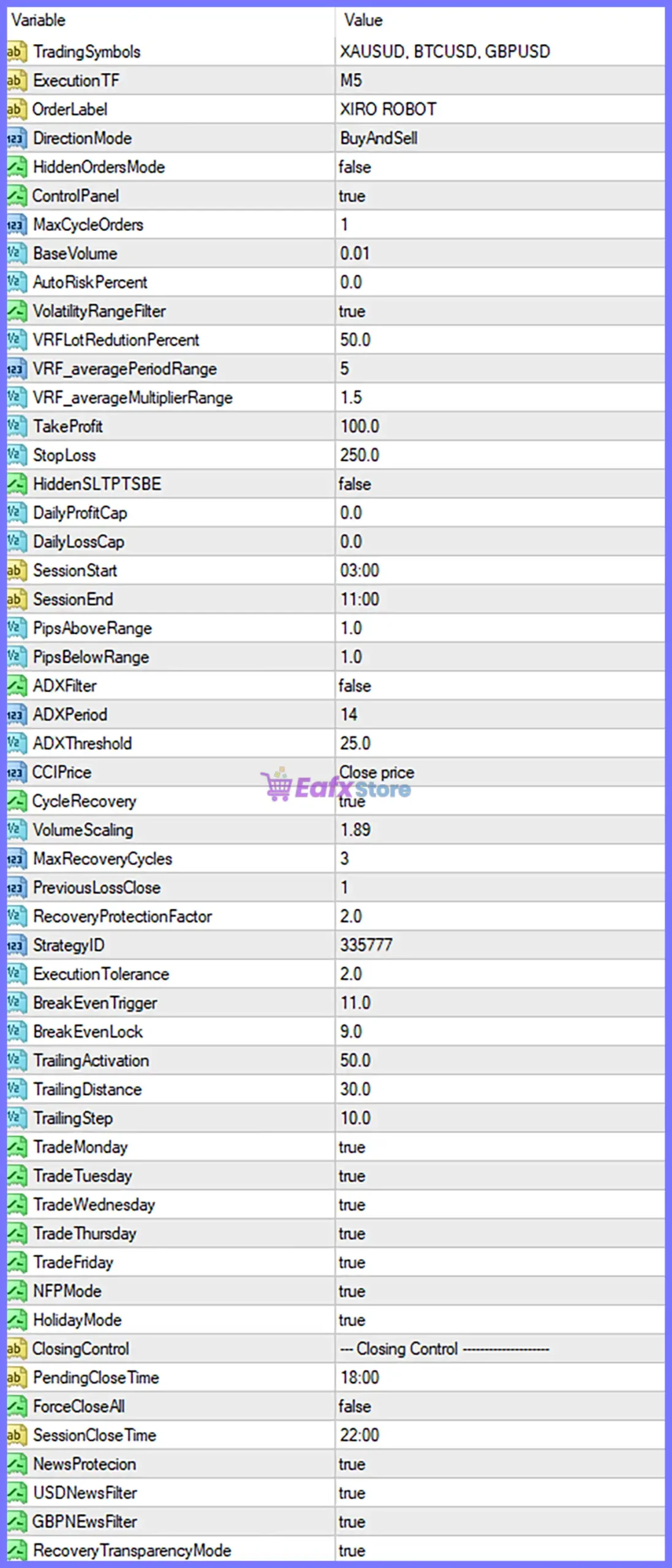
Below are the details of the parameters in the advisor’s trading system settings table:
🔄 General Settings
🔹 TradingSymbols = XAUUSD, BTCUSD, GBPUSD – Specifies the instruments traded by the EA: Gold, Bitcoin, and GBPUSD.
🔹 ExecutionTF = M5 – Executes all trading operations on the M5 (5-Minute) timeframe.
🔹 OrderLabel = XIRO ROBOT – Sets XIRO ROBOT as the order comment for all trades.
🔹 DirectionMode = BuyAndSell – Allows the EA to open both Buy and Sell positions.
🔹 HiddenOrdersMode = false – Disables hidden order execution; orders are visible to the broker.
🔹 ControlPanel = true – Displays the on-chart control panel.
🔹 MaxCycleOrders = 1 – Limits each trading cycle to 1 order.
🔄 Money Management
🔹 BaseVolume = 0.01 – Sets the default starting lot size to 0.01 lots.
🔹 AutoRiskPercent = 0.0 – Automatic risk calculation is disabled; fixed lot sizing is used.
🔄 Volatility Filter
🔹 VolatilityRangeFilter = true – Enables the volatility range filter before opening trades.
🔹 VRFLotReductionPercent = 50.0 – Reduces trading volume by 50.0% during high-volatility conditions.
🔹 VRF_averagePeriodRange = 5 – Uses 5 periods to calculate the average market range.
🔹 VRF_averageMultiplierRange = 1.5 – Applies a volatility multiplier of 1.5 for filtering conditions.
🔄 Trade Parameters
🔹 TakeProfit = 100.0 – Sets the Take Profit target to 100.0 points.
🔹 StopLoss = 250.0 – Sets the Stop Loss distance to 250.0 points.
🔹 HiddenSLTPTSBE = false – Uses visible Stop Loss, Take Profit, and Break Even levels.
🔹 DailyProfitCap = 0.0 – No daily profit limit is applied.
🔹 DailyLossCap = 0.0 – No daily loss limit is applied.
🔄 Trading Session
🔹 SessionStart = 03:00 – Trading begins at 03:00.
🔹 SessionEnd = 11:00 – Trading ends at 11:00.
🔄 Entry Filters
🔹 PipsAboveRange = 1.0 – Entry trigger is 1.0 pip above the reference range.
🔹 PipsBelowRange = 1.0 – Entry trigger is 1.0 pip below the reference range.
🔹 ADXFilter = false – ADX trend filter is disabled.
🔹 ADXPeriod = 14 – Uses an ADX calculation period of 14.
🔹 ADXThreshold = 25.0 – ADX threshold is set to 25.0.
🔹 CCIPrice = Close price – Uses the Close price for CCI calculations.
🔄 Recovery System
🔹 CycleRecovery = true – Enables the automatic recovery trading system.
🔹 VolumeScaling = 1.89 – Multiplies lot size by 1.89 during recovery trades.
🔹 MaxRecoveryCycles = 3 – Allows a maximum of 3 recovery cycles.
🔹 PreviousLossClose = 1 – Recovery logic references the previous losing trade before initiating recovery.
🔹 RecoveryProtectionFactor = 2.0 – Applies a protection factor of 2.0 during recovery management.
🔄 Strategy Settings
🔹 StrategyID = 335777 – Unique identifier for the trading strategy configuration.
🔹 ExecutionTolerance = 2.0 – Maximum execution tolerance is 2.0 points.
🔄 Break Even & Trailing Stop
🔹 BreakEvenTrigger = 11.0 – Activates Break Even after 11.0 points of profit.
🔹 BreakEvenLock = 9.0 – Locks in 9.0 points of profit once Break Even activates.
🔹 TrailingActivation = 50.0 – Starts trailing after 50.0 points of profit.
🔹 TrailingDistance = 30.0 – Maintains a trailing distance of 30.0 points.
🔹 TrailingStep = 10.0 – Updates the trailing stop every 10.0 points.
🔄 Trading Days
🔹 TradeMonday = true – Enables trading on Monday.
🔹 TradeTuesday = true – Enables trading on Tuesday.
🔹 TradeWednesday = true – Enables trading on Wednesday.
🔹 TradeThursday = true – Enables trading on Thursday.
🔹 TradeFriday = true – Enables trading on Friday.
🔄 News & Holiday Filters
🔹 NFPMode = true – Enables Non-Farm Payroll (NFP) trading protection.
🔹 HolidayMode = true – Activates holiday trading protection.
🔹 NewsProtection = true – Enables the built-in economic news protection system.
🔹 USDNewsFilter = true – Filters important USD economic news.
🔹 GBPNewsFilter = true – Filters important GBP economic news.
🔄 Closing Controls
🔹 ClosingControl = --- Closing Control ---------------- – Section header for trade closing management.
🔹 PendingCloseTime = 18:00 – Cancels pending orders at 18:00.
🔹 ForceCloseAll = false – Does not force-close all positions automatically.
🔹 SessionCloseTime = 22:00 – Closes trading activities at 22:00.
🔄 Recovery Display
🔹 RecoveryTransparencyMode = true – Displays recovery information with transparent visualization on the trading chart.
🔢 Risk Level
🔹 Fixed Lot – Uses a constant lot size (0.01) regardless of account balance.
🔹 Safe – Low-risk configuration focused on capital preservation and stable long-term performance.
🔹 Balanced – Moderate risk setting that balances consistent growth with controlled drawdowns.
🔹 Aggressive – Higher exposure designed for faster account growth while accepting increased trading risk.
🔢 Conclusion
XIRO Robot MT4 is a comprehensive automated trading system that combines multi-symbol trading, intelligent volatility filtering, adaptive recovery cycles, trailing stop management, economic news protection, and flexible session control. Its configurable risk management and recovery features make it suitable for traders seeking a reliable MT4 Expert Advisor capable of handling Gold, Bitcoin, and Forex markets with disciplined automation.
🔢 FAQs
❓ What markets can XIRO Robot MT4 trade?
XIRO Robot MT4 supports XAUUSD, BTCUSD, and GBPUSD, allowing automated trading across Gold, cryptocurrency, and Forex markets.
❓ Does XIRO Robot MT4 include automatic recovery trading?
Yes. The EA features an advanced recovery system with configurable volume scaling, protection factors, and recovery cycle limits.
❓ Can I control the trading session?
Yes. You can define custom trading hours using the SessionStart and SessionEnd parameters.
❓ Does XIRO Robot MT4 include news protection?
Yes. It includes built-in filters for USD news, GBP news, NFP events, and holiday trading conditions.
❓ Can I use fixed lots or automatic risk management?
Yes. The EA supports fixed lot trading by default and also allows automatic risk management through the AutoRiskPercent parameter when configured.



