


🔢 XTrader Pro Gold EA MT4 – Complete Settings & Input Parameters Guide
XTrader Pro Gold EA is a professional automated trading robot designed for MetaTrader 4 traders who want advanced control over Gold and Forex trading strategies. The EA combines flexible money management, collective trade management, trailing stop systems, trading session filters, and customizable panel settings. With both individual and collective exit modes, XTrader Pro Gold EA MT4 is suitable for traders looking to automate risk management and maximize trading efficiency.
🔢 XTrader Pro Gold EA MT4 Settings Explained
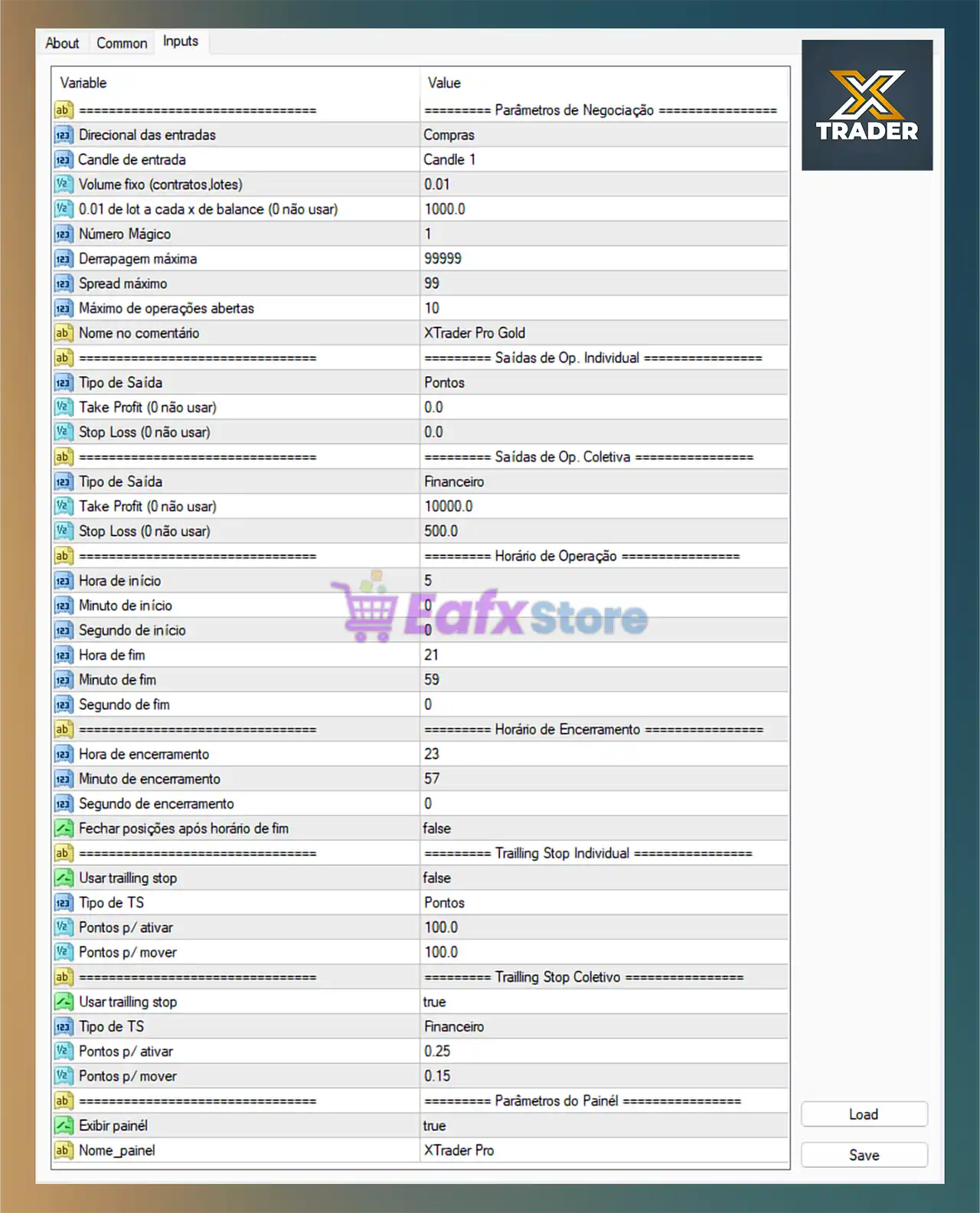
Below are the details of the parameters in the advisor’s trading system settings table:
🔶 Trading Parameters
🔹 Direcional das entradas = Compras: Entry direction is configured for buy trades only.
🔹 Candle de entrada = Candle 1: The EA uses Candle 1 as the signal candle for trade entries.
🔹 Volume fixo (contratos.lotes) = 0.01: Fixed lot size for trading is set to 0.01.
🔹 0.01 de lot a cada x de balance (0 não usar) = 1000.0: Dynamic lot sizing increases 0.01 lot for every 1000.0 account balance.
🔹 Número Mágico = 1: Unique Magic Number used to identify EA trades.
🔹 Derrapagem máxima = 99999: Maximum allowed slippage is set to 99999.
🔹 Spread máximo = 99: Maximum spread allowed for opening trades is 99.
🔹 Máximo de operações abertas = 10: Maximum simultaneous open trades allowed is 10.
🔹 Nome no comentário = XTrader Pro Gold: Trade comment displayed on opened positions.
🔶 Individual Trade Exit Settings
🔹 Tipo de Saída = Pontos: Individual trade exit mode is based on points.
🔹 Take Profit (0 não usar) = 0.0: Individual Take Profit is disabled because value is 0.0.
🔹 Stop Loss (0 não usar) = 0.0: Individual Stop Loss is disabled because value is 0.0.
🔶 Collective Trade Exit Settings
🔹 Tipo de Saída = Financeiro: Collective exit mode uses financial profit/loss targets.
🔹 Take Profit (0 não usar) = 10000.0: Collective Take Profit target is 10000.0.
🔹 Stop Loss (0 não usar) = 500.0: Collective Stop Loss value is 500.0.
🔶 Trading Session Settings
🔹 Hora de início = 5: Trading session starts at hour 5.
🔹 Minuto de início = 0: Trading session starts at minute 0.
🔹 Segundo de início = 0: Trading session starts at second 0.
🔹 Hora de fim = 21: Trading session ends at hour 21.
🔹 Minuto de fim = 59: Trading session ends at minute 59.
🔹 Segundo de fim = 0: Trading session ends at second 0.
🔶 Trade Closing Schedule Settings
🔹 Hora de encerramento = 23: Forced closing hour is 23.
🔹 Minuto de encerramento = 57: Forced closing minute is 57.
🔹 Segundo de encerramento = 0: Forced closing second is 0.
🔹 Fechar posições após horário de fim = false: The EA will not automatically close trades after session end time.
🔶 Individual Trailing Stop Settings
🔹 Usar trailing stop = false: Individual trailing stop feature is disabled.
🔹 Tipo de TS = Pontos: Trailing Stop type is based on points.
🔹 Pontos p/ ativar = 100.0: Trailing stop activates after 100.0 points in profit.
🔹 Pontos p/ mover = 100.0: Trailing stop moves in increments of 100.0 points.
🔶 Collective Trailing Stop Settings
🔹 Usar trailing stop = true: Collective trailing stop feature is enabled.
🔹 Tipo de TS = Financeiro: Collective trailing stop works using financial profit values.
🔹 Pontos p/ ativar = 0.25: Collective trailing stop activates after reaching 0.25 profit value.
🔹 Pontos p/ mover = 0.15: Collective trailing stop moves by 0.15.
🔶 Panel Settings
🔹 Exibir painel = true: Displays the EA information panel on the chart.
🔹 Nome_painel = XTrader Pro: Name shown on the trading panel is XTrader Pro.
🔢 Conclusion
XTrader Pro Gold EA MT4 is a versatile automated trading solution that provides advanced trade management, collective risk controls, trailing stop systems, and trading session customization. With flexible exit strategies and detailed configuration options, this EA is ideal for traders seeking precise control over automated Gold and Forex trading on MetaTrader 4.
🔢 FAQs
❓ What is XTrader Pro Gold EA MT4?
XTrader Pro Gold EA MT4 is an automated trading robot for MetaTrader 4 focused on Gold and Forex trading automation.
❓ Does XTrader Pro Gold EA MT4 support trailing stop features?
Yes, the EA supports both individual and collective trailing stop systems.
❓ Can I customize trading hours in XTrader Pro Gold EA MT4?
Yes, the EA allows full customization of trading session start and end times.
❓ What is the purpose of the Magic Number setting?
The Magic Number uniquely identifies trades opened by the EA to avoid conflicts with other robots.
❓ Is XTrader Pro Gold EA MT4 suitable for beginners?
Yes, the EA offers simple setup options while also providing advanced controls for experienced traders.



