
🔢 Ultimatum Breakout EA MT4 – Complete Settings & Input Parameters Guide
Ultimatum Breakout EA MT4 is a fully automated breakout trading Expert Advisor (EA) designed for MetaTrader 4 traders who want to capture strong market momentum with intelligent risk management.
The EA includes adaptive spread filtering, smart stop loss systems, breakeven protection, trailing stop functions and customizable trading schedules. With flexible lot sizing and automated money management, Ultimatum Breakout EA MT4 is suitable for both conservative and aggressive Forex traders.
🔢 Ultimatum Breakout EA MT4 Settings Explained
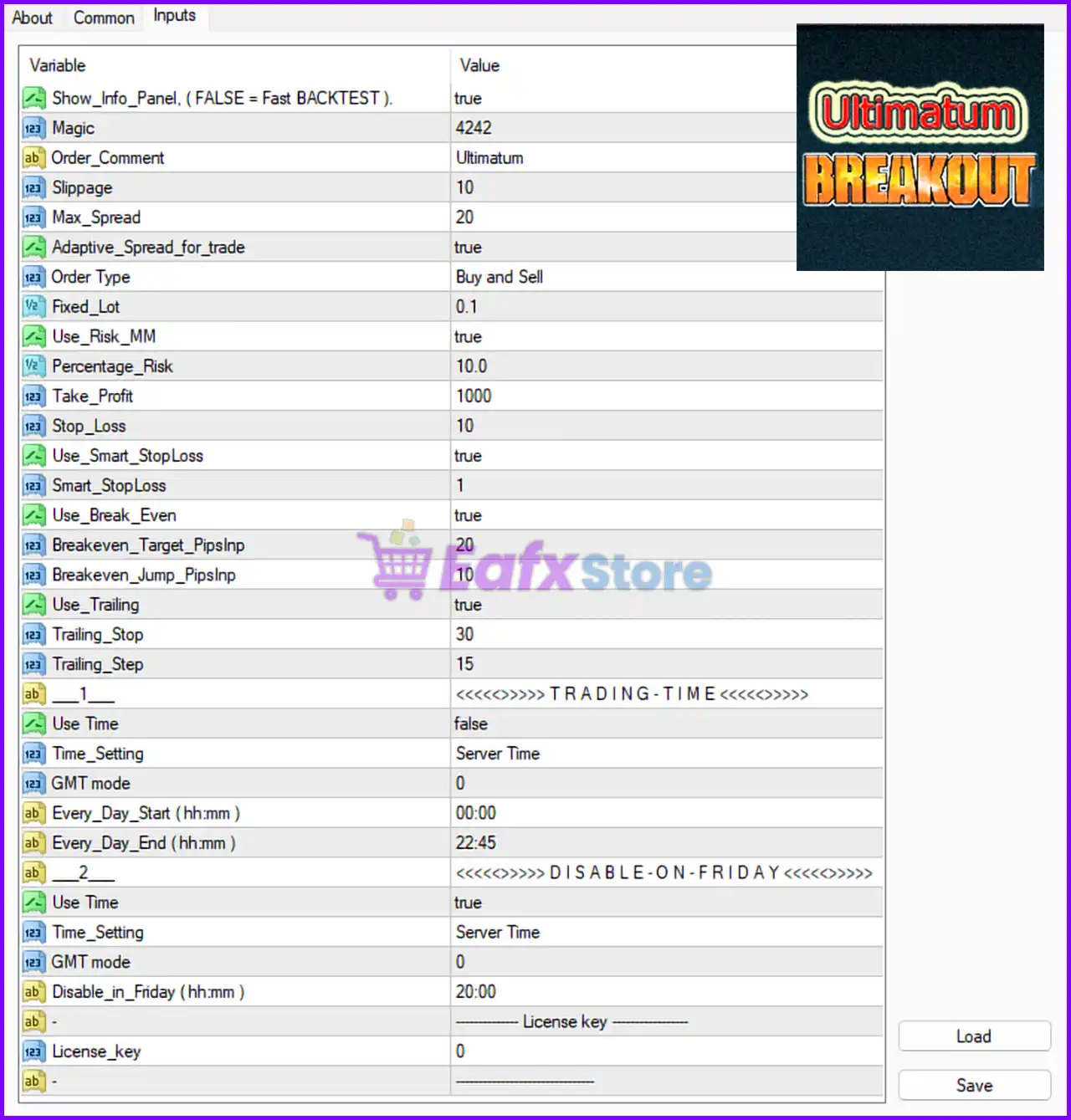
Below are the details of the parameters in the advisor’s trading system settings table:
🔶 General Settings
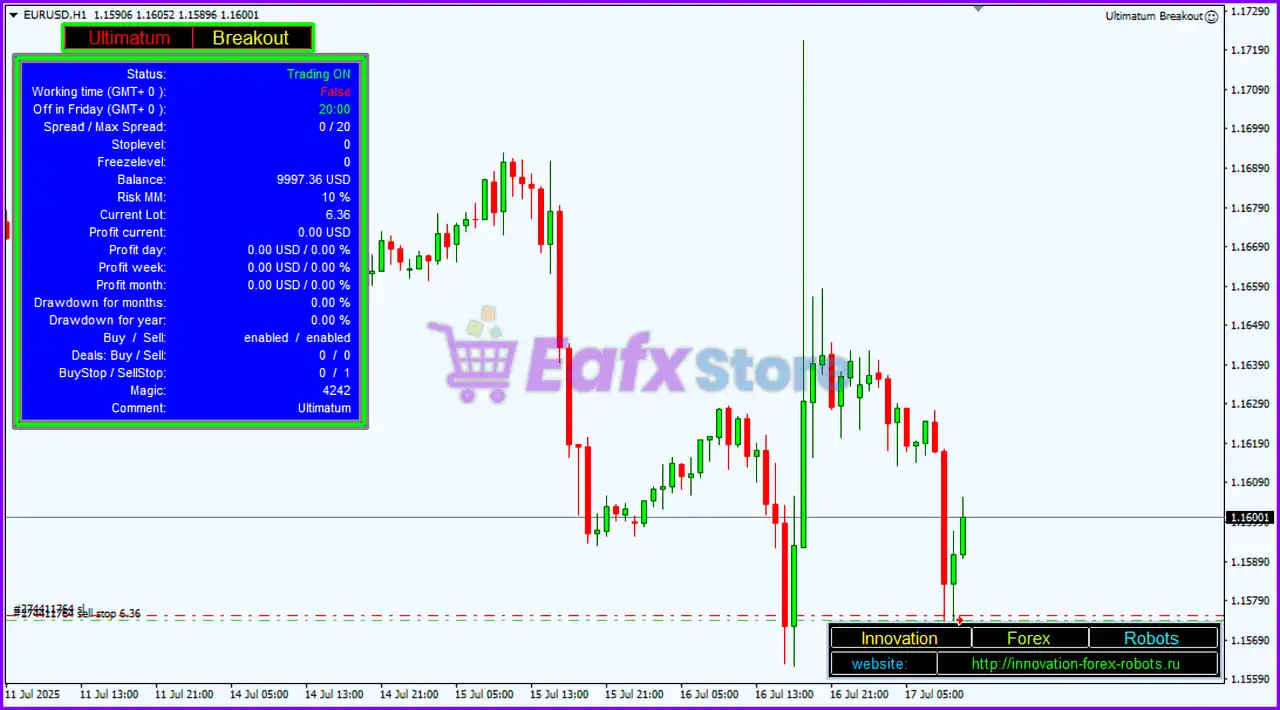
🔹 Show_Info_Panel ( FALSE = Fast BACKTEST ) = true: Displays the EA information panel on the chart; setting false speeds up backtesting.
🔹 Magic = 4242: Unique Magic Number 4242 used to identify EA trades.
🔹 Order_Comment = Ultimatum: Trade comment label displayed as Ultimatum.
🔹 Slippage = 10: Maximum allowed slippage during trade execution is 10.
🔹 Max_Spread = 20: Maximum spread allowed for opening trades is 20.
🔹 Adaptive_Spread_for_trade = true: Enables adaptive spread filtering based on market conditions.
🔹 Order Type = Buy and Sell: EA can open both Buy and Sell orders automatically.
🔶 Money Management Settings
🔹 Fixed_Lot = 0.1: Fixed trading lot size is set to 0.1.
🔹 Use_Risk_MM = true: Enables automatic risk-based money management.
🔹 Percentage_Risk = 10.0: Risk per trade is configured at 10.0%.
🔶 Take Profit & Stop Loss Settings
🔹 Take_Profit = 1000: Take Profit target is set to 1000 points.
🔹 Stop_Loss = 10: Stop Loss protection is set to 10 points.
🔶 Smart Stop Loss Settings
🔹 Use_Smart_StopLoss = true: Enables the intelligent Smart Stop Loss system.
🔹 Smart_StopLoss = 1: Smart Stop Loss sensitivity or mode value is set to 1.
🔶 Breakeven Settings
🔹 Use_Break_Even = true: Enables automatic breakeven functionality.
🔹 Breakeven_Target_PipsInp = 20: Breakeven activates after 20 pips profit.
🔹 Breakeven_Jump_PipsInp = 10: Breakeven jump offset is set to 10 pips.
🔶 Trailing Stop Settings
🔹 Use_Trailing = true: Enables trailing stop functionality.
🔹 Trailing_Stop = 30: Trailing Stop distance is configured at 30 points.
🔹 Trailing_Step = 15: Trailing Stop updates every 15 points.
🔶 Trading Time Settings
🔹 Use Time = false: Trading time filter is currently disabled.
🔹 Time_Setting = Server Time: EA uses broker server time for scheduling.
🔹 GMT mode = 0: GMT offset mode is set to 0.
🔹 Every_Day_Start (hh:mm) = 00:00: Daily trading session starts at 00:00.
🔹 Every_Day_End (hh:mm) = 22:45: Daily trading session ends at 22:45.
🔶 Friday Trading Disable Settings
🔹 Use Time = true: Friday shutdown filter is enabled.
🔹 Time_Setting = Server Time: Friday filter uses server time.
🔹 GMT mode = 0: GMT mode remains 0.
🔹 Disable_in_Friday (hh:mm) = 20:00: Trading is disabled on Friday starting at 20:00.
🔢 Conclusion
Ultimatum Breakout EA MT4 is a robust breakout trading robot that combines smart money management, adaptive spread filtering, breakeven protection, trailing stops, and advanced trading schedule controls. With flexible risk settings and automated trade management, the EA is designed to help traders capture breakout opportunities while maintaining disciplined risk control in MetaTrader 4.
🔢 FAQs
❓ What is Ultimatum Breakout EA MT4?
Ultimatum Breakout EA MT4 is an automated Forex breakout trading Expert Advisor for MetaTrader 4.
❓ Does Ultimatum Breakout EA MT4 support automatic risk management?
Yes, the EA includes percentage-based money management and fixed lot options.
❓ Can I use trailing stop and breakeven together?
Yes, the EA supports both trailing stop and breakeven protection simultaneously.
❓ What is the recommended spread setting for Ultimatum Breakout EA MT4?
The default maximum spread setting shown is 20.
❓ Does Ultimatum Breakout EA MT4 stop trading on Fridays?
Yes, the EA disables trading on Friday starting at 20:00 server time.