



Reactor Scalper EA MT4 v1.0 with SetFiles (Unlimited)

Subscriptions for Special Plan
- 30 EA package is more economical!
- Special package with 99%
- Download 1 EA/Day

Subscriptions for Premium Membership
- Download Unlimited in 1 Year
- Get 100% Discount
- Get free access to all

Subscriptions for Gold Membership
- 1 Year Membership
- Get 100% Discount
- Access EA+Indicator+Course
Frequently bought together 🎁
Add these products to enhance your purchase


What is Reactor Scalper EA?
Reactor Scalper EA is an Expert advisor (EA) specializing in trading Gold (XAUUSD). The EA is designed and integrated with professional trading features, without using potentially risky features such as Martingale, Hedge and Grid. EA loves the Metatrader 4 (MT4) platform.
Key Features of Reactor Scalper EA for MT4
🔹 Trading strategy: Trade using advanced and secret Scalping strategies.
🔹 Short-Term Mastery: The EA excels at scalping, seizing fleeting market opportunities for fast profits in forex.
🔹 Smart Risk Management: Advanced risk controls protect your capital and optimize returns, keeping your trades balanced in any market.
🔹 Real-Time Adaptation: The EA continuously analyzes markets, adjusting its strategy for informed trading decisions.
🔹 Efficient Scalping Execution: The EA has demonstrated efficient execution in scalping, allowing traders to benefit from quick and precise trades in volatile market conditions.
🔹 User-Friendly Interface: The EA is equipped with a user-friendly interface, making it accessible to traders with diverse levels of experience.
Reactor Scalper EA MT4 Review
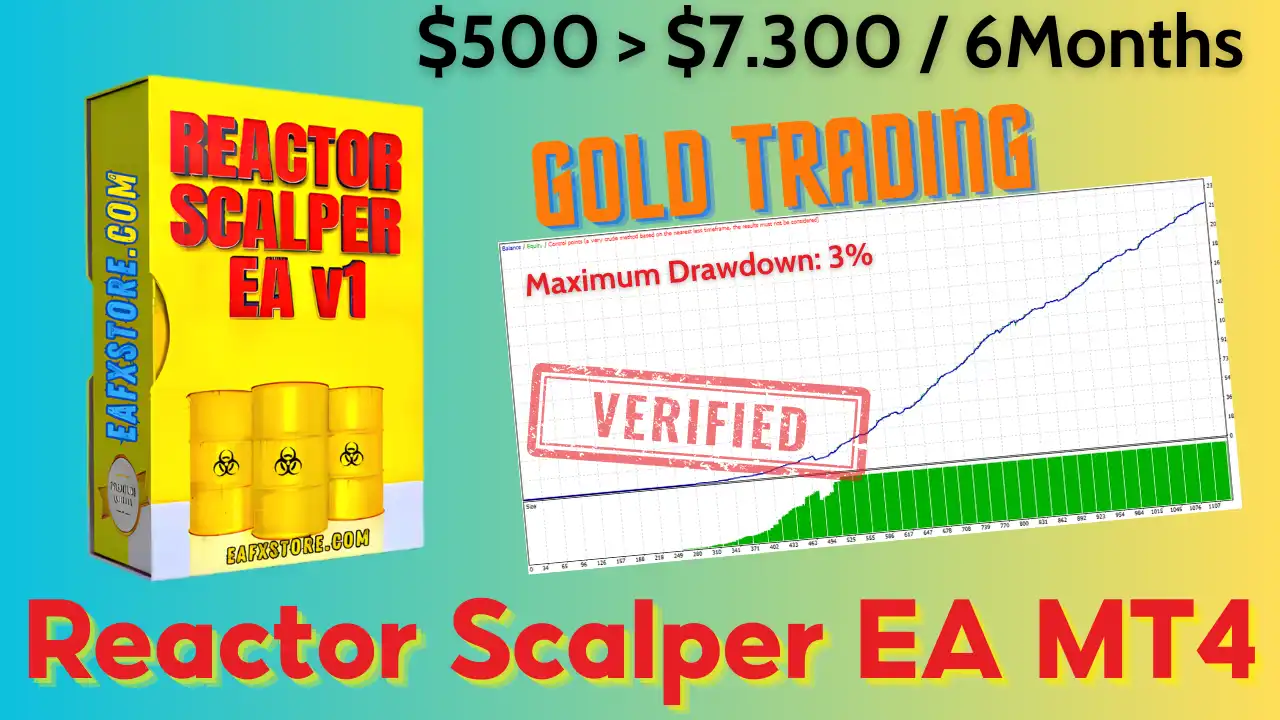
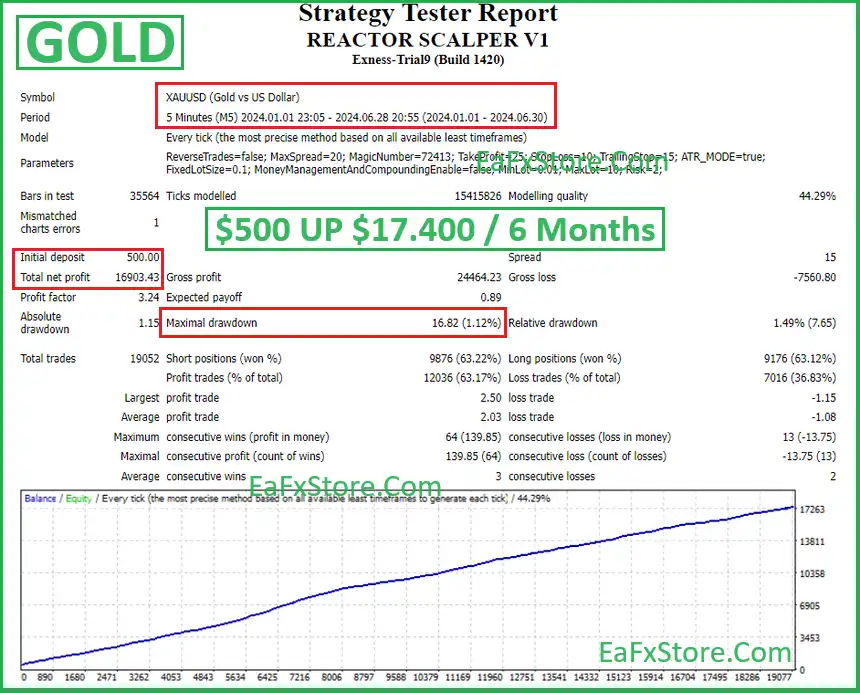
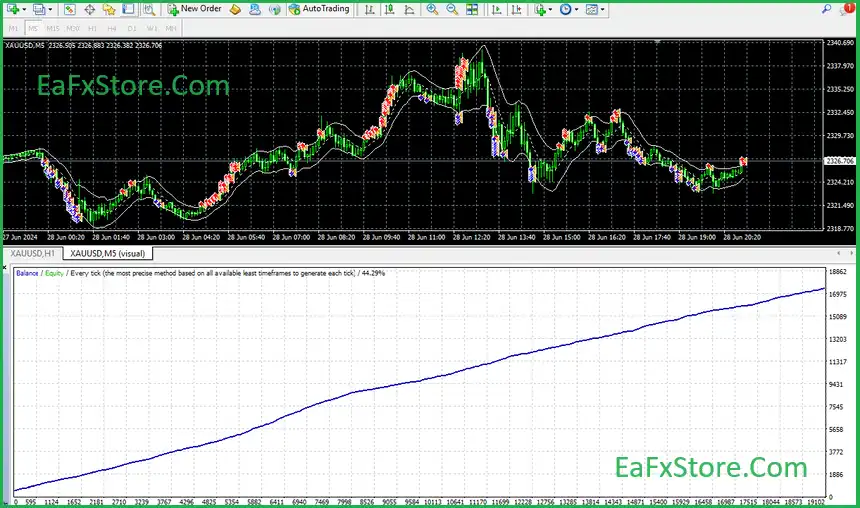
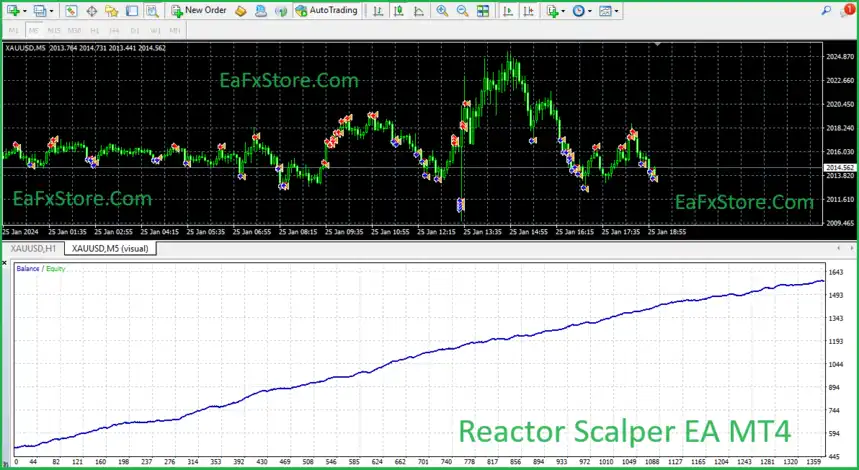
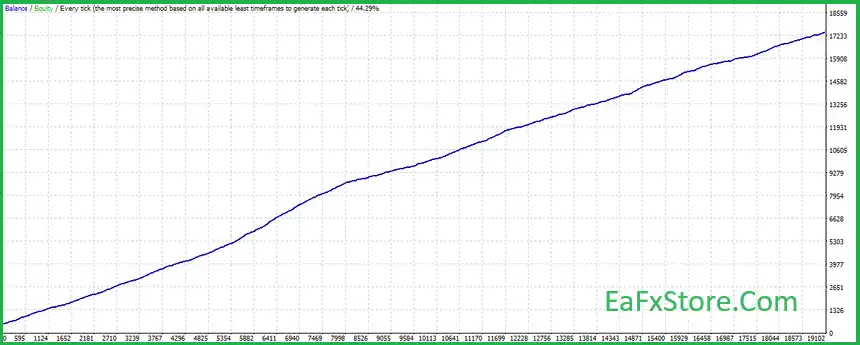
Reactor Scalper EA backtest trading results show impressive Gold trading potential. The total profit achieved in 6 months of continuous trading is very high. High level of safety during trading, with safe drawdown.
✅ Initial Deposit: $500
✅ Total Net Profit: $16,903.43
✅ Win Rate: 63.17%
✅ Maximum Drawdown: 1.12%
Reactor Scalper MT4 Reviews
Reactor Scalper MT4 Review
Recommended settings
Recommended settings and parameters to pay attention to from developers and experts:
| Features | Type |
|---|---|
| Trading platform | MetaTrader 4 (MT4) |
| Minimum / Recommended deposit | $500 |
| Time frames | M15 (15 minute chart) |
| Currency pairs | GOLD (XAUUSD) |
| Product type | NoDLL / Unlimited / Unlocked |
| Additional services | Unlock and Decompile |
| Recommended brokers | Exness Broker, Icmarkets Broker |
| Recommended VPS | MyfxVPS.com ( Blue VPS, Golden VPS). Lowest Latency, 2 week Free Trial, 100% Free for 12-18 Months. |
Product Download Package?
The download package of the product suite includes:
✅ Experts: REACTOR SCALPER EA_fix.ex4
✅ Indicators: KeltnerChannel_v1.ex4
➡️ Reviewed by David Easton
Conclusion
In short, Reactor Scalper EA for MT4 delivers exceptional performance in Gold (XAUUSD) trading through a refined, no-risk scalping strategy — completely free from Martingale, Hedge, or Grid systems. With smart risk management, real-time adaptation, and lightning-fast execution, it ensures steady, safe, and consistent profit growth. Reactor Scalper EA proves that precision and discipline define true trading excellence.
🔢 Reactor Scalper EA MT4 Settings Guide
Reactor Scalper EA MT4 is an automated scalping Expert Advisor designed around fast market execution, configurable Stop Loss and Take Profit levels, Keltner Channel parameters, position sizing, money management, adaptive trailing stops, pending-order controls, and speed-sensitive trade management.
The supplied configuration shows a 20.0 Stop Loss, 131.0 Take Profit, 39.0 Scaling Limit, 0.1 lot size, Magic Number 72413, and the custom trade comment “XTURBO SCALPER.” The EA also includes separate controls for low-speed and high-speed trailing behavior, allowing traders to customize how positions are managed under different market conditions.
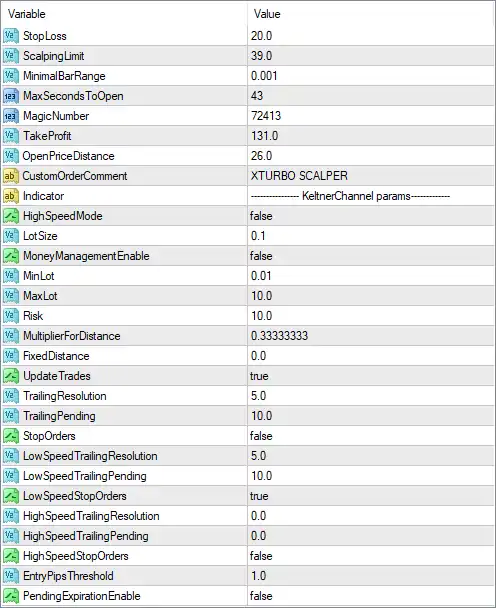
Reactor Scalper EA MT4 Settings Panel
🔢 Reactor Scalper EA MT4 Settings Explained
🔄 Core Trading Settings
🔹 StopLoss: 20.0 — Sets the Stop Loss distance to 20.0 according to the EA’s internal price-distance unit.
🔹 ScalpingLimit: 39.0 — Sets the scalping limit parameter to 39.0, controlling a key threshold within the EA’s scalping logic.
🔹 MinimalBarRange: 0.001 — Sets the minimum required bar range to 0.001, helping define the minimum price movement considered by the strategy.
🔹 MaxSecondsToOpen: 43 — Sets the maximum permitted time for opening a trade to 43 seconds, according to the EA’s execution logic.
🔹 MagicNumber: 72413 — Assigns 72413 as the EA’s Magic Number, allowing MT4 to identify and manage Reactor Scalper positions separately from other trades.
🔹 TakeProfit: 131.0 — Sets the Take Profit distance to 131.0 according to the EA’s internal price-distance unit.
🔹 OpenPriceDistance: 26.0 — Sets the required or permitted distance from the reference/open price to 26.0, according to the EA’s internal entry logic.
🔹 CustomOrderComment: XTURBO SCALPER — Sets the trade comment to XTURBO SCALPER, making positions generated by the EA easier to identify.
🔄 Keltner Channel Parameters
🔹 Indicator: KeltnerChannel params — Identifies the indicator configuration section as Keltner Channel parameters, indicating that the EA’s market/entry logic incorporates Keltner Channel-related calculations.
🔹 HighSpeedMode: false — Disables the high-speed trading mode.
🔄 Lot Size & Money Management
🔹 LotSize: 0.1 — Sets the configured trading volume to 0.1 lots.
🔹 MoneyManagementEnable: false — Disables the EA’s automatic money-management system.
🔹 MinLot: 0.01 — Sets the minimum permitted lot size to 0.01 lots.
🔹 MaxLot: 10.0 — Sets the maximum permitted lot size to 10.0 lots.
🔹 Risk: 10.0 — Sets the configured risk parameter to 10.0. Because MoneyManagementEnable = false, the displayed fixed LotSize = 0.1 is the relevant active position-size setting.
🔄 Distance & Trade Update Settings
🔹 MultiplierForDistance: 0.33333333 — Sets the distance multiplier to 0.33333333, controlling how the EA scales or calculates certain price distances.
🔹 FixedDistance: 0.0 — Sets the fixed-distance parameter to 0.0, meaning no fixed distance is configured through this parameter.
🔹 UpdateTrades: true — Enables updating or modifying existing trades according to the EA’s trade-management logic.
🔄 Trailing Stop Settings
🔹 TrailingResolution: 5.0 — Sets the trailing-stop resolution to 5.0, determining the precision or increment used when updating trailing protection.
🔹 TrailingTrending: 10.0 — Sets the trailing parameter for trending conditions to 10.0.
🔹 StopOrders: false — Disables the Stop Orders function in the displayed configuration.
🔄 Low-Speed Trailing Settings
🔹 LowSpeedTrailingResolution: 5.0 — Sets the low-speed trailing resolution to 5.0.
🔹 LowSpeedTrailingPending: 10.0 — Sets the low-speed trailing pending parameter to 10.0.
🔹 LowSpeedStopOrders: true — Enables Stop Orders under the low-speed trading configuration.
🔄 High-Speed Trailing Settings
🔹 HighSpeedTrailingResolution: 0.0 — Sets the high-speed trailing resolution to 0.0.
🔹 HighSpeedTrailingPending: 0.0 — Sets the high-speed trailing pending parameter to 0.0.
🔹 HighSpeedStopOrders: false — Disables Stop Orders under the high-speed configuration.
🔄 Entry & Pending Order Settings
🔹 EntryPipsThreshold: 1.0 — Sets the entry threshold to 1.0 pip, defining the configured minimum/reference price movement for entry conditions.
🔹 PendingExpansionEnable: false — Disables pending-order expansion in the displayed configuration.
🔄 Key Configuration Highlights
🔹 Stop Loss: The EA uses StopLoss = 20.0.
🔹 Take Profit: The configured Take Profit is 131.0.
🔹 Trade Identification: MagicNumber = 72413 identifies Reactor Scalper’s trades.
🔹 Trade Comment: Positions are labeled XTURBO SCALPER.
🔹 Lot Size: The configured LotSize is 0.1 lots, with a minimum of 0.01 and maximum of 10.0 lots.
🔹 Money Management: MoneyManagementEnable = false, so automatic money management is disabled.
🔹 Risk Parameter: The displayed risk value is 10.0, although the fixed lot configuration is being used while money management is disabled.
🔹 Scalping Threshold: ScalpingLimit = 39.0, defining an important threshold in the EA’s scalping logic.
🔹 Entry Timing: MaxSecondsToOpen = 43, limiting the configured trade-opening time window to 43 seconds.
🔹 Price Distance: OpenPriceDistance = 26.0, while MultiplierForDistance = 0.33333333 controls distance calculations.
🔹 Keltner Channel: The indicator section identifies KeltnerChannel as part of the EA’s configured indicator logic.
🔹 High-Speed Mode: HighSpeedMode = false, so the dedicated high-speed mode is disabled.
🔹 Trade Updates: UpdateTrades = true, allowing the EA to update existing trades according to its management rules.
🔹 Low-Speed Stop Orders: LowSpeedStopOrders = true, while the general StopOrders = false.
🔹 High-Speed Stop Orders: HighSpeedStopOrders = false, so high-speed Stop Orders are disabled.
🔹 Pending Expansion: PendingExpansionEnable = false, meaning pending-order expansion is disabled.
🔹 Entry Threshold: EntryPipsThreshold = 1.0, providing a 1.0-pip entry threshold.
🔄 Risk & Execution Considerations
🔹 Fixed Position Size: With LotSize = 0.1 and MoneyManagementEnable = false, the EA is configured around a fixed 0.1-lot position size rather than actively calculating lots from the Risk = 10.0 parameter.
🔹 Lot Limits: The permitted lot range is displayed as 0.01 to 10.0 lots, giving the EA a broad configurable position-size range.
🔹 Stop Loss vs. Take Profit: The displayed values are 20.0 SL and 131.0 TP, creating a numerical TP-to-SL relationship of approximately 6.55:1 if both values use the same unit.
🔹 Trailing Management: The EA has multiple trailing parameters, including TrailingResolution = 5.0, TrailingTrending = 10.0, LowSpeedTrailingResolution = 5.0, and LowSpeedTrailingPending = 10.0.
🔹 Speed Modes: Both HighSpeedMode = false and HighSpeedStopOrders = false, while low-speed Stop Orders are enabled.
🔹 Execution Timing: MaxSecondsToOpen = 43 provides a specific time-based execution constraint that may be important for scalping strategies.
Note: The screenshot does not explicitly specify whether values such as StopLoss = 20.0, TakeProfit = 131.0, ScalpingLimit = 39.0, and OpenPriceDistance = 26.0 are measured in points, pips, price units, or another internal unit. These units should be verified from the EA’s documentation before live deployment.
🔢 Conclusion
Reactor Scalper EA MT4 provides a highly configurable scalping framework focused on fast execution, Keltner Channel-based analysis, fixed position sizing, adaptive trade updates, trailing-stop management, and different speed-sensitive order-management modes.
The supplied configuration uses LotSize = 0.1, StopLoss = 20.0, TakeProfit = 131.0, ScalpingLimit = 39.0, and MagicNumber = 72413. Automatic money management is disabled, while the EA maintains a configurable lot range from 0.01 to 10.0 lots.
The trailing architecture is particularly detailed. General trailing uses 5.0 resolution and 10.0 trending parameters, while the low-speed configuration enables Stop Orders with 5.0 resolution and 10.0 pending. High-speed Stop Orders remain disabled, consistent with HighSpeedMode = false.
For traders evaluating Reactor Scalper EA MT4, the most important parameters to test are the 20.0 Stop Loss, 131.0 Take Profit, 39.0 ScalpingLimit, 43-second MaxSecondsToOpen, 0.1 LotSize, and 10.0 Risk setting. Because the exact units and internal relationships are not fully visible in the screenshot, backtesting and forward testing on the intended broker are strongly recommended before using the EA with live capital.
User Reviews
Only logged in customers who have purchased this product may leave a review.
❓ What is Reactor Scalper EA and how does it work?
Reactor Scalper EA is an automated trading system built for Gold (XAUUSD) on the MetaTrader 4 (MT4) platform. It uses advanced scalping algorithms to capture short-term price movements while maintaining strict risk control. The EA operates automatically — analyzing market conditions, executing trades, and managing them without manual intervention.
❓ Does Reactor Scalper EA use risky strategies like Martingale, Hedge, or Grid?
No. Reactor Scalper EA is designed to avoid all risky trading methods, including Martingale, Hedging, and Grid trading. Instead, it focuses on smart risk management, ensuring consistent growth and safety of trading capital.
❓ Which trading instrument does Reactor Scalper EA specialize in?
The EA is specifically optimized for Gold (XAUUSD) trading. Its internal logic and algorithms are fine-tuned for gold’s volatility, liquidity, and short-term price dynamics, making it one of the best EAs for XAUUSD scalping.
❓ What is the minimum deposit required to run Reactor Scalper EA?
The recommended minimum deposit is $500. This allows the EA enough margin to operate safely under its standard settings, especially when trading the volatile XAUUSD pair.
❓ What time frame does Reactor Scalper EA use for trading?
Reactor Scalper EA operates primarily on the M15 (15-minute) time frame. This balance between short-term opportunities and signal accuracy allows it to identify precise scalping entries without overtrading.
❓ How safe is Reactor Scalper EA for long-term use?
Backtests have shown a maximum drawdown of only 1.12%, proving that Reactor Scalper EA maintains a very high safety level. Its intelligent risk management and absence of aggressive strategies make it suitable for stable, long-term trading.
❓ Can beginners use Reactor Scalper EA, or is it only for professional traders?
Reactor Scalper EA is user-friendly and suitable for both beginners and experienced traders. Its easy setup and automated functions require minimal supervision, while professionals can adjust parameters for deeper optimization.
❓ How much profit can Reactor Scalper EA generate?
In backtesting with an initial capital of $500, Reactor Scalper EA achieved a total profit of $16,900 in 6 months, demonstrating strong performance potential. However, real results may vary based on broker conditions, leverage, and market volatility.
❓ Is Reactor Scalper EA compatible with all brokers and account types?
Yes. Reactor Scalper EA can work with any MT4 broker that supports Gold (XAUUSD) trading and allows low spreads and fast execution. ECN or Raw Spread accounts are ideal for optimal scalping performance.
🔥 Get This EA for FREE with Our Membership! 🚀🚀
Unlock access to this EA, premium Indicators, and exclusive trading tools completely FREE with any of our Membership Plans! Thousands of traders already benefit from our VIP library—join them and level up your trading instantly. Choose Your Membership:
- SPECIAL – 1 Month Membership
- GOLD – 1 Year Membership
- PREMIUM – 1 Year Membership
-
 Original price was: $4,998.00.$89.00Current price is: $89.00.
 -
 Original price was: $999.00.$89.00Current price is: $89.00.
 -
 Original price was: $249.00.$89.00Current price is: $89.00.
 -
 Price range: $65.00 through $599.00
-
 2Original price was: $1,799.00.$69.00Current price is: $69.00.
 -
 10Original price was: $499.00.$69.00Current price is: $69.00.
 -
 1Original price was: $1,599.00.$59.00Current price is: $59.00.
 -
 0Original price was: $500.00.$69.00Current price is: $69.00.
There are no reviews yet.