


🔢 BlackVault AI EA MT5 Settings Guide
BlackVault AI EA MT5 is an automated trading Expert Advisor designed around a structured breakout trading framework with EMA trend confirmation, ATR-based volatility filtering, fixed-point Stop Loss and Take Profit, trailing-stop management, automatic risk sizing, re-entry controls, and an optional recovery module.
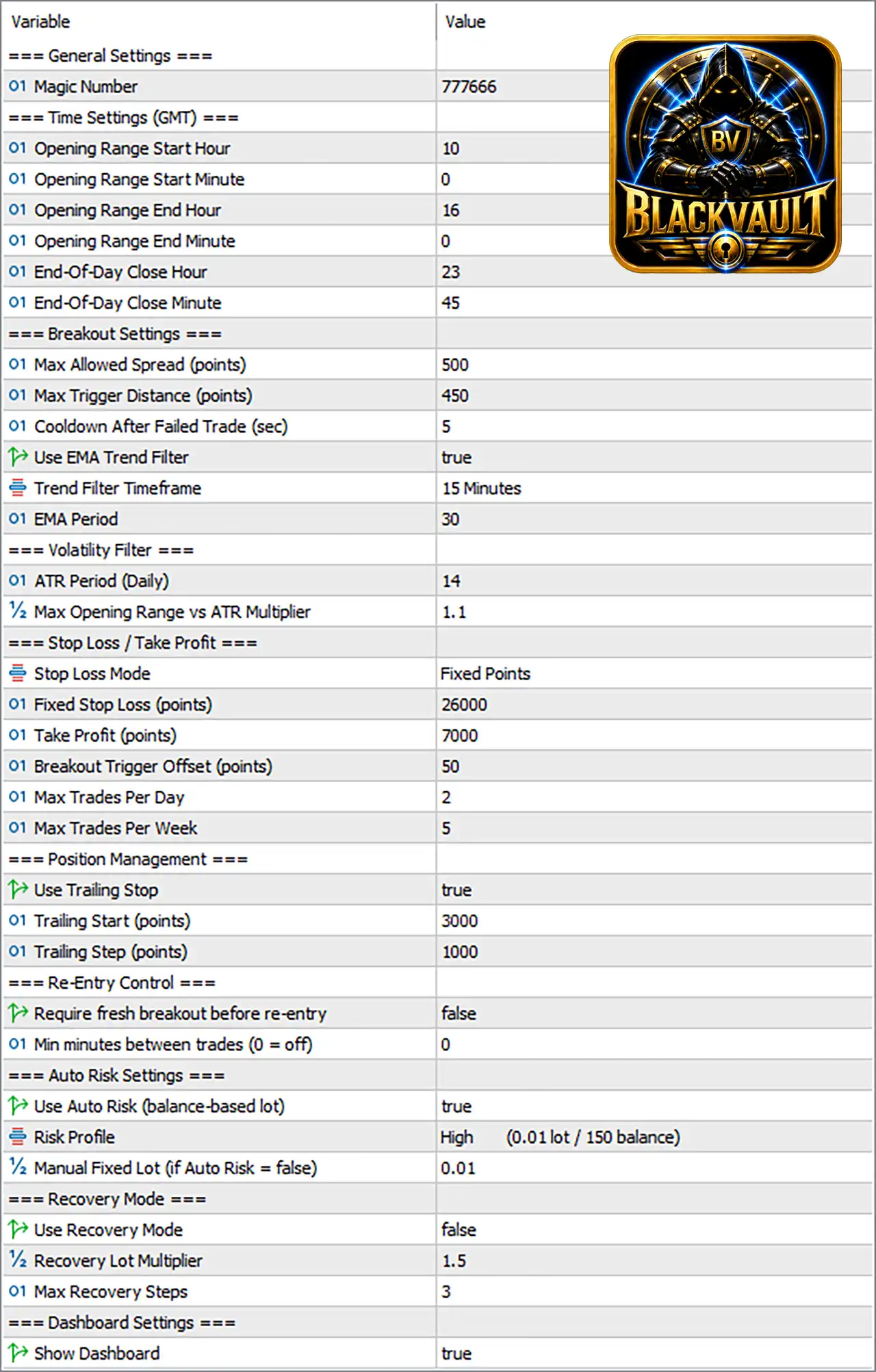
The supplied configuration uses Magic Number 777666, a 15-Minute EMA trend filter with EMA Period 30, an ATR Period of 14, a maximum of 2 trades per day, and 5 trades per week. It also uses High Auto Risk at 0.01 lot per 150 balance, while the recovery system is currently disabled.
🔢 BlackVault AI EA MT5 Settings Explained
General Settings
🔹 Magic Number: 777666 — Sets 777666 as the unique Magic Number used to identify trades opened by BlackVault AI EA MT5.
Time Settings (GMT)
🔹 Opening Range Start Hour: 10 — Sets the opening-range calculation start hour to 10 GMT.
🔹 Opening Range Start Minute: 0 — Sets the opening-range start minute to 0, making the opening range begin at 10:00 GMT.
🔹 Opening Range End Hour: 16 — Sets the opening-range calculation end hour to 16 GMT.
🔹 Opening Range End Minute: 0 — Sets the opening-range end minute to 0, making the opening range end at 16:00 GMT.
🔹 End-Of-Day Close Hour: 23 — Sets the end-of-day closing hour to 23 GMT.
🔹 End-Of-Day Close Minute: 45 — Sets the end-of-day closing minute to 45, configuring the end-of-day close at 23:45 GMT.
Breakout Settings
🔹 Max Allowed Spread (points): 500 — Sets the maximum permitted spread to 500 points before breakout trading can be considered.
🔹 Max Trigger Distance (points): 450 — Limits the maximum distance of the breakout trigger to 450 points.
🔹 Cooldown After Failed Trade (sec): 5 — Sets a 5-second cooldown period after a failed trade before the EA can continue its trading process.
🔹 Use EMA Trend Filter: true — Enables the EMA trend-confirmation filter.
🔹 Trend Filter Timeframe: 15 Minutes — Uses the 15-Minute timeframe for EMA trend analysis.
🔹 EMA Period: 30 — Sets the EMA calculation period to 30.
Volatility Filter
🔹 ATR Period (Daily): 14 — Uses an ATR period of 14 based on the daily volatility calculation.
🔹 Max Opening Range vs ATR Multiplier: 1.1 — Sets the maximum opening-range-to-ATR multiplier to 1.1, helping filter opening ranges that are too large relative to measured volatility.
Stop Loss / Take Profit
🔹 Stop Loss Mode: Fixed Points — Selects Fixed Points as the Stop Loss calculation method.
🔹 Fixed Stop Loss (points): 26000 — Sets the fixed Stop Loss distance to 26000 points.
🔹 Take Profit (points): 7000 — Sets the Take Profit target to 7000 points.
🔹 Breakout Trigger Offset (points): 50 — Sets the breakout-entry offset to 50 points beyond the relevant breakout level.
🔹 Max Trades Per Day: 2 — Limits the EA to a maximum of 2 trades per day.
🔹 Max Trades Per Week: 5 — Limits the EA to a maximum of 5 trades per week.
Position Management
🔹 Use Trailing Stop: true — Enables the trailing-stop management system.
🔹 Trailing Start (points): 3000 — Activates trailing-stop management after the configured profit reaches 3000 points.
🔹 Trailing Step (points): 1000 — Sets the trailing adjustment step to 1000 points.
Re-Entry Control
🔹 Require fresh breakout before re-entry: false — Does not require a completely new breakout signal before the EA can consider another entry.
🔹 Min minutes between trades (0 = off): 0 — Sets the minimum time between trades to 0 minutes, meaning this time-based restriction is disabled.
Auto Risk Settings
🔹 Use Auto Risk (balance-based lot): true — Enables automatic lot sizing based on the account balance.
🔹 Risk Profile: High (0.01 lot / 150 balance) — Selects the High risk profile, with the displayed sizing relationship of 0.01 lot per 150 balance.
🔹 Manual Fixed Lot (if Auto Risk = false): 0.01 — Sets the fallback fixed lot size to 0.01 lots if Auto Risk is disabled.
Recovery Mode
🔹 Use Recovery Mode: false — Disables the recovery trading mechanism in the supplied configuration.
🔹 Recovery Lot Multiplier: 1.5 — Sets the recovery lot multiplier to 1.5. Because Recovery Mode is false, this parameter is not currently active.
🔹 Max Recovery Steps: 3 — Limits the recovery system to a maximum of 3 recovery steps if Recovery Mode is enabled.
Dashboard Settings
🔹 Show Dashboard: true — Enables the EA's on-chart dashboard.
🔢 Key Configuration Highlights
🔹 Magic Number: 777666.
🔹 Opening Range: 10:00–16:00 GMT.
🔹 End-of-Day Close: 23:45 GMT.
🔹 Maximum Spread: 500 points.
🔹 Maximum Trigger Distance: 450 points.
🔹 Failed-Trade Cooldown: 5 seconds.
🔹 EMA Trend Filter: Enabled.
🔹 Trend Timeframe: 15 Minutes.
🔹 EMA Period: 30.
🔹 Daily ATR Period: 14.
🔹 Opening Range vs ATR Multiplier: 1.1.
🔹 Stop Loss Mode: Fixed Points.
🔹 Fixed Stop Loss: 26000 points.
🔹 Take Profit: 7000 points.
🔹 Breakout Trigger Offset: 50 points.
🔹 Maximum Daily Trades: 2.
🔹 Maximum Weekly Trades: 5.
🔹 Trailing Stop: Enabled.
🔹 Trailing Start: 3000 points.
🔹 Trailing Step: 1000 points.
🔹 Minimum Time Between Trades: 0 minutes (off).
🔹 Auto Risk: Enabled.
🔹 Risk Profile: High — 0.01 lot / 150 balance.
🔹 Manual Fixed Lot: 0.01.
🔹 Recovery Mode: Disabled.
🔹 Recovery Multiplier: 1.5.
🔹 Maximum Recovery Steps: 3.
🔹 Dashboard: Enabled.
🔢 Risk Management Analysis
🔹 Balance-Based Risk: Use Auto Risk = true means the EA is configured to calculate position size according to account balance rather than simply using the fixed 0.01 lot setting.
🔹 High Risk Profile: The selected High profile uses 0.01 lot / 150 balance, which should be carefully evaluated against the account size and broker's contract specifications.
🔹 Fixed Lot Fallback: Manual Fixed Lot = 0.01 provides an alternative if automatic risk sizing is disabled.
🔹 Daily Exposure Control: Max Trades Per Day = 2 limits the number of trades the EA can execute within a trading day.
🔹 Weekly Exposure Control: Max Trades Per Week = 5 adds another layer of trade-frequency control.
🔹 Stop Loss: The EA uses a fixed 26000-point Stop Loss, providing a predefined exit distance rather than a dynamic volatility-based Stop Loss.
🔹 Take Profit: The configured target is 7000 points, creating a fixed profit objective.
🔹 Trailing Protection: With Use Trailing Stop = true, the EA begins trailing after 3000 points, using a 1000-point trailing step.
🔹 Recovery Risk: Recovery is disabled with Use Recovery Mode = false, although the system is configured with a 1.5 multiplier and 3 maximum recovery steps if recovery is subsequently enabled.
🔢 Strategy Overview
🔹 Opening Range Breakout: The configuration establishes an opening-range period from 10:00 to 16:00 GMT, which forms the time framework for the breakout strategy.
🔹 Breakout Confirmation: The EA uses a 50-point trigger offset and limits the trigger distance to 450 points.
🔹 Trend Confirmation: The 30-period EMA on the 15-Minute timeframe provides an additional directional filter.
🔹 Volatility Control: A 14-period Daily ATR and 1.1 multiplier are used to evaluate whether the opening range is reasonable relative to market volatility.
🔹 Trade Frequency: The system is restricted to 2 trades per day and 5 trades per week, helping limit excessive trading.
🔹 Session Exit: The configured 23:45 GMT end-of-day close provides a defined daily exit point.
🔢 Conclusion
BlackVault AI EA MT5 combines an opening-range breakout strategy with EMA trend confirmation, ATR volatility analysis, fixed-point risk parameters, trailing-stop management, balance-based automatic lot sizing, and strict trade-frequency controls.
The supplied setup uses an opening-range window of 10:00–16:00 GMT, an EMA Period of 30 on the 15-Minute timeframe, and a Daily ATR Period of 14. The 1.1 ATR multiplier helps control the acceptable opening-range size relative to daily volatility.
For trade management, the EA uses a 26000-point Fixed Stop Loss, 7000-point Take Profit, and 50-point breakout trigger offset. Trailing protection is enabled, beginning at 3000 points with a 1000-point step.
Risk is configured using Auto Risk = true with the High profile of 0.01 lot / 150 balance. The EA also limits activity to 2 trades per day and 5 trades per week. Recovery is currently disabled, while the configured recovery parameters remain 1.5 multiplier and 3 maximum steps.
Overall, the settings create a relatively structured breakout framework with multiple layers of filtering and exposure control. However, the combination of a High risk profile, 26000-point Stop Loss, and balance-based lot sizing should be thoroughly backtested and forward-tested for the specific trading symbol and broker conditions before live deployment.
🔢 FAQs
❓ What trading strategy does BlackVault AI EA MT5 use?
The supplied configuration is built around an opening-range breakout approach, supported by a 30-period EMA trend filter and a 14-period Daily ATR volatility filter.
❓ What are the BlackVault AI EA MT5 trading hours?
The opening range is configured from 10:00 to 16:00 GMT, while the end-of-day closing time is 23:45 GMT.
❓ What are the Stop Loss and Take Profit settings?
The EA uses Fixed Points with a 26000-point Stop Loss and a 7000-point Take Profit.
❓ Does BlackVault AI EA MT5 use automatic risk management?
Yes. Use Auto Risk = true, with the High risk profile configured at 0.01 lot / 150 balance. The fallback Manual Fixed Lot is 0.01.
❓ Is the recovery system enabled?
No. Use Recovery Mode = false. If enabled, the configured recovery multiplier would be 1.5, with a maximum of 3 recovery steps.


