


0
SHOPPING CART
Instant Digital Delivery
Get your EA software delivered instantly to your email after purchase.
Instant Activation
Your EA will be activated immediately after purchase. No waiting time!
All-Inclusive Pricing
No hidden fees—what you see is what you pay.

NorthEastWay MT5 (Latest version) – GroupBuy

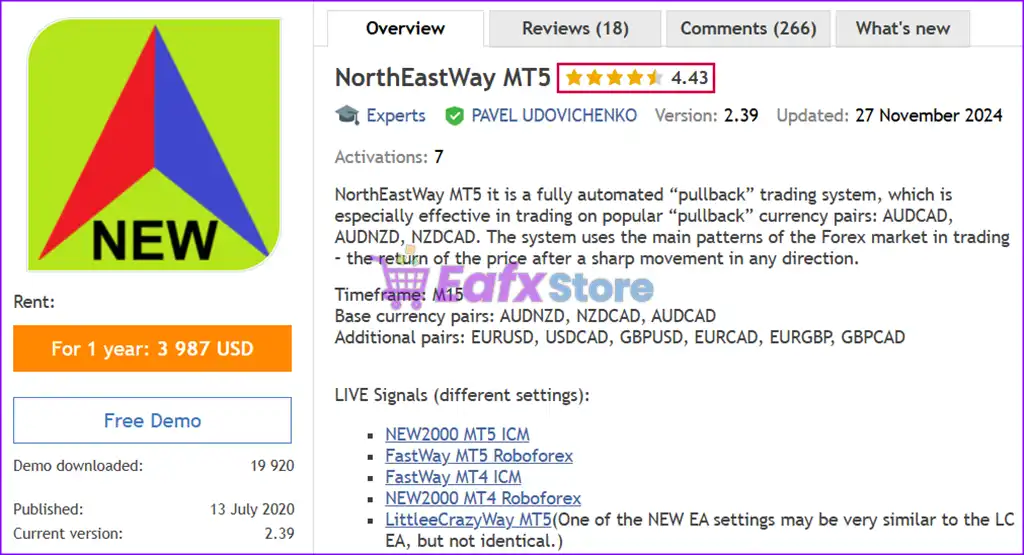
NorthEastWay EA is an automated and optimized trading robot with AUDNZD, NZDCAD and AUDCAD pairs. Verified performance of 642% in 112 weeks of trading.

Price range: $89.00 through $880.00
In stock

Select a variant to see availability.

What is NorthEastWay MT5?

NorthEastWay MT5 is a powerful, fully automated pullback trading system designed for traders seeking consistent profits in the forex market. Optimized for MT5, this Expert Advisor (EA) capitalizes on the market’s natural tendency to retrace after sharp price movements, ensuring a strategic entry for maximum profitability.

🔶 Vendor Website: Click here

🔶 This is GroupBuy ==> How to Join

About the Author

This product is compiled by PAVEL UDOVICHENKO. This author has more than +7 years of experience working on MQL5 with many famous products such as NorthEastWay MT5, MultiWay EA MT5, FastWay EA MT5, LittleCrazy MT5 and other advisors. Among them, NorthEastWay MT5 is his best performing products.

🔶 Join Our Channel Telegram

Why choose NorthEastWay MT5?

🔹 Stable Automated Trading: Designed to perform consistently across different market environments.
🔹 Enhanced Capital Protection: Emphasizes disciplined risk management and controlled exposure levels.
🔹 Diversified Market Coverage: Expands opportunities through simultaneous multi-pair trading.
🔹 Long-Term Market Adaptability: Built to handle evolving trends and changing volatility conditions.
🔹 Professional Trading Solution: Combines automation, resilience and strategic pullback execution.

Key Features of NorthEastWay MT5

🔹 Pullback Trading System: Identifies retracement opportunities following strong directional price movements.
🔹 Multi-Currency Operation: Trades multiple selected currency pairs simultaneously from a single chart.
🔹 Adaptive Money Management: Supports automatic lot calculation based on balance or equity levels.
🔹 Flexible Risk Controls: Offers configurable recovery and exposure settings for different risk profiles.
🔹 Broker-Friendly Execution: Designed to operate efficiently across diverse trading environments.

NorthEastWay MT5 Review

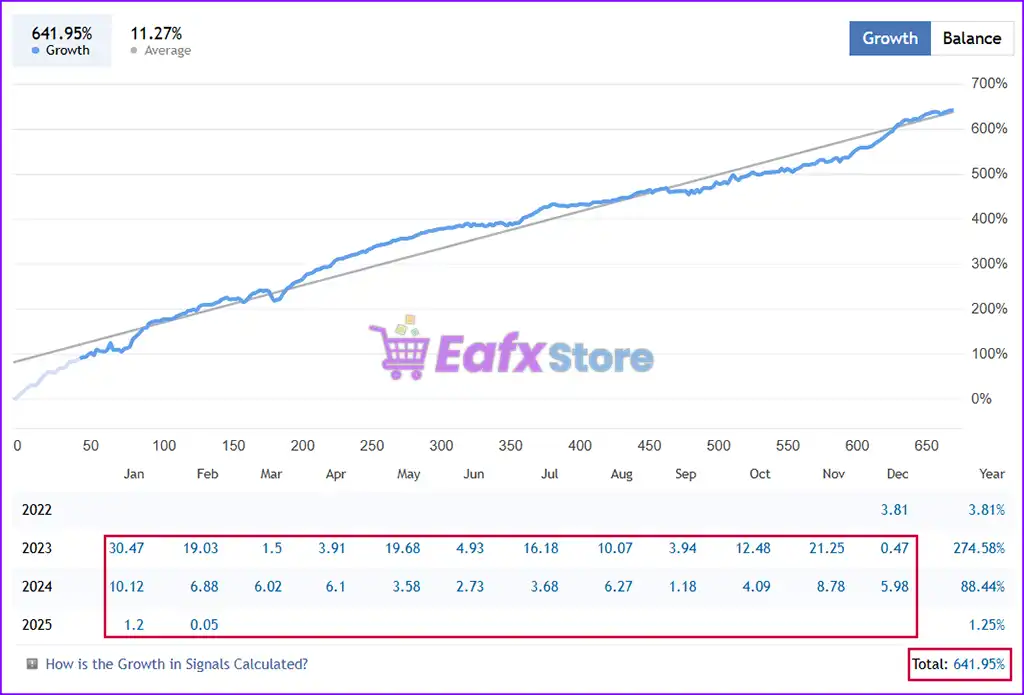
NorthEastWay EA Signal Results

The NorthEastWay MT5 achieved impressive profit performance when trading with AUDNZD, NZDCAD, AUDCAD. Trading results on real account for 112 consecutive weeks of trading.

Initial Deposit: $100
Growth Rate: +642%
Win Rate (% of total): 75.5%
Maximum Drawdown: 54.1%

NorthEastWay MT5 Live Signal

NorthEastWay MT5 Live Signal

NorthEastWay MT5 Signal

NorthEastWay MT5 Signal

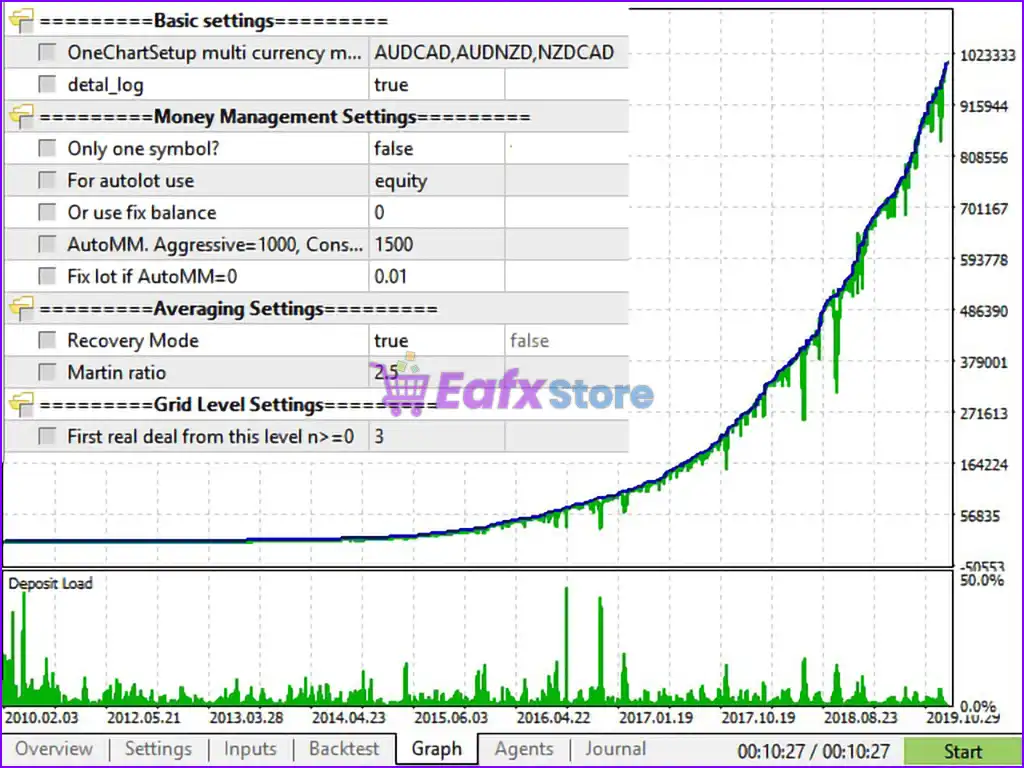
NorthEastWay MT5 Backtests

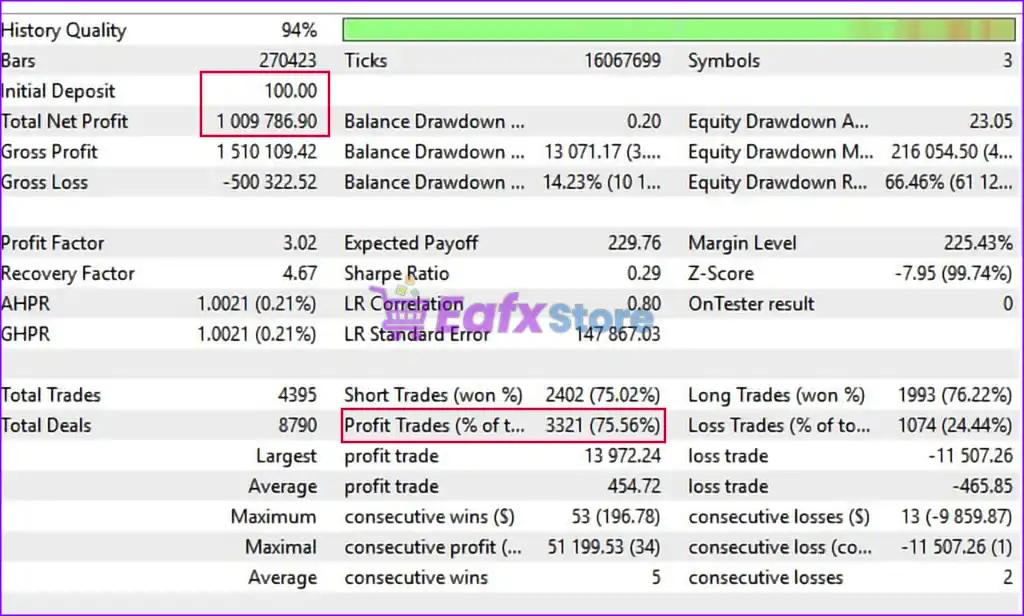
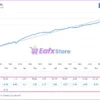
NorthEastWay MT5 backtesting results achieved impressive returns from an initial deposit of $100. Total profits achieved in 2 years were $1 million and the win rate was 75.56%.

Initial Deposit: $100
Total Net Profit: $1,009,786.90
Win Rate: 75.56%
Maximum Drawdown: 3.29%

NorthEastWay MT5 Backtests

NorthEastWay MT5 Backtests

NorthEastWay MT5 Backtest

NorthEastWay MT5 Backtest

What is the NorthEastWay MT5 Trading Strategy?

🔹 Pullback Opportunity Detection: Targets market retracements after significant bullish or bearish moves.
🔹 Price Reversion Analysis: Evaluates return-to-value scenarios within established market structures.
🔹 Multi-Pair Signal Processing: Scans several currency pairs to identify high-quality trade setups.
🔹 Adaptive Entry Selection: Filters opportunities based on predefined market condition thresholds.
🔹 Structured Position Management: Controls trade progression through dynamic risk and profit logic.

Is NorthEastWay MT5 Safe?

NorthEastWay EA showcases exceptional potential in generating consistent and reliable profits, positioning itself as a valuable tool in the forex market. Highly acclaimed by the MQL5 community for its performance and stability, this expert advisor has earned the trust of traders worldwide.

⭐⭐⭐⭐⭐ Lokoshon (2021.12.31)

“Excellent EA! As long as you listen to Pavel and follow his recommendation, EA works great.”

⭐⭐⭐⭐⭐ Francisco Javier Garzon Mendez (2021.02.11)

“Nice project, work fine and don´t make scared open position. Works fine.”

⭐⭐⭐⭐⭐ Torsten Hummitzsch (2021.12.10)

“I’ve been using the EA since June 2021. I was skeptical at first. But it is easy to set up and has earned its purchase price in a very short time. If you choose your risk attitudes carefully, you are a winner.”

⭐⭐⭐⭐⭐ Stefan Kleineniggenkemper (2021.04.01)

“So far it has been working reliably and has been generating income since the beginning. The product does not have enormous requirements for a VPS. After a longer test period, I will write a more detailed report on the product.”

Product Download Package?

Recommended settings and parameters to pay attention to from developers and experts:

FeaturesType
Trading platformMetaTrader 5 (MT5)
Time framesM15 (15 minute chart)
Base currency pairsAUDNZD, NZDCAD, AUDCAD
Additional pairsEURUSD, USDCAD, GBPUSD, EURCAD, EURGBP, GBPCAD
Minimum / Recommended deposit$1,000
Minimum / Recommended leverage1:100 or more
Product typeNoDLL
Additional servicesUnlock and Decompile
Recommended brokersExness Broker, Icmarkets Broker
Recommended VPSMyfxVPS.com ( Blue VPS, Golden VPS). Lowest Latency, 2 week Free Trial, 100% Free for 12-18 Months.

Product Download Package?

The download package of the product suite includes:

✅ Setting (If Any).docx

✅ Installation Guide.docx

➡️ Reviewed by David Easton

Conclusion

In short, NorthEastWay MT5 stands out as a powerful and reliable trading solution for Forex traders seeking automated, efficient, and long-term profitable strategies. Developed by Pavel Udovichenko, a seasoned expert in MQL5 with over four years of experience, this expert advisor (EA) has consistently delivered outstanding performance, boasting a 642% total profit over 112 trading weeks and a 75.7% win rate.
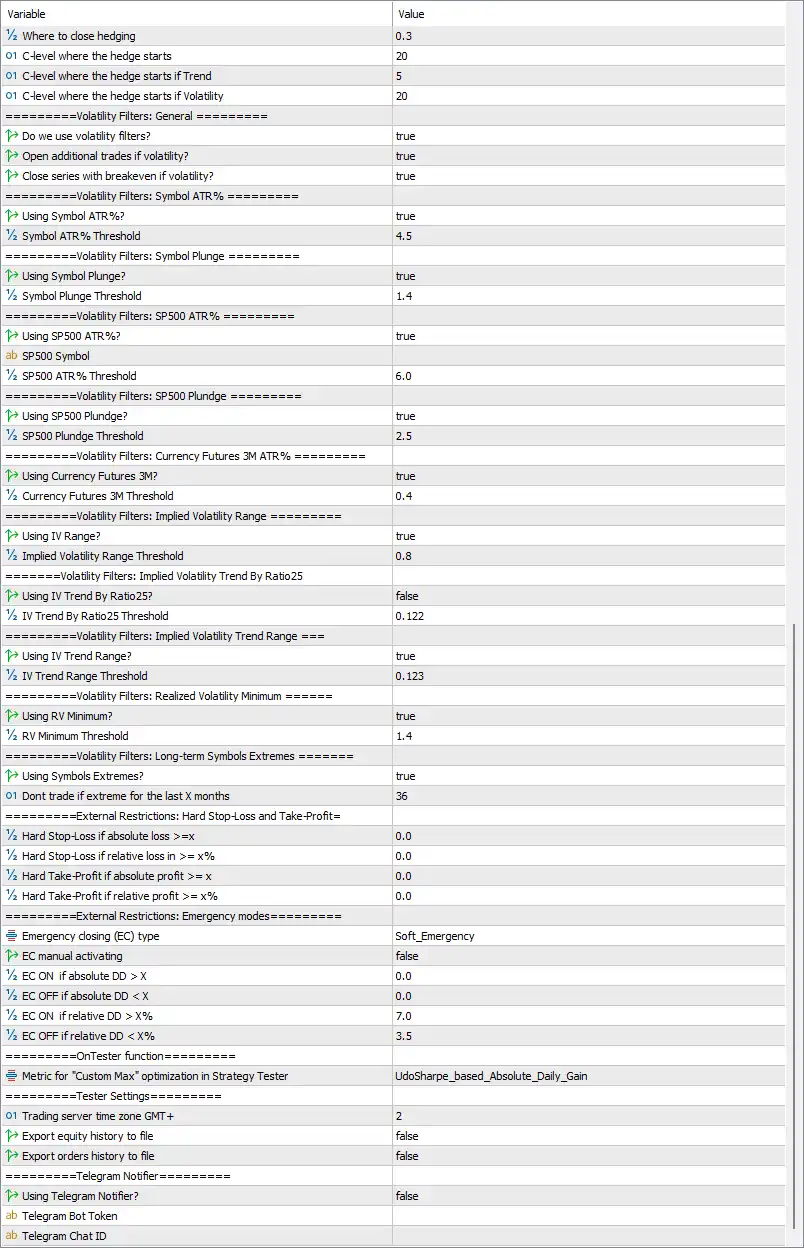
🔢 NorthEastWay MT5 Settings Guide

NorthEastWay MT5 is a professional multi-currency Expert Advisor designed for automated portfolio trading with advanced money management, adaptive grid control, volatility filtering, hedging and risk protection.

The EA includes configurable execution parameters, cross-symbol management, preventive chain closing, emergency protection, and optimization features, allowing traders to customize performance for different market conditions while maintaining strict control over risk exposure.

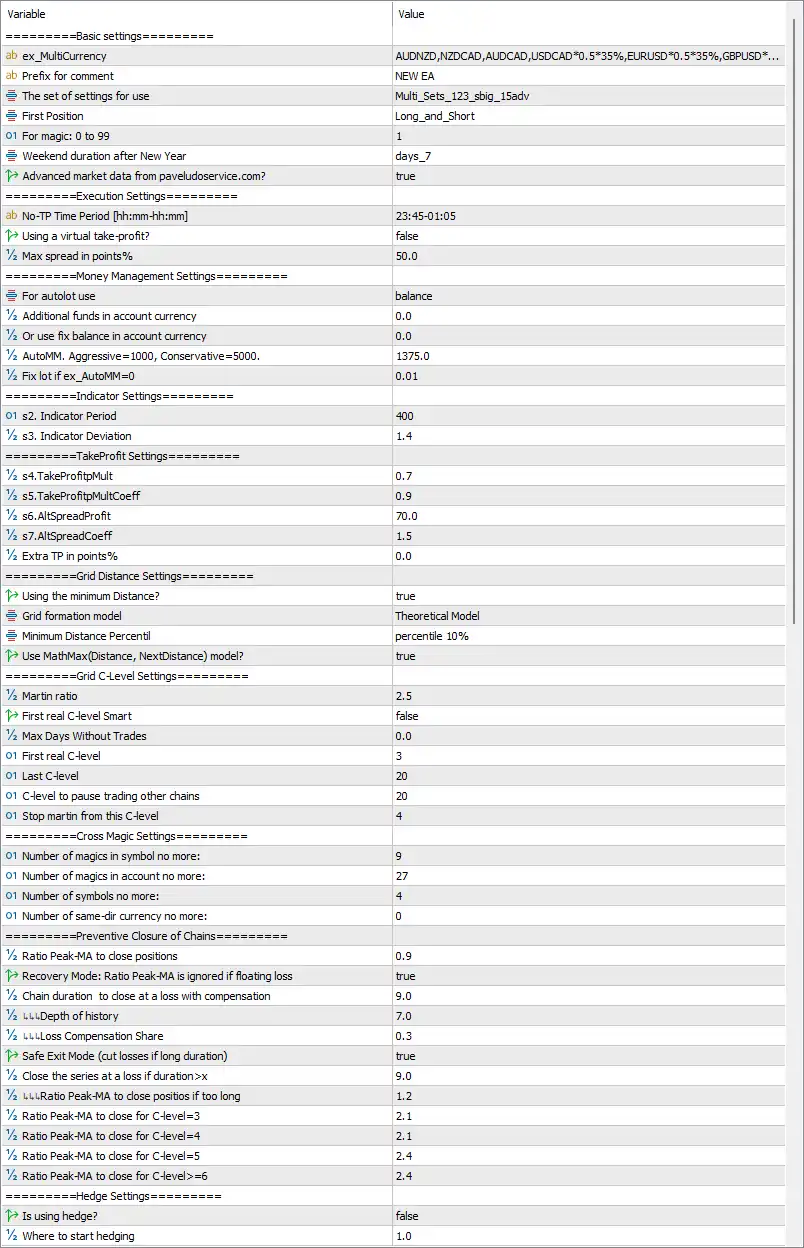
NorthEastWay MT5 Settings Panel

NorthEastWay MT5 Settings Panel

NorthEastWay MT5 EA Settings Panel

NorthEastWay MT5 EA Settings Panel


🔢 NorthEastWay MT5 Settings Explained

🔶 Basic Settings

🔹 ex_MultiCurrency = AUDNZD,NZDCAD,AUDCAD,USDCAD0.535%,EURUSD0.535%,GBPUSD…* – Defines the multi-currency portfolio and weighting used by the EA.

🔹 Prefix for comment = NEW EA – Adds the comment NEW EA to every trade opened by the Expert Advisor.

🔹 The set of settings for use = Multi_Sets_123_sbig_15adv – Specifies the preset configuration profile loaded by the EA.

🔹 First Position = Long_and_Short – Allows both Buy and Sell positions as initial entries.

🔹 For magic: 0 to 99 = 1 – Sets the internal Magic Number group identifier to 1.

🔹 Weekend duration after New Year = days_7 – Defines a 7-day trading pause after the New Year holiday.

🔹 Advanced market data from pavelduroservice.com? = true – Enables the use of external advanced market data services.


🔶 Execution Settings

🔹 No-TP Time Period [hh:mm-hh:mm] = 23:45-01:05 – Disables Take Profit execution during the specified time window.

🔹 Using a virtual take-profit? = false – Uses broker-side Take Profit instead of a virtual TP.

🔹 Max spread in points% = 50.0 – Rejects new entries when the spread exceeds 50.0 points.


🔶 Money Management Settings

🔹 For autolot use = balance – Calculates automatic lot sizing based on account balance.

🔹 Additional funds in account currency = 0.0 – No additional balance is included in lot calculations.

🔹 Or use fix balance in account currency = 0.0 – Fixed balance mode is disabled.

🔹 AutoMM, Aggressive=1000, Conservative=5000 = 1375.0 – Uses an Auto Money Management factor of 1375.0.

🔹 Fix lot if ex_AutoMM=0 = 0.01 – Uses a fixed lot size of 0.01 when AutoMM is disabled.


🔶 Indicator Settings

🔹 s2. Indicator Period = 400 – Sets the indicator calculation period to 400.

🔹 s3. Indicator Deviation = 1.4 – Defines the indicator deviation parameter as 1.4.


🔶 Take Profit Settings

🔹 s4.TakeProfitMult = 0.7 – Sets the primary Take Profit multiplier to 0.7.

🔹 s5.TakeProfitMultCoeff = 0.9 – Applies a coefficient of 0.9 to TP calculations.

🔹 s6.AltSpreadProfit = 70.0 – Uses 70.0 points for alternative spread profit calculations.

🔹 s7.AltSpreadCoeff = 1.5 – Sets the spread coefficient to 1.5.

🔹 Extra TP in points% = 0.0 – No additional Take Profit buffer is added.


🔶 Grid Distance Settings

🔹 Using the minimum Distance? = true – Enables minimum grid distance control.

🔹 Grid formation model = Theoretical Model – Uses the theoretical model for grid spacing calculations.

🔹 Minimum Distance Percentile = percentile 10% – Uses the 10th percentile as the minimum distance reference.

🔹 Use MathMax(Distance, NextDistance) model? = true – Enables MathMax logic for adaptive grid spacing.


🔶 Grid C-Level Settings

🔹 Martin ratio = 2.5 – Sets the martingale multiplier ratio to 2.5.

🔹 First real C-level Smart = false – Smart first C-Level logic is disabled.

🔹 Max Days Without Trades = 0.0 – No inactivity limit is applied.

🔹 First real C-level = 3 – Starts real C-Level management from level 3.

🔹 Last C-level = 20 – Limits grid expansion to 20 C-Levels.

🔹 C-level to pause trading other chains = 20 – Suspends other trading chains when C-Level reaches 20.

🔹 Stop martin from this C-level = 4 – Stops Martingale progression starting from C-Level 4.


🔶 Cross Magic Settings

🔹 Number of magics in symbol no more = 9 – Allows up to 9 Magic Numbers per symbol.

🔹 Number of magics in account no more = 27 – Limits the account to 27 Magic Numbers.

🔹 Number of symbols no more = 4 – Trades a maximum of 4 symbols simultaneously.

🔹 Number of same-dir currency no more = 0 – No additional same-direction currency restriction is applied.


🔶 Preventive Closure of Chains

🔹 Ratio Peak-MA to close positions = 0.9 – Uses a Peak/Moving Average ratio of 0.9 to trigger closures.

🔹 Recovery Mode: Ratio Peak-MA is ignored if floating loss = true – Ignores Peak-MA logic during floating losses.

🔹 Chain duration to close at a loss with compensation = 9.0 – Closes long-running chains after 9.0 units with compensation.

🔹 LL Depth of history = 7.0 – Uses 7.0 historical depth for calculations.

🔹 LL Loss Compensation Share = 0.3 – Allocates 30% for loss compensation.

🔹 Safe Exit Mode (cut losses if long duration) = true – Enables safe exit for prolonged losing trades.

🔹 Close the series at a loss if duration > X = 9.0 – Forces closure after 9.0 duration units.

🔹 LL Ratio Peak-MA to close positions if too long = 1.2 – Uses 1.2 ratio for extended-duration exits.

🔹 Ratio Peak-MA to close for C-level=3 = 2.1 – Uses 2.1 ratio at C-Level 3.

🔹 Ratio Peak-MA to close for C-level=4 = 2.1 – Uses 2.1 ratio at C-Level 4.

🔹 Ratio Peak-MA to close for C-level=5 = 2.4 – Uses 2.4 ratio at C-Level 5.

🔹 Ratio Peak-MA to close for C-level>=6 = 2.4 – Uses 2.4 ratio from C-Level 6 onward.


🔶 Hedge Settings

🔹 Is using hedge? = false – Hedging is disabled.

🔹 Where to start hedging = 1.0 – Defines hedge activation starting point at 1.0.

🔹 Where to close hedging = 0.3 – Closes hedge positions when the hedge ratio reaches 0.3.

🔹 C-level where the hedge starts = 20 – Starts hedging at C-Level 20.

🔹 C-level where the hedge starts if Trend = 5 – Starts hedging earlier during trend conditions at C-Level 5.

🔹 C-level where the hedge starts if Volatility = 20 – Starts hedging at C-Level 20 under volatile conditions.


🔶 General Volatility Filters

🔹 Do we use volatility filters? = true – Enables all volatility-based trade filters.

🔹 Open additional trades if volatility? = true – Allows additional entries during acceptable volatility.

🔹 Close series with breakeven if volatility? = true – Closes trade series at breakeven during high volatility.


🔶 Symbol ATR Filter

🔹 Using Symbol ATR%? = true – Enables ATR percentage filtering.

🔹 Symbol ATR% Threshold = 4.5 – Uses 4.5% as the ATR threshold.


🔶 Symbol Plunge Filter

🔹 Using Symbol Plunge? = true – Enables sudden price plunge detection.

🔹 Symbol Plunge Threshold = 1.4 – Sets plunge sensitivity to 1.4.


🔶 S&P500 Volatility Filters

🔹 Using SP500 ATR%? = true – Enables S&P500 ATR monitoring.

🔹 SP500 Symbol = (blank) – No custom S&P500 symbol is specified.

🔹 SP500 ATR% Threshold = 6.0 – Uses 6.0% as the S&P500 ATR threshold.

🔹 Using SP500 Plunge? = true – Enables S&P500 plunge detection.

🔹 SP500 Plunge Threshold = 2.5 – Uses 2.5 as the plunge threshold.


🔶 Currency Futures Filter

🔹 Using Currency Futures 3M? = true – Enables 3-month currency futures monitoring.

🔹 Currency Futures 3M Threshold = 0.4 – Uses 0.4 as the futures volatility threshold.


🔶 Implied Volatility Filters

🔹 Using IV Range? = true – Enables implied volatility range analysis.

🔹 Implied Volatility Range Threshold = 0.8 – Sets IV range threshold to 0.8.

🔹 Using IV Trend By Ratio25? = false – Disables Ratio25 IV trend filtering.

🔹 IV Trend By Ratio25 Threshold = 0.122 – Ratio25 threshold remains 0.122.

🔹 Using IV Trend Range? = true – Enables IV trend range filtering.

🔹 IV Trend Range Threshold = 0.123 – Uses 0.123 as the trend threshold.


🔶 Realized Volatility & Symbol Extremes

🔹 Using RV Minimum? = true – Enables realized volatility minimum filtering.

🔹 RV Minimum Threshold = 1.4 – Uses 1.4 as the minimum RV threshold.

🔹 Using Symbols Extremes? = true – Enables long-term symbol extreme filtering.

🔹 Don’t trade if extreme for the last X months = 36 – Avoids trading symbols with extremes during the past 36 months.


🔶 External Restrictions

🔹 Hard Stop-Loss if absolute loss >= X = 0.0 – Absolute loss restriction is disabled.

🔹 Hard Stop-Loss if relative loss >= X% = 0.0 – Relative loss restriction is disabled.

🔹 Hard Take-Profit if absolute profit >= X = 0.0 – Absolute profit restriction is disabled.

🔹 Hard Take-Profit if relative profit >= X% = 0.0 – Relative profit restriction is disabled.


🔶 Emergency Modes

🔹 Emergency closing (EC) type = Soft_Emergency – Uses Soft Emergency protection mode.

🔹 EC manual activating = false – Manual emergency mode is disabled.

🔹 EC ON if absolute DD > X = 0.0 – Absolute drawdown trigger is disabled.

🔹 EC OFF if absolute DD < X = 0.0 – Absolute recovery trigger is disabled.

🔹 EC ON if relative DD > X% = 7.0 – Activates emergency mode at 7.0% drawdown.

🔹 EC OFF if relative DD < X% = 3.5 – Disables emergency mode when drawdown falls below 3.5%.


🔶 Strategy Tester

🔹 Metric for “Custom Max” optimization = UdoSharpe_based_Absolute_Daily_Gain – Uses the UdoSharpe_based_Absolute_Daily_Gain optimization metric.


🔶 Tester Settings

🔹 Trading server time zone GMT+ = 2 – Uses GMT+2 server time.

🔹 Export equity history to file = false – Disables exporting equity history.

🔹 Export orders history to file = false – Disables exporting order history.


🔶 Telegram Notifications

🔹 Using Telegram Notifier? = false – Telegram notifications are disabled.

🔹 Telegram Bot Token = (empty) – No Telegram Bot Token is configured.

🔹 Telegram Chat ID = (empty) – No Telegram Chat ID is configured.


🔢 Conclusion

NorthEastWay MT5 is an advanced multi-currency Expert Advisor featuring sophisticated portfolio management, adaptive grid trading, intelligent volatility filters, comprehensive risk controls, emergency protection, and optimization tools. Its extensive configuration options allow experienced traders to fine-tune execution, money management, and market filtering for diversified automated trading while maintaining strict control over drawdown and portfolio exposure.


🔢 FAQs

What is the purpose of Auto Money Management in NorthEastWay MT5?

Auto Money Management automatically adjusts position sizes according to the account balance and the configured AutoMM value.

Does NorthEastWay MT5 support multi-currency trading?

Yes. The EA is designed for portfolio trading and supports multiple currency pairs simultaneously through the ex_MultiCurrency configuration.

Can NorthEastWay MT5 automatically filter high-volatility markets?

Yes. The EA includes ATR, implied volatility, S&P500, currency futures, realized volatility, and symbol extreme filters.

What happens when Emergency Mode is activated?

The Soft Emergency system applies protective actions when relative drawdown reaches 7.0%, helping reduce portfolio risk until recovery.

Does NorthEastWay MT5 support Telegram notifications?

Yes. The EA includes built-in Telegram notification support, although it is disabled by default until a valid Bot Token and Chat ID are configured.

User Reviews

0.0 out of 5
0
0
0
0
0
Write a review

There are no reviews yet.

Only logged in customers who have purchased this product may leave a review.

1. What is NorthEastWay MT5?

NorthEastWay MT5 is a fully automated Forex trading expert advisor (EA) optimized for the MetaTrader 5 (MT5) platform. It uses a pullback strategy to capitalize on price retracements after significant market movements.

2. How does NorthEastWay MT5 work?

The EA identifies pullback opportunities in the Forex market and executes trades automatically. It is designed to work efficiently across multiple currency pairs without being affected by spreads or slippage.

3. What currency pairs are recommended for trading with NorthEastWay MT5?

NorthEastWay MT5 is optimized for AUDNZD, NZDCAD, and AUDCAD but also supports EURUSD, USDCAD, GBPUSD, EURCAD, EURGBP, and GBPCAD.

4. What are the minimum deposit and leverage requirements?

The recommended minimum deposit is $1,000, and the minimum leverage is 1:100 or higher for optimal performance.

5. Is NorthEastWay MT5 suitable for beginners?

Yes, it features a user-friendly OneChartSetup, allowing traders to run multiple currency pairs from a single M15 chart. However, basic knowledge of Forex trading and risk management is advised.

6. What is the historical performance of NorthEastWay MT5?

The EA has achieved a 642% total profit over 112 weeks, with a 75.7% win rate and a maximum drawdown of 54% in live trading.

7. Can I customize the trading parameters?

Yes, NorthEastWay MT5 allows users to adjust settings such as lot size, money management, and recovery mode to match their trading strategy and risk tolerance.

Worldwide Instant Access
Download your EA software from anywhere in the world.
Reliable & Tested
Each EA is thoroughly tested and optimized for best performance.
Recently Viewed
  • Original price was: $1,200.00.Current price is: $69.00.
  • Original price was: $500.00.Current price is: $89.00.
  • Original price was: $1,499.00.Current price is: $199.00.
  • Original price was: $3,999.00.Current price is: $299.00.
Related Items
  • 2
    $180.00
  • 4
    $370.00
  • 3
    $140.00
  • 2
    $220.00
Want Unlimited Access to EA Bots, Indicators & Exclusive Trading Tools?

Start today, get instant access to all EA bots!

Download Unlimited - Exclusive Updates - Save More

The company’s mission

We are an organization offering affordable Forex trading tools for educational purposes. Achieve the greatest benefits with minimal investment at eafxstore.com.
  • Telegram
  • Email
  • Youtube
  • Facebook

Policy

DCMA REPORT
Privacy Policy
Refund policy

Help

About US
Contact
Copyright 2023 ©EAFXSTORE.COM
EA FX Store
Logo
Shopping cart