






Dracko Mt5 Bot with SetFiles (Latest version) – GroupBuy
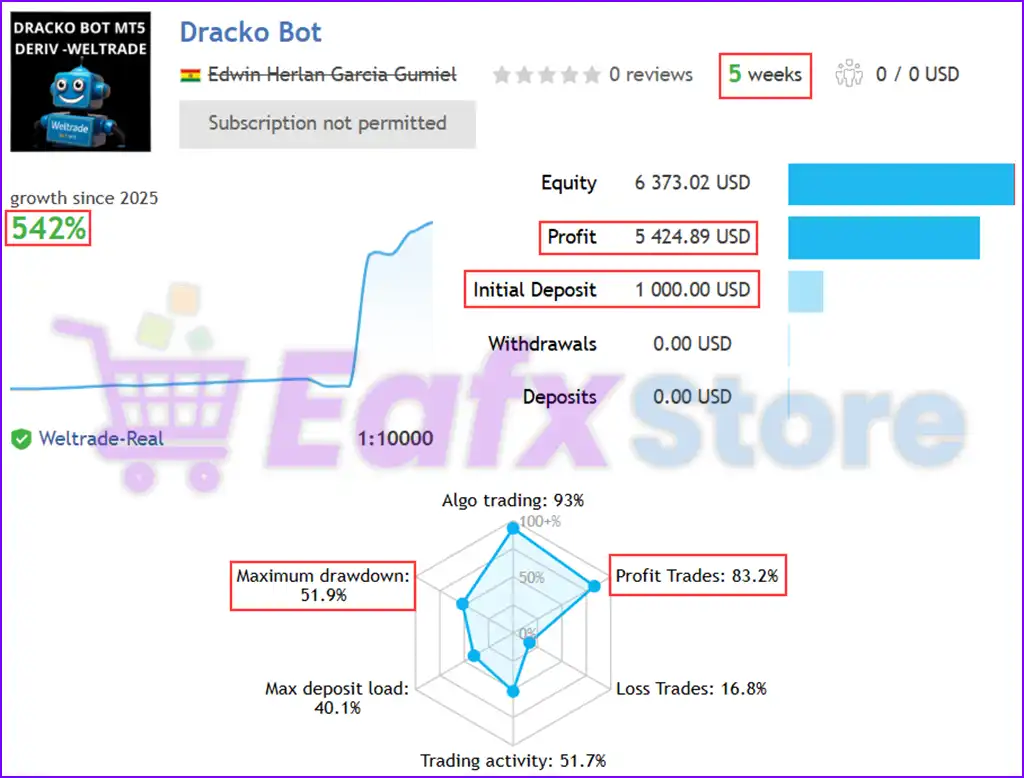
Dracko Mt5 Bot is an automated and optimized robot for trading with FlipX. Actual performance has been verified on a real account and reached 542% in 5 weeks of trading.
Select a variant to see availability.
What is Dracko MT5 Bot?
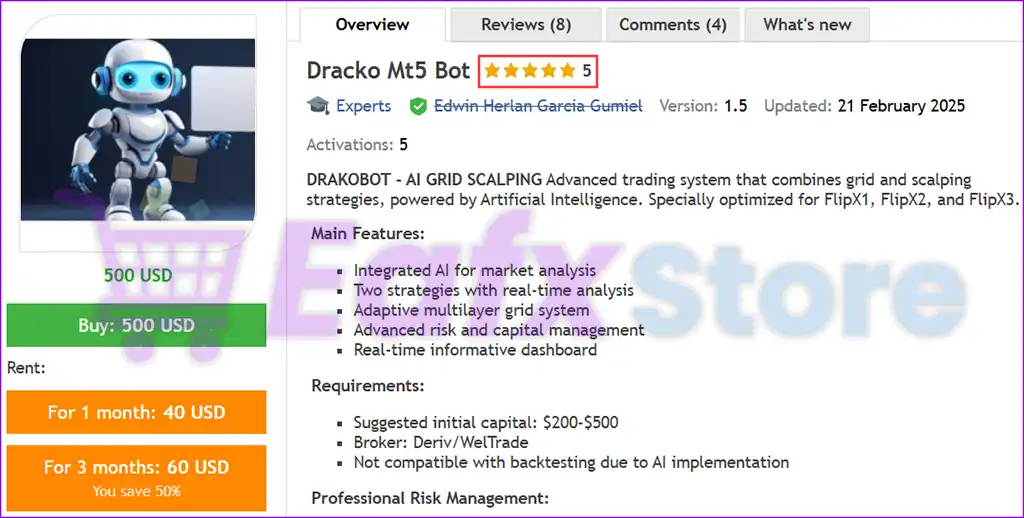
Dracko MT5 Bot is an advanced AI-driven trading system that seamlessly integrates Grid and scalping strategies to maximize trading efficiency. Designed specifically for FlipX1, FlipX2, and FlipX3, this innovative bot leverages Artificial Intelligence to enhance real-time market analysis and trade execution.
🔶 Vendor Website: Click here
🔶 This is GroupBuy ==> How to Join
About the Author
This product is compiled by Edwin Herlan Garcia Gumiel. This author has more than +2 years of experience working on MQL5 with many famous products such as Dracko Mt5 Bot, Dracko Mt4 Bot and other advisors. Among them, Dracko Mt5 Bot is his best performing products.
Dracko Mt5 Bot Overview
Key Features of Dracko Mt5 Bot
🔹 AI-Driven Market Analysis: Leverages artificial intelligence for intelligent market analysis, enabling more informed trading decisions.
🔹 Dual Trading Strategies with Real-Time Analysis: Employs two distinct trading strategies, analyzed in real-time for dynamic adaptation to market conditions.
🔹 Adaptive Multilayer Grid System: Utilizes a sophisticated, adaptive Grid system that automatically adjusts to market fluctuations, maximizing profit potential.
🔹 Advanced Risk and Capital Management: Implements robust risk management protocols to protect capital and minimize potential losses.
🔹 Real-Time Informative Dashboard: Provides a comprehensive dashboard with real-time data and insights for monitoring performance and making informed adjustments.
Why choose to use Dracko Mt5 Bot?
🔹 AI-Powered Precision: Leverages the power of AI for enhanced market analysis and trading decisions.
🔹 Automated Trading Efficiency: Automates trading processes, freeing up time and effort for users.
🔹 Adaptive Grid Scalping: Combines the power of grid and scalping strategies with an adaptive approach for maximizing potential returns.
🔹 Robust Risk Management: Prioritizes capital protection with advanced risk management features.
🔹 User-Friendly Interface: Provides a real-time dashboard for easy monitoring and control.
Dracko Mt5 Bot Review
Dracko Bot is an advanced automated trading algorithm running on MetaTrader 5 (MT5), optimized for high-frequency trading (HFT). With an impressive 542% growth in just 5 weeks, this EA is designed for aggressive traders who want fast returns.
✅ Account Growth: +542% in 5 weeks
✅ Total Profit: $5,424.89
✅ Win Rate: 83.2%
✅ Maximum Drawdown: 51.9%
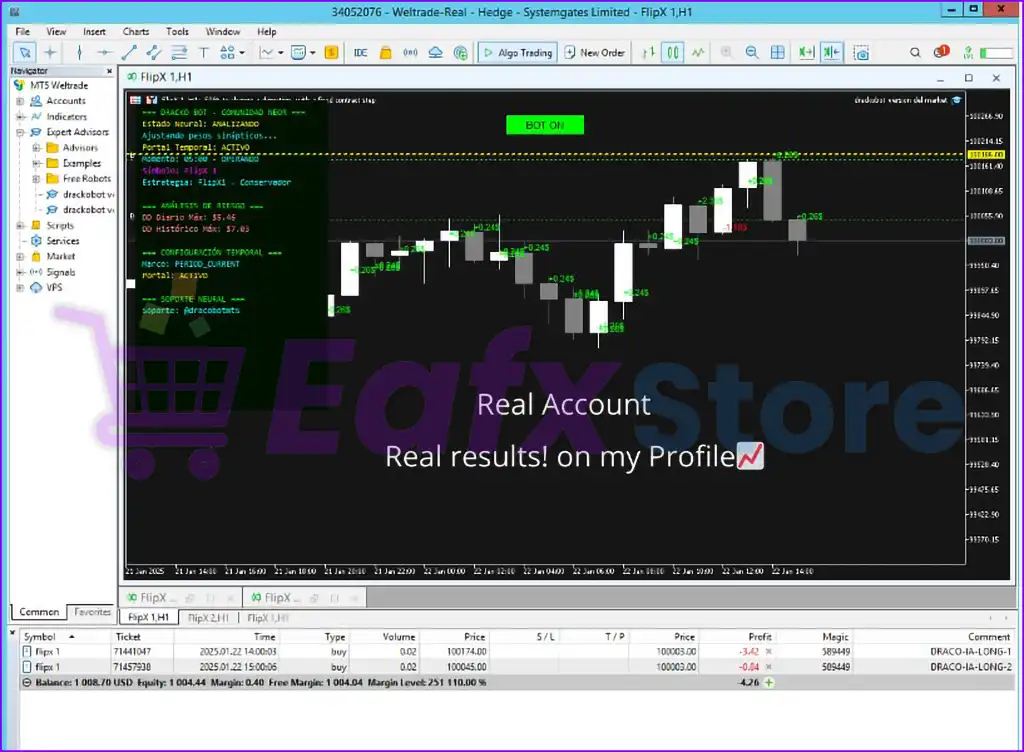
Dracko Bot Live Trading
Dracko Mt5 Bot Review
User Reviews and Feedback
Dracko Mt5 Bot showcases exceptional potential in generating consistent and reliable profits, positioning itself as a valuable tool in the forex market. Highly acclaimed by the MQL5 community for its performance and stability, this expert advisor has earned the trust of traders worldwide.
➡️ Eduardo Varela (2025.01.23): “It is an excellent tool, one of the best bots I have tried and the way it operates is spectacular, I hope it has more updates in the future.”
➡️ Jenny Artiga (2025.01.17): “Dracko Bot is an excellent trading tool with consistent results. Its intuitive interface and exceptional technical support make it stand out among other bots. 5 stars are an understatement for this highly efficient bot! Highly recommended for any trader.”
➡️ Nanny (2025.01.19): “Dracko is hands down the best bot available for synthetic indices. The support is absolutely excellent and top-notch. I strongly recommend this bot, especially as it’s specifically designed for real accounts with Weltrade broker, particularly optimized for the FLIPX1 symbol. The results have been nothing short of incredible. If you’re trading synthetics, this is definitely the tool you want!”
Trading Specifications
Recommended settings and parameters to pay attention to from developers and experts:
| Features | Type |
|---|---|
| Trading platform | MetaTrader 5 (MT5) |
| Time frames | Any |
| Currency pairs | Any |
| Minimum / Recommended deposit | $200 |
| Additional services | Unlock and Decompile |
| Recommended brokers | Exness Broker, Icmarkets Broker |
| Recommended VPS | MyfxVPS.com ( Blue VPS, Golden VPS). Lowest Latency, 2 week Free Trial, 100% Free for 12-18 Months. |
➡️ Reviewed by David Easton
Product Download Package?
The download package of the product suite includes:
Experts
✅ Setting (If Any).docx
✅ Installation Guide.docx
Presets
✅ Flipx1_M5_Conservador_capital_250_dolares.set
✅ Flip_x_1_M5_Conservador_capital_500_dolares.set
✅ Flip_x_1_M5_Conservador_capital_1000_dolares.set
Conclusion
In short, Dracko MT5 Bot stands out as an innovative, AI-powered trading solution that seamlessly integrates grid and scalping strategies to optimize trading efficiency. With its adaptive multilayer grid system, real-time market analysis, and robust risk management, this expert advisor ensures traders can capitalize on profitable opportunities while mitigating potential risks.
Backed by an impressive 542% growth in just five weeks and highly praised by the MQL5 community, Dracko MT5 Bot has proven itself as a reliable, high-performance tool for traders seeking automated efficiency and superior profitability. Whether you are an experienced trader or just starting out, this bot provides a user-friendly interface and customizable presets to fit your trading style.
🔢 Dracko MT5 Bot Settings Explained – Complete Parameter Guide
Dracko MT5 Bot is a fully automated Expert Advisor (EA) for MetaTrader 5 designed with advanced grid trading, multi-timeframe analysis, AI preset support, capital protection, dynamic trading schedules and intelligent position management.
The EA provides extensive customization options, allowing traders to optimize risk management, trading frequency, and strategy behavior across different market conditions.
- Dracko Mt5 Bot Settings
🔢 Installation Panel Parameters
Below are the details of the parameters in the advisor’s trading system settings table:
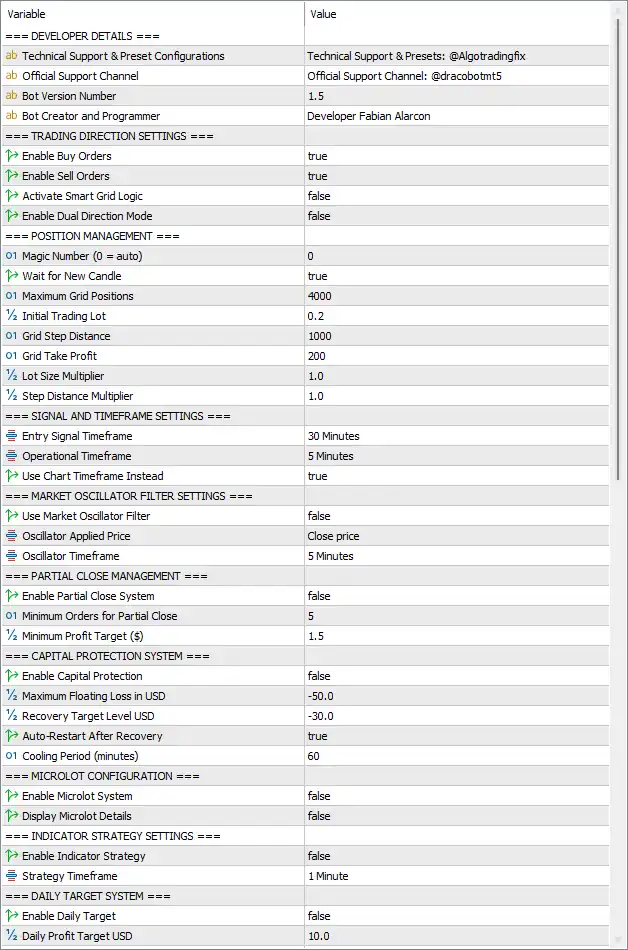
- Dracko Mt5 Bot Settings Panel
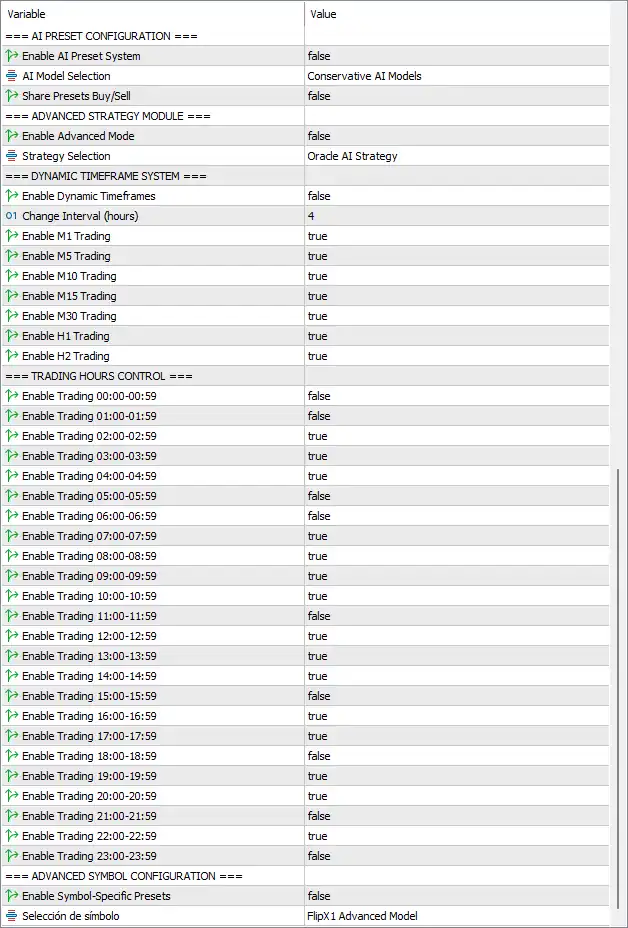
- Dracko Mt5 Bot Setting Panel
🔶 Trading Direction Settings
🔹 Enable Buy Orders = true – Allows the EA to open Buy positions.
🔹 Enable Sell Orders = true – Allows the EA to open Sell positions.
🔹 Activate Smart Grid Logic = false – Disables the intelligent Smart Grid management algorithm.
🔹 Enable Dual Direction Mode = false – Prevents simultaneous independent Buy and Sell strategy execution.
🔶 Position Management
🔹 Magic Number (0 = auto) = 0 – Uses automatic Magic Number generation for trade identification.
🔹 Wait for New Candle = true – Opens new trades only after a new candle forms.
🔹 Maximum Grid Positions = 4000 – Allows up to 4000 grid positions.
🔹 Initial Trading Lot = 0.2 – Sets the initial trade size to 0.20 lots.
🔹 Grid Step Distance = 1000 – Distance between consecutive grid orders is 1000 points.
🔹 Grid Take Profit = 200 – Sets the grid profit target to 200 points.
🔹 Lot Size Multiplier = 1.0 – Uses a 1.0 multiplier, keeping lot sizes constant.
🔹 Step Distance Multiplier = 1.0 – Keeps grid spacing unchanged with a multiplier of 1.0.
🔶 Signal and Timeframe Settings
🔹 Entry Signal Timeframe = 30 Minutes – Entry signals are generated using the M30 timeframe.
🔹 Operational Timeframe = 5 Minutes – Trade execution operates on the M5 timeframe.
🔹 Use Chart Timeframe Instead = true – Uses the current chart timeframe instead of predefined settings.
🔶 Market Oscillator Filter Settings
🔹 Use Market Oscillator Filter = false – Disables oscillator-based trade filtering.
🔹 Oscillator Applied Price = Close price – Uses the candle closing price for oscillator calculations.
🔹 Oscillator Timeframe = 5 Minutes – Oscillator calculations use the M5 timeframe.
🔶 Partial Close Management
🔹 Enable Partial Close System = false – Disables automatic partial position closing.
🔹 Minimum Orders For Partial Close = 5 – Requires at least 5 positions before partial closing becomes available.
🔹 Minimum Profit Target ($) = 1.5 – Minimum floating profit required is $1.50.
🔶 Capital Protection System
🔹 Enable Capital Protection = false – Disables automated capital protection.
🔹 Maximum Floating Loss in USD = -50.0 – Maximum floating loss threshold is -$50.00.
🔹 Recovery Target Level USD = -30.0 – Recovery monitoring continues until losses improve to -$30.00.
🔹 Auto-Restart After Recovery = true – Automatically resumes trading after recovery conditions are met.
🔹 Cooling Period (minutes) = 60 – Waits 60 minutes before restarting trading.
🔶 Microlot Configuration
🔹 Enable Microlot System = false – Disables micro-lot trading mode.
🔹 Display Microlot Details = false – Hides micro-lot information on the chart.
🔶 Indicator Strategy Settings
🔹 Enable Indicator Strategy = false – Disables indicator-based trading logic.
🔹 Strategy Timeframe = 1 Minute – Indicator strategy uses the M1 timeframe.
🔶 Daily Target System
🔹 Enable Daily Target = false – Disables the daily profit target feature.
🔹 Daily Profit Target USD = 10.0 – Daily target is configured at $10.00.
🔶 AI Preset Configuration
🔹 Enable AI Preset System = false – Disables AI-generated preset optimization.
🔹 AI Model Selection = Conservative AI Models – Selects the Conservative AI Models profile.
🔹 Share Presets Buy/Sell = false – Buy and Sell strategies use independent preset configurations.
🔶 Advanced Strategy Module
🔹 Enable Advanced Mode = false – Disables advanced strategy functionality.
🔹 Strategy Selection = Oracle AI Strategy – Selects the Oracle AI Strategy profile.
🔶 Dynamic Timeframe System
🔹 Enable Dynamic Timeframes = false – Disables automatic timeframe switching.
🔹 Change Interval (hours) = 4 – Dynamic timeframe evaluation interval is 4 hours.
🔹 Enable M1 Trading = true – Allows trading on the M1 timeframe.
🔹 Enable M5 Trading = true – Allows trading on the M5 timeframe.
🔹 Enable M10 Trading = true – Allows trading on the M10 timeframe.
🔹 Enable M15 Trading = true – Allows trading on the M15 timeframe.
🔹 Enable M30 Trading = true – Allows trading on the M30 timeframe.
🔹 Enable H1 Trading = true – Allows trading on the H1 timeframe.
🔹 Enable H2 Trading = true – Allows trading on the H2 timeframe.
🔶 Trading Hours Control
🔹 Enable Trading 00:00–00:59 = false – Trading disabled during 00:00–00:59.
🔹 Enable Trading 01:00–01:59 = false – Trading disabled during 01:00–01:59.
🔹 Enable Trading 02:00–02:59 = true – Trading enabled during 02:00–02:59.
🔹 Enable Trading 03:00–03:59 = true – Trading enabled during 03:00–03:59.
🔹 Enable Trading 04:00–04:59 = true – Trading enabled during 04:00–04:59.
🔹 Enable Trading 05:00–05:59 = false – Trading disabled during 05:00–05:59.
🔹 Enable Trading 06:00–06:59 = false – Trading disabled during 06:00–06:59.
🔹 Enable Trading 07:00–07:59 = true – Trading enabled during 07:00–07:59.
🔹 Enable Trading 08:00–08:59 = true – Trading enabled during 08:00–08:59.
🔹 Enable Trading 09:00–09:59 = true – Trading enabled during 09:00–09:59.
🔹 Enable Trading 10:00–10:59 = true – Trading enabled during 10:00–10:59.
🔹 Enable Trading 11:00–11:59 = false – Trading disabled during 11:00–11:59.
🔹 Enable Trading 12:00–12:59 = true – Trading enabled during 12:00–12:59.
🔹 Enable Trading 13:00–13:59 = true – Trading enabled during 13:00–13:59.
🔹 Enable Trading 14:00–14:59 = true – Trading enabled during 14:00–14:59.
🔹 Enable Trading 15:00–15:59 = false – Trading disabled during 15:00–15:59.
🔹 Enable Trading 16:00–16:59 = true – Trading enabled during 16:00–16:59.
🔹 Enable Trading 17:00–17:59 = true – Trading enabled during 17:00–17:59.
🔹 Enable Trading 18:00–18:59 = false – Trading disabled during 18:00–18:59.
🔹 Enable Trading 19:00–19:59 = true – Trading enabled during 19:00–19:59.
🔹 Enable Trading 20:00–20:59 = true – Trading enabled during 20:00–20:59.
🔹 Enable Trading 21:00–21:59 = false – Trading disabled during 21:00–21:59.
🔹 Enable Trading 22:00–22:59 = true – Trading enabled during 22:00–22:59.
🔹 Enable Trading 23:00–23:59 = false – Trading disabled during 23:00–23:59.
🔶 Advanced Symbol Configuration
🔹 Enable Symbol-Specific Presets = false – Disables individual preset configurations for each trading symbol.
🔹 Selection = FlipX1 Advanced Model – Uses the FlipX1 Advanced Model as the selected advanced symbol profile.
🔢 Conclusion
Dracko MT5 Bot provides a highly configurable automated trading environment with advanced grid management, AI-ready strategy modules, multi-timeframe analysis, capital protection, and customizable trading schedules.
Whether you prefer conservative trading or advanced strategy deployment, its extensive parameter set allows traders to tailor the EA to different market conditions, broker requirements, and individual risk preferences.
🔢 FAQs
❓ What is the purpose of the Smart Grid Logic in Dracko MT5 Bot?
The Smart Grid Logic enhances traditional grid trading by intelligently managing position spacing and recovery, although it is disabled in this configuration.
❓ Can Dracko MT5 Bot trade on multiple timeframes?
Yes. The bot supports M1, M5, M10, M15, M30, H1, and H2 timeframes, and each can be individually enabled or disabled.
❓ How does the Capital Protection System work?
When enabled, it monitors floating losses, pauses trading if the configured loss threshold is reached, and can automatically resume trading after recovery.
❓ Does Dracko MT5 Bot include AI-based trading models?
Yes. The EA supports AI Preset configurations, including Conservative AI Models and Oracle AI Strategy, although these features are optional.
❓ Can I customize trading hours with Dracko MT5 Bot?
Yes. Every hourly session from 00:00 to 23:59 can be individually enabled or disabled, giving complete control over the EA’s trading schedule.
User Reviews
Only logged in customers who have purchased this product may leave a review.
1. What is Dracko MT5 Bot?
Dracko MT5 Bot is an AI-powered automated trading system designed for MetaTrader 5 (MT5). It integrates Grid and Scalping strategies to optimize trading efficiency and maximize profit potential.
2. How does Dracko MT5 Bot work?
The bot leverages artificial intelligence to analyze real-time market conditions and execute trades using a dual strategy—a multilayer Grid system combined with Scalping techniques for high-frequency trading.
3. What trading strategies does Dracko MT5 Bot use?
Dracko MT5 Bot employs:
✔ Grid Trading – Uses an adaptive grid system that adjusts to market fluctuations.
✔ Scalping – Executes fast trades to capitalize on small price movements.
4. What is the minimum deposit required?
The recommended minimum deposit is $200 - $500, depending on the risk level and trading settings.
5. What is the expected profitability and risk of using Dracko MT5 Bot?
Live trading results show:
✔ Account Growth: +542% in 5 weeks
✔ Total Profit: $5,424.89
✔ Win Rate: 83.2%
✔ Maximum Drawdown: 51.9% (High Risk)
6. Can I use Dracko MT5 Bot on any currency pair?
Yes, the bot supports any currency pair and has been specifically optimized for FlipX1, FlipX2, and FlipX3 trading symbols.
7. Does Dracko MT5 Bot have built-in risk management?
Yes, the bot includes advanced risk and capital management features, such as hidden Stop Loss (SL) and Take Profit (TP) to minimize potential losses.
8. Is Dracko MT5 Bot risk-free?
No trading bot is 100% risk-free. While Dracko MT5 Bot offers AI-driven risk management, traders should apply proper capital allocation and money management to mitigate potential losses.
-
 Price range: $80.00 through $599.00
 -
 Price range: $70.00 through $599.00
 -
 Original price was: $470.00.$89.00Current price is: $89.00.
 -
 Price range: $60.00 through $599.00
-
 2
2 -
 3Price range: $89.00 through $599.00
 -
 3Price range: $89.00 through $599.00
 -
 0Price range: $89.00 through $599.00
There are no reviews yet.