


Gecko EA MT4 v1.2 with SetFiles (Platform build 1476+)

Subscriptions for Special Plan
- 30 EA package is more economical!
- Special package with 99%
- Download 1 EA/Day

Subscriptions for Premium Membership
- Download Unlimited in 1 Year
- Get 100% Discount
- Get free access to all

Subscriptions for Gold Membership
- 1 Year Membership
- Get 100% Discount
- Access EA+Indicator+Course
Frequently bought together 🎁
Add these products to enhance your purchase




What is Gecko EA?
The Gecko EA is an Expert Advisor (EA) designed for the MetaTrader 4 trading platform, which is widely used by forex traders around the world. This type of software is created to automate trading strategies, making it easier for traders to execute trades based on predefined criteria without the need for constant manual oversight.
🔶 Vendor website: View here
About the Author
This product is compiled by Wim Schrynemakers. This Malta author has more than +14 years of experience working on MQL5, famous products such as Gecko EA MT4, Stability Pro MT4, Advanced Scalper MT4, Gold Trade Pro MT4 and other products. Among them, Gecko EA is his most famous products.
Key Features of Gecko EA for MT4
🔹 Advanced Exit Algorithms: Uses unique and very advanced exit algorithms and entry calculations for precise trade management.
🔹 Strict Safety Focus: Every trade is protected by a Stop Loss (SL) at a safe distance – no dangerous money management is used.
🔹 Multi-Parameter Trailing SL: Features Trailing SL that uses multiple parameters, including Move to Break-even and time-based control.
🔹 Risk Customization: Includes multiple risk management options, such as setting a specific risk per trade.
🔹 High/Low Trailing SL: Offers a Trailing SL based on recent highs/lows, with an option to stop at the break-even level.
What is the Gecko EA trading strategy?
The core strategy is a proven breakout system that identifies important recent high and lows for potential entry. However, the sophistication lies in the trade management.
🔹 Breakout Entry: Looks for important recent high and lows to execute breakout trades.
🔹 Profit Protection: Moves to Break-even at a certain point, with the option to add extra pips for guaranteed profit.
🔹 Momentum-Based Exit: Time-based Trailing Stop Loss activates after X minutes to limit exposure when the trade loses momentum.
🔹 Risk Per Balance Sizing: Lotsize is determined based on Lots Per Balance for consistent sizing.
Gecko EA MT4 Review
Gecko EA Live Results
The Gecko EA achieves impressive profit performance when trading on real accounts. Profit performance over 190 consecutive trading weeks.
✅ Initial Deposit: $5,000
✅ Growth Rate: +224%
✅ Win Rate (% of total): 69.7%
✅ Maximum Drawdown: 17.5%
Gecko EA Live Results
Gecko EA Myfxbook Results
The Gecko EA has been verified profitable by MyFxBook in the long term and has achieved impressive returns. The advisor shows good GBPUSD, USDJPY and AUDUSD trading potential and high profit rate.
✅ Initial Deposit: $5,000
✅ Total Gain: +385.83%
✅ Average Monthly Profit: 2.49%
✅ Maximum Drawdown: 18.07%
Gecko EA Myfxbook
Gecko EA Backtest Results
The Gecko EA backtest trading results achieved impressive profit performance for 4 years on the USDJPY pair. The advisor showed the ability to maintain safe stars on the 60-minute chart.
✅ Initial Deposit: $1,000
✅ Total Net Profit: $15,162.82
✅ Win Rate: 83.50%
✅ Maximum Drawdown: 12.18%
Gecko EA MT4 Backtest
Why Should You Use Gecko EA MT4?
🔹 High Hit Rate: Achieves a very high hit rate of profitable trades through advanced execution.
🔹 No Over-Optimization Risk: No optimization process has been done, ensuring its strategy is robust across different data.
🔹 Proven Stress Testing: Stress tested with ninety-nine point nine zero percent tickdata, including variable spread and slippage simulation.
🔹 Broker Agnostic: Not sensitive to spread or slippage, and the Virtual SL option prevents broker knowledge of SL location.
User Reviews and Feedback
Gecko EA shows significant potential in providing stable and reliable profits, becoming a reliable tool in the forex market. This advisor is highly appreciated by the community in many aspects and has won the trust of users.
⭐⭐⭐⭐⭐ Takoya (2020.06.30): “Wim is one of the few developers which are reliable on this site. This EA is also good so far.”
⭐⭐⭐⭐⭐ Wolfgang Rockert (2020.06.16): “Buy it some Weeks ago, great EA, works Profitable any Week end with Profit. Low Risk… Buy it.”
⭐⭐⭐⭐⭐ Michał Sietycki 2020.06.30): “Total return – 4,9% peak drawdown -4,2% trade win – 74,3% trades per day – 2.5 most trades were made on EURUSD (52,9%), then GPBUSD (28,6%) and least on USDJPY 18,6% (it was worst pair – but even this was on plus side (profit) – even with only 69% win rate, while EURUSD was 86% win rate So – personally I’m pleased.”
Gecko EA is rated 5 stars
Gecko EA Settings
Recommended settings and parameters to pay attention to from developers and experts:
| Features | Type |
|---|---|
| Trading platform | MetaTrader 4 (MT4) |
| Time frames | H1 (60 minute chart) |
| Account type | Any |
| Minimum / Recommended deposit | $100 |
| Currency pairs | EURUSD, GBPUSD, USDJPY and AUDUSD |
| Setup files | Available |
| Product type | NoDLL / Fix |
| Additional services | Unlock and Decompile |
| Recommended brokers | Exness Broker, Icmarkets Broker |
| Recommended VPS | MyfxVPS.com ( Blue VPS, Golden VPS). Lowest Latency, 2 week Free Trial, 100% Free for 12-18 Months. |
What’s in the package?
The download package of the product suite includes:
Experts
✅ Gecko EA v1.2.ex4
SetFiles
✅ audusd.set
✅ eurusd.set
✅ gbpusd.set
✅ usdjpyA.set
✅ usdjpyB.set
➡️ Reviewed by David Easton
Conclusion
In short, Gecko for MT4 is a precision-built breakout trading system that combines advanced entry logic with multi-layered exit algorithms for consistent, low-risk performance. With features like Trailing SL, Break-even protection, and momentum-based exits, it ensures disciplined trade management and sustainable profits. A proven, long-term performer — Gecko stands out as a truly professional solution for serious forex traders.
🔢 Gecko EA MT4 Settings Guide
Gecko EA is an automated trading Expert Advisor designed to manage trade entries, position sizing, Stop Loss, Take Profit, trailing protection, and break-even management through a comprehensive set of configurable parameters. The EA provides dedicated controls for lot calculation, spread filtering, entry timing, pending-order expiration, Friday trading restrictions, and multiple Stop Loss management methods.
With adjustable risk, trade-entry, trailing, and protection settings, Gecko EA MT4 allows traders to configure the trading behavior according to their preferred trading environment and account-management approach.
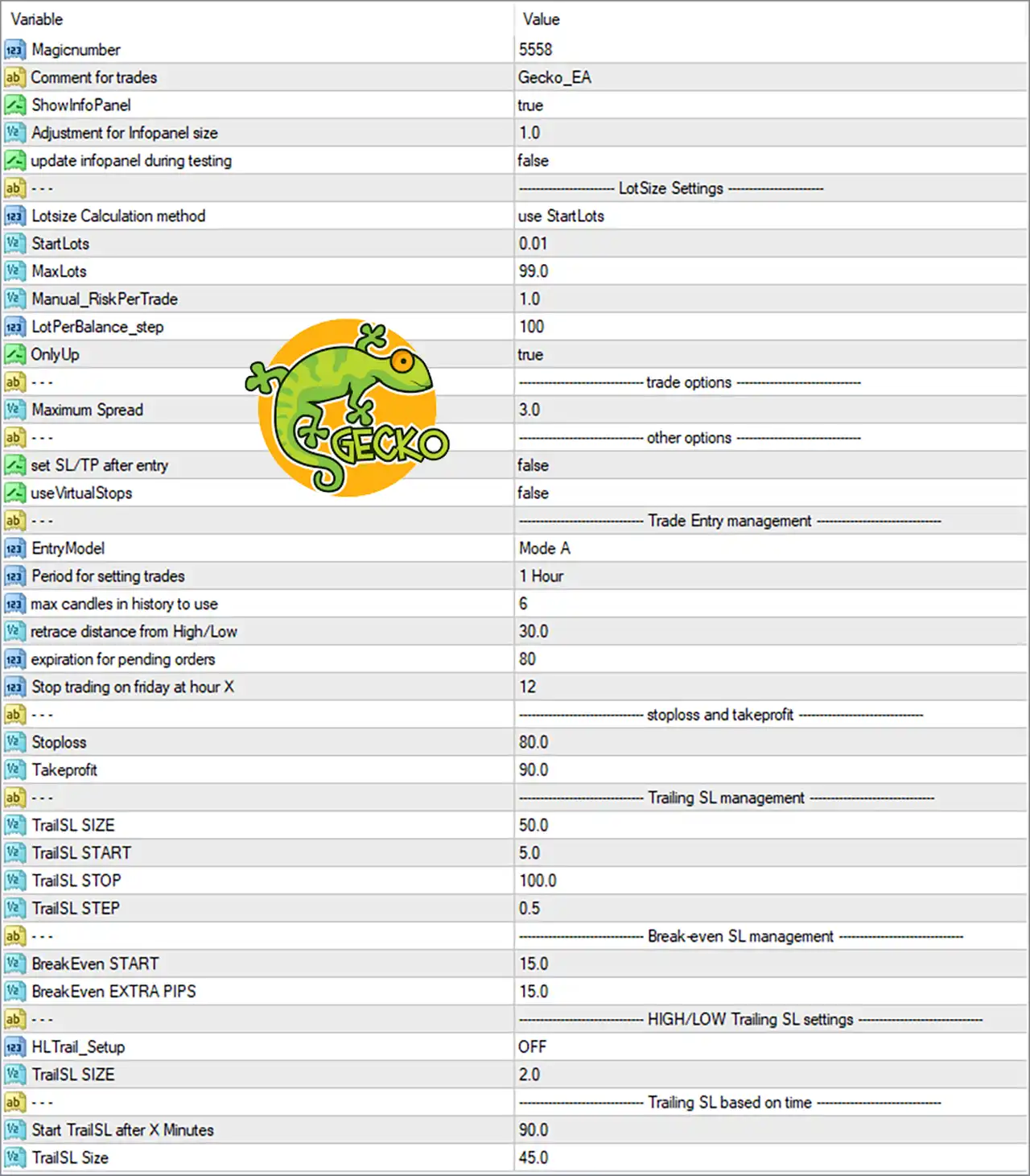
Gecko EA MT4 Settings Panel
🔢 Gecko EA MT4 Input Settings
General Settings
🔹 Magicnumber = 5558 — Sets the unique Magic Number used by Gecko EA MT4 to identify and manage its own trades separately from other Expert Advisors or manual positions.
🔹 Comment for trades = Gecko_EA — Defines the comment attached to trades opened by the EA, making Gecko EA positions easier to identify in the MT4 terminal.
🔹 ShowInfoPanel = true — Enables the EA information panel on the trading chart, allowing important EA information and operating details to be displayed.
🔹 Adjustment for Inpofiler size = 1.0 — Sets the adjustment factor for the information-panel size, with 1.0 representing the displayed default scale.
🔹 update infopanel during testing = false — Disables continuous information-panel updates during Strategy Tester operation.
LotSize Settings
🔹 Lotsize Calculation method = use StartLots — Selects the StartLots method as the active calculation approach for determining the initial trading lot size.
🔹 StartLots = 0.01 — Sets the starting lot size to 0.01 lots, providing the base volume used by the EA when opening trades.
🔹 MaxLots = 99.0 — Defines the maximum permitted lot size at 99.0 lots, preventing the calculated position volume from exceeding this value.
🔹 Manual_RiskPerTrade = 1.0 — Sets the manual risk-per-trade parameter to 1.0, providing a configurable value for the EA’s manual risk calculation mode.
🔹 LotPerBalance_step = 100 — Sets the balance step at 100, which is used by the EA when calculating lot size according to account balance increments.
🔹 OnlyUp = true — Enables the OnlyUp option, allowing the EA to apply its lot-sizing logic in an upward direction according to the selected calculation method.
Trade Options
🔹 Maximum Spread = 3.0 — Limits trading to market conditions where the spread is within the configured maximum value of 3.0.
Other Options
🔹 set SL/TP after entry = false — Disables the option to set Stop Loss and Take Profit after the trade entry has been executed.
🔹 useVirtualStops = false — Disables virtual Stop Loss and Take Profit functionality, so the EA does not use virtual stops through this setting.
⚙️ Trade Entry Management
🔹 EntryModel = Mode A — Selects Mode A as the active entry model for Gecko EA MT4.
🔹 Period for setting trades = 1 Hour — Sets the trading setup period to 1 Hour, meaning the EA uses the 1-hour timeframe as the configured period for establishing trade setups.
🔹 max candles in history to use = 6 — Limits the historical candle data used by the entry logic to 6 candles.
🔹 retrace distance from High/Low = 30.0 — Sets the configured retracement distance from the relevant High/Low level to 30.0.
🔹 expiration for pending orders = 80 — Sets the pending-order expiration parameter to 80, controlling how long pending orders remain active according to the EA’s internal logic.
🔹 Stop trading on friday at hour X = 12 — Configures Gecko EA MT4 to stop opening new trades on Friday at hour 12, helping control trading activity toward the end of the trading week.
⚙️ Stop Loss and Take Profit
🔹 Stoploss = 80.0 — Sets the Stop Loss distance to 80.0, defining the configured protective-loss distance for EA trades.
🔹 Takeprofit = 90.0 — Sets the Take Profit distance to 90.0, defining the configured profit-target distance for EA trades.
⚙️ Trailing SL Management
🔹 TrailSL SIZE = 50.0 — Sets the main trailing Stop Loss size to 50.0, controlling the configured trailing distance.
🔹 TrailSL START = 5.0 — Activates the trailing Stop Loss mechanism after the configured condition reaches 5.0.
🔹 TrailSL STOP = 10.0 — Sets the trailing Stop Loss parameter to 10.0, defining the configured protective distance used by the trailing mechanism.
🔹 TrailSL STEP = 0.5 — Sets the trailing Stop Loss adjustment step to 0.5, controlling how frequently the trailing level can be adjusted.
⚙️ Break-Even SL Management
🔹 BreakEven START = 15.0 — Configures break-even activation at 15.0, determining the point at which the EA begins applying its break-even protection logic.
🔹 BreakEven EXTRA PIPS = 15.0 — Adds 15.0 pips beyond the break-even level when the break-even management function is applied.
⚙️ HIGH/LOW Trailing SL Settings
🔹 HLTrail_Setup = OFF — Disables the High/Low-based trailing Stop Loss setup.
🔹 TrailSL SIZE = 2.0 — Sets the High/Low trailing Stop Loss size to 2.0 for this specific trailing configuration.
⚙️ Trailing SL Based on Time
🔹 Start TrailSL after X Minutes = 90.0 — Configures the time-based trailing Stop Loss to start after 90.0 minutes.
🔹 TrailSL Size = 45.0 — Sets the trailing Stop Loss size for the time-based trailing system to 45.0.
🔢 Gecko EA MT4 Risk and Trade Management Overview
The Gecko EA MT4 configuration shown above combines several layers of automated trade management. The StartLots = 0.01 setting establishes the initial position size, while MaxLots = 99.0 defines the upper lot-size limit. The EA also includes a Maximum Spread = 3.0 filter to control trading under wider spread conditions.
For trade protection, the configuration uses Stoploss = 80.0 and Takeprofit = 90.0, together with several optional management mechanisms. The main trailing system uses TrailSL SIZE = 50.0, TrailSL START = 5.0, TrailSL STOP = 10.0, and TrailSL STEP = 0.5. Break-even management is configured with BreakEven START = 15.0 and BreakEven EXTRA PIPS = 15.0.
The EA also provides additional High/Low and time-based trailing controls. In the displayed configuration, HLTrail_Setup = OFF, while the time-based trailing system is configured to start after 90.0 minutes with a TrailSL Size = 45.0.
🔢 Conclusion
Gecko EA MT4 provides a detailed collection of settings for automated trade entry, lot-size calculation, market-condition filtering, Stop Loss, Take Profit, break-even protection, and trailing Stop Loss management. The displayed configuration uses StartLots = 0.01, a Maximum Spread of 3.0, an 80.0 Stop Loss, and a 90.0 Take Profit, while also incorporating multiple trailing and break-even parameters.
Because several protection systems can operate independently, traders should understand how each setting interacts with the EA’s entry and position-management logic before changing the default configuration. Testing the selected parameters in the MT4 Strategy Tester and on a demo account can help verify how Gecko EA MT4 behaves under different market conditions.
User Reviews
Only logged in customers who have purchased this product may leave a review.
1. What is the core strategy of the Gecko EA?
The Gecko EA employs a proven breakout strategy, identifying significant recent highs and lows and trading the subsequent breakouts.
2. How does the EA manage risk?
The EA utilizes multiple risk management techniques, including strict stop-loss orders, trailing stop-loss, and a "move to break-even" feature. It also allows users to set a maximum risk per trade.
3. Is the EA suitable for beginners?
While the EA is relatively straightforward, some understanding of forex trading concepts is beneficial. However, its user-friendly interface and robust risk management features make it accessible to traders of all levels.
4. What is the recommended timeframe for the EA?
The recommended timeframe for the Gecko EA is H1 (1-hour).
5. Can I use the EA on multiple currency pairs?
While the EA is primarily designed for EURUSD, it can be used on other pairs like GBPUSD, USDJPY, and AUDUSD with appropriate parameter settings.
6. Does the EA use any risky strategies like martingale or grid trading?
No, the Gecko EA strictly avoids risky strategies like martingale or grid trading. It focuses on a conservative approach with strict stop-loss orders and other risk management features.
7. How often does the EA typically trade?
The trading frequency of the EA depends on market conditions and the specific parameters set by the user. However, it's generally not a high-frequency scalping EA.
8. What is the minimum account balance required to use the EA?
The recommended minimum account balance is $100.
9. Does the EA require optimization?
No, the EA does not require optimization. Its parameters are pre-optimized for optimal performance.
10. How can I customize the EA's settings to suit my trading style?
The EA offers various customizable parameters, including lot size, stop-loss, take-profit, and trailing stop-loss settings. Users can adjust these parameters to align with their risk tolerance and trading objectives.
🔥 Get This EA for FREE with Our Membership! 🚀🚀
Unlock access to this EA, premium Indicators, and exclusive trading tools completely FREE with any of our Membership Plans! Thousands of traders already benefit from our VIP library—join them and level up your trading instantly. Choose Your Membership:
- SPECIAL – 1 Month Membership
- GOLD – 1 Year Membership
- PREMIUM – 1 Year Membership
-
 Original price was: $500.00.$249.00Current price is: $249.00.
-
 Original price was: $888.00.$249.00Current price is: $249.00.
-
 Original price was: $439.00.$249.00Current price is: $249.00.
-
 Original price was: $9,999.00.$249.00Current price is: $249.00.
-
 10Original price was: $499.00.$69.00Current price is: $69.00.
-
 1Original price was: $11,000.00.$89.00Current price is: $89.00.
-
 1Original price was: $599.00.$59.00Current price is: $59.00.
-
 3Original price was: $999.00.$69.00Current price is: $69.00.
There are no reviews yet.