


Stability Pro MT4 v1.5 + SetFiles (Platform build 1476+)

Subscriptions for Special Plan
- 30 EA package is more economical!
- Special package with 99%
- Download 1 EA/Day

Subscriptions for Premium Membership
- Download Unlimited in 1 Year
- Get 100% Discount
- Get free access to all

Subscriptions for Gold Membership
- 1 Year Membership
- Get 100% Discount
- Access EA+Indicator+Course
Frequently bought together 🎁
Add these products to enhance your purchase




Stability Pro MT4: Advanced Smart Variable Grid System
Stability Pro MT4 is one of the most advanced, stable, and low-risk grid systems on the market, highly suitable for trading the AUDCAD, AUDNZD, and NZDCAD currency pairs. It utilizes the proprietary SVG-algorithm to determine grid positions dynamically, ensuring strong recovery factor and multiple layers of risk control.
🔶 Vendor Website: View here
About the Author
This product is compiled by Wim Schrynemakers. This Malta author has more than +14 years of experience working on MQL5, famous products such as Stability Pro MT4, The Gold Phantom EA MT5, Advanced Scalper MT4, Gold Trade Pro MT4 and other products. Among them, Stability Pro MT4 is his most famous products.

Stability Pro MT4 Features
Key Features of Stability Pro MT4
🔹 Smart Variable Grid (SVG): Uses an advanced SVG-algorithm that determines Grid positions by analyzing real market moves, not fixed distances.
🔹 Targeted Pairs: Optimized and only recommended for three highly suitable pairs: AUDCAD, AUDNZD, and NZDCAD.
🔹 Multi-Layer Safety SL: Features multiple ways to set a “worst case scenario” Stop Loss (SL) to prevent high equity drawdowns.
🔹 One Chart Setup: Supports running all three pairs simultaneously from a single EURUSD M5 chart.
🔹 Dynamic Broker Adjustment: Automatically adjusts to the broker’s suffix for seamless integration.
What is the Stability Pro MT4 trading strategy?
The core strategy is built on a dynamic, low-risk grid system driven by the SVG-algorithm. Unlike typical grid EAs, it doesn’t add trades at fixed distances. Instead, it analyzes market moves to place grid trades optimally.
🔹 Dynamic Grid Placement: The SVG-algorithm analyzes market movement to determine optimal, variable grid positions.
🔹 Historical SL Setting: Safety SL can be set based on maximum historical drawdown.
🔹 Risk Customization: Offers multiple ways to determine risk for user comfort.
🔹 Fast Recovery: Designed with a strong recovery factor to recover quickly from any potential loss.
Stability Pro MT4 Review
Stability Pro MT4 Live Results
🔶 Stability Pro EA has achieved impressive profit performance in 47 consecutive weeks of trading. The advisor is effective with a starting capital of $1,044, the risk level remains safe.
✅ Growth Rate: +11%
✅ Total Net Profit: $115.22
✅ Win Rate (% of total): 79.10%
✅ Maximum Drawdown: 15.5%
Real trading results of Stability Pro EA
🔶 Stability Pro EA has achieved impressive profit performance in 47 consecutive weeks of trading. The advisor is effective with a starting capital of $200, the risk level remains safe.
✅ Growth Rate: +29%
✅ Total Net Profit: $242.81
✅ Win Rate (% of total): 79.8%
✅ Maximum Drawdown: 33.3%
Real trading results of Stability Pro MT4
Stability Pro MT4 Backtest Results
🔶 The Stability Pro MT4 backtest trading results achieved impressive profit performance for 7 years on the AUDCAD pair.
✅ Initial Deposit: $10,000
✅ Total Net Profit: $337,082.40
✅ Win Rate: 80.45%
✅ Maximum Drawdown: 3.42%
Stability Pro EA MT4 Backtesting Results
🔶 The Stability Pro MT4 backtest trading results achieved impressive profit performance for 3 years on the AUDCAD pair.
✅ Initial Deposit: $200
✅ Total Net Profit: $238,668.79
✅ Win Rate: 81.06%
✅ Maximum Drawdown: 12.96%
Stability Pro MT4 Backtesting Results
Why Choose and Use Stability Pro MT4?
🔹 Proven Stability: Stress tested on full historical data and profitable every month since 2007.
🔹 Super Simple: Very easy to use, no setup files or special settings required for quick setup.
🔹 Maximum Drawdown Control: Multiple SL implementations help prevent high drawdowns and crashes.
🔹 Exchange Adaptability: Works on any exchange and is not affected by spreads or slippage, ensuring reliable trade execution.
🔹 Portfolio Efficiency: OneChartSetup allows running an entire three-currency pair portfolio from a single chart to increase efficiency and simplify testing.
Is Stability Pro MT4 Safe?
The Stability Pro MT4 shows significant potential in providing stable and reliable profits, becoming a reliable tool in the forex market. This advisor is highly appreciated by the community in many aspects and has won the trust of users.
⭐⭐⭐⭐⭐ Abdullah Uygar Tuna (2025.05.10): “I have been using this EA with low risk for more than a month now. Very solid, profitable, low risk so far. I am usually not a huge fan of grid systems but I am using all EAs of the author and wanted to complete the set. Turns out it is one of his best EAs. Very happy.”
Recommended Settings
Recommended settings and parameters to pay attention to from developers and experts:
| Features | Type |
|---|---|
| Trading platform | MetaTrader 4 (MT4) |
| Time frames | M5 (5 minute chart) |
| Minimum / Recommended deposit | $200 |
| Currency pairs | AUDCAD, AUDNZD, EURUSD and NZDCAD |
| Minimum / Recommended leverage | 1:100 or higher. (Can be as high as 1:30, but only at lower risk) |
| Setup files | Available |
| Product type | NoDLL / Fix |
| Additional services | Unlock and Decompile |
| Recommended brokers | Exness Broker, Icmarkets Broker |
| Recommended VPS | MyfxVPS.com ( Blue VPS, Golden VPS). Lowest Latency, 2 week Free Trial, 100% Free for 12-18 Months. |
Product Download Package?
The download package of the product suite includes:
✅ Experts: Stability Pro MT4 v1.5_fix.ex4
✅ Presets: AutoLot Profit.set
➡️ Reviewed by David Easton
Conclusion
In short, Stability Pro MT4 is a next-generation trading system powered by the Smart Variable Grid (SVG) algorithm, designed to trade AUDCAD, AUDNZD, and NZDCAD with dynamic precision and minimal risk. With multi-layer safety, one-chart setup, and proven long-term results, it delivers stable, consistent profits with full capital protection. A perfect blend of innovation and reliability — built for traders who value safety and steady growth.
🔢 Stability Pro MT4 Settings Guide
Stability Pro MT4 is an automated trading Expert Advisor designed with a strong focus on configurable trade management, account protection, position sizing and flexible execution settings.
The EA provides controls for Buy and Sell trading, spread filtering, virtual Take Profit, lot-size calculation, maximum drawdown protection, account-balance-based position sizing, and broker lot limitations.
With dedicated risk-management parameters and customizable trading controls, Stability Pro MT4 gives traders the ability to adapt the EA configuration to different account sizes and trading environments.
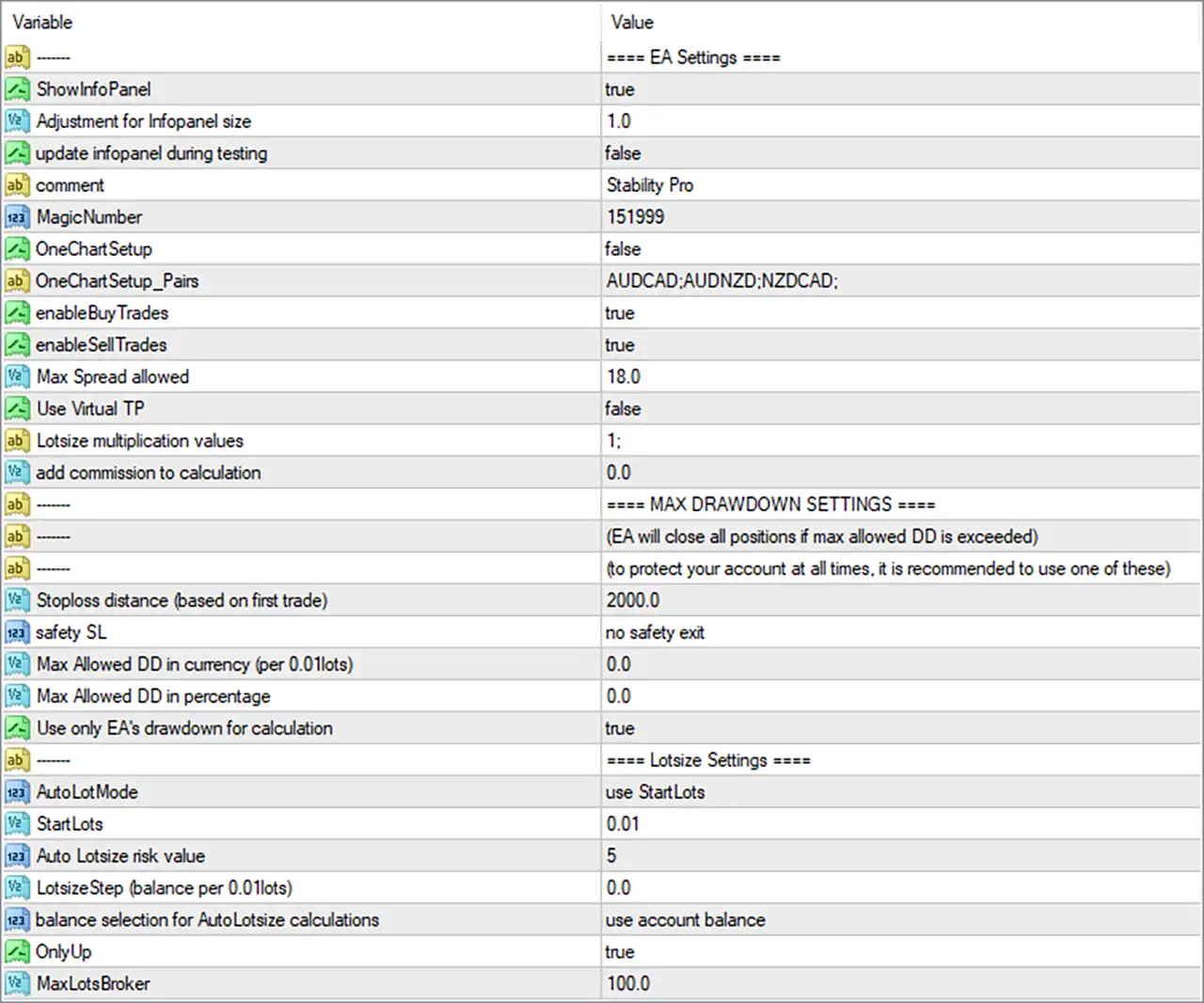
Stability Pro MT4 Settings Panel
🔢 Stability Pro MT4 Input Settings
⚙️ EA Settings
🔹 ShowInfoPanel = true — Enables the EA information panel on the MT4 chart, allowing important trading information to be displayed.
🔹 Adjustment for Infopanel size = 1.0 — Sets the information-panel size adjustment to 1.0, defining the configured display scale.
🔹 update infopanel during testing = false — Disables information-panel updates while the EA is running during Strategy Tester or backtesting operations.
🔹 comment = Stability Pro — Sets Stability Pro as the trade comment used to identify positions opened by the EA.
🔹 MagicNumber = 151999 — Assigns the unique Magic Number 151999, allowing the EA to identify and manage its own trades.
🔹 OneChartSetup = false — Disables the One Chart Setup mode in the displayed configuration.
🔹 OneChartSetup_Pairs = AUDCAD:AUDNZD:NZDCAD: — Defines the configured One Chart Setup symbols as AUDCAD, AUDNZD, and NZDCAD.
🔹 enableBuyTrades = true — Enables Buy trades, allowing the EA to open long positions when its trading conditions are satisfied.
🔹 enableSellTrades = true — Enables Sell trades, allowing the EA to open short positions when its trading conditions are satisfied.
🔹 Max Spread allowed = 18.0 — Sets the maximum allowed spread parameter to 18.0, providing a spread filter for trade execution.
🔹 Use Virtual TP = false — Disables the use of a virtual Take Profit mechanism in the displayed configuration.
🔹 Lotsize multiplication values = 1: — Sets the displayed lot-size multiplication sequence to 1:.
🔹 add commission to calculation = 0.0 — Sets the commission adjustment used in calculations to 0.0.
⚙️ Maximum Drawdown Settings
The EA’s MAX DRAWDOWN SETTINGS section states that the EA can close all positions if the maximum allowed drawdown is exceeded. The displayed panel also recommends using one of the available maximum-drawdown protection methods to help protect the account.
🔹 Stoploss distance (based on first trade) = 2000.0 — Sets the Stop Loss distance based on the first trade to 2000.0.
🔹 safety SL = no safety exit — Sets the safety Stop Loss option to no safety exit, meaning no safety-exit mode is selected in the displayed configuration.
🔹 Max Allowed DD in currency (per 0.01lots) = 0.0 — Sets the maximum allowed drawdown measured in currency per 0.01 lots to 0.0.
🔹 Max Allowed DD in percentage = 0.0 — Sets the maximum allowed drawdown percentage to 0.0.
🔹 Use only EA’s drawdown for calculation = true — Enables the option to calculate drawdown using only the drawdown associated with the EA.
⚙️ Lotsize Settings
🔹 AutoLotMode = use StartLots — Selects use StartLots as the active lot-size calculation method.
🔹 StartLots = 0.01 — Sets the starting trading volume to 0.01 lots.
🔹 Auto Lotsize risk value = 5 — Sets the Auto Lotsize risk value to 5 for the EA’s automatic position-sizing calculations.
🔹 LotsizeStep (balance per 0.01lots) = 0.0 — Sets the balance step associated with each 0.01 lots to 0.0.
🔹 balance selection for AutoLotsize calculations = use account balance — Configures AutoLotsize calculations to use the account balance as the balance reference.
🔹 OnlyUp = true — Enables the OnlyUp option in the lot-size management system.
🔹 MaxLotsBroker = 100.0 — Sets the maximum broker lot-size limit used by the EA to 100.0 lots.
🔢 Stability Pro MT4 Risk Management Overview
Stability Pro MT4 includes several configurable layers for managing position size and account drawdown. The displayed setup uses StartLots = 0.01 and selects use StartLots as the AutoLotMode. The EA also uses an Auto Lotsize risk value of 5 and selects account balance as the reference for AutoLotsize calculations.
The EA provides dedicated maximum-drawdown controls, including Stoploss distance = 2000.0, Max Allowed DD in currency (per 0.01lots) = 0.0, and Max Allowed DD in percentage = 0.0. The setting Use only EA’s drawdown for calculation = true limits the drawdown calculation to the EA’s own trading activity according to the parameter description.
For execution conditions, Max Spread allowed = 18.0 provides the configured spread limit, while Use Virtual TP = false means virtual Take Profit is disabled in the displayed setup.
🔢 Trading Direction and Symbol Configuration
Both trading directions are enabled in the displayed configuration:
🔹 Buy Trading = enabled — enableBuyTrades = true, allowing Buy positions.
🔹 Sell Trading = enabled — enableSellTrades = true, allowing Sell positions.
The screenshot also contains a One Chart Setup symbol list:
🔹 AUDCAD — Included in the OneChartSetup_Pairs list.
🔹 AUDNZD — Included in the OneChartSetup_Pairs list.
🔹 NZDCAD — Included in the OneChartSetup_Pairs list.
However, OneChartSetup = false, so the One Chart Setup feature itself is disabled in the displayed configuration.
🔢 Conclusion
Stability Pro MT4 offers a detailed configuration framework for automated trading, combining trade-direction controls, spread filtering, virtual Take Profit management, maximum drawdown protection, and flexible lot-size calculations.
User Reviews
Only logged in customers who have purchased this product may leave a review.
❓ What is Stability Pro MT4 and how does it work?
Stability Pro MT4 is an advanced, low-risk grid trading Expert Advisor (EA) designed for AUDCAD, AUDNZD, and NZDCAD pairs. It uses the Smart Variable Grid (SVG) algorithm to determine grid positions dynamically — analyzing real market movements instead of using fixed distances. This allows for adaptive entries, faster recovery, and consistent profit stability.
❓ What makes the SVG-algorithm different from traditional grid systems?
Unlike conventional grid EAs that place trades at preset intervals, the SVG-algorithm analyzes live price action to identify the most efficient grid positions. This innovation reduces overexposure, improves accuracy, and allows the EA to adapt to varying market volatility for safer and more efficient trade management.
❓ Which currency pairs does Stability Pro MT4 trade best?
Stability Pro MT4 is specifically optimized for AUDCAD, AUDNZD, and NZDCAD — three highly correlated and stable currency pairs. This selective optimization ensures low volatility exposure and high recovery capability, which are essential for grid-based strategies.
❓ What type of trading strategy does Stability Pro MT4 use?
The EA implements a dynamic grid trading strategy that uses variable grid spacing, multi-layer Stop Loss protection, and historical drawdown-based safety limits. It’s designed for steady, controlled growth rather than aggressive trading, making it suitable for traders who prefer stability over high-risk returns.
❓ How does Stability Pro MT4 manage risk and drawdown?
Stability Pro MT4 incorporates multi-layer Stop Loss systems, historical SL setting, and dynamic position sizing to minimize risk. Users can define their comfort level with different risk customization modes, while the EA’s recovery factor ensures that losses are quickly offset by future profits.
❓ What are the live and backtest results of Stability Pro MT4?
Live Results: Over 47 consecutive profitable weeks, achieving up to +29% growth with a maximum drawdown of 33.3% on a $200 account.
Backtest Results: On AUDCAD, a $10,000 deposit grew to $337,082 over 7 years with just 3.42% drawdown.
These results show remarkable consistency and safety over both live and historical periods.
❓ Is Stability Pro MT4 beginner-friendly?
Yes — Stability Pro MT4 is extremely user-friendly. It requires no complex setup files, supports One Chart Setup (run all pairs from one EURUSD M5 chart), and automatically adjusts to the broker’s suffix. Traders only need to attach it once, and the EA handles all operations automatically.
❓ Does Stability Pro MT4 use dangerous techniques like Martingale or Hedging?
No — Stability Pro MT4 does not use Martingale or aggressive hedging. Its risk is controlled through variable grid logic and smart SL layers, focusing on safe, sustainable growth. This makes it suitable even for traders who typically avoid grid systems due to high-risk exposure.
❓ What is the minimum deposit and leverage required?
The minimum recommended deposit is $200, but higher balances (e.g., $500 or more) offer smoother performance and recovery. The EA operates efficiently with a leverage of 1:100 or higher, though it can run on 1:30 leverage at lower risk settings.
🔥 Get This EA for FREE with Our Membership! 🚀🚀
Unlock access to this EA, premium Indicators, and exclusive trading tools completely FREE with any of our Membership Plans! Thousands of traders already benefit from our VIP library—join them and level up your trading instantly. Choose Your Membership:
- SPECIAL – 1 Month Membership
- GOLD – 1 Year Membership
- PREMIUM – 1 Year Membership
-
 Original price was: $8,000.00.$249.00Current price is: $249.00.
-
 Original price was: $7,000.00.$249.00Current price is: $249.00.
-
 Original price was: $8,000.00.$249.00Current price is: $249.00.
-
 Original price was: $25,000.00.$249.00Current price is: $249.00.
-
 10Original price was: $499.00.$69.00Current price is: $69.00.
-
 1Original price was: $1,599.00.$59.00Current price is: $59.00.
-
 1Original price was: $11,000.00.$89.00Current price is: $89.00.
-
 0Original price was: $399.00.$59.00Current price is: $59.00.
There are no reviews yet.