









Madness EA MT5 (Latest version) – GroupBuy
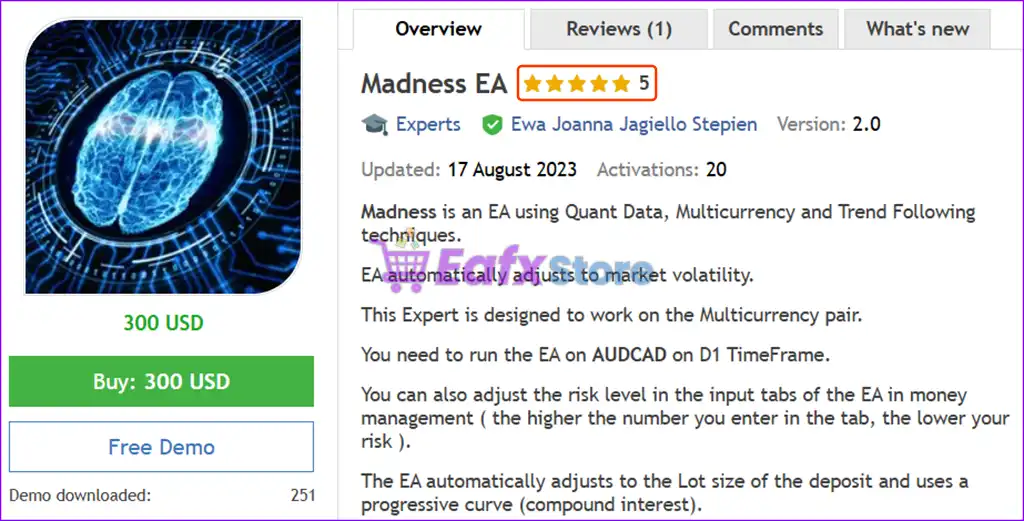
Madness EA is an automated and optimized robot trading with AUDCAD pair. Real trading performance verified for 3 years (2020 - 2023).
Select a variant to see availability.
Madness EA MT5 – Advanced Multicurrency Quant Trading with Trend Following Strategy
Madness EA is a cutting-edge Expert Advisor (EA) that combines quantitative data analysis, multicurrency trading, and trend-following algorithms to deliver long-term growth with low-risk exposure. Built to operate automatically on the MetaTrader 5 platform, this EA is engineered for traders who demand precision, adaptability, and sustainable performance.
🔶 Vendor Website: Click here
🔶 This is GroupBuy ==> How to Join
About the Author
This product is compiled by Ewa Joanna Jagiello Stepien. This author has more than +3 years of experience working on MQL5 with many famous products such as Madness EA, Golden Phantom EA MT5, Solution EA MT5 and other advisors. Among them, Madness EA is his best performing products.
Madness EA MT5 Overview
Key Features of Madness EA MT5
🔹Quantitative Data-Driven Trading – Madness EA uses Quantitative Analysis and Multi-Currency Trend Following techniques to generate high-probability trades based on market behavior.
🔹Adaptive to Market Volatility – The algorithm automatically adjusts to changing market volatility, ensuring smarter entries and exits across different market conditions.
🔹Multicurrency Architecture – Although launched on AUDCAD, the EA analyzes multiple currencies for broader context and smarter decision-making.
🔹Progressive Lot Sizing with Compound Growth – Uses a compound interest model by adjusting lot sizes relative to account balance for progressive and sustainable growth.
🔹Daily Timeframe Optimization – Designed to run on AUDCAD (D1 timeframe) for optimal performance and long-term trading stability.
🔹Smart Risk Management Control – Customizable risk level in the EA’s input tab, the higher the value entered, the lower the risk, offering full user control over exposure.
Additional Features
🔹Automatic Lot Size Scaling – EA detects your account balance and automatically adjusts lot sizes to match, removing manual configuration hassles.
🔹Support for Non-Standard Broker Symbols – Easily input prefixes or suffixes like “a.AUDCAD” or “AUDCADm” in the EA settings to ensure compatibility with any broker.
🔹Hedging Account Support – Fully compatible with hedging accounts, offering more flexibility in trading strategies.
Madness EA MT5 Review
Madness EA is a high-frequency trading robot for MetaTrader 5 (MT5), optimized for long-term compounding on a small starting capital. With a highly scalable strategy and multi-symbol support, the EA turned $500 into over $37,000 in just three years.
✅ Initial Deposit: $500
✅ Net Profit: $37,065.91
✅ Balance Drawdown Maximal: 9.95%
A total return of over 7,300% in 3 years on a small deposit showcases the strong compounding ability and profit retention of the EA.
Madness EA MT5 Backtest Trading Results
Why choose and use Madness EA?
🔹Hands-Free Quant Trading – Leverages complex quant models without manual input, making it ideal for traders who prefer fully automated solutions.
🔹Stable Long-Term Growth Strategy – Built to trade slow and steady using compound growth logic, ideal for account stability and long-term compounding returns.
🔹Emotional-Free Risk Management – Dynamically scales lot sizes and allows precise control of risk levels for conservative and aggressive traders alike.
🔹Broker Compatibility – Easily adaptable to any broker using custom symbol formatting, ensuring seamless deployment across platforms.
🔹Ideal for Busy and Systematic Traders – Perfect for users looking for a long-term, low-maintenance Expert Advisor with smart, self-adjusting behavior.
User Reviews and Feedback
Madness EA demonstrates remarkable potential in delivering stable and reliable profits, making it a reliable tool in the forex market. Madness EA is highly regarded by the MQL5 community in many aspects and has gained the trust of its users.
➡️ Herrryyp (2023.09.02): “This is a good EA, profitable, easy to use, works well.”
Trading Specifications
Recommended settings and parameters to pay attention to from developers and experts:
| Features | Type |
|---|---|
| Trading platform | MetaTrader 5 (MT5) |
| Time frames | H1 (60 minute chart) |
| Currency pairs | AUDCAD |
| Minimum / Recommended deposit | $500 |
| Minimum / Recommended leverage | 1:50 ( recommend 1:100 or more ) |
| Additional services | Unlock and Decompile |
| Recommended brokers | Exness Broker, Icmarkets Broker |
| Recommended VPS | MyfxVPS.com (Blue VPS, Golden VPS). Lowest Latency, 2 week Free Trial, 100% Free for 12-18 Months. |
➡️ Reviewed by David Easton
Product Download Package?
The download package of the product suite includes:
✅ Setting (If Any).docx
✅ Installation Guide.docx
Conclusion
In short, Madness EA stands out as a premium multicurrency Expert Advisor that blends quantitative trading strategies with adaptive trend-following intelligence. Designed for the MetaTrader 5 platform, this EA provides a fully automated, low-risk trading solution that’s perfect for traders seeking consistent long-term results. With its ability to analyze multiple markets, dynamically adjust to volatility, and scale lot sizes through a compound growth model, Madness EA delivers an optimized trading experience for both novice and professional users.
🔢 Madness EA MT5 Settings Explained – Complete Parameter Guide
Madness EA is an automated MetaTrader 5 Expert Advisor (EA) that combines trend analysis, currency strength filtering, averaging management and built-in risk protection.
With configurable Take Profit, Trailing Stop, Drawdown protection, Currency Strength filters, and lot management, the EA offers traders a flexible framework for automated Forex trading while maintaining comprehensive risk control.
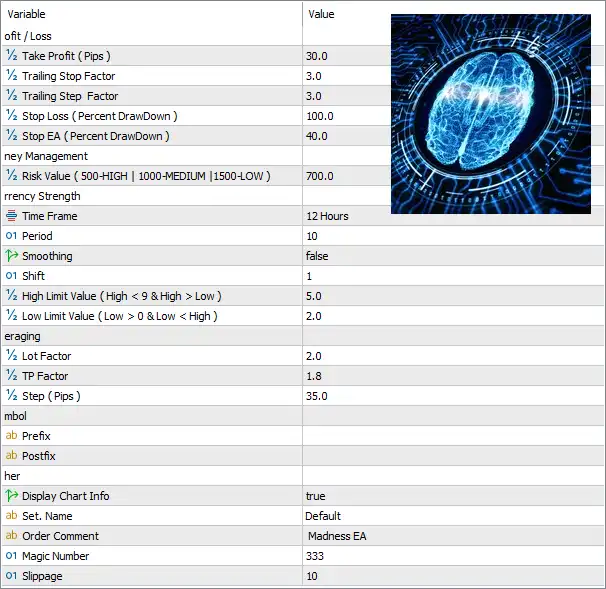
- Madness EA MT5 Settings
🔢 Installation Panel Parameters
Below are the details of the parameters in the advisor’s trading system settings table:
- Madness EA MT5 Settings Panel
🔶 Profit / Loss Settings
🔹 Take Profit (Pips) = 30.0 – Sets the default Take Profit target to 30.0 pips for each completed trade.
🔹 Trailing Stop Factor = 3.0 – Defines the multiplier used to calculate the Trailing Stop distance dynamically.
🔹 Trailing Step Factor = 3.0 – Sets the multiplier used for each Trailing Stop adjustment as the market moves in favor of the trade.
🔹 Stop Loss (Percent DrawDown) = 100.0 – Closes positions if the account reaches a maximum drawdown of 100.0%.
🔹 Stop EA (Percent DrawDown) = 40.0 – Automatically stops the EA from opening new trades once the account reaches a 40.0% drawdown.
🔶 Money Management
🔹 Risk Value (500-HIGH | 1000-MEDIUM | 1500-LOW) = 700.0 – Sets the internal money management risk level to 700.0, representing a risk level between the recommended HIGH (500) and MEDIUM (1000) profiles.
🔶 Currency Strength Settings
🔹 Time Frame = 12 Hours – Uses the 12-hour timeframe for Currency Strength analysis.
🔹 Period = 10 – Calculates Currency Strength using a lookback period of 10.
🔹 Smoothing = false – Disables smoothing in the Currency Strength calculation.
🔹 Shift = 1 – Uses data shifted by 1 candle for indicator calculations.
🔹 High Limit Value (High < 9 & High > Low) = 5.0 – Sets the upper Currency Strength threshold to 5.0 for identifying strong currencies.
🔹 Low Limit Value (Low > 0 & Low < High) = 2.0 – Sets the lower Currency Strength threshold to 2.0 for identifying weak currencies.
🔶 Averaging Settings
🔹 Lot Factor = 2.0 – Multiplies the lot size by 2.0 for each averaging position.
🔹 TP Factor = 1.8 – Uses a 1.8 multiplier when calculating the Take Profit level for averaged positions.
🔹 Step (Pips) = 35.0 – Opens the next averaging position every 35.0 pips of adverse price movement.
🔶 Symbol Settings
🔹 Prefix = (blank) – No broker-specific symbol prefix is required.
🔹 Postfix = (blank) – No broker-specific symbol suffix is required.
🔶 Other Settings
🔹 Display Chart Info = true – Displays the EA information panel and trading statistics directly on the chart.
🔹 Set. Name = Default – Loads the default preset configuration.
🔹 Order Comment = Madness EA – Adds the comment “Madness EA” to every order opened by the Expert Advisor.
🔹 Magic Number = 333 – Assigns the unique Magic Number 333 for identifying trades managed by the EA.
🔹 Slippage = 10 – Allows a maximum execution slippage of 10 points during order placement.
🔢 Conclusion
Madness EA MT5 is a versatile automated trading system that combines Currency Strength analysis, averaging logic, dynamic trailing stops, and configurable risk management into a single Expert Advisor. Its flexible parameters allow traders to fine-tune trade entries, money management, drawdown protection, and averaging behavior, making it suitable for both conservative and aggressive automated trading strategies on MetaTrader 5.
🔢 FAQs
❓ What is the default Take Profit in Madness EA MT5?
The default Take Profit is set to 30.0 pips.
❓ How does the Risk Value parameter work?
The Risk Value controls the EA’s internal money management. Lower values represent higher risk, while higher values produce a more conservative trading approach.
❓ Does Madness EA MT5 use Currency Strength analysis?
Yes. The EA analyzes Currency Strength using a 12-hour timeframe with a 10-period calculation by default.
❓ Can Madness EA MT5 perform averaging trades?
Yes. The EA supports averaging with configurable Lot Factor, TP Factor, and 35.0-pip averaging intervals.
❓ Does Madness EA MT5 include drawdown protection?
Yes. The EA can stop opening new trades after a 40.0% drawdown and includes configurable drawdown-based Stop Loss protection for enhanced account safety.
User Reviews
Only logged in customers who have purchased this product may leave a review.
1. What is Madness EA MT5 designed for?
Madness EA MT5 is a fully automated, quantitative trading robot developed for long-term, low-risk trading. It uses trend-following and multicurrency analysis to identify high-probability trades—optimized for AUDCAD on the D1 timeframe.
2. Which currency pairs and timeframes does Madness EA support?
Although it is optimized for AUDCAD on the Daily (D1) timeframe, the EA analyzes multiple symbols in the background to support smarter trade decisions.
3. What is the minimum deposit required to run Madness EA?
The EA can be started with a minimum deposit of $500, making it accessible to both small and large accounts.
4. How does the EA handle risk and money management?
Madness EA uses a smart risk control system, allowing users to customize their risk level in the settings. It also features automatic lot size scaling based on account balance for consistent compounding.
5. Is Madness EA beginner-friendly?
Yes. The EA is easy to set up, automatically adjusts lot sizes, and comes with preconfigured settings. It also supports non-standard broker symbols, minimizing compatibility issues.
6. Does the EA support hedging accounts?
Yes, Madness EA is fully compatible with hedging accounts, offering more flexibility for traders who prefer this account type.
7. Can the EA adapt to changing market conditions?
Absolutely. Madness EA features adaptive volatility filters that dynamically adjust trading logic to current market behavior, reducing risk during unpredictable conditions.
8. How profitable is Madness EA based on backtests?
Backtests show that with a $500 initial deposit, the EA generated over $37,000 in profit in 3 years, with a maximum drawdown of only 9.95%, showcasing both strong compounding and risk control.
9. Is the EA suitable for full automation and set-and-forget trading?
Yes, it is designed for hands-free, fully automated trading. Once set up, it requires minimal intervention, making it ideal for busy traders and long-term portfolio strategies.
-
 Original price was: $699.00.$89.00Current price is: $89.00.
 -
 Price range: $80.00 through $599.00
 -
 Price range: $70.00 through $599.00
 -
 Original price was: $470.00.$89.00Current price is: $89.00.
-
 0
0 -
 2
2 -
 5Price range: $89.00 through $599.00
 -
 0
0
There are no reviews yet.