




Syna EA MT5 (Latest version) – GroupBuy
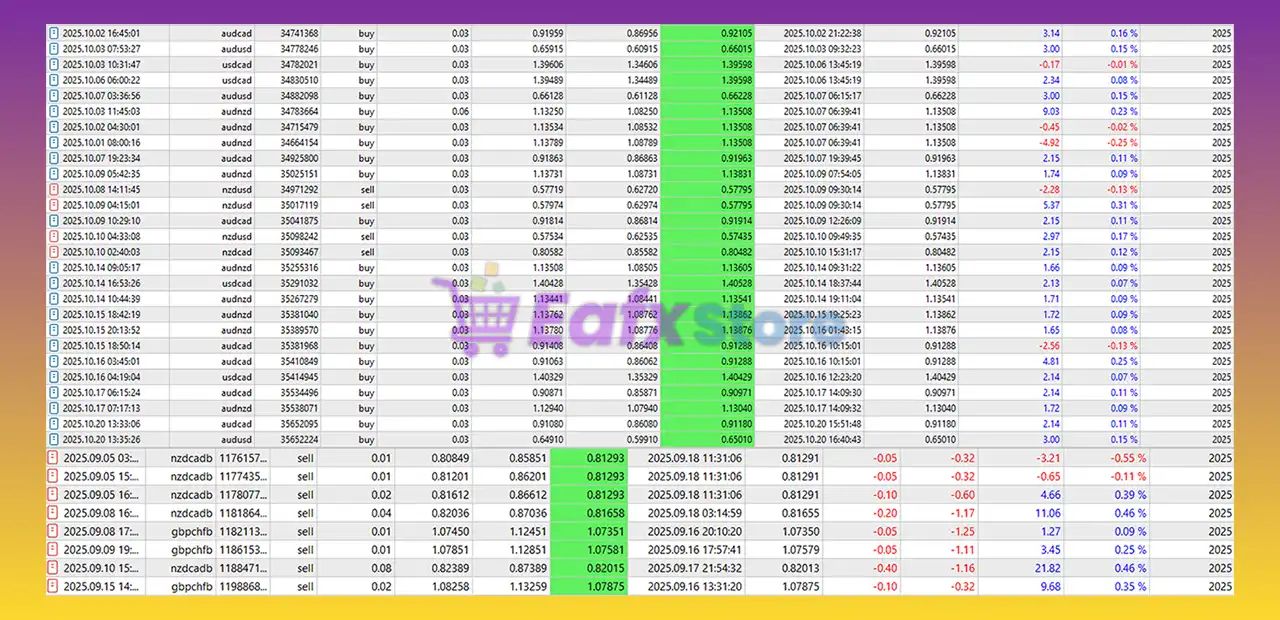
Syna EA is an AI powered expert advisor and auto trades on AUDCAD, AUDNZD, NZDCAD pairs. Verified performance on real account.
Select a variant to see availability.
Syna EA MT5: Breakthrough AI Trading with Automated EAs
Syna EA is a next-generation automated Expert Advisor (EA) powered by persistent AI intelligence with true long-term memory. Unlike static systems, it continuously learns from every trade, adapting to market shifts in real time. Designed for automated, manual, or hybrid trading, Syna EA enhances stability, adaptability, risk management, and indicator-based analysis across multiple accounts and assets.
🔶 Vendor Website: View here
🔶 This is GroupBuy ==> How to Join
About the Author
This product is compiled by William Brandon Autry. This author has more than +4 years of experience working on MQL5 with many famous products such as Syna EA MT5, AiQ EA MT5, Mean Machine EA MT5, Byrdi EA MT5 and other advisors. Among them, Syna EA is his best performing products.
Key Features of Syna EA for MT5
🔹 Persistent AI Memory Core: Remembers trades, reasoning and outcomes across sessions for evolving precision.
🔹 Master-Agent Architecture: One intelligence coordinates multiple accounts and strategies seamlessly.
🔹 Universal Strategy Integration: Works with any EA, manual method, indicator or asset class.
🔹 Portfolio Risk Synchronization: Distributes intelligence to reduce concentrated drawdown risk.
🔹 Adaptive Intelligence Loop: Continuously refines decisions using live market feedback.
What is the Syna MT5 trading strategy?
🔹 Context-Aware Decision Engine: Evaluates full historical reasoning before executing trades.
🔹 Multi-Account Coordination Model: Aligns diverse risk profiles under one adaptive intelligence.
🔹 Dynamic Regime Recognition: Detects structural shifts and adjusts trading sensitivity.
🔹 Hybrid Automation Flexibility: Supports fully automated, manual or blended execution modes.
🔹 Indicator-Aware Analysis Layer: Reads and interprets chart indicators with persistent context.
Syna EA MT5 Review
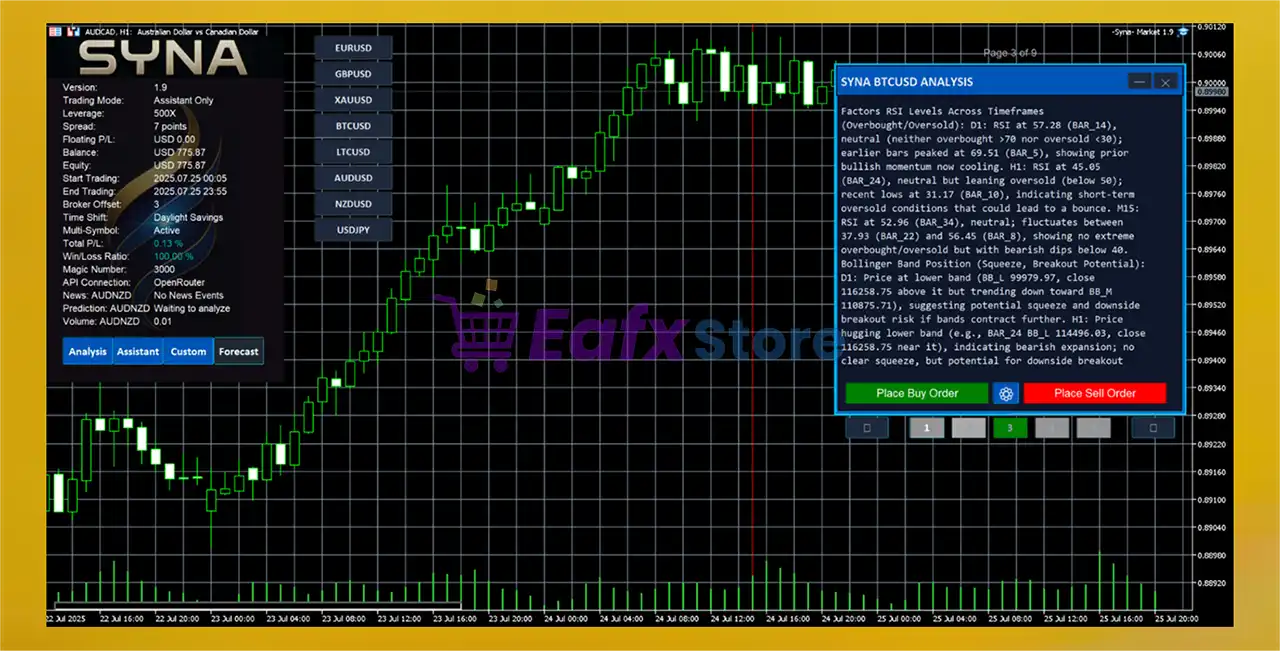
Syna provides 24/7 automated trading with AI-driven entries, exits, and advanced risk management (AI Position Management – APM). Simultaneously, its Interactive Assistant mode offers real-time analysis, custom queries, and position management guidance via an intuitive on-screen interface.
Syna MT5 Review
Syna EA MT5 Review
Why Choose & Use Syna EA?
🔹 Institutional-Grade Risk Logic: Diversifies intelligence across assets and accounts.
🔹 Continuous Self-Improvement: Learns from outcomes, compounding edge over time.
🔹 Reduced Operational Costs: Centralized intelligence lowers redundant processing needs.
🔹 Long-Term Stability Focus: Built for adaptive consistency, not short-term hype.
🔹 Marketplace-Ready AI Ecosystem: Ideal for serious traders seeking evolving automation.
Is Syna EA MT5 Safe?
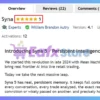
Syna EA shows significant potential in providing stable and reliable profits, making it a reliable tool in the forex market. The advisor is highly appreciated by the MQL5 community in many aspects and has won the trust of users.
➡️ Konrad Mieszkowski (2025.09.21): “From the very beginning, when William released the first version of Mean Machine back in the early AI era – before LLMs even existed – I have been using his solutions. I can say with full confidence that every new EA from him is another step forward in the world of automated trading.”
➡️ LUIS ALBERTO BIANUCCI (2025.09.21): “The support I received from the author was very good. And the EA works very well.”
➡️ TONOVONOT (2025.09.18): “Great tool with super support and unlimited possibilities! Syna is a real breakthrough in trading with artificial intelligence! Integration with various APIs works great, plus automatic key management is convenient—you don’t have to enter them every time! Real-time market analysis helps you make smart decisions, and the ability to input images for chart analysis is just amazing.”
Trading Specifications
Recommended settings and parameters to pay attention to from developers and experts:
| Features | Type |
|---|---|
| Trading platform | MetaTrader 5 (MT5) |
| Time frames | M5 (5 minute chart) |
| Currency pairs | AUDCAD, AUDNZD, NZDCAD |
| Minimum / Recommended deposit | $100 |
| Minimum / Recommended leverage | Any |
| Product type | Original version |
| Additional services | Unlock and Decompile |
| Recommended brokers | Exness Broker, Icmarkets Broker |
| Recommended VPS | MyfxVPS.com (Blue VPS, Golden VPS). Lowest Latency, 2 week Free Trial, 100% Free for 12-18 Months. |
➡️ Reviewed by David Easton
Product Download Package?
The download package of the product suite includes:
✅ Setting (If Any).docx
✅ Installation Guide.docx
Conclusion
In short, Syna stands at the forefront of innovation in algorithmic trading by combining a fully automated AI trading system with an interactive AI assistant, creating an all-in-one intelligent trading environment. Designed for MetaTrader 5, Syna EA integrates a powerful multi-AI architecture, allowing traders to automate decisions, perform real-time market analysis, and manage risk—all backed by artificial intelligence.
🔢 Syna EA MT5 – Complete Settings & Parameters Guide
Syna EA is an advanced AI-powered Expert Advisor for MetaTrader 5 that integrates multiple artificial intelligence models, adaptive trading logic, volatility filtering, XGBoost optimization, news analysis and smart position management.
Designed for prop firm trading and professional forex traders, Syna EA MT5 combines automated execution with AI-assisted market analysis for intelligent trading decisions.
- Syna EA MT5 Settings
🔢 Syna EA MT5 Installation & Setup Settings
Below are the details of the parameters in the advisor’s trading system settings table:
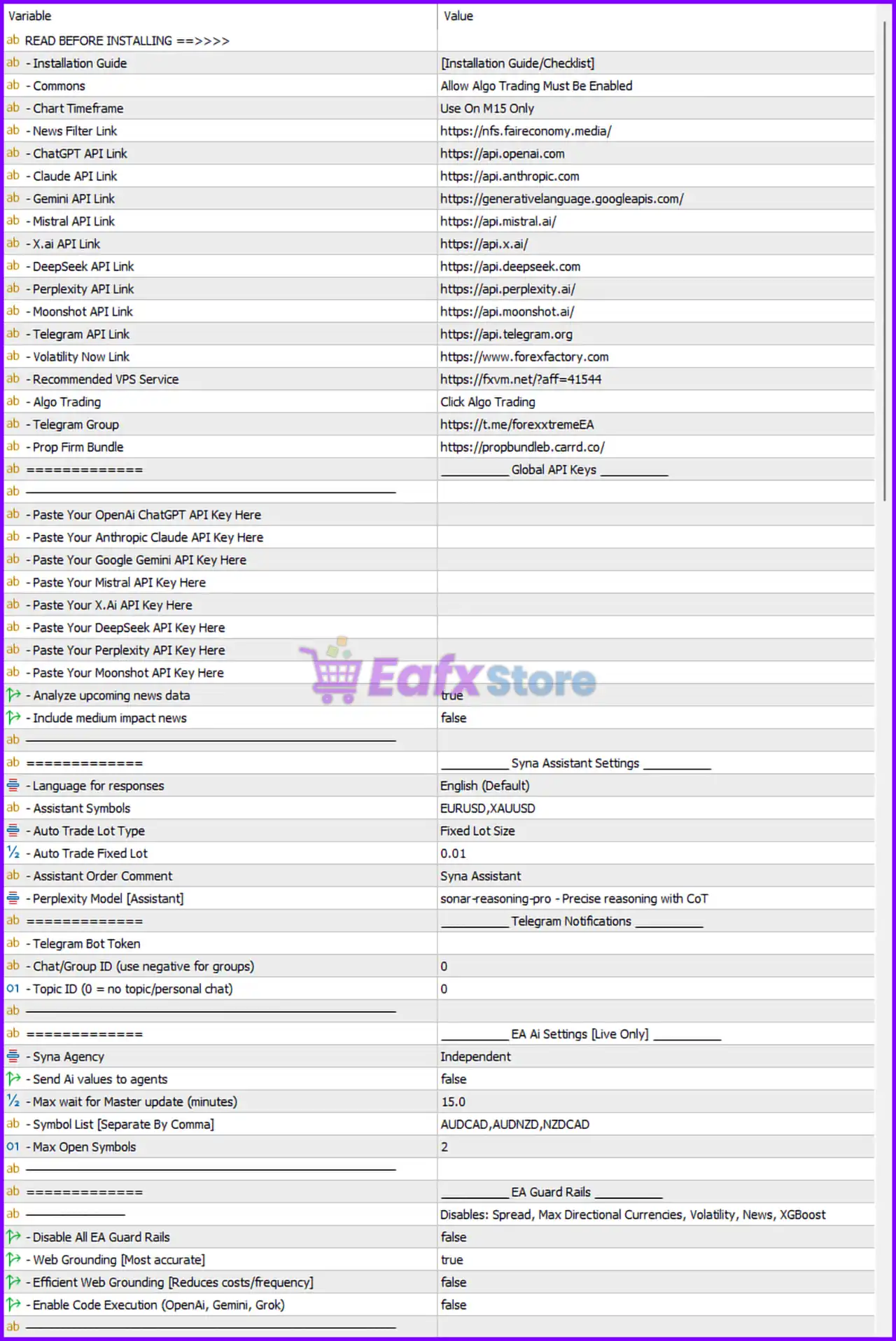
- Syna EA MT5 Settings Panel
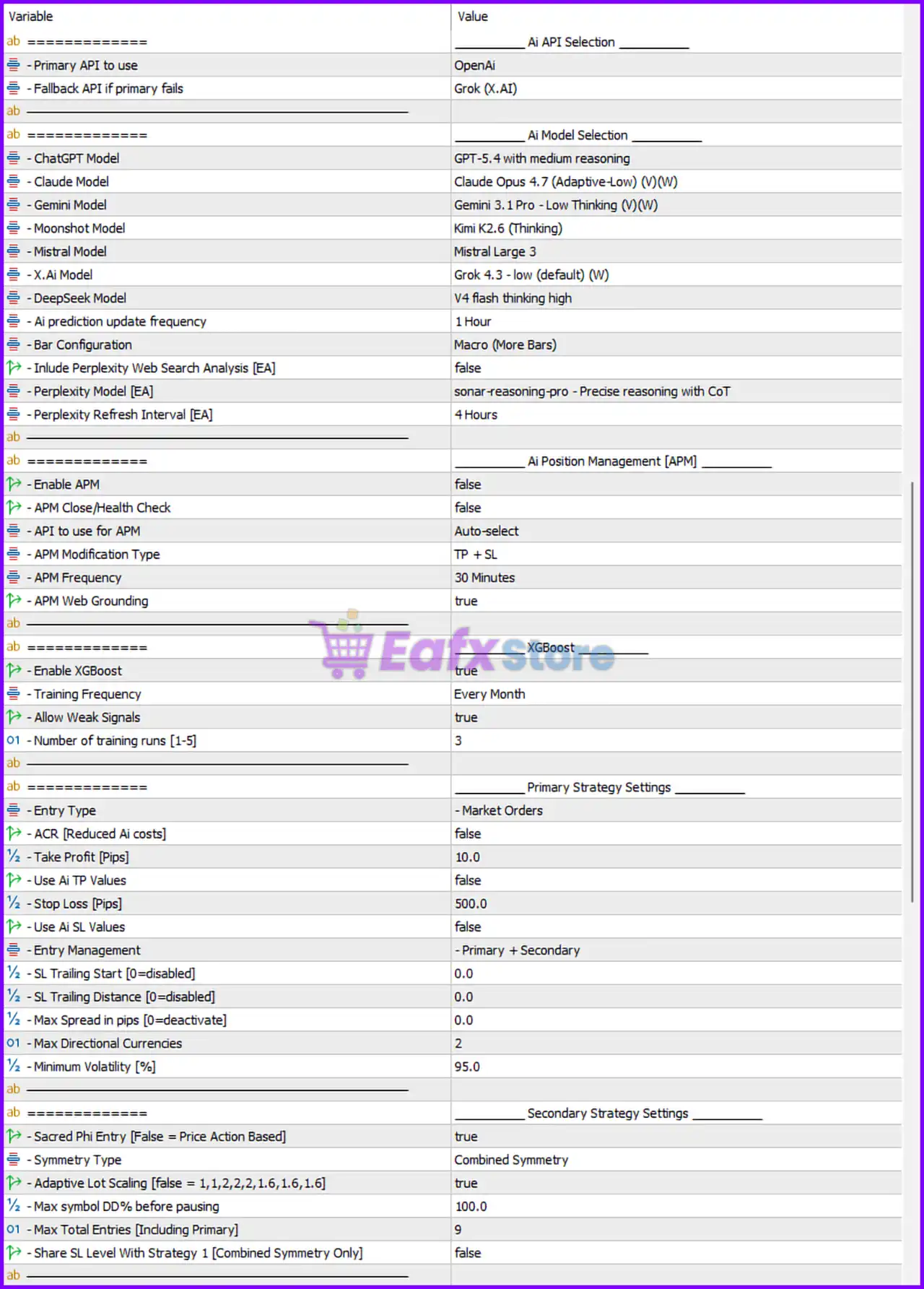
- Syna EA Settings Panel
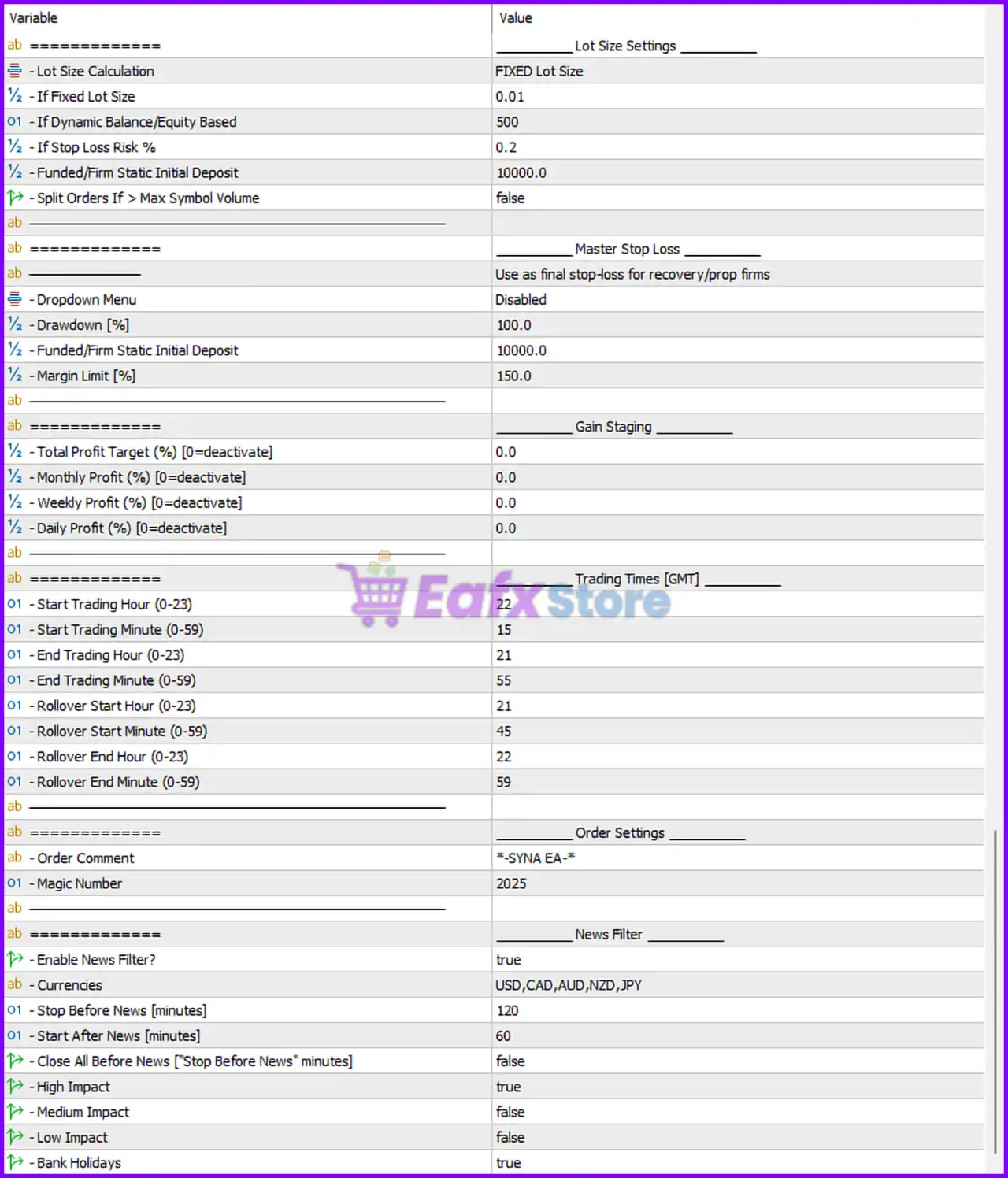
- Syna MT5 Settings Panel
🔹 Installation Guide = [Installation Guide/Checklist] — Reference section containing setup instructions for the EA.
🔹 Commons = Allow Algo Trading Must Be Enabled — Algo Trading must be enabled inside MT5 for the EA to function properly.
🔹 Chart Timeframe = Use On M15 Only — Recommended timeframe for running the EA is M15.
🔹 News Filter Link = https://nfs.faireconomy.media/ — Economic calendar source used for news filtering.
🔹 ChatGPT API Link = https://api.openai.com — API endpoint for OpenAI integration.
🔹 Claude API Link = https://api.anthropic.com — API endpoint for Anthropic Claude integration.
🔹 Gemini API Link = https://generativelanguage.googleapis.com/ — Google Gemini API endpoint.
🔹 Mistral API Link = https://api.mistral.ai/ — API endpoint for Mistral AI.
🔹 X.ai API Link = https://api.x.ai/ — API endpoint for X.AI integration.
🔹 DeepSeek API Link = https://api.deepseek.com — API endpoint for DeepSeek AI.
🔹 Perplexity API Link = https://api.perplexity.ai/ — API endpoint for Perplexity AI.
🔹 Moonshot API Link = https://api.moonshot.ai/ — API endpoint for Moonshot AI.
🔹 Telegram API Link = https://api.telegram.org — Telegram notification API endpoint.
🔹 Volatility Now Link = https://www.forexfactory.com — Volatility/news reference source.
🔹 Recommended VPS Service = https://fxvm.net/?aff=41544 — Suggested VPS provider for stable EA hosting.
🔹 Algo Trading = Click Algo Trading — Reminder to enable automated trading inside MT5.
🔹 Telegram Group = https://t.me/forexxtremeEA — Official Telegram community.
🔹 Prop Firm Bundle = https://propbundleb.carrd.co/ — Prop firm trading package resource.
Syna EA MT5 Global API Keys
🔹 Paste Your OpenAi ChatGPT API Key Here — Field for entering OpenAI API credentials.
🔹 Paste Your Anthropic Claude API Key Here — Field for entering Claude API credentials.
🔹 Paste Your Google Gemini API Key Here — Field for entering Gemini API credentials.
🔹 Paste Your Mistral API Key Here — Field for entering Mistral API credentials.
🔹 Paste Your X.Ai API Key Here — Field for entering X.AI API credentials.
🔹 Paste Your DeepSeek API Key Here — Field for entering DeepSeek API credentials.
🔹 Paste Your Perplexity API Key Here — Field for entering Perplexity API credentials.
🔹 Paste Your Moonshot API Key Here — Field for entering Moonshot API credentials.
🔹 Analyze upcoming news data = true — Enables AI-based news event analysis.
🔹 Include medium impact news = false — Medium-impact news events are ignored.
Syna Assistant Settings
🔹 Language for responses = English (Default) — Assistant response language is English.
🔹 Assistant Symbols = EURUSD,XAUUSD — Symbols monitored by the assistant.
🔹 Auto Trade Lot Type = Fixed Lot Size — Uses fixed lot sizing for assistant trading.
🔹 Auto Trade Fixed Lot = 0.01 — Fixed lot size value is 0.01 lots.
🔹 Assistant Order Comment = Syna Assistant — Comment attached to assistant trades.
🔹 Perplexity Model [Assistant] = sonar-reasoning-pro – Precise reasoning with CoT — AI reasoning model used by the assistant.
Telegram Notifications
🔹 Telegram Bot Token — Field for entering Telegram bot token.
🔹 Chat/Group ID (use negative for groups) = 0 — Telegram chat/group identifier.
🔹 Topic ID (0 = no topic/personal chat) = 0 — Telegram topic ID configuration.
EA AI Settings (Live Only)
🔹 Syna Agency = Independent — Independent AI operating mode.
🔹 Send Ai values to agents = false — AI values are not shared with external agents.
🔹 Max wait for Master update (minutes) = 15.0 — Maximum synchronization delay allowed.
🔹 Symbol List [Separate By Comma] = AUDCAD,AUDNZD,NZDCAD — Trading symbol list.
🔹 Max Open Symbols = 2 — Maximum simultaneously active symbols.
EA Guard Rails
🔹 Disable All EA Guard Rails = false — Safety protections remain enabled.
🔹 Web Grounding [Most accurate] = true — Enables web-grounded AI analysis.
🔹 Efficient Web Grounding [Reduces costs/frequency] = false — Cost-saving grounding mode disabled.
🔹 Enable Code Execution (OpenAi, Gemini, Grok) = false — AI code execution disabled.
AI API Selection
🔹 Primary API to use = OpenAi — OpenAI selected as the primary AI provider.
🔹 Fallback API if primary fails = Grok (X.AI) — Grok used as backup AI provider.
AI Model Selection
🔹 ChatGPT Model = GPT-5.4 with medium reasoning — Selected OpenAI reasoning model.
🔹 Claude Model = Claude Opus 4.7 (Adaptive-Low) (V)(W) — Claude model configuration.
🔹 Gemini Model = Gemini 3.1 Pro – Low Thinking (V)(W) — Gemini AI model selection.
🔹 Moonshot Model = Kimi K2.6 (Thinking) — Moonshot AI model configuration.
🔹 Mistral Model = Mistral Large 3 — Selected Mistral model.
🔹 X.Ai Model = Grok 4.3 – low (default) (W) — Selected X.AI Grok model.
🔹 DeepSeek Model = V4 flash thinking high — DeepSeek reasoning model.
🔹 Ai prediction update frequency = 1 Hour — AI predictions refresh every hour.
🔹 Bar Configuration = Macro (More Bars) — Uses macro-level candle analysis.
🔹 Include Perplexity Web Search Analysis [EA] = false — Perplexity web search disabled.
🔹 Perplexity Model [EA] = sonar-reasoning-pro – Precise reasoning with CoT — Perplexity reasoning model.
🔹 Perplexity Refresh Interval [EA] = 4 Hours — Perplexity data refresh interval.
AI Position Management (APM)
🔹 Enable APM = false — AI Position Management disabled.
🔹 APM Close/Health Check = false — Position health monitoring disabled.
🔹 API to use for APM = Auto-select — Automatic AI API selection for APM.
🔹 APM Modification Type = TP + SL — APM can modify Take Profit and Stop Loss.
🔹 APM Frequency = 30 Minutes — Position analysis frequency.
🔹 APM Web Grounding = true — Enables grounded AI position analysis.
XGBoost Settings
🔹 Enable XGBoost = true — Machine learning optimization enabled.
🔹 Training Frequency = Every Month — XGBoost retraining interval.
🔹 Allow Weak Signals = true — Weak market signals are allowed.
🔹 Number of training runs [1-5] = 3 — Number of AI training cycles.
Primary Strategy Settings
🔹 Entry Type = Market Orders — Trades executed as market orders.
🔹 ACR [Reduced Ai costs] = false — AI cost reduction mode disabled.
🔹 Take Profit [Pips] = 10.0 — Default TP value is 10 pips.
🔹 Use Ai TP Values = false — AI TP calculations disabled.
🔹 Stop Loss [Pips] = 500.0 — Default SL value is 500 pips.
🔹 Use Ai SL Values = false — AI SL calculations disabled.
🔹 Entry Management = Primary + Secondary — Dual-layer entry management enabled.
🔹 SL Trailing Start [0=disabled] = 0.0 — Trailing stop disabled.
🔹 SL Trailing Distance [0=disabled] = 0.0 — No trailing stop distance.
🔹 Max Spread in pips [0=deactivate] = 0.0 — Spread filter disabled.
🔹 Max Directional Currencies = 2 — Limits directional currency exposure.
🔹 Minimum Volatility [%] = 95.0 — Minimum market volatility requirement.
Secondary Strategy Settings
🔹 Sacred Phi Entry [False = Price Action Based] = true — Enables Sacred Phi entry logic.
🔹 Symmetry Type = Combined Symmetry — Uses combined symmetry calculations.
🔹 Adaptive Lot Scaling [false = 1,1,2,2,2,1.6,1.6,1.6] = true — Adaptive lot progression enabled.
🔹 Max symbol DD% before pausing = 100.0 — Drawdown threshold before pausing trades.
🔹 Max Total Entries [Including Primary] = 9 — Maximum total open entries allowed.
🔹 Share SL Level With Strategy 1 [Combined Symmetry Only] = false — Separate SL logic between strategies.
Lot Size Settings
🔹 Lot Size Calculation = FIXED Lot Size — Uses fixed lot sizing mode.
🔹 If Fixed Lot Size = 0.01 — Fixed lot size is 0.01 lots.
🔹 If Dynamic Balance/Equity Based = 500 — Dynamic lot sizing balance reference.
🔹 If Stop Loss Risk % = 0.2 — Risk percentage used for SL calculations.
🔹 Funded/Firm Static Initial Deposit = 10000.0 — Static account size reference.
🔹 Split Orders If > Max Symbol Volume = false — Order splitting disabled.
Master Stop Loss
🔹 Dropdown Menu = Disabled — Master stop loss dropdown disabled.
🔹 Drawdown [%] = 100.0 — Maximum drawdown limit.
🔹 Funded/Firm Static Initial Deposit = 10000.0 — Deposit reference for master SL calculations.
🔹 Margin Limit [%] = 150.0 — Margin safety threshold.
Gain Staging
🔹 Total Profit Target (%) [0=deactivate] = 0.0 — Total profit target disabled.
🔹 Monthly Profit (%) [0=deactivate] = 0.0 — Monthly profit target disabled.
🔹 Weekly Profit (%) [0=deactivate] = 0.0 — Weekly profit target disabled.
🔹 Daily Profit (%) [0=deactivate] = 0.0 — Daily profit target disabled.
Trading Times [GMT]
🔹 Start Trading Hour (0-23) = 22 — Trading begins at 22:00 GMT.
🔹 Start Trading Minute (0-59) = 15 — Trading starts at minute 15.
🔹 End Trading Hour (0-23) = 21 — Trading ends at 21:00 GMT.
🔹 End Trading Minute (0-59) = 55 — Trading stops at minute 55.
🔹 Rollover Start Hour (0-23) = 21 — Rollover begins at 21:00 GMT.
🔹 Rollover Start Minute (0-59) = 45 — Rollover start minute.
🔹 Rollover End Hour (0-23) = 22 — Rollover ends at 22:00 GMT.
🔹 Rollover End Minute (0-59) = 59 — Rollover final minute.
Order Settings
🔹 **Order Comment = -SYNA EA- ** — Comment attached to EA trades.
🔹 Magic Number = 2025 — Unique identifier for EA orders.
News Filter Settings
🔹 Enable News Filter? = true — News filter enabled.
🔹 Currencies = USD,CAD,AUD,NZD,JPY — News filter currencies.
🔹 Stop Before News [minutes] = 120 — Stops trading 120 minutes before news.
🔹 Start After News [minutes] = 60 — Resumes trading 60 minutes after news.
🔹 Close All Before News [“Stop Before News” minutes] = false — Existing trades remain open before news.
🔹 High Impact = true — High-impact news filtering enabled.
🔹 Medium Impact = false — Medium-impact news ignored.
🔹 Low Impact = false — Low-impact news ignored.
🔹 Bank Holidays = true — Bank holiday filtering enabled.
Conclusion
Syna EA MT5 is a highly advanced AI-integrated trading robot designed for traders seeking intelligent automation, multi-model AI analysis, adaptive risk control, and prop firm compatibility. With support for OpenAI, Claude, Gemini, Grok, XGBoost optimization, news filtering, and advanced market symmetry logic, Syna EA MT5 delivers a powerful next-generation automated trading environment for MetaTrader 5 users.
FAQs
❓ What is Syna EA MT5?
Syna EA MT5 is an AI-powered automated trading Expert Advisor for MetaTrader 5.
❓ Which AI models are supported by Syna EA MT5?
The EA supports OpenAI, Claude, Gemini, Grok, DeepSeek, Mistral, Moonshot, and Perplexity AI models.
❓ Does Syna EA MT5 include news filtering?
Yes, the EA includes advanced economic news filtering with currency selection.
❓ Can Syna EA MT5 work with prop firm accounts?
Yes, the EA includes prop firm protection and funded account settings.
❓ Does Syna EA MT5 support automatic lot sizing?
Yes, the EA supports both fixed lot sizing and dynamic equity-based lot management.
User Reviews
Only logged in customers who have purchased this product may leave a review.
❓ What makes Syna EA different from other Expert Advisors?
Syna EA is a dual-functional AI system that combines a fully automated trading EA with an interactive AI assistant, allowing both automatic trading and real-time user-guided analysis.
❓ Which currency pairs and timeframes does Syna EA support by default?
By default, it trades AUDCAD, AUDNZD, and NZDCAD on the M5 timeframe, but it can be customized to support any instruments.
❓ Is Syna EA suitable for Prop Firm accounts?
Yes, it includes Prop Firm compliance features such as drawdown protection, proper risk control, and automatic order splitting to meet volume limits and trading rules.
❓ What is the AI Position Management (APM) feature?
APM is a specialized AI model that actively monitors, protects, and optimizes every trade, including manual trades, by managing risk, TP/SL, and trade health dynamically.
❓ Can I adjust the risk level or aggressiveness of the EA?
Yes, you can control trade frequency and risk level using the AI Confidence Control feature, which allows for conservative or aggressive trading setups.
❓ Does the EA include news filtering and smart adaptation?
Absolutely. Syna EA has intelligent news processing, auto sentiment analysis, and dynamic adaptation based on real-time market conditions.
❓ Can beginners use Syna EA, or is it for experienced traders only?
Syna EA is designed for all trader levels, offering a user-friendly setup while still being powerful and flexible enough for professional strategies.
❓ Is the AI Assistant useful for manual or hybrid traders?
Yes. The interactive AI assistant provides on-demand analysis, custom queries, and position management guidance, making it ideal for hybrid and semi-automated trading styles.
❓ How many AI models are included with the system?
Syna EA provides access to dozens of free AI models and a comprehensive library from multiple providers, supporting both automated and assistant modes.
❓ What is the minimum deposit and leverage required to run the EA?
The recommended minimum deposit is $100, and the system supports any leverage setup depending on the broker.
-
 Original price was: $699.00.$89.00Current price is: $89.00.
 -
 Price range: $80.00 through $599.00
 -
 Price range: $70.00 through $599.00
 -
 Original price was: $470.00.$89.00Current price is: $89.00.
-
 3
3 -
 7Original price was: $1,199.00.$229.00Current price is: $229.00.
 -
 5Price range: $89.00 through $599.00
 -
 1Price range: $89.00 through $599.00
There are no reviews yet.