


🔢 Neuron Net GOLD MT5 Settings Explained – Complete Parameter Guide
Neuron Net GOLD EA is an automated Expert Advisor designed for Gold trading on MetaTrader 5. It includes configurable risk-based money management, automatic lot sizing, Stop Loss and Take Profit controls, trailing stop management, broker protection settings, and automatic ONNX model loading.
Understanding every parameter helps traders optimize performance while maintaining proper risk management across different account sizes and broker environments.

🔢 Neuron Net GOLD MT5 Parameters Explained
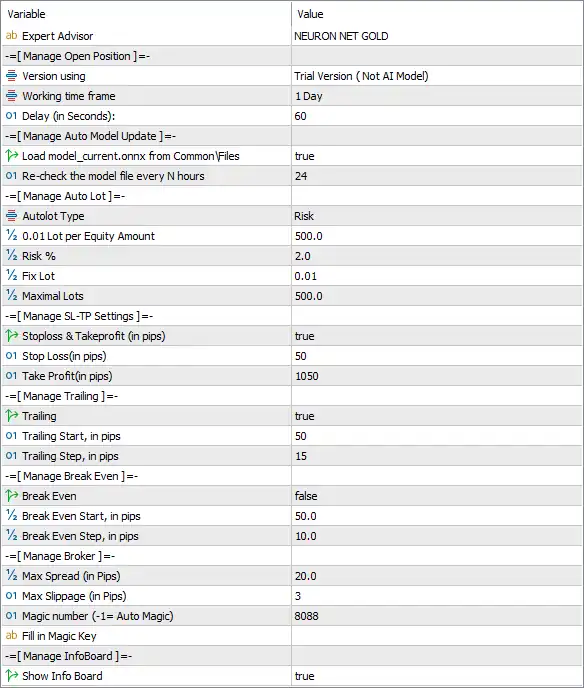
Below are the details of the parameters in the advisor’s trading system settings table:
🔄 Expert Advisor Information
🔹 Expert Advisor = NEURON NET GOLD – Displays the name of the Expert Advisor loaded on the chart.
🔄 Manage Open Position
🔹 Version using = Trial Version (Not AI Model) – Indicates the EA is running the Trial Version (Not AI Model).
🔹 Working time frame = 1 Day – The trading logic is designed to operate on the Daily (D1) timeframe.
🔹 Delay (in Seconds) = 60 – The EA refreshes or performs its processing every 60 seconds.
🔄 Manage Auto Model Update
🔹 Load model_current.onnx from CommonFiles = true – Automatically loads the model_current.onnx file from the MetaTrader CommonFiles directory.
🔹 Re-check the model file every N Hours = 24 – Checks for an updated ONNX model every 24 hours.
🔄 Manage Auto Lot
🔹 AutoLot Type = Risk – Uses risk-based automatic lot sizing instead of a fixed lot.
🔹 0.01 Lot per Equity Amount = 500.0 – Allocates 0.01 lot for every 500.0 units of account equity.
🔹 Risk % = 2.0 – Risks 2.0% of account equity per trade when AutoLot is enabled.
🔹 Fix Lot = 0.01 – Uses 0.01 lots whenever fixed lot mode is selected.
🔹 Maximal Lots = 500.0 – Limits the maximum trading volume to 500.0 lots.
🔄 Manage SL-TP Settings
🔹 Stoploss & Takeprofit (in pips) = true – Enables predefined Stop Loss and Take Profit levels measured in pips.
🔹 Stop Loss (in pips) = 50 – Sets the Stop Loss distance to 50 pips.
🔹 Take Profit (in pips) = 1050 – Sets the Take Profit target to 1050 pips.
🔄 Manage Trailing
🔹 Trailing = true – Enables automatic Trailing Stop management.
🔹 Trailing Start, in pips = 50 – Starts trailing once the trade reaches 50 pips of profit.
🔹 Trailing Step, in pips = 15 – Adjusts the Trailing Stop every 15 pips as price moves in favor of the position.
🔄 Manage Break Even
🔹 Break Even = false – Disables the automatic Break Even function.
🔹 Break Even Start, in pips = 50.0 – If enabled, Break Even activates after 50.0 pips of profit.
🔹 Break Even Step, in pips = 10.0 – Moves the Stop Loss by 10.0 pips beyond the entry price when Break Even is triggered.
🔄 Manage Broker
🔹 Max Spread (in Pips) = 20.0 – The EA will only trade when the market spread is 20.0 pips or lower.
🔹 Max Slippage (in Pips) = 3 – Limits execution slippage to 3 pips.
🔹 Magic Number (-1 = Auto Magic) = 8088 – Assigns 8088 as the unique identifier for all trades opened by the EA.
🔹 Fill in Magic Key – Optional field for entering a custom Magic Key or identification value if required.
🔄 Manage InfoBoard
🔹 Show Info Board = true – Displays the EA's information panel directly on the chart.
🔢 Conclusion
Neuron Net GOLD MT5 provides a streamlined yet powerful configuration focused on automated Gold trading. Its built-in risk-based AutoLot system, ONNX model management, Stop Loss and Take Profit controls, Trailing Stop functionality, broker protection parameters, and chart information panel allow traders to customize the EA for various account sizes while maintaining disciplined risk management. Correctly configuring each parameter helps improve execution quality and overall trading stability.
🔢 FAQs
❓ What timeframe is recommended for Neuron Net GOLD MT5?
The current configuration is designed to run on the 1 Day (D1) timeframe.
❓ Does Neuron Net GOLD MT5 support automatic lot sizing?
Yes. The EA supports Risk-based AutoLot, using 2.0% risk with 0.01 lot per 500.0 equity.
❓ How often does the EA check for a new ONNX model?
The EA automatically checks the model_current.onnx file every 24 hours.
❓ Is the Break Even feature enabled by default?
No. In this configuration, Break Even = false, although its activation parameters are already predefined.
❓ What Magic Number does Neuron Net GOLD MT5 use?
The EA uses Magic Number 8088, allowing it to identify and manage only its own trades independently from other Expert Advisors.