🧩 What is Recovery Boost Pro? Recovery Boost Pro EA is an automated trading system designed to manage losing positions through recovery trading, grid expansion, hedge logic, and indicator-based confirmation. The Expert Advisor (EA) focuses on drawdown control and equity recovery rather than aggressive standalone profit generation. Below is a comprehensive explanation of all trading parameters […]
Recovery Boost Pro EA is an automated trading system designed to manage losing positions through recovery trading, grid expansion, hedge logic, and indicator-based confirmation. The Expert Advisor (EA) focuses on drawdown control and equity recovery rather than aggressive standalone profit generation.
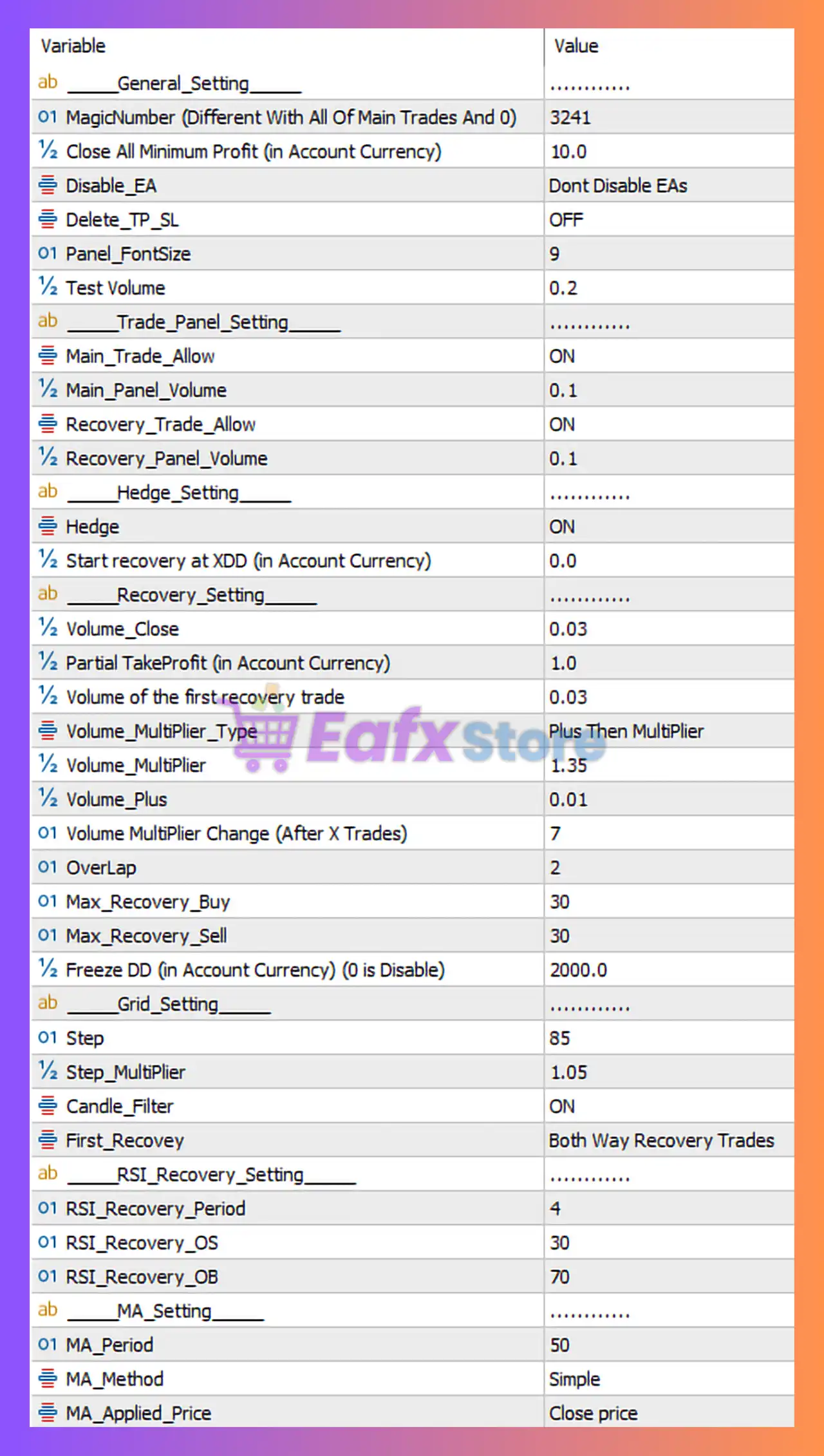
Below is a comprehensive explanation of all trading parameters visible in the settings panel, followed by a professional conclusion to help traders understand the risk profile, strategy behavior, and ideal use case of this EA.
Recovery Boost Pro EA MT5 Settings Review & Full Analysis 4
🧩 General Settings
Parameter
Value
Explanation (Easy to Understand)
Risk Level
MagicNumber
3241
Unique ID used to manage and track trades opened by this EA only. Allows multiple EAs on one account.
None
Close All Minimum Profit
10.0
Closes all open trades when total floating profit reaches 10 in account currency. Locks in profits and reduces exposure.
Low
Disable_EA
Do Not Disable
Keeps the EA active and running normally.
None
Delete_TP_SL
OFF
Does not remove manually set Take Profit or Stop Loss levels.
None
Panel_FontSize
9
Controls the size of the on-chart information panel text. Visual only.
None
Test Volume
0.2
Internal testing parameter. Does not directly affect live trading behavior.
None
🧩 Main Trade & Recovery Panel Settings
Parameter
Value
Explanation
Risk Level
Main_Trade_Allow
ON
Allows the EA to open initial (main) trades based on its strategy logic.
Low
Main_Panel_Volume
0.1
Lot size used for the first main trade. Conservative volume helps manage drawdown.
Low
Recovery_Trade_Allow
ON
Enables recovery trades when positions move into loss. Core feature of the EA.
Medium
Recovery_Panel_Volume
0.1
Initial lot size used for recovery trades before multipliers are applied.
Medium
🧩 Hedge Settings
Parameter
Value
Explanation
Risk Level
Hedge
ON
Allows opening opposite-direction trades to balance exposure and reduce net drawdown.
Medium
Start recovery at XDD
0.0
Recovery trades start immediately when drawdown appears. Very responsive but increases activity.
Medium
🧩 Recovery & Money Management Settings
Parameter
Value
Explanation
Risk Level
Volume_Close
0.03
Lot size used for partial position closing to gradually reduce exposure.
Low
Partial TakeProfit
1.0
Takes partial profit when total profit reaches this value in account currency.
Low
Volume of first recovery trade
0.03
Small initial recovery trade size ensures gradual and controlled recovery.
Medium
Volume_Multiplier_Type
Plus Then Multiplier
Combines fixed lot increase with a multiplier for adaptive recovery scaling.
Medium
Volume_Multiplier
1.35
Determines how fast lot size increases during recovery. Moderate and controlled.
Medium
Volume_Plus
0.01
Fixed lot size added to each recovery trade to smooth lot growth.
Low
Volume Multiplier Change
After 7 Trades
Adjusts multiplier behavior after extended recovery cycles to limit risk.
Medium
OverLap
2
Enables strategic closing of losing trades after 2 positions are open.
Medium
Max_Recovery_Buy
30
Maximum number of recovery buy trades allowed. Prevents unlimited grid expansion.
High
Max_Recovery_Sell
30
Maximum number of recovery sell trades allowed. Acts as a hard safety limit.
High
Freeze DD
2000
Stops recovery trading if drawdown reaches 2000 in account currency. Strong capital protection feature.
High
🧩 Grid Settings
Parameter
Value
Explanation
Risk Level
Step
85
Distance between grid orders. Wide spacing reduces trade frequency and drawdown pressure.
Low
Step_Multiplier
1.05
Gradually increases grid spacing as more trades open, improving trend survivability.
Low
Candle_Filter
ON
Uses candle confirmation to avoid random or low-quality trade entries.
Low
First_Recovery
Both Way
Allows recovery trades in both buy and sell directions for flexibility.
Medium
🧩 RSI Recovery Settings
Parameter
Value
Explanation
Risk Level
RSI_Recovery_Period
4
Short RSI period makes recovery signals highly responsive to price changes.
Medium
RSI_Recovery_OS
30
RSI oversold level for initiating recovery buy trades.
Low
RSI_Recovery_OB
70
RSI overbought level for initiating recovery sell trades.
Low
🧩 Moving Average (MA) Settings
Parameter
Value
Explanation
Risk Level
MA_Period
50
Moving Average length used for trend filtering and direction confirmation.
Low
MA_Method
Simple
Uses Simple Moving Average for stable and reliable signals.
None
MA_Applied_Price
Close price
Calculates MA using closing prices for higher signal accuracy.
None
🧩 How This Table Helps Traders
This structured table allows traders to:
Quickly understand what each parameter does
Identify risk-sensitive settings
Adjust the EA based on account size and risk tolerance
Compare Recovery Boost Pro EA with other recovery or grid EAs
🧩 Final Summary
The Recovery Boost Pro EA settings shown above represent a well-balanced recovery-focused trading system that emphasizes controlled drawdown management, gradual lot scaling, and multiple safety layers.
With features such as hedging, RSI confirmation, adaptive grid spacing, overlap closing, and drawdown freeze protection, this EA is more robust than traditional martingale-based systems, making it suitable for traders who prioritize account stability and long-term survivability.