




Onyx MT5 with SetFiles (Latest version) - Unlimited

Subscriptions for Special Plan
- 30 EA package is more economical!
- Special package with 99%
- Download 1 EA/Day

Subscriptions for Premium Membership
- Download Unlimited in 1 Year
- Get 100% Discount
- Get free access to all

Subscriptions for Gold Membership
- 1 Year Membership
- Get 100% Discount
- Access EA+Indicator+Course
Frequently bought together 🎁
Add these products to enhance your purchase


Quick Verdict – Automated XAUUSD Trading EA for MetaTrader 5
Onyx MT5 is a specialized XAUUSD Expert Advisor (EA) built around daily breakout levels, automated pending orders, dynamic position sizing, Stop Loss, trailing protection and configurable trading sets. Its strong historical results and active live signal make it an interesting option for traders seeking systematic Gold trading.
Best For
✅ XAUUSD Gold traders.
✅ MetaTrader 5 users.
✅ Automated breakout strategies.
✅ Traders seeking dynamic lot sizing.
✅ Traders who prefer systematic execution.
✅ Experienced users comfortable with configurable risk.
Overall Rating
8.5/10 ⭐⭐⭐⭐⭐
| Category | Rating |
|---|---|
| Strategy & Execution | 8.5/10 |
| Risk Management | 7.5/10 |
| Configuration Flexibility | 9.0/10 |
| Historical Performance | 9.0/10 |
| Live Signal Transparency | 8.5/10 |
| Overall Rating | 8.5/10 |
What is Onyx MT5?
Onyx MT5 is an automated MetaTrader 5 Expert Advisor designed specifically for XAUUSD (Gold). Its core approach identifies the previous day’s high and low and uses pending Buy Stop and Sell Stop orders to participate when price breaks these important levels.
The EA also provides automated Stop Loss, Trailing-stop, Break-Even, spread control, dynamic lot sizing and configurable trading schedules.
 Vendor Website: View here
Delivery time 24h-48h after payment.
Refund if not delivered.
You will receive the current version without any limitations (ID+Time).
How Does Onyx MT5 Work?
Identifies Key Daily Levels
Onyx MT5 analyzes the previous trading day’s high and low to establish important breakout reference points for the next trading session.
Places Automated Pending Orders
The EA can use Buy Stop and Sell Stop orders around the identified levels, allowing it to participate when Gold breaks beyond the previous day’s range.
Manages Positions Automatically
Once a position is triggered, the EA handles the trade automatically according to its configured Stop Loss, Trailing, Break-Even and other management parameters.
Uses Dynamic Position Sizing
Onyx MT5 supports Dynamic Lot, Fixed Lot calculation based on account equity and the selected risk percentage, allowing position size to adapt as account equity changes.
Applies Trading Filters
The EA includes controls for maximum spread, trading hours, GMT settings, and multiple trading sets, helping users define when and how the system can operate.
Key Features of Onyx MT5
Daily Breakout Trading
Onyx MT5 is designed around the previous day’s high and low, giving the system a clearly defined market structure for identifying potential Gold breakouts.
Dynamic Equity-Based Lot Sizing
The EA supports dynamic position sizing using a percentage of account equity. This allows trade volume to adjust according to the account’s changing equity.
Break-Even Protection
The integrated Break-Even function can move trade protection toward the entry area after the configured condition is reached, helping reduce the risk of allowing a profitable position to turn into a larger loss.
Trailing Stop Management
Each trading set can use its own trailing-stop configuration. This allows the EA to progressively adjust protection as price develops in the intended direction.
Four Independent Trading Sets
Onyx MT5 provides four separate strategy configurations. Traders can enable or disable individual sets and customize their Stop Loss, trailing parameters, and trading schedules.
Spread and Trading-Time Controls
The EA includes maximum-spread protection and GMT-based trading-hour settings, providing additional control over execution conditions.
Verified Live Signal Performance
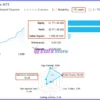
The Onyx MT5 achieved impressive profit performance when trading with XAUUSD (Gold). Trading results on real account for 18 consecutive weeks of trading.
Onyx MT5 Live Signal
| Metric | Result |
|---|---|
| Growth Since 2026 | 425% |
| Initial Deposit | $1,000 |
| Profit | $20,771.38 |
| Equity | 421,771.38 |
| Maximum Drawdown | 36.6% |
| Profit Trades | 96.1% |
| Loss Trades | 3.9% |
| Algo Trading | 100% |
| Trading Activity | 0.5% |
| Leverage | 1:500 |
The live signal also shows VantageMarkets as the broker/server environment.
The displayed performance provides useful real-market evidence, but traders should remember that live results can vary because of spreads, slippage, liquidity, execution speed, and account conditions.
Historical Trading Results Performance
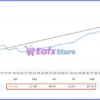
12-Month Backtest Results
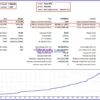
The first historical test covers XAUUSD on M15 from 2025.03.01 to 2026.03.31, using an initial deposit of $500.
The balance curve shown in the supplied report develops progressively upward over the test period.
Onyx MT5 Backtest Results
| Metric | Result |
|---|---|
| Initial Deposit | $500 |
| Period | 2025.03.01 – 2026.03.31 |
| Total Net Profit | $4,637.40 |
| Balance Drawdown Maximal | 15.35% |
| Equity Drawdown Maximal | 16.22% |
| Profit Factor | 48.71 |
| Total Trades | 181 |
| Profit Trades | 86.74% |
| Loss Trades | 13.26% |
The test shows a steadily rising balance curve with relatively controlled periods of decline.
The reported profit-trade percentage is strong, although the drawdown figures demonstrate that the strategy can still experience meaningful account fluctuations.
15-Month Backtest Results
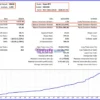
The second historical test covers XAUUSD on M15 from 2025.01.01 to 2026.03.31, starting with a $1,000 deposit.
The supplied balance chart shows a generally progressive upward trajectory throughout the test.
Onyx MT5 Backtest
| Metric | Result |
|---|---|
| Initial Deposit | $1,000 |
| Period | 2025.01.01 – 2026.03.31 |
| Total Net Profit | $9,713.00 |
| Balance Drawdown Maximal | 11.18% |
| Equity Drawdown Maximal | 11.85% |
| Profit Factor | 49.96 |
| Total Trades | 213 |
| Profit Trades | 84.98% |
| Loss Trades | 15.02% |
This second test also demonstrates a predominantly upward balance progression.
Compared with the first test, it uses a larger starting balance and reports a slightly lower profit-trade percentage while maintaining strong overall profitability.
Why Onyx MT5 Stands Out
Gold-Focused Strategy
Rather than being presented as a generic multi-market robot, Onyx MT5 is specifically designed around XAUUSD, one of the most actively traded and volatile instruments.
Clear Breakout Concept
The previous day’s high and low provide a straightforward structural foundation for the strategy.
This makes the underlying concept easier to understand than a system based on numerous opaque entry conditions.
Flexible Configuration
The combination of multiple trading sets, dynamic lot calculation, Stop Loss, trailing controls, Break-Even, spread filtering, and trading schedules gives users significant control over the EA’s behavior.
Automated Execution
Once configured, the EA can handle pending orders and position management automatically, reducing the need for constant chart monitoring.
Risk Management Features
Onyx MT5 includes several tools designed to help traders control their exposure.
Dynamic Lot Calculation
The EA can calculate position size according to a percentage of account equity instead of relying only on a fixed lot size.
Stop Loss Protection
Each trading set can have its own Stop Loss configuration, creating a predefined loss boundary for individual positions.
Break-Even Management
The Break-Even function can adjust trade protection after the configured trigger condition is reached.
Trailing Stop
Trailing parameters allow the EA to follow favorable price movement and progressively adjust protection.
Maximum Spread Filter
The maximum-spread setting can help prevent trading when transaction costs become excessive.
Trading-Time Controls
GMT-based start and end times allow users to restrict trading to selected market periods.
Recommended Trading Conditions
For the best operating environment, Onyx MT5 is intended for:
| Features | Type |
|---|---|
| Trading platform | MetaTrader 5 (MT5) |
| Time frames | Any |
| Currency pairs | XAUUSD (Gold) |
| Minimum / Recommended deposit | $100+ |
| Minimum / Recommended leverage | Any |
| Account type | Any |
| Additional services | Unlock and Decompile |
| Recommended brokers | Exness Broker, Icmarkets Broker |
| Recommended VPS | MyfxVPS.com (Blue VPS, Golden VPS). Lowest Latency, 2 week Free Trial, 100% Free for 12-18 Months. |
Product Download Package?
The download package of the product suite includes:
Experts
 Onyx MT5.ex5
SetFiles
Onyx EA_Fixed Lot.set
Onyx EA_Dynamic Lot.set
 Reviewed by David Easton
Weaknesses and Risk Warnings
High Risk Exposure
The supplied configuration includes an aggressive equity-risk setting.
This can significantly increase potential losses when market conditions move against the strategy.
Gold Can Be Highly Volatile
XAUUSD can experience rapid price movements, especially during major economic announcements and periods of increased market volatility.
Historical Results Are Not Guaranteed
Backtest performance may differ substantially from future live performance.
Changes in spread, slippage, liquidity, execution, and market behavior can all affect results.
Drawdown Can Be Significant
The supplied live signal and historical tests demonstrate that periods of drawdown can occur.
Traders should be prepared for temporary account declines rather than expecting a continuously rising balance.
Configuration Matters
Onyx MT5 offers extensive settings. Incorrect risk, lot-size, Stop Loss, trading-time, or spread configurations can materially change the behavior of the EA.
Who Should Use Onyx MT5?
Onyx MT5 may be suitable for traders who:
🔹 Want automated XAUUSD trading.
🔹 Prefer breakout-based strategies.
🔹 Use MetaTrader 5.
🔹 Want dynamic position sizing.
🔹 Prefer automated trade management.
🔹 Value configurable Stop Loss and trailing protection.
🔹 Are comfortable monitoring drawdown.
🔹 Understand the risks of leveraged Gold trading.
🔹 Want to reduce the need for constant chart monitoring.
It is better suited to traders who understand automated trading and risk management rather than complete beginners looking for guaranteed returns.
Final Verdict
Onyx MT5 offers a clear and structured approach to automated Gold trading, combining daily-level breakout entries with dynamic position sizing and multiple layers of trade management. Its configurable architecture gives traders considerable flexibility, while the supplied live signal and historical tests provide useful evidence of how the strategy has behaved in real and simulated environments.
The strongest attraction is the combination of XAUUSD specialization, automated execution, flexible configuration and comprehensive position management. However, its risk settings require careful attention, and traders should always adapt exposure to their own capital and risk tolerance.
For traders seeking a systematic MetaTrader 5 Gold breakout EA, Onyx MT5 is a compelling option worth evaluating through demo testing before moving to live capital.
🔢 Onyx MT5 – Complete Settings & Configuration Guide
Onyx MT5 is a configurable automated trading Expert Advisor built around flexible BUY/SELL control, dynamic equity-based lot sizing, multiple trading sets, Stop Loss management, trailing-stop logic, Break-Even protection, spread control and GMT-based trading schedules.
The supplied configuration shows a multi-set trading architecture, allowing up to 4 independent trading sets, each with its own entry permission, Take Profit, Stop Loss, trailing parameters, and trading hours. The EA also provides dynamic position sizing based on equity risk percentage, making its money-management system highly configurable.
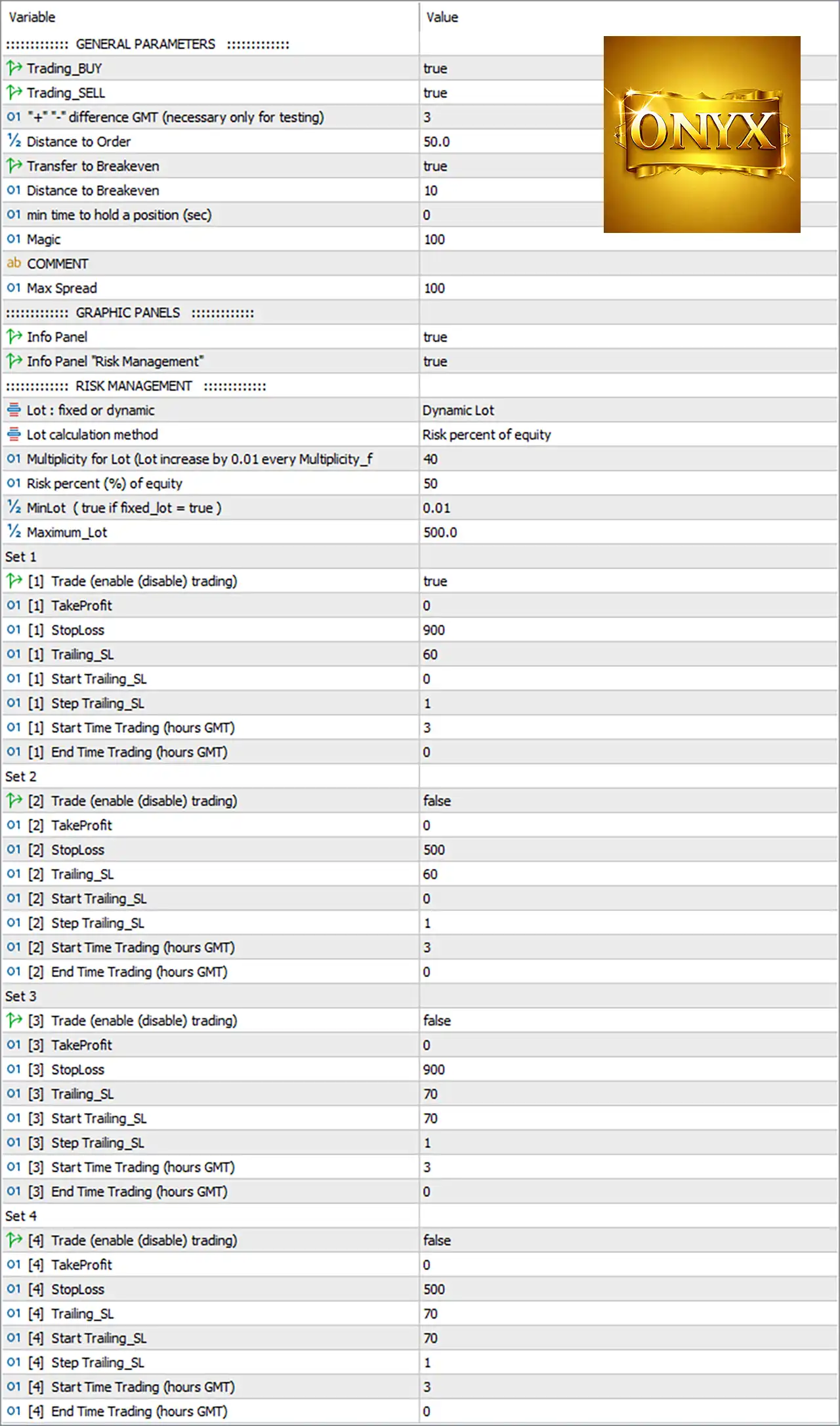
Onyx MT5 Settings Panel
🔄 General Parameters
🔹 Trading_BUY = true — Enables BUY trading.
🔹 Trading_SELL = true — Enables SELL trading.
🔹 “—-” difference GMT (necessary only for testing) = 3 — Sets the GMT difference to 3, primarily intended for testing purposes.
🔹 Distance to Order = 50.0 — Sets the configured distance to the order at 50.0.
🔹 Transfer to Breakeven = true — Enables the EA’s Break-Even transfer function.
🔹 Distance to Breakeven = 10 — Sets the Break-Even distance/trigger parameter to 10.
🔹 min time to hold a position (sec) = 0 — Sets the minimum holding time to 0 seconds, meaning no minimum holding period is imposed by this parameter.
🔹 Magic = 100 — Uses 100 as the EA’s Magic Number for identifying its trades.
🔹 COMMENT = [blank] — No trade comment is specified in the supplied configuration.
🔹 Max Spread = 100 — Sets the maximum permitted spread parameter to 100.
🔄 Graphic Panels
🔹 Info Panel = true — Enables the EA’s main information panel on the chart.
🔹 Info Panel “Risk Management” = true — Enables the Risk Management information panel.
🔄 Risk Management
🔹 Lot: fixed or dynamic = Dynamic Lot — Selects Dynamic Lot position sizing instead of a fixed-lot calculation.
🔹 Lot calculation method = Risk percent of equity — Calculates position size according to a percentage of account equity.
🔹 01 Multiplicity for Lot (Lot increase by 0.01 every Multiplicity_f = 40 — Sets the lot-sizing multiplicity/reference value to 40; the parameter indicates a 0.01-lot increase per configured multiplicity level.
🔹 Risk percent (%) of equity = 50 — Sets the dynamic risk calculation to 50% of equity.
🔹 MinLot (true if fixed_lot = true) = 0.01 — Sets the minimum/reference lot size to 0.01.
🔹 Maximum_Lot = 500.0 — Sets the maximum permitted lot size to 500.0 lots.
🔄 Set 1
🔹 [1] Trade (enable (disable) trading) = true — Enables Set 1 trading.
🔹 [1] TakeProfit = 0 — Sets Set 1 Take Profit to 0.
🔹 [1] StopLoss = 900 — Sets Set 1 Stop Loss to 900 points.
🔹 [1] Trailing_SL = 60 — Sets Set 1 trailing-stop distance/parameter to 60.
🔹 [1] Start Trailing_SL = 0 — Sets the Set 1 trailing-start level to 0.
🔹 [1] Step Trailing_SL = 1 — Sets the Set 1 trailing-stop adjustment step to 1.
🔹 [1] Start Time Trading (hours GMT) = 3 — Sets Set 1 trading to start at 03:00 GMT.
🔹 [1] End Time Trading (hours GMT) = 0 — Sets the Set 1 trading end-hour parameter to 0.
🔄 Set 2
🔹 [2] Trade (enable (disable) trading) = false — Disables Set 2 trading.
🔹 [2] TakeProfit = 0 — Sets Set 2 Take Profit to 0.
🔹 [2] StopLoss = 500 — Sets Set 2 Stop Loss to 500 points.
🔹 [2] Trailing_SL = 60 — Sets Set 2 trailing-stop parameter to 60.
🔹 [2] Start Trailing_SL = 0 — Sets the Set 2 trailing-start level to 0.
🔹 [2] Step Trailing_SL = 1 — Sets the Set 2 trailing adjustment step to 1.
🔹 [2] Start Time Trading (hours GMT) = 3 — Sets Set 2 trading start time to 03:00 GMT.
🔹 [2] End Time Trading (hours GMT) = 0 — Sets Set 2 trading end-hour parameter to 0.
🔄 Set 3
🔹 [3] Trade (enable (disable) trading) = false — Disables Set 3 trading.
🔹 [3] TakeProfit = 0 — Sets Set 3 Take Profit to 0.
🔹 [3] StopLoss = 900 — Sets Set 3 Stop Loss to 900 points.
🔹 [3] Trailing_SL = 70 — Sets Set 3 trailing-stop parameter to 70.
🔹 [3] Start Trailing_SL = 70 — Sets the Set 3 trailing-start level to 70.
🔹 [3] Step Trailing_SL = 1 — Sets the Set 3 trailing adjustment step to 1.
🔹 [3] Start Time Trading (hours GMT) = 3 — Sets Set 3 trading start time to 03:00 GMT.
🔹 [3] End Time Trading (hours GMT) = 0 — Sets Set 3 trading end-hour parameter to 0.
🔄 Set 4
🔹 [4] Trade (enable (disable) trading) = false — Disables Set 4 trading.
🔹 [4] TakeProfit = 0 — Sets Set 4 Take Profit to 0.
🔹 [4] StopLoss = 500 — Sets Set 4 Stop Loss to 500 points.
🔹 [4] Trailing_SL = 70 — Sets Set 4 trailing-stop parameter to 70.
🔹 [4] Start Trailing_SL = 70 — Sets the Set 4 trailing-start level to 70.
🔹 [4] Step Trailing_SL = 1 — Sets the Set 4 trailing adjustment step to 1.
🔹 [4] Start Time Trading (hours GMT) = 3 — Sets Set 4 trading start time to 03:00 GMT.
🔹 [4] End Time Trading (hours GMT) = 0 — Sets Set 4 trading end-hour parameter to 0.
🔢 Key Configuration Highlights
🔹 BUY Trading = true — BUY operations are enabled.
🔹 SELL Trading = true — SELL operations are enabled.
🔹 GMT Difference = 3 — Testing GMT difference is configured as 3.
🔹 Distance to Order = 50.0 — Order-distance parameter is 50.0.
🔹 Break-Even Transfer = true — Break-Even management is enabled.
🔹 Break-Even Distance = 10 — Break-Even distance is 10.
🔹 Minimum Position Holding Time = 0 seconds — No minimum holding time is configured.
🔹 Magic Number = 100 — EA trade identifier is 100.
🔹 Maximum Spread = 100 — Maximum spread setting is 100.
🔹 Lot Mode = Dynamic Lot — Dynamic position sizing is selected.
🔹 Lot Calculation = Risk percent of equity — Lot size is calculated from equity risk.
🔹 Lot Multiplicity = 40 — The configured multiplicity reference is 40, associated with a 0.01-lot increment.
🔹 Risk Percentage = 50% — The configured equity-risk percentage is 50.
🔹 Minimum Lot = 0.01 — Minimum lot is 0.01.
🔹 Maximum Lot = 500.0 — Maximum lot is 500.0.
🔹 Set 1 = Enabled — The first strategy/trading set is active.
🔹 Set 2 = Disabled — The second set is inactive.
🔹 Set 3 = Disabled — The third set is inactive.
🔹 Set 4 = Disabled — The fourth set is inactive.
🔹 Set 1 Stop Loss = 900 points — Set 1 uses 900 points.
🔹 Set 2 Stop Loss = 500 points — Set 2 uses 500 points.
🔹 Set 3 Stop Loss = 900 points — Set 3 uses 900 points.
🔹 Set 4 Stop Loss = 500 points — Set 4 uses 500 points.
🔹 Set 1 Trailing SL = 60 — Set 1 trailing parameter is 60.
🔹 Set 2 Trailing SL = 60 — Set 2 trailing parameter is 60.
🔹 Set 3 Trailing SL = 70 — Set 3 trailing parameter is 70.
🔹 Set 4 Trailing SL = 70 — Set 4 trailing parameter is 70.
🔢 Conclusion
Onyx MT5 provides a highly configurable framework for automated trading, combining directional trade control, dynamic equity-based lot sizing, Break-Even management, trailing-stop protection, multiple strategy sets, spread filtering, and GMT-based execution schedules.
The supplied setup is configured for both BUY and SELL trading, with Dynamic Lot and Risk percent of equity selected. The most significant risk-management parameter is Risk percent (%) of equity = 50, which is an aggressive configuration and should be carefully evaluated through backtesting and demo testing before live deployment.
Only Set 1 is currently active. It uses a 900-point Stop Loss, 60 trailing parameter, 0 trailing-start value, and 1 trailing step, with trading beginning at 03:00 GMT. Sets 2–4 remain available for alternative configurations but are currently disabled.
The EA’s Break-Even function is enabled, the Break-Even distance is 10, and the maximum spread is set to 100. The combination gives traders substantial control over how Onyx MT5 handles entries, protection, and position management.
Important: The numerical settings shown above are the exact values visible in the supplied image. Parameters such as 50% equity risk and 500.0 maximum lot can represent substantial exposure depending on the account and broker, so they should not be interpreted as generally recommended values.
🔢 FAQs
❓ What is the current trading direction configuration of Onyx MT5?
Both Trading_BUY = true and Trading_SELL = true, so BUY and SELL trading are enabled.
❓ How does Onyx MT5 calculate its lot size?
The EA is configured for Dynamic Lot with Lot calculation method = Risk percent of equity and Risk percent (%) of equity = 50. The minimum lot is 0.01 and maximum lot is 500.0.
❓ Which trading set is currently active?
Only Set 1 is enabled. Set 2, Set 3, and Set 4 are all configured as false.
❓ What are the main Stop Loss and trailing settings?
Set 1 uses StopLoss = 900, Trailing_SL = 60, Start Trailing_SL = 0, and Step Trailing_SL = 1. Set 2 uses 500 / 60 / 0 / 1, while Sets 3 and 4 use 900 / 70 / 70 / 1 and 500 / 70 / 70 / 1, respectively.
❓ Is Break-Even protection enabled?
Yes. Transfer to Breakeven = true, with Distance to Breakeven = 10.
User Reviews
Only logged in customers who have purchased this product may leave a review.
❓ What market is Onyx MT5 designed for?
Onyx MT5 is designed specifically for XAUUSD Gold, using previous daily high and low levels to identify potential breakout opportunities.
❓ How does Onyx MT5 identify trading opportunities?
Onyx MT5 uses daily breakout levels and can place Buy Stop or Sell Stop pending orders when price approaches the configured trading levels.
❓ Does Onyx MT5 support both BUY and SELL trading?
Yes. Onyx MT5 supports both BUY and SELL operations, allowing the EA to participate in potential upward or downward Gold breakout movements.
❓ Does Onyx MT5 support dynamic lot sizing?
Yes. Onyx MT5 provides dynamic lot sizing based on equity risk, while also offering flexible controls for minimum and maximum position sizes.
❓ Does Onyx MT5 include Break-Even protection?
Yes. Onyx MT5 includes Break-Even management, allowing the system to move protection toward the entry level once the configured conditions are reached.
❓ Does Onyx MT5 use a Trailing Stop?
Yes. Onyx MT5 includes configurable trailing-stop management that can dynamically adjust protective levels as the market moves in favor of an open position.
❓ How many trading sets does Onyx MT5 provide?
Onyx MT5 provides four independent trading sets, each with its own trading permission, Stop Loss, trailing parameters, and configurable trading schedule.
❓ Can Onyx MT5 control trading hours?
Yes. Onyx MT5 provides GMT-based trading schedules for each trading set, allowing users to define when automated Gold trading can operate.
❓ Does Onyx MT5 have spread protection?
Yes. Onyx MT5 includes a maximum-spread control designed to restrict trading when broker spread conditions become unfavorable for automated execution.
❓ What timeframe should Onyx MT5 be used on?
Onyx MT5 is designed for XAUUSD and can be installed on any timeframe chart, while its trading logic is based on daily market levels rather than a specific chart period.
-
 Original price was: $888.00.$249.00Current price is: $249.00.
-
 Original price was: $439.00.$249.00Current price is: $249.00.
-
 Original price was: $9,999.00.$249.00Current price is: $249.00.
-
 Original price was: $30,000.00.$249.00Current price is: $249.00.
-
 0Original price was: $2,288.00.$249.00Current price is: $249.00.
-
 0Original price was: $290.00.$179.00Current price is: $179.00.
-
 0Original price was: $199.00.$179.00Current price is: $179.00.
-
 0Original price was: $778.00.$249.00Current price is: $249.00.
There are no reviews yet.