


🔢 Quantum StarMan MT5 Settings Explained – Complete Configuration Guide
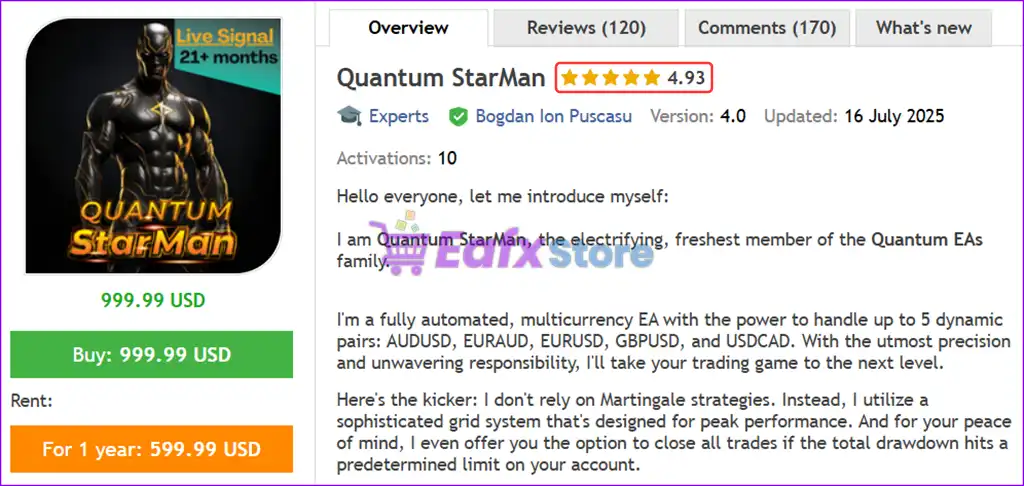
Quantum StarMan MT5 is a powerful multi-currency Expert Advisor (EA) developed for MetaTrader 5, designed to trade multiple Forex pairs simultaneously using advanced money management, grid logic and automated risk control systems.
With support for auto lot sizing, drawdown protection, holiday filters, and customizable visual panels, Quantum StarMan MT5 offers traders a flexible and efficient automated trading experience suitable for different account sizes and trading styles.
🔢 Quantum StarMan MT5 Full Settings Explanation
Below are the details of the parameters in the advisor’s trading system settings table:
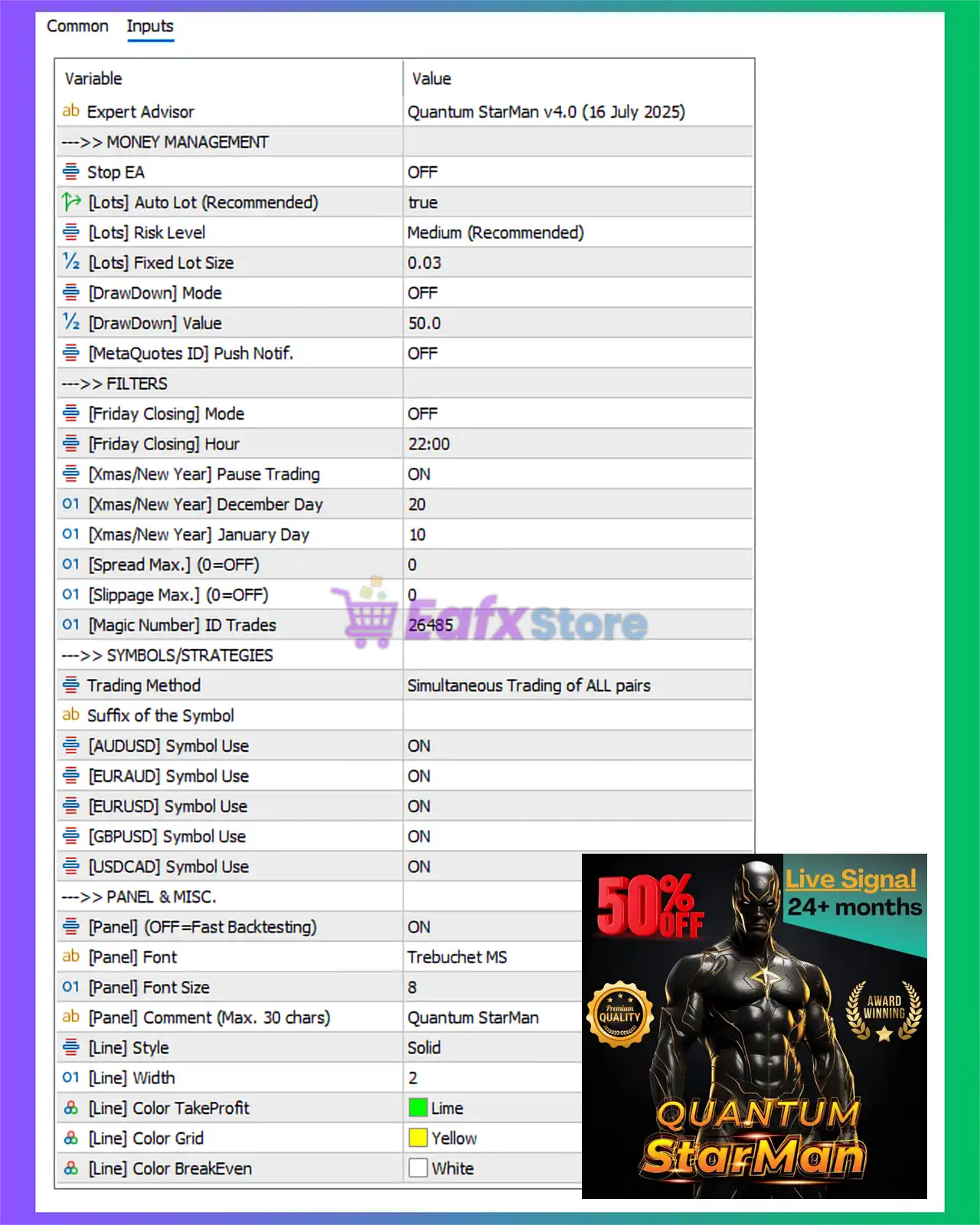
🔶 Money Management Settings
🔹 Stop EA = OFF: Keeps the Expert Advisor active and trading.
🔹 [Lots] Auto Lot (Recommended) = true: Enables automatic lot sizing based on account conditions.
🔹 [Lots] Risk Level = Medium (Recommended): Sets the trading risk profile to Medium.
🔹 [Lots] Fixed Lot Size = 0.03: Uses a fixed trading lot size of 0.03 when Auto Lot is disabled.
🔹 [DrawDown] Mode = OFF: Disables drawdown protection mode.
🔹 [DrawDown] Value = 50.0: Sets the drawdown threshold value to 50.0.
🔹 [MetaQuotes ID] Push Notif. = OFF: Disables MetaQuotes mobile push notifications.
🔶 Filter Settings
🔹 [Friday Closing] Mode = OFF: Disables automatic Friday trade closure.
🔹 [Friday Closing] Hour = 22:00: Defines Friday closing hour as 22:00 if the feature is enabled.
🔹 [Xmas/New Year] Pause Trading = ON: Enables trading pause during Christmas and New Year holidays.
🔹 [Xmas/New Year] December Day = 20: Trading pause begins from December 20.
🔹 [Xmas/New Year] January Day = 10: Trading resumes after January 10.
🔹 [Spread Max.] (0=OFF) = 0: Spread filter is disabled because the value is 0.
🔹 [Slippage Max.] (0=OFF) = 0: Slippage filter is disabled because the value is 0.
🔹 [Magic Number] ID Trades = 26485: Uses Magic Number 26485 to identify EA trades.
🔶 Symbols & Strategies Settings
🔹 Trading Method = Simultaneous Trading of ALL pairs: The EA trades all enabled currency pairs simultaneously.
🔹 Suffix of the Symbol =: No broker symbol suffix is configured.
🔹 [AUDUSD] Symbol Use = ON: Enables trading for the AUDUSD pair.
🔹 [EURAUD] Symbol Use = ON: Enables trading for the EURAUD pair.
🔹 [EURUSD] Symbol Use = ON: Enables trading for the EURUSD pair.
🔹 [GBPUSD] Symbol Use = ON: Enables trading for the GBPUSD pair.
🔹 [USDCAD] Symbol Use = ON: Enables trading for the USDCAD pair.
🔶 Panel & Miscellaneous Settings
🔹 [Panel] (OFF=Fast Backtesting) = ON: Enables the on-chart information panel.
🔹 [Panel] Font = Trebuchet MS: Uses Trebuchet MS as the panel font style.
🔹 [Panel] Font Size = 8: Sets panel font size to 8.
🔹 [Panel] Comment (Max. 30 chars) = Quantum StarMan: Displays the comment Quantum StarMan on the chart.
🔹 [Line] Style = Solid: Uses Solid style for chart lines.
🔹 [Line] Width = 2: Sets chart line thickness to 2.
🔹 [Line] Color TakeProfit = Lime: Displays Take Profit lines in Lime color.
🔹 [Line] Color Grid = Yellow: Displays grid lines in Yellow color.
🔹 [Line] Color BreakEven = White: Displays Break Even lines in White color.
🔢 Conclusion
Quantum StarMan MT5 is a sophisticated multi-pair trading Expert Advisor designed for traders seeking automated portfolio-style Forex trading. With built-in auto lot management, holiday trading filters, simultaneous pair execution, and customizable visual panels, the EA provides a balanced approach to automation and risk control. Its flexible configuration makes it suitable for both moderate and advanced MT5 traders.
🔢 FAQs
❓ What is Quantum StarMan MT5?
Quantum StarMan MT5 is a multi-currency automated trading robot for MetaTrader 5 that trades several Forex pairs simultaneously.
❓ Does Quantum StarMan MT5 support Auto Lot sizing?
Yes, the EA includes an Auto Lot feature that automatically adjusts lot size based on account settings.
❓ Which currency pairs are enabled in the default settings?
The enabled pairs are AUDUSD, EURAUD, EURUSD, GBPUSD, and USDCAD.
❓ Does Quantum StarMan MT5 pause trading during holidays?
Yes, the EA pauses trading from December 20 until January 10.
❓ Can I customize the panel and chart appearance in Quantum StarMan MT5?
Yes, the EA allows customization of panel fonts, colors, line styles, and visual chart elements.