Shark Surfer EA MT4 Settings Guide – Complete Inputs Explanation


Shark Surfer EA is an automated trading Expert Advisor (EA) designed for the MetaTrader 4 platform. Its configuration includes flexible lot sizing, breakeven management, price range calculations, directional trade controls, Stop Loss (SL) and Take Profit (TP) adjustments, and automated trading options.
The EA also provides statistical monitoring features and customizable chart display settings, allowing traders to monitor trading activity and adjust the system according to their account conditions and trading preferences.
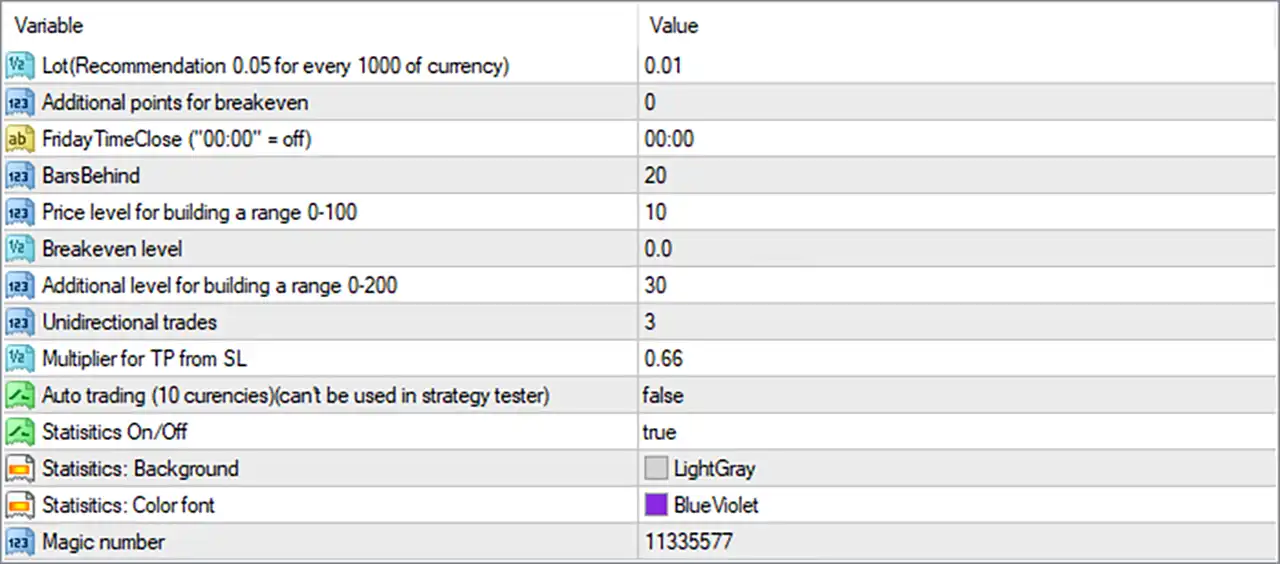
Below is a complete explanation of all 14 input parameters of Shark Surfer EA MT4, including their default values and functions.
1. Lot Size and Breakeven Settings
🔹 Lot (Recommendation 0.05 for every 1000 of currency) = 0.01 – Determines the trading volume used by Shark Surfer EA MT4. The recommended lot size is 0.05 for every 1,000 units of account currency, while the default value is 0.01 lots. Traders can adjust this value according to their account balance and risk tolerance.
🔹 Additional points for breakeven = 0 – Specifies the additional points added to the breakeven price when moving the Stop Loss to the entry level. A value of 0 means the EA uses the original breakeven price without adding extra points.
🔹 Breakeven level = 0.0 – Defines the breakeven level used by the EA to manage open positions. This parameter determines the configured threshold for breakeven functionality, although the exact activation conditions depend on the EA’s internal trading logic.
2. Trading Time and Market Analysis Settings
🔹 FridayTimeClose (“00:00” = off) = 00:00 – Controls the scheduled closing time for trading positions on Friday. The default value of 00:00 disables this time-based closing function, allowing traders to configure a specific Friday closing time if supported by their trading schedule.
🔹 BarsBehind = 20 – Determines how many historical price bars the EA considers when analyzing previous market movements. The default value of 20 provides a reference window for its price analysis and trading calculations.
🔹 Price level for building a range 0-100 = 10 – Sets the price level within a configurable range of 0 to 100. The default value of 10 is used by the EA when calculating or establishing its primary trading range.
🔹 Additional level for building a range 0-200 = 30 – Defines an additional range-building level within the permitted interval of 0 to 200. The default value of 30 provides an extra parameter for adjusting the EA’s market range calculations.
3. Trade Direction and Profit Management
🔹 Unidirectional trades = 3 – Controls the EA’s unidirectional trading configuration. The default value of 3 defines the selected directional trading setting, which may determine how the EA handles trades in one market direction. The exact meaning of the numerical mode depends on the EA’s programming.
🔹 Multiplier for TP from SL = 0.66 – Sets the multiplier used to calculate the Take Profit distance relative to the Stop Loss distance. With a value of 0.66, the configured Take Profit calculation is 66% of the corresponding Stop Loss distance, if the EA applies a direct multiplication formula.
4. Automated Trading and Statistics Settings
🔹 Auto trading (10 currencies)(can’t be used in strategy tester) = false – Enables or disables the EA’s automatic trading functionality across 10 currencies. The default value of false means this multi-currency automated trading feature is disabled. According to the input description, this function cannot be used in the MT4 Strategy Tester.
🔹 Statistics On/Off = true – Controls whether the EA displays trading statistics on the chart. The default value of true enables the statistics display, allowing traders to monitor relevant trading information directly from the MT4 interface.
🔹 Statistics: Background = LightGray – Specifies the background color of the statistics panel displayed on the chart. The default LightGray color provides a light background to improve the visibility of statistical information.
🔹 Statistics: Color font = BlueViolet – Determines the font color used for displaying trading statistics. The default BlueViolet color helps distinguish statistical text from the LightGray background.
5. Trade Identification Settings
🔹 Magic number = 11335577 – Sets the unique Magic Number used by Shark Surfer EA MT4 to identify its trading orders. The default value of 11335577 helps the EA distinguish its positions from manually opened trades and orders generated by other Expert Advisors.
Conclusion
Shark Surfer EA provides a comprehensive set of 14 input parameters for customizing lot sizing, breakeven management, market range calculations, directional trading, profit targets, and automated trading operations.
Some important default settings include Lot = 0.01, BarsBehind = 20, Price level = 10, Additional level = 30, Unidirectional trades = 3, and Multiplier for TP from SL = 0.66.
The EA also includes a multi-currency automated trading option, configurable statistics display, and a unique Magic Number for trade identification.
Before running Shark Surfer EA on a live trading account, traders should test different configurations, verify the EA’s internal calculation methods, and ensure that the recommended lot size is appropriate for their account balance and risk tolerance.