

Introduction to AI NoX EA MT4
AI NoX EA MT4 is an automated trading Expert Advisor (EA) designed for MetaTrader 4, featuring configurable money management, risk control, recovery functionality, trailing stop management, and AI-assisted trading settings.
The EA combines automatic lot calculation, drawdown monitoring, optional recovery trading, and customizable trade execution parameters. It also includes GPT-related configuration options, allowing traders to select strategy aggressiveness and configure the ChatGPT function available within the EA.
Additionally, AI NoX EA MT4 provides economic news filtering, animation controls, and a customizable information menu to support its trading operations.
Money Management (MM) Settings
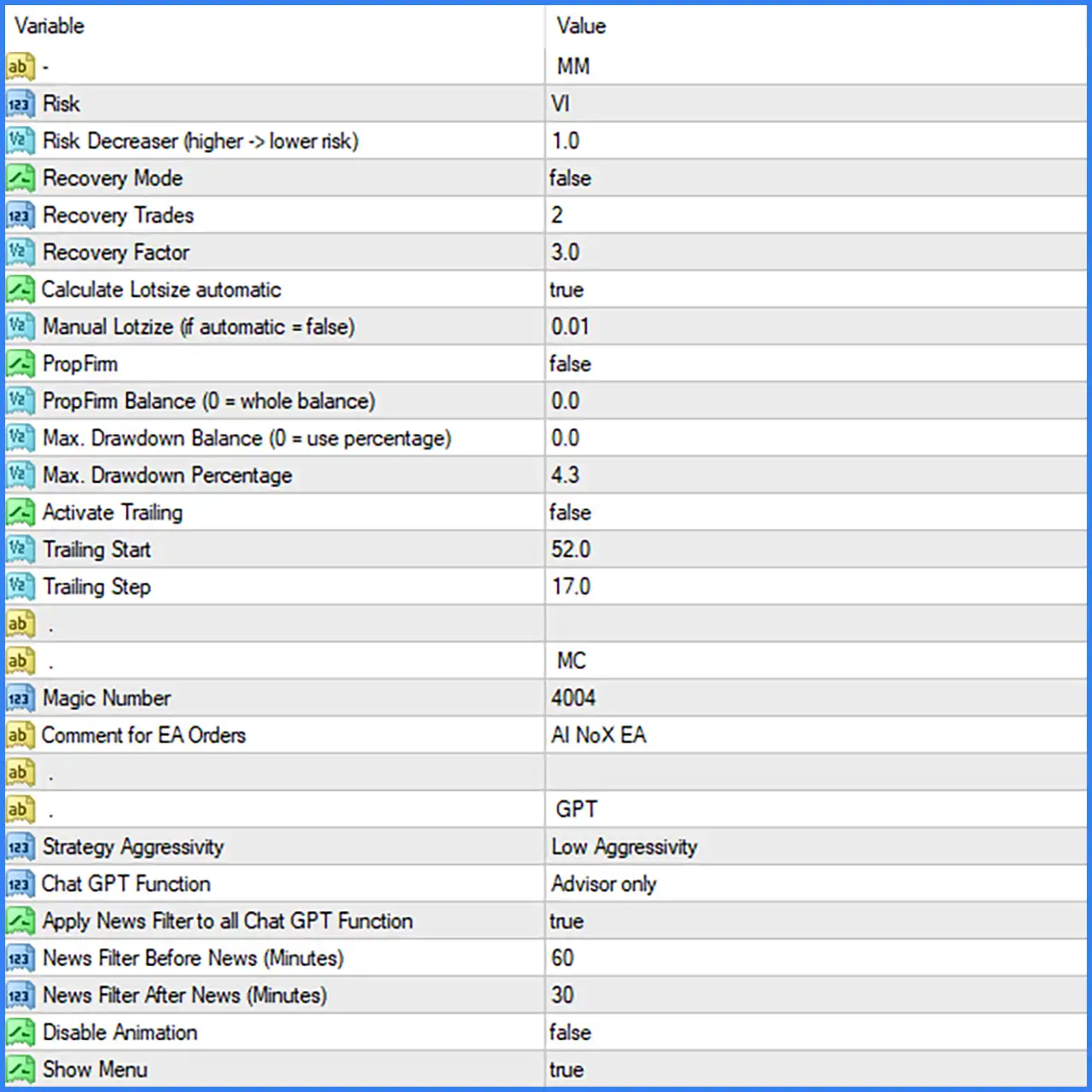
This section controls the EA's risk profile, position sizing, recovery configuration, drawdown limits, and trailing stop functionality.
🔹 Money Management Mode = MM: Identifies the MM configuration section, which contains the EA's money management and risk control parameters.
🔹 Risk = VI: Sets the displayed risk profile identifier to VI, defining the selected risk configuration in the supplied settings.
🔹 Risk Decreaser (higher -> lower risk) = 1.0: Sets the risk adjustment factor to 1.0, providing the default value for the EA's risk reduction mechanism.
🔹 Recovery Mode = false: Disables recovery trading, meaning the EA does not activate its optional recovery mechanism under the supplied default configuration.
🔹 Recovery Trades = 2: Sets the recovery trade parameter to 2, defining the configured number of trades associated with the recovery functionality when enabled.
🔹 Recovery Factor = 3.0: Sets the recovery factor to 3.0, establishing the configured multiplier used by the EA's recovery calculations.
🔹 Calculate Lotsize automatic = true: Enables automatic lot size calculation, allowing the EA to determine trading volume through its internal position-sizing mechanism.
🔹 Manual Lotsize (if automatic = false) = 0.01: Sets the manual trading volume to 0.01 lots, which serves as the configured position size when automatic lot calculation is disabled.
🔹 PropFirm = false: Disables the Prop Firm mode, meaning the EA does not activate its optional proprietary trading account configuration by default.
🔹 PropFirm Balance (0 = whole balance) = 0.0: Sets the Prop Firm reference balance to 0.0, indicating that the whole account balance is used according to the parameter description.
🔹 Max. Drawdown Balance (0 = use percentage) = 0.0: Sets the maximum drawdown balance limit to 0.0, indicating that the EA uses the percentage-based drawdown configuration instead of a fixed monetary balance limit.
🔹 Max. Drawdown Percentage = 4.3: Sets the maximum drawdown threshold to 4.3%, defining the configured percentage-based loss limit for the EA's drawdown management.
🔹 Activate Trailing = false: Disables the trailing stop functionality, meaning automatic Stop Loss adjustments through this feature are inactive by default.
🔹 Trailing Start = 52.0: Sets the trailing activation threshold to 52.0, defining the configured level at which trailing stop management can begin when enabled.
🔹 Trailing Step = 17.0: Sets the trailing adjustment step to 17.0, defining the configured increment used when updating the trailing Stop Loss.
Trade Control and Identification (MC) Settings
This section contains the MC identification label, Magic Number, and order comment used to distinguish the EA's trading operations.
🔹 Trade Control Mode = MC: Identifies the MC configuration section, which contains the EA's trade identification and order management settings.
🔹 Magic Number = 4004: Assigns the Magic Number 4004 to the EA's trading orders, allowing MetaTrader 4 to identify and distinguish positions opened by AI NoX EA MT4.
🔹 Comment for EA Orders = AI NoX EA: Sets the order comment to AI NoX EA, allowing traders to recognize the Expert Advisor's orders in the MT4 trading terminal.
GPT and AI Trading Settings
This section contains the GPT-related configuration parameters, allowing traders to customize the displayed strategy aggressiveness and ChatGPT functionality.
🔹 AI Integration Mode = GPT: Identifies the GPT configuration section, which contains the EA's ChatGPT-related settings.
🔹 Strategy Aggressivity = Low Aggressivity: Selects Low Aggressivity as the strategy aggressiveness level, defining the configured trading behavior preference for the GPT-related functionality.
🔹 Chat GPT Function = Advisor only: Selects Advisor only mode, defining the configured ChatGPT function as an advisory feature rather than an explicitly selected autonomous execution mode.
🔹 Apply News Filter to all Chat GPT Function = true: Enables the application of the news filter to all ChatGPT functions, ensuring that the configured news protection is applied across the corresponding GPT-related functionality.
Economic News Filter Settings
This section controls the time intervals used by the EA's news protection mechanism to manage trading activity around economic announcements.
🔹 News Filter Before News (Minutes) = 60: Sets the pre-news filtering period to 60 minutes, defining how long before an applicable economic announcement the news filter should be applied.
🔹 News Filter After News (Minutes) = 30: Sets the post-news filtering period to 30 minutes, defining how long after an applicable economic announcement the news filter should remain active.
Display and Interface Settings
This section controls the EA's visual animation and menu display options.
🔹 Disable Animation = false: Keeps the animation enabled, allowing the EA's corresponding visual animation effects to operate normally.
🔹 Show Menu = true: Enables the EA menu, allowing the corresponding information or control menu to be displayed on the MetaTrader 4 chart.
Conclusion
AI NoX EA MT4 offers a configurable automated trading environment with several money management, risk control, recovery, and AI-related settings.
Its default configuration uses automatic lot calculation, with a manual lot size of 0.01 available when automatic sizing is disabled. The EA also provides a recovery mechanism with 2 recovery trades and a recovery factor of 3.0, although Recovery Mode is disabled by default.
For account protection, the Max. Drawdown Percentage is configured at 4.3%, while Prop Firm mode is disabled. Trailing functionality is also available with a Trailing Start of 52.0 and a Trailing Step of 17.0.
One notable feature is the GPT configuration, which uses Low Aggressivity and Advisor only mode. The news filter is configured to apply a 60-minute protection period before economic announcements and a 30-minute period afterward.
Overall, AI NoX EA MT4 provides multiple adjustable parameters for traders seeking automated position sizing, configurable risk management, recovery options, and AI-assisted trading functionality. Traders should carefully evaluate the recovery settings, drawdown limits, and lot-sizing behavior through backtesting and demo trading before using the EA on a live account.