

Introduction
Z4scalp EA is an automated trading Expert Advisor (EA) designed for the MetaTrader 4 platform. It features configurable lot sizing, trading time restrictions, spread filtering, Stop Loss protection, Trailing Stop management, and maximum price slippage control.

The EA also includes additional parameters for trade management and strategy configuration, allowing traders to adjust its behavior according to their trading preferences and account conditions.
Understanding the Z4scalp settings is essential for configuring position sizes, controlling trading costs, managing potential losses, and optimizing automated trading operations.
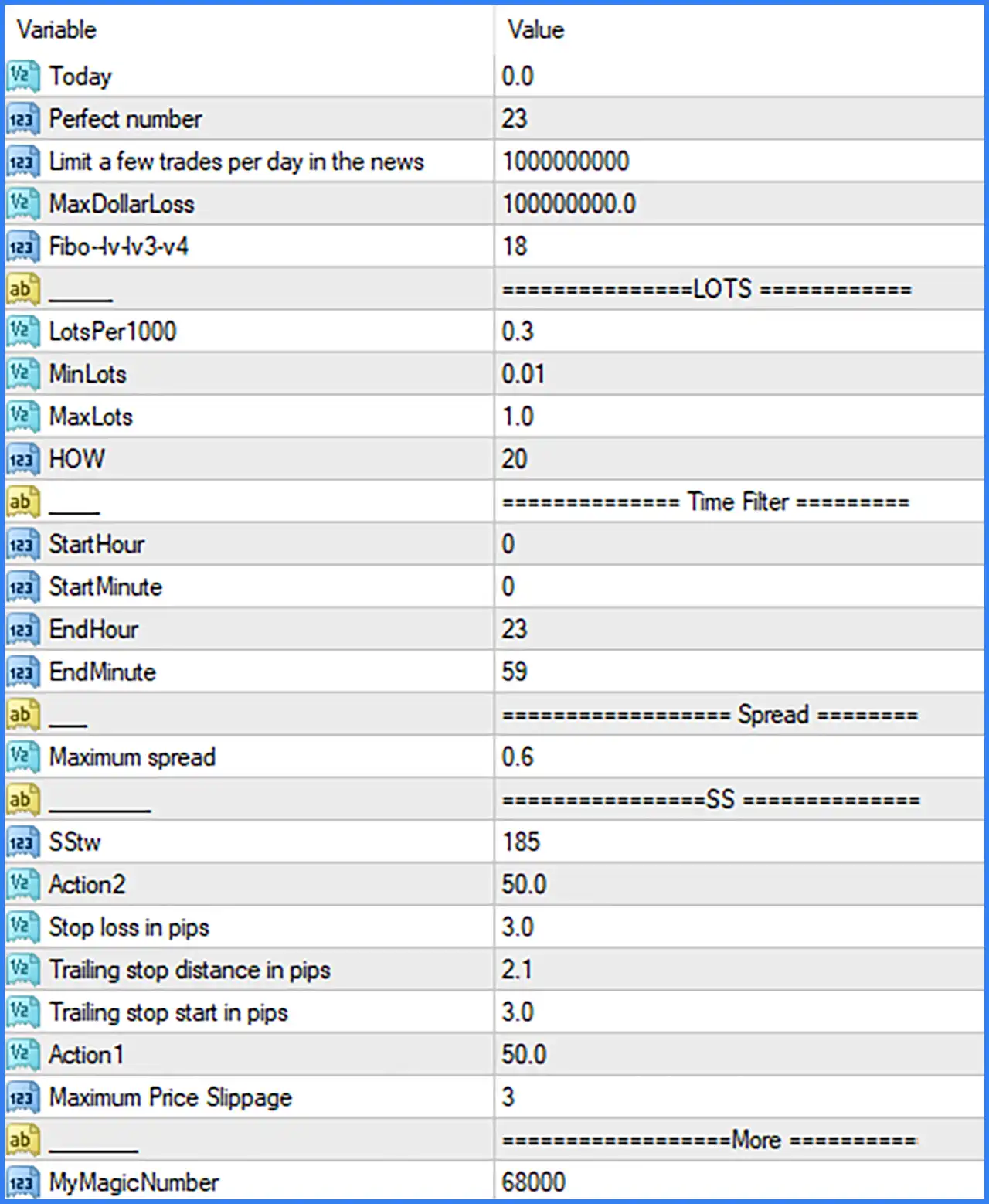
General Settings
🔹 Today = 0.0: A general numerical parameter that may be associated with daily trading calculations or internal EA operations. Its exact function is not identified in the available Inputs panel.
🔹 Perfect number = 23: Sets a numerical value of 23 for the EA's internal strategy calculations or trading conditions. The precise calculation associated with this parameter is not specified.
🔹 Limit a few trades per day in the news = 1000000000: Sets the numerical limit used for controlling trading activity during news-related conditions. The configured value is 1,000,000,000, which represents an extremely high limit.
🔹 MaxDollarLoss = 100000000.0: Defines the maximum dollar loss threshold used by the EA. The configured value is 100,000,000.0, an extremely high limit that may effectively disable practical dollar-loss restrictions.
🔹 Fibo-lvlv3-v4 = 18: Sets the Fibonacci-related strategy parameter to 18. This value may be used in the EA's internal Fibonacci calculations or trading signal conditions; its exact implementation is not shown.
Lot Settings
🔹 LotsPer1000 = 0.3: Determines the lot-sizing amount relative to every 1,000 units of account balance or equity, depending on the EA's calculation method. The configured value is 0.3.
🔹 MinLots = 0.01: Sets the minimum trading volume to 0.01 lots, preventing the EA from opening positions smaller than the configured minimum.
🔹 MaxLots = 1.0: Sets the maximum permitted trading volume to 1.0 lot, limiting the position size generated by the EA's lot-sizing mechanism.
🔹 HOW = 20: Sets an internal numerical parameter to 20 within the lot configuration section. Its exact role in the position-sizing calculation cannot be confirmed from the Inputs panel alone.
Time Filter Settings
🔹 StartHour = 0: Sets the starting trading hour to 00:00, allowing the EA to begin trading from the beginning of the configured trading day.
🔹 StartMinute = 0: Sets the starting trading minute to 00, meaning the trading session begins exactly at the specified hour.
🔹 EndHour = 23: Sets the ending trading hour to 23, allowing trading activity to continue until the final hour of the configured trading day.
🔹 EndMinute = 59: Sets the ending trading minute to 59, configuring the trading session to finish at 23:59.
Spread Settings
🔹 Maximum spread = 0.6: Defines the maximum permitted spread at 0.6. The EA can use this parameter to filter out trading opportunities when the spread exceeds the configured threshold, helping avoid unfavorable trading costs.
SS – Trading and Risk Management Settings
🔹 SStw = 185: Sets an internal SS-related parameter to 185. This value may control a strategy-specific calculation or trading condition, although its exact function requires confirmation from the EA source code or developer documentation.
🔹 Action2 = 50.0: Defines an additional numerical value of 50.0 for the EA's internal action or trade-management logic. The exact action associated with this parameter is not specified.
🔹 Stop loss in pips = 3.0: Sets the Stop Loss distance to 3.0 pips, defining the configured price movement against an open position before the EA's stop-loss protection is triggered.
🔹 Trailing stop distance in pips = 2.1: Sets the trailing stop distance to 2.1 pips. This determines how far the protective Stop Loss follows the market price when the trailing mechanism is active.
🔹 Trailing stop start in pips = 3.0: Activates the trailing stop mechanism when the trade reaches 3.0 pips of profit, according to the EA's trailing-stop calculation.
🔹 Action1 = 50.0: Sets another internal action-related parameter to 50.0. It may be associated with a strategy condition or trade-management operation, but its precise function cannot be established from the displayed setting name.
🔹 Maximum Price Slippage = 3: Defines the maximum acceptable price slippage as 3 points or the EA's corresponding slippage units. This setting helps control the difference between the requested execution price and the actual execution price.
Additional Settings
🔹 MyMagicNumber = 68000: Assigns the Magic Number 68000 to trades opened by Z4scalp EA MT4. This identifier allows the EA to distinguish and manage its own positions separately from trades opened manually or by other Expert Advisors.
Conclusion
Z4scalp EA MT4 provides several configurable parameters for automated trading, including lot sizing, trading session management, spread filtering, Stop Loss, Trailing Stop, and trade identification.
The default configuration uses a minimum lot size of 0.01, a maximum lot size of 1.0, a maximum spread of 0.6, a Stop Loss of 3.0 pips, and a trailing stop that starts at 3.0 pips with a distance of 2.1 pips.
Traders should pay particular attention to the lot-sizing configuration, extremely high MaxDollarLoss value, and the strategy-specific parameters whose functions are not fully documented. Before using Z4scalp EA MT4 on a live account, it is advisable to test the settings on a demo account and verify the EA's actual execution behavior.