

Introduction to TeamGG EA MT4
TeamGG EA MT4 is an automated trading Expert Advisor (EA) designed for MetaTrader 4, featuring configurable lot management, multiplier-based position sizing, basket profit and loss management, and grid trading parameters.

The EA provides several adjustable settings for controlling trade execution, including Take Profit, Stop Loss, initial lot size, lot increments, maximum open lot exposure, and spread limitations. It also incorporates Mini Grid, Smart Grid, and Pending Step Trail parameters to customize its trading order spacing and management behavior.
Additionally, TeamGG EA MT4 includes maximum trade restrictions, leverage configuration, and customizable trading hours, allowing traders to adjust its operating parameters according to their account conditions and trading preferences.
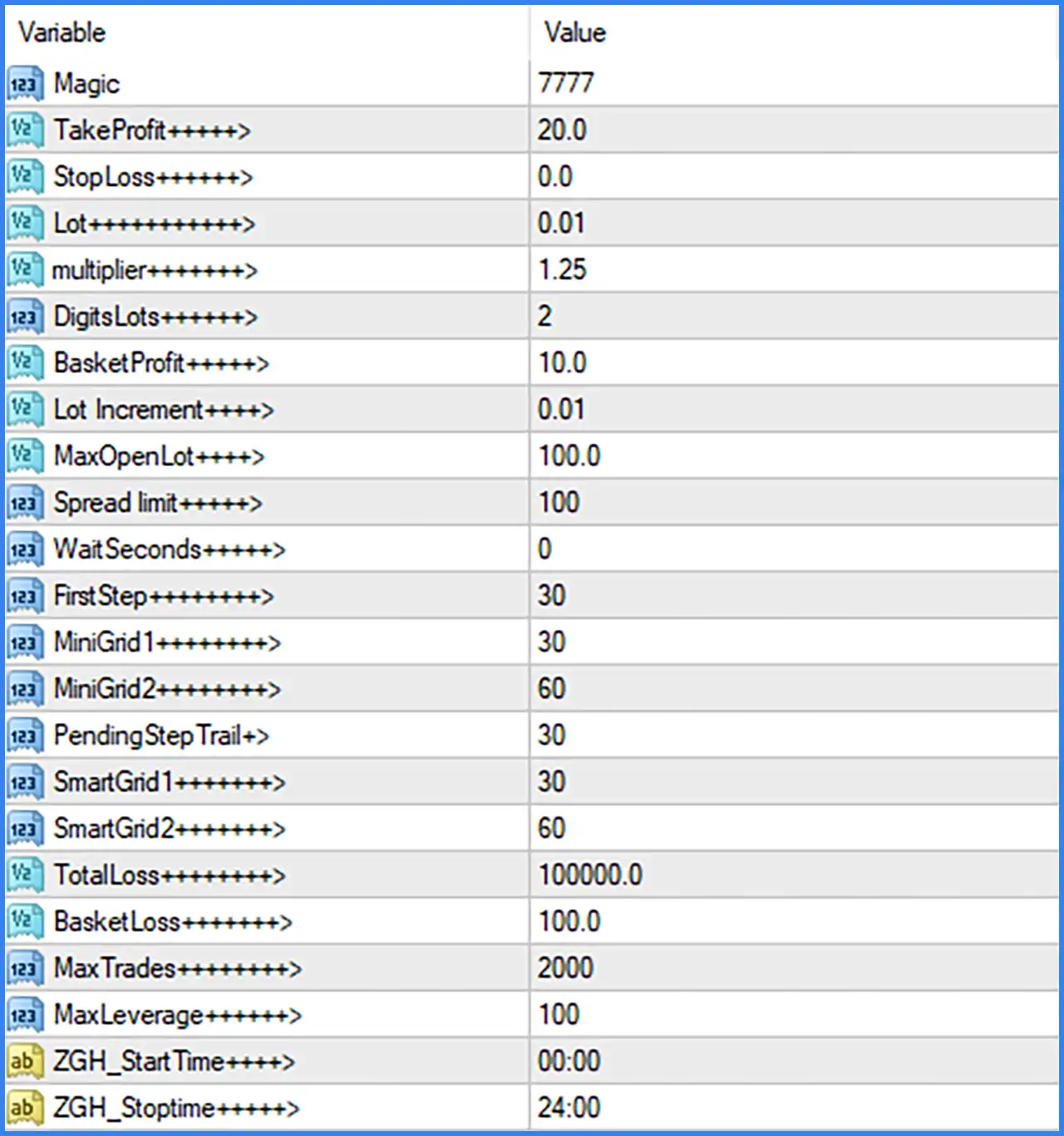
General Trading Settings
This section controls trade identification, profit targets, Stop Loss configuration, and initial position sizing.
🔹 Magic = 7777: Assigns the Magic Number 7777 to the EA's trading operations, allowing MetaTrader 4 to identify and distinguish orders opened by TeamGG EA MT4.
🔹 TakeProfit = 20.0: Sets the Take Profit parameter to 20.0, defining the configured profit target for individual trading operations.
🔹 StopLoss = 0.0: Sets the Stop Loss parameter to 0.0, indicating that no numerical Stop Loss value is configured through this parameter by default.
🔹 Lot = 0.01: Sets the initial trading volume to 0.01 lots, determining the default position size used when opening trades.
🔹 Multiplier = 1.25: Sets the lot multiplier to 1.25, defining the configured volume multiplication factor for subsequent positions when the multiplier-based trading mechanism is applied.
🔹 DigitsLots = 2: Sets lot-size precision to 2 decimal places, controlling the number of decimal digits used when calculating or adjusting trading volumes.
Basket Profit and Lot Management Settings
This section controls basket-level profit targets, lot increments, and maximum open lot exposure.
🔹 BasketProfit = 10.0: Sets the basket profit target to 10.0, defining the configured profit threshold for a group of trades managed together.
🔹 Lot Increment = 0.01: Sets the lot increment to 0.01, defining the configured volume increase applied when the EA adjusts its trading lot size.
🔹 MaxOpenLot = 100.0: Sets the maximum open lot parameter to 100.0, establishing the configured upper lot-volume limit for the EA's open trading exposure.
Spread and Execution Settings
These parameters control market spread conditions and execution timing.
🔹 Spread limit = 100: Sets the maximum spread limit to 100, defining the configured spread threshold used by the EA when evaluating whether market conditions are suitable for trade execution.
🔹 WaitSeconds = 0: Sets the waiting interval to 0 seconds, indicating that no additional waiting time is configured through this parameter before the corresponding trading operation.
Grid Trading Settings
This section contains the initial grid spacing, Mini Grid configuration, pending order trailing, and Smart Grid parameters. These settings define numerical distances used by the EA's grid-related trading logic.
🔹 FirstStep = 30: Sets the initial grid step to 30, defining the configured distance associated with the first grid trading level.
🔹 MiniGrid1 = 30: Sets the first Mini Grid parameter to 30, defining the configured spacing value for the first Mini Grid level.
🔹 MiniGrid2 = 60: Sets the second Mini Grid parameter to 60, providing an additional spacing value for the Mini Grid trading mechanism.
🔹 PendingStepTrail = 30: Sets the pending order trailing step to 30, defining the configured adjustment distance associated with trailing pending orders.
🔹 SmartGird1 = 30: Sets the first Smart Grid parameter to 30, defining the configured distance or step value for the first Smart Grid level. The parameter name is preserved as displayed in the screenshot.
🔹 SmartGrid2 = 60: Sets the second Smart Grid parameter to 60, providing an additional configured distance or step value for the Smart Grid mechanism.
Loss Management and Trading Limits
This section controls total loss thresholds, basket loss limits, maximum trading activity, and leverage configuration.
🔹 TotalLoss = 100000.0: Sets the total loss parameter to 100000.0, defining the configured overall loss threshold for the EA's trading management.
🔹 BasketLoss = 100.0: Sets the basket loss limit to 100.0, establishing the configured loss threshold for a group of trades managed as a basket.
🔹 MaxTrades = 2000: Sets the maximum number of trades to 2000, defining the configured upper limit for the EA's trading activity.
🔹 MaxLeverage = 100: Sets the maximum leverage parameter to 100, defining the configured leverage-related limit used by the EA.
Trading Time Settings
This section controls the starting and ending times of the EA's configured trading schedule.
🔹 ZGH_StartTime = 00:00: Sets the trading start time to 00:00, allowing the EA's configured trading schedule to begin at midnight.
🔹 ZGH_Stoptime = 24:00: Sets the trading stop time to 24:00, defining the configured end of the daily trading schedule.
Conclusion
TeamGG EA MT4 offers a comprehensive set of configurable trading parameters, combining multiplier-based lot management, grid trading configuration, basket profit and loss controls, and execution restrictions.
Its default configuration starts with a lot size of 0.01 and uses a multiplier of 1.25, with a lot increment of 0.01. The EA also provides a BasketProfit target of 10.0 and a BasketLoss threshold of 100.0 for managing groups of trading positions.
For grid trading, the supplied settings include FirstStep = 30, MiniGrid1 = 30, MiniGrid2 = 60, SmartGird1 = 30, and SmartGrid2 = 60. These parameters provide multiple adjustable values for configuring the EA's grid spacing and order management behavior.
The EA also includes a maximum trade setting of 2000, a MaxOpenLot parameter of 100.0, and a TotalLoss threshold of 100000.0. Its configured trading schedule runs from 00:00 to 24:00.
Overall, TeamGG EA MT4 provides flexible configuration options for traders who want to customize automated trading volume, grid spacing, basket management, and trading schedules.
However, the default StopLoss is 0.0, so traders should carefully verify how the EA manages downside exposure when individual Stop Loss protection is not configured. The multiplier of 1.25 and grid-related parameters should also be thoroughly tested to understand potential cumulative exposure during prolonged unfavorable market conditions.