

Introduction
Dollar Mint EA is an automated Forex trading Expert Advisor (EA) designed with configurable lot management, position sizing, Stop Loss protection, and multi-level economic news filtering. The EA provides flexible trading parameters, allowing traders to adjust their initial lot size, percentage risk, lot multiplier, maximum number of orders, and trading timeframe.

One of its notable features is its integrated News Filter configuration, which includes separate controls for low, medium, high-impact, and Non-Farm Payroll (NFP) economic events. Traders can also customize GMT offsets and display color-coded news lines directly on the trading chart.
Understanding the Dollar Mint EA settings helps traders configure the robot according to their trading preferences, risk tolerance, and account management requirements.
Dollar Mint EA MT4 Settings Explained
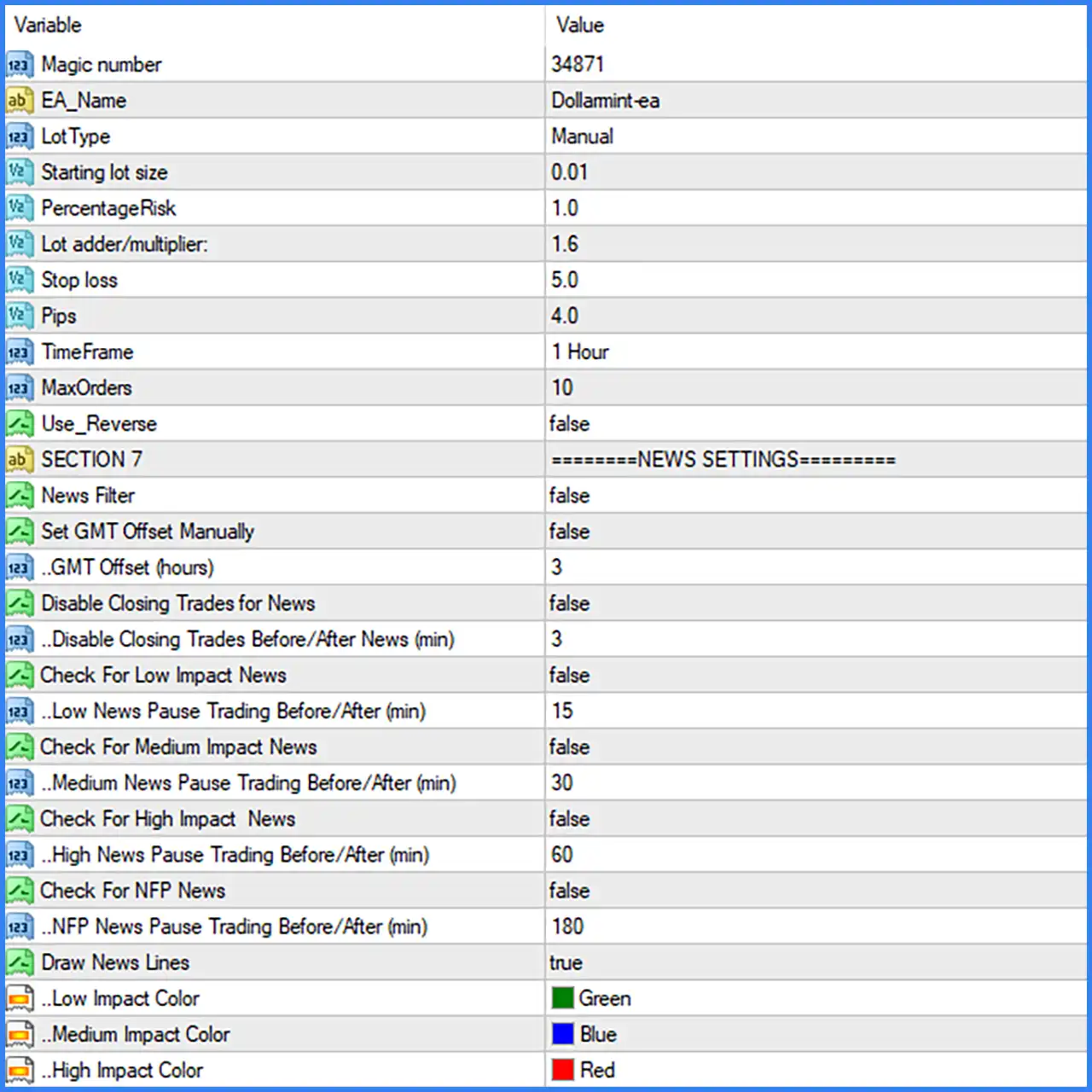
1. General Trading Settings
🔹 Magic number = 34871 – Assigns the unique Magic Number 34871 to identify trades opened by Dollar Mint EA MT4 and distinguish them from other trading robots or manual positions.
🔹 EA_Name = Dollamint-ea – Defines the EA identification name as Dollamint-ea, which can be used to identify the Expert Advisor in its internal configuration.
🔹 Lot Type = Manual – Selects Manual lot sizing, allowing traders to use a predefined starting lot instead of relying entirely on automatic position sizing.
🔹 Starting lot size = 0.01 – Sets the initial trading volume to 0.01 lots, determining the starting position size for the EA.
🔹 PercentageRisk = 1.0 – Sets the percentage risk parameter to 1.0, representing the configured risk percentage for percentage-based money management when supported by the selected lot mode.
🔹 Lot adder/multiplier = 1.6 – Sets the lot multiplier to 1.6, defining the volume multiplication factor used when the EA increases position sizes.
🔹 Stop loss = 5.0 – Sets the Stop Loss parameter to 5.0, defining the configured loss protection distance for trades.
🔹 Pips = 4.0 – Sets the pip-related parameter to 4.0, providing the configured pip reference used by the EA's trading calculations.
🔹 TimeFrame = 1 Hour – Sets the trading timeframe to H1 (1-hour chart), defining the timeframe used by the EA's trading logic.
🔹 MaxOrders = 10 – Limits the configured maximum number of orders to 10, controlling how many orders the EA can open according to its trading rules.
🔹 Use_Reverse = false – Disables reverse trading logic, meaning the EA does not activate its optional reverse buy/sell functionality.
2. News Settings
🔹 SECTION 7 = NEWS SETTINGS – Identifies the economic news configuration section, containing GMT adjustment, news protection, event impact, and chart display parameters.
🔹 News Filter = false – Disables the main economic news filter, meaning news-based trading restrictions are not activated in the supplied configuration.
🔹 Set GMT Offset Manually = false – Disables manual GMT offset configuration, indicating that the EA is not instructed to use the manually specified GMT offset through this option.
🔹 GMT Offset (hours) = 3 – Sets the GMT offset parameter to 3 hours, representing the configured time difference used for economic calendar synchronization when applicable.
🔹 Disable Closing Trades for News = false – Disables the option to prevent trade-closing operations during news events, so this particular news-related closing restriction is inactive.
🔹 Disable Closing Trades Before/After News (min) = 3 – Sets the news-related trade-closing restriction interval to 3 minutes before and after qualifying news events when the corresponding option is enabled.
3. Low Impact News Settings
🔹 Check For Low Impact News = false – Disables low-impact economic news monitoring, meaning low-impact announcements are not selected as an active news-filtering condition.
🔹 Low News Pause Trading Before/After (min) = 15 – Sets the trading pause interval to 15 minutes before and after low-impact news events when low-impact news checking is enabled.
4. Medium Impact News Settings
🔹 Check For Medium Impact News = false – Disables medium-impact economic news monitoring, so medium-impact announcements are not used as an active trading restriction.
🔹 Medium News Pause Trading Before/After (min) = 30 – Sets the trading pause interval to 30 minutes before and after medium-impact news events when the corresponding news option is enabled.
5. High Impact News Settings
🔹 Check For High Impact News = false – Disables high-impact economic news monitoring, meaning high-impact announcements do not activate this specific news restriction in the supplied configuration.
🔹 High News Pause Trading Before/After (min) = 60 – Sets the trading pause interval to 60 minutes before and after high-impact news events when high-impact news monitoring is enabled.
6. Non-Farm Payroll (NFP) News Settings
🔹 Check For NFP News = false – Disables the dedicated Non-Farm Payroll news filter, meaning NFP announcements are not currently selected as an active trading restriction.
🔹 NFP News Pause Trading Before/After (min) = 180 – Sets the trading pause interval to 180 minutes before and after NFP announcements when the NFP news filter is enabled.
7. News Display and Color Settings
🔹 Draw News Lines = true – Enables the display of economic news lines on the trading chart, helping traders visually identify scheduled news events.
🔹 Low Impact Color = Green – Sets the chart display color for low-impact economic news events to Green, making these announcements visually distinguishable.
🔹 Medium Impact Color = Blue – Sets the chart display color for medium-impact economic news events to Blue, allowing traders to identify their importance on the chart.
🔹 High Impact Color = Red – Sets the chart display color for high-impact economic news events to Red, highlighting potentially significant market-moving announcements.
Conclusion
Dollar Mint EA MT4 provides a configurable automated trading environment with manual lot sizing, percentage-based risk parameters, lot multiplication, and customizable order management.
The supplied configuration uses a starting lot size of 0.01, a lot multiplier of 1.6, a Stop Loss setting of 5.0, a pip parameter of 4.0, and a maximum of 10 orders. It also uses the H1 timeframe and has reverse trading disabled.
For economic event management, the EA includes separate settings for low-impact, medium-impact, high-impact, and NFP news. However, the main News Filter and all individual news monitoring options are currently disabled, while Draw News Lines remains enabled.
Before running Dollar Mint EA MT4 on a live account, traders should carefully evaluate the lot multiplier of 1.6, maximum order limit of 10, and Stop Loss configuration. Demo testing and backtesting are recommended to understand its trading behavior and potential drawdown under different market conditions.