
Introduction
BSS Scalping EA is an automated Forex trading Expert Advisor (EA) designed for scalping strategies, with configurable position sizing, spread management, pending order execution, and automated trade protection.
The EA provides flexible money management through fixed and automatic lot sizing, alongside a Capital Risk Percent parameter for adjusting capital allocation. It also includes customizable Stop Loss, Take Profit, Trailing Stop, and Trailing Step settings to help manage individual trading positions.
Additionally, BSS Scalping EA MT4 features pending order controls, abnormal spread protection, daily profit targets, and server-time trading restrictions. These settings allow traders to customize the EA's trading environment according to their preferred execution conditions and risk management requirements.
BSS Scalping EA MT4 Settings Explained
1. Lot Size and Money Management Settings
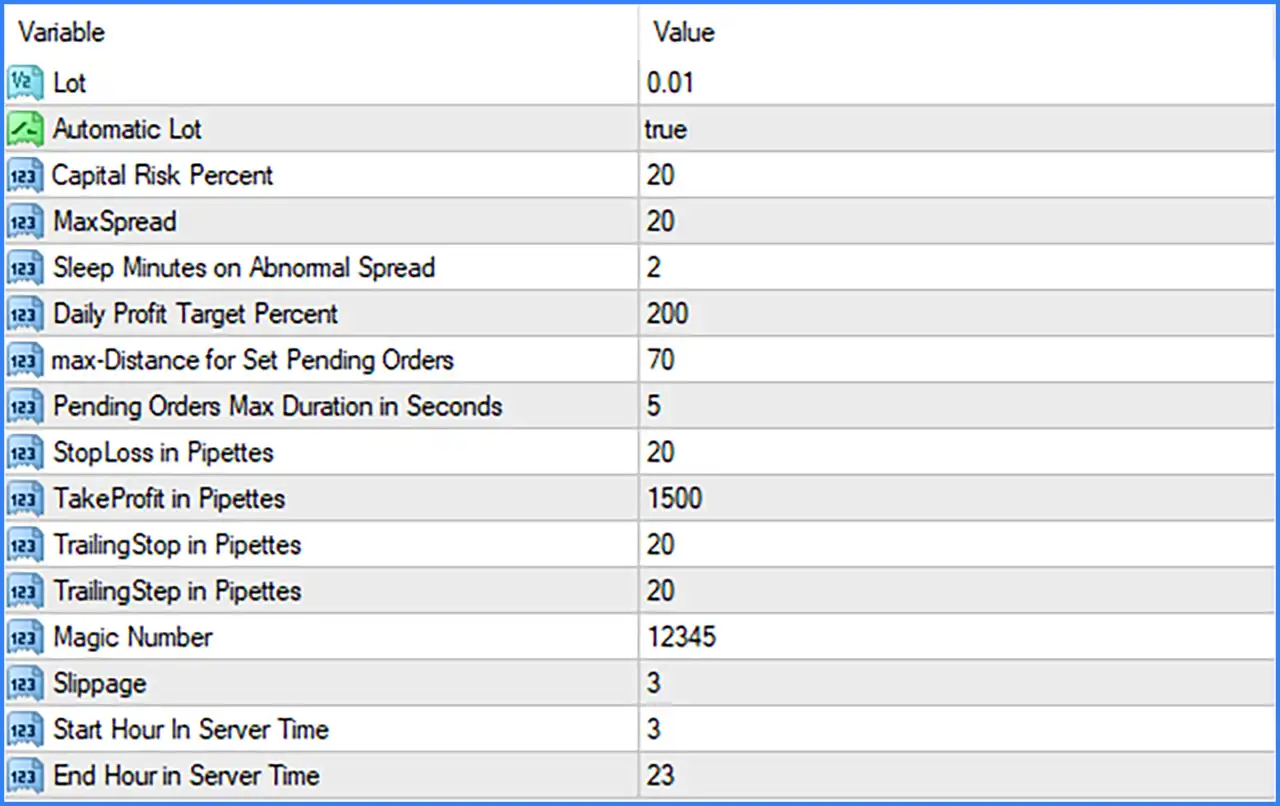
🔹 Lot = 0.01 – Sets the default trading volume to 0.01 lots, defining the standard position size used by the EA.
🔹 Automatic Lot = true – Enables automatic lot sizing, allowing the EA to calculate trading volume dynamically rather than relying exclusively on a fixed lot size.
🔹 Capital Risk Percent = 20 – Sets the capital risk percentage parameter to 20, which is used by the EA's capital-based risk management configuration.
2. Spread Protection Settings
🔹 MaxSpread = 20 – Sets the maximum permitted spread to 20 points, helping prevent the EA from opening trades when market spreads exceed the configured threshold.
🔹 Sleep Minutes on Abnormal Spread = 2 – Configures a 2-minute waiting period when an abnormal spread condition is detected, helping the EA avoid trading during unfavorable spread conditions.
3. Daily Profit Target Settings
🔹 Daily Profit Target Percent = 200 – Sets the daily profit target parameter to 200%, defining the configured daily profit objective for the EA.
4. Pending Order Settings
🔹 max-Distance for Set Pending Orders = 70 – Sets the maximum distance for placing pending orders to 70 points, controlling how far pending entries can be positioned from the relevant market price.
🔹 Pending Orders Max Duration in Seconds = 5 – Sets the maximum pending order duration to 5 seconds, defining how long pending orders are allowed to remain active according to the EA's order-management logic.
5. Stop Loss and Take Profit Settings
🔹 StopLoss in Pipettes = 20 – Sets the Stop Loss distance to 20 pipettes, defining the configured loss-protection distance for each trade.
🔹 TakeProfit in Pipettes = 1500 – Sets the Take Profit distance to 1500 pipettes, establishing the target price movement for closing profitable positions.
6. Trailing Stop Settings
🔹 TrailingStop in Pipettes = 20 – Sets the trailing stop distance to 20 pipettes, determining how far the Stop Loss follows the market price when trailing functionality is active.
🔹 TrailingStep in Pipettes = 20 – Sets the trailing adjustment step to 20 pipettes, defining the price movement required for the EA to update the trailing Stop Loss.
7. Trade Identification and Execution Settings
🔹 Magic Number = 12345 – Assigns Magic Number 12345 to trades opened by BSS Scalping EA MT4, allowing the EA to identify and manage its own trading positions.
🔹 Slippage = 3 – Sets the maximum permitted slippage to 3 points, controlling the acceptable difference between the requested execution price and the actual trade execution price.
8. Trading Time Settings
🔹 Start Hour In Server Time = 3 – Sets the trading start hour to 03:00 according to the broker's server time, defining when the EA can begin its trading operations.
🔹 End Hour in Server Time = 23 – Sets the trading end hour to 23:00 according to the broker's server time, defining the end of the configured trading window.
Conclusion
BSS Scalping EA MT4 offers a customizable automated scalping environment with automatic lot sizing, capital risk configuration, spread protection, pending order management, and trailing stop functionality.
The supplied configuration uses a default lot size of 0.01, Automatic Lot enabled, Capital Risk Percent set to 20, and MaxSpread configured at 20 points. Its trade management settings include Stop Loss of 20 pipettes, Take Profit of 1500 pipettes, and trailing parameters of 20 pipettes for both distance and adjustment step.
The EA also includes a daily profit target of 200%, a 2-minute abnormal spread waiting period, and a trading schedule from 03:00 to 23:00 broker server time.
Before deploying BSS Scalping EA MT4 on a live account, traders should carefully evaluate the automatic lot-sizing calculation, capital risk configuration, pipette specifications, and pending order behavior. Backtesting and demo testing are recommended to assess execution quality and determine whether the settings are appropriate for the selected broker and trading account.